The right controls can make flight simulation feel more precise, immersive, and comfortable, whether you fly airliners, fighter jets, or general-aviation aircraft.
We compared 10 popular yokes, HOTAS systems, joysticks, throttle quadrants, and rudder pedals to help you choose a setup that matches your platform, aircraft preferences, and budget.
Best 10 Flight Simulator Controls for Flight Simulation Picks for 2026
Best All-in-One Setup
VelocityOne Flight Universal Control System
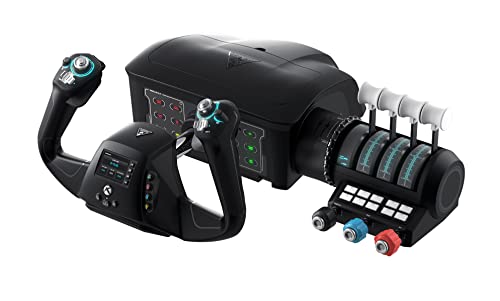
- Integrated yoke, throttle, trim, rudder, and brakes
- Works with Xbox and Windows PCs
- Includes display, switches, and secure clamp
Best For: Users wanting a complete Xbox and PC cockpit setup
Best Ambidextrous Flight Stick Pack

- Includes stick, throttle, and pedals
- Ambidextrous design for either hand
- Offers 16 buttons and custom profiles
Best For: PC users seeking a configurable complete control pack
Best Throttle Expansion
Honeycomb Bravo Throttle Quadrant

- Configurable for one to four engines
- Adds autopilot, gear, flaps, and trim
- Includes annunciator panel and warning lights
Best For: PC and Mac users building a dedicated cockpit
Best Yoke and Pedals Bundle
Logitech G Pro Flight Yoke System

- Pairs a yoke with self-centering rudder pedals
- Adds differential toe brakes
- Provides 14 buttons and mode switching
Best For: Windows users building a yoke-based flight setup
Versatile Xbox & PC Pick
Turtle Beach VelocityOne Flightstick

- Xbox, Xbox Series X|S, and PC compatible
- 27 programmable buttons and 8 axes
- Ambidextrous design with OLED display
Best For: Console and PC pilots seeking extensive customization
Traditional Cockpit Choice
Logitech G PRO Flight Yoke System
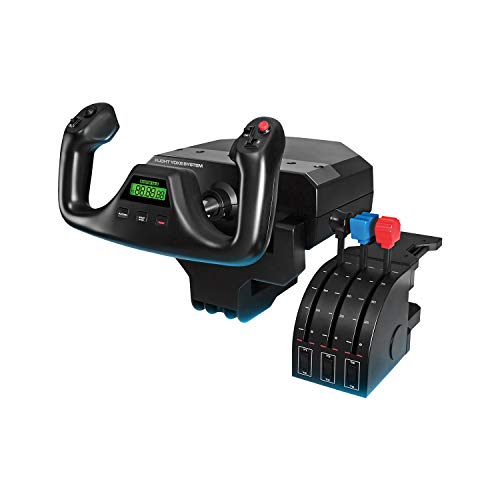
- Yoke and separate throttle quadrant
- 14 buttons and 3-position mode switch
- Secure desk clamps for desktop mounting
Best For: Windows users wanting traditional yoke control
Budget-Friendly HOTAS

- PC-compatible joystick and throttle
- 12 programmable buttons and 5 axes
- Detachable throttle with adjustable resistance
Best For: PC pilots seeking an easy-to-configure HOTAS
Premium HOTAS Control
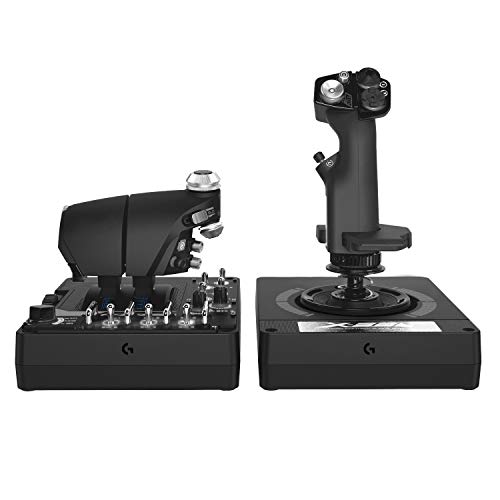
- 189 programmable controls for extensive customization
- Twin throttles with friction adjustment and lock
- Adjustable stick force and 16-bit Hall-effect axes
Best For: Advanced PC combat and space-sim setups
Official Console Choice
Thrustmaster T-Flight HOTAS One MSFS 2024

- Official Microsoft Flight Simulator 2024 licensing
- Compatible with Xbox Series X|S and PC
- Detachable throttle and five-axis control
Best For: Xbox and PC Microsoft Flight Simulator players
Precision Rudder Upgrade
Thrustmaster TFRP Flight Sim Pedals

- Long-travel rudder axis for smooth turns
- Self-centering control with adjustable resistance
- S.M.A.R.T. aluminum rail sliding system
Best For: Adding realistic rudder control to PC or console setups
Best All-in-One Setup – VelocityOne Flight Universal Control System
For shoppers seeking flight simulator controls for flight simulation across Xbox and PC, the Turtle Beach VelocityOne Flight combines a yoke, throttle quadrant, trim wheel, and rudder controls in one system. Its modular layout and secure clamp make it a practical choice for varied home setups.
Best For: Xbox and Windows users who want an integrated cockpit-style control system.
Pros:
- Combines yoke, throttle, trim, rudder, and brake controls.
- Supports Xbox consoles and Windows 10 and 11 PCs.
- Offers 12 analog axes, programmable switches, and a flight management display.
- Includes a secure clamping system for different home setups.
Cons:
- Its all-in-one design occupies more space than a standalone flight stick.
- At 10 pounds, it is less convenient to move frequently.
The VelocityOne Flight is a strong fit when you want broad aircraft-control coverage without assembling several separate peripherals.
Best Ambidextrous Flight Stick Pack – T16000M FCS Flight Pack
The Thrustmaster T16000M FCS Flight Pack is a PC-focused option for flight simulator controls for flight simulation, combining a flight stick, throttle, and pedals. Its ambidextrous design and USB connectivity make it adaptable for different desk arrangements and play styles.
Best For: PC pilots who want a flexible stick-and-pedals package with extensive controls.
Pros:
- Includes flightstick, throttle, and pedals in one pack.
- Fully ambidextrous with removable components for left- or right-handed use.
- Provides 16 action buttons, an 8-way hat switch, and four axes.
- Supports custom game profiles through T.A.R.G.E.T software.
Cons:
- Compatibility is listed for Windows PCs rather than consoles.
- It uses a flight-stick layout instead of a yoke.
This pack suits PC users who value configurable controls and the ability to position the stick for either hand.
Best Throttle Expansion – Honeycomb Bravo Throttle Quadrant
The Honeycomb Bravo Throttle Quadrant adds cockpit-style functionality to flight simulator controls for flight simulation, with configurable throttle arrangements and dedicated aircraft controls. It is designed for PC and Mac and connects through USB-C.
Best For: Sim pilots who want a dedicated throttle quadrant with autopilot, gear, flap, and annunciator controls.
Pros:
- Configurable for single-engine through four-engine aircraft.
- Includes autopilot, gear, flap, and trim controls.
- Features a seven-switch annunciator panel and 14 warning lights.
- Landing-gear lever includes red and green indicator lights.
Cons:
- It is a throttle quadrant rather than a complete yoke-and-pedals system.
- Its specialized controls may be more than casual users need.
The Bravo is a practical centerpiece or expansion for a desktop cockpit when throttle and aircraft-management controls are the priority.
Best Yoke and Pedals Bundle – Logitech G Pro Flight Yoke System
The Logitech G Pro Flight Yoke System bundle pairs a realistic yoke with rudder pedals, giving Windows users a coordinated set of flight simulator controls for flight simulation. Differential toe brakes and adjustable footrests add useful ground-control functionality.
Best For: Windows users who want a yoke-and-pedals foundation for realistic aircraft control.
Pros:
- Bundles a yoke system with self-centering rudder pedals.
- Provides differential toe brakes for runway and ground control.
- Offers a POV hat, 14 buttons, and a three-position mode switch.
- Pedal footrests adjust for different users and include non-slip materials.
Cons:
- The supplied notes list Windows compatibility rather than console support.
- The bundle does not list a separate throttle quadrant.
This bundle is a sensible starting point for users who prefer yoke-based flying and want rudder and braking control included from the outset.
Versatile Xbox & PC Pick – Turtle Beach VelocityOne Flightstick
The Turtle Beach VelocityOne Flightstick is a flexible choice for flight simulator controls for flight simulation on Xbox or PC. Its ambidextrous design, Hall-effect main axes, and broad button layout suit both airliner and fighter-jet setups.
Best For: Xbox and PC pilots who want a programmable all-in-one flightstick with extensive controls.
Pros:
- Works with Xbox Series X|S, Xbox One, and PC.
- Provides 27 programmable buttons and 8 axes.
- Includes throttle and flap levers, an OLED display, and a flight configuration wheel.
- Ambidextrous design with adjustable RGB lighting.
Cons:
- It is a flightstick rather than a dedicated yoke system.
- Its many controls may take time to configure fully.
Choose this model when platform flexibility and a large number of customizable inputs matter more than a traditional yoke feel.
Traditional Cockpit Choice – Logitech G PRO Flight Yoke System
The Logitech G PRO Flight Yoke System is designed for pilots who prefer traditional yoke-based flight simulator controls for flight simulation. It pairs a stainless steel yoke shaft with a separate throttle quadrant and desk clamps for a secure desktop setup.
Best For: Windows users practicing civil aviation procedures and building yoke-based flying muscle memory.
Pros:
- Yoke and throttle quadrant provide a more traditional aircraft-control layout.
- Offers a POV hat, 14 buttons, and a 3-position mode switch.
- Desk clamps provide mounting flexibility and secure placement.
- Compatible with Windows 11, 10, 8.1, and 7.
Cons:
- It is intended for Windows rather than Xbox consoles.
- Optional software is required for Microsoft Flight Simulator, FSX, X-Plane 10, and Prepar3D.
- The system occupies more desk space than a standalone flightstick.
This is the stronger fit for users prioritizing a yoke-and-throttle arrangement, especially when practicing the control habits associated with larger aircraft.
Budget-Friendly HOTAS – Thrustmaster T-Flight Hotas X
The Thrustmaster T-Flight Hotas X offers straightforward flight simulator controls for flight simulation on PC. Its detachable throttle, adjustable joystick resistance, and programmable layout make it adaptable for both civil-flight and military-flight games.
Best For: PC pilots who want an ergonomic, plug-and-play HOTAS with flexible placement and onboard profile memory.
Pros:
- Includes 12 programmable buttons and 5 axes.
- Detachable, full-size throttle supports separate or connected placement.
- Adjustable joystick resistance and dual rudder control support precise handling.
- Preconfigured controls, profile switching, and built-in memory simplify setup.
Cons:
- Compatibility is listed for PC, not Xbox platforms.
- It has fewer programmable controls than the VelocityOne Flightstick.
Consider it when you want a compact HOTAS layout with useful customization without moving to a larger yoke-based system.
Premium HOTAS Control – Logitech G X56 H.O.T.A.S.
The Logitech G X56 is a full HOTAS setup for PC pilots who want extensive flight simulator controls for flight simulation. Its twin throttles, adjustable stick force, Hall-effect sensors, programmable controls, and RGB lighting make it suited to detailed combat and space-sim setups.
Best For: PC users who want a highly configurable HOTAS for combat flight, space simulation, or VR.
Pros:
- Provides 189 programmable controls for detailed customization.
- Includes twin throttles with friction adjustment and a throttle lock.
- Offers adjustable stick force through a four-spring system.
- Includes a mini analog stick and accurate 16-bit aileron and elevator axes.
Cons:
- Requires two USB 2.0 ports.
- Designed for Windows PC use rather than broad console compatibility.
- Its extensive controls may be more than casual pilots need.
The X56 is a strong choice when control density and customization matter most. It is especially compelling for users prepared to configure a more advanced PC cockpit.
Official Console Choice – Thrustmaster T-Flight HOTAS One MSFS 2024
The Thrustmaster T-Flight HOTAS One MSFS 2024 Collector Edition provides accessible flight simulator controls for flight simulation on Xbox and PC. Its detachable throttle, five axes, rudder options, and official Microsoft Flight Simulator licensing make it a practical all-in-one starter setup.
Best For: Xbox Series X|S and PC pilots seeking plug-and-play controls for Microsoft Flight Simulator 2024.
Pros:
- Officially licensed for Microsoft Flight Simulator 2024.
- Works with Xbox Series X|S and PC.
- Offers 10-bit precision, five axes, 14 action buttons, and a multidirectional hat switch.
- Detachable throttle supports desk or lap configurations.
Cons:
- Pedal support requires separately sold TFRP rudder pedals.
- Its 14 action buttons provide less customization than larger HOTAS systems.
- It is focused on Xbox and PC rather than PlayStation platforms.
With its console compatibility and modular design, this HOTAS is a sensible option for Microsoft Flight Simulator players who want more control than a standard gamepad without building a complex cockpit.
Precision Rudder Upgrade – Thrustmaster TFRP Flight Sim Pedals
The Thrustmaster TFRP pedals add dedicated foot control to flight simulator controls for flight simulation. Their long-travel rudder axis, self-centering action, adjustable resistance, and S.M.A.R.T. aluminum rail system are designed for smoother turns and coordinated maneuvers.
Best For: Pilots who want more realistic rudder and differential-braking control on PC, PlayStation, or Xbox.
Pros:
- Provides long travel for smooth, accurate rudder inputs.
- Self-centering rudder axis balances responsiveness with resistance.
- Four aluminum rails support smooth, rigid sliding motion.
- Compatible with PC, PS4, PS5, and Xbox platforms.
Cons:
- These are pedals rather than a complete joystick-and-throttle setup.
- They require additional cockpit or desk space.
- They add a separate component to the overall control setup.
The TFRP is a useful next step for pilots who already have a joystick or HOTAS and want more natural yaw control. Its broad platform compatibility also makes it a flexible rudder-pedal upgrade.
How We Picked the Best Flight Simulator Controls for Flight Simulation
We selected products that cover the main control styles used in Microsoft Flight Simulator and other PC or console flight simulators. The lineup includes entry-level sticks, complete HOTAS bundles, civilian-focused yokes, modular throttle systems, and rudder pedals. We considered platform compatibility, control layout, adjustability, programmability, included accessories, and how easily each product can fit into a growing cockpit setup.
Compatibility is especially important. Some devices support Windows PCs, Xbox consoles, or both, while PlayStation support is more limited. Always confirm the current system requirements and game support before buying.
Quick Comparison
- Best for civilian aircraft: A yoke system paired with rudder pedals offers a natural control layout for airliners and general-aviation planes.
- Best for combat and space simulations: HOTAS controls keep the stick and throttle separate, making frequent inputs easier to manage.
- Best for beginners: An all-in-one joystick-and-throttle unit is affordable, compact, and simple to set up.
- Best for expansion: A modular throttle quadrant or standalone pedals can complement controls you already own.
Key Buying Factors for Flight Simulator Controls for Flight Simulation
Aircraft and Control Style
Choose a yoke if you mainly fly aircraft that use yoke-style controls, such as many passenger and touring planes. Choose a joystick or HOTAS if you prefer fighter jets, helicopters, space simulators, or aircraft designed around a center stick. Rudder pedals add finer yaw and braking control to either setup.
Platform Compatibility
Check whether the device works with your computer, Xbox console, or PlayStation system. USB connectivity is common on PC, but console support may require a specific model or game. Console compatibility can also vary by title and firmware version.
Adjustability and Programming
Look for adjustable resistance, configurable buttons, multiple axes, and useful software profiles. A large number of controls is valuable only if they are easy to reach and assign. Detachable or adjustable components can also improve comfort during long sessions.
Desk Space and Mounting
Yokes, throttle quadrants, and pedals need more space than a basic joystick. Measure your desk and consider cable routing, mounting hardware, and storage. A compact HOTAS may be the better choice for a temporary or shared gaming area.
Who Should Buy Which Flight Simulator Controls for Flight Simulation?
New sim pilots should start with an affordable joystick or entry-level HOTAS package that provides the essential axes without requiring a full cockpit.
Airliner and general-aviation enthusiasts should prioritize a yoke, throttle quadrant, and rudder pedals for a more authentic control layout.
Combat-sim and space-sim players should choose a programmable HOTAS with a comfortable grip, plentiful inputs, and a separate throttle.
Experienced users building a dedicated setup can combine a professional yoke or joystick with standalone throttle and rudder-pedal modules. This approach costs more, but it allows each control to be upgraded independently.