The right headset can make flight simulation feel dramatically more realistic, but the best choice depends on your simulator platform, graphics hardware, comfort needs, and budget.
We compared high-resolution PC VR headsets, standalone options, mobile viewers, and a compatible RC flight simulator to help you choose the right setup for immersive cockpit practice.
Best 10 Virtual Reality Headsets for Flight Simulation Picks for 2026
Best for Maximum Peripheral Vision

- 3840x3840 resolution per eye
- 140° field of view
- Eye tracking and Mini-LED local dimming
Best For: PC pilots seeking wide, highly detailed cockpit views
Best Standalone Option

- Standalone VR platform
- 6DoF headset and controller tracking
- Approximately 3-hour battery life
Best For: Users wanting wireless simulation and training VR
Best High-Refresh PC Value
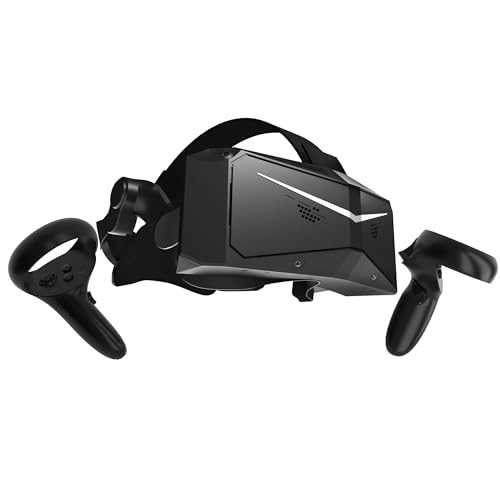
- 2880x2880 resolution per eye
- Refresh rate up to 120Hz
- QLED with local dimming and HDR
Best For: PC sim users balancing clarity and smooth motion
Best RC Flight Simulator Bundle
RealFlight Evolution Simulator
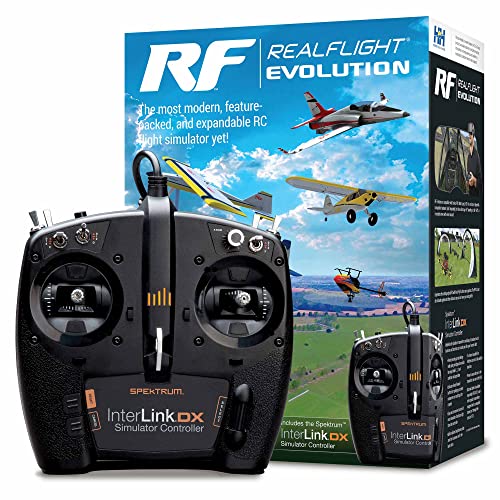
- Steam software key and InterLink DX controller
- 100+ additional aircraft and many fields
- Compatible with VR headsets
Best For: RC pilots practicing airplane and helicopter flying
Best Adjustable Phone Viewer

- 120° field of view with included remote
- Focus and pupil-distance adjustments
- Glasses-friendly, portable design
Best For: Travelers and families seeking customizable smartphone VR
Best for Immersive Phone Viewing

- Fits smartphones up to 6.7 inches
- Unibody lens and adjustable screen distance
- Designed for private, distraction-free viewing
Best For: Adults focused on phone-based visual immersion
Best Mobile Flight Sim Sampler

- Fits 5.0- to 7.0-inch smartphones
- Adjustable focal and pupil distance
- Includes phone-connected controller
Best For: Casual smartphone VR and compatible mobile simulation content
Best Beginner Phone Option
VR Headset with Adjustable Lens

- Supports compatible phones up to 6.3 inches
- Adjustable lenses and headband
- Includes controller and two-year warranty
Best For: First-time smartphone VR users with supported phones
Best Wide-Phone Compatibility

- Fits 4.7- to 7-inch smartphones
- Adjustable interpupillary distance
- Supports 360-degree panoramic viewing
Best For: Shared family use with compatible mobile VR content
Best for Maximum Peripheral Vision – Pimax Crystal Super
For buyers comparing virtual reality headsets for flight simulation, the Pimax Crystal Super emphasizes visual clarity and peripheral awareness. Its 3840×3840-per-eye QLED and Mini-LED display, 140-degree field of view, eye tracking, and DisplayPort PC connection are aimed at demanding simulation setups.
Best For: PC pilots and sim racers who prioritize wide situational awareness, high resolution, and detailed visuals.
Pros:
- 3840×3840 resolution per eye and 50 PPD support highly detailed imagery.
- 140-degree field of view can reduce the tunnel-vision effect in cockpit simulations.
- Eye tracking, inside-out tracking, and up to 90Hz refresh support responsive PC VR use.
- QLED and Mini-LED local dimming provide high brightness and contrast.
Cons:
- Requires a compatible Windows PC and wired DisplayPort/USB connection.
- The feature-rich design is likely best suited to buyers with capable PC hardware.
The Crystal Super is a strong fit when immersion depends on seeing more of the virtual cockpit and surrounding environment. Its wide view and high pixel density are compelling, though the wired PC setup and performance demands should be considered before buying.
Best Standalone Option – HTC Vive Focus Plus
The HTC Vive Focus Plus is a standalone alternative for shoppers exploring virtual reality headsets for flight simulation. It combines dual AMOLED displays, 6DoF inside-out tracking, built-in audio, and a 32GB storage capacity, while also supporting SteamVR according to the supplied specifications.
Best For: Adults who want a self-contained headset with 6DoF controls for simulation, training, and general VR use.
Pros:
- Standalone design is powered by a Qualcomm Snapdragon 835 processor.
- 6DoF headset and controller tracking supports responsive movement.
- Adjustable IPD and a replaceable synthetic leather face gasket support extended use.
- Built-in speakers and a 3.5mm headphone jack provide flexible audio options.
Cons:
- Its 2880×1600 combined resolution is lower than the newer Pimax options in this roundup.
- Battery life is listed at approximately three hours.
- Its 110-degree field of view may provide less peripheral coverage than ultrawide PC headsets.
The Focus Plus makes sense for users who value a wireless, standalone format and included 6DoF controller. Its shorter listed battery life and more modest resolution make it less suited to buyers chasing maximum visual sharpness for long PC simulation sessions.
Best High-Refresh PC Value – Pimax Crystal Light
The Pimax Crystal Light targets PC pilots looking for virtual reality headsets for flight simulation with high resolution and smooth motion. Its 2880×2880-per-eye QLED display, local dimming, glass aspheric lenses, inside-out tracking, and up-to-120Hz refresh rate are designed for flight sims, iRacing, and gaming.
Best For: SteamVR users who want detailed cockpit visuals, high refresh rates, and compatibility with existing PC VR accessories.
Pros:
- 2880×2880 resolution per eye delivers a detailed view of instruments and scenery.
- QLED, HDR support, and local dimming aim to improve contrast and color.
- Up to 120Hz refresh rate supports fluid, responsive simulation movement.
- Inside-out tracking and SteamVR compatibility simplify integration with a PC setup.
Cons:
- At approximately 815 grams, it may feel substantial during longer sessions.
- It is a PC-focused headset and requires a compatible computer setup.
- The supplied specifications list HDMI connectivity, which buyers should verify against their hardware.
Crystal Light is a practical choice for sim enthusiasts who want a high-resolution PC headset without moving to the Crystal Super’s stated 3840×3840-per-eye resolution. Its 120Hz capability and fixed foveated rendering features are especially relevant when smooth performance matters.
Best RC Flight Simulator Bundle – RealFlight Evolution Simulator
RealFlight Evolution is software rather than a headset, but it is a useful companion for shoppers building a virtual reality headsets for flight simulation setup. The package includes a Steam key and InterLink DX controller, supports VR headsets, and provides a broad selection of aircraft, fields, and multiplayer options.
Best For: RC pilots who want structured airplane and helicopter practice with a dedicated controller and optional VR support.
Pros:
- Includes the RealFlight Evolution Steam key and InterLink DX controller.
- Offers more than 100 additional aircraft plus 3D fields and PhotoFields.
- Includes airplanes, helicopters, and newer aircraft from several RC brands.
- Supports online multiplayer for one to three players.
Cons:
- This is simulator software with a controller, not a VR headset.
- VR headset compatibility is supported, but the headset is not included.
- Additional future models and fields may require separate purchases or season passes.
RealFlight Evolution is best viewed as the flight-simulation content layer in a VR setup, not a replacement for the headset itself. It is a strong option for RC practice when you want a large aircraft and field library plus a purpose-built controller.
Best Smartphone Starter Kit – DESTEK V5 VR Headset
The DESTEK V5 is a smartphone-based option for shoppers comparing virtual reality headsets for flight simulation and other immersive apps. It fits phones from 5.5 to 7.2 inches, includes a Bluetooth controller, and offers adjustable-free smartphone VR viewing with a 110-degree field of view. Because flight-simulation support depends on the phone app and controller compatibility, verify your preferred app before buying.
Best For: Android users who want a bundled smartphone VR headset with controller-based interaction and broad app access.
Pros:
- Fits a wide range of iPhone, Samsung, and other smartphones from 5.5 to 7.2 inches.
- Includes a Bluetooth controller, headset touch buttons, and access to more than 50,000 listed VR movies without a subscription.
- Offers a 110-degree field of view, anti-blue-light lenses, and lightweight 4.8-ounce construction.
Cons:
- Full interactive controller functions require Android; iOS controller use is limited mainly to music and YouTube controls.
- It is smartphone VR rather than a dedicated flight-simulation headset, so performance depends on the phone and app.
The DESTEK V5 is appealing as an inexpensive, feature-rich entry point, particularly for Android owners. It is less suitable for buyers seeking a dedicated PC or standalone flight-simulation platform.
Best Adjustable Phone Viewer – Wennedalyn VR Headset
The Wennedalyn VR headset is a portable smartphone viewer to consider when evaluating virtual reality headsets for flight simulation. Its 120-degree field of view, included remote, focus adjustment, and pupil-distance dial can help tailor the viewing experience, though actual simulator compatibility will depend on the phone and app used.
Best For: Families and travelers who want an adjustable phone VR headset with remote control and glasses-friendly viewing.
Pros:
- Includes a wireless remote for navigating menus and controlling compatible mobile experiences.
- Provides 120-degree viewing, aspheric anti-distortion lenses, focus adjustment, and PD adjustment.
- Designed for portability and comfort, with an adjustable strap and stated 13-ounce weight.
Cons:
- It relies on a smartphone and does not provide a dedicated flight-simulation display or onboard operating platform.
- Remote functionality may vary by phone, operating system, and app.
With its broad field of view and optical adjustments, this model is one of the more flexible phone-based choices in the group. Buyers should confirm that their preferred flight app supports the included remote and phone orientation.
Best for Immersive Phone Viewing – MagiMask VR Headset
The MagiMask is a phone-based viewer focused on a sharp, distraction-free image, making it a possible fit for users exploring virtual reality headsets for flight simulation on a compatible smartphone. It supports phones up to 6.7 inches and uses an adjustable lens distance, but its supplied features emphasize entertainment rather than simulator controls.
Best For: Adults who prioritize a private, high-contrast viewing experience for compatible phone video or VR content.
Pros:
- Fits smartphones up to 6.7 inches and requires no extra apps for basic movie viewing.
- Uses a unibody lens design advertised as delivering sharper imagery than similar devices.
- Includes breathable padding, an adjustable headband, and adjustable screen distance.
Cons:
- No physical controller is listed, which may limit hands-on interaction in flight-simulation apps.
- Its supplied positioning centers on entertainment, so buyers should verify compatibility with simulator software.
- At approximately 0.85 kg, it is substantially heavier than the DESTEK V5 listed here.
The MagiMask makes the most sense for phone-based visual immersion rather than control-heavy simulation. Its lens and blackout-focused design may suit cockpit viewing, provided the chosen app works with a passive smartphone headset.
Best Mobile Flight Sim Sampler – Adjustable 3D VR Headset
If you want to try virtual reality headsets for flight simulation without buying a dedicated PC headset, this smartphone model is a simple starting point. It accepts 5.0- to 7.0-inch phones and includes adjustable focal and pupil distance settings, though your flight-simulation experience will depend on your phone and compatible mobile content.
Best For: Casual mobile VR users who want to sample immersive games, panoramic content, and movies.
Pros:
- Supports smartphones with 5.0- to 7.0-inch screens.
- Offers field-of-view and object-distance adjustments for image alignment.
- Includes a phone-connected controller for play, pause, and volume control.
- Adjustable head strap and soft nose piece support longer viewing sessions.
Cons:
- Requires a compatible smartphone and mobile VR content.
- Not a standalone or dedicated PC flight-simulation headset.
Its broad phone compatibility and basic optical adjustments make it a practical entry-level option. Check your phone size and the requirements of your intended flight-simulation app before buying.
Best Beginner Phone Option – VR Headset with Adjustable Lens
For beginners exploring virtual reality headsets for flight simulation, this phone-based set emphasizes simple setup and fit adjustment. It works with supported iPhone and Android phones up to a 6.3-inch screen, making it suitable for mobile VR applications rather than dedicated PC simulation rigs.
Best For: Kids and adults beginning with smartphone VR games, videos, education, and compatible simulation apps.
Pros:
- Adjustable lenses support pupil-distance and focus customization.
- Adjustable headband accommodates different head sizes.
- Includes a controller and lists Bluetooth connectivity.
- Backed by a stated two-year manufacturer warranty.
Cons:
- Does not fit phones longer than 6.3 inches, including several Pro Max and Ultra models.
- Requires a compatible smartphone for operation.
- Mobile VR limitations may restrict advanced flight-simulation features.
The adjustable fit and included controller make this a reasonable low-cost introduction to phone-based VR. Carefully compare your phone’s dimensions with the listed 6.3-inch limit before ordering.
Best Wide-Phone Compatibility – 360° VR Glasses
This model is worth considering when shopping for virtual reality headsets for flight simulation on a range of smartphones. It supports 4.7- to 7-inch phones and provides adjustable interpupillary distance, but its smartphone-based design is better suited to casual or compatible mobile simulation experiences than advanced PC flight training.
Best For: Families sharing a lightweight smartphone VR headset for panoramic video, games, and entry-level simulation content.
Pros:
- Compatible with smartphones measuring 4.7 to 7 inches.
- Adjustable interpupillary distance helps users tune image clarity.
- Advertises 360-degree panoramic viewing and anti-blue-light lenses.
- Includes a headband, cleaning cloth, and manual.
Cons:
- Requires a compatible smartphone and appropriate mobile content.
- Listed 90-degree field of view is narrower than some competing models.
- Button control may be less convenient than a more advanced controller.
Its wide phone-size range and adjustable optics give it useful flexibility for shared household use. Verify app compatibility and phone fit, especially if you expect detailed flight-simulation controls.
How We Picked the Best Virtual Reality Headsets for Flight Simulation
We focused on the features that matter most in a cockpit: display resolution, lens clarity, field of view, tracking stability, comfort, compatibility, and the ability to read small instruments. PC-tethered models generally offer the strongest visual quality for Microsoft Flight Simulator, X-Plane, DCS, and similar platforms, while mobile viewers are more suitable for basic 360-degree content and introductory VR.
We also considered practical setup requirements. A premium headset is only useful if your computer can drive it smoothly, and some models require specific controllers, connection methods, or simulator support. The included simulator software is evaluated as a separate option for RC aircraft practice rather than as a replacement for a full cockpit simulator.
Quick Comparison
| Best For | Recommended Type | Main Priority |
|---|---|---|
| Maximum cockpit detail | High-resolution PC VR | Resolution and lens clarity |
| Wide peripheral awareness | Ultrawide PC VR | Field of view |
| Flexible wireless use | Standalone VR | Convenience and tracking |
| RC flight practice | Simulator and controller bundle | Aircraft control training |
| Low-cost VR viewing | Smartphone headset | Affordability and compatibility |
Key Buying Factors for Virtual Reality Headsets for Flight Simulation
Resolution and Lens Quality
High resolution helps you read cockpit gauges, navigation displays, and distant terrain without constantly leaning forward. Look for sharp lenses and good edge clarity, not just a large advertised pixel count. Local dimming or strong contrast can also improve dark cockpits and night flying.
Field of View and Tracking
A wider field of view can make scanning the cockpit and checking outside references feel more natural. Inside-out tracking simplifies setup, while reliable positional tracking is essential for stable head movement. Eye tracking may improve interaction or rendering efficiency when supported by the software.
Computer Requirements and Compatibility
High-end PC VR headsets can demand a powerful graphics card and fast processor, especially at native resolution. Check connector requirements, supported operating systems, simulator compatibility, and whether controllers are included. Smartphone viewers require a compatible phone and typically cannot run full PC flight simulators.
Comfort and Session Length
Flight sessions often last longer than typical gaming sessions. Consider headset weight, balance, facial padding, ventilation, adjustment range, and whether glasses fit comfortably. A lighter or lower-resolution headset may be preferable if it remains comfortable for extended practice.
Who Should Buy Which Virtual Reality Headsets for Flight Simulation?
Choose a premium high-resolution PC headset if reading instruments and achieving the clearest cockpit view are your top priorities. A wide-FOV model is better for pilots who value peripheral awareness and immersion in flight and racing simulators. Standalone headsets suit buyers who want easier setup and more flexibility beyond a gaming PC.
Choose the RC simulator bundle if your main goal is practicing model aircraft or helicopters with a dedicated controller. Smartphone headsets are reasonable for inexpensive VR movies, simple demonstrations, and casual family use, but they are not a substitute for PC-grade flight simulation hardware.