The best laser engravers for home studios balance engraving quality, cutting power, workspace, safety, and manageable setup. The right machine depends on what you make, how often you use it, and how much room you can dedicate to ventilation and materials.
We’ve gathered ten options ranging from compact beginner machines to enclosed, high-powered systems for tumblers, wood projects, coated metals, acrylic, and small-batch production. Use the guide below to narrow the list by performance, convenience, and value.
Best 10 Laser Engravers for Home Studios Picks for 2026
Best Dual-Laser Pick
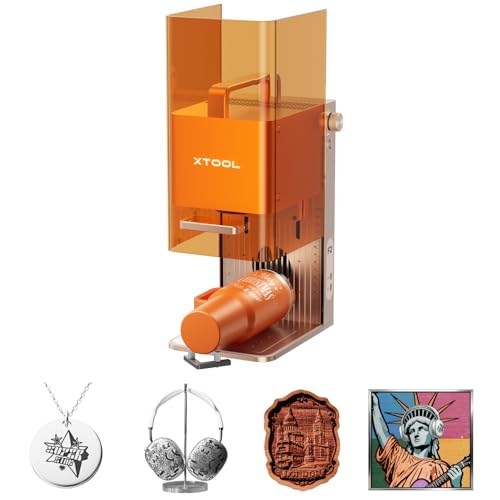
- 15W diode plus 5W IR laser coverage
- 50MP camera for precise alignment
- Up to 6000mm/s for batch personalization
Best For: Portable home studios and small-batch personalization
Best Large-Format Value
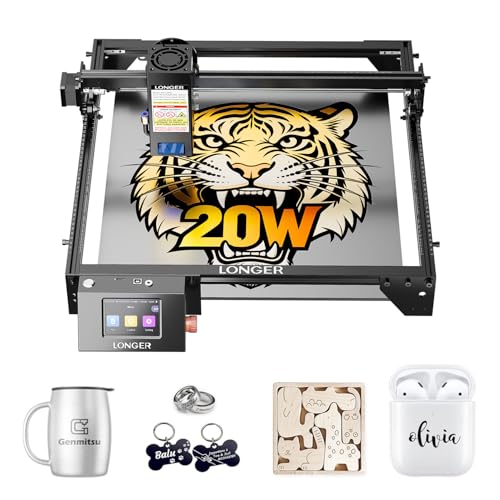
- 20W laser for stronger cutting performance
- 400 × 365mm working area
- Touchscreen and broad software connectivity
Best For: Larger signs, layered designs, and demanding studio projects
Best Enclosed Home-Crafting System

- Class 1 enclosed design for home use
- Dual cameras support guided placement
- Templates and AI tools in xTool Studio
Best For: Beginners making gifts, décor, and everyday crafts
Best Compact Studio Workhorse

- True 12W laser for engraving and cutting
- 300 × 300mm workspace for studio projects
- Compatible with ACMER Studio, LightBurn, and LaserGRBL
Best For: Detailed crafts, signs, ornaments, and small-business work
Best Overall

- Ready-to-use setup with preset parameters
- Camera-assisted positioning and 600mm/s speed
- Enclosed Class 1 design with safety controls
Best For: Beginner-friendly home studios working mainly with wood
Best for Large Projects

- 40W power with a spacious 23.93 × 15.16-inch bed
- Rotary engraving and 3,000mm AutoPassthrough
- Enclosed design with five flame sensors
Best For: High-volume home studios and large or curved projects
Precision Starter

- 15.7 × 16.3-inch work area
- 10,000mm/min speed
- LightBurn and LaserGRBL support
Best For: Larger home-studio signs, gifts, and mixed-material projects
Beginner-Friendly Compact

- Compact near-A4 work area
- App, computer, and offline control
- Optional IR upgrade path
Best For: Beginners and small home businesses making compact craft projects
Enclosed Production Choice

- 20W cutting power
- 300 × 300mm work area
- Fully enclosed with safety controls
Best For: Small-business orders and larger home-studio batch projects
Best Dual-Laser Pick – xTool F2
For home studios that need material flexibility and fast personalization, the xTool F2 stands out among laser engravers for home studios. Its 15W diode and 5W IR lasers cover engraving, cutting, 3D embossing, and color marking on metal, while the enclosed design and built-in camera support more controlled indoor workflows.
Best For: Makers and small businesses creating personalized items, metal-marked products, and small batches at home or on-site.
Pros:
- Dual lasers support more than 300 materials, including metal color marking and thicker-material cutting.
- Built-in 50MP camera offers up to 0.1 mm alignment accuracy for small pieces.
- Speeds up to 6000mm/s and optional slide extension support batch work.
- Fully enclosed, assembled design weighs about 4.6 kg and includes a built-in fan.
Cons:
- Slide extension, rotary accessories, and purifier are optional add-ons.
- The machine is a Class 4 laser product, so users should follow its safety requirements carefully.
The xTool F2 is a strong choice when speed, portability, camera alignment, and metal-marking capability matter more than having the largest work area. It is especially appealing for personalization businesses that move between a studio and events.
Best Large-Format Value – LONGER Ray5 20W
The LONGER Ray5 20W is a practical option for laser engravers for home studios when a larger work area and stronger cutting performance are priorities. Its 400 × 365mm workspace, 20W module, touchscreen, and broad connectivity make it suited to both detailed crafts and more demanding projects.
Best For: Home studios handling larger signs, layered artwork, multi-piece layouts, and higher-volume cutting projects.
Pros:
- 20W laser supports single-pass cutting of up to 15mm pine wood and multiple-pass work on thicker materials.
- 400 × 365mm working area accommodates larger projects.
- Supports USB, TF card, Wi-Fi, app control, LaserGRBL, LightBurn, and LaserBurn.
- Includes touchscreen controls, protective enclosure, safety goggles, emergency stop, and motion protection.
Cons:
- Its larger footprint is less convenient for very compact workspaces.
- Setup requires assembly, unlike fully assembled desktop alternatives.
- Some deeper cutting claims require multiple passes.
Choose the Ray5 20W if workspace and cutting capacity are more important than portability. It offers useful controls and software flexibility for a growing studio, while its enclosure and included safety equipment provide a more contained setup.
Best Enclosed Home-Crafting System – xTool M2 10W
The xTool M2 10W is designed for home crafters who want a contained, guided workflow. Among laser engravers for home studios, it combines a Class 1 enclosed design, dual cameras, templates, and a 10W diode laser for projects involving wood, leather, felt, fabric, paper, and other materials.
Best For: Beginners and home makers creating gifts, home décor, paper crafts, fabric projects, and personalized items.
Pros:
- Class 1 enclosed design includes real-time monitoring for a more home-friendly setup.
- Dual cameras enable workspace previews and the “Place & Go” workflow.
- xTool Studio provides templates and an integrated AI image generator.
- Optional modules can add CMYK printing, IR engraving, or rotary capability.
Cons:
- The CMYK inkjet module and RA3 Lite rotary are sold separately.
- The 10W diode laser is less powerful than the 12W and 20W options in this roundup.
- At 36.2 pounds, it is not especially portable.
The M2 is a sensible pick when ease of use and enclosed operation take priority over maximum cutting power. Its camera-assisted workflow and template-based software can shorten the path from idea to finished craft.
Best Compact Studio Workhorse – ACMER S2 12W
The ACMER S2 12W offers a balanced setup for laser engravers for home studios, combining a 300 × 300mm workspace with a true 12W module and compatibility with several design programs. It is aimed at makers who want room for signs and layered projects without moving to a much larger machine.
Best For: DIY makers and small businesses producing detailed gifts, signs, ornaments, layered artwork, and craft pieces.
Pros:
- True 12W laser handles more than 100 materials and can cut up to 15mm paulownia wood with multiple passes.
- 0.08 × 0.08mm spot and up to 0.01mm positioning accuracy support fine details.
- 300 × 300mm workspace fits signs, layouts, and multi-piece projects.
- Works with ACMER Studio, LightBurn, and LaserGRBL on Windows, macOS, and Linux.
Cons:
- Optional rotary modules, risers, and air assist add to the overall cost.
- Multiple passes are needed for the listed deeper-cutting capacities.
- The included anti-UV shield and goggles do not make it an enclosed Class 1 machine.
The ACMER S2 is a well-rounded choice for creators who want fine engraving, a useful mid-size workspace, and upgrade options. Its software compatibility also makes it easier to fit into an existing design workflow.
Best Overall – CREALITY Falcon A1 10W
For home studios seeking a ready-to-use option, the CREALITY Falcon A1 10W combines an enclosed design, smart camera positioning, and fast 600mm/s operation. Its preset settings and included software can make it easier to begin projects without extensive manual setup.
Best For: Home makers who want an enclosed, beginner-friendly engraver for wood and compatible materials.
Pros:
- Pre-calibrated camera provides a full-frame view for positioning projects.
- CoreXY motion system supports speeds up to 600mm/s.
- Class 1 enclosed design includes auto-lock, emergency stop, and smoke control features.
- Supports Falcon software, LightBurn, LaserGRBL, and Cutlabx.
Cons:
- The working area is 381 × 305mm and is not compatible with a 500 × 500mm honeycomb panel.
- It is not intended for highly reflective materials, and cutting acrylic is not supported.
The Falcon A1 is a practical fit for a home studio that values guided setup and safety features. Confirm its smaller work area and material limitations before buying.
Best Portable Pick – LaserPecker LP1 Plus Mini
The LaserPecker LP1 Plus is a compact choice for home studios where portability and simplicity matter. It can start in about two minutes, runs from a power bank, and uses a mobile app to turn photos or doodles into small personalized projects.
Best For: Beginners and makers who need a lightweight engraver for wood, leather, paper, acrylic, and other compatible non-metal materials.
Pros:
- Pocket-sized 2.4-pound design is easy to transport.
- Adjustable stand supports 360° engraving and a magnetic base helps secure small items.
- Cross-platform app is designed for simple image and doodle imports.
- Can run from a power bank for flexible use outside a permanent workspace.
Cons:
- Metal engraving is not supported.
- The included ruler should be used to maintain the required 200mm lens-to-material distance.
- Its compact format is better suited to small projects than large workpieces.
If your idea of a home studio includes moving between rooms or locations, the LP1 Plus offers unusually easy setup and transport. Choose it for convenience rather than metal work or larger-format production.
Best for Large Projects – xTool S1 40W Rotary Bundle
For home studios handling larger or more demanding work, the xTool S1 40W offers a spacious 23.93-by-15.16-inch bed, up to 600mm/s speed, and a rotary bundle for curved items. Its 40W laser is designed for strong cutting performance, while autofocus and guided software help simplify operation.
Best For: Product makers and serious hobbyists working on larger wood, metal, acrylic, tumbler, and curved-surface projects.
Pros:
- 40W laser can cut up to 18mm cherry wood in a single pass, according to the supplied specifications.
- Large bed supports sizable projects and batch engraving.
- Rotary features support curved items, while AutoPassthrough handles projects up to 3,000mm.
- Enclosed Class 1 design includes flame sensors, emergency stop, and lid-open stop features.
Cons:
- At 86.8 pounds, it is substantially less portable than compact engravers.
- The larger, more powerful setup may be more machine than occasional makers need.
The S1 is the strongest choice here for productivity and project range, particularly when a home studio needs batch capacity or rotary work. Its size and weight make a dedicated workspace sensible.
Precision Starter – Creality Falcon 10W
The Creality Falcon 10W is a practical choice for home studios that need a relatively large work area, fast motion, and detailed engraving. Its 15.7 × 16.3-inch workspace supports projects across wood, leather, acrylic, fabric, and compatible metals, while LightBurn and LaserGRBL provide flexible software options.
Best For: Home-studio users making larger signs, gifts, leather goods, and mixed-material projects.
Pros:
- 15.7 × 16.3-inch workspace accommodates larger pieces.
- Up to 10,000mm/min work speed supports faster projects.
- 0.06 × 0.06mm compressed spot is designed for detailed work.
- Supports LightBurn, LaserGRBL, and offline SD-card operation.
Cons:
- Its open-style design may require additional attention to workspace safety and ventilation.
- Software compatibility varies by operating system, so users should confirm requirements before setup.
- Included product dimensions are listed as 1 × 1 × 1 inches, which may not reflect the machine’s actual footprint.
Choose this model if workspace size and broad material compatibility matter more than having a fully enclosed machine. The included UV-filter acrylic and goggles add protective features, but normal laser-safety practices remain important.
Beginner-Friendly Compact – K15 Pro 10W
The K15 Pro is designed for creators who want one of the more approachable laser engravers for home studios. It assembles with six screws, includes starter materials and tools, and offers app, computer, and offline TF-card control. Its near-A4 work area keeps the machine compact while still covering many everyday craft projects.
Best For: Beginners, apartment or desk-based makers, and small businesses producing coasters, tags, gifts, and branded items.
Pros:
- Compact 11.8 × 7.9-inch A4 workspace fits under a desk.
- Free CutLabX software supports computers, tablets, and phones, with AI-assisted design features.
- Verified 10W output, dual-fan cooling, one-touch focus, and speeds up to 15,000mm/min.
- Upgradeable with an optional IR laser head for compatible stainless-steel and aluminum work.
Cons:
- The standard 10W diode is not the same as the optional IR laser head for bare-metal projects.
- The A4 work area is smaller than the larger-format machines in this roundup.
- Some useful additions, such as a rotary roller, honeycomb plate, or air purifier, are optional.
The K15 Pro stands out for its setup help, wireless workflow, and compact footprint. It is a strong starting point for home crafting, though users planning larger signs or production batches may eventually want a larger work area.
Enclosed Production Choice – 20W Laser Cutter
This 20W model is aimed at home studios that need more cutting power and room for batch work. Its 300 × 300mm workspace accommodates larger designs or multiple smaller pieces, while speeds up to 20,000mm/min can help with production turnaround. The fully enclosed format also suits creative workspaces where containing direct laser exposure, fumes, dust, and noise is a priority.
Best For: Small businesses and serious home makers producing signs, ornaments, gifts, and custom orders.
Pros:
- 20W power is suited to thicker wood and demanding cutting projects.
- 300 × 300mm work area supports larger designs and batch production.
- 0.01mm square focus is intended for crisp logos, text, and fine patterns.
- Enclosure includes flame detection, tilt protection, automatic shutdown, and emergency stop features.
Cons:
- At 21.5 × 18.48 × 8.5 inches and 16 pounds, it requires more dedicated space than compact options.
- Its higher power and enclosed construction may be more machine than casual hobbyists need.
- Material results depend on compatibility and settings; the notes do not specify cutting performance for every listed material.
For home studios balancing safety features, cutting capability, and throughput, this is the strongest production-oriented option of the three. Its larger footprint is a reasonable trade-off for the 20W output and enclosed 300 × 300mm workspace.
How We Picked the Best Laser Engravers for Home Studios
We compared these machines by laser type and stated power, engraving speed, work area, enclosure design, camera or positioning features, air-assist support, material compatibility, and ease of use. We also considered whether each model suits occasional DIY projects, frequent crafting, or small-business production. Product specifications can vary by configuration, so verify the included laser head, accessories, software support, and safety certification before ordering.
Quick Comparison
| Best For | What to Prioritize | Models to Consider |
|---|---|---|
| Beginners and limited spaces | Compact footprint, guided setup, enclosure | LaserPecker LP1 Plus, K15 Pro |
| General DIY crafting | Flexible materials and moderate work area | xTool M2, ACMER S2, Creality Falcon 10W |
| Faster cutting and production | Higher power, air assist, larger bed | LONGER Ray5, xTool S1, 20W 300×300mm machine |
| Precision and convenience | Camera positioning, enclosure, automation | xTool F2, Creality Falcon A1 |
Key Buying Factors for Laser Engravers for Home Studios
Laser Power and Material Goals
Higher diode power generally improves cutting performance and reduces the number of passes, but it does not automatically produce better engraving. For wood, leather, paper, and coated materials, a lower-powered diode can be enough. If you plan to cut thicker plywood or make repeated production runs, consider a 20W or 40W system and confirm the manufacturer’s tested material limits.
Workspace, Speed, and Accuracy
Measure your available bench space, including room for ventilation and material loading. A larger work area helps with signs and batch jobs, while a compact machine is easier to store. Camera positioning, autofocus, fine spot size, and frame previews can make alignment more reliable, especially for irregular blanks and personalized products.
Safety and Ventilation
Enclosed machines are usually easier to manage in a home environment because they help contain light, smoke, and debris. Open-frame engravers require greater attention to protective eyewear, supervision, ventilation, fire prevention, and local safety rules. Never engrave PVC, vinyl, or unknown plastics, and use suitable extraction for smoke and fumes.
Software and Expansion
Check operating-system compatibility, supported file formats, workflow software, and whether the machine works with accessories such as rotary attachments or air assist. These extras can matter as much as headline speed when you move from experiments to repeatable projects.
Who Should Buy Which Laser Engravers for Home Studios?
Choose the LaserPecker LP1 Plus or K15 Pro if portability and beginner-friendly projects matter most. The xTool M2 and Creality Falcon 10W are sensible all-purpose choices for home crafting. For larger materials or faster cutting, look at the LONGER Ray5, ACMER S2, or the 20W 300×300mm machine. The xTool S1 is better suited to users who need a larger bed and tumbler-focused versatility, while the xTool F2 and Creality Falcon A1 emphasize enclosed operation, camera assistance, and streamlined workflows.