Detailed engraving demands more than raw laser power. Camera alignment, motion accuracy, workspace design, material compatibility, and reliable safety features all affect the final result.
We compare 10 laser engravers suited to intricate artwork, lettering, personalized gifts, prototypes, and small-business production, from compact enclosed systems to versatile dual-laser machines.
Best 10 Laser Engravers for Detailed Designs Picks for 2026
Best Portable Dual-Laser Pick
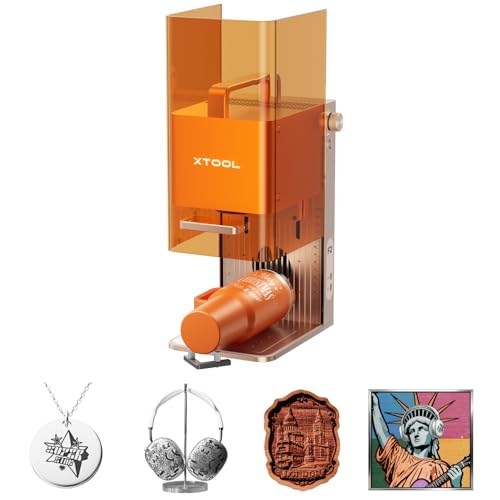
- 15W diode and 5W IR lasers cover diverse materials
- 50MP camera supports precise small-item alignment
- 6000mm/s speed suits batch personalization
Best For: Portable on-site customization and small-batch production
Best Value Detail-and-Cutting Option

- 0.08 × 0.08mm spot supports intricate artwork
- 300 × 300mm workspace accommodates larger layouts
- Compatible with three major design-control software options
Best For: Detailed crafts, signs, gifts, and small-business projects
Best Premium Metal-and-3D Engraver

- 20W fiber and diode lasers cover metals and nonmetals
- Supports deep engraving and multi-level 3D embossing
- 10,000mm/s speed supports production workflows
Best For: Professional metal customization and high-volume detailed work
Best Beginner-Friendly Enclosed Pick

- AI tools streamline photo conversion and layout
- 0.1mm positioning and auto focus simplify setup
- Class 1 enclosure suits homes, classrooms, and studios
Best For: Beginners creating gifts, photos, signs, and décor
Best Precision Value

- 0.01 mm stated engraving accuracy
- 300 × 300 mm work area
- Supports 100+ materials
Best For: Detailed craft projects and personalized gifts
Best Enclosed Versatility

- Built-in dual-camera positioning
- Fully enclosed Class 1 design
- Optional color and IR modules
Best For: Home crafting and guided personalized projects
Best Fast Enclosed Workflow

- Up to 600 mm/s engraving speed
- Pre-calibrated HD smart camera
- Class 1 enclosed safety design
Best For: Fast, camera-assisted engraving on supported materials
Best Enclosed DIY Pick

- 0.01mm square focus for crisp, intricate patterns
- 20,000mm/min engraving speed
- Enclosed 300×300mm workspace
Best For: Home DIY, personalized gifts, and small-batch detailed engraving
Best for Large Projects

- 40W laser cuts up to 18mm cherry wood in one pass
- 600mm/s speed with a spacious work bed
- Rotary and positioning features for curved designs
Best For: Large signs, batch production, and high-power cutting
Best Automated Rotary Setup
WeCreat Vision 20W Laser Engraver

- 0.06×0.08mm spot for fine engraving
- Automatic 0–140mm height adjustment
- Built-in camera and included rotary system
Best For: Tumblers, gifts, jewelry, and home-business production
Best Portable Dual-Laser Pick – xTool F2
The xTool F2 is a strong choice among laser engravers for detailed designs when you want fast, precise work across a broad range of materials. Its 15W diode and 5W IR lasers cover tasks from 3D embossing and cutting to vivid color marking on metal, while the built-in 50MP camera helps align small projects accurately.
Best For: On-site personalization, small-batch production, metal color marking, and makers who need a portable enclosed machine.
Pros:
- Dual lasers support more than 300 materials, including metal, wood, and thicker materials.
- 50MP camera offers up to 0.1 mm alignment accuracy, and motion accuracy is listed at 0.00199 inches.
- Speeds up to 6000mm/s and optional Slide Extension support efficient batch work.
- Fully enclosed design, built-in fan, and optional purifier suit indoor and on-site use.
Cons:
- Slide Extension, rotary accessories, and purifier are optional additions.
- The compact workspace may be less suitable for oversized projects.
- Its Class 4 laser classification requires careful adherence to safety procedures.
The F2 stands out for combining detailed alignment, high speed, and two complementary laser types in a lightweight desktop format. It is particularly appealing if your projects mix personalized metal goods with wood, leather, or thicker material work.
Best Value Detail-and-Cutting Option – ACMER S2 12W
The ACMER S2 12W is a practical option for laser engravers for detailed designs, combining a fine 0.08 × 0.08mm spot with a 300 × 300mm work area. Its true 12W laser is suited to intricate artwork, photos, text, and projects that also require deeper cutting.
Best For: Personalized gifts, signs, ornaments, layered art, and growing makers who want broad software compatibility.
Pros:
- Up to 0.01mm positioning accuracy helps reproduce fine text, patterns, photos, and artwork.
- True 12W output supports engraving across more than 100 materials.
- Can cut up to 15mm paulownia wood and 12mm black acrylic with multiple passes.
- Works with ACMER Studio, LightBurn, and LaserGRBL on Windows, macOS, and Linux.
Cons:
- Rotary modules, risers, air assist, and other expansion accessories are optional.
- Deeper cuts may require multiple passes rather than a single pass.
- Compared with enclosed models, its setup may require more attention to workspace safety.
With its spacious work area and fine stated positioning accuracy, the S2 balances detailed engraving with useful cutting capability. It is a flexible pick for hobbyists and small businesses that want room to expand their workflow.
Best Premium Metal-and-3D Engraver – xTool F1 Ultra
The xTool F1 Ultra is built for demanding laser engravers for detailed designs, especially when metal marking, deep engraving, and 3D effects are priorities. Its 20W fiber and 20W diode lasers cover metals and nonmetal materials, while the 16MP camera supports accurate production workflows.
Best For: Professional customization, intricate metal work, 3D embossing, deep engraving, and higher-volume batch production.
Pros:
- Dual 20W fiber and diode lasers handle metals, wood, acrylic, leather, glass, rubber, fabric, and more.
- Supports intricate multi-level 3D embossing and deep engraving.
- Speeds up to 10,000mm/s and a 220 × 220mm area suit rapid production.
- Enclosed design includes smoke extraction, a fire safety alarm, and emergency stop button.
Cons:
- The Auto Conveyor for expanded 220 × 500mm batch work is sold separately.
- At 43.8 pounds, it is substantially less portable than compact desktop models.
- Its advanced capabilities may be more than casual makers need.
The F1 Ultra is the most production-oriented option here, with especially broad material coverage and advanced 3D capabilities. Choose it when detailed metal personalization and repeatable throughput justify a larger, heavier investment.
Best Beginner-Friendly Enclosed Pick – Creality Falcon A1C
The Creality Falcon A1C simplifies laser engravers for detailed designs with AI-assisted setup, automatic focusing, and camera-based positioning. Its enclosed Class 1 design and compact footprint make it approachable for home creators, classrooms, studios, and makerspaces working with wood, leather, and acrylic.
Best For: Beginners, photo engraving, personalized gifts, classroom projects, and creators who value guided software features.
Pros:
- AI tools can convert photos, remove backgrounds, arrange layouts, and recommend settings.
- AI camera and auto focus support positioning accuracy up to 0.1 mm.
- Speeds up to 15,000mm/min provide quick engraving for gifts and décor.
- Class 1 enclosure and interchangeable platform support a safer, expandable setup.
Cons:
- The included package contains one laser module based on the selected model.
- Its 150 × 150 × 148mm work area is smaller than the ACMER S2’s workspace.
- Rotary attachments, smoke purifiers, and other expansion accessories are optional.
The Falcon A1C is a convenient choice for users who want detailed results without a complicated initial workflow. Its AI features, auto focus, and Class 1 enclosure emphasize accessibility, while the interchangeable platform leaves room to expand later.
Best Precision Value – ACMER S2 7W Laser Engraver
For shoppers comparing laser engravers for detailed designs, the ACMER S2 stands out for its fine 0.08 × 0.08 mm laser spot and stated engraving accuracy up to 0.01 mm. Its 300 × 300 mm work area, broad material compatibility, and beginner-friendly Acmerstudio software make it a practical choice for signs, gifts, logos, and small-business projects.
Best For: Detailed wood, leather, acrylic, and coated-metal projects on a budget-friendly open-frame machine.
Pros:
- Fine laser spot supports small text, patterns, and sharper edges.
- Engraves more than 100 materials and can cut paulownia wood and black acrylic with multiple passes.
- Fast engraving speeds up to 10,000 mm/min with a 300 × 300 mm work area.
- Includes safety goggles, an anti-UV shield, and motion-detection auto-pause.
Cons:
- Open-frame design may require additional workspace safety measures compared with an enclosed machine.
- Rotary modules, risers, enclosures, and air assist are optional accessories.
The S2 is a strong fit when fine detail and flexibility matter more than an enclosed setup. Its software and upgrade path also give beginners room to expand their projects over time.
Best Enclosed Versatility – xTool M2 20W Laser Engraver
The xTool M2 is a compelling option among laser engravers for detailed designs when you want guided setup and an enclosed workspace. Its built-in dual cameras provide real-time positioning, while the 20W diode laser handles engraving and cutting across materials such as wood, leather, felt, fabric, paper, and cardstock.
Best For: Home crafters and DIY makers who value enclosed Class 1 safety, camera-assisted placement, and expansion options.
Pros:
- Dual cameras support real-time previews and accurate “Place & Go” positioning.
- Fully enclosed Class 1 design includes real-time safety monitoring.
- xTool Studio offers templates and an integrated AI image generator.
- Optional modules can add CMYK color printing or 3W IR engraving for metal and plastic.
Cons:
- CMYK Inkjet and RA3 Lite Rotary modules are not included.
- The 3W IR laser and color-printing capabilities require separately sold modules.
- Its 35.9-pound weight and larger package make it less portable than compact machines.
The M2 prioritizes convenience and versatility over a simple starter format. It is especially attractive for home use where camera alignment, enclosed operation, and a polished software experience can reduce setup guesswork.
Best Fast Enclosed Workflow – CREALITY Falcon A1 10W
For laser engravers for detailed designs that also need efficient production, the CREALITY Falcon A1 combines a pre-calibrated HD camera, graphic outline extraction, and speeds up to 600 mm/s. Its enclosed Class 1 design and preset material parameters make it approachable for projects on wood and other supported materials.
Best For: Makers who want fast, camera-assisted engraving with an enclosed setup and ready-to-use software.
Pros:
- Pre-calibrated HD camera helps position objects across the engraving area.
- CoreXY motion system and dual motors support speeds up to 600 mm/s.
- Graphic outline extraction can convert patterns into engraving paths.
- Enclosed Class 1 design includes auto-lock, emergency stop, and smoke-control features.
Cons:
- The 381 × 305 mm work area is not compatible with the 500 × 500 mm honeycomb panel.
- It cannot engrave highly reflective materials such as mirror-finished metals or mirrored acrylic.
- Cutting acrylic is not supported, and acrylic engraving requires a coated surface.
The Falcon A1 is a practical choice for repeatable, speed-focused workflows, particularly when camera alignment and preset settings are more important than broad material freedom. Check its acrylic and reflective-material limitations before buying.
Best Enclosed DIY Pick – L2 MAX 10W Laser Engraver
For makers seeking laser engravers for detailed designs, the L2 MAX combines a fine 0.01mm square focus with a 300×300mm work area. Its enclosed, modular design and broad connectivity make it a practical choice for personalized crafts, gifts, and small-batch projects.
Best For: Home DIY users, beginners, and small businesses creating detailed designs on wood, coated metal, glass, leather, stone, and other compatible materials.
Pros:
- 0.01mm square focus helps produce sharp lines and intricate patterns.
- 20,000mm/min speed supports faster batch engraving.
- 360° enclosure helps contain fumes, dust, and operating noise.
- Includes multiple safety features and supports LightBurn, LaserGRBL, and CutLabX.
Cons:
- Its 10W output is less powerful than the 20W and 40W options in this roundup.
- Optional Air Assist and Rotary Roller accessories are not included as standard.
The L2 MAX is a balanced option when fine detail, accessible setup, and enclosed operation matter more than maximum cutting power. Its work area and offline-control options also suit varied workshop workflows.
Best for Large Projects – xTool S1 40W Rotary Bundle
The xTool S1 is a high-output choice among laser engravers for detailed designs, pairing a 40W laser with a spacious 23.93-by-15.16-inch bed. Its positioning technology, rotary bundle, and guided software are designed for larger projects and repeatable production.
Best For: Larger signs, batch production, curved-surface engraving, and users who want strong cutting power with guided setup tools.
Pros:
- 40W power can cut 18mm cherry wood in a single pass.
- 600mm/s engraving speed and a large bed support productive workflows.
- Pin-point Positioning and rotary capabilities support detailed work on curved surfaces.
- Enclosed Class 1 design includes five flame sensors, lid-open stopping, and an emergency stop.
Cons:
- Its 86.8-pound weight makes it less convenient to move than a compact desktop machine.
- The higher-power, large-format design may be more capability than casual hobbyists need.
Choose the S1 when throughput and material capability are priorities. Auto-focus, pre-tested material settings, tutorials, and AI-assisted design features also make this powerful machine more approachable for first-time users.
Best Automated Rotary Setup – WeCreat Vision 20W Laser Engraver
The WeCreat Vision 20W stands out among laser engravers for detailed designs with a 0.06-by-0.08mm laser spot, automatic height adjustment, and a built-in camera. It is particularly well suited to makers who want precise positioning and rotary engraving in a pre-assembled desktop machine.
Best For: Jewelry and gift making, tumblers, mugs, signs, and home-business production involving flat and cylindrical materials.
Pros:
- Fine 0.06×0.08mm spot supports detailed engraving.
- 20W power cuts up to 10mm wood or 8mm opaque black acrylic in one pass.
- Automatic 0–140mm lift adjustment accommodates materials of different heights.
- Built-in HD camera, Smart Air Assist, and rotary system streamline production.
Cons:
- Its 66.9-pound weight limits portability.
- Users must choose between WeCreat MakeIt and LightBurn software workflows.
For creators who value automation, the Vision 20W offers a convenient combination of detail, camera-assisted alignment, height adjustment, and rotary versatility. Its enclosed Class 1 design further suits home workshops and small businesses.
How We Picked the Best Laser Engravers for Detailed Designs
We evaluated the selected machines around the factors that matter most for fine engraving: laser type and output, claimed resolution or precision, maximum work area, movement speed, camera-assisted positioning, enclosure design, air assist, rotary compatibility, software workflow, and material range. We also considered whether each model is best suited to hobby projects, occasional personalization, or repeated small-business production.
Specifications can vary by configuration, included accessories, and regional listing, so confirm the exact package before buying. A higher wattage rating does not automatically produce finer detail; optics, focus control, calibration, material settings, and mechanical stability are equally important.
Quick Comparison
| Best For | Look For | Models to Consider |
|---|---|---|
| Fine work and positioning | Camera alignment, stable mechanics, focused beam | xTool F2, xTool F1 Ultra, xTool M2 |
| Versatile material work | Diode and fiber capability or broad accessory support | xTool F2, xTool F1 Ultra |
| Safer desktop use | Fully enclosed, Class 1 design, interlocks | Creality Falcon A1C, xTool M2, Creality Falcon A1 |
| Large projects | Roomy bed and optional rotary support | xTool S1, 10W 300×300mm model |
| Value-focused making | Useful work area, air assist, and basic controls | ACMER S2 models, WECREAT, 10W DIY model |
Key Buying Factors for Laser Engravers for Detailed Designs
Laser Type and Real Material Needs
Diode lasers are commonly used for wood, paper, leather, many coated materials, and some acrylic. Fiber lasers are better suited to bare metals and can produce strong marking and fine detail on metal products. Dual-laser systems cost more but can cover a wider range of projects. Never assume a material is safe to process: avoid PVC, vinyl, and other materials that can release hazardous fumes.
Precision, Focus, and Alignment
For small text and intricate line art, prioritize a stable frame, accurate focus, dependable homing, and a practical alignment system. Built-in cameras can reduce setup errors and help place artwork on irregular or preexisting objects, but software calibration still matters.
Enclosure, Ventilation, and Workflow
An enclosed Class 1 machine is generally easier to manage in a home or shared workspace, especially when paired with an exhaust system. Open-frame models may offer flexibility and lower cost, but require more attention to eye protection, ventilation, fire safety, and supervision. Air assist helps reduce scorching and supports cleaner cuts.
Work Area and Accessories
Match the bed size to your typical projects rather than buying only for maximum speed. Check whether a rotary attachment, riser, honeycomb panel, camera, or air pump is included or sold separately. Tumbler and cylindrical-object work usually requires compatible rotary hardware and sufficient enclosure clearance.
Who Should Buy Which Laser Engravers for Detailed Designs?
Choose a camera-equipped enclosed model if accurate placement, convenience, and safer desktop use are priorities. Choose a dual-laser machine if you work across both wood-based projects and metal marking. A 40W diode system or larger-bed engraver makes more sense for frequent cutting and oversized work, while a 10W machine can be a sensible entry point for lighter engraving and modest budgets. Small businesses should prioritize repeatability, ventilation, accessory availability, software support, and service over headline speed alone.