The best small-business laser engravers make it easier to personalize products, create prototypes, and fulfill small production runs without investing in industrial equipment. The right choice depends on your materials, workspace, workflow, and required output.
We selected 10 machines spanning compact beginner models, enclosed designs, app-controlled systems, and larger work areas so you can match features and capacity to your business goals.
Best 10 Small-Business Laser Engravers Picks for 2026
Best Value Power

- 5.5W laser with air-assist support
- 300 x 300mm working area
- Wi-Fi, TF-card, LightBurn, and LaserGRBL support
Best For: Medium-size wood, leather, and acrylic projects
Best for Larger Designs

- Large A3-size design capability
- Fine spot size for detailed engraving
- Upgradeable modules and optional rotary support
Best For: Larger personalized products and expandable workflows
Best for Growing Shops

- A4 work area with 10W verified output
- Offline, app, and computer control
- Upgradeable with IR and rotary accessories
Best For: Repeatable custom merchandise and small-business production
Best Power and Speed

- 7W diode laser for engraving and light cutting
- 0.01mm accuracy for detailed designs
- Up to 10,000mm/min maximum speed
Best For: Small products requiring detailed engraving and occasional light cutting
Best Beginner-Friendly Setup

- 99% preassembled for quick setup
- Supports major operating systems and popular software
- 0.01mm repeatable positioning accuracy
Best For: Beginners and home-based businesses making small personalized products
Best Smart Enclosed Pick
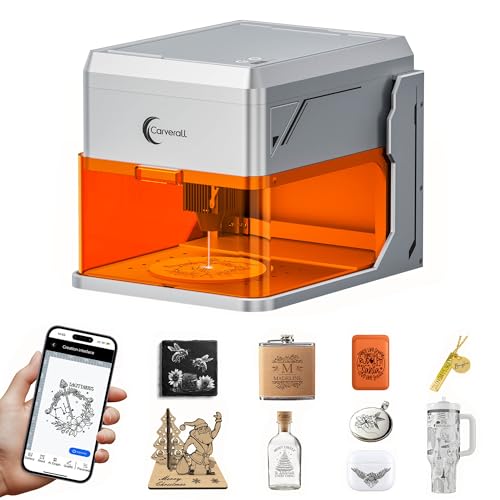
- HD camera for precise design placement
- Class 1 enclosure with automatic safety stops
- App, AI, offline batch, and LightBurn support
Best For: Small-batch makers producing tags and jewelry
Best Value Power – Twotrees TTS-55 Pro
The Twotrees TTS-55 Pro is a capable option for small-business laser engravers that need a practical balance of cutting power, detail, and workspace. Its 300 x 300mm area, 5.5W laser, wireless control, and support for LightBurn and LaserGRBL make it suitable for a range of custom-product work.
Best For: Makers and small businesses producing wood, leather, acrylic, paper, and selected metal engraving projects.
Pros:
- 5.5W laser with a fine 0.08 x 0.46mm spot and up to 0.1mm engraving accuracy.
- 300 x 300mm work area supports signs, gifts, and other medium-size projects.
- Supports air-assist integration, Wi-Fi control, TF-card offline engraving, LightBurn, and LaserGRBL.
Cons:
- Open-frame design requires careful attention to laser safety and workspace setup.
- Its listed cutting capabilities are limited compared with higher-powered machines.
The TTS-55 Pro is a well-rounded diode engraver for growing makers who want more cutting ability than a compact entry-level unit without moving to a much larger machine.
Best for Larger Designs – ARTILUME A4 Laser Engraver
The ARTILUME A4 laser engraver is designed for small-business laser engravers that need a broad work area and flexible wireless operation. Its 7W version offers a useful starting point for detailed projects, while the platform can also accept higher-power modules as needs grow.
Best For: Businesses making larger personalized signs, gifts, leather goods, coated-metal items, and cylindrical products with optional accessories.
Pros:
- Supports full A3-size designs in a single pass according to the supplied product information.
- Fine spot sizes as small as 40 x 140 micrometers are intended for detailed work.
- App, LaserGRBL, and LightBurn compatibility provide flexible control, with optional rotary and air-assist accessories.
Cons:
- The listed configuration is 7W, while higher-power 12W and 22W modules are optional choices.
- Some business-oriented features, including rotary engraving and air assist, require optional accessories.
With its large claimed work area, upgrade path, and wireless control, the ARTILUME is appealing for sellers who want room to handle larger designs and expand capabilities over time.
Best Compact Enclosed Pick – Twotrees TS1 Mini
The Twotrees TS1 Mini is a compact choice for small-business laser engravers working with small items and limited bench space. Its enclosed acrylic cover, included goggles, smartphone control, and simple plug-and-play setup make it approachable for classrooms, home studios, and light-duty product personalization.
Best For: Small gifts, tags, cards, thin wood pieces, leather projects, and beginner engraving in compact workspaces.
Pros:
- Fully enclosed design contains light and debris, and the package includes safety goggles.
- Bluetooth smartphone control works with iOS and Android through the dedicated app.
- Very small footprint and approximately 1kg weight make it easy to place or transport.
Cons:
- The 80 x 80mm work area limits it to small projects.
- The adjustable 3W laser is intended for detailed engraving and light cutting rather than demanding production work.
- Objects inside the enclosure are limited to about 30mm in height.
The TS1 Mini prioritizes convenience and enclosure safety over throughput, making it a sensible starter machine for small-format personalization rather than a high-volume shop tool.
Best for Growing Shops – K15 Pro 10W
The K15 Pro is aimed at small-business laser engravers that need a larger A4 workspace, repeatable production features, and a straightforward setup. Its verified 10W output, one-touch focusing, offline operation, and claimed compatibility with more than 300 materials give it a broad range for custom merchandise.
Best For: Small businesses producing coasters, signs, keychains, pet tags, jewelry blanks, tumblers, and other branded goods.
Pros:
- 11.8 x 7.9-inch A4 work area handles common business projects while remaining compact.
- Verified 10.36–10.58W output, dual-fan cooling, and claimed cutting capacity for 12mm plywood and 8mm acrylic.
- Free CutLabX software, app control, LightBurn and LaserGRBL compatibility, TF-card offline jobs, and smart repeat-job memory support flexible workflows.
Cons:
- The optional 1W IR head is needed for the listed bare-metal engraving upgrade.
- Rotary, honeycomb, air-pump, and air-purifier accessories are optional.
- Its compact A4 area is smaller than machines designed for larger sign production.
The K15 Pro stands out as a versatile production-minded option for sellers who want easy setup and repeat jobs today, with room to add accessories and an IR laser head later.
Best Power and Speed – 7W Laser Engraver
For small-business laser engravers that need both detailed marking and light cutting, this 7W diode machine offers a practical balance of power, speed, and compact size. It can engrave a range of craft materials and cut thin basswood with multiple passes, while its foldable design helps conserve workspace.
Best For: Small businesses making coasters, ornaments, leather patches, gift tags, and other compact products that require engraving plus occasional light cutting.
Pros:
- 7W laser supports engraving and cutting thin wood up to 4mm basswood with multiple passes.
- 0.01mm engraving accuracy is suited to fine text, photos, and intricate artwork.
- Up to 10,000mm/min maximum speed can help reduce project time.
- Engraves wood, leather, bamboo, dark acrylic, coated metal, and other listed materials.
Cons:
- Its compact engraving area is better suited to smaller products than large signs.
- Bare metal requires marking spray for best results.
- Material settings should be tested on scrap before production runs.
This is a strong fit when a small shop wants more cutting capability than a basic mini engraver provides. The compact footprint and foldable frame are useful, but the machine remains oriented toward smaller desktop projects.
Best Beginner-Friendly Setup – ACMER S1
The ACMER S1 is a convenient option for small-business laser engravers that want a compact machine with minimal setup. It arrives 99% preassembled, includes free Acmerstudio software, and supports LightBurn and LaserGRBL across macOS, Windows, and Linux.
Best For: Beginners and small home-based businesses producing detailed work on small items such as wood, leather, acrylic, and other supported materials.
Pros:
- 99% preassembled, with approximately one minute needed to install the laser head.
- Supports up to 10,000mm/min engraving speed and 0.01mm repeatable positioning accuracy.
- Works with Acmerstudio, LightBurn, and LaserGRBL on major desktop operating systems.
- Includes a 12-month warranty and 24/7 customer support.
Cons:
- The 130 x 130mm working area limits the size of products it can process.
- Its 2,500mW diode laser is intended for thin plywood, MDF, acrylic, and similar light-duty cutting.
- The machine is compact, so larger production pieces require a different setup.
With straightforward setup, broad software compatibility, and a small footprint, the S1 is approachable for first-time operators. Its modest work area makes it most practical for personalized goods and small-batch work rather than oversized signage.
Best Portable Option – LaserPecker LP1 Plus
For small-business laser engravers that need maximum portability, the LaserPecker LP1 Plus is designed to travel easily and start quickly. Its adjustable stand supports 360-degree multi-angle engraving, and it can run from a power bank for mobile projects.
Best For: Mobile makers and beginners personalizing small non-metal items such as wood, leather, acrylic, paper, and similar compatible materials.
Pros:
- Pocket-sized design is easy to carry in a backpack.
- Can go from unpacking to a first engraving in under two minutes, according to the supplied notes.
- Runs from any power bank for outdoor or mobile use.
- Adjustable stand, magnetic base, and 360-degree engraving support improve flexibility with small items.
Cons:
- Metal engraving is not supported.
- The machine requires a 200mm distance between the lens and material surface.
- Its portable format is better suited to small objects than larger production pieces.
The LP1 Plus prioritizes convenience over broad material capability. It makes sense for a traveling creator or a small business that sells personalized, non-metal goods and values quick, app-based operation.
Best with Extra Features – LONGER RAY5 Mini 2.5W
For small-business laser engravers, the LONGER RAY5 Mini stands out when portability and straightforward setup matter more than a large work area. Its 2.5W laser, 130 x 130mm workspace, and support for wood, acrylic, coated aluminum, leather, paper, and other materials make it suitable for compact personalized products and mobile crafting.
Best For: Beginners and small businesses that need a lightweight engraver for small designs, custom goods, and occasional on-the-go use.
Pros:
- Compact 4.84-pound design with a 130 x 130mm working area.
- Up to 12,000mm/min speed and a 0.04 x 0.04mm spot size for detailed engravings.
- Works with LightBurn and LaserGRBL, plus Wi-Fi and USB connectivity.
- Arrives as a one-piece unit and includes protective goggles and a magnetic laser cover.
Cons:
- The small work area limits larger signs and batch layouts.
- Its 2.5W output has more limited cutting capacity than higher-powered options.
- Some advanced safety or workflow features may require additional setup and attention from the operator.
The RAY5 Mini is a practical entry point for small-business laser engravers that prioritize low space requirements and easy transport. Choose it for detailed small-format work, but consider a more powerful enclosed model for frequent cutting or higher-volume production.
Best Smart Enclosed Pick – Carverall A1 Pro 5W
The Carverall A1 Pro is one of the more approachable small-business laser engravers for precise, repeatable small products. Its built-in camera, app and AI-assisted software, enclosed Class 1 design, and offline batch capability are particularly useful for makers producing pet tags, jewelry blanks, bookmarks, and other compact items.
Best For: Home studios and small-batch makers who want camera-guided positioning, simple controls, and added enclosure safety.
Pros:
- HD camera helps position designs accurately, while presets can simplify work on materials under 3mm.
- Verified 5.12–5.35W output supports cutting up to 4mm plywood and 3mm acrylic in one pass, according to the supplied notes.
- Fully enclosed Class 1 design includes open-lid and tilt shutoff protections, plus air assist and an exhaust fan.
- Supports CutLabX, LightBurn, LaserGRBL, mobile control, and offline batch jobs through the included TF card.
Cons:
- The 3.94 x 3.94-inch work area is best suited to small items.
- Some expanded capabilities, including bare-metal marking and odor filtration, require optional accessories.
- Its feature-rich software and accessory ecosystem may take time to learn.
With camera alignment and a compact enclosed format, the A1 Pro is a strong fit for businesses selling repeatable small custom products. Its limited workspace is the main trade-off, so larger signage or broad batch layouts may call for a bigger machine.
Best Starter Bundle – BlazeX M3 10W
The BlazeX M3 gives small-business laser engravers a more powerful desktop starting point, combining a 10W laser with a protective enclosure, honeycomb bed, tools, and sample materials. Its 0.01mm stated precision and compatibility with wood, leather, glass, and coated metal support detailed product customization and small-batch production.
Best For: Beginners and hobby businesses that want a higher-power starter kit for engraving and cutting without sourcing core accessories separately.
Pros:
- 10W laser and 0.01mm stated precision target detailed engraving and stronger cutting performance.
- Includes a protective enclosure, honeycomb bed, tool kit, goggles, and 13 engraving materials.
- Class 1 safety design includes lid and tilt sensors, while the integrated fan helps exhaust smoke and odors.
- Supports LightBurn, LaserGRBL, and CutLabX across Windows, macOS, iOS, and Android.
Cons:
- The supplied notes do not specify the machine’s working-area dimensions.
- Rotary engraving, air assist, and purification require optional upgrades.
- Its broader feature set may be more machine than occasional users need.
The M3 is appealing when cutting capability and included accessories matter more than minimum size or weight. It offers a fuller starting package than a bare desktop engraver, while optional upgrades leave room to expand into cylindrical items and cleaner production workflows.
How We Picked These Small-Business Laser Engravers
We focused on features that matter when an engraver must support real business tasks: laser power, working area, precision, enclosure design, software and app compatibility, camera or alignment assistance, portability, and ease of setup. The list includes machines suited to personalized gifts, signage, craft products, samples, and low-volume production.
Laser wattage is only one part of performance. Actual results also depend on the laser type, material settings, air assist, focusing method, motion system, and whether the machine is designed for engraving, cutting, or both. Always confirm current specifications and follow the manufacturer’s safety guidance before purchase.
Quick Comparison
| Best for | Prioritize | Why it matters |
|---|---|---|
| Personalized gifts | Easy software and camera alignment | Speeds up placement and repeat orders |
| Small product batches | Higher power and dependable motion | Improves throughput and cutting capability |
| Limited workspaces | Compact or enclosed construction | Makes ventilation and storage easier |
| Mobile or pop-up selling | Portable design and offline controls | Allows work away from a permanent studio |
| Mixed materials | Broad material compatibility | Supports more products and custom orders |
Key Buying Factors for Small-Business Laser Engravers
Power and Material Compatibility
Choose power based on your usual materials rather than occasional projects. Diode lasers commonly handle wood, leather, paper, cardboard, and some coated metals; cutting thicker stock generally requires more power and multiple passes. Acrylic compatibility varies significantly, so verify the manufacturer’s material guidance.
Work Area and Production Speed
A near-A4 or larger bed is useful for signs, panels, and batch layouts, while mini machines suit small tags, jewelry, and compact products. A larger area can reduce repositioning, but it also increases the machine’s footprint. For paid work, repeatability and stable movement may matter more than maximum headline speed.
Safety, Ventilation, and Software
An enclosure can help contain light, smoke, and debris, but it does not eliminate the need for appropriate ventilation and fire precautions. Check whether the machine supports your preferred software, operating system, file formats, and workflow. App control is convenient, while offline operation can be valuable in a workshop or market setting.
Maintenance and Operating Costs
Budget for ventilation, protective eyewear where required, cleaning supplies, replacement lenses or modules, materials, and possible air-assist accessories. Clear documentation and accessible customer support can reduce downtime when the engraver becomes part of your order fulfillment process.
Who Should Buy Which Small-Business Laser Engravers?
Beginners and occasional makers should favor compact, enclosed, or highly guided models with straightforward controls. Sellers producing small personalized items may benefit from camera alignment, adjustable stands, or app workflows. Businesses cutting thicker wood or handling broader product formats should look toward higher-power machines with a larger work area and strong motion stability.
If you expect demand to grow, choose a model with room for accessories, reliable software support, and a bed size that matches likely orders. For any commercial setup, prioritize documented safety features and a ventilation plan before comparing cosmetic extras.