Large-format laser engraving demands more than a powerful laser. Bed size, material clearance, software control, safety features, and reliable motion all affect whether a machine can handle oversized signs, batch production, furniture components, or repeated custom orders.
We selected 10 machines spanning high-power cutters, extended work areas, dual-laser systems, and more accessible desktop options. Use the guide below to match cutting power and workspace to your materials, workflow, and budget.
Best 10 Laser Engravers for Large Projects Picks for 2026
Best Overall
Aliencell X1 40W Laser Engraver

- 26" × 21" work bed for large projects
- Fast 600 mm/s engraving with 40W power
- Cameras, touchscreen, and enclosed Class 1 design
Best For: Large-format work and batch production
Most Powerful
SCULPFUN S70 MAX 70W Laser Engraver

- 32.7" × 31.5" bed for oversized work
- 70W diode laser for heavy cutting tasks
- Enclosed metal frame with multiple safety features
Best For: Large signs and thick-material cutting
Best Compact Option
Artilume T1 Foldable 12W Laser Engraver

- Foldable 4.62-pound design saves workspace
- 12W output for detailed craft engraving
- App, LightBurn, and LaserGRBL compatibility
Best For: Portable crafting and small personalized items
Best Value for Large Signs
LASER TREE 20W Large-Format Laser Engraver
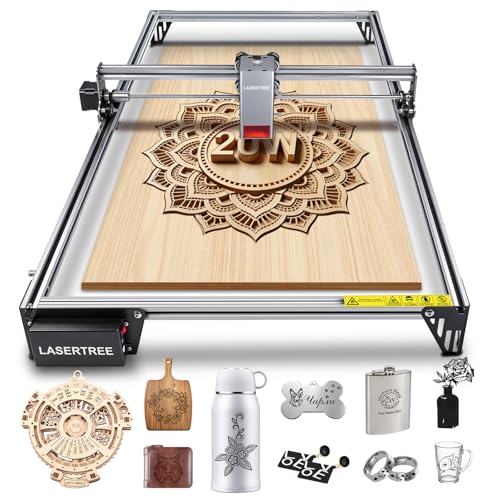
- 400 × 800 mm workspace for long designs
- 20W compressed-spot cutting and engraving
- Works with LightBurn and LaserGRBL
Best For: Large signs and small-batch production
Best Portable Dual-Laser Pick

- IR and diode lasers handle different materials
- Up to 6000mm/s engraving speed
- 50MP camera and slide-extension support
Best For: Portable customization and varied-material projects
Best Extra-Large Work Area

- 830 × 800 mm workspace for oversized blanks
- 48W output cuts substantial wood and acrylic
- Up to 36,000 mm/min engraving speed
Best For: Large-format cutting and batch production
Best Enclosed Large-Project Bundle

- 23.93 × 15.16-inch bed for larger projects
- AutoPassthrough supports work up to 118 inches
- Enclosed Class 1 design with rotary capability
Best For: Large signs, tumblers, and safer workshop use
Best Large-Format Pick

- 600 x 600 mm working area
- 20W diode laser with up to 30,000 mm/min speed
- Wi-Fi, USB, and TF-card operation
Best For: Oversized signs, wall art, and batch craft production
Best Portable Mid-Size Pick

- 300 x 300 mm working area
- Fine laser spot with claimed 0.01 mm accuracy
- Lightweight design for mobile use
Best For: Medium-size crafts, classrooms, and portable engraving
Best Overall – Aliencell X1 40W Laser Engraver
For shoppers comparing laser engravers for large projects, the Aliencell X1 stands out with a 26″ × 21″ bed, fast 600 mm/s engraving, and features designed to reduce setup and material waste. Its enclosed design and offline touchscreen workflow also make it a practical option for small businesses and serious hobbyists.
Best For: Large-format projects, batch production, and users who want camera-assisted positioning without relying on a PC.
Pros:
- Large 26″ × 21″ engraving surface for signs, batches, and oversized work.
- 40W laser with 20,000 mm/s² acceleration and 20 kHz frequency for fast, detailed processing.
- Dual 8MP cameras, cross-laser positioning, and simulated previews help improve placement and reduce waste.
- Standalone touchscreen control, offline operation, and Class 1 enclosed safety design.
Cons:
- At 104.8 pounds, it is a substantial machine for a home workspace.
- The feature-rich design may be more than beginners need for occasional small projects.
The X1 is a strong all-around choice when bed size, workflow automation, and enclosed safety matter as much as laser power. It is particularly well suited to users processing larger pieces or repeating designs.
Most Powerful – SCULPFUN S70 MAX 70W Laser Engraver
The SCULPFUN S70 MAX is built for laser engravers for large projects that require both a very large work area and serious cutting capability. Its 32.7″ × 31.5″ bed and 70W diode laser are aimed at hobbyists and small businesses handling oversized pieces or demanding materials.
Best For: Large signs, batch orders, and thick wood or acrylic cutting where maximum diode-laser power is a priority.
Pros:
- Very large 32.7″ × 31.5″ engraving bed for oversized creations and production batches.
- 70W, 455±5 nm diode laser supports engraving across wood, acrylic, leather, plastic, and more.
- Supplied notes report single-pass cutting of up to 40 mm basswood and 60 mm black acrylic.
- Full metal enclosed structure includes a flame detector, safety lock, emergency stop, and other protections.
Cons:
- The large footprint requires considerable workspace.
- Its 41.9-pound weight and production-focused specifications may be excessive for small craft projects.
Choose the S70 MAX when cutting depth and bed size are more important than compactness. It offers the strongest stated cutting performance in this lineup, while its enclosed structure adds useful protection during demanding jobs.
Best Compact Option – Artilume T1 Foldable 12W Laser Engraver
The Artilume T1 takes a different approach to laser engravers for large projects: it is designed for portability rather than oversized workpieces. Its foldable frame, 200 × 150 mm work area, and mobile-app support make it a convenient choice for everyday crafts in a small workspace.
Best For: Beginners, mobile makers, and small personalized items such as tags, coasters, ornaments, and leather patches.
Pros:
- Foldable 4.62-pound design is easy to move and store between projects.
- 12W laser supports detailed engraving and light cutting on common craft materials.
- Mobile app control works alongside compatible LightBurn and LaserGRBL desktop software.
- 0.01 mm engraving precision and included goggles and beginner materials simplify startup.
Cons:
- The 200 × 150 mm work area is not suited to genuinely large signs or oversized batches.
- Its 12W output is intended for light cutting rather than heavy material processing.
The T1 is best viewed as a compact craft machine, not a large-format production engraver. It makes sense when storage space, portability, and beginner-friendly operation outweigh the need for a large bed.
Best Value for Large Signs – LASER TREE 20W Large-Format Laser Engraver
For buyers seeking laser engravers for large projects without moving to a heavier high-power machine, the LASER TREE 20W offers a 400 × 800 mm work area and a stated 10,000 mm/min maximum speed. It is sized for large signs, murals, crafts, and small-batch commercial work.
Best For: Large wooden signs, custom murals, batch engraving, and beginners who want familiar software compatibility.
Pros:
- 400 × 800 mm work area accommodates oversized creations and repeated production work.
- 20W compressed-spot laser is designed for precise engraving and one-pass cutting on stated materials.
- Up to 10,000 mm/min engraving speed helps reduce processing time.
- Supports LightBurn and LaserGRBL on Windows and Mac, with common image and vector formats.
Cons:
- The open-style machine may require more attention to ventilation and workspace safety than an enclosed unit.
- Its 11-pound build is lighter than many large-format machines, which may not feel as substantial for intensive production.
The LASER TREE is a practical middle ground: its long 400 × 800 mm workspace handles large designs, while the 20W module and mainstream software support keep the workflow approachable. It is a compelling fit for sign makers and small businesses that do not need the highest-powered option.
Best Portable Dual-Laser Pick – xTool F2 5W IR & 15W Diode
For makers who need flexibility more than a huge fixed work area, the xTool F2 is a versatile option among laser engravers for large projects. Its slide extension supports batch work, while the dual-laser setup covers metal marking, 3D embossing, and cutting across more than 300 materials.
Best For: Portable personalization businesses, workshops, pop-ups, and makers working across varied materials.
Pros:
- Combines a 5W IR laser for metal marking with a 15W diode laser for cutting and 3D embossing.
- Reaches speeds up to 6000mm/s for fast engraving and batch production.
- Built-in 50MP camera provides up to 0.1 mm alignment accuracy.
- Enclosed design, built-in fan, optional purifier, and 4.6 kg weight support indoor and mobile use.
Cons:
- The slide extension and RA3 rotary add-ons are needed for some larger or specialized workflows.
- Its compact format is less suitable for very large flat sheets than an open-frame machine.
The F2 stands out when portability, material versatility, and quick setup matter. It is a strong choice for custom-product work, though users focused on oversized flat projects may prefer a larger bed.
Best Extra-Large Work Area – SCULPFUN S40 Max 48W
The SCULPFUN S40 Max is built for makers who need room to work. Its 830 × 800 mm workspace makes it a compelling choice among laser engravers for large projects, especially when cutting oversized blanks, large craft pieces, or multiple smaller items in batches.
Best For: Professional studios, large-format cutting, batch production, and hobbyists needing a spacious open work area.
Pros:
- True 48W output is rated to cut 20 mm wood board and 6 mm black acrylic in a single pass.
- Large 830 × 800 mm work area accommodates oversized projects.
- Up to 36,000 mm/min engraving speed supports faster large-format and batch work.
- Auto-focus, cross positioning, LightBurn Z-axis control, and a 50L air pump improve workflow consistency.
Cons:
- Optional honeycomb board, enclosure, and smoke purifier are sold separately.
- The open-frame setup may require additional workspace and safety planning.
Choose the S40 Max when usable bed size and cutting power are the priorities. Its optional accessories allow further customization, but budgeting for them may be important for a cleaner or more enclosed setup.
Best Enclosed Large-Project Bundle – xTool S1 40W Rotary
The xTool S1 combines a spacious 23.93 × 15.16-inch bed with a 40W laser, making it a practical enclosed option for laser engravers for large projects. Its rotary bundle adds flexibility for tumblers and other curved items, while AutoPassthrough supports projects up to 118 inches long.
Best For: Large signs, batch engraving, tumblers, curved items, and users who prioritize enclosed operation.
Pros:
- 40W power can cut up to 18 mm cherry wood in a single pass.
- Spacious bed supports large signs and batches such as up to 119 dog tags.
- AutoPassthrough handles projects up to 3000 mm, and the rotary bundle supports curved work.
- Enclosed Class 1 design includes 99% laser-light filtering, flame sensors, and lid-open stopping.
Cons:
- At 86.8 pounds, it is considerably less portable than compact desktop options.
- The 600mm/s maximum speed is lower than the xTool F2’s stated top speed.
The S1 is a well-rounded choice for larger projects when safety features, guided software, and rotary capability are as important as cutting power. Its enclosure and passthrough design make it particularly suitable for a dedicated workshop.
Best Large-Format Pick – Twotrees TTS-20 Max
For shoppers comparing laser engravers for large projects, the Twotrees TTS-20 Max stands out with a 600 x 600 mm working area and 20W optical laser power. Its spacious bed is suited to oversized signs, wall art, and repeated craft work, while its 30,000 mm/min maximum speed supports efficient production.
Best For: Large signs, wall décor, batch crafting, and small-business production.
Pros:
- Large 600 x 600 mm engraving area for oversized projects.
- Stable 19.5W-or-higher optical output and 0.1 mm positioning accuracy.
- Supports Wi-Fi, USB, and 4GB TF-card offline operation.
- Works with LightBurn and LaserGRBL on Windows, macOS, and Linux.
Cons:
- Honeycomb panel and air-assist kit are optional rather than included.
- Its large-format frame requires more workspace than compact engravers.
The TTS-20 Max is the strongest match here when project size matters most. Its generous work area, high power, and offline workflow make it particularly practical for larger designs and repeat jobs.
Best Beginner Compact Pick – ACMER S1 Laser Engraver
The ACMER S1 is a compact option for laser engravers for large projects when portability and simple setup are more important than maximum bed size. It arrives 99% preassembled, includes beginner-oriented AI design tools, and supports engraving and cutting across several common materials.
Best For: Beginners, home workshops, portable crafting, and smaller detailed projects.
Pros:
- 99% preassembled with a quick laser-head installation.
- Built-in AI tools can create designs from text prompts or photos.
- Supports LightBurn, LaserGRBL, macOS, Windows, and Linux.
- Lightweight 2 kg aluminum-alloy construction is easy to store and carry.
Cons:
- The 130 x 130 mm working area is limited for genuinely oversized pieces.
- Its 6W laser is less powerful than the 20W model in this roundup.
The S1 is best viewed as an accessible, portable engraver rather than a true large-format machine. Its easy setup and design assistance make it appealing for newcomers who work on smaller sections or compact projects.
Best Portable Mid-Size Pick – ELIDOR Z6 6W Laser Engraver
The ELIDOR Z6 offers a useful middle ground for shoppers considering laser engravers for large projects but still needing a lightweight machine. Its 300 x 300 mm work area is substantially roomier than compact desktop models, while the 6W laser and fine spot support detailed engraving on a broad range of materials.
Best For: Home workshops, classrooms, craft fairs, and medium-size personalized projects.
Pros:
- 300 x 300 mm working area accommodates medium-size designs.
- Fine 0.04 x 0.14 mm spot and claimed 0.01 mm engraving accuracy.
- Up to 10,000 mm/min speed for efficient project work.
- Compatible with LightBurn and LaserGRBL on major desktop operating systems.
Cons:
- Its 6W output is better suited to lighter engraving and thin cutting than heavy-duty work.
- The working area is smaller than the Twotrees model’s 600 x 600 mm bed.
The Z6 is a practical compromise for makers who want more room than a compact engraver provides without moving to a much larger machine. Its portable design and detailed engraving capability suit mobile or medium-format creative work.
How We Picked the Best Laser Engravers for Large Projects
We focused on the specifications that matter most when a project exceeds the limits of a typical compact engraver: usable work area, laser output, cutting capability, motion speed, material compatibility, expandability, and ease of operation. We also considered features such as pass-through or extension options, rotary support, cameras, air assistance, enclosures, filtration, and offline controls.
Laser power claims can vary by manufacturer, so treat wattage as a starting point rather than a guarantee. Actual results depend on lens configuration, material density, air assist, focus, speed, and the number of passes required.
Quick Comparison
- Largest-workspace candidates: Look first at the SCULPFUN S70 MAX, LASER TREE 20W, and xTool S1 with its spacious bed and expansion-friendly design.
- Higher cutting power: The Aliencell X1 40W, SCULPFUN S70 MAX 70W, and xTool S1 40W are better suited to thicker wood and demanding production work.
- Material versatility: The xTool F2 combines infrared and diode lasers for a broader range of engraving tasks, while several diode models focus on wood, acrylic, and similar materials.
- Compact or flexible setups: The Artilume T1, ACMER S1, and ELIDOR models may suit smaller workshops or users who need lower-cost entry points.
Key Buying Factors for Large Projects
Work Area and Project Dimensions
Measure the largest item you expect to process, not just your average project. A larger bed reduces repositioning and alignment errors. Extension kits, pass-through designs, and removable panels can make a smaller machine more practical, but confirm the supported dimensions before buying.
Power, Cutting Depth, and Materials
Higher optical power generally enables faster cutting and fewer passes through thicker wood, plywood, leather, and some acrylic. Diode lasers are not automatically suitable for every material; transparent, reflective, or PVC-containing materials require special care or a different laser type. Check the manufacturer’s material guidance and never cut unknown plastics.
Workflow, Accuracy, and Production Speed
For repeated work, prioritize rigid frames, dependable limit switches, consistent focus, air assist, and software that supports your preferred file formats. Cameras and positioning systems can save time on irregular or preprinted materials, while high acceleration and speed matter most when producing many small designs.
Safety and Ventilation
Laser engraving creates smoke, odors, and potentially hazardous fumes. An enclosed machine with interlocks and filtration is easier to use indoors, but it still needs appropriate ventilation. Open-frame machines require a controlled workspace, protective eyewear where applicable, fire precautions, and constant supervision.
Who Should Buy Which Laser Engravers for Large Projects?
Choose a high-power, large-bed machine if you cut thick sheet goods, make signs, or need fewer passes in a production workflow. Choose an expandable desktop model if your projects vary in size and you want to add extensions or rotary accessories later. Choose a dual-laser system if engraving different materials is more important than maximum wood-cutting power. Choose a lower-power compact machine if you are learning, work mainly with thin materials, or have limited bench space.
Before ordering, verify the complete package: air pump, enclosure, exhaust or purifier, honeycomb bed, rotary attachment, software compatibility, warranty, replacement parts, and local electrical requirements. Those included accessories can substantially change the machine’s real-world value.