Small workspaces do not have to limit your 3D scanning projects. The best 3D scanners for compact setups combine portable designs, useful tracking features, and enough accuracy for reverse engineering, 3D printing, repairs, and creative work.
This roundup compares 10 handheld and desktop-friendly options across different price and performance levels, so you can match your scanner to object size, surface type, workflow, and available space.
Best 10 3D Scanners for Compact Setups Picks for 2026
Best Pocket Scanner
Creality Pika Wireless 3D Scanner

- 260g wireless design for space-saving workflows
- 0.03mm blue-laser accuracy
- Scans objects from 5mm to 2000mm
Best For: Portable scanning across parts, people, and larger objects
Best Entry-Level Choice
3DMakerpro Fox Medium-Format Scanner

- 0.07mm accuracy for beginner projects
- Markerless AI tracking can recover interrupted scans
- JMStudio includes editing and optimization tools
Best For: Hobbyists and beginners building printable 3D models
Best Lightweight Wireless Scanner
Creality Otter Lite Wireless 3D Scanner

- 330g body with up to three hours of scanning
- Wi-Fi 6 wireless transmission
- Quad-lens system for small and large objects
Best For: Mobile scanning of parts, figures, furniture, and sculptures
Best High-Speed Precision Scanner
Creality Pika 110 FPS 3D Scanner

- 0.03mm accuracy with 7-line blue laser
- Built-in screen and 8-core processor
- Up to 110FPS on a USB 3.0 PC
Best For: Detailed scanning of parts, metal objects, and people
Compact Precision Pick

- 0.05mm accuracy with 0.10mm resolution
- 250g lightweight, quiet design
- JMStudio scanning and editing workflow
Best For: Portable desktop scanning and detailed 3D printing models
High-Speed Pro Pick

- 0.02mm accuracy with blue laser mode
- Up to 60fps scanning speed
- Blue laser and marker-free NIR modes
Best For: Detail-focused users with a powerful Windows or Mac workstation
Beginner-Friendly Value

- Markerless NIR scanning with anti-shake
- 0.07mm accuracy for small to medium objects
- Exports OBJ, STL, PLY, and ASC
Best For: STEM learning, DIY prototypes, and desktop 3D printing
Best Wireless Pick

- 0.1mm accuracy and 30FPS scanning
- Wi-Fi 6 wireless mobile support
- Exports OBJ, STL, and PLY files
Best For: Small workspaces and mobile scanning
Best Budget Desktop Option
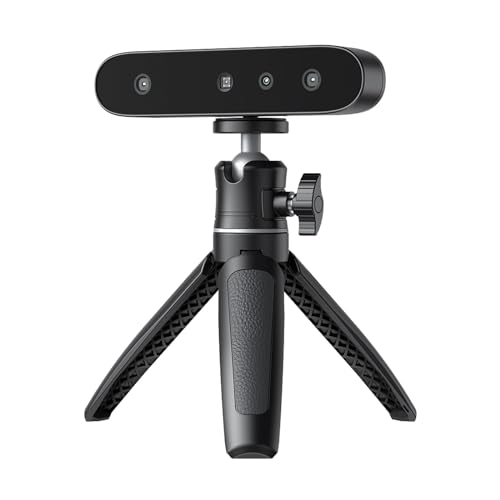
- Lightweight 105g compact design
- Scans dark and metallic objects without spray
- 24-bit full-color capture
Best For: Windows desktop scanning on a budget
Best Simple Portable Choice

- Compact 105g portable design
- Anti-shake scanning for stable models
- One-click, full-color workflow
Best For: Beginners and small Mac or Windows studios
Best Pocket Scanner – Creality Pika Wireless 3D Scanner
For compact setups, the Creality Pika combines a 260g pocket-sized design with wireless Wi-Fi 6 operation. Its dual-light system covers fine-detail parts and faster full-body scans, making it a flexible option when workspace and equipment are limited.
Best For: Portable scanning of small components, medium objects, and full-body subjects without a laptop tether.
Pros:
- 0.03mm blue-laser accuracy and a 5mm–2000mm scanning range.
- Wireless operation with phones or PCs, plus a lightweight 260g body.
- AI hole-filling, body completion, and color-detail processing streamline model cleanup.
- Supports black and metal objects without spray and can work outdoors in bright conditions.
Cons:
- The smallest body and included battery may not suit users seeking a larger, workstation-style scanner.
- Its extensive AI and dual-mode feature set may require some learning for first-time users.
The Pika is particularly compelling for 3D scanners for compact setups because it minimizes cables, computer dependence, and physical footprint while still covering a broad range of object sizes.
Best Entry-Level Choice – 3DMakerpro Fox Medium-Format Scanner
The 3DMakerpro Fox offers an approachable starting point for hobbyists who want capable scanning without jumping straight to a professional system. Its medium-format design and markerless AI tracking make it a practical fit for organized, compact work areas.
Best For: Beginners and hobbyists creating printable models, measurements, or inspection references.
Pros:
- 0.07mm accuracy and 0.10mm resolution provide useful detail for entry-level projects.
- Markerless AI visual tracking can relock onto an object if handheld movement interrupts a scan.
- JMStudio combines scanning, editing, and optimization in one software workflow.
- Designed for 3D printing, modeling, measurement, and quality-inspection tasks.
Cons:
- At 2.39 pounds, it is less portable than the lightweight wireless scanners in this roundup.
- The supplied notes do not specify wireless operation or a built-in battery.
For compact setups that prioritize an accessible software workflow over maximum portability, Fox is a sensible entry point. Its tracking recovery and integrated processing reduce the friction often associated with handheld scanning.
Best Lightweight Wireless Scanner – Creality Otter Lite Wireless 3D Scanner
The Creality Otter Lite is built for flexible scanning in a compact workspace or away from the desk. Wi-Fi 6, a 330g handheld body, and a three-hour battery give it a strong mobility advantage, while its quad-lens system handles both small details and larger subjects.
Best For: Users who need a lightweight wireless scanner for objects ranging from jewelry and mechanical parts to furniture and sculptures.
Pros:
- Fully wireless Wi-Fi 6 operation with low-latency data transmission.
- 330g body, three-hour battery life, and 40W HyperCharge support mobile workflows.
- 30FPS scanning, anti-shake tracking, and backtracking help maintain scan continuity.
- Quad-lens optics support both small and large objects, with full-color scanning.
Cons:
- The supplied notes do not state a specific accuracy or resolution figure.
- Wireless operation still depends on the included CrealityScan software workflow.
Otter Lite is a strong match for compact setups where portability matters more than a fixed scanning station. It combines useful battery endurance with tracking aids that can make freehand scanning less disruptive.
Best High-Speed Precision Scanner – Creality Pika 110 FPS 3D Scanner
This Creality Pika pairs 0.03mm accuracy with dual blue-laser and infrared modes, making it a versatile choice for a compact setup that still demands detailed results. Its built-in touch screen and onboard processor also support independent operation without constant phone or PC checking.
Best For: Precision-focused users scanning mechanical parts, metal objects, coins, and full-body subjects.
Pros:
- 7-line blue laser captures fine details at 0.03mm accuracy without marker stickers.
- Infrared mode supports fast full-body scans, while the system can scan black metal without coating.
- Built-in 3-inch touch screen and 8-core processor reduce dependence on a connected device.
- Up to 110FPS laser scanning on a USB 3.0 PC connection, with AI texture and hole-filling tools.
Cons:
- The 4.51-pound package weight suggests a less travel-friendly setup than the smaller handheld options.
- Maximum 110FPS performance requires a USB 3.0 PC connection rather than wireless operation alone.
This model suits compact workstations that need high-detail capture and fast tracking without giving up flexible scanning modes. The screen, processing hardware, and broad platform compatibility add convenience for repeated scanning sessions.
Compact Precision Pick – 3DMakerpro Moose Lite
For 3D scanners for compact setups, the 3DMakerpro Moose Lite stands out as a lightweight, quiet option for medium-sized objects. Its 0.05mm accuracy, 0.10mm resolution, AI tracking, and scan range of 15mm to 1500mm make it suitable for detailed models without adding much equipment to a workspace.
Best For: Desktop 3D printing, display models, and users who want a portable scanner with integrated processing software.
Pros:
- 0.05mm accuracy and 0.10mm resolution preserve fine object details.
- AI visual tracking helps simplify handheld scanning.
- Lightweight 250g design with no fan noise is convenient for compact work areas.
- JMStudio combines scanning, editing, and optimization in one workflow.
Cons:
- The supplied product details list a scan range suited to small and medium objects rather than very large items.
- Plastic construction may feel less substantial than an aluminum-bodied alternative.
The Moose Lite is a practical choice when portability and quiet operation matter as much as detail. Its broad device support and streamlined software workflow further suit a small home studio or mobile scanning setup.
High-Speed Pro Pick – Creality CR-Scan Raptor
The Creality CR-Scan Raptor brings high-end capability to a compact scanning workflow, combining blue laser and NIR modes. It reaches up to 0.02mm accuracy and 60fps in blue-light mode, but its demanding computer requirements make it better suited to a well-equipped workstation than a minimal laptop setup.
Best For: Users who need very fine detail, fast scanning, and flexibility across small artifacts, larger objects, faces, or bodies.
Pros:
- Blue laser scanning offers accuracy up to 0.02mm.
- Up to 60fps blue-light scanning supports faster capture.
- NIR mode enables marker-free scanning for faces, bodies, and artifacts.
- Handles objects from 5mm up to 2000mm in each dimension.
Cons:
- Requires a high-performance PC, including 16GB RAM and a dedicated Nvidia GPU on Windows.
- Its 8.48-pound package weight makes it less convenient for highly portable setups.
- Blue laser scanning requires avoiding direct eye exposure.
The Raptor is the strongest choice here for speed and measurement detail, provided your computer can meet its requirements. Its two scanning modes give it broader subject coverage than a simpler entry-level scanner.
Beginner-Friendly Value – 3DMakerpro Fox
The 3DMakerpro Fox is an accessible option for 3D scanners for compact setups, especially for desktop miniatures, prototypes, and educational projects. Its markerless NIR tracking and anti-shake system reduce setup friction, while the 40mm to 1200mm scanning range covers many small and medium objects.
Best For: STEM education, DIY prototyping, and beginners willing to learn mesh refinement and 3D-print preparation.
Pros:
- Markerless tracking avoids applying target dots to objects.
- NIR light supports direct face and body scanning and is safe for human eyes.
- 0.07mm accuracy captures useful structural detail.
- JMStudio supports scanning, editing, fusion, and OBJ, STL, PLY, and ASC export.
Cons:
- Results require patience and a learning curve, particularly for mesh refinement and slicing.
- A capable PC with a dedicated GPU is strongly recommended.
- The 40mm to 1200mm range is less suitable for very large objects.
The Fox balances a relatively approachable workflow with useful scanning coverage, making it a sensible starting point for compact studios and classrooms. Plan for software learning and adequate computer hardware to get consistent results.
Best Wireless Pick – CR-Scan Ferret Pro
For compact setups that need flexibility, the Creality CR-Scan Ferret Pro combines handheld scanning with Wi-Fi 6 wireless transmission. Its 0.1mm accuracy, 30FPS scanning, and support for iOS, Android, Mac, and Windows make it a versatile choice when desk space and cable clutter are concerns.
Best For: Small workspaces, mobile scanning, and users who want wireless compatibility alongside PC connectivity.
Pros:
- Up to 0.1mm accuracy, 0.16mm resolution, and 30FPS scanning.
- Wi-Fi 6 wireless transmission supports smoother mobile workflows.
- Exports OBJ, STL, and PLY files for printing, design, and reverse engineering.
- Anti-shake tracking helps maintain smooth scans during hand movement.
Cons:
- Requires compatible devices and at least 8GB RAM for many supported platforms.
- Results may be limited on highly reflective, transparent, or extremely dark surfaces.
The Ferret Pro is the strongest fit here for compact setups that benefit from cordless operation and broad device support. It offers more mobility than the wired Ferret SE models while retaining practical file-export options.
Best Budget Desktop Option – CR-Ferret SE
The Creality CR-Ferret SE is a compact desktop scanner for users building a straightforward PC-based setup. Anti-shake tracking, 0.1mm accuracy, and the ability to scan black or metallic objects without spray make it useful for practical modeling work in limited spaces.
Best For: Windows users who want a lightweight, beginner-friendly scanner for dark, metallic, or non-reflective objects.
Pros:
- Lightweight 105g design is easy to carry and store.
- Anti-shake technology supports steadier scans with unsteady hands.
- Can scan black and metallic objects without scanning spray.
- Built-in 2MP camera captures 24-bit full-color models.
Cons:
- Supports PC scanning only and connects through USB.
- Requires Windows 10/11, an i5 Gen 8-or-later processor, and more than 8GB RAM.
Choose the Ferret SE when simplicity, low weight, and desktop operation matter more than wireless mobility. Its compact form and easy one-click workflow suit a dedicated workstation with limited room.
Best Simple Portable Choice – CR-Ferret SE Color Scanner
This CR-Ferret SE listing offers the same compact, wired approach for people seeking 3D scanners for compact setups. With anti-shake precision, one-click operation, and full-color capture, it is designed to keep the scanning process approachable without taking up much workspace or storage.
Best For: Beginners, small studios, and on-site users who need a portable Mac- or Windows-compatible scanner.
Pros:
- Weighs just 105g and is easy to transport.
- Anti-shake technology helps produce stable models.
- Scans dark and metallic objects without spray or markers.
- 24-bit color capture provides detailed, true-to-life color reproduction.
Cons:
- Its supplied notes specify Mac and Windows compatibility rather than mobile support.
- USB connectivity means it is not a wireless scanning solution.
This version is a practical choice when portability and a beginner-friendly workflow are priorities. It keeps the setup small and uncomplicated, though users wanting wireless scanning should consider the Ferret Pro instead.
How We Picked the Best 3D Scanners for Compact Setups
We evaluated these scanners around the needs of users working in bedrooms, home workshops, studios, classrooms, and small maker spaces. The main criteria were scanning accuracy, portability, tracking stability, capture speed, connectivity, object-size range, color capture, and ease of moving from a scan to a printable or editable 3D model.
We also considered whether a scanner is better suited to small detailed parts, medium-sized objects, or larger subjects. Wireless models can reduce cable clutter, while desktop-oriented scanners may be easier to position consistently when repeatability matters more than mobility.
Quick Comparison
| Best For | Features to Prioritize | Models to Consider |
|---|---|---|
| Small parts and fine detail | High accuracy, laser capture, stable tracking | Creality Pika, CR-Scan Raptor |
| General home 3D printing | Simple software, medium-object coverage, good portability | 3DMakerpro Fox, Creality Otter Lite |
| Wireless scanning | Wi-Fi connectivity, anti-shake tracking, battery flexibility | CR-Scan Ferret Pro, Otter Lite |
| Budget-friendly scanning | Easy setup, reasonable accuracy, broad compatibility | CR-Ferret SE, 3DMakerpro handheld models |
| Large or varied objects | Wide scanning range, fast capture, multiple scan modes | CR-Scan Raptor, 3DMakerpro Fox |
Key Buying Factors for 3D Scanners for Compact Setups
Accuracy and Resolution
Accuracy describes how closely measurements match the real object, while resolution affects how much surface detail the scanner can capture. Choose higher precision for mechanical parts, replacement components, and dimensional inspection. For decorative models or basic replicas, moderate accuracy may be sufficient.
Object Size and Tracking
Check the scanner’s recommended capture range before buying. A model designed for small objects may struggle with furniture or body-sized subjects, while a large-format scanner can be less convenient for tiny parts. Anti-shake tracking, visual positioning, and multiple light sources can help maintain alignment during handheld use.
Connectivity and Workspace
Wireless scanning is useful when your computer or subject must remain mobile, but wired operation may provide a simpler and more predictable setup. Also check software compatibility, required computer specifications, export formats, and whether the scanner needs markers, a turntable, or special lighting.
Color, Surface, and Lighting Performance
Full-color capture is valuable for people, props, and visually detailed objects, but color scanning does not replace geometric accuracy. Dark, shiny, transparent, or textureless surfaces may require preparation, additional lighting, scanning spray, or markers regardless of the advertised specifications.
Who Should Buy Which 3D Scanners for Compact Setups?
Choose a high-accuracy blue-laser model if you scan functional parts or need the finest dimensional detail. A medium-format scanner is a better fit for users who want one device for household objects, prototypes, and general 3D-printing work. Select a wireless scanner if cable-free movement and a tidy compact workspace are priorities.
For beginners, prioritize straightforward software, reliable tracking, and broad object-size support over headline scan speed. If your budget is limited, an entry-level or desktop-oriented model can still be worthwhile for learning, scanning medium objects, and creating models for non-critical prints. Before purchasing, confirm operating-system support, included accessories, and the computer requirements for the software.