The best travel-friendly USB docking stations turn a laptop’s limited ports into a practical mobile workstation without adding unnecessary bulk. This roundup compares compact hubs and docks with useful combinations of display outputs, USB ports, charging, Ethernet, and card readers.
Whether you need a simple HDMI adapter for presentations or a dual-monitor dock for hotel-room productivity, the right choice depends on your laptop, travel routine, and required peripherals.
Best 10 Travel-Friendly USB Docking Stations Picks for 2026
Best Overall

- Eight ports with integrated USB-C cable
- 4K at 60Hz via HDMI 2.1
- Up to 65W laptop pass-through charging
Best For: Mobile professionals needing one 4K display and broad USB connectivity
Best for Dual HDMI

- Dual HDMI with up to two 4K/30Hz displays
- Includes Ethernet and SD/microSD readers
- Up to 85W pass-through charging
Best For: Windows users building a portable dual-monitor setup
Best for Dual 4K
Lenovo USB-C Dual Display Travel Dock

- Supports two 4K displays
- Includes DisplayPort, HDMI, and gigabit Ethernet
- Always-on USB charging port
Best For: Traveling professionals who need a compact dual-screen workstation
Best Ultra-Portable Hub

- Lightweight 2.72-ounce aluminum design
- 4K HDMI output at 30Hz
- 10Gbps USB data and up to 100W PD
Best For: Minimalist travelers carrying a laptop, display, and fast storage
Best Compact Hub

- 4K@30Hz HDMI output
- Up to 5 Gbps data transfer
- 85W pass-through charging
Best For: Lightweight travel setups with one external display
Best Dual-Monitor Dock

- Dual 4K@60Hz HDMI outputs
- USB-A, USB-C, SD, and MicroSD ports
- Up to 90W laptop power delivery
Best For: Mobile workstations using two external monitors
Best Smart Travel Hub
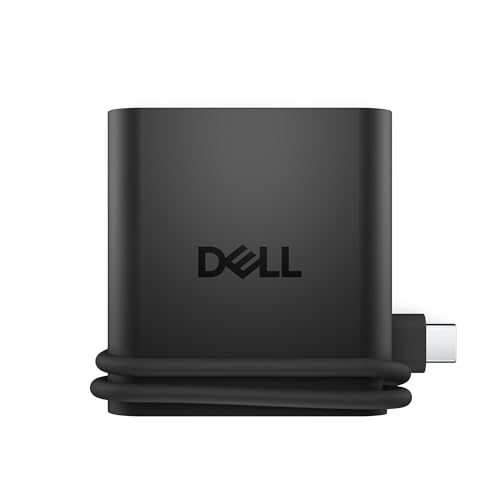
- Slim 1.6-ounce travel design
- HDMI plus two USB-C and USB-A
- Smart power and port monitoring
Best For: Portable single-monitor laptop setups
Best Compact Plug-and-Play Pick
Lenovo USB-C 5-in-1 Travel Hub

- Compact 48.8-gram design for mobile work
- 4K@60Hz HDMI output
- Up to 90W power pass-through
Best For: Simple travel connectivity and presentations
Best for Wireless Phone Charging
Philips Elite USB-C Travel Dock

- Built-in 10W Qi wireless charging
- Dual HDMI plus Ethernet and SD connectivity
- 100W USB-C power pass-through
Best For: Travelers combining laptop docking with phone charging
Best Overall – Lenovo USB-C Slim Travel Dock
The Lenovo USB-C Slim Travel Dock is a strong choice among travel-friendly USB docking stations for professionals who need broad connectivity without carrying a bulky desktop dock. Its eight ports, integrated cable, 4K display support, and up to 65W pass-through charging suit mobile workstations.
Best For: Remote professionals who want a compact, polished dock for one 4K display and multiple USB accessories.
Pros:
- Supports 4K resolution at 60Hz through HDMI 2.1.
- Provides eight ports, including USB-A, USB-C, and a power-only USB-C port.
- Passes through up to 65W to compatible USB-C laptops.
- Compact 4.8-ounce design with an integrated cable and 66% post-consumer recycled-content exterior.
Cons:
- Offers one HDMI display output rather than dual-display connectivity.
- Power adapter is not identified in the supplied product details.
Choose this Lenovo when a single high-resolution monitor and flexible USB expansion matter more than Ethernet or multiple display outputs. Its three-year warranty also adds confidence for frequent travel.
Best for Dual HDMI – Anker 8-in-1 USB-C Dock
The Anker 8-in-1 USB-C Dock packs dual HDMI, Ethernet, card readers, USB ports, and pass-through charging into a compact travel hub. It is one of the more versatile travel-friendly USB docking stations for users who regularly move between a laptop, external displays, and removable storage.
Best For: Windows users who need dual-monitor support, wired networking, and SD or microSD card access.
Pros:
- Includes two HDMI outputs, supporting one 4K display at 60Hz or two at 30Hz.
- Adds 1Gbps Ethernet plus SD and microSD card readers.
- Supports up to 85W USB-C Power Delivery pass-through.
- Works with USB-C, USB4, and Thunderbolt connections on supported systems.
Cons:
- Requires a 100W PD wall charger and USB-C cable, which are not included.
- On macOS, both external monitors display identical content.
- Not compatible with Linux.
This is a practical pick when connectivity variety outweighs having the highest dual-display refresh rate. Check your operating system and ensure you already have the required charger before buying.
Best for Dual 4K – Lenovo USB-C Dual Display Travel Dock
The Lenovo USB-C Dual Display Travel Dock is designed for travelers who need two external screens, wired networking, and laptop charging in a small enclosure. Among travel-friendly USB docking stations, it stands out for combining DisplayPort 1.4 and HDMI 2.0 with a gigabit Ethernet port.
Best For: Remote professionals who use dual 4K displays and want a compact dock with an always-on charging port.
Pros:
- Supports two 4K displays through DisplayPort 1.4 and HDMI 2.0.
- Includes gigabit Ethernet and fast USB connectivity.
- Provides up to 65W with the included 100W adapter configuration, with optional higher-power support noted by Lenovo.
- Features an always-on USB port for charging mobile devices when the laptop is disconnected.
Cons:
- Only three USB ports are listed among the seven total ports.
- Higher 100W laptop power delivery requires an optional 135W USB-C adapter.
Pick this model if a dual-screen workspace is central to your travel setup. Its small 4.8-ounce body and integrated cable make it easier to pack, while the Ethernet port helps in offices and hotels with reliable wired networks.
Best Ultra-Portable Hub – Wedellink 5-in-1 USB-C Dock
The Wedellink 5-in-1 USB-C Dock keeps the essentials compact for travelers who mainly need display output, fast USB transfers, and laptop charging. Its 2.72-ounce aluminum design makes it an appealing minimalist option among travel-friendly USB docking stations.
Best For: Travelers who want a lightweight hub for 4K video, fast file transfers, and up to 100W charging.
Pros:
- Lightweight 2.72-ounce aluminum construction for easy packing.
- Supports HDMI output up to 4K at 30Hz.
- Offers USB-A and USB-C data ports rated up to 10Gbps.
- Supports up to 100W laptop charging and includes plug-and-play operation.
Cons:
- Provides only five total ports and does not include Ethernet or card readers.
- HDMI is limited to 30Hz at 4K.
- Requires host-device support for USB-C DP Alt Mode and Power Delivery.
This hub makes the most sense when low weight and fast USB transfers matter more than a full desktop-style port selection. Confirm your laptop or tablet supports the required USB-C video and charging features before purchasing.
Best Compact Hub – Anker 5-in-1 USB-C Hub
The Anker 5-in-1 is a practical choice among travel-friendly USB docking stations when you need essential connectivity without much bulk. It combines HDMI, USB-A, USB-C data, and pass-through charging in a compact 1.44-ounce design.
Best For: Travelers who need one external display, fast file transfers, and laptop charging in a lightweight hub.
Pros:
- Supports up to 4K@30Hz HDMI output for mirroring or streaming.
- Offers two USB-A ports and one USB-C data port with speeds up to 5 Gbps.
- Provides up to 85W pass-through charging.
- Compact ABS enclosure weighs just 1.44 ounces.
Cons:
- It has only one HDMI display output.
- The USB-C data port does not support video output.
- It is not compatible with Linux, and the charger is not included.
This Anker hub keeps the travel setup simple and portable, making it well suited to everyday laptop accessories. Choose it over a larger dock when dual monitors, card readers, or numerous ports are not priorities.
Best Dual-Monitor Dock – Acer 9-in-1 USB-C Dock
The Acer 9-in-1 dock is a versatile option among travel-friendly USB docking stations for users who want dual-display support and a broad selection of ports. Its aluminum body includes two HDMI outputs, USB ports, card slots, and high-wattage power delivery.
Best For: Windows laptop users who need two 4K monitors, fast peripherals, memory-card access, and laptop charging from one dock.
Pros:
- Supports two HDMI displays at up to 4K@60Hz.
- Includes three USB-A ports, one USB-C port, and SD/MicroSD slots.
- Accepts up to 100W input and delivers up to 90W to a laptop.
- Features a 0.65-foot built-in cable, aluminum body, and lock button.
Cons:
- Mac laptops can only mirror the same content across external monitors.
- It requires a full-featured USB-C port with display, charging, and data support.
- The dock is larger and less minimalist than a basic travel hub.
With its dual HDMI outputs and card readers, the Acer is closer to a portable workstation dock than a simple adapter. It is a strong fit for a mobile office, provided your laptop and operating system support the desired display configuration.
Best Smart Travel Hub – Dell Pro 4-in-1 DA225
The Dell Pro 4-in-1 USB-C Travel Hub is designed for portability, making it a natural fit for travel-friendly USB docking stations. It provides HDMI connectivity, two USB-C ports, and a USB-A port in a slim 1.6-ounce design with a built-in 10.63-inch cable.
Best For: Travelers who want a lightweight plug-and-play hub with one external monitor and smart power monitoring.
Pros:
- Portable design fits easily in a bag or laptop sleeve.
- Includes HDMI, two USB-C ports, and one USB-A port.
- Smart Power Management rebalances power based on device consumption.
- Provides notifications and real-time updates for power usage and port status.
Cons:
- It has only one HDMI output and no listed card-reader ports.
- The supplied details do not specify HDMI resolution or charging wattage.
- The plastic enclosure may feel less premium than an aluminum dock.
The DA225 prioritizes portability and power awareness over maximum expansion. Its straightforward four-port layout is well suited to business travel, hotel desks, and other situations where a single monitor and a few peripherals are enough.
Best for Windows Dual-Monitor Setups – Anker Nano 8-in-1 Dual-Monitor Dock
For travelers who need a full desktop setup in a compact package, this Anker dock is one of the more capable travel-friendly USB docking stations. It combines dual-display support, fast data ports, card readers, and laptop charging, though its strongest display features are designed for compatible Windows systems.
Best For: Windows users who need dual 4K monitors and fast file transfers while traveling.
Pros:
- Supports up to two 4K@60Hz displays on compatible Windows systems with DP 1.4 and DSC 3:1.
- Provides 10Gbps USB-C and USB-A data connections plus SD and TF card slots.
- Passes through up to 85W for laptop charging with a suitable 100W charger and cable.
- Compact aluminum construction weighs 3.84 ounces.
Cons:
- Mac displays mirror the same content rather than extending independently.
- Charger and cable are not included, and the device is not compatible with Linux.
- USB ports are for data only and do not provide video output or charging.
This is a strong choice when a lightweight dock must handle demanding Windows productivity workflows. Confirm your laptop supports full-function USB-C, DisplayPort Alt Mode, and Power Delivery before buying.
Best Compact Plug-and-Play Pick – Lenovo USB-C 5-in-1 Travel Hub
The Lenovo USB-C 5-in-1 Travel Hub keeps connectivity simple for mobile workstations. Its compact aluminum-and-plastic design adds 4K HDMI, USB-C, and USB-A ports without requiring drivers, making it a practical option among travel-friendly USB docking stations.
Best For: Travelers who want a small, straightforward hub with 4K HDMI and laptop power pass-through.
Pros:
- Compact 2.56-by-2.56-by-0.45-inch design weighs 48.8 grams.
- Supports 4K HDMI output at 60Hz for compatible external displays.
- Offers up to 90W power pass-through charging.
- Plug-and-play setup requires no drivers on compatible devices.
Cons:
- Its 5Gbps data rate is slower than 10Gbps alternatives.
- It lacks SD card and Ethernet ports for expanded desktop connectivity.
- Actual compatibility depends on the connected laptop, tablet, or other USB-C device.
Choose this hub when portability and easy setup matter more than a large port selection. It is well suited to presentations, hotel-room work, and everyday accessory connections.
Best for Wireless Phone Charging – Philips Elite USB-C Travel Dock
The Philips Elite Travel Dock adds a useful charging surface to a traditional USB-C dock. With Qi wireless charging, dual HDMI, USB-A, Ethernet, card-reader support, and 100W USB-C power pass-through, it suits travelers who want one station for both laptop accessories and a compatible phone.
Best For: Travelers who value Qi phone charging alongside laptop connectivity and wired networking.
Pros:
- Built-in 10W Qi wireless charging supports compatible phones.
- Includes 100W USB-C device-charging pass-through when connected to the device’s power adapter.
- Offers dual HDMI ports supporting up to 4K@30Hz, two USB 3.0 ports, SD, and Ethernet.
- Works with Windows 7 and later, PC and Mac devices, and a broad range of Qi-compatible devices.
Cons:
- HDMI output is limited to 4K at 30Hz.
- Full charging performance requires the manufacturer-supplied device power adapter.
- The supplied notes do not specify a compact weight or dimensions.
This dock is a good fit for travel desks where phone charging and wired networking are as important as display expansion. Its 4K@30Hz limit makes it less suited to users prioritizing smoother high-refresh external displays.
How We Picked These Travel-Friendly USB Docking Stations
We focused on compact USB-C docks and hubs that are easy to carry and useful beyond a basic port adapter. The selected models cover common travel needs, including HDMI display output, USB-A and USB-C expansion, power delivery pass-through, dual-monitor support, Ethernet, SD card access, and integrated cables. We also considered port variety, advertised display resolution, charging capacity, plug-and-play convenience, and compatibility across common Windows laptops and USB-C devices.
Specifications can vary by host laptop. Before buying, confirm that your USB-C port supports video output and USB Power Delivery if you want external displays or pass-through charging.
Quick Comparison
| Best For | Look For |
|---|---|
| Basic presentations | HDMI output, compact design, and an attached cable |
| Dual-monitor work | Two display outputs and confirmed laptop support |
| Charging while traveling | USB Power Delivery pass-through with adequate wattage |
| Photo and video workflows | Fast USB ports and an SD card reader |
| Office or hotel Ethernet | A built-in RJ45 network port |
Key Buying Factors for Travel-Friendly USB Docking Stations
Ports and Layout
List the devices you actually carry before choosing a dock. HDMI, USB-A, USB-C, Ethernet, and card readers each add convenience, but a smaller five-in-one hub may be preferable if you only need a monitor and a few accessories. An integrated cable reduces the chance of forgetting a separate connection lead.
Display Support
Check both resolution and refresh rate. A dock advertised for 4K may support 4K at 30Hz rather than 60Hz, which is adequate for documents and presentations but less fluid for everyday desktop motion. Dual-display support can also depend on the laptop’s graphics hardware, operating system, and whether the dock uses DisplayLink or native USB-C video.
Power Delivery
Power Delivery pass-through lets you connect your laptop charger through the dock. Compare the dock’s maximum pass-through rating with your laptop’s charger, and remember that the dock itself may consume some power. A high wattage rating does not automatically mean every laptop will charge at its maximum speed.
Portability and Durability
For frequent travel, prioritize a compact enclosure, a short integrated cable, and a design that will not strain the laptop’s USB-C port. A slightly larger dock can be worthwhile if it adds Ethernet, SD access, or a second display connection you will use regularly.
Who Should Buy Which Travel-Friendly USB Docking Stations?
Choose a five-in-one hub if you want the lightest solution for HDMI, USB accessories, and occasional charging. A Lenovo or Dell travel hub is a strong fit for users who value a tidy integrated cable and straightforward office connectivity. Travelers building a dual-monitor workstation should consider the Anker, Lenovo, or Acer dual-display options, while checking host-device requirements first.
Photographers and content creators should prioritize models with SD access and faster USB connectivity, such as the Philips option or a hub with 10Gbps ports. If you frequently work in hotels or offices with wired networks, select a dock with Ethernet rather than relying on Wi-Fi. Finally, choose the smallest model that covers your real setup: fewer unused ports usually means a lighter, simpler travel bag.