Advanced robotics projects demand more than a simple remote-controlled car. The best kits combine programmable controllers, expandable hardware, useful sensors, and enough mechanical flexibility to support increasingly complex builds.
We compared 10 robot building kits for advanced learners across robot arms, tank platforms, modular vehicles, AI-focused systems, and engineering kits. This guide highlights the differences that matter most, from programming support and actuator quality to documentation, upgrade potential, and project scope.
Best 10 Robot Building Kits for Advanced Learners Picks for 2026
Best All-Around Platform
Makeblock mBot Ultimate 10-in-1

- Builds 10 different robot models
- Progresses from blocks to Python
- Works with Arduino and Raspberry Pi
Best For: Teens and adults pursuing expandable robotics projects
Best Robotic Arm Practice
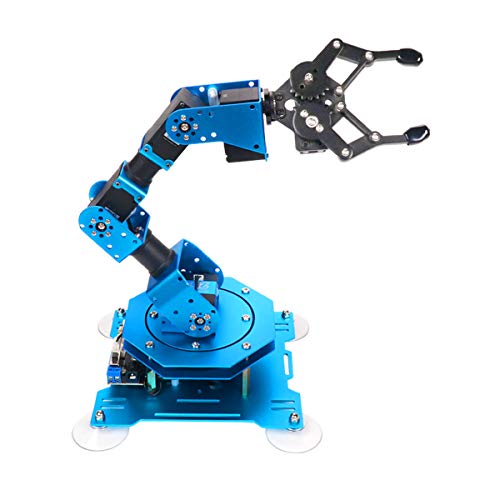
- Six-axis metal robotic arm
- Feedback-enabled intelligent servos
- Supports app, PC, and controller operation
Best For: Learners exploring manipulation and motion programming
Best Sensor-Driven Tank
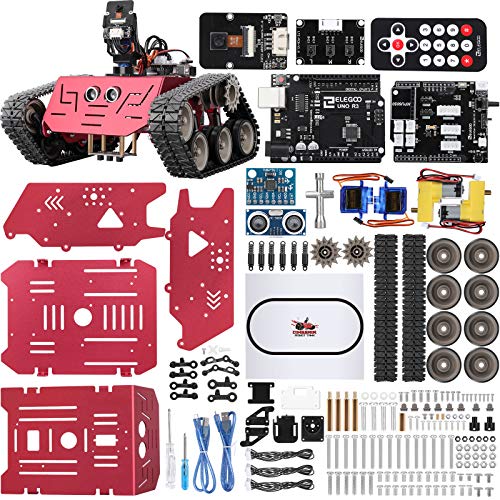
- Five driving and autonomy modes
- Wi-Fi FPV camera included
- Visual coding can advance to Arduino IDE
Best For: Navigation, sensor, and Arduino vehicle projects
Best Guided Learning Path

- Includes 52 electronic components
- Supports mobile and PC coding
- Uses story-led robotics missions
Best For: Teens who prefer structured, progressive STEM projects
Best All-Around Arduino Car

- Arduino IDE support with guided wiring
- FPV, line tracking, and obstacle avoidance
- Rechargeable battery included
Best For: Arduino learners and STEM robotics projects
Best Multi-Configuration Build

- Builds as a tank, balancing robot, or racer
- Scratch and Arduino programming support
- Metal construction with a broad sensor set
Best For: Learners wanting varied mechanical and coding challenges
Best for AI and Research Projects
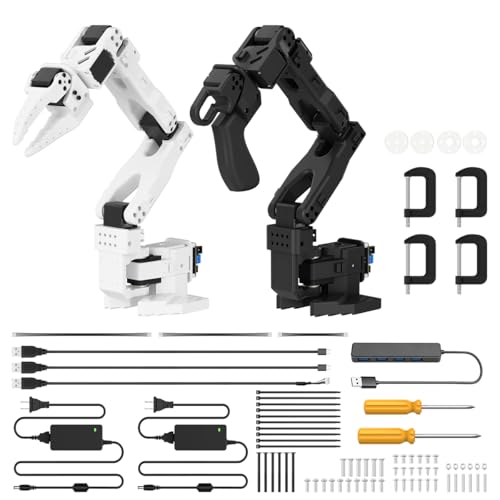
- LeRobot-compatible imitation-learning platform
- Dual cameras and 12 feedback servos
- Professional calibration and debugging tools
Best For: Adult developers and robotics researchers
Best Progressive Learning Platform

- 36 guided robot builds
- Scratch and Python support
- ESP32 with 13 sensors
Best For: Teens and adults progressing from visual coding to Python
Best Customizable Arduino Rover Base

- Flexible sensor-mounting chassis
- Four motors and wheels included
- Arduino board sold separately
Best For: Arduino users building custom mobile-robot experiments
Best Robotic Arm for Open-Source Projects

- Arduino-compatible Atmega328 platform
- Open-source tutorials and examples
- Expandable sensor architecture
Best For: Older learners studying robotic-arm control and development
Best All-Around Platform – Makeblock mBot Ultimate 10-in-1
For advanced learners who want room to grow, the Makeblock mBot Ultimate is one of the most versatile robot building kits for advanced learners. It supports 10 different builds, including a robotic arm and remote-controlled tank, while offering a progression from block coding in mBlock to Arduino IDE and Python with a Raspberry Pi.
Best For: Teens and adults who want a durable, expandable robotics platform for mechanical builds, coding practice, and sensor-based projects.
Pros:
- Offers 10 robot models in one kit.
- Supports mBlock, Arduino IDE, and Python workflows.
- Compatible with Arduino and Raspberry Pi.
- Uses sturdy aluminum-alloy parts and a MegaPi control board.
Cons:
- Requires six AA batteries, which are not included.
- Its 8-pound build may be more involved than a simple starter kit.
The mBot Ultimate stands out for its breadth and long-term flexibility. It is a strong choice when the goal is to move beyond guided assembly into custom motor, servo, sensor, and machine-vision experiments.
Best Robotic Arm Practice – Hiwonder xArm1S 6DOF
The Hiwonder xArm1S focuses on a specific but highly engaging area of robotics: programmable manipulation. Among robot building kits for advanced learners, it is a practical tabletop option for studying six-axis movement, servo feedback, object handling, and action sequencing.
Best For: Learners aged 14 and up who want to experiment with robotic-arm control, graphical programming, and repeatable motion routines.
Pros:
- Six-axis design supports detailed movement experiments.
- Six intelligent servos provide position, voltage, and temperature feedback.
- Can grasp objects weighing up to 500 grams.
- Offers PC, app, mouse, and wireless-controller operation.
Cons:
- Its focused arm design offers less variety than a multi-model construction kit.
- Remote-control and action-editing features may require time to learn.
Choose the xArm1S if manipulation is more important than building multiple vehicle-style robots. Its metal construction, feedback-enabled servos, and several control methods create a useful foundation for studying real robotic-arm behavior.
Best Sensor-Driven Tank – ELEGOO Conqueror Robot Tank
The ELEGOO Conqueror combines mechanical assembly with hands-on navigation challenges, making it a compelling option among robot building kits for advanced learners. Its tracked chassis, UNO R3 controller, camera, and multiple sensors support experiments in remote driving, obstacle avoidance, line tracking, and autonomous following.
Best For: Students and hobbyists who want an Arduino-compatible vehicle platform for navigation, sensor logic, and FPV experiments.
Pros:
- Includes five interactive modes, including obstacle avoidance and line tracking.
- Wi-Fi FPV camera provides a robot-view driving experience.
- Moves from visual programming in the app to Arduino IDE coding.
- Includes a metal chassis, battery, tools, and no-solder components.
Cons:
- The design is centered on a tank platform rather than multiple robot builds.
- Its many modes and modules may create a steeper project-learning curve.
This kit is especially appealing for learners who enjoy testing code in physical environments. The combination of tracks, camera, ultrasonic sensing, and line detection gives advanced builders several concrete ways to tune movement and navigation behavior.
Best Guided Learning Path – WhalesBot E9 Pro
The WhalesBot E9 Pro is designed for learners who want structured projects without giving up advanced programming options. It fits the robot building kits for advanced learners category with 52 electronic components, 12 servo motor joints, sensors, displays, mobile coding, PC programming, and story-led missions for ongoing practice.
Best For: Teens ages 12 to 18 who benefit from guided robotics challenges and want to progress from drag-and-drop coding toward more advanced programming logic.
Pros:
- Includes a substantial electronic system with sensors, motors, and dot-matrix displays.
- Supports both mobile-app coding and PC programming.
- Story-driven missions encourage building, coding, and problem-solving.
- Modular design and WhalesBot 3D software support continued experimentation.
Cons:
- The 9.2-pound kit may require a dedicated workspace.
- Its guided, story-based approach may be less appealing to learners seeking an entirely open-ended platform.
The E9 Pro is a good match for families, educators, or clubs that value a clear learning sequence. Its combination of printed resources, interactive missions, and dual coding platforms can help learners stay engaged while developing more sophisticated robotics skills.
Best All-Around Arduino Car – UNO R3 Smart Robot Car V4
For learners seeking robot building kits for advanced learners with a practical path from assembly to programming, the ELEGOO UNO R3 Smart Robot Car V4 combines guided wiring with hands-on sensor experiments. Its camera, line-tracking sensor, ultrasonic sensor, app, and IR control provide several ways to extend an Arduino-based project.
Best For: Arduino learners, STEM classrooms, coding clubs, and makers who want a programmable robot car with FPV video and multiple driving modes.
Pros:
- Supports Arduino IDE programming and custom coding experiments.
- Includes FPV video, line tracking, obstacle avoidance, app control, and IR control.
- Keyed connectors and an illustrated tutorial help reduce wiring mistakes.
- Includes a rechargeable 2000 mAh lithium-ion battery.
Cons:
- Adult guidance is recommended for first-time builders.
- The manufacturer recommends it for ages 12 and up, despite some listings describing it for younger children.
- Its acrylic and plastic construction may be less suited to heavy-duty use than a metal robot platform.
This is a versatile choice when you want one build to support driving, sensing, camera exploration, and Arduino coding. It offers a gentler entry than a research-oriented platform while leaving room for meaningful modifications.
Best Multi-Configuration Build – Makeblock mBot Ranger 3-in-1
The Makeblock mBot Ranger is a strong option among robot building kits for advanced learners who want repeated builds rather than a single fixed robot. Its three configurations—tracked Land Raider, self-balancing Nervous Bird, and three-wheel Dashing Raptor—pair mechanical experimentation with Scratch and Arduino programming.
Best For: Learners aged 10 and up, families, classrooms, and makers who want a durable multi-configuration platform with sensors and progressive coding options.
Pros:
- Three robot forms create varied mechanical and programming challenges.
- Supports Scratch and Arduino through the mBlock5 programming app.
- Metal parts, tracked drive, and strong grip support indoor and outdoor play.
- Includes ultrasonic, line-tracking, light, gyroscope, temperature, Bluetooth, LED, and buzzer modules.
Cons:
- Requires six AA batteries or lithium batteries, which are not included.
- The range of parts and configurations may make the build more involved than a basic starter robot.
- Some advanced experimentation may require moving beyond the provided instructions.
Ranger stands out for learners who benefit from comparing different robot designs and control problems. The self-balancing configuration and broad sensor set offer especially useful challenges after the initial assembly is complete.
Best for AI and Research Projects – SO-ARM101 6-Axis Robot Arm
For adult makers and developers comparing robot building kits for advanced learners, the Hiwonder SO-ARM101 moves beyond basic movement exercises into embodied AI and imitation learning. This assembled six-axis arm is compatible with the LeRobot open-source framework and combines dual-camera vision with 12 high-torque bus servos.
Best For: Users aged 16 and up, robotics hobbyists, researchers, and developers exploring AI vision, imitation learning, calibration, and trajectory control.
Pros:
- Compatible with the LeRobot open-source framework and shared AI resources.
- Dual cameras support gripper-level manipulation and wider environmental awareness.
- Twelve bus servos provide magnetic feedback for smooth, stable motion.
- BusLinker V3.0 supports servo scanning, status monitoring, trajectory control, and debugging.
Cons:
- Its adult-oriented platform and AI focus make it less suitable for young beginners.
- The kit is supplied assembled, so it offers less mechanical build work than an unassembled robot kit.
- Its advanced software, calibration, and open-source workflow may require substantial technical learning.
The SO-ARM101 is the most technically ambitious option here, particularly for users interested in current AI robotics workflows rather than chassis assembly. Choose it when vision, servos, and imitation learning matter more than a traditional build-from-parts experience.
Best Progressive Learning Platform – DaDablock Ultimate Kit
For learners seeking robot building kits for advanced learners, the DaDablock Ultimate Kit offers a broad progression from guided block-based builds to Python programming. Its ESP32 controller, wireless connectivity, 36 projects, and sensor selection make it a flexible platform for continued experimentation.
Best For: Teens and adults who want structured projects that can grow from Scratch fundamentals into Python-based robotics.
Pros:
- Includes guides for more than 36 robot models.
- Supports both Scratch and Python programming.
- ESP32 controller includes Wi-Fi and Bluetooth.
- Provides 13 sensor modules for responsive robot projects.
Cons:
- Manufacturer recommends the kit for ages 14 and up.
- The large number of parts and projects may require a significant time commitment.
With 538 building pieces and a clear learning path, this is the most comprehensive option here for developing both mechanical and coding skills over time.
Best Customizable Arduino Rover Base – OSOYOO FlexiRover
The OSOYOO FlexiRover is a practical choice among robot building kits for advanced learners who already have an Arduino board and want to experiment with mobile-robot hardware. Its open mounting layout, four motors, and included motor shield provide a foundation for custom sensor and control projects.
Best For: Arduino users, hobbyists, and educators developing custom robot-car experiments.
Pros:
- Customizable chassis includes numerous mounting holes for sensors and components.
- Four TT motors and durable wheels are included.
- Plug-and-play Model X motor driver shield simplifies motor connections.
- Battery holder has an integrated switch and DC connector.
Cons:
- Arduino Uno main board is not included.
- 18-650 batteries are not included.
- Recommended for users age 15 and up.
This kit is best viewed as a customizable robotics chassis rather than a complete standalone platform, making it particularly useful for learners who already own compatible electronics.
Best Robotic Arm for Open-Source Projects – miniArm 5DOF Kit
For advanced learners interested in robotic manipulation, the miniArm 5DOF kit focuses on Arduino programming, open-source development, and expandable hardware. Its digital servos, knob controller, Bluetooth module, and sensor expansion ports support hands-on control and secondary development.
Best For: Older teens and adults exploring robotic-arm programming, motion control, and sensor-based expansion.
Pros:
- Uses an Atmega328 platform compatible with Arduino programming.
- Open-source programs, tutorials, and development examples are available.
- Includes six-channel knob control, Bluetooth, and digital servos.
- Supports expansion with sensors and modules such as ESP32 Cam.
Cons:
- The Starter Kit does not include the listed ultrasonic, touch, acceleration, or ESP32 Cam modules.
- Manufacturer recommends the kit for ages 17 and up.
- Its focus on open-ended development may require prior programming knowledge.
Unlike wheeled platforms, this kit concentrates on arm movement and control, making it a strong fit for learners ready to study servos, robotic positioning, and open-ended Arduino projects.
How We Picked These Robot Building Kits for Advanced Learners
We focused on kits that offer a meaningful path beyond beginner assembly. Each selection supports hands-on programming, mechanical construction, or robotics engineering through features such as Arduino or ESP32 compatibility, multiple axes of movement, servo motors, cameras, sensors, or modular chassis designs.
We also considered the learning ecosystem around each kit. Clear documentation, Scratch or Python support, open-source compatibility, replacement parts, and an active maker community can make a major difference when learners move from following instructions to designing their own projects.
Quick Comparison
| Best For | Look For |
|---|---|
| Robot arms | DOF count, servo torque, working range, and control software |
| Autonomous vehicles | Motor control, sensors, camera support, and chassis flexibility |
| AI and computer vision | Open-source tools, camera integration, and processing compatibility |
| Structured STEM learning | Guided projects, programming lessons, and age-appropriate documentation |
| Custom engineering | Modular parts, expansion ports, compatible controllers, and available spares |
Key Buying Factors
Programming and Controller Compatibility
Arduino-compatible kits are particularly useful for learners who want to study electronics, C/C++, sensors, and motor control. ESP32-based systems add wireless connectivity and greater processing flexibility. Scratch can provide an accessible starting point, while Python support is valuable for more advanced automation, vision, and AI projects.
Mechanical Capability
For robotic arms, compare degrees of freedom, payload, servo type, gear strength, and repeatability. More axes enable more natural movement, but they also increase calibration and programming demands. For wheeled robots, examine the chassis design, motor layout, wheel traction, and whether the frame can accommodate additional sensors or batteries.
Sensors, Cameras, and Expansion
A kit with ultrasonic, infrared, line-following, or environmental sensors can support varied experiments. Camera-equipped platforms are better suited to computer vision, object recognition, and autonomous navigation. Check connection methods and expansion ports before buying, especially if the learner already owns sensors or a preferred development board.
Documentation and Project Depth
Advanced learners still benefit from reliable instructions. Look for wiring diagrams, sample code, calibration guidance, troubleshooting resources, and progressively difficult projects. A kit that is technically capable but poorly documented may require substantially more independent debugging.
Who Should Buy Which Robot Building Kits for Advanced Learners?
Choose a modular Makeblock or LewanSoul kit for learners who want several robot formats and a broad project platform. Arduino tank and smart-car kits are a strong fit for programming, sensors, and autonomous-vehicle experiments. Consider an OSOYOO chassis when the priority is building a custom vehicle around selected electronics.
Robot-arm kits are better for learners interested in kinematics, precision control, and manipulation. A multi-axis educational arm suits structured engineering practice, while the Hiwonder AI-focused arm is more appropriate for users exploring computer vision, imitation learning, and open-source robotics. Before ordering, confirm the required computer, power supply, software, and assembly tools, since advanced kits may not be complete plug-and-play systems.