Working from home puts every weak signal on display. Video calls, cloud apps, and large file uploads all need steady coverage, not just fast peak speeds.
These mesh Wi-Fi systems for home offices are built to reduce dead zones, simplify setup, and keep your work devices connected across rooms and floors.
Best 10 Mesh Wi-Fi Systems for Home Offices Picks for 2026
Best for dependable whole-home coverage
TP-Link Deco M5 Mesh WiFi System

- Up to 5,500 sq. ft. with 3 units
- Single network name for seamless roaming
- HomeCare antivirus, parental controls, and QoS
Best For: Home offices that need simple coverage and built-in security
Best for Wi-Fi 7 future-proofing
Amazon eero 7 Dual-Band Mesh Router

- Wi-Fi 7 with support up to 2.5 Gbps
- 3-pack covers up to 6,000 sq. ft.
- TrueMesh software helps keep connections stable
Best For: Home offices that want newer Wi-Fi 7 performance
Best for tri-band speed and 6 GHz capacity
TP-Link Deco XE75 WiFi 6E System

- Tri-band Wi-Fi 6E with dedicated 6 GHz band
- Up to 7,200 sq. ft. and 200 devices
- Total speeds up to 5,400 Mbps
Best For: Busy home offices needing fast tri-band coverage
Best for simple Google-based setup
Google WiFi Mesh Router System 2-Pack

- Up to 3,800 sq. ft. of coverage
- Wi-Fi 5 with speeds up to 2.2 Gbps
- Expandable with additional Wifi points
Best For: Smaller home offices that want easy setup and scaling
Editor’s Pick
TP-Link Deco X55 AX3000 WiFi 6 Mesh System

- Covers up to 6,500 sq. ft.
- Supports up to 150 devices
- 3 Gigabit ports per unit with Ethernet backhaul
Best For: Home offices needing wide coverage and easy management
Premium Upgrade
NETGEAR Orbi 370 WiFi 7 Mesh System

- Wi-Fi 7 speeds up to 5 Gbps
- Covers up to 6,000 sq. ft.
- Ready for plans up to 2.5 Gbps
Best For: Home offices that want top-end speed and future-proofing
Budget-Friendly Pick
TP-Link Deco S4 AC1900 Mesh System

- Covers up to 5,500 sq. ft.
- Supports up to 100 devices
- 2 Gigabit ports per unit with Ethernet backhaul
Best For: Value-focused home offices needing stable whole-home Wi-Fi
Value Mesh for Bigger Home Offices
TP-Link Deco X25 Renewed 3-Pack

- Wi-Fi 6 dual-band mesh system
- Covers up to 5,800 sq. ft.
- Built-in antivirus and QoS
Best For: Large home offices needing wide coverage and security tools
Balanced Coverage for Busy Workdays
TP-Link Deco X15 AX1500 3-Pack
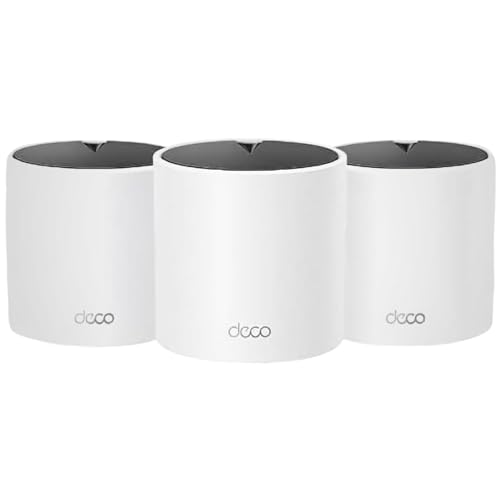
- Covers up to 5,600 sq. ft.
- Supports up to 120 devices
- 2 Gigabit ports per unit with backhaul
Best For: Medium-to-large home offices with many devices
Compact Mesh for Smaller Offices
TP-Link Deco X15 AX1500 2-Pack

- Covers up to 3,900 sq. ft.
- Supports up to 120 devices
- 2 Gigabit ports per unit with backhaul
Best For: Smaller home offices and apartments
Best for dependable whole-home coverage – TP-Link Deco M5 Mesh WiFi System
If you want mesh Wi-Fi systems for home offices that replace a router-and-extender setup, the TP-Link Deco M5 is built for simple, stable coverage. Three units can cover up to 5,500 sq. ft., and the single network name makes it easier to move between rooms without reconnecting.
Best For: Home offices that need straightforward whole-home Wi-Fi, wired backhaul support, and built-in security features.
Pros:
- Up to 5,500 sq. ft. of coverage with a 3-pack
- Single Wi-Fi name for seamless roaming between rooms
- Adaptive Routing helps keep connections stable
- Includes HomeCare antivirus, parental controls, and QoS
Cons:
- Uses Wi-Fi 5-era wireless compatibility rather than newer Wi-Fi 6/6E/7
- Modem required for most ISP setups
For a home office that needs reliable coverage more than cutting-edge specs, the Deco M5 is a practical mesh kit with useful security and easy app-based setup. Wired backhaul and Gigabit ports add flexibility if your workspace benefits from Ethernet.
Best for Wi-Fi 7 future-proofing – Amazon eero 7 Dual-Band Mesh Router
For mesh Wi-Fi systems for home offices where speed and long-term compatibility matter, the eero 7 brings Wi-Fi 7 support in an affordable 3-pack. It is designed to reduce dead spots, supports internet plans up to 2.5 Gbps, and can handle a busy household or work-from-home setup with 120+ devices.
Best For: Home office users who want Wi-Fi 7 performance, fast internet support, and a system that can grow with future devices.
Pros:
- Wi-Fi 7 support with up to 2.5 Gbps internet plan compatibility
- Three units cover up to 6,000 sq. ft. and support 120+ devices
- Two auto-sensing 2.5 GbE ports on each router
- TrueMesh, TrueRoam, and TrueChannel software help maintain stable connections
Cons:
- Dual-band design, so it lacks a dedicated third band
- Advanced security and extras require an optional eero Plus subscription
The eero 7 is a strong pick if you want newer Wi-Fi 7 hardware without overcomplicating setup. It pairs high-speed support with eero’s network software and a three-year warranty, making it appealing for a demanding home office.
Best for tri-band speed and 6 GHz capacity – TP-Link Deco XE75 WiFi 6E System
If your home office needs mesh Wi-Fi systems for home offices with extra headroom, the Deco XE75 adds tri-band Wi-Fi 6E and a dedicated 6 GHz band. That can help reduce interference and improve stability, especially when you have multiple devices and want strong performance across a large home.
Best For: Busy home offices that need fast tri-band mesh coverage, strong device capacity, and a 6 GHz band for cleaner connections.
Pros:
- Tri-band Wi-Fi 6E with a brand-new 6 GHz band
- Up to 7,200 sq. ft. of coverage and support for 200 devices
- Total speeds up to 5,400 Mbps
- AI-driven mesh and easy app setup for simple management
Cons:
- 6 GHz benefits depend on Wi-Fi 6E-compatible devices
- Modem required for most internet service providers
The XE75 stands out if your workspace is crowded with laptops, phones, and smart devices and you want more separation than a standard dual-band system offers. Its 6 GHz backhaul and HomeShield features make it a strong all-around choice for serious home networking.
Best for simple Google-based setup – Google WiFi Mesh Router System 2-Pack
This Google WiFi system is a straightforward option for mesh Wi-Fi systems for home offices when you want simple setup and expandable coverage. The 2-pack provides up to 3,800 square feet of whole-home coverage, and you can add more points later if your workspace grows.
Best For: Smaller home offices that want easy setup, reliable coverage, and a system that can scale over time.
Pros:
- Up to 3,800 sq. ft. of seamless coverage with the 2-pack
- Wi-Fi 5 technology with speeds up to 2.2 Gbps
- Scalable system that can expand with more Wifi points
- Includes parental controls and simple setup
Cons:
- Dual-band Wi-Fi 5 is less advanced than newer Wi-Fi 6/6E/7 systems
- 2-pack covers less area than the larger kits in this roundup
For a home office that values ease of use over cutting-edge features, Google WiFi is the simplest route. It is a practical pick for basic whole-home coverage and future expansion, especially if you do not need the fastest standard on the market.
Editor’s Pick – TP-Link Deco X55 AX3000 WiFi 6 Mesh System
If you want mesh Wi-Fi systems for home offices that are simple to manage but still built for heavy everyday use, the TP-Link Deco X55 is a strong all-around choice. Its Wi-Fi 6 AX3000 design, support for up to 150 devices, and wired Ethernet backhaul make it a practical fit for work-from-home setups with laptops, video calls, printers, and other connected gear.
Best For: Home offices that need broad coverage, lots of device connections, and easy app-based management.
Pros:
- Covers up to 6,500 sq. ft. with a 3-pack
- Supports up to 150 devices for busy homes
- Includes 3 Gigabit Ethernet ports per unit
- Supports wired Ethernet backhaul for better speeds
Cons:
- Dual-band design may not suit users wanting the newest Wi-Fi 7 class performance
- May be more system than needed for smaller homes
The Deco X55 is a sensible pick if your priority is dependable whole-home coverage with flexible wired and wireless options. It combines broad range, strong device capacity, and straightforward setup in a package that fits most home office networks well.
Premium Upgrade – NETGEAR Orbi 370 WiFi 7 Mesh System
For mesh Wi-Fi systems for home offices where speed is the main priority, the NETGEAR Orbi 370 brings Wi-Fi 7 performance and whole-home coverage in one package. It is designed for fast, reliable connectivity across large spaces, with support for up to 70 devices, enhanced backhaul, and multi-gig readiness for faster internet plans.
Best For: Fast-paced home offices, streaming-heavy households, and users who want Wi-Fi 7 headroom.
Pros:
- Wi-Fi 7 speeds up to 5 Gbps
- Covers up to 6,000 sq. ft. with the 3-pack
- Supports up to 70 devices on one network
- Ready for internet plans up to 2.5 Gbps
Cons:
- Premium performance comes with a more advanced feature set than basic users may need
- Expansion requires adding compatible Orbi satellites
The Orbi 370 is the most future-facing option in this group, especially if you want top-end wireless speed and a system that can keep up as your network demands grow. It is a strong fit for demanding home office setups, particularly where fast service and many connected devices matter.
Budget-Friendly Pick – TP-Link Deco S4 AC1900 Mesh System
If you need mesh Wi-Fi systems for home offices without paying for the latest wireless standard, the TP-Link Deco S4 offers a practical, easy-to-use setup. Its AC1900 mesh design focuses on stable whole-home coverage, simple roaming, and enough capacity for a busy household with work devices online at the same time.
Best For: Budget-conscious home offices that need reliable coverage and straightforward setup.
Pros:
- Covers homes up to 5,500 sq. ft. with the 3-pack
- Supports up to 100 devices
- Single network name and password for seamless roaming
- Includes 2 Gigabit Ethernet ports per unit and supports Ethernet backhaul
Cons:
- Older AC1900 Wi-Fi standard
- Not as fast or advanced as Wi-Fi 6 or Wi-Fi 7 systems
The Deco S4 keeps the focus on coverage, simplicity, and value. It is a smart option for users who mainly want to eliminate dead zones and keep work devices connected reliably, rather than chase the newest wireless technology.
Value Mesh for Bigger Home Offices – TP-Link Deco X25 Renewed 3-Pack
TP-Link - Deco X25 AX1800 Dual-Band Whole Home Mesh Wi-Fi 6 System (3-Pack) - White (Renewed)
Check Price On AmazonIf you need mesh Wi-Fi systems for home offices that can stretch across a larger space without adding a lot of setup complexity, the TP-Link Deco X25 is a practical option. This renewed 3-pack gives you Wi-Fi 6, dual-band coverage, and enough range for multi-room work setups, with a strong focus on security and simple app-based control.
Best For: Home offices spread across multiple rooms that need broad coverage and built-in security features.
Pros:
- Wi-Fi 6 mesh system with up to 5,800 sq. ft. of coverage
- Built-in antivirus, parental controls, and QoS for prioritizing devices
- Two Gigabit WAN/LAN ports for stable wired connections
- Supports WPA3 or WPA2 security
Cons:
- Renewed condition may not suit buyers wanting brand-new hardware
- Dual-band design is less flexible than tri-band mesh systems
The Deco X25 is a good fit if your office network needs wide coverage, dependable wired options, and security tools in one package. It’s especially appealing when you want whole-home coverage without paying for more advanced mesh hardware than your workflow actually needs.
Balanced Coverage for Busy Workdays – TP-Link Deco X15 AX1500 3-Pack
The TP-Link Deco X15 is a strong pick if you’re comparing mesh Wi-Fi systems for home offices and want a balanced mix of coverage, device support, and wired backhaul. This AX1500 dual-band kit is built to replace older routers and extenders, while still keeping setup and day-to-day management straightforward through the Deco app.
Best For: Medium-to-large home offices that need reliable whole-home coverage and easy expansion.
Pros:
- Wi-Fi 6 AX1500 mesh system with up to 5,600 sq. ft. coverage
- Supports up to 120 devices with dynamic backhaul
- Each unit includes 2 Gigabit Ethernet ports and wired backhaul support
- Includes app control, voice support, and security features like QoS and parental controls
Cons:
- Dual-band design may not match the performance of higher-end tri-band mesh systems
- Large feature set may be more than needed for very small offices
This Deco X15 3-pack makes sense when your work-from-home setup has many connected devices and you want a mesh system that can scale without a complicated installation. It leans toward practical coverage and useful office-friendly features rather than premium networking extras.
Compact Mesh for Smaller Offices – TP-Link Deco X15 AX1500 2-Pack
If you want mesh Wi-Fi systems for home offices but don’t need the range of a larger kit, the TP-Link Deco X15 2-pack is a compact, lower-coverage version of the same Wi-Fi 6 platform. It still offers dual-band coverage, wired backhaul support, and the same app-based management, making it a sensible choice for smaller workspaces or apartment offices.
Best For: Smaller home offices or apartments that need reliable mesh coverage without paying for extra nodes.
Pros:
- Wi-Fi 6 AX1500 mesh system with up to 3,900 sq. ft. coverage
- Supports up to 120 devices with dynamic backhaul
- Each unit includes 2 Gigabit Ethernet ports and wired backhaul support
- Includes security features, QoS, and Deco app setup
Cons:
- Only a 2-pack, so coverage is lower than the 3-pack version
- Dual-band design may not be ideal for heavier networking demands
This 2-pack is the better fit when your office footprint is smaller but you still want the convenience of a unified mesh network. It keeps the core Deco benefits while avoiding the cost and footprint of a larger system.
How We Picked the Best Mesh Wi-Fi Systems for Home Offices
We focused on Mesh Wi-Fi Systems for Home Offices that balance whole-home coverage, consistent performance, and practical features for remote work. That means strong support for multiple devices, simple management, and enough backhaul or band capacity to keep calls and uploads stable when the network gets busy.
We also looked at range claims, Wi-Fi generation, ease of installation, security features, and whether the system suits a small apartment, a mid-size home, or a larger multi-floor workspace.
Quick Comparison
For most buyers, the best choice depends on the size of the home office setup and internet speed. Wi-Fi 7 models are the newest and fastest option, while Wi-Fi 6 and 6E systems usually offer the best value for everyday remote work. Dual-band systems are often enough for moderate workloads, while tri-band models can help more in busy homes with many connected devices.
Key Buying Factors for Mesh Wi-Fi Systems for Home Offices
Coverage and Layout
Choose a system that covers your actual living space, not just the floor plan on paper. Walls, stairs, and interference from appliances can reduce real-world range, so larger or multi-level homes may need a three-pack or a stronger tri-band setup.
Speed and Internet Plan Support
If your work depends on video conferencing, backups, or large downloads, match the system to your internet speed. Faster plans benefit from Wi-Fi 6E or Wi-Fi 7, but a stable Wi-Fi 6 mesh can still be more than enough for most home offices.
Device Load and Reliability
Remote work often means a laptop, phone, printer, smart display, and maybe a work PC all sharing the network. Look for systems designed to handle many devices without obvious slowdowns during peak hours.
Ports and Wired Options
Ethernet ports matter if you use a desktop, docking station, NAS, or gaming console after hours. Wired backhaul or wired device connections can improve stability, especially in offices with thick walls or noisy wireless environments.
Setup and Management
A good app, straightforward onboarding, and useful controls can save time. Features like guest networks, parental controls, and device prioritization are helpful when your work network also serves the rest of the household.
Who Should Buy Which Mesh Wi-Fi Systems for Home Offices?
Choose Wi-Fi 7 if you want the newest platform, have a fast internet plan, or expect heavy device traffic. Choose Wi-Fi 6E or Wi-Fi 6 if you want strong performance and better value for most Mesh Wi-Fi Systems for Home Offices. Pick a dual-band model for simpler homes and moderate use, or a tri-band system if you need more headroom for a crowded network. If budget matters most, an older Wi-Fi 5 or entry-level Wi-Fi 6 kit can still deliver reliable coverage, especially in smaller homes or apartments.