A dependable dock can turn a laptop into a practical workstation with multiple displays, fast charging, wired networking, and easy access to essential peripherals.
These 10 professional USB docking stations cover modern USB-C setups, universal USB compatibility, triple-monitor workflows, and flexible home or office deployments.
Best 10 Professional USB Docking Stations Picks for 2026
Best for Dell-Focused IT

- Up to four high-resolution displays
- Up to 100W power delivery
- 3-year limited hardware warranty
Best For: Managed Dell and mixed-PC office deployments
Best for Triple-Display Home Offices

- Supports 4K plus two 2K displays
- Six 10Gbps USB ports
- 100W charging and Gigabit Ethernet
Best For: Multi-monitor home offices and mixed USB-C laptop setups
Best for Hybrid-Work Deployment

- Supports three extended HDMI displays
- 100W Power Delivery
- Lifetime technical support and compatibility guarantee
Best For: Mixed-fleet offices and hot-desking programs
Best for High-Power Dual Displays

- 160W total output
- Dual HDMI display support
- 14 ports with 10Gbps data transfer
Best For: Windows and ChromeOS dual-display workstations
Best for Fleet Deployment
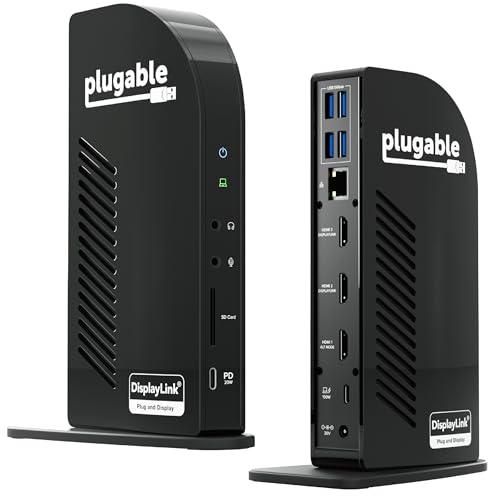
- 13-in-1 connectivity for standardized workstations
- Up to three extended HDMI displays with DisplayLink
- 100W laptop and 20W accessory charging
Best For: Office, education, government, and home-office deployments
Best for Windows Triple-Display Setups

- Two HDMI plus DisplayPort for three Windows displays
- 100W charging with included 110W adapter
- Ethernet, card readers, audio, and USB expansion
Best For: Windows users building a three-screen workstation
Best for Triple 4K Workstations

- Drives up to three 4K monitors at 60Hz
- Six video outputs: three HDMI and three DisplayPort
- 100W charging with 10Gbps USB-C expansion
Best For: IT deployments and demanding multi-monitor workstations
Best for Mixed-OS Office Fleets

- Dual HDMI output up to 1920x1200
- USB-C and USB-A host cables included
- Windows, macOS, and ChromeOS support
Best For: Office productivity deployments with mixed laptop fleets
Best for 4K Multi-Display Desks

- Dual HDMI and DisplayPort up to 4K/60Hz
- 100W PD input with up to 87W laptop charging
- 13 ports including 10Gbps USB and Ethernet
Best For: Windows 4K multi-monitor workstations
Best for Budget Dual-HD Workstations
USB 3.0 Dual-HD Universal Dock

- Dual HDMI up to 1920x1200 at 60Hz
- Hybrid USB 3.0 and USB-C host cable
- Ethernet, audio, and six USB ports
Best For: Everyday productivity desks with dual HD monitors
Best for Dell-Focused IT – Dell Pro Dock WD25
The Dell Pro Dock WD25 is a strong choice for professional USB docking stations in managed workplaces. It delivers up to 100W of power, supports up to four high-resolution displays, and works with Dell and non-Dell PCs running supported operating systems.
Best For: Dell-centered offices, managed IT environments, and users who need quad-display support with business-focused warranty coverage.
Pros:
- Supports up to four high-resolution displays.
- Provides up to 100W of power delivery and faster USB and network speeds.
- Includes flexible USB-C cable routing, enterprise manageability features, and a 3-year limited hardware warranty.
Cons:
- Its strongest feature set is geared toward compatible Windows, Linux, and ChromeOS computers rather than every laptop configuration.
- The dock has six USB ports, which may be limiting for exceptionally large peripheral setups.
Choose the WD25 when manageability, broad business compatibility, and four-display expansion matter more than having the highest port count.
Best for Triple-Display Home Offices – WAVLINK DisplayLink Dock
The WAVLINK DisplayLink dock is built for professional USB docking stations setups that need three external screens and substantial connectivity. It combines 100W charging, three-display support, six 10Gbps USB ports, and Gigabit Ethernet in a compact desk-oriented design.
Best For: Home offices, coding or trading workstations, remote meetings, and mixed-model USB-C laptop environments.
Pros:
- Supports up to 4K plus two 2K displays at 60Hz.
- Offers six USB ports with 10Gbps transfer speeds individually.
- Includes 100W power delivery, Gigabit Ethernet, heat-dissipation vents, anti-slip pads, and a 2-year warranty.
Cons:
- MacBook M1 through M5 systems require a DisplayLink driver, and the host USB-C port must support video output.
- It does not support USB-A laptops or gaming consoles.
- It is not recommended for gaming or HDCP-protected 4K streaming.
This is a practical pick when three monitors and fast peripheral storage connectivity are priorities, provided your laptop and display use case meet its requirements.
Best for Hybrid-Work Deployment – Plugable Triple Display Dock
The Plugable triple-display dock is designed for professional USB docking stations deployments across hybrid teams. It adds three HDMI displays, wired Gigabit Ethernet, six USB 3.0 peripheral connections, audio, and 100W Power Delivery for compatible Windows, macOS, and ChromeOS laptops.
Best For: Hot-desking programs, managed office workspaces, and IT teams supporting mixed USB-C, USB4, and Thunderbolt fleets.
Pros:
- Supports three extended HDMI monitors, including one 4K display and two 1080p displays.
- Works across Windows, macOS, and ChromeOS with supported systems and DisplayLink installation where required.
- Provides enterprise-oriented compatibility assistance, a compatibility guarantee, and lifetime technical support.
Cons:
- It is not compatible with Linux.
- HDCP is not supported.
- DisplayLink-dependent monitors require driver installation on applicable systems.
The Plugable model stands out for organizations that value deployment support and broad laptop compatibility, though Linux users and HDCP-dependent media setups should look elsewhere.
Best for High-Power Dual Displays – Anker Prime 14-in-1 Dock
The Anker Prime 14-in-1 is a flexible option among professional USB docking stations for users who want dual-display connectivity and high total charging output. It provides 14 ports, up to 160W total output, 10Gbps data transfer, Ethernet, audio, and support for compatible USB-C, USB4, and Thunderbolt systems.
Best For: Windows and ChromeOS users who need dual HDMI displays, multiple device charging, and a broad selection of data ports.
Pros:
- Offers 14-in-1 connectivity with up to 10Gbps data transfer.
- Provides up to 160W total output, with up to 100W available through each of three USB-C ports.
- Supports dual HDMI displays and includes Ethernet and audio connectivity.
Cons:
- On macOS, both external displays show the same image rather than separate extended desktops.
- It is not compatible with Linux.
- Dual-display output depends on a compatible DP Alt Mode laptop, and 5120×1440 monitors are not supported.
The Anker Prime makes sense for high-connectivity desks that prioritize charging capacity and dual HDMI output, especially on Windows systems.
Best for Fleet Deployment – Triple-Monitor USB-C Dock
For organizations standardizing professional USB docking stations, this 13-in-1 Plugable model combines broad connectivity with 100W laptop charging. Its DisplayLink support enables up to three extended HDMI displays, including on compatible Macs that would otherwise support fewer external screens.
Best For: Office, education, government, and home-office deployments needing triple-display expansion and consistent connectivity.
Pros:
- Supports up to three extended HDMI displays through DisplayLink.
- Provides up to 100W laptop charging and 20W front USB-C device charging.
- Includes HDMI, USB-A, Ethernet, SD, and audio connectivity, plus TAA, NDAA, and Section 889 compliance.
Cons:
- DisplayLink Manager installation is required for multiple displays on macOS and for HDMI 2 and 3.
- Does not support HDCP-protected streaming content such as Netflix or Hulu.
- Display output resolutions vary by port, with HDMI 1 reaching 4K at 30Hz and HDMI 2/3 reaching 1920×1200 at 60Hz.
This is a practical choice when deployment consistency, Mac multi-monitor support, and a large selection of ports matter more than plug-and-play video on every platform. Lifetime support from Plugable’s North American team adds useful assistance for office rollouts.
Best for Windows Triple-Display Setups – Acer 13-in-1 Dock
This Acer dock is one of the more capable professional USB docking stations for Windows users building a three-screen workstation. It pairs two HDMI outputs with DisplayPort, 100W laptop power delivery, Ethernet, card readers, audio, and USB expansion in an aluminum chassis.
Best For: Windows professionals who need three independent displays, substantial charging capacity, and built-in media-card connectivity.
Pros:
- Supports three independent displays on compatible Windows laptops through two HDMI ports and one DisplayPort 1.4 output.
- Includes a 110W power adapter for up to 100W laptop charging.
- Combines networking, USB ports, audio, SD/TF readers, and display outputs in one dock.
- Integrated security slot helps deter theft when used with a compatible cable lock.
Cons:
- macOS supports mirroring only across multiple displays; extended desktop mode is unavailable.
- Triple 4K at 30Hz requires a compatible Windows laptop and GPU with Display Stream Compression.
- The security cable lock is not included.
The Acer is especially attractive for Windows command-center setups where three independent screens and sustained power are priorities. Mac users should choose it only if mirrored displays meet their needs.
Best for Triple 4K Workstations – Plugable UD-ULTC4K Dock
The Plugable UD-ULTC4K is a strong option among professional USB docking stations for users who need extensive display flexibility. Its six video outputs can drive up to three 4K monitors at 60Hz, while one USB-C connection handles peripherals, Ethernet, audio, storage cards, and laptop charging.
Best For: IT deployments, financial analysts, developers, and hybrid workers who need serious multi-monitor workspace capacity.
Pros:
- Supports up to three 4K 60Hz monitors using three HDMI and three DisplayPort outputs.
- Delivers up to 100W laptop charging, with 96W certified Power Delivery.
- Offers 10Gbps USB-C accessory connectivity and up to 20W charging for compatible devices.
- Works with supported Windows, macOS, and ChromeOS systems using compatible USB-C, USB4, or Thunderbolt connections.
Cons:
- DisplayLink drivers and macOS Screen Recording permission are required for external displays on Mac.
- HDCP is not supported, so protected streaming content may not play on connected displays.
- Triple-display operation depends on a compatible host system and connection.
Choose this model when 4K refresh rate and flexible HDMI/DisplayPort combinations are more important than a minimal port count. Its charging, wired networking, and lifetime support make it well suited to demanding desk deployments.
Best for Mixed-OS Office Fleets – Dual 1080p Universal Dock
For organizations standardizing professional USB docking stations across Windows, macOS, and ChromeOS laptops, the Plugable UD-3900Z offers a practical dual-monitor setup from one USB connection. It supports two HDMI displays up to 1920×1200 and includes both USB-C and USB-A host cables, though it does not charge the connected laptop.
Best For: Office productivity deployments with mixed laptop fleets and dual HDMI monitors.
Pros:
- Supports dual HDMI displays up to 1920×1200.
- Works with Windows, macOS, and ChromeOS, with DisplayLink required on macOS.
- Includes USB-C and USB-A host connectivity plus Gigabit Ethernet, audio, and six USB ports.
- Backed by North American-based technical support and a compatibility guarantee.
Cons:
- Does not charge the laptop.
- Does not support DisplayPort, HDCP-protected content, gaming, or full-screen video playback.
- macOS requires a DisplayLink software installation.
The UD-3900Z is a strong fit when reliable dual-HD productivity and broad OS compatibility matter more than charging, 4K output, or entertainment features.
Best for 4K Multi-Display Desks – 13-in-1 USB-C 4K Dock
Among professional USB docking stations, this LIONWEI 13-in-1 model stands out for its 4K display support, fast data connections, and laptop charging. Windows systems can use HDMI and DisplayPort for triple-display configurations, while macOS can extend only one monitor.
Best For: Windows users who need 4K multi-monitor output, 100W PD, and extensive connectivity.
Pros:
- Provides two HDMI ports and DisplayPort, with up to 4K at 60Hz on supported sources.
- Offers 10Gbps USB-C data transfer and up to 100W PD input, with 87W available to the laptop after dock power use.
- Includes Gigabit Ethernet, audio/mic, multiple USB-A and USB-C ports, and plug-and-play operation.
- Supports Windows MST/SST display modes and includes an 18-month warranty.
Cons:
- macOS can extend only one monitor.
- Charging requires a separate USB-C power source and the dock uses 13W of that power.
- Display capabilities depend on the laptop’s source and operating system.
This is the most feature-rich option of the three for a Windows workstation, especially if 4K monitors, fast peripherals, Ethernet, and laptop charging are all part of the desk setup.
Best for Budget Dual-HD Workstations – USB 3.0 Dual-HD Universal Dock
The Plugable UD-3900 is a straightforward choice for professional USB docking stations in office environments. Its hybrid USB 3.0/USB-C host cable supports two HDMI displays up to 1920×1200 while adding Ethernet, audio, and six USB ports, but it is not designed for 4K, gaming, or laptop charging.
Best For: Windows, macOS, and ChromeOS productivity desks using dual HD HDMI monitors.
Pros:
- Supports two HDMI displays at up to 1920×1200 at 60Hz.
- Hybrid USB 3.0 and USB-C cable provides flexible host compatibility.
- Adds Gigabit Ethernet, headphone and microphone jacks, and six USB ports.
- Includes two-year coverage and lifetime support from Plugable.
Cons:
- Does not support 4K, DisplayPort, HDCP-protected content, or gaming.
- Does not charge the connected laptop.
- Requires a DisplayLink driver on macOS and is not compatible with Linux or Unix systems.
Choose the UD-3900 when dual HD monitors and everyday business applications are the priority. It delivers useful workstation expansion without paying for capabilities it does not support.
How We Picked the Best Professional USB Docking Stations
We selected models based on the needs of professional laptop users: display support, charging capacity, port variety, operating-system compatibility, connection stability, and ease of deployment. The lineup includes USB-C docks with up to 100W Power Delivery, DisplayLink-based universal models, dual- and triple-monitor options, and docks with HDMI and DisplayPort outputs.
Because laptop ports and display requirements vary, we considered practical compatibility rather than assuming every dock works identically with every computer. DisplayLink models may require software, while native USB-C video output generally depends on the laptop supporting DisplayPort Alt Mode.
Quick Comparison
- Best for straightforward business use: Dell Pro Laptop Docking Station WD25.
- Best for three-monitor flexibility: WAVLINK DisplayLink and Plugable triple-display docks.
- Best for broad connectivity: Anker Prime 14-in-1 Docking Station.
- Best for USB-C charging and productivity: Plugable 13-in-1 and triple-monitor models.
- Best for older USB laptops: Plugable USB 3.0 Universal and Dual 1080p HDMI docks.
- Best for a compact multiport setup: Acer 13-in-1 and similar 13-in-1 USB-C hubs.
Key Buying Factors for Professional USB Docking Stations
Display Technology and Monitor Count
Check the maximum resolution and refresh rate for each output, along with whether simultaneous displays require DisplayLink software. Native USB-C video is often simpler, while DisplayLink can expand monitor support on compatible Windows and Mac systems.
Power Delivery
A 100W dock can provide substantial charging, but the laptop may accept less, and the dock itself needs an adequate power adapter. Confirm both the dock’s maximum input and your computer’s charging requirements.
Ports and Network Connectivity
Count the ports you actually use: HDMI, DisplayPort, USB-A, USB-C, Ethernet, audio, SD or microSD. A fast wired network connection can improve reliability for video calls, large transfers, and office access.
Compatibility and Desk Setup
Verify operating-system support, required drivers, cable length, and whether the dock can remain connected to your monitors and accessories permanently. For shared workspaces, consider models that simplify reconnecting a laptop with one cable.
Who Should Buy Which Professional USB Docking Stations?
Choose the Dell dock if you want a business-oriented setup centered on a compatible Dell laptop and conventional DisplayPort or HDMI monitors. Select a WAVLINK or Plugable DisplayLink model when three displays are the priority, especially when the laptop’s native video outputs are limited.
Anker’s 14-in-1 model suits users who need a broad range of connections from one central dock. Acer and the 13-in-1 Plugable models are strong choices for USB-C laptops that need multiple displays, charging, and everyday peripherals without adding separate adapters.
For basic dual-monitor productivity, the Plugable Dual 1080p model is a sensible fit. Users with older USB-A laptops should consider the Plugable USB 3.0 Universal dock, while MacBook and USB-C users seeking a flexible hub can compare the dedicated 13-in-1 dual-monitor option. Before buying, confirm your laptop’s USB-C video support, monitor inputs, and operating-system requirements.