Choosing the right podcast production console can make a four-host show feel organized instead of chaotic. The best setups simplify mic control, monitoring, recording, and sound shaping from one place.
Below, we focus on options that fit real-world group podcasts, with an emphasis on easy operation, dependable audio quality, and flexible expansion for future growth.
Best 10 Podcast Production Consoles for Four Hosts Picks for 2026
Four-Host Audio Hub
TASCAM Mixcast 4 Podcast Streaming Mixer

- Four mic inputs and four headphone outs
- 14-track SD recording built in
- Sound pads plus Bluetooth and USB inputs
Best For: Podcasters who want straightforward four-host recording with onboard effects and capture
Complete Studio Bundle
RODECaster Pro II White Podcast Kit

- Console plus four mics, arms, and headphones
- 9-channel APHEX processing with multitrack recording
- Dual USB-C, Bluetooth, and wireless support
Best For: Creators who want a full four-host podcast studio in one bundle
Video-First Production Desk
RODECaster Video Livestream Bundle

- Switches up to six 1080p60 video sources
- Mixes up to 20 audio inputs
- Includes mics, headphones, and video cables
Best For: Shows that need podcast audio plus live video switching
Reference-Monitoring Rig
RODECaster Pro II 4-Host Bundle

- Four NTH-100 headphones for every host
- 14-track USB-C multitrack recording
- Four PodMics with arms, cables, and pop filters
Best For: Four-person podcasts that prioritize accurate monitoring and stem-ready recording
Starter 4-Person Podcast Kit
Movo 4-Person Podcast Equipment Bundle
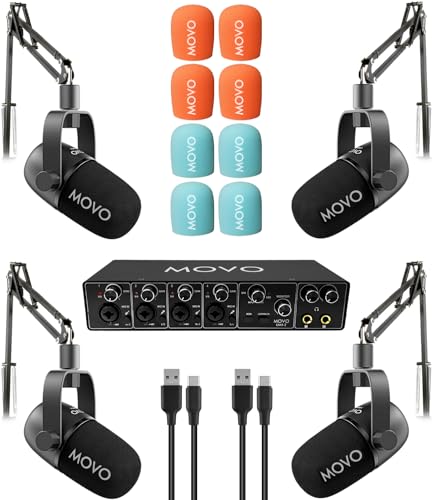
- 4-channel USB interface for four hosts
- Includes 4 dynamic mics and 4 boom arms
- USB-C plug-and-play on macOS and Windows 10+
Best For: Beginners who want a complete four-person podcast bundle
Pro Studio Bundle
Rode RODECaster Pro II Production Studio Bundle

- RODECaster Pro II with per-host processing
- Includes 4 PodMics, stands, and XLR cables
- Records multitrack to microSD without a computer
Best For: Teams needing a full-featured four-host podcast studio
White Studio Bundle
Rode RODECaster Pro II White Four-Mic Setup

- White RODECaster Pro II with 4 mics
- Includes PSA1+ boom arms and a cover
- Dual USB-C plus Bluetooth connectivity
Best For: Creators wanting a white four-host podcast rig
All-in-One Four-Host Starter

- Includes 4 mics, 4 stands, and monitoring gear
- Built-in effects, voice change, and auto-tune
- USB plug-and-play with no driver download
Best For: Four-person creator teams wanting a quick-start bundle
Premium Color-Coded Studio Bundle
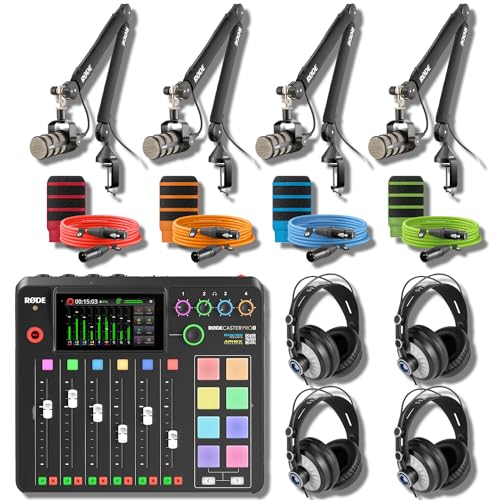
- RODECaster Pro II with 4-channel input and touchscreen
- Includes 4 PodMics, arms, headphones, and cables
- 14-track USB-C recording with onboard processing
Best For: Teams building a premium, organized four-host studio
Tabletop Roundtable Bundle

- RODECaster Pro II with 9-channel routing and 4 mic inputs
- Includes 4 ZDM-1 packs with tripods, headphones, and cables
- Supports dual USB-C, Bluetooth, and onboard wireless
Best For: Roundtable teams wanting a portable four-host tabletop setup
Four-Host Audio Hub – TASCAM Mixcast 4 Podcast Streaming Mixer
If you want podcast production consoles for four hosts that stay simple at the desk, the TASCAM Mixcast 4 is built around that use case. It gives you four mic inputs, four headphone outputs, onboard SD recording, and touch-panel control, so you can record a full roundtable without a complicated setup.
Best For: Podcasters and streamers who want an easy-to-run four-mic console with onboard recording and sound pads.
Pros:
- Four XLR/TRS mic inputs and four individual headphone outputs for a true four-host setup.
- 14-track recording direct to SD card for standalone capture.
- Built-in Bluetooth, Aux input, and USB connectivity for phones, PCs, and other sources.
- Eight banks of customizable sound pads for effects, music, and jingles.
Cons:
- More focused on audio workflow than advanced video or scene switching.
- Touch-panel operation is streamlined, but not as feature-rich as larger broadcast systems.
The Mixcast 4 is a practical choice when you need a four-host podcast console that covers recording, mixing, and live sound triggers in one box. It is especially appealing if you want solid onboard functionality without building a separate interface-and-recorder stack.
Complete Studio Bundle – RODECaster Pro II White Podcast Kit
For podcast production consoles for four hosts, this RODECaster Pro II White bundle is aimed at people who want the whole studio in one purchase. The console is paired with four PodMic mics, four PSA1+ arms, four headphones, XLR cables, and a microSD card, so a four-person show can be set up and recorded right away.
Best For: Teams and creators who want a ready-to-record four-host podcast studio with matching gear and onboard multitrack capture.
Pros:
- RODECaster Pro II with 9-channel APHEX processing and onboard multitrack recording.
- Four PodMic mics, four PSA1+ arms, and four Cans50 headphones included in the bundle.
- Dual USB-C, Bluetooth, and wireless receiver support for flexible guest and computer routing.
- Four-host-ready package includes XLR cables and a 32GB microSD card.
Cons:
- Large bundle may be more than needed if you already own mics, arms, or headphones.
- Setup is more involved than a simple standalone mixer because it includes a full studio kit.
This bundle stands out if you want a turnkey four-host production console with matching peripherals and fewer extra purchases. It is a strong fit for podcast producers who value a clean, all-in-one buying decision.
Video-First Production Desk – RODECaster Video Livestream Bundle
If your four-host show needs video as well as audio, this RODECaster Video bundle gives you an all-in-one production console built for switching and mixing. It handles multiple video sources, a large audio input count, and scene-based control, making it a good fit for podcasts that also livestream or publish social content.
Best For: Podcasters and livestreamers who need a console that combines multi-source video switching with pro audio control.
Pros:
- Controls up to six 1080p60 video sources with scene presets and multiview support.
- Mixes up to 20 audio inputs with dual studio-grade combo XLR-1/4" inputs.
- Built-in Wi-Fi 6 or Ethernet streaming and recording to external USB storage.
- Bundle includes headphones, microphones, cables, and accessories to get started.
Cons:
- Only two microphones and two headphones are included, so a four-host setup needs more gear.
- More complex than audio-only consoles if you do not need video switching.
The RODECaster Video is best viewed as a production centerpiece rather than a simple podcast mixer. If your workflow includes cameras, graphics, and live switching, it offers a much broader toolset than an audio-only console.
Reference-Monitoring Rig – RODECaster Pro II 4-Host Bundle
Among podcast production consoles for four hosts, this RODECaster Pro II bundle is designed for teams that want everyone monitoring like an engineer. It pairs the console with four PodMics, four PSA1+ arms, and four NTH-100 reference headphones, giving each host a matched mic chain and studio monitoring.
Best For: Four-host podcast teams that want reference-grade headphone monitoring at every seat.
Pros:
- RODECaster Pro II multitrack console with six physical faders and three virtual faders.
- Four NTH-100 headphones let each host hear the mix clearly in real time.
- Four PodMics, four PSA1+ arms, and color-matched cables and pop filters included.
- 14-track USB-C multitrack recording supports stem-based post-production.
Cons:
- The bundle is extensive, so it may be more than needed for a minimal desk setup.
- It is optimized for audio production, not video switching or camera control.
This version is especially compelling if monitoring accuracy matters as much as recording quality. It gives four hosts a consistent listening experience while still keeping the console workflow centered on fast multitrack production.
Starter 4-Person Podcast Kit – Movo 4-Person Podcast Equipment Bundle
If you want podcast production consoles for four hosts without piecing together every component separately, this Movo bundle is a straightforward entry point. It combines a 4-channel USB audio interface, four dynamic microphones, and four boom arms, so a full table can get recording quickly.
Best For: Teams that want a simple all-in-one starter setup for a four-person podcast or streaming session.
Pros:
- Includes the 4-channel UMX-2 interface, four CastMic dynamic mics, and four tabletop boom arms.
- Zero-latency direct monitoring and loopback help with live conversation and system-audio capture.
- Dynamic microphones are built for speech and do not require phantom power.
- USB-C connectivity supports plug-and-play use on macOS and Windows 10+ with ASIO driver mode.
Cons:
- The bundle is focused on the essentials rather than advanced studio routing.
- Windows users need driver mode support, while macOS is the easier plug-and-play path.
For teams that need a complete four-host recording kit, this package keeps setup simple and covers the basic hardware in one purchase. It is a practical choice when you want to start recording fast without building a rig one piece at a time.
Pro Studio Bundle – Rode RODECaster Pro II Production Studio Bundle
When you are comparing podcast production consoles for four hosts, this Rode bundle is built for a more complete studio workflow. The RODECaster Pro II pairs with four PodMic broadcast mics, four desk stands, XLR cables, and storage, so a four-person show can record and monitor in a single setup.
Best For: Multi-host podcast teams, live streamers, and voice-over setups that want deeper control and included accessories.
Pros:
- RODECaster Pro II offers per-host preamps, APHEX processing, and independent headphone outputs.
- Includes four PodMic broadcast dynamics, four DS1 desk stands, and four balanced XLR cables.
- Revolution Preamps provide up to 76 dB of gain, which suits dynamic microphones well.
- Multitrack microSD recording lets you capture each channel without a computer.
Cons:
- This is a larger bundle than a basic starter kit, so it is more setup-heavy.
- Its production features may be more than a simple casual recording needs.
This bundle stands out for hosts who want a polished, all-in-one console with serious processing and recording flexibility. It is a strong fit if you expect to run the whole table from one central production unit.
White Studio Bundle – Rode RODECaster Pro II White Four-Mic Setup
This white RODECaster Pro II bundle is a strong option if you want podcast production consoles for four hosts with a cleaner visual style. It combines the console, four white PodMic dynamic microphones, PSA1+ boom arms, a cover, XLR cable, and a microSD card in one coordinated package.
Best For: Creators who want a four-person podcast setup with a premium white finish and flexible boom-arm positioning.
Pros:
- RODECaster Pro II includes four Revolution Mic Preamps, six faders, and nine channels.
- Onboard APHEX processing, SMART pads, and a touchscreen support live show control.
- Four PSA1+ boom arms make microphone positioning more flexible and precise.
- Dual USB-C and Bluetooth connectivity add options for computers, mobile devices, and streaming.
Cons:
- The notes emphasize a complete setup but do not list all cable counts in the same detail as some other bundles.
- macOS is the supported operating system listed in the supplied details.
For teams that care about both workflow and presentation, this package delivers the same core RODECaster Pro II production platform in a coordinated white build. It is a compelling choice if your four-host setup will live on-camera or in a visible studio space.
All-in-One Four-Host Starter – All-in-One Console Kit
If you want podcast production consoles for four hosts in a single package, this COMMANDER M100 3rd bundle is built to cover the basics without adding extra gear hunts. It combines the interface, four dynamic microphones, desktop stands, monitoring, and several broadcast-style effects so a small team can start recording, streaming, or creating content quickly.
Best For: Four-person creator teams that want an all-in-one starter rig with built-in effects and simple plug-and-play setup.
Pros:
- Includes 4 dynamic mics, 4 desktop mic stands, and monitoring accessories in one box.
- Built-in voice change, sound effects, auto-tune, and Bluetooth accompaniment for live sessions.
- Offers 4-channel support plus practical controls like noise reduction, loopback, side chain, and independent mic volume.
- Plug-and-play USB compatibility with computers and smartphones, with no driver download required.
Cons:
- Dynamic mics need correct top-facing technique to get the best sound.
- Feature-heavy layout may be more than a simple talk-only setup needs.
For teams that want one package to handle four-host podcasting, this bundle leans more toward convenience and effects than studio modularity. It is a practical option if you value fast setup and a broad feature set over building each part separately.
Premium Color-Coded Studio Bundle – Broadcast-Ready 4-Host Rig
This is one of the more complete podcast production consoles for four hosts if you want a ready-to-record broadcast setup instead of a bare mixer. The bundle pairs the RODECaster Pro II with four PodMics, four boom arms, four headphones, color-coded XLR cables, and pop filters, making it easier to keep a four-person studio organized from day one.
Best For: Four-host podcast studios that want a premium, fully matched setup with strong channel processing and clear cable organization.
Pros:
- RODECaster Pro II includes four combo XLR/1/4-inch inputs, six physical faders, and a 9.7-inch touchscreen.
- Built-in APHEX, Neve-style EQ/compression, dbx gate, and de-esser processing for each host channel.
- Bundle adds 4 PodMic mics, 4 PSA1+ arms, 4 Cans50 headphones, and color-coded cables and pop filters.
- 14-track multitrack USB-C recording supports separate tracks for hosts, pads, and the stereo mix.
Cons:
- Premium bundle size may be more than casual users need.
- The full kit is geared toward a dedicated studio space rather than a minimal portable setup.
If you want a four-host system that feels like a finished studio, this bundle stands out for both workflow and completeness. The color-coded accessories also make it easier to identify each host’s signal path at a glance.
Tabletop Roundtable Bundle – Four-Host Tabletop Studio
For podcast production consoles for four hosts, this RODECaster Pro II bundle focuses on getting a tabletop roundtable up and running with matched accessories. You get the console plus four Zoom ZDM-1 mic packs, so each host has a mic, tripod, headphones, and cable ready for a shared table setup.
Best For: Roundtable podcasts and travel crews that want a tabletop four-host system with matched accessories and remote-call options.
Pros:
- RODECaster Pro II provides 9-channel routing with four mic inputs, dual USB-C, Bluetooth, and onboard wireless.
- Revolution preamps and APHEX DSP help drive dynamic mics cleanly with no inline booster required.
- Bundle includes 4 Zoom ZDM-1 packs with tripods, headphones, windscreens, and shielded XLR cables.
- Compatible with Mac, Windows, iOS, Android, and major DAWs or streaming apps.
Cons:
- Tabletop tripods are less flexible than boom-arm mounting for larger studio layouts.
- The bundle is better for shared-table recording than a space where each host needs a fixed arm position.
This bundle is a strong fit if you want the console and all four host channels sorted in one purchase. It is especially practical when portability and fast setup matter more than a permanent arm-mounted studio.
How We Picked These Podcast Production Consoles for Four Hosts
We prioritized consoles and bundles that can reliably handle four microphones at once, offer straightforward gain and monitoring control, and support fast recording workflows. For Podcast Production Consoles for Four Hosts, that means looking beyond basic input count and checking whether the unit is actually convenient for a multi-person session.
We also favored systems with strong onboard processing, useful headphone outputs, USB connectivity, and creator-friendly features like pads, mix-minus, and built-in recording where available.
Quick Comparison
In this category, the best choice depends on how you record. Some buyers need an all-in-one console for table-top studio use, while others want a bundle with microphones, arms, and headphones included. If you want the simplest path to a complete four-person setup, bundle kits can save time and reduce compatibility headaches.
Key Buying Factors for Four-Host Podcast Production Consoles
Input Count and Mic Compatibility
Make sure the console has at least four usable mic inputs, preferably XLR or XLR/TRS combo inputs. This gives you enough flexibility for dynamic microphones, broadcast mics, or future upgrades.
Headphone Monitoring
Each host should be able to hear themselves and the show clearly. Separate headphone outputs with individual volume control are a major advantage for avoiding awkward monitoring issues.
Recording and Streaming Workflow
Look for onboard recording, multitrack support, or simple USB audio interface mode if you plan to edit later. For live streaming, easy routing and mix-minus features help prevent echo and feedback.
Built-In Processing
Compression, EQ, gating, and voice enhancement tools can improve consistency across four different voices. These features are especially helpful when the hosts have different mic technique or room acoustics.
Bundled Accessories
For many buyers, the best value comes from a package that includes microphones, boom arms, stands, cables, and headphones. That is often the fastest way to build a complete four-seat studio without extra research.
Who Should Buy Which Podcast Production Consoles for Four Hosts?
If you want the most streamlined studio hub, choose a console-centric setup with strong onboard effects and recording tools. If you are starting from scratch, a full bundle is usually the smarter value. If your show includes video, guests, or live switching, consider an all-in-one production console that can grow with your workflow. For teams focused mainly on audio, a simpler four-input interface bundle may be all you need.