Choosing the right podcast console can make multi-host recording much easier, especially when you want cleaner levels and less time spent fixing audio later.
This roundup highlights podcast production consoles with automatic mixing that help streamline interviews, livestreams, and home studio sessions.
Best 10 Podcast Production Consoles with Automatic Mixing Picks for 2026
All-in-One Podcast Console

- 4 mic inputs with 4 headphone outputs
- 14-track SD recording and USB connectivity
- 8 banks of customizable sound pads
Best For: multi-host podcasts and live streaming
Budget-Friendly Input Hub
Aveek 5-Channel USB Bluetooth Mixer

- 3 XLR inputs with 48V phantom power
- USB-B recording chip for plug-and-play use
- Echo, delay, EQ, and headphone monitoring
Best For: small podcast setups on a budget
All-in-One Beginner Bundle

- Mixer bundle includes mic, cables, and stand
- 4 user-recordable and 8 built-in effects
- Supports 2 people, 4 devices, and real-time monitoring
Best For: new podcasters who want an easy starter kit
Compact DSP Mixer
Aveek 4-Channel DSP Podcast Console

- 2 XLR/6.35mm inputs plus RCA and USB
- 99 DSP effects with 3-band EQ and gain
- Built-in HD recording chip with Type-C
Best For: small podcast and streaming setups
All-in-One Starter Pick
MAONO Podcast Equipment Bundle with Audio Mixer & 3.5mm Mic

- Includes mixer and condenser microphone
- 4 recordable + 8 built-in sound effects
- Compatible with PC, phone, and tablets
Best For: Beginners starting a podcast or stream setup
Compact Mixer Upgrade
4 Channel Podcast Audio Mixer with 99 DSP Effects

- 48V phantom power for condenser mics
- 99 DSP effects with reverb and delay
- USB recording plus Bluetooth streaming
Best For: Home studios needing a compact XLR mixer
Portable Performance Bundle
G9 Podcast Equipment Bundle with Voice Changer

- Mixer and mic bundle for streaming
- Built-in battery with Bluetooth support
- 12 effects plus 2 custom buttons
Best For: Portable creators who stream, sing, or podcast
Compact 6-Channel Podcast Console
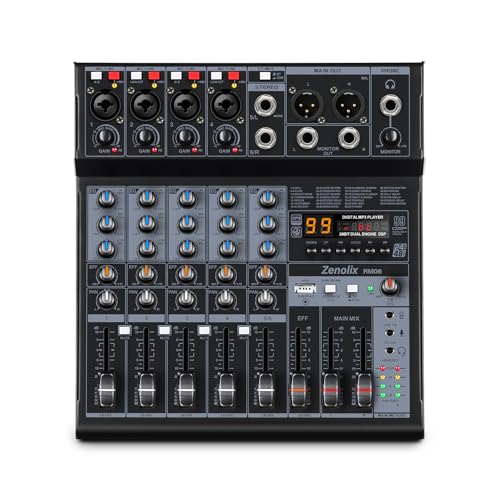
- 4 combo inputs plus stereo line in
- USB-C 24-bit/192 kHz recording with loopback
- Bluetooth, USB playback, and 99 reverb effects
Best For: Podcasters and streamers who want a compact, flexible mixer for multi-source setups
All-in-One Creator Podcaster
MAONO E2 Gen2 Podcast Equipment Bundle

- Dual XLR combo inputs with 60dB gain
- Loopback, Bluetooth, and USB-C connectivity
- Eight custom sound effect buttons plus 8-hour battery
Best For: Co-hosted podcasts and creators who want an easy all-in-one interface bundle
RGB Streaming Audio Controller

- One XLR input with 48V phantom power
- Individual control for mic, line, headphone, and line out
- Front mute/monitor buttons plus RGB and effects
Best For: Solo streamers and beginner podcasters who want direct physical control
All-in-One Podcast Console – TASCAM Mixcast 4
If you’re comparing podcast production consoles with automatic mixing, the TASCAM Mixcast 4 stands out as a full-featured creator hub rather than a basic mixer. It combines four mic inputs, four headphone outputs, onboard sound pads, Bluetooth and Aux input options, and 14-track recording to SD card, making it well suited to multi-host recording, live streaming, and voice-over work.
Best For: Podcasters and streamers who want an all-in-one console with strong hands-on control and built-in recording.
Pros:
- Four XLR/TRS mic inputs and four individual headphone outputs for multi-person sessions.
- 14-track recording direct to SD card plus USB connectivity for computer-based workflows.
- Eight banks of customizable illuminated sound pads for effects, jingles, and pre-recorded sounds.
- Includes Bluetooth and Aux input options for mixing external audio sources, including phone calls with mix-minus.
Cons:
- More complex than a simple entry-level mixer if you only need one or two channels.
- Designed around podcast production and streaming, so it may be more console than casual users need.
Overall, the Mixcast 4 is built for creators who want a practical, centralized workflow for recording and live production. Its strength is the combination of input flexibility, onboard sound triggering, and direct-to-card recording in one desktop unit.
Budget-Friendly Input Hub – Aveek 5-Channel USB Bluetooth Mixer
For buyers looking at podcast production consoles with automatic mixing, the Aveek 5-channel mixer is a compact option that covers the basics without a lot of setup. It offers XLR, stereo, USB recording, Bluetooth playback, and built-in echo/delay controls, so it works well for small podcast rigs, streaming setups, and simple recording sessions.
Best For: Small podcast teams and streamers who want a budget-friendly mixer with multiple input options.
Pros:
- Three XLR inputs with 48V phantom power for condenser microphones.
- Built-in recording chip for plug-and-play PC recording through USB-B.
- USB stick playback and recording support for simple media workflows.
- Onboard EQ, gain, echo, and delay controls for shaping voice and mix balance.
Cons:
- Bluetooth, USB, and 4/5-channel functions cannot be used simultaneously.
- Bluetooth is for playback, not output device connection.
- More limited than larger podcast consoles for complex multi-host production.
This Aveek model is best viewed as a practical entry mixer for basic podcasting and streaming rather than a full studio centerpiece. It gives you enough connectivity and processing to get going quickly, with a small footprint and straightforward operation.
All-in-One Beginner Bundle – MAONO AM200 S1 Podcast Bundle
If you want podcast production consoles with automatic mixing in a starter-friendly package, the MAONO Podcast Equipment Bundle is built for quick setup. It combines a mixer, microphone, sound effects, voice-changing modes, and real-time monitoring in one bundle, making it a convenient choice for streaming from a phone, PC, or tablet.
Best For: Beginners who want an all-in-one podcast bundle with built-in effects and a mic included.
Pros:
- All-in-one bundle includes a mixer, microphone, cables, stand, and windscreen.
- Four user-recordable effects plus eight built-in special audio effects.
- Supports up to 2 people, 4 devices, and 4 platforms for streaming.
- Real-time monitoring and denoise function help simplify live use.
Cons:
- Only supports 3.5mm microphone input and does not support phantom power.
- Some devices may need an OTG adapter or manual input selection in PC settings.
- Not intended for XLR-based microphone workflows.
The AM200 S1 is a strong fit if you want a ready-to-use package instead of assembling separate gear. Its appeal is convenience: you get the mixer, mic, and basic production tools needed to start recording and streaming right away.
Compact DSP Mixer – Aveek 4-Channel DSP Podcast Console
Among podcast production consoles with automatic mixing-style features, this Aveek 4-channel mixer focuses on practical control and built-in processing. It includes USB recording, Bluetooth playback, 48V phantom power, and 99 DSP effects, so it suits podcasting, live streaming, karaoke, and small studio work where flexibility matters more than advanced automation.
Best For: Creators who want a compact mixer with effects, USB recording, and basic multi-input support.
Pros:
- Two XLR/6.35mm input jacks plus RCA and 6.35mm connectivity for different sources.
- Built-in HD recording chip supports plug-and-play PC recording through Type-C.
- 99 DSP effects, 3-band EQ, gain control, and output fader for mix shaping.
- Bluetooth playback and USB drive recording/playback add useful convenience.
Cons:
- Bluetooth cannot be used to connect an output device.
- Only four channels, so it is less expansive than larger podcast consoles.
- Best suited to simple setups rather than advanced multi-host production.
This model is a good choice if you want a small mixer with plenty of built-in sound processing and recording support. It gives you straightforward control for voice-focused content without pushing into more complicated studio gear.
All-in-One Starter Pick – MAONO Podcast Equipment Bundle with Audio Mixer & 3.5mm Mic
If you want podcast production consoles with automatic mixing features in a simple starter package, this MAONO bundle is built for fast setup and flexible content creation. It combines an audio mixer, included condenser mic, and easy plug-and-play use for phone or PC, while adding voice changes, denoise control, and built-in sound effects for live shows and recordings.
Best For: Beginners who want an all-in-one podcast and streaming setup with quick voice effects and broad device support.
Pros:
- All-in-one bundle includes a mixer and condenser microphone
- Four user-recordable and eight built-in sound effects for live content
- Voice-changing options plus denoise button for cleaner streaming
- Works with laptops, PCs, Macs, smartphones, iPhones, and tablets
Cons:
- Phone use may require an OTG adapter if there is no 3.5mm jack
- Feature set is broad enough that setup may take some learning
This is a strong choice if you want a compact creator console with lots of built-in effects and flexible compatibility. It is less about pro studio expansion and more about making podcasting, streaming, and casual recording easy to start.
Compact Mixer Upgrade – 4 Channel Podcast Audio Mixer with 99 DSP Effects
For buyers comparing podcast production consoles with automatic mixing-style effects and hands-on control, this compact 4-channel mixer focuses on core recording tools rather than bundle extras. It offers XLR inputs, 48V phantom power, a PAD switch, an 80Hz high-pass filter, and 99 DSP effects, making it a practical pick for home studios and live streaming.
Best For: Creators who want a small mixer with XLR support, phantom power, and effect processing for recording or streaming.
Pros:
- 48V phantom power supports condenser microphones
- 99 DSP effects add reverb and delay options
- PAD and 80Hz high-pass filter help manage loud or noisy sources
- USB recording and Bluetooth streaming expand connectivity
Cons:
- Does not include a microphone or bundle accessories
- Only 4 channels, so larger setups may outgrow it
This mixer is a solid step up if you already have mics and want more control over input shaping and effects. It is especially appealing for compact setups that need XLR connectivity, recording support, and simple streaming flexibility.
Portable Performance Bundle – G9 Podcast Equipment Bundle with Voice Changer
If you want podcast production consoles with automatic mixing-style convenience in a portable bundle, the G9 package is aimed at creators who stream, sing, and chat across multiple devices. It combines an audio mixer, 3.5mm condenser microphone, voice changer, noise reduction, Bluetooth, and built-in battery power for flexible use at home or on the go.
Best For: Streamers and podcasters who want a portable all-in-one kit with voice effects and simple phone or PC compatibility.
Pros:
- Complete bundle includes mixer, microphone, and accessories
- Noise reduction and voice-changing tools support live content
- Built-in battery and Bluetooth improve portability
- 12 sound effects plus 2 custom effect buttons add variety
Cons:
- Uses a 2-channel design, so it is less expandable than larger mixers
- Best suited to creator content rather than full studio routing
This is a versatile option for users who care more about convenience, vocal effects, and portable operation than deep studio mixing. Its plug-and-play design and monitoring features make it especially appealing for solo creators, small collaborations, and live performance-style content.
Compact 6-Channel Podcast Console – RM06 6Channel Audio Mixer
If you’re shopping for podcast production consoles with automatic mixing, the RM06 is a practical compact mixer for creators who want hands-on control plus modern connectivity. It gives you multiple combo inputs, Bluetooth playback, USB recording, and a 24-bit/192 kHz USB audio interface with loopback, making it easy to manage voices, music, and monitoring in one board.
Best For: Podcasters, streamers, home studios, and small live setups that need a flexible mixer with USB recording and Bluetooth playback.
Pros:
- 4 XLR/6.35 mm combo inputs plus a stereo line input for multi-source setups
- USB-C interface with 24-bit/192 kHz recording and loopback for streaming or podcast capture
- Built-in Bluetooth, USB playback, and onboard recording for fast show prep
- Per-channel EQ, pan, FX send, phantom power, and 99 reverb effects
Cons:
- Does not include any true automatic mixing features in the supplied specs
- More hands-on than a fully automated podcasting solution
- Broad feature set may be more than casual users need
Overall, the RM06 is a strong choice if you want a compact mixer that can handle podcasting and streaming while still feeling like a real sound board. It emphasizes flexible routing, recording, and source control rather than automation, so it suits users who prefer to manage their mix directly.
All-in-One Creator Podcaster – MAONO E2 Gen2 Podcast Equipment Bundle
For buyers comparing podcast production consoles with automatic mixing, the MAONO E2 Gen2 stands out as an all-in-one podcast bundle with dual XLR inputs, loopback, Bluetooth, and simple plug-and-play connectivity. It is designed for creators who want a straightforward setup for podcasting, streaming, and recording without needing extra gear.
Best For: Co-hosted podcasts, beginner-to-intermediate streamers, and creators who want an easy all-in-one interface bundle.
Pros:
- Two XLR combo inputs with up to 60dB gain for dynamic microphones
- Loopback support plus USB-C, AUX-IN, and Bluetooth for flexible routing
- Eight customizable sound effect buttons for intros, clips, and show flair
- Built-in battery rated for up to 8 hours of use
Cons:
- The supplied notes do not mention automatic mixing specifically
- Sound effects and voice options may be more than some podcasters need
- Best suited to small setups rather than larger multi-person productions
This is a strong option if you want a creator-focused podcast interface that keeps setup simple while still offering useful performance tools. It prioritizes convenience, portability, and easy connection options, which makes it appealing for fast-moving content workflows.
RGB Streaming Audio Controller – FIFINE AmpliGame SC3 Mixer
If you want podcast production consoles with automatic mixing in a streamer-friendly format, the FIFINE AmpliGame SC3 is a compact USB mixer focused on hands-on control, monitoring, and effects. It combines one XLR mic input, individual channel sliders, mute and monitor buttons, and plug-and-play PC support for simple podcast, recording, and live stream workflows.
Best For: Solo streamers, beginner podcasters, and PC creators who want direct physical control with RGB styling.
Pros:
- One XLR mic input with 48V phantom power for condenser microphones
- Individual control for microphone, line in, headphone, and line out channels
- Mute and monitor buttons placed on the front for easier use during sessions
- Includes sound effects, voice-changing modes, auto-tune changes, and RGB lighting
Cons:
- Only one XLR mic input, so it is less suited to multi-host shows
- XLR cable is not included
- Feature set is geared more toward streaming and vocal effects than full studio expansion
The SC3 is best viewed as a compact creator mixer with useful control over voice, monitoring, and presentation. It is a good fit if you want a simple USB interface with extra personality, though it is not the right pick for larger podcast setups.
How We Picked the Best Podcast Production Consoles with Automatic Mixing
We focused on Podcast Production Consoles with Automatic Mixing that offer practical tools for real-world recording: multiple mic inputs, dependable gain control, USB or Bluetooth connectivity, phantom power where needed, and workflow features that reduce setup time. We also looked for models that fit different use cases, from beginner bundles to more flexible consoles for creators who want to grow.
Quick Comparison
If you want a simple setup, compact mixers and all-in-one bundles are the easiest starting point. For multi-person shows, look for more inputs, stronger routing options, and clearer monitoring controls. If you record both live and edited content, prioritize loopback, USB audio interface support, and onboard processing that helps keep voices even.
Key Buying Factors for Podcast Production Consoles with Automatic Mixing
Input Count and Mic Compatibility
Match the console to your show format. Solo creators may only need one or two mic channels, while panels and co-hosted shows benefit from four or more inputs. Check whether the console supports XLR, TRS, or combo jacks so your microphones will connect without extra adapters.
Mixing Control and Automatic Level Management
Automatic mixing is most useful when multiple speakers talk over one another or when you want consistent levels with less manual adjustment. Look for features that help balance voices, reduce clipping, and keep the overall mix stable during fast-paced discussions.
Connectivity and Recording Workflow
USB audio interface support is essential if you record to a computer, and Bluetooth can help with call-ins or playback. Loopback is valuable for streaming, while onboard recording can be a backup if your computer session fails.
Power, Monitoring, and Effects
48V phantom power matters for condenser microphones. Headphone monitoring should be clear and independent if possible, so each speaker can hear the mix. DSP effects, noise reduction, and voice processing can be useful, but they should support the show rather than complicate the setup.
Who Should Buy Which Podcast Production Consoles with Automatic Mixing?
Beginners should prioritize simple controls and bundled gear for fast setup. Streamers and gaming creators may prefer consoles with RGB, mute buttons, and USB routing. Interview and panel hosts should focus on more inputs, stable gain handling, and monitoring flexibility. If you want a more polished production workflow, choose a console that balances automatic mixing convenience with enough manual control to fine-tune the final sound.