Podcast production consoles with sound pads can make live shows faster, smoother, and more engaging. They let creators trigger effects, manage inputs, and control audio without breaking the flow.
In this roundup, we focus on practical features that matter for podcasting, streaming, and content creation so you can choose a console that fits your workflow.
Best 10 Podcast Production Consoles with Sound Pads Picks for 2026
Compact Creator Console
MAONO E2 Gen2 Podcast Equipment Bundle

- Dual XLR inputs with up to 60dB gain.
- 8 customizable sound effect buttons.
- Loopback, Bluetooth, mute, and battery-powered portability.
Best For: Creators who want an easy portable podcast console with sound effects.
Premium Studio Hub
RØDECaster Pro II All-in-One Production Solution

- Four combo inputs with Revolution preamps.
- 8 SMART pads with 64 total assignable actions.
- APHEX processing, dual USB, Bluetooth, and microSD recording.
Best For: Advanced creators who want a full-featured podcast and streaming console.
Sound Pad Workhorse
MAONO AME2 Podcast Studio Console

- 11 customizable sound pads with 60-second options on 3 pads.
- 48V phantom power and up to 60dB gain for XLR mics.
- Supports phones, PCs, tablets, and instruments.
Best For: Creators who want maximum sound-pad control and flexible connectivity.
Compact Pro Console
RØDECaster Duo Compact All-in-One Audio Production Solution
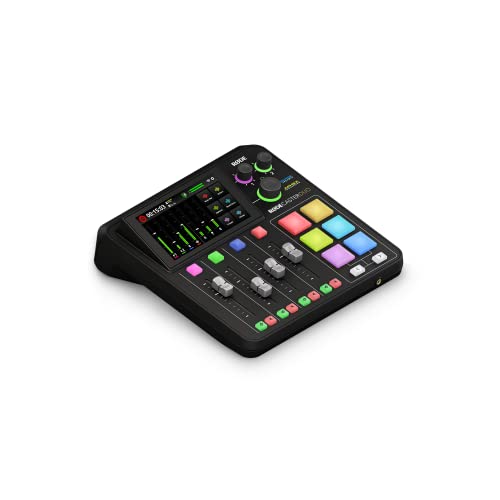
- Two combo jacks with Revolution preamps.
- 6 SMART pads with bank switching.
- Touchscreen, broadcast faders, and APHEX processing.
Best For: Solo creators who want a compact premium podcast console with pads.
Budget-Friendly Streaming Mixer

- One XLR mic input with 48V phantom power.
- Four customizable sound buttons for live effects.
- Individual faders plus mute and monitor controls.
Best For: Beginner streamers who want XLR input and sound pads.
All-in-One Podcast Bundle
MAONO AM200-S6 Podcast Equipment Bundle

- Includes mixer, 3.5mm mic, and sound pads.
- Four user-recordable pads plus eight built-in effects.
- Works with PCs and smartphones for streaming.
Best For: Creators who want an all-in-one podcast setup with effects.
Noise-Reduced Effect Mixer

- Four programmable sound effect pads for live clips.
- Voice changer, reverb, and noise cancellation built in.
- Bluetooth input supports background audio playback.
Best For: Streamers needing sound pads and cleaner live voice control.
All-in-One Studio Console
G10 Podcast Equipment Bundle with P15 Mic

- 4.5-inch display with six angle adjustments
- 5 reverb modes plus auto-tune and tone controls
- Saves up to 19 voice modes for quick switching
Best For: Creators who want an all-in-one podcast and livestream console
Portable Beginner Sound Card
Facmogu F998 Live Sound Card Audio Mixer

- 7 knobs and 2 fader buttons for direct control
- 16 sound effects with DSP noise reduction
- Built-in battery and Bluetooth accompaniment support
Best For: Beginners or intermediate creators who want a small, portable sound card
Creator Sound Pad Bundle
G10 Podcast Mixer with Mic and Boom Arm

- Includes microphone, boom arm, and sound board
- 12 sound effects plus voice changer controls
- Noise reduction and follow singing mode included
Best For: Streamers and podcasters who want an all-in-one bundle with sound effects
Compact Creator Console – MAONO E2 Gen2 Podcast Equipment Bundle
The MAONO E2 Gen2 is a practical pick for podcast production consoles with sound pads when you want an all-in-one setup that can handle podcasting, streaming, and studio recording. Its dual XLR combo inputs, 60dB preamps, Bluetooth, loopback, and phone/computer connectivity make it easy to build a flexible workflow without extra gear.
Best For: Podcasters and streamers who want a simple, portable console with customizable sound effects and dual mic inputs.
Pros:
- Two XLR combo inputs with low-noise preamps and up to 60dB gain.
- Eight customizable sound effect buttons for intros, bites, and quick accents.
- Loopback, mute, monitoring, and Bluetooth support for creator workflows.
- Built-in battery offers up to 8 hours of use for portable sessions.
Cons:
- Only 8 sound pads, so it is less expansive than larger production consoles.
- Best suited to simple creator setups rather than high-end studio routing.
Overall, the E2 Gen2 balances beginner-friendly operation with enough control to keep live shows moving smoothly. If you want podcast production consoles with sound pads and a compact feature set, this one covers the essentials well.
Premium Studio Hub – RØDECaster Pro II All-in-One Production Solution
The RØDECaster Pro II is a powerful choice among podcast production consoles with sound pads for creators who want a more complete production hub. It combines four combo inputs, dual USB, Bluetooth, and eight fully customizable SMART pads, making it suitable for podcasting, streaming, and music-focused workflows.
Best For: Podcasters, streamers, and content creators who want advanced processing and deep custom control.
Pros:
- Four combo inputs with high-gain Revolution preamps for clean recording.
- Eight customizable SMART pads with eight banks for up to 64 actions.
- Studio processing includes APHEX Aural Exciter, Big Bottom, Compellor, EQ, and more.
- Dual USB, Bluetooth, microSD recording, and network connectivity add flexibility.
Cons:
- More complex than simpler starter interfaces.
- Larger feature set may be more than some solo creators need.
This is the strongest fit if you want a console that can grow with a serious production workflow. It stands out for its routing options, sound pads, and studio-grade processing in one device.
Sound Pad Workhorse – MAONO AME2 Podcast Studio Console
The MAONO AME2 is a strong match for podcast production consoles with sound pads if you want a feature-rich mixer for recording, streaming, and live content. It adds 11 customizable sound pads, XLR support with phantom power, and flexible inputs for PC, smartphones, tablets, and instruments.
Best For: Podcasters who want lots of sound pads plus broad input support for streaming and recording.
Pros:
- 11 customizable sound pads, including longer 60-second slots on three pads.
- Built-in preamps with 48V phantom power and up to 60dB gain.
- Works with XLR mics, 6.35mm instruments, phones, tablets, and PCs.
- Includes reverb modes, auto-tune, tone controls, loopback, and sidechain options.
Cons:
- Does not support USB microphones.
- Feature set may feel busy if you only need basic podcast controls.
The AME2 offers one of the broadest sound-pad counts in this group, which is useful for creators who like to trigger multiple effects on the fly. If your setup includes instruments or several devices, it gives you plenty of routing options without sacrificing podcast-focused controls.
Compact Pro Console – RØDECaster Duo Compact All-in-One Audio Production Solution
The RØDECaster Duo is a compact option in the podcast production consoles with sound pads category for creators who want pro features in a smaller footprint. It offers two combo jacks, a high-resolution touchscreen, six SMART pads with bank switching, and APHEX processing for polished podcast and streaming work.
Best For: Solo podcasters and compact studios that want premium controls without a larger console.
Pros:
- Two Neutrik combo jacks with high-gain Revolution preamps.
- Six SMART pads with bank switching for extra triggering options.
- Broadcast-style faders and a touchscreen with haptic feedback.
- Studio-grade APHEX effects and 3.5mm TRRS headset support.
Cons:
- Fewer input channels than larger podcast consoles.
- Only six pads, so it is less expansive for heavy sound-effect use.
The Duo is a smart choice if you want RØDE’s polished workflow in a smaller format. It keeps the core tools of a serious production console while staying easier to fit into a tight desk setup.
Budget-Friendly Streaming Mixer – FIFINE SC3 Gaming Audio Mixer
If you want podcast production consoles with sound pads that also work as a compact streaming mixer, the FIFINE SC3 is a practical entry point. It combines an XLR mic input, individual channel control, and four programmable sound effect buttons in a plug-and-play PC setup, making it useful for beginners who want hands-on control without a complicated setup.
Best For: Beginner podcasters, streamers, and gamers who want XLR support plus built-in sound effects.
Pros:
- Includes one XLR microphone input with 48V phantom power for condenser mics.
- Four independent channel controls for microphone, line in, headphone, and line out levels.
- Four pre-recorded customizable sound buttons plus voice-changing and auto-tune effects.
- Front mute and monitor buttons make live adjustments quick and easy.
Cons:
- XLR cable is not included.
- 48V phantom power does not work with USB mics.
- Best suited to PC-based workflows rather than a full multi-source studio.
The SC3 stands out if you need a simple way to add sound pads, voice effects, and XLR mic support in one affordable mixer. It is more of a creator-friendly starter console than a fully expanded production board, but that makes it easy to use right away.
All-in-One Podcast Bundle – MAONO AM200-S6 Podcast Equipment Bundle
For buyers comparing podcast production consoles with sound pads, the MAONO AM200-S6 is the most complete bundle in this group. It packages an audio mixer with a 3.5mm condenser mic and adds four user-recordable soundpads, built-in effects, and broad device compatibility, so it works well as an all-in-one home podcast setup.
Best For: Creators who want a bundled podcast starter kit with sound effects and broad device support.
Pros:
- All-in-one bundle includes an audio mixer and 3.5mm microphone.
- Four user-recordable soundpads plus eight built-in audio effects.
- Supports up to 2 people, 4 devices, and 4 platforms at once.
- Includes voice changes, denoise, reverb, and tone controls.
Cons:
- May take some time to learn because the product is fairly complex.
- Phones without a 3.5mm jack need an OTG adapter, which is not included.
- Battery-powered design may not suit every fixed studio setup.
This is the strongest pick if you want a ready-made podcast console with sound pads and extra creative tools. It offers more of the needed pieces in one box than the simpler mixer-only options, which is helpful for first-time creators.
Noise-Reduced Effect Mixer – PUPGSIS T12S Audio Interface
The PUPGSIS T12S is a solid choice if you want podcast production consoles with sound pads and a stronger focus on live voice shaping. It combines four custom sound effect pads, a voice changer, adjustable reverb, Bluetooth input for background audio, and noise cancellation, giving streamers a flexible control surface for real-time use.
Best For: Streamers and podcasters who want sound pads, voice effects, and noise reduction in one interface.
Pros:
- Four programmable sound effect pads for clips like laughs, claps, and alarms.
- Built-in voice changer and adjustable reverb for live vocal shaping.
- Noise cancellation helps reduce fan noise and background hum.
- Bluetooth input can stream background audio from a phone, tablet, or computer.
Cons:
- Not compatible with USB microphones.
- Does not support 48V dynamic microphones.
- Bluetooth is input only, so it cannot be used for wireless headphones or output.
This mixer makes sense if your priority is cleaner live audio with easy-access effects rather than a full studio bundle. Its sound pads and voice tools are useful for interactive streams, while the noise reduction can help in less-than-ideal room conditions.
All-in-One Studio Console – G10 Podcast Equipment Bundle with P15 Mic
If you want podcast production consoles with sound pads that also cover live streaming and recording, this G10 bundle gives you a more complete control hub than a basic mixer. It combines a compact audio mixer, microphone support, voice effects, and a built-in LCD display, making it a practical pick for creators who want quick hands-on control without a complicated setup.
Best For: Creators who want an all-in-one podcast and livestream console with built-in effects, presets, and easy plug-and-play use.
Pros:
- 4.5-inch adjustable LCD screen with six viewing angles for clear control
- Includes reverb modes, auto-tune, tone controls, pitch changing, and loopback
- Supports multiple mic inputs and phantom power for XLR use
- Sound mode saving lets you store and switch between up to 19 voice setups
Cons:
- Feature set may be more than a simple beginner needs
- Best suited to creators who want to spend time learning the controls
Overall, this G10 is a strong fit if you want a more studio-style control surface with live production features built in. It is especially useful when you need fast access to voice shaping and saved sound profiles for repeatable podcast or streaming sessions.
Portable Beginner Sound Card – Facmogu F998 Live Sound Card Audio Mixer
For buyers comparing podcast production consoles with sound pads, the Facmogu F998 is a compact entry-level option focused on simple live audio control. It offers independent volume knobs, multiple sound effects, Bluetooth accompaniment, and plug-and-play setup, so it works well when you want a lightweight mixer for streaming, podcasting, or casual recording.
Best For: Beginners or intermediate creators who want a small, portable sound card with easy controls and preset effects.
Pros:
- 7 independent volume knobs plus 2 fader buttons for hands-on control
- 16 sound effects and DSP processing with noise reduction
- Bluetooth accompaniment support and built-in battery for portability
- Compatible with iOS, Android, iPad, Mac, and Windows
Cons:
- Single-channel design limits more advanced multi-source workflows
- Designed more for entry-level use than deep studio customization
This is a practical choice if you want a compact live sound card that is easy to carry and easy to learn. It covers the basics well for podcasting, gaming, and social live streams, especially when portability matters more than advanced routing.
Creator Sound Pad Bundle – G10 Podcast Mixer with Mic and Boom Arm
This G10 bundle is a good match if you want podcast production consoles with sound pads plus a microphone and boom arm in one package. It focuses on plug-and-play streaming and recording, while adding voice changer features, reverb options, noise reduction, and built-in sound effects for creators who want a more entertaining on-air setup.
Best For: Streamers and podcasters who want an all-in-one bundle with sound effects, voice control, and a microphone included.
Pros:
- Includes a 3.5mm condenser microphone and boom arm with the sound board
- Offers 12 built-in sound effects plus voice-changing options
- Noise reduction helps keep vocals clear during podcasting and streaming
- Supports reverb, bass, treble, pitch, harmony, and follow singing mode
Cons:
- Many features are geared toward live performance and creative effects
- Included microphone uses 3.5mm connection, which may not suit every setup
Overall, this bundle stands out when you want more than a basic mixer and prefer a starter kit that includes the mic hardware too. It is best for creators who value easy setup, built-in effects, and flexible voice shaping for live content.
How We Picked the Best Podcast Production Consoles with Sound Pads
We prioritized Podcast Production Consoles with Sound Pads that balance ease of use, sound control, and creator-friendly features. The strongest picks offer dependable mic inputs, useful effects or pad functions, clean monitoring, and enough flexibility for solo creators, co-hosts, and live streaming setups.
We also looked for clear value: good preamps, Bluetooth or loopback when useful, phantom power for compatible microphones, and controls that reduce friction during recording or broadcasts.
Quick Comparison
If you want a simple workflow and polished results, higher-end all-in-one units are the easiest place to start. If you need a more budget-conscious setup, entry-level mixers and sound cards can still handle podcasting well, though they may trade away refinement, routing options, or build quality.
Typical Strengths by Tier
Premium consoles usually deliver better routing, more stable performance, and stronger hands-on control. Midrange models often offer the best balance of sound pads, connectivity, and price. Budget picks may suit casual use, mobile recording, or creators testing the format before upgrading.
Key Buying Factors for Podcast Production Consoles with Sound Pads
Start with input needs. Count your microphones, guests, and any instruments or phone sources you plan to use. Dual XLR support is often enough for small shows, while larger setups benefit from more routing flexibility.
Next, evaluate the pads themselves. Some sound pads are best for quick stingers and audience reactions; others support custom effects, samples, or voice processing. Make sure the pad layout is easy to reach and simple to manage while you are live.
Also check monitoring, connectivity, and power options. Zero-latency monitoring, USB compatibility, Bluetooth, loopback, and phantom power can all matter depending on whether you record locally, stream, or connect to a smartphone, PC, or camera.
Who Should Buy Which Podcast Production Consoles with Sound Pads?
Solo podcasters and streamers may prefer a compact all-in-one console that keeps setup simple. Co-hosted shows and interview creators should look for stable XLR inputs, clear gain control, and reliable sound-pad access. Live streamers who want on-the-fly production tools may benefit most from models with stronger routing and more customizable effects.
If you are just getting started, choose the most straightforward option that still covers your current microphone and platform needs. If you already know you will expand, invest in a console with more headroom, better controls, and room to grow.