Mini desktop computers for gaming are a smart way to get real playable performance without giving up much desk space. Today’s best compact systems can handle esports, indie games, and even many demanding titles at 1080p with the right settings.
In this roundup, we focus on speed, integrated graphics, memory, storage, and connectivity so you can choose a mini PC that fits your games, monitor setup, and budget.
Best 10 Mini Desktop Computers for Gaming Picks for 2026
Editor’s Pick
ACEMAGICIAN S3A Ryzen 7 Mini Gaming PC

- Ryzen 7 H 255 with 8C/16T performance
- Radeon 780M graphics for casual gaming
- Triple 4K display support and up to 4TB storage expansion
Best For: A compact gaming-and-creator PC with strong multitasking and display flexibility.
Performance Favorite
Getorli Ryzen 7 6800H Gaming Mini PC

- Ryzen 7 6800H with Radeon 680M graphics
- 32GB LPDDR5 RAM and 1TB SSD included
- WiFi 6, Bluetooth 5.3, and dual LAN connectivity
Best For: Users wanting stronger out-of-box specs for gaming and multitasking.
Balanced All-Rounder
ACEMAGIC K1 Ryzen 7 7730U Mini PC

- Ryzen 7 7730U with 8-core multitasking
- Radeon Vega 8 for light 1080p gaming
- Triple 4K@60Hz display support and 1TB SSD
Best For: A compact work-and-play PC for light gaming and multitasking.
Budget-Friendly Everyday Mini PC

- Ryzen 5 3500U with 4C/8T processing
- 16GB RAM and 512GB NVMe SSD
- Dual HDMI, WiFi 6, and BT 5.3
Best For: Budget buyers who want a compact PC for everyday tasks and light gaming
High-Performance Triple-Display Mini PC
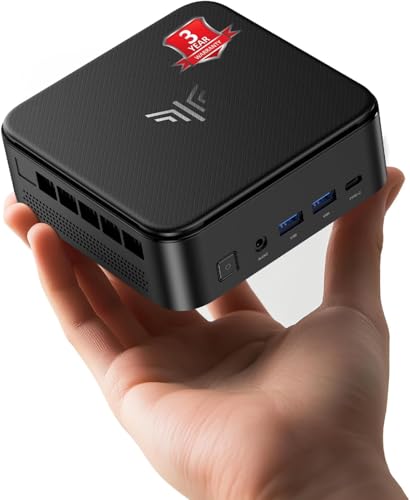
- Ryzen 7 7735HS with 8C/16T
- LPDDR5 RAM and SSD up to 4TB
- Triple 4K display support plus 2.5GbE
Best For: Users who want a compact, higher-performance mini PC for multitasking and light gaming
Best Value Gaming-Ready Mini PC

- Ryzen 7 7730U with 8C/16T
- 32GB RAM and 512GB PCIe SSD
- Triple-display output with WiFi 6E and 2.5G LAN
Best For: Buyers who want a compact, well-equipped mini PC for office work, streaming, and casual gaming
Quiet 4K-Friendly Pick
KAMRUI E3B Ryzen 7 Mini Gaming PC

- Ryzen 7 7730U with 8 cores and 16 threads
- 16GB LPDDR4X RAM and 1TB SSD included
- Triple-display output with 4K support
Best For: Casual gaming, office work, and multi-monitor setups
Best All-Rounder
Glorlin Ryzen 7 8745HS Mini Gaming PC

- Ryzen 7 8745HS with Radeon 780M graphics
- 16GB DDR5 RAM and 1TB NVMe SSD
- Quad 4K display support with USB4
Best For: Users wanting the strongest balanced mini PC for gaming and multitasking
Budget-Friendly Retro Option
GMKtec M5S Ryzen 3 Mini Gaming PC

- Ryzen 3 5400U with low-power efficiency
- 16GB DDR4 RAM and 512GB PCIe SSD
- Good for emulation, indie games, and older titles
Best For: Retro gaming and budget buyers who need a compact everyday PC
Editor’s Pick – ACEMAGICIAN S3A Ryzen 7 Mini Gaming PC
If you want mini desktop computers for gaming that can also handle creator work, the ACEMAGICIAN S3A brings strong all-around performance in a compact footprint. Its Ryzen 7 H 255 processor and Radeon 780M graphics are built for multitasking, casual gaming, streaming, and heavier productivity without taking over your desk.
Best For: Users who want a compact gaming PC that also doubles as a creator and productivity machine.
Pros:
- Ryzen 7 H 255 with 8 cores and 16 threads for responsive everyday performance.
- Radeon 780M graphics with RDNA 3 architecture for smooth casual gaming and visuals.
- Supports up to three 4K displays through HDMI, DP, and USB4 Type-C.
- Tool-free storage expansion up to 4TB for growing game and project libraries.
Cons:
- Ships with 16GB RAM and 512GB SSD, which may feel modest for larger game libraries.
- Gaming is described as casual rather than high-end AAA-focused.
- Performance depends on the selected power mode and cooling profile.
The S3A stands out as a flexible mini PC for buyers who want gaming ability without giving up workstation-style features. It’s a practical pick if you value display support, quiet operation, and future storage expansion.
Best Value Efficiency Pick – KAMRUI Pinova P2 Ryzen 7330U Mini PC
The KAMRUI Pinova P2 is a smart choice if you’re comparing mini desktop computers for gaming on a tighter budget and want a quiet, efficient system. Its Ryzen 7330U and integrated Radeon graphics are positioned for smooth multitasking, lighter gaming, and everyday use rather than high-wattage performance.
Best For: Buyers who want an efficient mini PC for light gaming, home use, and productivity.
Pros:
- Ryzen 7330U offers 4 cores, 8 threads, and a 15W TDP for efficient operation.
- Integrated Radeon graphics can drive triple 4K@60Hz displays.
- Two storage expansion slots support up to 4TB total.
- Very compact design with included VESA mount and quiet cooling.
Cons:
- 16GB RAM and 256GB SSD are more modest than some gaming-focused competitors.
- Graphics are aimed at light gaming and media, not demanding titles.
- Smaller chassis limits the overall upgrade headroom compared with larger mini PCs.
Overall, the Pinova P2 is best when efficiency, silence, and desk savings matter most. It’s a sensible entry point for light gaming and daily productivity in a tiny footprint.
Performance Favorite – Getorli Ryzen 7 6800H Gaming Mini PC
Among mini desktop computers for gaming, the Getorli mini PC stands out for buyers who want stronger hardware headroom. With a Ryzen 7 6800H processor, Radeon 680M graphics, 32GB of LPDDR5 memory, and a 1TB SSD, it is built to handle gaming, multitasking, and creative work in a compact desktop form.
Best For: Gamers and power users who want a compact PC with stronger memory and storage out of the box.
Pros:
- Ryzen 7 6800H with 8 cores, 16 threads, and up to 4.7 GHz boost.
- 32GB LPDDR5 RAM and a 1TB SSD for smoother multitasking and faster load times.
- Radeon 680M graphics for desktop-class integrated graphics performance.
- WiFi 6, Bluetooth 5.3, dual LAN, HDMI, and DisplayPort for flexible connectivity.
Cons:
- The notes emphasize compact power, but this is still an integrated-graphics gaming system.
- One HDMI port means some multi-monitor setups may rely on DisplayPort.
- 45W power draw is higher than low-power mini PC options.
If you want a mini PC that feels more fully spec’d for gaming and heavy multitasking, this model is easy to recommend. It offers a strong mix of memory, storage, and connectivity in a small chassis.
Balanced All-Rounder – ACEMAGIC K1 Ryzen 7 7730U Mini PC
The ACEMAGIC K1 is a balanced choice in mini desktop computers for gaming when you want a system that can also serve as an everyday workstation. Its Ryzen 7 7730U processor, Radeon Vega 8 graphics, and triple 4K display support make it suitable for light gaming, multitasking, and home office use.
Best For: Users who want a compact everyday PC that can also handle light gaming and creator tasks.
Pros:
- Ryzen 7 7730U delivers 8 cores, strong multitasking, and up to 4.5GHz boost.
- Radeon Vega 8 graphics are described as suitable for 1080p gaming and media use.
- Triple 4K@60Hz display support helps with productivity and multitasking.
- 1TB SSD and 16GB RAM provide a solid starting point for daily use.
Cons:
- Gaming focus is on light gaming rather than higher-end titles.
- 16GB RAM may be limiting for heavier creative workloads.
- Performance is tuned to a 15-28W TDP range, so it is not a desktop-replacement powerhouse.
The K1 makes sense if you want one mini PC to cover work, media, and occasional gaming without overcomplicating the purchase. It’s a practical all-rounder with useful display and connectivity features.
Budget-Friendly Everyday Mini PC – Ryzen 5 3500U Compact Desktop
If you want mini desktop computers for gaming on a tight budget, this Getorli model is best viewed as a light-duty option rather than a hardcore gaming machine. Its Ryzen 5 3500U, 16GB of DDR4 RAM, and 512GB NVMe SSD should make everyday use, streaming, and casual play feel responsive, while the compact case helps keep your desk clear.
Best For: Budget buyers who want a compact PC for everyday tasks, streaming, and very light gaming.
Pros:
- AMD Ryzen 5 3500U with 4 cores and 8 threads for basic multitasking
- 16GB RAM and 512GB NVMe SSD for quicker boot times and app loading
- Dual HDMI output supports up to two 4K displays
- WiFi 6 and Bluetooth 5.3 add modern wireless connectivity
Cons:
- Integrated graphics are better suited to casual or older games than demanding titles
- Storage and memory are expandable, but the starting specs are still budget-oriented
- Designed primarily for home office and streaming use, not high-end gaming
Overall, this is a practical entry-level mini PC for people who want compact size and decent day-to-day speed first, with gaming only as a secondary use. It fits best when your expectations stay focused on lighter workloads and simple entertainment.
High-Performance Triple-Display Mini PC – Ryzen 7 7735HS Triple Display
For shoppers comparing mini desktop computers for gaming, this KAMRUI unit stands out for its Ryzen 7 7735HS processor and stronger cooling setup. It is built to stay responsive under heavier multitasking, and its Radeon graphics, triple-display support, and fast networking make it a better fit for demanding everyday use and lighter gaming than entry-level minis.
Best For: Users who want a compact, higher-performance mini PC for multitasking, content work, and light gaming.
Pros:
- Ryzen 7 7735HS with 8 cores and 16 threads for stronger sustained performance
- LPDDR5 memory and 512GB SSD, with storage expansion up to 4TB
- Supports three 4K@60Hz displays for multitasking
- 2.5GbE Ethernet, WiFi 6, and Bluetooth 5.2 for fast connectivity
Cons:
- Integrated Radeon graphics are intended for light gaming, not top-tier AAA settings
- Compact systems can still be limited by thermal and power headroom versus larger desktops
- Ports are versatile, but the appeal is mainly performance rather than upgrade freedom
This is the strongest all-around pick in the group if you want a small desktop that can juggle work, media, and casual gaming with more confidence. It balances speed and efficiency well for users who need more than a basic mini PC.
Best Value Gaming-Ready Mini PC – GMKtec M5 Ultra Ryzen 7
This GMKtec M5 Ultra is one of the more appealing mini desktop computers for gaming if you want a value-focused system with stronger memory and network features. Its Ryzen 7 7730U, 32GB of dual-channel RAM, and 512GB PCIe SSD provide a solid base for productivity and casual gaming, while the triple-screen output makes it easy to spread out apps and media.
Best For: Buyers who want a compact, well-equipped mini PC for office work, streaming, and casual gaming.
Pros:
- Ryzen 7 7730U with 8 cores and 16 threads for solid everyday performance
- 32GB dual-channel RAM and 512GB PCIe SSD, with storage and memory expansion support
- Supports three 4K@60Hz displays for a flexible desktop setup
- WiFi 6E and 2.5G dual NIC LAN offer fast, low-lag connectivity
Cons:
- Integrated Radeon graphics are suitable for casual gaming rather than demanding titles
- Some performance behavior depends on BIOS power mode settings
- Compact cooling is good, but this is still not a replacement for a discrete-GPU gaming rig
If you want more memory out of the box and a well-rounded feature set, this model offers strong value in a small footprint. It is especially attractive for users who care about multitasking, multi-monitor use, and steady responsiveness.
Quiet 4K-Friendly Pick – KAMRUI E3B Ryzen 7 Mini Gaming PC
If you want mini desktop computers for gaming that also work well for everyday productivity, the KAMRUI E3B is a practical middle-ground option. Its Ryzen 7 7730U, 16GB LPDDR4X memory, and 1TB SSD give it enough speed for light gaming, multitasking, and fast app loading, while the compact 5.05-inch footprint keeps it easy to place on a desk or behind a monitor.
Best For: Casual gaming, office work, and users who want triple-display support in a small, quiet system.
Pros:
- Ryzen 7 7730U with 8 cores and 16 threads for solid everyday responsiveness.
- Integrated Radeon graphics and 4K triple-display support for flexible setups.
- 16GB RAM and 1TB SSD included, with room for more storage via two M.2 slots.
- WiFi 6, Bluetooth 5.2, and dual 2.5G networking options for modern connectivity.
Cons:
- Graphics are integrated, so it is better for casual gaming than demanding AAA play.
- RAM uses LPDDR4X, which is not the same as upgrade-friendly desktop memory.
- Best gaming results will depend on tuned settings rather than maxed-out visuals.
This is a good choice if you need a compact mini PC that balances work and light gaming without taking up much space. It stands out more for versatility, display support, and storage than for raw gaming power.
Best All-Rounder – Glorlin Ryzen 7 8745HS Mini Gaming PC
Among mini desktop computers for gaming, the Glorlin model is the strongest all-round option here thanks to its Ryzen 7 8745HS processor and Radeon 780M graphics. It pairs 16GB DDR5 memory with a 1TB NVMe SSD, giving you a responsive small system for daily work, casual gaming, and heavier multitasking across multiple displays.
Best For: Users who want the most capable integrated-graphics mini PC here for work, media, and light gaming.
Pros:
- Ryzen 7 8745HS with 8 cores and 16 threads for strong overall performance.
- Radeon 780M graphics for smooth 4K playback and many games at adjusted settings.
- Supports up to four 4K displays, which is great for productivity and multitasking.
- USB4, dual 2.5G LAN, WiFi 6, and Bluetooth 5.3 add modern connectivity.
Cons:
- It uses integrated graphics, so it is not meant for high-end dedicated-GPU gaming.
- Ships with a single 16GB memory stick, so the starting configuration is modest.
- Best suited to light gaming rather than pushing the newest titles at high settings.
If you want a compact machine with the best mix of speed, graphics, and expansion flexibility, this is the most compelling pick in the group. It feels especially strong for mixed-use buyers who care about both gaming and workstation-style features.
Budget-Friendly Retro Option – GMKtec M5S Ryzen 3 Mini Gaming PC
If your goal is to buy one of the more affordable mini desktop computers for gaming, the GMKtec M5S is aimed at light-duty play rather than demanding releases. Its Ryzen 3 5400U, 16GB DDR4 memory, and 512GB PCIe SSD make it suitable for office tasks, casual everyday use, and lightweight gaming such as emulation or older Steam titles.
Best For: Retro gaming, indie games, and buyers who want a low-power compact PC for work and play.
Pros:
- Ryzen 3 5400U offers quiet, efficient performance for everyday tasks.
- Radeon integrated graphics are described as suitable for lightweight and retro gaming.
- 16GB RAM and 512GB SSD provide a workable starter configuration.
- Triple-display support, WiFi 6, Bluetooth 5.2, and dual 2.5G LAN improve versatility.
Cons:
- Processor and graphics are entry-level compared with the other mini PCs here.
- Best gaming use is limited to older games, emulation, and indie titles.
- 512GB storage is serviceable, but smaller than the 1TB options in this roundup.
This model makes sense if you mainly want a compact, low-power system and only need casual gaming on the side. It is the least powerful pick, but also the one most clearly positioned for budget-conscious buyers.
How We Picked These Mini Desktop Computers for Gaming
We prioritized processors with strong multi-core performance, capable integrated graphics, and enough memory to keep gameplay smooth. We also looked at SSD capacity, cooling-friendly designs, and useful ports such as USB4, dual LAN, and multi-display support. For Mini Desktop Computers for Gaming, those details matter as much as raw CPU speed.
Quick Comparison
If you want the best overall gaming flexibility, look first at models with Ryzen 7-class chips and Radeon 780M or similar graphics. If you mainly play lighter games, older titles, or want a compact living-room PC, midrange Ryzen 5 and Ryzen 7 U-series systems can be enough. Systems with 32GB RAM and 1TB SSDs are better for multitasking, larger game libraries, and smoother background performance.
Key Buying Factors for Mini Desktop Computers for Gaming
Graphics Capability
Integrated graphics vary widely. Newer Radeon 780M-class solutions are far better for gaming than older Vega-based graphics, especially if you plan to play at 1080p. The GPU is often the biggest limiter in a mini PC, so it should be your first filter.
Processor Class
H-series and newer high-performance chips generally deliver better sustained gaming performance than low-power U-series processors. More cores and higher boost clocks help with modern games, streaming, and voice chat running at the same time.
Memory and Storage
For Mini Desktop Computers for Gaming, 16GB RAM is the practical minimum. 32GB is a better long-term choice if you keep many apps open or want more headroom. A 512GB SSD works for a few games, but 1TB is easier if you install larger AAA titles.
Ports, Displays, and Networking
Check how many monitors the system supports, whether it offers USB4 or fast USB-C, and if wired networking includes 2.5G LAN. Better connectivity improves both gaming and general use, especially for a compact desk or media-center setup.
Who Should Buy Which Mini Desktop Computers for Gaming?
Choose a higher-end mini PC with Ryzen 7-class performance and stronger graphics if you want the best chance at smooth 1080p gaming. Pick a balanced 16GB/512GB model if you mainly play competitive esports, indie games, or older AAA titles. Go with 32GB RAM and 1TB storage if you want the most comfortable all-around experience, especially for a growing game library and multitasking.
If your priority is value above all, a lower-cost option can still be a good fit for lighter gaming and everyday use. The right choice depends on whether you want maximum frame rates, more storage, or the best price-to-performance mix.