Choosing the right mini desktop computer for video editing is about more than raw specs. You need enough CPU power for timeline scrubbing, enough RAM for multitasking, and fast storage for large media files.
This roundup focuses on compact systems that balance performance, connectivity, and upgrade potential for creators who want a small footprint without sacrificing editing speed.
Best 10 Mini Desktop Computers for Video Editing Picks for 2026
Creator Value Pick

- Ryzen 9 6900HX handles smooth 1080p editing
- 24GB LPDDR5X RAM and 1TB PCIe 4.0 SSD
- Three 4K displays supported with quiet operation
Best For: Creators who want an affordable mini PC for 1080p editing
Business Powerhouse
HP Pro Mini 400 G9 with i7 and 32GB RAM

- Core i7-12700T delivers 12 cores and 20 threads
- 32GB RAM and 1TB SSD suit multitasking and storage
- Dual-monitor support plus Windows 11 Pro included
Best For: Small teams, home offices, and creators who want a compact desktop with stronger memory and storage
Creator-Ready Compact
MINISFORUM AI X1-255 for High-Speed Workflows
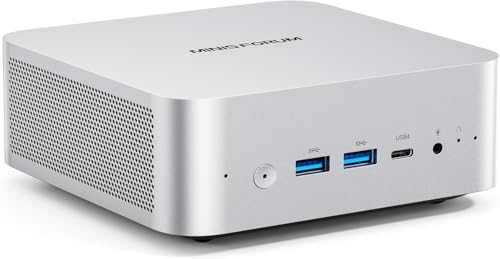
- Ryzen 7 255 with Radeon 780M for creative work
- 32GB DDR5 and dual PCIe 4.0 SSD slots
- USB4, OCuLink, and 4-screen output support
Best For: Content creators who want a compact, well-connected mini PC for editing and multitasking
Editor-Ready Power Pick
GEEKOM IT13 i9 32GB/2TB Mini PC
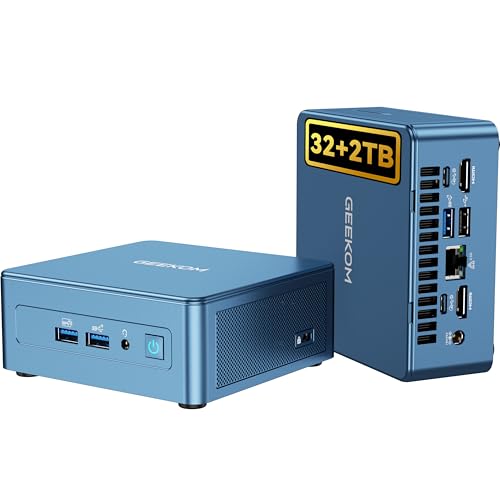
- Intel i9-13900H with 14 cores and 20 threads
- 32GB RAM and 2TB Gen4 SSD
- Dual USB4, dual HDMI, and 8K support
Best For: Creators who want a compact, fast editing machine
Balanced AMD Workhorse

- Ryzen 7 8745H with 8 cores and 16 threads
- Radeon 780M graphics for light editing tasks
- Triple display support via HDMI, DP, and USB4
Best For: Editors wanting a compact AMD mini PC with room to expand
Compact Creator Choice
GEEKOM A6 Ryzen 7 6800H Mini PC

- Ryzen 7 6800H with 45W performance
- 32GB upgradeable DDR5 and 1TB Gen4 SSD
- Radeon 680M, USB4, and dual HDMI
Best For: Creators who want a small, upgrade-friendly editing PC
AI-Ready Creative Workstation

- Core Ultra 9 185H with Intel Arc Graphics
- 24GB LPDDR5 and 500GB PCIe 4.0 SSD
- IceBlast 3.0 cooling for sustained workloads
Best For: Creators who want compact AI-assisted editing performance
Elite Space-Saver – HP Elite Mini 800 G9 for Enterprise Multitasking
If you want mini desktop computers for video editing that also double as a serious work machine, the HP Elite Mini 800 G9 is built around a 14th Gen Intel Core i5-14500 and a compact chassis that fits almost anywhere. It is better suited to light-to-moderate editing timelines, proxy workflows, and multi-monitor productivity than to heavy GPU-bound effects work, but its fast DDR5 memory, NVMe storage, and broad connectivity make it a practical desktop for creators who need a tidy setup.
Best For: Editors and professionals who need a compact, quiet Windows 11 Pro desktop for multitasking, multiple displays, and everyday creative workloads.
Pros:
- 14-core Intel Core i5-14500 delivers strong all-around performance for demanding workflows.
- Supports up to 4 displays through DisplayPort, HDMI 2.1, and USB-C with DisplayPort output.
- 16GB DDR5 RAM and 512GB PCIe NVMe SSD help with fast launches and smooth multitasking.
- Includes Windows 11 Pro, keyboard, mouse, Wi-Fi 6, and VESA mount compatibility.
Cons:
- Intel UHD 770 graphics are limited for intensive video effects and rendering.
- 512GB storage may fill quickly with large media files.
- Focused more on business productivity than creator-grade graphics performance.
This HP mini is strongest as a compact, business-first system that can handle editing-adjacent work and clean multi-monitor setups. For creators prioritizing space savings and stability over graphics power, it is an easy fit.
Creator Value Pick – BOSGAME P6 Ryzen 9 Mini PC
For buyers comparing mini desktop computers for video editing, the BOSGAME P6 stands out for its Ryzen 9 6900HX, 24GB of LPDDR5X memory, and 1TB PCIe 4.0 SSD. The notes specifically call out smooth 1080p editing in DaVinci Resolve, which makes it a strong value choice for lighter creative work, especially if you also want a compact system for travel, office tasks, or small multi-monitor setups.
Best For: Creators who want an affordable mini PC for 1080p editing, multitasking, and compact desk or travel use.
Pros:
- Ryzen 9 6900HX is positioned for smooth 1080p video editing and multitasking.
- 24GB LPDDR5X RAM and 1TB PCIe 4.0 SSD offer fast responsiveness and storage.
- Can drive three 4K displays at 60Hz through HDMI, DisplayPort, and USB-C.
- Quiet operation under 36dB and expandable storage up to 8TB add flexibility.
Cons:
- Better suited to light editing than demanding professional 4K workflows.
- Graphics are integrated Radeon 680M, not a discrete GPU.
- Bluetooth 5.3 requires a driver download to activate fully.
Overall, this is a strong value-focused mini PC for creators who need decent editing performance without moving up to a larger tower. It balances speed, portability, and quiet operation well for everyday content work.
Business Powerhouse – HP Pro Mini 400 G9 with i7 and 32GB RAM
The HP Pro Mini 400 G9 is one of the more practical mini desktop computers for video editing if your workload leans toward light-to-moderate timeline work, file management, and everyday production tasks. Its Core i7-12700T, 32GB of RAM, and 1TB SSD give it more headroom than basic office minis, while the compact case and dual-monitor output keep the desk footprint small and the workspace organized.
Best For: Small teams, home offices, and creators who want a compact desktop with stronger memory and storage for editing-adjacent work.
Pros:
- Intel Core i7-12700T offers 12 cores and 20 threads for strong multitasking.
- 32GB DDR4 RAM and 1TB PCIe NVMe SSD provide plenty of room for files and apps.
- Supports dual monitors through DisplayPort 1.4 and HDMI 2.1.
- Includes Windows 11 Pro, keyboard, mouse, Wi-Fi, Bluetooth, and Gigabit Ethernet.
Cons:
- Integrated graphics are not aimed at heavy visual effects or GPU acceleration.
- DDR4 memory is less current than DDR5-based competitors.
- Only dual-monitor support is highlighted in the notes.
This model is best viewed as a compact productivity machine that can support lighter video editing rather than a dedicated creator workstation. Its strong CPU, generous RAM, and large SSD make it appealing when workspace efficiency matters.
Creator-Ready Compact – MINISFORUM AI X1-255 for High-Speed Workflows
Among mini desktop computers for video editing, the MINISFORUM AI X1-255 is the most creator-oriented option here thanks to its Ryzen 7 255, Radeon 780M graphics, 32GB DDR5 memory, and dual PCIe 4.0 SSD slots. The notes point to support for multimedia editing, 4-screen display output, and fast USB4 connectivity, making it a strong match for users who want a compact machine with more performance headroom for creative projects.
Best For: Content creators who want a compact, well-connected mini PC for editing, multitasking, and high-resolution multi-display setups.
Pros:
- Ryzen 7 255 and Radeon 780M are built for heavy office work and multimedia editing.
- 32GB DDR5 RAM plus dual PCIe 4.0 M.2 slots support fast storage and expansion.
- USB4, HDMI, DisplayPort, and OCuLink enable flexible high-speed connectivity.
- Supports 4-screen output, Wi-Fi 7, 2.5G LAN, and includes built-in speakers and microphone.
Cons:
- It is still an integrated-graphics mini PC, so extreme effects work may be limited.
- OCuLink support depends on compatibility with the specified SSD slot and dock setup.
- Full-load noise is listed up to 45dB, so it is not the quietest option here.
If you want the most feature-rich compact system in this group for creator use, this MINISFORUM is a compelling pick. Its mix of fast memory, high-bandwidth ports, and strong integrated graphics gives it the best fit for modern editing workflows.
Editor-Ready Power Pick – GEEKOM IT13 i9 32GB/2TB Mini PC
If you want mini desktop computers for video editing that feel closer to a full workstation, the GEEKOM IT13 is built for serious multitasking. Its Intel Core i9-13900H, 32GB of RAM, and 2TB PCIe Gen4 SSD give you fast responsiveness for editing timelines, moving media, and keeping multiple creative apps open.
Best For: Editors and creators who need a compact, high-performance mini PC with strong storage and display flexibility.
Pros:
- 13th Gen Intel Core i9-13900H with 14 cores and 20 threads
- 32GB RAM and 2TB Gen4 NVMe SSD for fast project loading and multitasking
- Dual USB4 and dual HDMI support for up to four displays, including 8K output
- Metal mid-frame, quiet cooling, and 3-year warranty for dependable use
Cons:
- Integrated Iris Xe graphics, so it is not meant for demanding discrete-GPU workflows
- Premium feature set may be more than casual users need
This is a strong fit if your editing workflow values speed, expandability, and stable day-to-day reliability in a small footprint. The IT13 focuses on practical creator features rather than flashy extras, which makes it a smart long-term choice for compact editing setups.
Balanced AMD Workhorse – MINISFORUM UM870 Slim 8745H
The MINISFORUM UM870 Slim is a practical option among mini desktop computers for video editing if you want solid CPU speed and modern connectivity without going oversized. Its Ryzen 7 8745H, DDR5 memory, and PCIe 4.0 storage help it handle editing, browsing, and multitasking smoothly, while the Radeon 780M graphics add useful visual support.
Best For: Budget-conscious editors and creators who need a capable compact PC with triple-display output.
Pros:
- AMD Ryzen 7 8745H with 8 cores and 16 threads for responsive performance
- Radeon 780M integrated graphics for light editing and image work
- Triple display support with HDMI, DisplayPort, and USB4
- 16GB DDR5 RAM and 1TB PCIe 4.0 SSD, both expandable
Cons:
- Ships with 16GB RAM, so heavier projects may benefit from an upgrade
- Integrated graphics are better for light-to-moderate editing than advanced GPU-heavy workloads
For a compact editing setup, the UM870 Slim offers a nice balance of speed, expandability, and display options. It looks especially appealing if you want dependable everyday performance with enough headroom to grow.
Compact Creator Choice – GEEKOM A6 Ryzen 7 6800H Mini PC
The GEEKOM A6 is a compact pick for mini desktop computers for video editing when you want strong everyday performance in a small aluminum chassis. With a Ryzen 7 6800H, 32GB of upgradeable DDR5 RAM, and a 1TB Gen4 SSD, it is aimed at creators who need smooth multitasking, fast storage access, and reliable 4K-capable visuals.
Best For: Video editors, multitaskers, and creative professionals who want a small, upgrade-friendly system.
Pros:
- Ryzen 7 6800H with 45W desktop-class performance
- 32GB upgradeable DDR5 RAM and 1TB PCIe Gen4 SSD
- Radeon 680M graphics for 4K video editing and multi-monitor use
- USB4, dual HDMI, Wi-Fi 6E, and 2.5GbE for flexible connectivity
Cons:
- Integrated graphics are suited to efficient editing, not high-end discrete-GPU workflows
- Compact size means you should rely on its upgrade paths if your projects grow
The A6 stands out as a practical creator mini PC because it combines upgradeability with useful port selection and strong thermal design. It is a sensible choice if you want a small editing machine that can stay useful as your workload increases.
AI-Ready Creative Workstation – GEEKOM IT13 MAX, Ultra 9 185H
For mini desktop computers for video editing, the GEEKOM IT13 MAX is built for creators who want a compact system that can handle editing, multitasking, and AI-assisted workflows. Its Core Ultra 9 185H, Intel Arc Graphics, and built-in NPU are aimed at moving from brainstorming to actual production without unnecessary slowdowns.
Best For: Editors and creators who want an AI-friendly mini PC with strong multitasking and expandable storage options.
Pros:
- Core Ultra 9 185H with Intel Arc Graphics supports demanding visuals and video editing tasks.
- 24GB LPDDR5 5600MT/s memory helps keep multitasking fast and efficient.
- 500GB PCIe 4.0 SSD plus M.2 and SATA/HDD expansion gives you room for larger projects.
- IceBlast 3.0 cooling is designed to keep performance stable during long workloads.
Cons:
- Storage starts at 500GB, so serious video libraries may need expansion.
- Memory is fixed at 24GB in the supplied configuration.
- Best suited to users who value compactness over full desktop upgrade flexibility.
The IT13 MAX stands out if you want a small machine that can handle creative work plus supported AI features. Its cooling, support coverage, and easy-access design add practical value for long-term use.
High-End Editing And Expansion Pick – MINISFORUM M1 Pro-285H AI Mini PC
Among mini desktop computers for video editing, the MINISFORUM M1 Pro-285H is geared toward users who want strong CPU performance, fast storage, and plenty of display connectivity. With an Intel Core Ultra 9 285H, integrated Intel Arc graphics, and support for up to four 4K displays, it is built for demanding creative and multitasking setups.
Best For: Video editors and power users who want a premium mini PC with extensive connectivity and upgrade headroom.
Pros:
- Intel Core Ultra 9 285H and Intel Arc graphics support content creation and multimedia editing.
- Dual M.2 PCIe 4.0 slots, RAID support, and up to 128GB memory capacity offer strong expansion options.
- Quad-display output over HDMI, DP, and dual USB4 makes multi-monitor editing easier.
- Dual-fan cooling and phase change material are designed to manage heat under higher loads.
Cons:
- The feature set is broad, which may be more machine than casual editors need.
- OCuLink and RAID-focused expansion may be overkill for simple editing workflows.
- Premium connectivity and performance may come with a higher overall cost profile.
The M1 Pro-285H is a strong fit if you want a mini PC that can grow with heavier creative workloads. It combines editing-friendly power with unusually deep storage, display, and expansion support.
Value-Friendly 4K Editing Option – Getorli Ryzen 7 6800H Mini PC
If you want mini desktop computers for video editing without moving to the highest-end platform, the Getorli Mini PC offers a balanced spec sheet. Its Ryzen 7 6800H, Radeon 680M graphics, 32GB LPDDR5 memory, and 1TB NVMe SSD are positioned for high-definition editing, multitasking, and everyday creative work.
Best For: Editors who want a capable midrange mini PC for 4K workflows, multitasking, and multi-monitor use.
Pros:
- Ryzen 7 6800H and Radeon 680M are designed for high-definition video editing and 4K media.
- 32GB LPDDR5 RAM and a 1TB NVMe SSD provide a solid starting point for creative work.
- Triple 4K display support helps build an efficient multi-monitor editing setup.
- Dual LAN, WiFi 6, and BT 5.3 add flexible connectivity for home or office use.
Cons:
- It uses WiFi 6 rather than newer WiFi 7.
- Expandable storage tops out at 4TB total, which may still be limiting for large archives.
- It offers strong midrange capability, but not the newest CPU platform in this group.
The Getorli lands well for buyers who want practical editing performance with a roomy memory and storage setup. It is especially appealing if triple-display productivity matters more than chasing the latest platform.
How We Picked These Mini Desktop Computers for Video Editing
We looked for Mini Desktop Computers for Video Editing that offer strong multi-core CPUs, at least 16GB of memory, fast NVMe storage, and practical display output options. We also favored systems with upgrade-friendly designs, modern USB and network connectivity, and enough headroom for 1080p and 4K editing workloads.
Quick Comparison
For lighter editing and everyday creator work, efficient systems with 16GB to 24GB RAM can be a smart value. For more demanding multicam timelines, larger motion graphics projects, or frequent export jobs, 32GB RAM and higher-end processors are the safer choice. If you rely on external displays or fast peripherals, look closely at USB4, HDMI, DisplayPort, and 2.5G Ethernet support.
Key Buying Factors for Mini Desktop Computers for Video Editing
CPU Performance
Video editing benefits from strong sustained performance, not just a high peak boost clock. Look for modern Intel Core i7, Core Ultra, or AMD Ryzen 7 and above when possible, especially if you edit in apps that use CPU acceleration heavily.
Memory Capacity
16GB is the minimum comfortable baseline for simple editing, but 32GB is a better target for smoother multitasking and larger projects. If you work with effects, large codecs, or several apps open at once, extra RAM can make a noticeable difference.
Storage Speed and Capacity
Fast NVMe SSDs help with project loading, cache files, and export workflows. A 1TB drive is preferable if you store active media locally, while 512GB may be enough only if you offload footage to external storage.
Ports and Display Support
Mini Desktop Computers for Video Editing should have enough outputs for your monitor setup and enough fast ports for drives, card readers, and docks. USB4 is especially useful for high-speed accessories and external storage expansion.
Thermals and Upgradability
Compact systems can run hotter under long renders, so cooling quality matters. If you expect your workload to grow, choose a model with accessible RAM and SSD upgrades so the machine can keep pace over time.
Who Should Buy Which Mini Desktop Computers for Video Editing?
Choose a more affordable 16GB system if you mainly cut short-form content, social videos, or lightweight 1080p projects. Step up to 32GB RAM and a higher-tier CPU if you edit 4K footage, use Adobe Premiere Pro or DaVinci Resolve heavily, or render often.
If you need a small workstation for both editing and everyday office tasks, a business-class mini PC can be a strong fit. If your focus is creative performance first, prioritize stronger processors, larger SSDs, and better expansion support over the lowest price.