Frequent engraving demands more than a powerful laser. Work-area size, repeatable positioning, ventilation, software, and maintenance all affect how efficiently a machine handles daily projects.
We’ve compared 10 laser engravers across diode, infrared, and fiber-style configurations to help you choose a practical setup for crafts, personalization, prototyping, and small-business production.
Best 10 Laser Engravers for Frequent Use Picks for 2026
Powerhouse Pick

- 40W power with up to 600mm/s engraving
- Large bed and AutoPassthrough for oversized work
- Enclosed Class 1 safety design with rotary support
Best For: High-volume makers and small businesses
Production Specialist

- 20W fiber and diode lasers cover diverse materials
- 10,000mm/s speed supports rapid batch work
- Camera-assisted positioning and 3D embossing support
Best For: Commercial metal and mixed-material customization
Easy-Start Workhorse

- Pre-assembled and ready to use
- 600mm/s speed with 0.05mm accuracy
- Enclosed Class 1 design with camera positioning
Best For: Ready-to-run craft and small-business production
Budget Maker Option

- 5.5W laser with air-assist support
- 300-by-300mm work area for everyday projects
- Wi-Fi, offline, LightBurn, and LaserGRBL support
Best For: Budget-conscious hobbyists and small shops
Best Portable Speed
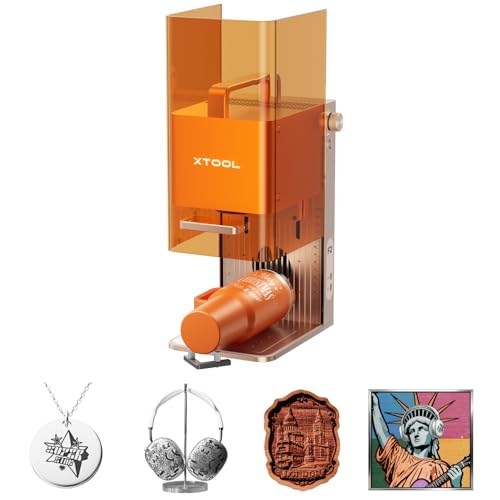
- 15W diode and 5W IR lasers support varied materials
- Up to 6000mm/s speed for rapid repeat jobs
- 50MP camera and enclosed portable design
Best For: On-site personalization and small-batch production
Best for Heavy-Duty Versatility

- 20W output with claimed 0.01 mm accuracy
- Automatic 60L/min air assist supports cleaner cuts
- Included 4-in-1 rotary system handles cylindrical items
Best For: Gift businesses and makers producing flat and rotary products
Best Enclosed Home Workstation

- Class 1 enclosed design suits home crafting
- Dual cameras support accurate Place & Go setup
- Optional modules expand printing and engraving capabilities
Best For: Home crafters and side-hustle personalization work
Power-Ready Production Pick

- 20W output with speeds up to 400mm/s
- Modular aluminum frame and precision motion system
- Works with LightBurn, LaserGRBL, and ATOMSTACK software
Best For: Frequent makers and small-scale production users
Compact Batch-Crafting Pick

- Near-A4 work area for compact projects
- Offline batch control and smart repeat-job memory
- Upgradeable with an optional IR laser head
Best For: Beginners and small businesses with limited workspace
Enclosed Small-Business Pick

- 20W power and 300×300mm work area
- Up to 20,000mm/min operating speed
- Fully enclosed with multiple safety features
Best For: Small businesses and makers handling repeat custom orders
Powerhouse Pick – xTool S1 40W Rotary Bundle
For frequent use, the xTool S1 combines high laser power, a large work area, and fast engraving speeds. Its 40W laser can cut up to 18mm cherry wood in one pass, while the rotary bundle supports projects on curved items.
Best For: High-volume makers and small businesses handling large signs, batches of small items, and rotary projects.
Pros:
- Large 23.93-by-15.16-inch bed and speeds up to 600mm/s
- AutoPassthrough supports projects up to 118 inches long
- Enclosed Class 1 design includes flame sensors, emergency stop, and lid-open protection
- Auto-focus and preset material settings simplify setup
Cons:
- Heavy at 86.8 pounds
- Its larger footprint may require a dedicated workspace
The S1 is a strong choice when productivity and project capacity matter more than portability. Its tested, enclosed design and workflow-oriented software make it particularly well suited to regular production.
Production Specialist – xTool F1 Ultra Dual Laser
The xTool F1 Ultra is built for frequent, material-diverse production. Its 20W fiber and 20W diode lasers cover metals, wood, acrylic, leather, glass, and more, with speeds up to 10,000mm/s and support for deep and 3D embossing work.
Best For: Businesses needing rapid customization across metal and nonmetal materials.
Pros:
- Dual lasers handle metals and many organic or synthetic materials
- Up to 10,000mm/s speed supports fast batch work
- 16MP camera helps recognize shapes and position designs
- Fully enclosed with smoke extraction, fire alarm, and emergency stop
Cons:
- Auto Conveyor for expanded batch production is sold separately
- Class 4 laser classification requires careful attention to the safety setup
- 220-by-220mm standard working area is smaller than the S1’s bed
For frequent commercial use, the F1 Ultra stands out for its combination of metal capability, high speed, and camera-assisted workflow. It is most compelling when customization variety and turnaround time are priorities.
Easy-Start Workhorse – Creality Falcon A1 10W
The Creality Falcon A1 is a practical option for frequent use when fast setup and consistent positioning are important. It arrives pre-assembled, reaches 600mm/s, and uses a built-in camera for material recognition and automatic positioning.
Best For: Makers and small businesses wanting an enclosed, ready-to-run engraver for wood projects, gifts, and curved items.
Pros:
- Pre-assembled with no setup required
- Up to 600mm/s speed and 0.05mm engraving accuracy
- Fully enclosed Class 1 design blocks 99% of laser light
- Compatible with Falcon Design Space, LightBurn, and LaserGRBL
Cons:
- Cannot be used on highly reflective materials such as mirror-finished metals
- Limited to compatible 460-by-346mm honeycomb panels
- Its 10W laser cuts less material in one pass than higher-powered models
The Falcon A1 balances convenience, safety, and speed without demanding a complicated installation. It is a sensible frequent-use choice for repeatable craft production, especially when pre-assembly and camera guidance can save time.
Budget Maker Option – Twotrees TTS-55 Pro
The Twotrees TTS-55 Pro is a compact, lower-power option for frequent hobby or small-business work. Its 300-by-300mm working area, wireless controls, offline engraving, and air-assist support make it suited to repeat projects involving wood, acrylic, leather, and other supported materials.
Best For: Budget-conscious makers and small shops producing moderately sized projects.
Pros:
- 5.5W laser can cut up to 5mm plywood, 3mm acrylic, and 0.7mm leather
- Air-assist nozzle supports cleaner, deeper cuts
- Engraving speeds reach 30,000mm/min
- Supports LightBurn, LaserGRBL, Wi-Fi, TF-card, and offline operation
Cons:
- Lower power and a 300-by-300mm area limit project size and cutting capacity
- Open-frame Class II design requires more hands-on safety precautions
- Installation is required rather than being fully pre-assembled
The TTS-55 Pro offers useful workflow features at a smaller scale, particularly for makers who value wireless or offline control. It is better suited to steady batches of modest projects than to large-format or heavy-production cutting.
Best Portable Speed – xTool F2 Dual-Laser Engraver
For frequent use where speed, portability, and material flexibility matter, the xTool F2 combines a 15W diode laser with a 5W IR laser. Its enclosed design, built-in camera, and claimed speeds up to 6000mm/s make it suited to repeat personalization work and small-batch production.
Best For: On-site customization, small businesses, and makers engraving varied materials, including metal items that benefit from IR color marking.
Pros:
- Dual lasers support engraving across more than 300 materials, including color marking on metal and 3D embossing.
- Built-in 50MP camera provides workspace visualization and up to 0.1 mm alignment accuracy on small pieces.
- Fully enclosed, leak-proof design with a built-in fan; optional purifier support is available for indoor use.
- Lightweight 4.6 kg design and fully assembled setup suit markets, fairs, and pop-up work.
Cons:
- The optional purifier, Slide Extension, and rotary accessories add to the overall investment.
- The compact portable format may be less suitable for users needing a large working area.
The xTool F2 is a strong choice among laser engravers for frequent use when fast turnaround and mobility are priorities. Its dual-laser setup expands material options, while the camera and enclosed construction help streamline repeat jobs.
Best for Heavy-Duty Versatility – ATOMSTACK A20 Pro V2
The ATOMSTACK A20 Pro V2 is built for frequent use that demands higher cutting power and rotary capability. Its 20W output, linear guide structure, automatic air assist, and included 4-in-1 rotary system create a practical setup for repeat work on wood, acrylic, leather, metal, and cylindrical items.
Best For: Small businesses and experienced makers producing personalized gifts, signage, tumblers, rings, and other cylindrical products.
Pros:
- 20W output and a claimed 0.01 mm engraving accuracy support detailed, high-contrast work.
- Up to 400mm/s engraving speed can reduce processing time for recurring jobs.
- Included 60L/min air assist helps clear smoke, reduce heat, and limit charring during cuts.
- R8 Roller, Chuck, Sphere, and Ring modules cover a broad range of cylindrical engraving tasks.
Cons:
- As a Class 4 laser, it requires careful operation and use of the supplied safety features.
- The open-frame format may require more workspace and ventilation planning than an enclosed machine.
- Its broader feature set may be more than needed for occasional flat-material engraving.
For frequent production work, the A20 Pro V2 stands out for combining strong diode output with rotary versatility and automatic air assist. It is especially compelling if cylindrical products make up a meaningful part of your order mix.
Best Enclosed Home Workstation – xTool M2 10W
The xTool M2 is a practical option for frequent home crafting and repeat gift orders when a fully enclosed, beginner-friendly machine is important. Its 10W diode laser, dual cameras, Class 1 design, and template-driven software support engraving and cutting on materials such as wood, leather, felt, fabric, paper, and cardstock.
Best For: Home crafters, DIY makers, and side-hustle sellers who want a safer enclosed workflow for recurring craft and personalization projects.
Pros:
- Class 1 enclosed construction with real-time monitoring is designed for safer home use.
- Dual cameras and the Place & Go workflow help position projects accurately and reduce guesswork.
- xTool Studio includes templates and an AI image generator for a simpler design process.
- Optional modules can add CMYK printing or 3W IR engraving capabilities.
Cons:
- The CMYK inkjet module and RA3 Lite Rotary are not included with this standalone model.
- The 10W diode configuration is less powerful than the 15W and 20W options in this roundup.
- The machine is substantially heavier and larger than the portable xTool F2.
The M2 is a sensible choice among laser engravers for frequent use when convenience, enclosure, and accessible software outweigh maximum cutting power. Budget for optional modules if you need printing, rotary work, or finer metal and plastic engraving.
Power-Ready Production Pick – ATOMSTACK A20 Pro V2
For shoppers comparing laser engravers for frequent use, the ATOMSTACK A20 Pro V2 stands out with 20W output, speeds up to 400mm/s, and a durable aluminum-alloy, modular frame. It is designed for repeated engraving and cutting across wood, acrylic, leather, and compatible metal projects.
Best For: Frequent makers and small-scale production users who prioritize speed, cutting power, and long-term support.
Pros:
- 20W output supports high-energy cutting and detailed engraving.
- Engraving speeds reach up to 400mm/s for faster project turnaround.
- Integrated linear guides, limit switches, and cross-line positioning support precise work.
- Supports ATOMSTACK software, LightBurn, and LaserGRBL, with lifetime technical support.
Cons:
- The 400×365mm work area may be limiting for especially large projects.
- Its 13.67-pound desktop design still requires a dedicated, stable workspace.
The A20 Pro V2 is a practical choice when frequent use calls for strong output and faster processing. Its safety features, replaceable parts, and stated 10,000-hour lifespan add reassurance for regular operation.
Compact Batch-Crafting Pick – K15 Pro 10W Laser Engraver
The K15 Pro is a compact option for laser engravers for frequent use, combining a near-A4 work area with verified 10W output, smart focus, and offline batch control. Its compact footprint suits home workspaces while still supporting repeated craft and small-business jobs.
Best For: Beginners, home crafters, and small businesses handling gifts, signage, tumblers, and other compact projects.
Pros:
- Near-A4, 11.8×7.9-inch work area fits many everyday projects without taking over a desk.
- Verified 10.36–10.58W output and dual-fan cooling are suited to repeated jobs.
- Supports wireless app control, LightBurn, LaserGRBL, and offline TF-card operation.
- One-touch focus, repeat-job memory, and three-minute assembly simplify regular use.
Cons:
- The smaller work area is less suitable for large signs or oversized batches.
- The optional IR head is required for the stated bare-metal expansion path.
With a starter kit, free software, community support, and a 1-year warranty, the K15 Pro is approachable for users who want frequent production without a bulky machine. Its upgrade path also leaves room to expand later.
Enclosed Small-Business Pick – L2 MAX 20W Laser Cutter
For laser engravers for frequent use in a home workshop or small business, the L2 MAX pairs 20W power with a 300×300mm work area and speeds up to 20,000mm/min. Its fully enclosed design and multiple control options make it suited to repeat cutting, engraving, and custom-order workflows.
Best For: Small businesses and makers producing larger designs, personalized goods, or small batches.
Pros:
- 20W power supports thicker wood cutting and detailed engraving.
- 300×300mm work area accommodates larger designs and multiple smaller pieces.
- Up to 20,000mm/min speed helps reduce turnaround time.
- Enclosure, flame detection, tilt protection, automatic shutdown, and emergency stop add operational safeguards.
Cons:
- At 16 pounds and over 21 inches wide, it needs substantial workspace.
- The supplied warranty description lists 1 year, which is shorter than some long-term support offerings.
The L2 MAX is a strong fit for frequent users who value throughput and a larger work area without giving up enclosed operation. Wi-Fi, USB, app, and TF-card control also provide flexibility for recurring production jobs.
How We Picked the Best Laser Engravers for Frequent Use
For this roundup, we focused on machines that can support repeated projects rather than occasional experimentation. We considered laser type and output, usable work area, cutting and engraving speed, enclosure design, camera-assisted alignment, air-assist capability, rotary compatibility, software workflow, and overall practicality.
Higher power can improve cutting performance, but it is not the only measure of productivity. A smaller enclosed machine with reliable alignment may be more useful for detailed personalization, while an open-frame model with a larger bed may better suit sheet materials and batch work. We also looked for features that reduce setup time and make results more consistent.
Quick Comparison
Use the product specifications to narrow your choices by workflow. The xTool S1, ATOMSTACK A20 Pro V2 models, and other larger-bed machines are suited to wood projects, signs, gifts, and batch layouts. Compact enclosed options such as the xTool M2, xTool F1 Ultra, and xTool F2 can be preferable when safety, portability, camera alignment, or mixed-material work matters most.
For metal marking, prioritize a machine with an infrared or fiber-capable laser rather than choosing solely by diode wattage. For frequent cutting, compare actual material thickness ratings, air-assist support, and ventilation requirements instead of relying only on advertised speed.
Key Buying Factors for Laser Engravers for Frequent Use
Laser Type and Material Range
Diode lasers are versatile for wood, leather, cardboard, and some coated materials. Infrared and fiber systems are better suited to many metals and detailed marking. Dual-laser machines offer broader material coverage but generally cost more and may require a more involved setup.
Work Area and Production Speed
Choose a bed that accommodates your largest regular project, with enough room for efficient batch layouts. Advertised speed is useful for comparison, but acceleration, focusing, material preparation, and repositioning often determine real throughput.
Safety, Ventilation, and Maintenance
An enclosed Class 1 design can simplify home or shared-workspace use, though fumes still need appropriate extraction. Open-frame machines require more attention to shielding, ventilation, fire prevention, and workspace control. Air assist, replaceable lenses, accessible optics, and a stable frame can reduce downtime.
Alignment and Workflow Features
Built-in cameras, autofocus, rotary support, offline controls, and compatible design software can save significant time during repeated jobs. Confirm that the included software supports your operating system and preferred file formats.
Who Should Buy Which Laser Engravers for Frequent Use?
Choose a compact enclosed model if you value convenience, cleaner operation, and detailed personalization. Choose a larger-bed diode engraver if you make signs, gifts, or multiple pieces in one run. Select a higher-powered cutter when thicker wood and faster production are central to your workload. For professional metal marking, prioritize the appropriate infrared or fiber configuration. If you are starting a small business, favor dependable alignment, air assist, serviceability, and workflow speed over maximum headline specifications.