Choosing the right large-format printer is about more than maximum width. You need dependable roll handling, sharp output, sensible ink costs, and a setup that fits your workflow.
This roundup of the best large format inkjet printers with roll feeders in 2026 focuses on practical value for CAD, posters, graphics, and mixed office use.
Best 10 Large Format Inkjet Printers with Roll Feeders Picks for 2026
Premium Fine-Art Pick
Canon imagePROGRAF PRO-4100 44-inch roll printer

- 44-inch roll-fed printing with fine-detail 2400 x 1200 dpi output
- 12-color pigment ink system supports vibrant, consistent color
- Color Density Sensor helps automate calibration and repeatability
Best For: High-end studios and photographers needing premium large-format roll printing
Technical Workflow Choice
HP DesignJet T650 36-inch roll plotter

- Handles 36-inch rolls and 13 x 19-inch sheets with auto switching
- HP Click software simplifies CAD, PDF, and poster printing
- Includes 2-year onsite warranty support
Best For: Architects and engineers who need reliable roll-fed plotting
Space-Saving Office Pick
Epson SureColor T5170 36-inch wireless plotter

- Compact wide-format printer with a small office-friendly footprint
- 31-second A1/D-size prints and a touchscreen control panel
- Wi-Fi Direct and wireless printing support mobile workflows
Best For: Small offices needing a compact, wireless 36-inch wide-format printer
Value Plotter Option
HP DesignJet T630 36-inch roll plotter

- 36-inch roll feed with automatic sheet switching and a media bin
- HP Click streamlines CAD, PDF, and poster jobs
- Ethernet, USB, and Wi-Fi connectivity fit shared office use
Best For: Budget-conscious technical teams that need a roll-fed 36-inch plotter
Roll-Feed Workhorse
Canon imagePROGRAF iPF770 36-inch Plotter

- 36-inch wide color printing
- Supports roll paper and common large-format media
- Ethernet and USB connectivity
Best For: Offices needing a dedicated print-only plotter
All-in-One Plotter
HP DesignJet T830 24-inch Multifunction Plotter
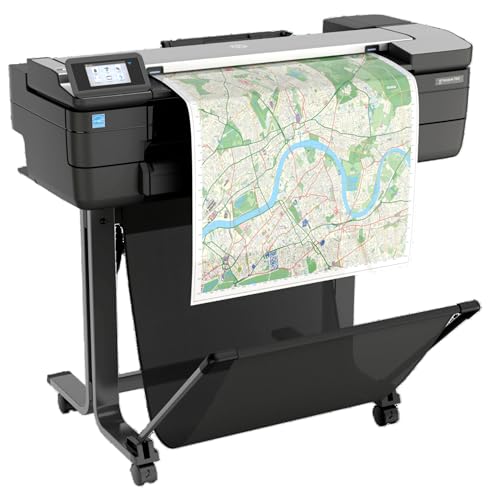
- Print, scan, and copy in one unit
- Roll feed for 11- to 24-inch media
- Wi-Fi, Ethernet, and mobile printing
Best For: Architecture and construction offices needing a compact MFP
Poster-Focused Choice
Canon imagePROGRAF TM-340 36-inch Poster Printer

- 36-inch roll-fed large-format printing
- Automatic media detection and color calibration
- Includes stand, catch basket, and starter ink
Best For: Poster and plot printing with simple setup
Pro Plotter Pick
HP DesignJet T210 24-Inch CAD & Poster Printer

- 24-inch roll feed with sheet feed support
- HP Click software simplifies PDF printing
- Includes 2-year HP Care Pack with onsite support
Best For: Architects and engineers needing efficient 24-inch roll printing
Versatile Multifunction Choice
Canon imagePROGRAF TC-21M 24" Multifunction Plotter

- Roll and cut sheet feeder for flexible media
- Flatbed scanner supports enlargements and copying
- USB, Wi-Fi, LAN, and cloud workflows
Best For: Offices needing a multifunction 24-inch plotter with scanning
Value Roll Printer
Canon imagePROGRAF TC-21 24" Poster Printer

- 24-inch roll printing with automatic sheet feeder
- Ships with 280 ml of ink included
- Wi-Fi, USB, and Ethernet connectivity
Best For: Users wanting a simple 24-inch roll printer with generous starter ink
Premium Fine-Art Pick – Canon imagePROGRAF PRO-4100 44-inch roll printer
If you need large format inkjet printers with roll feeders for gallery-style graphics, proofs, or premium posters, the Canon imagePROGRAF PRO-4100 is built for detail-first output. Its 44-inch roll handling, 12-channel print head, and 12-color pigment system make it a strong fit when color accuracy and repeatable results matter more than speed alone.
Best For: Professional studios, print shops, and photographers who want high-detail 44-inch roll printing with dependable color management.
Pros:
- 2400 x 1200 dpi resolution with 12-channel integrated print head technology for sharp, vibrant output
- Integrated Color Density Sensor supports automatic calibration for more consistent color reproduction
- 12 individual LUCIA PRO pigment ink tanks help extend use and manage ink costs
- Built-in Multifunction Roll System and roll holder support wide-format media up to 44 inches
Cons:
- Large 345-pound footprint requires substantial space and setup planning
- Print-only design may not suit users looking for scanning or copying
- Best value is tied to professional-volume workflows rather than casual use
Overall, the PRO-4100 stands out as a serious production printer for users who prioritize print quality, dependable calibration, and wide roll-fed media support. It is best suited to environments where large-format output is part of a professional workflow.
Technical Workflow Choice – HP DesignJet T650 36-inch roll plotter
For large format inkjet printers with roll feeders in technical and CAD-heavy workflows, the HP DesignJet T650 focuses on accuracy and ease of use. It handles up to 36-inch rolls and includes sheet-feed support, automatic sheet/roll switching, and HP Click software to streamline plotting, posters, maps, and line drawings.
Best For: Architects, engineers, and construction teams that need precise 36-inch roll printing plus simple multi-size job handling.
Pros:
- Supports up to 36-inch wide media rolls and 13 x 19-inch sheets with included sheet feeder accessory
- Automatic sheet/roll switch, media bin, and horizontal cutter simplify mixed-size jobs
- HP Click software adds PDF error checking, auto-nesting, and drag-and-drop printing
- Includes a 2-year onsite HP Care Pack for added support coverage
Cons:
- Designed for print-only use, so it will not replace an MFP workflow
- Max sheet capacity is limited compared with heavier-duty production systems
- Ink savings and CAD features matter more here than photo-centric output
The T650 is a practical choice when you want roll-feed convenience without a complicated setup. It is especially appealing for technical users who value clean line quality, easy file handling, and onsite warranty support.
Space-Saving Office Pick – Epson SureColor T5170 36-inch wireless plotter
The Epson SureColor T5170 is a smart option if you want large format inkjet printers with roll feeders in a smaller office-friendly package. It combines 36-inch wide-format capability with fast A1/D-size output, a touchscreen interface, and wireless connectivity so teams can print from tablets and smartphones with less friction.
Best For: Small offices and workgroups that need a compact 36-inch roll-fed printer with wireless convenience.
Pros:
- Prints A1/D-size output in 31 seconds, according to the supplied notes
- Ultra small footprint and 4.3-inch color touchscreen make it easier to fit and operate in tight spaces
- High-capacity cartridges reduce how often ink needs to be replaced
- Integrated wireless and Wi-Fi Direct support allow printing from mobile devices without a router
Cons:
- Maximum media size is 11 x 17 inches per the listed specs, so fit your workflow carefully
- Print-only function limits versatility for scanning or copying needs
- Best suited to office graphics and technical work rather than full production use
For teams that want a compact, easy-to-use wide-format printer, the T5170 balances speed, mobility, and simple operation. It is a strong fit when space is limited but roll-fed large-format output is still important.
Value Plotter Option – HP DesignJet T630 36-inch roll plotter
If you are comparing large format inkjet printers with roll feeders for CAD drawings, posters, or maps, the HP DesignJet T630 offers a streamlined path into 36-inch plotting. It includes roll feed, automatic sheet switching, a media bin, and HP Click software, making it easy to move between rolls and sheets without constant manual intervention.
Best For: CAD, graphics, and map users who want 36-inch roll printing with simple mixed-media handling.
Pros:
- Supports up to 36-inch roll media plus 13 x 19-inch sheets with the included automatic sheet feeder
- Automatic sheet/roll switch and horizontal cutter help reduce manual handling
- HP Click software adds drag-and-drop printing, PDF error checking, and auto-nesting
- Connectivity includes Ethernet, USB, and Wi-Fi for flexible office deployment
Cons:
- 1-year limited warranty is shorter than the T650’s included 2-year onsite support
- Print-only design does not cover scanning or copying needs
- Built for technical output, so it is less specialized for photo or art reproduction
The T630 is a sensible option for users who want roll-fed large-format printing with straightforward workflow tools. It is especially useful when mixed-size jobs and CAD output are the daily priority.
Roll-Feed Workhorse – Canon imagePROGRAF iPF770 36-inch Plotter
Canon imagePROGRAF iPF770 Inkjet Large Format Printer - 914.40 mm (36") - Colour - 5
Check Price On AmazonIf you need a large format inkjet printer with roll feeders for straightforward color plotting and poster work, the Canon imagePROGRAF iPF770 is built around fast, reliable output. It offers 36-inch wide printing, network-ready connectivity, and support for roll paper plus common media like glossy photo paper, banner paper, and high-resolution paper.
Best For: Offices that want a dedicated 36-inch color plotter for technical documents, banners, and everyday large-format printing.
Pros:
- 36-inch wide format with roll paper support
- Color ink system with five inks, including MBK
- Network-ready with Ethernet and USB connectivity
- 1-year on-site warranty included
Cons:
- Print-only device, so it does not scan or copy
- Uses a dedicated cartridge set, which may add ongoing consumable planning
- Simplex printing only
The iPF770 is a practical pick if your priority is dependable 36-inch output rather than multifunction features. Its roll-paper support and office-focused design make it a sensible fit for teams that need a large-format workhorse.
All-in-One Plotter – HP DesignJet T830 24-inch Multifunction Plotter
The HP DesignJet T830 is a strong option if you’re comparing large format inkjet printers with roll feeders and want scanning plus copying in the same device. It handles 11- to 24-inch rolls, includes an automatic cutter, and adds Wi-Fi and Gigabit Ethernet for flexible office setup.
Best For: Architecture and construction teams that need a compact large-format MFP for printing, scanning, and copying technical documents.
Pros:
- Multifunction design with print, scan, and copy
- Roll feed supports 11- to 24-inch media
- Wi-Fi and Gigabit Ethernet connectivity
- Automatic cutter and mobile printing support
Cons:
- Smaller 24-inch width than 36-inch plotters
- Heavier and larger than a basic desktop printer
- Uses HP 728 cartridges, so consumable costs matter
For teams that want one machine to handle project markups and document sharing, the T830 stands out for convenience more than raw size. Its roll-feed handling and MFP tools make it especially practical in busy technical offices.
Poster-Focused Choice – Canon imagePROGRAF TM-340 36-inch Poster Printer
The Canon imagePROGRAF TM-340 fits buyers who want a large format inkjet printer with roll feeders focused on clean poster and plot output. It supports 36-inch media, includes a stand and catch basket, and adds automatic media detection plus color calibration to simplify setup and keep results consistent.
Best For: Teams that print posters, proofs, and wide-format graphics and want easy setup with reliable color control.
Pros:
- 36-inch wide format with roll paper support
- Automatic media detection and color calibration
- Includes stand, catch basket, and starter ink tanks
- USB and Ethernet connectivity for wired workflows
Cons:
- Print-only design, so no scan or copy functions
- Uses a fixed cartridge set, which may require planning for replacements
- Heavier unit with a relatively large footprint
Overall, the TM-340 is aimed at users who value polished output and easy operation over multifunction extras. If your workflow centers on posters and wide-format prints, its automation features are a real advantage.
Pro Plotter Pick – HP DesignJet T210 24-Inch CAD & Poster Printer
If you want a dependable large format inkjet printer with roll feeders for CAD drawings, posters, maps, or sewing patterns, the HP DesignJet T210 is built around straightforward wide-format output. It supports up to 24-inch rolls, includes sheet feed and an automatic horizontal cutter, and is designed to simplify multi-size jobs without constant media switching.
Best For: Architects, engineers, and other professionals who need efficient 24-inch roll printing for technical and poster work.
Pros:
- Handles up to 24-inch wide media rolls plus sheet feed support.
- Includes HP Click software for PDF checking, auto-nesting, and drag-and-drop printing.
- Automatic horizontal cutter helps streamline wide-format output.
- 2-year HP Care Pack with onsite support adds extra peace of mind.
Cons:
- Print-only design means no scanning or copying functions.
- Optional automatic sheet feeder is needed for 13″ x 19″ sheets.
- Built for professional output, so it may be more than casual users need.
Overall, the T210 is a practical pick if your workflow centers on technical line work and roll-fed prints. Its software, cutter, and included support package make it a strong fit for a compact professional plotting setup.
Versatile Multifunction Choice – Canon imagePROGRAF TC-21M 24" Multifunction Plotter
The Canon imagePROGRAF TC-21M is a versatile large format inkjet printer with roll feeders that adds copying and scanning to poster and plotter printing. It supports 24-inch roll media, includes an automatic roll and cut sheet feeder, and uses a flatbed scanner for enlargements from smaller originals.
Best For: Offices and small teams that want a 24-inch multifunction plotter with scanning and enlarging features.
Pros:
- Automatic roll and cut sheet feeder supports flexible media handling.
- Flatbed scanner enables enlargements from smaller originals.
- USB flash drive printing adds a simple direct-output option.
- Cloud printing and scanning can streamline remote workflows.
Cons:
- 1-year manufacturer warranty is shorter than some bundled alternatives.
- Max media size is listed as A1, so very large jobs may not fit every use case.
- Designed for office productivity, not high-volume production printing.
For buyers who need more than basic print output, the TC-21M stands out by combining roll-fed large-format printing with copying and scanning. It is a sensible choice when flexibility matters more than raw specialization.
Value Roll Printer – Canon imagePROGRAF TC-21 24" Poster Printer
The Canon imagePROGRAF TC-21 is a practical large format inkjet printer with roll feeders for posters, labels, and everyday wide-format jobs. It prints up to 24 inches wide on roll media or from the automatic sheet feeder, and it ships with 280 ml of ink, which is a notable plus for setup value.
Best For: Buyers who want an affordable-feeling 24-inch roll printer with strong starter ink capacity.
Pros:
- Supports 24-inch roll media and automatic sheet feeding.
- Ships with 280 ml of ink, including 70 ml of each color.
- Built-in Wi-Fi plus USB and Ethernet connectivity.
- Top and front access makes maintenance and roll changes easier.
Cons:
- Print-only model, so it does not copy or scan.
- Maximum media size is listed as 11 x 17 inch in the specs provided.
- Not intended for users who need multifunction features.
The TC-21 is a straightforward choice if you want roll-fed poster printing without extra complexity. Its included ink supply and easy access design make it appealing for users who value convenience at setup and during maintenance.
How We Picked the Best Large Format Inkjet Printers with Roll Feeders
We prioritized models that make roll-based printing easier in real-world use: reliable media handling, usable print widths, strong color or line accuracy, and features that reduce manual intervention. We also weighed ink system efficiency, connectivity, and whether the printer is a better fit for technical drawings, posters, or multifunction office work.
Quick Comparison
In broad terms, 36-inch models are the sweet spot for most teams because they balance size, speed, and media flexibility. 24-inch printers are easier to place and usually cost less, while 44-inch machines are better for high-end graphics and larger production jobs. Multifunction units add scanning and copying, which can be valuable for project teams, but they also take up more space.
Key Buying Factors for Large Format Inkjet Printers with Roll Feeders
Print Width and Media Support
Start with the largest media size you truly need. If your work is mostly CAD, construction drawings, or standard posters, a 24-inch or 36-inch device may be enough. For gallery graphics, retail signage, or presentation work, wider formats can save trimming and rework.
Roll Handling and Workflow
Look for automatic roll loading, a media bin or catch basket, and clear support for different roll lengths and paper types. These features matter because Large Format Inkjet Printers with Roll Feeders are often chosen to reduce downtime and keep long print jobs moving.
Ink Type and Output Quality
Pigment ink is usually the safer choice for durable lines, archival work, and many business graphics. Dye-based systems can be excellent for color vibrancy, depending on the application. If you print both technical and presentation work, color consistency and calibration tools are especially important.
Connectivity and Software
Wi-Fi, mobile printing, and straightforward driver support can make a big difference in shared offices. For technical teams, compatibility with common CAD and PDF workflows is more important than extra consumer features.
Who Should Buy Which Large Format Inkjet Printers with Roll Feeders?
Design studios and sign shops should lean toward wider, higher-end models with strong color output and robust roll handling. Engineering and architecture teams may prefer 24-inch or 36-inch plotters with accurate line work, fast output, and easy networking. Small offices and growing teams should consider compact multifunction options if scanning and copying matter as much as printing.
If you want the simplest decision, choose the smallest width that meets your current projects, then prioritize roll feeder convenience, ink efficiency, and support features over extra bells and whistles.