If you need to digitize drawings, site plans, blueprints, or oversized project files, the right scanner can save hours and reduce handling damage. This roundup focuses on practical options for architectural workflows.
We compared large-format document scanners for architects across scan size, image quality, speed, and ease of use so you can choose the best fit for your office or studio.
Best 10 Large Format Document Scanners for Architects Picks for 2026
Office-Ready Wide Format Choice
Plustek S30 Large Format Desktop Scanner

- 12-inch wide scanning for plans and drawings
- 100-sheet duplex ADF for busy offices
- Automatic paper detection for mixed batches
Best For: Architecture offices that need one scanner for standard pages and wide-format plans
Compact Detail Scanner
Epson Perfection V19 II Flatbed

- 4800 dpi optical resolution for fine detail
- High-rise lid helps with books and documents
- USB powered and lightweight for portability
Best For: Small-format reference scans, books, and detailed images
A2 Overhead Capture System
VIISAN S21 Large Format Book Scanner

- A2 capture size for oversized originals
- 26MP camera with auto-flatten and OCR
- Great for books, maps, and reference material
Best For: Overhead scanning of large-format books, maps, and documents
Large-Format Flatbed Pick
Plustek OS1180 A3 Graphics Scanner

- A3/tabloid flatbed for oversized originals
- LED light source with no warm-up delay
- One-touch operation with OCR software
Best For: Occasional A3 scanning of drawings and documents
Compact Duplex Runner-Up
Epson WorkForce ES-C220 Portable Scanner

- Ultra-compact body saves desk space
- Duplex scans up to 30 ppm/60 ipm
- 20-page ADF for batch paperwork
Best For: Standard office paperwork in a small workspace
Professional A3 Flatbed
Plustek OpticPro A320E Large Format Scanner
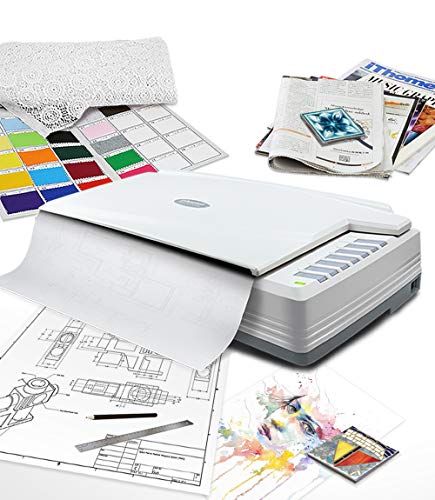
- 12" x 17" flatbed for A3 and wide-format originals
- CCD sensor geared toward color scanning
- TWAIN/WIA support with Windows, Mac, and Linux
Best For: Large-format drawings, maps, and bound materials
Compact Desk Scanner
ScanSnap iX1300 Wireless or USB

- Space-saving desktop design
- Fast duplex scanning up to 30 ppm
- USB or Wi-Fi for Mac, PC, and mobile
Best For: Day-to-day office paperwork in a small studio
A3 Flatbed Choice
VIISAN 3120 A3 Flatbed Scanner
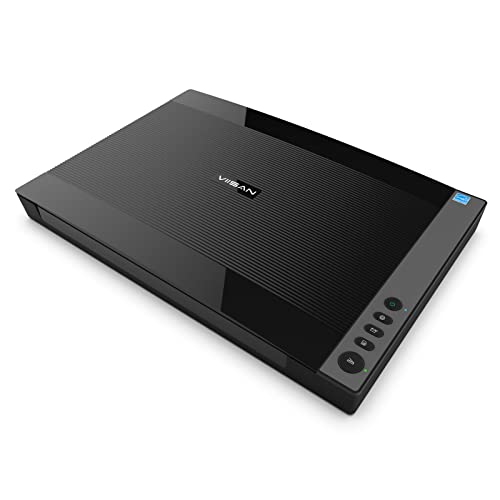
- Supports A3 originals up to 304 x 426 mm
- 1200 dpi optical resolution
- Fast 8-second scans at 200 dpi
Best For: Oversized flat drawings, books, and magazines
Office-Ready Wide Format Choice – Plustek S30 Large Format Desktop Scanner
If you’re comparing large format document scanners for architects, the Plustek S30 is built for mixed office workflows that include standard pages and wider materials like blueprints, architectural plans, and engineering drawings. Its 12-inch wide scanning and 100-sheet duplex ADF make it a practical fit when you need speed, space-saving design, and flexible paper handling in one desktop unit.
Best For: Architecture offices that need a compact scanner for plans, drawings, and everyday paperwork.
Pros:
- Scans up to 12 inches wide and handles documents up to 200 inches long.
- 100-sheet duplex auto document feeder supports high-volume office use.
- Handles blueprints, architectural plans, engineering drawings, and thin papers.
- Automatic paper detection helps reduce manual setup across mixed batches.
Cons:
- USB-only connection may not suit every workstation layout.
- Built around document scanning rather than photo-quality imaging.
The S30 stands out for offices that want one scanner for both standard paperwork and occasional wide-format jobs. If your team needs a desktop device that saves space while still covering architectural documents, it offers a strong balance of capacity and convenience.
Compact Detail Scanner – Epson Perfection V19 II Flatbed
The Epson Perfection V19 II is not a true large format document scanner for architects, but it can still be useful when your workflow includes smaller reference documents, sketches, books, or photo-based material. With 4800 dpi optical resolution, a removable high-rise lid, and USB power, it is a compact option when detail and portability matter more than wide-format throughput.
Best For: Architects who need a small flatbed scanner for detailed documents, reference images, and books.
Pros:
- 4800 dpi optical resolution delivers very high image detail.
- High-rise removable lid makes it easier to scan books and bound material.
- USB powered and lightweight for portable use.
- Includes ScanSmart software for searchable PDFs and Office file conversion.
Cons:
- Letter-size flatbed limits it for oversized architectural sheets.
- Standard sheet capacity is only 1, so it is not built for batch scanning.
For architecture teams, this model makes more sense as a secondary scanner than a primary wide-format solution. It is best when you want compact, high-detail scanning for smaller items rather than plans or drawings.
Fast Office Feeder Scanner – Canon imageFORMULA R30
The Canon imageFORMULA R30 is a straightforward office document scanner for teams that want fast duplex scanning and simple setup. For architects, it is useful for converting contracts, invoices, business cards, and mixed document batches into searchable digital files, though it is not designed for oversized plans or wide-format drawings.
Best For: Offices that need a quick, easy document feeder scanner for standard paperwork.
Pros:
- Scans both sides at up to 25 pages per minute.
- 60-sheet automatic feeder supports regular office batches.
- Built-in software requires no installation and updates automatically.
- Handles mixed document types, including documents, invoices, contracts, and business cards.
Cons:
- Not a wide-format model, so it will not handle architectural plans or blueprints.
- USB-only setup may be less flexible for shared environments.
If your priority is quick digitizing of everyday paperwork, the R30 is a practical choice. Architecture firms will still need a separate wide-format solution for plans, but this scanner can streamline the administrative side of the office.
A2 Overhead Capture System – VIISAN S21 Large Format Book Scanner
For architects who need a large format document scanner for oversized reference material, the VIISAN S21 is an overhead A2/A3 capture system rather than a traditional feeder scanner. Its 26MP camera, auto-flatten tools, and OCR features make it a strong fit for scanning books, journals, newspapers, maps, and other broad-format materials that don’t work well on a flatbed or ADF.
Best For: Teams that need overhead scanning for large-format books, maps, and reference documents.
Pros:
- A2 capture size handles large-format originals up to 594 x 420 mm.
- 26MP resolution with software-enhanced output up to 600 DPI.
- Auto-flatten, finger removal, and split-page tools improve book and document scans.
- OCR can convert scans into PDF or editable Word, Excel, EPUB, and TXT files.
Cons:
- Bundled software is not compatible with ARM-based devices.
- Designed for overhead capture, so it is less suited to high-speed office batching.
The S21 is best when document size and surface handling matter more than feeder speed. For architectural teams working with large books, maps, or reference material, it offers specialized capture tools that go beyond a conventional office scanner.
Large-Format Flatbed Pick – Plustek OS1180 A3 Graphics Scanner
If you need a straightforward option among large format document scanners for architects, the Plustek OS1180 is built for A3 and tabloid-size pages, drawings, and other oversized originals. Its flatbed design suits careful capture of plans and graphic documents, while the LED light source avoids warm-up delays for faster everyday use.
Best For: Architects, libraries, schools, and small offices that need occasional A3 flatbed scanning of drawings or documents.
Pros:
- Scans up to 11.7″ x 17″ A3/tabloid originals.
- LED light source means no warm-up hassle.
- One-touch buttons and included OCR software streamline routine tasks.
- Supports color and grayscale scanning for documents and art.
Cons:
- Flatbed design is better for individual sheets than high-volume batches.
- USB connection only, so it is not a network scanner.
Overall, the OS1180 is a practical large-format flatbed if your workflow centers on oversized sheets rather than stacks of paper. It emphasizes simple operation, decent scan speed for A3 pages, and software tools that help organize and make text searchable.
Compact Duplex Runner-Up – Epson WorkForce ES-C220 Portable Scanner
The Epson WorkForce ES-C220 is not a large-format document scanner for architects, but it can be a smart desktop choice when you need fast, space-saving scanning for standard paperwork. Its compact design, duplex capture, and 20-page ADF make it useful for scanning contracts, notes, and project admin without taking over your desk.
Best For: Architects who want a compact, portable document scanner for standard-sized office paperwork.
Pros:
- Very compact design saves desk space and is easy to move.
- Duplex scanning captures both sides in one pass at up to 30 ppm/60 ipm.
- 20-page ADF supports batch scanning of mixed document stacks.
- Includes image cleanup features like blank page deletion and skew correction.
Cons:
- Best suited to standard documents, not A3 or other oversized sheets.
- Uses a 20-page feeder rather than a flatbed for large originals.
For offices that primarily process paperwork rather than plans, the ES-C220 offers speed and convenience in a small footprint. It is a workflow scanner, not a drafting scanner, so it makes more sense as a secondary device alongside a true large-format model.
Professional A3 Flatbed – Plustek OpticPro A320E Large Format Scanner
For architects who need a true large format document scanner, the Plustek OpticPro A320E is designed for A3-sized sheets, wide-format paper, maps, drawings, and even odd-shaped originals. Its 12″ x 17″ scan area and CCD sensor are aimed at detailed color capture, while the flatbed format makes it easy to handle fragile or bound materials.
Best For: Architects and design offices that need a true A3 flatbed scanner for drawings, maps, and bound books.
Pros:
- Large 12″ x 17″ scan area handles A3 and wide-format originals.
- CCD sensor is well suited to color scanning.
- Supports batch scanning and saving to multiple PDF files.
- TWAIN/WIA support plus Windows, Mac, and Linux compatibility expand workflow options.
Cons:
- Flatbed scanning is slower and less automated than an ADF scanner for stacks.
- Requires a fairly large footprint on the desk.
The A320E is the most purpose-built option here for oversized architectural materials. If you need dependable flatbed scanning for drawings, maps, or books, it offers the right mix of size support, color-focused hardware, and broad software compatibility.
Compact Desk Scanner – ScanSnap iX1300 Wireless or USB
If you’re comparing large format document scanners for architects, the ScanSnap iX1300 is better viewed as a compact office scanner for everyday paperwork rather than a true A3 solution. It handles documents, photos, cards, and mixed stacks quickly, and its small footprint makes it easy to keep on a crowded desk or shared studio table.
Best For: Architects who need a space-saving scanner for permits, notes, receipts, and smaller design-office paperwork.
Pros:
- Space-saving design that stays out of the way on the desk
- Scans documents, photos, business cards, and thick items
- Up to 30 ppm duplex scanning with auto de-skew, color optimization, and blank page removal
- USB or Wi-Fi connectivity for Mac, PC, mobile devices, and cloud services
Cons:
- 20-sheet capacity is modest for larger scan batches
- Not designed for oversized architectural drawings or A3 plans
- Best suited to standard-size documents rather than true large-format sheets
For architecture teams that need a fast desktop scanner for routine paperwork, the iX1300 is practical and easy to use. It is a strong fit for general document capture, but buyers needing to scan full-size drawings should look at a dedicated flatbed large-format model instead.
A3 Flatbed Choice – VIISAN 3120 A3 Flatbed Scanner
For architects who need large format document scanners for architects use cases, the VIISAN 3120 is the most directly relevant option here because it supports A3-size material up to 304 x 426 mm. It is built for scanning drawings, books, magazines, newspapers, artwork, and other oversized flat items, making it a more natural fit for studio or library workflows.
Best For: Scanning A3 drawings, CAD documents, books, and other oversized flat originals.
Pros:
- Supports large documents up to 304 x 426 mm (11.98″ x 16.8″)
- 1200 x 1200 dpi optical resolution for detailed captures
- Fast 8-second scanning at 200 dpi for A3 color pages
- Frameless design helps with books, magazines, and thick items
Cons:
- CIS sensor is limited to flat paper images, not 3D items
- USB-only connection may be less flexible than wireless options
- WIA support is limited to 600 dpi; higher resolution needs the supplied software
This is the best fit in the group for oversized architecture documents because it is explicitly made for A3 scanning. If your workflow centers on flat drawings and reference materials, it offers the size and resolution that standard desktop scanners cannot match.
Portable Mobile Scanner – Epson Workforce ES-60W Wireless
If you need a lightweight companion for architecture work, the Epson WorkForce ES-60W is a portable document scanner rather than a large format model. It is built for quick single-sheet scanning on the go, with wireless support and battery power that make it easy to carry between meetings, jobsites, and the office.
Best For: Mobile scanning of contracts, receipts, and standard-size documents away from the desk.
Pros:
- Very compact and battery powered for mobile use
- Scans a page in as fast as 4 seconds
- Wireless scanning to PC, Mac, iOS, and Android devices
- Supports documents up to 8.5″ x 72″ plus ID cards and receipts
Cons:
- Single-sheet-fed design is not suited to large-format drawings
- Standard sheet capacity is only 1 page at a time
- Best for document capture, not oversized plan archiving
The ES-60W is a strong portable option when convenience matters more than page size. For architects who mostly need to digitize paperwork outside the studio, it is useful; for true large-format scanning, an A3 flatbed is the better choice.
How We Picked the Best Large Format Document Scanners for Architects
Our shortlist prioritizes real-world usability for architectural teams: supported paper size, scan quality for fine linework, workflow speed, and whether the scanner fits shared office use or mobile work. We also looked at software simplicity, duplex capability where relevant, and how well each model handles mixed document types beyond drawings.
Quick Comparison
Among Large Format Document Scanners for Architects, flatbed models are best for preserving detail on fragile originals, while sheet-fed scanners are faster for stacks of standard paperwork. Camera-style units can be useful when you need quick capture of bound materials, but they are usually less ideal than a true flatbed for archival-quality plan reproduction.
Key Buying Factors for Large Format Document Scanners for Architects
Supported Size
Confirm the maximum scan area matches the documents you handle most often. A3 and tabloid formats work for many offices, but firms regularly scanning larger drawings may need broader coverage or specialized capture workflows.
Image Detail and Line Accuracy
Architectural documents depend on crisp lines, annotations, and dimension marks. Look for strong optical resolution, good color reproduction, and sensors that preserve contrast without warping fine details.
Speed Vs. Precision
If you archive large project sets, faster duplex sheet-fed scanners can improve throughput. If you frequently scan original plans, sketches, or marked-up prints, a flatbed is often the safer choice because it reduces feed risk and supports careful placement.
Workflow and Sharing
Consider whether your team needs direct-to-PDF scanning, wireless access, portable operation, or a device that works cleanly with both Mac and PC environments. For busy offices, ease of setup matters almost as much as raw scan specs.
Who Should Buy Which Large Format Document Scanners for Architects?
Choose a large-format flatbed if your priority is accuracy and document preservation. Choose a sheet-fed scanner if your workload is mostly invoices, contracts, and standard office paperwork with occasional oversized needs. Choose a compact or wireless model if you split time between job sites, home offices, and client visits. For most architectural studios, the best option is the one that matches your most common document size and scanning frequency, not the one with the highest headline speed.