Digital whiteboard systems with built in cameras are becoming must-have tools for hybrid meetings, classrooms, and collaborative workspaces. They combine touch annotation, video capture, and app support in one display.
If you want a cleaner setup with fewer devices and better teamwork, this roundup highlights the best options for different room sizes, use cases, and budgets.
Best 10 Digital Whiteboard Systems with Built in Cameras Picks for 2026
Office-Ready 55" 4K Smartboard
55" Smart Board with 13MP Camera

- 55-inch 4K UHD touchscreen with 20-point touch
- Built-in 13MP camera, 8-array mics, and 2 x 20W speakers
- Open app ecosystem with wireless screen projection
Best For: Teams, classrooms, and home users needing an all-in-one conferencing board
Enterprise Collaboration Board
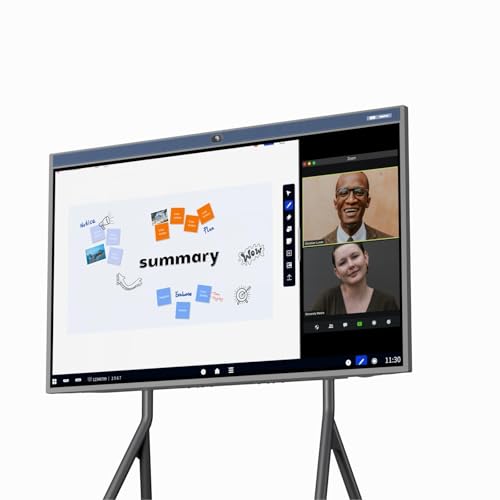
- 86-inch 4K touchscreen with infinite canvas
- AI 4K camera plus 24-mic array for hybrid meetings
- Supports Teams, Zoom, Google Meet, and WebEx apps
Best For: Large hybrid meeting rooms and classroom collaboration spaces
Google-Ready Classroom Smart Board

- Google EDLA-certified with Google Play and Workspace access
- 40-point touch with palm erase and split-screen tools
- Built-in camera, 8 mics, and AI noise reduction
Best For: Google-based classrooms, offices, and training rooms
Flexible 55" Collaboration Display
55" 4K Smart Board with Camera

- 55-inch 4K touchscreen with 20-point touch
- 13MP camera, 8 mics, and 20W speakers for calls
- Open app ecosystem with QR-code saving
Best For: Small to medium spaces needing a versatile meeting and teaching board
Elite 86-inch Dual-System Collaboration Hub
86" 4K Smart Board with Win 11 & Android 13
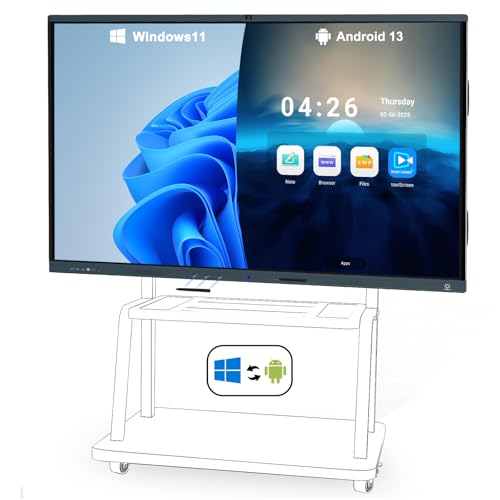
- Built-in AI camera and 8-array mics
- Windows 11 Pro plus Android 13
- 20-point touch with wireless sharing
Best For: Large classrooms and meeting rooms needing an all-in-one conferencing board
Classroom-Ready 55-inch Conference Board
55" Smart Board with 48MP Camera

- 48MP HD camera with dual 8-array mics
- Windows 11 and Android 13 dual systems
- 20-point touch with 6ms response
Best For: Wall-mounted classrooms and offices that want a high-resolution conferencing board
Compact 55-inch Android Collaboration Display
55 Inch Interactive Whiteboard with Stand

- Built-in 13MP camera and 8 mics
- Android 13 with WiFi 6 support
- 20-point touch and wireless projection
Best For: Flexible rooms that need a smaller smart board with a stand and conferencing tools
Executive Collaboration Hub
75" 4K Dual-System Smart Board

- Windows 11 Pro + Android 12.0 dual system
- AI camera auto-framing for video calls
- Mobile stand and wall-mount included
Best For: Conference rooms, classrooms, and hybrid collaboration
Classroom-Ready 4K Board

- 4K touchscreen with 20-point infrared touch
- Built-in UHD camera and 8-array microphone
- Wireless casting for up to 4 devices
Best For: Offices, classrooms, and compact collaboration spaces
Wall-Mounted Meeting Display
- Wall-mounted version for permanent rooms
- 4K touchscreen with built-in UHD camera
- Android 13 with wireless casting support
Best For: Fixed conference rooms and classrooms
Office-Ready 55" 4K Smartboard – 55" Smart Board with 13MP Camera
This digital whiteboard system with built in cameras is built for teams that need a simple all-in-one display for meetings, teaching, and remote collaboration. The 55-inch 4K touchscreen, 13MP camera, 8-array mics, and dual 20W speakers make it a practical setup for video calls and annotation in one place.
Best For: Offices, classrooms, and home users who want a wall-mounted smart board for conferencing and whiteboarding.
Pros:
- 4K UHD 55-inch touchscreen with 20-point multi-touch for notes and annotations.
- Built-in 13MP camera, 8-array microphones, and 2 x 20W speakers for conferencing.
- Open app ecosystem for downloading work, learning, or entertainment apps.
- Wireless projection and reverse touch control support collaborative presentations.
Cons:
- Wall mount is included, but a mobile stand requires a separate purchase.
- Only one HDMI port and one USB port are listed in the specs.
Overall, this model is a strong fit if you want a straightforward smartboard that combines whiteboarding and video meetings without extra hardware. Its feature set is broad, but it stays focused on practical everyday use.
Enterprise Collaboration Board – 86" AI 4K Meeting Whiteboard
For larger rooms, this digital whiteboard system with built in cameras is designed to combine hybrid meetings, whiteboarding, and casting in one device. The 86-inch screen, AI 4K camera, and 24-mic array are aimed at creating a more capable collaboration hub for office or school use.
Best For: Large meeting rooms, hybrid collaboration spaces, and classrooms that need a wall-mount or mobile-stand option.
Pros:
- 86-inch 4K touchscreen with multi-touch and infinite canvas for broad collaboration.
- Built-in AI 4K camera and 24-element microphone array for video meetings.
- Supports gallery view, speaker tracking, and auto framing for hybrid calls.
- Open ecosystem supports common apps like Teams, Zoom, Google Meet, and WebEx.
Cons:
- Large-format design may be more than smaller rooms need.
- Feature-rich setup may take more planning than a basic classroom display.
This is the most meeting-focused option in the group, especially if camera quality, voice pickup, and large-screen visibility matter. It is built to handle serious collaboration rather than casual whiteboarding alone.
Google-Ready Classroom Smart Board – 55" EDLA-Certified Whiteboard
If you want a digital whiteboard system with built in cameras that also fits into the Google ecosystem, this 55-inch smart board is a strong candidate. It pairs 4K touchscreen writing with Android 14, Google EDLA certification, and classroom-focused tools for annotation, sharing, and interactive lessons.
Best For: Schools, offices, and training rooms that rely on Google apps and interactive teaching tools.
Pros:
- Google EDLA-certified with access to Google Play, Workspace, and Education Suite.
- Built-in camera, eight-array microphones, and AI noise reduction for meetings.
- 40-point touch with palm erase, split screen, and handwritten annotation tools.
- 8GB+128GB storage and Android 14 for a more modern software foundation.
Cons:
- Camera details are not as specific as some competing models.
- Single-wall-mount package may limit placement flexibility for some buyers.
Compared with more generic boards, this one stands out for its Google certification and education-friendly workflow. It suits buyers who want app access and classroom tools alongside the usual whiteboard and meeting functions.
Flexible 55" Collaboration Display – 55" 4K Smart Board with Camera
This digital whiteboard system with built in cameras is aimed at buyers who want a practical 55-inch collaboration screen for home, office, or classroom use. It combines a 4K touchscreen, Android 13, 13MP camera, 8 mics, and wireless projection into a straightforward presentation and meeting tool.
Best For: Small to medium rooms that need a versatile smart board for calls, annotation, and content sharing.
Pros:
- 55-inch 4K touchscreen with 20-point touch for shared use.
- 13MP camera, 8 microphones, and 20W speakers support video calls.
- 6ms response time helps keep on-screen writing and annotation responsive.
- Open app ecosystem and QR-code saving support everyday productivity.
Cons:
- Only one HDMI port is listed in the specs.
- Mobile stand is not clearly included, so buyers may need to plan mounting separately.
As a general-purpose smartboard, this model keeps the core collaboration features front and center without overcomplicating the setup. It is a sensible option if you want built-in camera support and multi-user sharing in a familiar 55-inch format.
Elite 86-inch Dual-System Collaboration Hub – 86" 4K Smart Board with Win 11 & Android 13
If you’re comparing digital whiteboard systems with built in cameras for a classroom, office, or meeting room, this 86-inch smart board is built around all-in-one collaboration. It combines Windows 11 Pro and Android 13, plus an AI auto-framing camera and 8-array microphones, so video calls and shared whiteboarding can happen from the same display.
Best For: Large rooms that need a dual-OS interactive board with built-in video conferencing hardware.
Pros:
- Windows 11 Pro and Android 13 dual system for flexible app use
- Built-in AI camera and 8 microphones for remote meetings
- 20-point touch support with palm or back-of-hand erase
- Wireless and wired screen sharing from iOS, Windows, and Android
Cons:
- 86-inch size may be more than smaller rooms need
- Listed as floor standing, which may affect placement flexibility
- Best suited to users who want a full room hub, not a simple display
This model stands out when you want presentation, annotation, conferencing, and app access in one unit. The included Mini PC, wall mount, stylus, and cables make it a practical turnkey option for teams that want fewer external devices.
Classroom-Ready 55-inch Conference Board – 55" Smart Board with 48MP Camera
This 55-inch option is a practical pick for buyers looking at digital whiteboard systems with built in cameras for classrooms, offices, or home use. It pairs Windows 11 and Android 13 with a built-in 48MP HD camera, dual 8-array microphones, and stereo speakers, giving it the core hardware needed for meetings and lessons.
Best For: Teams and educators who want a wall-mounted smart board with a high-resolution camera and dual operating systems.
Pros:
- Built-in 48MP HD camera with dual 8-array microphones
- Windows 11 and Android 13 dual-system setup
- 20-point multi-touch with 6ms response time
- Supports Zoom, Google Meet, Teams, Webex, and screen mirroring
Cons:
- Wall mount is included, but no mobile floor stand is provided
- Smaller 55-inch format may be limiting for larger rooms
- Designed around a fixed installation rather than portable use
Its mix of camera quality, open app ecosystem, and collaboration features makes it a strong fit for everyday teaching or business meetings. The build details and 3-year parts replacement warranty add extra appeal for buyers planning a more permanent setup.
Compact 55-inch Android Collaboration Display – 55 Inch Interactive Whiteboard with Stand
If you want digital whiteboard systems with built in cameras in a more compact, movable format, this 55-inch interactive whiteboard is designed for everyday presentation and collaboration. It runs Android 13, includes a built-in 13MP camera, 8-array microphones, and 2x20W speakers, and comes with a stand for easier placement in office, classroom, or home settings.
Best For: Buyers who want a smaller smart board with built-in conferencing hardware and a stand included.
Pros:
- Built-in 13MP camera, 8 microphones, and stereo speakers
- Android 13 with 8-core CPU, 8GB RAM, and 64GB storage
- 20-point touch with 6ms response speed
- Supports wireless projection and app downloads
Cons:
- Single Android system only, unlike dual-OS rivals
- 13MP camera is less specified than higher-resolution alternatives
- 55-inch size may not suit larger conference rooms
It makes sense for users who want a straightforward interactive board with built-in video-call hardware and easy setup. The included stand and open app ecosystem help it work well as a flexible presentation screen without requiring a lot of extra equipment.
Executive Collaboration Hub – 75" 4K Dual-System Smart Board
If you’re comparing digital whiteboard systems with built in cameras for meetings, teaching, or hybrid presentations, this 75-inch board stands out for its dual-system setup and AI camera. It combines Windows 11 Pro and Android 12.0, so you can switch between work apps, conferencing tools, and classroom software without feeling boxed in. The built-in camera also uses auto-framing to keep participants centered during video calls.
Best For: Conference rooms, classrooms, and teams that want an all-in-one board with flexible OS support.
Pros:
- Dual-system design with Windows 11 Pro and Android 12.0
- AI camera with auto-framing for video meetings and classes
- Includes a mobile stand with lockable wheels plus wall-mount option
- Supports 20-point touch, palm/back-hand erasing, and 2mm precision
Cons:
- Large 75-inch size may be too much for smaller rooms
- More advanced than a basic whiteboard, so setup may take planning
This is a strong pick if you want one large board to handle collaboration, apps, and video calls in one package. Its combination of a built-in AI camera, open software ecosystem, and flexible mounting makes it especially practical for shared spaces.
Classroom-Ready 4K Board – 55" Webcam Smart Board
For buyers shopping digital whiteboard systems with built in cameras, this 55-inch MWE board focuses on presentation clarity, touch responsiveness, and easy wireless sharing. It pairs a 4K touchscreen with a built-in UHD camera and 8-array microphone, making it a practical fit for meetings, lessons, and collaborative reviews. The Android 13 host system also supports app installation for more tailored workflows.
Best For: Offices, classrooms, and home workspaces that want a compact all-in-one board with a built-in camera.
Pros:
- 4K display with 20-point infrared touch control
- Built-in 1300W-pixel camera and 8-array microphone
- Wireless screencasting supports up to 4 devices at once
- Android 13 system with app installation and HDMI support
Cons:
- 55-inch size may be limiting for larger rooms
- Glossy screen finish may not suit every bright environment
This board is a solid middle-ground option if you want strong camera and casting features without moving to a larger display. Its durability features and open app support make it especially useful for everyday shared spaces.
Wall-Mounted Meeting Display – 55" Fixed Smart Board
If you want digital whiteboard systems with built in cameras in a permanent installation, this wall-mounted 55-inch MWE board is built for stable everyday use. It keeps the same 4K touchscreen, built-in UHD camera, and 8-array microphone found in the other model, but swaps the mobile setup for a wall-mounted format. That makes it a better fit for rooms where the board will stay in place and serve as a shared meeting or teaching display.
Best For: Fixed conference rooms, classrooms, and offices that prefer wall-mounted installation.
Pros:
- Wall-mounted format for a permanent room setup
- 4K touchscreen with built-in UHD camera and microphone array
- Supports wireless screencasting from up to 4 devices
- Android 13 system with app installation and HDMI input
Cons:
- No mobile stand included, so placement is less flexible
- 55-inch size may be small for larger meeting areas
This version makes sense if mobility is not a priority and you want a cleaner, fixed install. It delivers the same core collaboration tools while keeping the setup straightforward for rooms that are used the same way every day.
How We Picked These Digital Whiteboard Systems with Built in Cameras
We focused on all-in-one boards that balance display quality, camera performance, system flexibility, and ease of use. Priority went to models with 4K panels, responsive touch input, strong onboard camera features, and practical collaboration tools for real-world meetings and lessons.
We also considered whether the systems support common workflows like wireless sharing, annotation, video calls, and multi-user interaction. For buyers comparing Digital Whiteboard Systems with Built in Cameras, reliability and setup simplicity matter just as much as raw specs.
Quick Comparison
Smaller 55-inch boards are usually the best fit for offices, huddle rooms, and home training spaces. Larger 75-inch and 86-inch models are better for classrooms, conference rooms, and larger teams that need improved visibility from a distance.
Camera and audio quality also separate the categories. Some models prioritize integrated AI cameras and microphone arrays for conferencing, while others focus more on whiteboarding, app ecosystems, and touchscreen responsiveness.
Key Buying Factors for Digital Whiteboard Systems with Built in Cameras
Display Size and Resolution
Choose the screen size based on viewing distance and group size. A 4K display is the sweet spot for crisp text, detailed diagrams, and shared presentations.
Camera and Audio Quality
Built-in cameras should provide clear framing and usable image quality for meetings or remote instruction. If your team relies on video calls, look for stronger microphone arrays and camera enhancements rather than treating the camera as a secondary feature.
Operating System and App Support
Some boards run Android-based systems, while others use dual systems or add Windows support. More flexibility can be helpful if you need broader app access or compatibility with existing workflows.
Touch Performance and Collaboration Features
Multi-touch support, smooth annotation, and fast response times make a big difference in daily use. For shared work, consider whether the board supports multiple users and easy content sharing.
Installation and Room Fit
Think about mounting, cable management, and the space available around the display. A board that fits the room well will be easier to adopt and more comfortable to use.
Who Should Buy Which Digital Whiteboard Systems with Built in Cameras?
If you need a compact solution for meetings or a home office, a 55-inch model is usually the most practical choice. For classrooms, training rooms, and larger collaborative spaces, 75-inch and 86-inch boards offer better visibility and presence.
Buyers who want the most straightforward experience should look for models with strong app ecosystems and simple setup. Teams that rely heavily on video collaboration should prioritize camera and microphone quality first, then compare touch features and operating system options.