Need a scanner that can handle wide pages without turning every scan into a manual chore? The best large format document scanners with automatic feeders save time, reduce feed errors, and make batch digitizing far more practical.
Below, we break down the top options for offices, home workspaces, and anyone who needs reliable duplex scanning with less hassle.
Best 10 Large Format Document Scanners with Automatic Feeders Picks for 2026
Wide-Format Office Workhorse
Plustek S30 Large Format Scanner

- 12-inch-wide scanning with 200-inch long document support
- 100-sheet duplex ADF for high-volume office jobs
- Automatic paper detection for mixed-size scanning
Best For: Offices needing one scanner for standard and wide-format paperwork
Compact High-Speed Feeder
Ambir ImageScan Pro 830ix ADF Scanner

- 30 ppm duplex scanning for fast batch work
- Compact design with automatic feeder support
- Handles paper plus business and ID cards
Best For: Small counters and offices that need quick, space-saving scanning
Heavy-Duty Desktop Feeder

- 100-sheet feeder for frequent batch scanning
- Desktop design for office workflows
- Simple USB connection and 17-watt power draw
Best For: Busy offices that need a robust high-capacity paper scanner
Smart Cloud Feeder
ScanSnap iX2500 Wireless Scanner

- 45 ppm duplex scanning with a 100-sheet feeder
- Wi-Fi 6, USB-C, and cloud-enabled sharing
- Sensors and rollers help prevent jams and misfeeds
Best For: Users who want fast connected scanning for everyday office documents
High-Detail Office Scanning
Epson Workforce GT-1500 Sheet-Fed Scanner
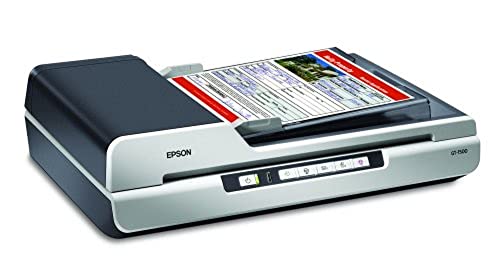
- 1200 x 2400 dpi resolution
- 40-page automatic document feeder
- Scans up to 20 ppm
Best For: Small offices needing sharper scans and simple batch feeding
Customizable Batch Scanning
Plustek PS186 Desktop Document Scanner
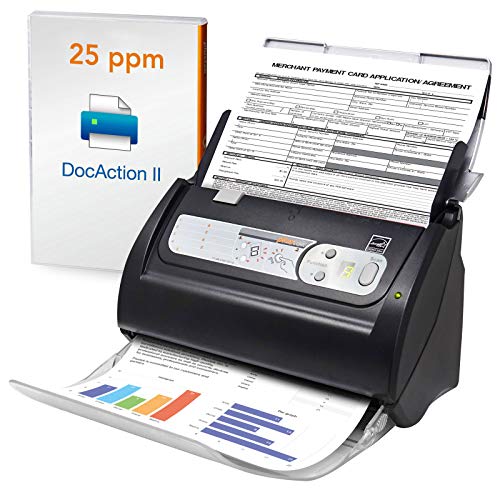
- 50-page automatic document feeder
- OCR for searchable, editable PDFs
- Single Touch profiles with up to 255 settings
Best For: Windows users who want flexible batch scanning and file automation
Fast Duplex Office Pick
Epson WorkForce ES-400 II High-Speed Color Duplex Desktop Scanner

- 50-sheet ADF for faster batch scanning
- Duplex scanning with double feed detection
- OCR and ScanSmart software streamline files
Best For: Small offices and home users needing fast, reliable document scanning
Custom Workflow Value Pick
Plustek PS188 High Speed Double-Sided Color Document Scanner

- 50-page ADF with 30 ppm duplex scanning
- 255 scan profiles for repeatable workflows
- Barcode naming and full-text search tools
Best For: Windows users who want customizable, efficient document workflows
Wide-Format Office Workhorse – Plustek S30 Large Format Scanner
If you need large format document scanners with automatic feeders for mixed office jobs, the Plustek S30 is built for practical high-volume use. It scans tabloid, ledger, A3, and documents up to 12 inches wide, while the 100-sheet duplex ADF helps keep longer jobs moving without constant reloading.
Best For: Offices that regularly scan standard paperwork plus occasional wide-format sheets, plans, or long documents.
Pros:
- Scans documents up to 12 inches wide and as long as 200 inches.
- 100-sheet duplex automatic document feeder supports high-volume workflows.
- Can scan A4/Letter and 12-inch-wide documents at the same time for flexibility.
- Automatic paper detection helps handle mixed document sizes without manual setup.
Cons:
- USB connection only, so it is best suited to a desktop scanning setup.
- Windows 7 is the minimum system requirement listed.
- Its larger wide-format capability may be more scanner than a small office needs.
The S30 is a smart choice if wide documents are part of the job but do not justify a separate specialty device. Its blend of feeder capacity, automatic detection, and broad paper handling makes it a strong office-friendly option.
Compact High-Speed Feeder – Ambir ImageScan Pro 830ix ADF Scanner
For buyers comparing large format document scanners with automatic feeders, the Ambir ImageScan Pro 830ix is really about fast everyday feeding in a very compact body. It handles duplex scanning and supports documents plus cards, making it useful for workspaces that need speed without taking up much desk space.
Best For: Busy offices, front desks, and service counters that need quick duplex scanning in a small footprint.
Pros:
- 30 ppm high-speed duplex scanning saves time on batch jobs.
- Automatic feeder handles paper, business cards, ID cards, insurance cards, and plastic cards.
- Compact footprint is about the size of a toaster.
- Enhanced TWAIN driver offers broad software compatibility.
Cons:
- 50-sheet standard capacity is lower than some larger office scanners.
- It is focused on cards and standard paper rather than true wide-format scanning.
- USB-only connectivity may limit placement options.
This model makes sense when speed, footprint, and compatibility matter more than oversized paper handling. It is a practical ADF scanner for day-to-day business scanning, but not the pick for tabloid or blueprint work.
Heavy-Duty Desktop Feeder – Fujitsu fi-8290 ADF Scanner
If you want large format document scanners with automatic feeders for serious desktop throughput, the Fujitsu fi-8290 is a heavy-duty option to consider. It pairs a 100-sheet ADF with a substantial desktop footprint and is aimed at office environments that need reliable bulk feeding more than compact size.
Best For: Workplaces that want a robust desktop scanner with a large feeder capacity for frequent batch jobs.
Pros:
- 100-sheet standard sheet capacity supports longer scan runs.
- Desktop design is built for office scanning workflows.
- USB connection keeps setup straightforward.
- 17-watt power draw is relatively modest for a high-capacity scanner.
Cons:
- Listed media type is paper only, so it is not as flexible as card-friendly models.
- Large physical size requires meaningful desk space.
- No wide-format scanning details are provided in the supplied notes.
The fi-8290 looks best as a dependable feed-through scanner for offices with lots of standard paper to process. If your priority is capacity and desktop durability over specialty media handling, it fits the brief well.
Smart Cloud Feeder – ScanSnap iX2500 Wireless Scanner
The ScanSnap iX2500 is a strong fit if you want large format document scanners with automatic feeders in a modern, connected workflow. It combines a 100-sheet feeder, fast duplex scanning, and both Wi-Fi 6 and USB-C, so it can move documents to computers, mobile devices, or cloud services with minimal friction.
Best For: Users who want a fast, easy-to-share scanner for documents, receipts, photos, and business cards.
Pros:
- 45 ppm double-sided scanning with a 100-sheet ADF.
- Wi-Fi 6 and USB-C connectivity support flexible setups.
- Automatic optimizations help organize, name, and sort files.
- Brake roller, multi-feed sensor, and skew detection help reduce jams and paper damage.
Cons:
- It is not a wide-format scanner for tabloid or blueprint-sized documents.
- Its feature set may be more than a basic office needs.
- Wireless and cloud features add complexity if you only want simple USB scanning.
This is the most workflow-focused scanner in the group, especially if sharing to cloud or multiple devices matters. It is less about oversized originals and more about making everyday scanning fast, clean, and easy to manage.
High-Detail Office Scanning – Epson Workforce GT-1500 Sheet-Fed Scanner
If you want large format document scanners with automatic feeders that still prioritize image quality, the Epson Workforce GT-1500 is built around speed and detail. Its 40-page ADF, 20 ppm scan rate, and 1200 x 2400 dpi resolution make it a practical fit for routine paperwork that needs to be digitized cleanly.
Best For: Small offices and home users who want sharper scans and a simple sheet-fed workflow.
Pros:
- 1200 x 2400 dpi resolution for detailed document capture
- 40-page automatic document feeder helps batch scanning
- Scans up to 20 ppm for everyday office work
- Includes document management software to help organize files
Cons:
- ADF capacity is lower than some higher-volume office scanners
- USB-connected, so it is designed for a single computer setup
Overall, this Epson is a straightforward sheet-fed scanner for users who value clarity more than raw throughput. It is a solid choice when you need dependable automatic feeding and detailed scans without moving up to a larger production model.
Plug-and-Scan Convenience – Canon imageFORMULA R30 Office Scanner
The Canon imageFORMULA R30 is a practical pick among large format document scanners with automatic feeders when you want fast setup and easy everyday use. It handles duplex scanning at up to 25 pages per minute and uses a 60-sheet feeder, while its built-in software means you do not need to install anything before getting started.
Best For: Busy offices that want a simple, ready-to-use scanner for mixed document stacks.
Pros:
- Duplex scanning captures both sides at once
- Up to 25 pages per minute for efficient throughput
- 60-sheet automatic feeder supports larger batches
- Built-in software requires no installation
Cons:
- 600 dpi resolution is lower than higher-detail scanners
- Designed for USB connection to a computer
This Canon focuses on convenience first, making it easy to move paper into searchable digital files without a complicated setup. If speed, duplex capture, and low-friction operation matter more than ultra-high resolution, it is a strong fit.
Customizable Batch Scanning – Plustek PS186 Desktop Document Scanner
The Plustek PS186 is geared toward organized batch scanning in a compact desktop footprint, making it relevant for shoppers comparing large format document scanners with automatic feeders for office paperwork. With a 50-page ADF, OCR support, and image tools like auto rotate, crop, deskew, and blank page removal, it is built to turn stacks of paper into manageable digital files.
Best For: Users who want flexible file handling and automation tools in a lightweight scanner.
Pros:
- 50-page auto document feeder supports batch scanning
- OCR lets you save searchable, editable PDF files
- Image processing includes auto rotate, crop, deskew, and blank page removal
- Single Touch profiles can store up to 255 scan settings
Cons:
- Windows-only support limits compatibility
- 600 dpi resolution is standard rather than premium
For users who care more about workflow control than maximum resolution, the PS186 offers a lot of practical scanning tools. Its customization options and file-handling features make it a useful choice for paper-heavy organization tasks.
Fast Duplex Office Pick – Epson WorkForce ES-400 II High-Speed Color Duplex Desktop Scanner
If you want large format document scanners with automatic feeders for a busy desk setup, the Epson WorkForce ES-400 II is built for quick, straightforward batch scanning. Its 50-sheet ADF, duplex capture, and software tools make it a practical fit for users who need to move paper into searchable files without a lot of manual steps.
Best For: Small offices and home users who want fast duplex scanning with simple file handling.
Pros:
- 50-sheet automatic document feeder helps you scan stacks efficiently.
- Duplex scanning plus ultrasonic double feed detection supports reliable batch jobs.
- Epson ScanSmart adds previewing, cloud upload, email sharing, and automatic file naming.
- OCR support can create searchable PDFs and convert scans to Word or Excel.
Cons:
- Uses USB connection only, so it is designed for a computer-based workflow.
- Document-focused scanner, so it is not intended as a photo specialist.
This model stands out for office users who care more about speed, feeding reliability, and easy workflow integration than advanced media handling. If your main goal is efficient document digitizing, it covers the essentials well.
Photo-Handling Flex Pick – Canon imageFORMULA RS40 Photo and Document Scanner
For buyers comparing large format document scanners with automatic feeders that can do more than paperwork, the Canon imageFORMULA RS40 brings photo and document scanning together in one desktop unit. Its automatic feeder, bundled enhancement software, and broad media support make it a flexible option for people digitizing mixed piles of prints, receipts, cards, and documents.
Best For: Households and small offices that need to scan photos, paper documents, and odd-sized items in one device.
Pros:
- Scans both sides at once and reaches up to 40 items per minute through the automatic feeder.
- Handles photos, receipts, ID cards, business cards, and various document sizes.
- Bundled software includes photo enhancement, red-eye correction, and face smoothing.
- Supports Windows and Mac, with a TWAIN driver included.
Cons:
- ADF capacity is 60 sheets, which may be limiting for very large stacks.
- Resolution tops out at 600 dpi native, with higher settings listed as interpolated.
The RS40 is a strong choice if your scanning needs go beyond standard office documents and include family photos or mixed media. It is especially appealing when flexibility matters more than raw office throughput.
Custom Workflow Value Pick – Plustek PS188 High Speed Double-Sided Color Document Scanner
If you are shopping for large format document scanners with automatic feeders and want strong workflow customization, the Plustek PS188 is geared toward speed and file management. Its 50-page ADF, one-touch duplex scanning, and profile-based software are useful for users who process similar documents over and over.
Best For: Users who want a fast duplex scanner with lots of custom scan presets and file organization tools.
Pros:
- 50-page ADF and 30 pages-per-minute duplex scanning support efficient batch jobs.
- DocAction II lets you build up to 255 customizable scan profiles.
- Barcode recognition can save the barcode number as the filename.
- Full-text search and support for long documents add flexibility.
Cons:
- Windows-only support limits compatibility for Mac users.
- It is focused on document scanning rather than photo handling.
The PS188 is a smart fit when organization and repeatable workflows matter as much as scan speed. For offices that want to automate naming, routing, and destination settings, it offers a lot of control.
How We Picked the Best Large Format Document Scanners with Automatic Feeders
We focused on scanning width, feeder capacity, duplex performance, speed, and operating system support. For Large Format Document Scanners with Automatic Feeders, the most important question is not just whether a device scans wide pages, but whether it can feed them consistently and handle mixed workloads without constant babysitting.
We also favored models with practical software support, simple setup, and enough speed to justify the price for recurring use.
Quick Comparison
Think about the balance between format and workflow. Some scanners are built for tabloid, ledger, or A3 pages, while others prioritize faster everyday document handling with ADF convenience. If you mostly scan standard office documents, a compact high-speed ADF unit may be enough. If you regularly handle oversized forms, wider pages, or mixed stacks, a true large-format-capable model is the better fit.
Key Buying Factors for Large Format Document Scanners with Automatic Feeders
Supported Paper Size
Check the maximum scan width and length first. Many users assume “large format” means any oversized paper, but some models only handle legal or letter sizes. Verify whether you need tabloid, ledger, A3, or long-page support.
ADF Capacity and Duplexing
A larger automatic feeder reduces interruptions during batch jobs. Duplex scanning is equally important if you work with double-sided contracts, forms, or reports. If your workflow includes mixed stacks, a dependable ADF matters as much as raw speed.
Speed and Duty Cycle
Pages per minute is useful, but real-world productivity also depends on how often the scanner jams or pauses. Heavier office users should pay attention to duty cycle and multi-page stability rather than speed alone.
Software and Connectivity
USB, wireless, and cloud options can change how easy the scanner is to place in a shared environment. Compatibility with Windows and Mac may also matter if multiple people use the same device. For simpler deployments, plug-and-scan convenience can be a major advantage.
Who Should Buy Which Large Format Document Scanners with Automatic Feeders?
If you need large-format support for plans, wide forms, or archival jobs, prioritize size compatibility and feeder reliability first. If you scan mostly standard documents but want a faster desktop workflow, choose a smaller ADF scanner with strong duplex performance. For mixed media like receipts, photos, and office paperwork, look for flexible feed handling and good software tools.
In short, the best choice depends on whether your priority is maximum page size, everyday batch speed, or the easiest setup for a busy shared office.