Digitizing a box of family photos one print at a time can take weeks. A feeder-equipped scanner can move through a stack much faster—but the best choice depends on whether you’re scanning keepsakes, documents, or both.
These five picks include dedicated photo scanners and more general-purpose models. Before buying, consider the condition of your prints, the image quality you need, and how much hands-on sorting your collection requires.
Best 5 Photo Scanners with Batch Scanning Picks for 2026
Portable Office Pick
HP HPPS200 Duplex Document & Photo Scanner

- 25-sheet auto-feed tray
- Single-pass duplex scanning
- Compact USB-connected design
Best For: Portable, small-batch document and occasional photo scanning
Photo Archive Pick

- Feeds up to 36 photos
- Scans notes on photo backs
- Wi-Fi and USB connectivity
Best For: Large photo collections with mixed sizes and handwritten notes
USB Photo Batch Pick
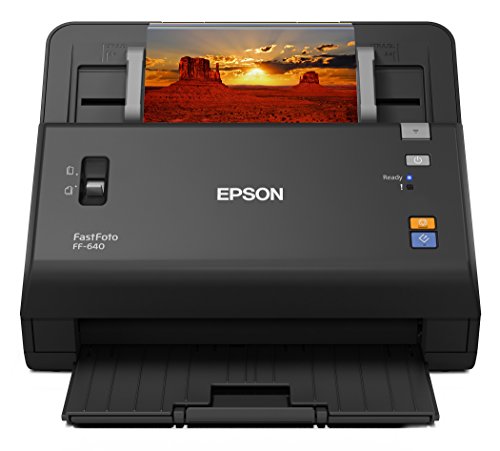
- 30-photo auto-feed tray
- Up to 600 dpi photo scans
- USB-connected setup
Best For: Batch digitizing printed photos at a desktop workstation
Best for Mixed Media

- Holds up to 36 photos or 100 documents
- Includes three carrier sheets for delicate prints
- Wi-Fi 6, USB-C, and touchscreen profiles
Best For: Scanning photos and everyday paperwork with one device
Best for Old Photo Collections

- 36-photo feeder for batch jobs
- Automatic faded-color and brightness correction
- Captures notes on photo backs in one pass
Best For: Digitizing large collections of older prints
Portable Office Pick – HP HPPS200 Duplex Document & Photo Scanner
For shoppers comparing photo scanners with batch scanning, the HP HPPS200 is a compact choice for mixed office paperwork and occasional photos. Its rear auto-feed tray holds up to 25 sheets, and it scans both sides in one pass.
Best For: Home offices that need portable, small-batch scanning for documents, receipts, cards, and photos.
Pros:
- 25-sheet auto-feed tray supports small- to medium-batch jobs.
- Single-pass duplex scanning at a stated speed of up to 25 pages per minute.
- Compact 3.1-pound design with USB connectivity for PC or Mac.
Cons:
- 25-sheet capacity means larger batches need reloading.
- USB connection and AC wall power limit cable-free placement.
This is the practical pick when documents lead your workload and photos are part of the mix, rather than the main reason to buy.
Photo Archive Pick – Epson FastFoto FF-680W
The Epson FastFoto FF-680W is built for photo scanners with batch scanning: it can feed up to 36 photos at once and scan as quickly as one photo per second at 300 dpi. It also handles mixed photo sizes in a batch, making it a strong fit for sorting through family collections.
Best For: Digitizing large photo collections, especially prints with handwritten notes on the back.
Pros:
- Batch-scans up to 36 photos at a time.
- Captures the front image and notes on the back in a single scan.
- Offers Wi-Fi and USB connectivity, plus restoration and image-correction tools.
- Includes a carrier sheet for delicate photos.
Cons:
- At 8.2 pounds, it is less portable than a lightweight travel scanner.
- Its stated one-photo-per-second pace applies to 300 dpi scanning.
Choose this model when fast photo archiving and preserving the stories written behind prints matter more than a minimal footprint.
USB Photo Batch Pick – Epson FastFoto FF-640
The Epson FastFoto FF-640 keeps photo scanners with batch scanning focused on the basics: its auto-feed tray accommodates 30 photos, with a stated pace as fast as one photo per second under the specified 300 dpi test conditions. It supports scans up to 600 dpi and handles prints from wallet size to panoramas.
Best For: Scanning batches of printed photos at a USB-connected workstation.
Pros:
- 30-photo auto-feed tray reduces hand-feeding.
- Scans as fast as one photo per second in the stated 300 dpi test.
- Supports photo scans up to 600 dpi, including wallet-size and panoramic prints.
Cons:
- USB connection requires a wired setup.
- The quoted speed is based on thirty 4-by-6-inch photos at 300 dpi in landscape orientation.
If your priority is feeding stacks of prints rather than adding wireless connectivity, the FF-640 offers a straightforward photo-archiving setup.
Best for Mixed Media – ScanSnap iX2500 Photo Edition
For shoppers comparing photo scanners with batch scanning, the ScanSnap iX2500 Photo Edition handles prints alongside documents, receipts, and business cards. Its feeder holds up to 36 photos or 100 documents, and it includes three carrier sheets for delicate prints.
Best For: Households and offices that want one scanner for photo collections and everyday paperwork.
Pros:
- Scans up to 100 photos per minute, according to the supplied specifications.
- Touchscreen profiles and automatic file optimization, naming, and sorting simplify organization.
- Offers Wi-Fi 6 and USB-C connectivity, with options to send scans to computers, mobile devices, or cloud services.
Cons:
- The photo feeder holds fewer items than the 100-document capacity.
- Delicate prints may require using the included carrier sheets.
This is a flexible pick when the scanning project extends beyond photos; the carrier sheets and customizable profiles add useful options for handling and organizing a varied collection.
Best for Old Photo Collections – FastFoto FF-680W
Among photo scanners with batch scanning, the FastFoto FF-680W is aimed at working through boxes of older prints. Its 36-photo feeder and claimed rate of one photo per second reduce the need to load pictures individually.
Best For: Digitizing inherited or long-stored photo collections, especially prints with fading or handwritten notes on the back.
Pros:
- Loads up to 36 photos at a time for batch scanning.
- Automatic photo enhancements address faded color, red-eye, and brightness.
- Scans both sides in one pass to capture notes on photo backs; also scans documents and creates searchable PDFs with OCR.
Cons:
- The 36-photo feeder still needs reloading during large projects.
- The supplied details list Windows 11 as the minimum system requirement; compatibility with other systems is not specified.
The FF-680W makes the most sense when speed and restoration tools matter as much as feeding photos in batches. Its document features provide a use for it after the photo project is done.
How We Picked These Photo Scanners with Batch Scanning
We focused on models with automatic feeding that can help digitize multiple prints without placing each one individually. We also considered the differences between photo-focused workflows and document-first scanners, along with connectivity, duplex capability, and how practical each type is for a home archive. A feeder saves time, but it does not make every fragile or irregular print safe to batch scan.
Quick Comparison: Which Type Fits Your Project?
The Epson FastFoto FF-680W listings suit buyers prioritizing a photo-focused batch workflow; because two selected listings carry that model name, check the seller, included accessories, and warranty rather than assuming they represent different scanners. The older FastFoto FF-640 is another photo-feeder option, but verify software compatibility and product condition before purchase. The ScanSnap iX2500 Photo Edition may appeal to households that also scan substantial paperwork. The compact HP HPPS200 is worth considering when desk space and portability matter, though its document-oriented design calls for a closer look at photo-handling requirements.
Key Buying Factors for Batch Photo Scanners
Print Condition and Feeder Safety
Sort photos before loading them. Keep bent, torn, curled, sticky, mounted, or unusually thick originals out of an automatic feeder unless the manufacturer explicitly supports them. Scan irreplaceable or delicate prints individually—potentially on a flatbed—and test a few ordinary prints first for scratches, skew, or double-feeds.
Image Quality and File Workflow
Look beyond advertised pages-per-minute figures. Check available optical resolution, color handling, and output formats against your goal: easy sharing, photo books, or an archival master. Automatic enhancement can produce convenient copies, but preserving an unedited scan gives you more flexibility later. Plan time to name files, organize folders, and back up the results.
Feeder Capacity, Sizes, and Connectivity
Capacity matters most when your prints are already sorted into compatible groups. Confirm supported photo dimensions, thickness, and mixed-size feeding guidance rather than assuming a document feeder accepts every snapshot. USB can simplify a fixed workstation; wireless scanning may be more convenient for a shared space. Duplex scanning can be useful for notes on photo backs, but confirm how the specific scanner and software save those images.
Who Should Buy Which Photo Scanners with Batch Scanning?
Choose a photo-focused FastFoto model if your main job is processing a large collection of standard, feeder-safe prints. Compare the two FF-680W listings on package contents and seller terms, not name alone; consider the FF-640 only after checking its age and compatibility. Choose the ScanSnap if documents are a major part of your workload, or consider the HP if a smaller, portable setup matters more than a dedicated photo workflow. For a collection dominated by fragile originals, prioritize careful individual scanning over batch speed.