Choosing the right classroom display can improve lesson flow, student engagement, and collaboration in every subject.
This roundup of the best interactive classroom displays with 4K resolution for 2026 focuses on screen size, touch performance, platform compatibility, and classroom-friendly features.
Best 10 Interactive Classroom Displays with 4K Resolution Picks for 2026
Classroom-ready Collaboration Hub

- 65-inch 4K UHD touchscreen with 20-point multi-touch
- Android 13, 128GB storage, and open app ecosystem
- Wireless sharing, QR file transfer, and conferencing app support
Best For: Teachers and teams needing a 65-inch interactive board for collaboration
Premium Hybrid Learning Display
AVOCOR 75" A Series 4K Display
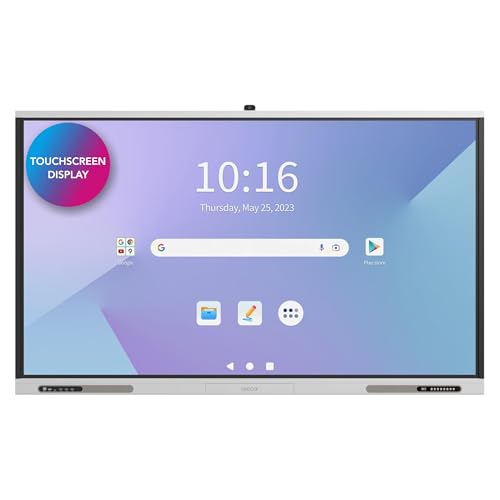
- 75-inch 4K UHD screen with 500 cd/m² brightness
- Google EDLA certified with access to education apps
- Detachable 4K camera and 10-mic array for hybrid learning
Best For: Large classrooms and lecture halls with hybrid teaching needs
Flexible 4K Teaching Board
EUNIVON 55" Interactive Whiteboard

- 55-inch 4K UHD touchscreen for smaller spaces
- Android 14 with 8GB RAM and octa-core CPU
- Screencasting, HDMI input, and annotation support
Best For: Smaller classrooms and offices needing a compact interactive board
Enterprise Classroom Display
Samsung 75" WAD Interactive Display

- 75-inch 4K display with 40-point multi-touch
- EDLA support for Google Classroom and other Google services
- Screen mirroring for up to nine devices and USB-C connectivity
Best For: Schools that want a Google-friendly 75-inch teaching display
Teacher-Friendly Touch Display
Smart Ink Board GX175N-V4 Plus 75" 4K UHD

- 75-inch 4K UHD interactive display
- SMART Ink annotation for Windows and Mac
- Works with preferred OS, apps, and hardware
Best For: Teachers who want a familiar, easy-to-use classroom display
Conference-Ready Classroom Screen
AVOCOR 75" E Series 4K Interactive Display

- 75-inch 4K UHD display with anti-glare bonded glass
- 20-point InGlass touch with pen, finger, and palm support
- USB-C guest input and wireless sharing
Best For: Collaborative classrooms and rooms that need polished touch and sharing features
Flexible OS Whiteboard
Promethean ActivPanel LX 65" 4K Interactive Display

- 65-inch 4K UHD IPS display with 3840 x 2160 resolution
- OS-free design for simpler security and management
- Includes wall mount, Android OPS, and 3-year onsite support
Best For: Buyers who want a secure, flexible classroom display with low-maintenance management
Premium Collaborative Hub

- 65-inch 4K UHD touchscreen
- Up to 20 touchpoints
- SmartView+ supports 50 devices
Best For: Classrooms and teams needing a durable, highly connected 4K touch display
Google-Certified Teaching Board
NewBoard 75E 75" 4K Smart Board

- Google EDLA-certified with Android 14
- 75-inch 4K UHD display
- 50-point touch with 16-device casting
Best For: Google-based classrooms and hybrid rooms needing a large interactive board
Large-Format Education Display

- 86-inch 4K UHD panel
- 20-point multi-touch whiteboard
- Shares up to 9 screens
Best For: Large classrooms and presentation spaces needing a room-filling interactive display
Classroom-ready Collaboration Hub – COOLHOOD 65" 4K Smart Board
If you want interactive classroom displays with 4K resolution for teaching, presenting, and live annotation, the COOLHOOD 65-inch smart board is built for exactly that workflow. It combines a 4K UHD 20-point touchscreen with Android 13, an octa-core processor, and open app support, so it can handle daily instruction, file sharing, and group interaction without feeling overly complicated.
Best For: Classrooms, training rooms, and office teams that want a 65-inch touch display for presentations, annotation, and wireless collaboration.
Pros:
- 65-inch 4K UHD display with 20-point multi-touch and 6ms response time
- Wireless screen sharing, QR code file sharing, and built-in presentation tools
- Supports Zoom, Google Meet, Microsoft Teams, and Webex
- Android 13 with 128GB storage and open app ecosystem
Cons:
- Stand is sold separately
- Includes wall mount only
- Limited to 1 HDMI port based on the supplied specs
Overall, this model is a practical pick if you need a feature-rich classroom board with strong collaboration tools and smooth handwriting response. It leans more toward interactive teaching and team workflows than minimalist display use.
Premium Hybrid Learning Display – AVOCOR 75" A Series 4K Display
For larger rooms that need interactive classroom displays with 4K resolution, the AVOCOR 75-inch A Series is aimed at modern learning environments and hybrid instruction. Its 500 cd/m² brightness, 40-point touch, Google EDLA access, and detachable 4K camera make it a strong fit when lessons need to reach both in-person and remote students.
Best For: Large classrooms, lecture halls, and hybrid learning setups that need a bright 75-inch display with video collaboration tools.
Pros:
- 75-inch 4K UHD panel with 500 cd/m² brightness for larger rooms
- Google EDLA certified for Google Play, Google Classroom, and Android teaching apps
- Detachable 4K camera and 10-mic array support hybrid learning
- 40-point touch with anti-glare, anti-fingerprint glass and fast 3.3ms response
Cons:
- Wall mount only in the supplied package
- Large 75-inch size may be more than needed for small rooms
- Feature set is geared toward education and collaboration rather than simple signage
This is one of the most classroom-focused options in the group if your priority is visibility, touch precision, and remote participation. The built-in connectivity and AV features help it function as a true teaching hub.
Flexible 4K Teaching Board – EUNIVON 55" Interactive Whiteboard
The EUNIVON 55-inch board is a compact option for buyers comparing interactive classroom displays with 4K resolution for smaller classrooms, offices, or home learning spaces. It runs on Android 14 with an 8-core Cortex-A55 processor and 8GB RAM, while still supporting screencasting, HDMI input, and on-screen annotation for everyday instruction and presentations.
Best For: Small to mid-size classrooms, meeting rooms, and home offices that need a straightforward 55-inch interactive board.
Pros:
- 55-inch 4K UHD touchscreen in a more space-friendly format
- Supports screencasting from Mac, Windows, iOS, and Android devices
- Android 14 with 8GB RAM and Cortex-A55 octa-core processor
- Open app ecosystem and enterprise security management tools
Cons:
- Smaller screen than 75-inch classroom models
- Wall mount included, but no expanded AV details were provided
- Less specialized for hybrid learning than camera-equipped models
This board makes sense if you want a practical classroom display without jumping to a large-format system. It focuses on core teaching features, simple connectivity, and flexible app support.
Enterprise Classroom Display – Samsung 75" WAD Interactive Display
The Samsung WAD series is a strong candidate if you’re shopping for interactive classroom displays with 4K resolution and want a familiar Android-based interface. It offers 40-point multi-touch, EDLA access to Google services, split-screen and multi-window viewing, and screen mirroring for up to nine devices, making it well suited to active classroom workflows.
Best For: Schools and training spaces that want a 75-inch 4K interactive display with Google services, multitasking, and easy device sharing.
Pros:
- 75-inch 4K display with up to 40 touchpoints
- EDLA certification for Google Play, YouTube, and Google Classroom
- Screen mirroring for up to nine devices across major platforms
- 3-in-1 USB-C port plus OPS slot for flexible classroom connectivity
Cons:
- Response time is listed at 8ms, slower than some competitors
- Wall mount only in the included package details
- Designed for education and management use, so it may be more display than casual users need
For schools that rely on Google tools and want a polished all-in-one teaching display, this Samsung model covers the essentials well. It stands out for classroom multitasking and easy multi-device sharing rather than flashy extras.
Teacher-Friendly Touch Display – Smart Ink Board GX175N-V4 Plus 75" 4K UHD
If you want interactive classroom displays with 4K resolution that feel familiar from day one, the Smart Ink Board GX175N-V4 Plus is built for easy adoption. It works with your preferred OS, apps, and hardware, while SMART Ink adds integrated annotation tools and a full multi-user touch experience for teaching and collaboration.
Best For: Classrooms that want a large, teacher-friendly 4K interactive display with simple setup and built-in annotation tools.
Pros:
- 75-inch 4K UHD panel with 3840 x 2160 native resolution
- Integrated annotation tools for Windows and Mac OS with SMART Ink
- Seamless compatibility with preferred OS, apps, and hardware
- Includes built-in speakers and touchscreen support
Cons:
- Glossy screen finish may not suit every lighting setup
- Heavier at 92.6 pounds, so installation planning matters
Overall, this is a practical pick for educators who want a large-format classroom display without a steep learning curve. Its strength is simplicity: strong 4K visuals, familiar software support, and tools that make interactive lessons easier to run.
Conference-Ready Classroom Screen – AVOCOR 75" E Series 4K Interactive Display
The AVOCOR 75" E Series is a strong choice if you need interactive classroom displays with 4K resolution and polished touch performance. Its optically bonded anti-glare glass, 20-point InGlass touch, and front USB-C connectivity make it well suited for lessons, whiteboarding, and device sharing in busy rooms.
Best For: Classrooms and meeting spaces that need a sharp, collaborative 75-inch touchscreen with easy sharing and management.
Pros:
- 75-inch 4K UHD screen with 3840 x 2160 resolution at 60Hz
- 20-point touch with pen, finger, and palm recognition
- Optically bonded anti-glare, anti-fingerprint glass for clearer viewing
- USB-C guest connectivity plus Montage wireless sharing
Cons:
- Wall mount only, so placement is less flexible
- Heavier than some alternatives at 114.6 pounds
This model stands out when you want touch accuracy, classroom visibility, and easier AV/IT integration in one package. The free FUSE cloud management and broad connectivity make it especially useful for schools that value remote administration as much as in-room interaction.
Flexible OS Whiteboard – Promethean ActivPanel LX 65" 4K Interactive Display
For buyers comparing interactive classroom displays with 4K resolution, the Promethean ActivPanel LX stands out for its OS-flexible, security-first design. It is built to work with your chosen operating system, keeping the panel itself simple while leaving computing and security management to the connected device you already prefer.
Best For: Schools and offices that want a secure, low-maintenance interactive display with OS flexibility.
Pros:
- 65-inch 4K UHD IPS panel with 3840 x 2160 native resolution
- OS-free design reduces network complexity and built-in storage concerns
- Includes panel and wall mount, plus bundled 4GB Android OPS
- 3-year onsite support adds service coverage
Cons:
- 65-inch size is smaller than some classroom alternatives
- Only one HDMI port listed in the supplied specs
As an interactive display, this model is less about built-in extras and more about flexibility, simplicity, and security. That makes it a smart fit for teams that want a familiar workflow and long-term manageability without committing to a fixed onboard OS.
Premium Collaborative Hub – Samsung 65” 4K Flip Pro
If you want interactive classroom displays with 4K resolution that can also handle business meetings and family-style brainstorming, the Samsung Pro 65” Flip Pro is built for flexible collaboration. Its 65-inch 4K touchscreen, up to 20 touchpoints, and SmartView+ screen sharing make it easy to present, annotate, and work across multiple devices.
Best For: Classrooms, training rooms, and team spaces that need a durable 4K touch display with strong wireless collaboration.
Pros:
- 65-inch 4K UHD touchscreen with 3840 x 2160 native resolution.
- Up to 20 touchpoints for shared writing, drawing, and group input.
- SmartView+ can wirelessly connect up to 50 devices and show up to six screens at once.
- Built-in speakers, Wi-Fi, Bluetooth, and Universal Pairing support for easy setup.
Cons:
- Large 65-inch size may be more display than smaller classrooms need.
- At 105 pounds, installation will require planning.
This is a strong fit when you want a polished 4K interactive display that emphasizes multi-user collaboration and device connectivity. The durable design and broad compatibility make it especially useful for environments that move between teaching, presenting, and brainstorming.
Google-Certified Teaching Board – NewBoard 75E 75" 4K Smart Board
The NewBoard 75E is aimed at schools and offices that want interactive classroom displays with 4K resolution plus a familiar Google-powered workflow. With Google EDLA certification, Android 14, and a 75-inch UHD screen, it is designed for lesson delivery, collaborative writing, and wireless casting.
Best For: Classrooms and hybrid workspaces that rely on Google apps, multi-user writing, and wireless sharing.
Pros:
- Google EDLA-certified with access to Google Play Store, Google Workspace, and Google Education Suite.
- 75-inch 4K UHD display with a 178° viewing angle and 85% NTSC color gamut.
- 50-point multi-touch supports up to 10 simultaneous writers.
- Wireless casting can share content from up to 16 devices at once.
Cons:
- Best fit is clearly tied to Google-centric environments.
- No built-in portability; it is intended as a wall-mounted board.
For classrooms that want a modern Android-based board with strong Google integration, this model checks a lot of practical boxes. The combination of 4K clarity, multi-user writing, and broad wireless casting makes it well suited to active teaching and collaboration.
Large-Format Education Display – Samsung WA86C 86" 4K Board
The Samsung Interactive Display 2 WA86C is a large-format option for buyers seeking interactive classroom displays with 4K resolution and a wide canvas for group learning. Its 86-inch UHD panel, Android 11 base, and 20-point multi-touch support are built for lesson delivery, mirroring, and screen sharing across the room.
Best For: Large classrooms and presentation spaces that need a bright, room-filling 4K interactive display.
Pros:
- 86-inch 4K UHD panel with 3840 x 2160 native resolution.
- 20-point multi-touch whiteboard functionality for classroom interaction.
- Simultaneously share up to 9 screens for group productivity.
- Built-in speaker, Wi-Fi, HDMI, and USB support for flexible connectivity.
Cons:
- Very large 86-inch size may be excessive for smaller rooms.
- Only one HDMI port and one USB port are listed in the supplied specs.
This display makes sense when visibility and shared participation matter more than compact sizing. Its oversized 4K panel and multi-screen sharing features are especially useful in classrooms where many students need to follow along at once.
How We Picked the Best Interactive Classroom Displays with 4K Resolution
We looked for Interactive Classroom Displays with 4K Resolution that balance clarity, responsive touch, reliable operating systems, and practical installation options. We also prioritized models suited to real classroom use, including wireless casting, Google compatibility, multi-touch support, and durability.
Quick Comparison
In simple terms, smaller 55-inch and 65-inch displays are often a better fit for compact classrooms, tutoring spaces, or flexible teaching rooms. Larger 75-inch and 86-inch models work best in bigger rooms, lecture settings, and spaces where visibility from the back matters more. Platform choice also matters: EDLA-certified and Android-based options are typically easier for schools already using Google services, while OS-flexible panels may suit mixed-device environments.
Key Buying Factors for Interactive Classroom Displays with 4K Resolution
Screen Size and Room Layout
Match the display to viewing distance and wall space. A sharp 4K panel helps text stay readable, but size still determines whether every student can clearly follow diagrams, notes, and video content.
Touch Points and Annotation
More touch points can improve group work and simultaneous annotation. If multiple students will write at once, look for displays with strong multi-touch performance and low-latency pen input.
Operating System and Ecosystem
Consider whether your school depends on Google Workspace, Android apps, Windows devices, or mixed hardware. Interactive Classroom Displays with 4K Resolution are most useful when they integrate smoothly with the tools teachers already use.
Connectivity and Sharing
Wireless casting, Wi-Fi, Bluetooth, HDMI, and USB connections make it easier to connect laptops, tablets, and document cameras. Built-in speakers and embedded computing can also reduce the need for extra hardware.
Installation and Long-Term Use
Check mounting support, panel durability, and serviceability. For daily classroom use, simple setup and dependable construction matter as much as headline specifications.
Who Should Buy Which Interactive Classroom Displays with 4K Resolution?
If you want a compact all-in-one teaching setup, a 55-inch or 65-inch model is often the most practical choice. For standard classrooms and hybrid learning spaces, a 75-inch display usually offers the best balance of size and versatility. If you need maximum visibility for large rooms, auditoriums, or multi-row seating, an 86-inch option is the strongest fit.
Schools centered on Google services should lean toward EDLA-certified or Google-friendly models, while teams that want flexibility across devices may prefer panels with broader OS support and easy wireless sharing. The best choice is the one that fits the room, the teaching style, and the devices your staff already know how to use.