Interactive classroom displays paired with document cameras can make lessons easier to follow, easier to project, and easier to adapt for in-person or remote students.
This roundup focuses on practical classroom-ready options that help teachers present books, worksheets, experiments, and student work with less friction.
Best 10 Interactive Classroom Displays with Document Cameras Picks for 2026
Premium AI Classroom Hub
65" Google EDLA Smart Board Pro
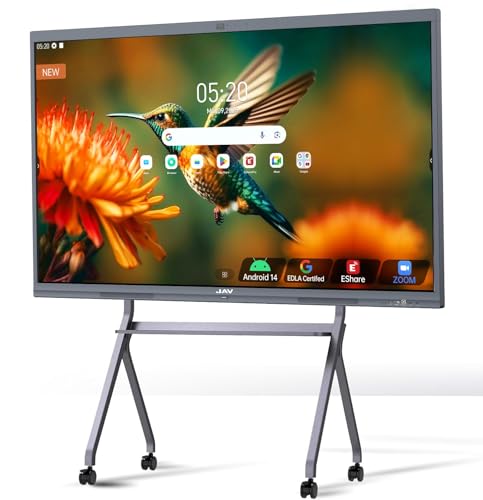
- 4K UHD 65-inch touchscreen with Android 14
- Google EDLA access for Play Store and Workspace
- 8-array mics, screen sharing, and hybrid meeting tools
Best For: Large classrooms and hybrid teaching spaces
Reliable Live Demo Pick
IPEVO V4K 8MP USB Document Camera

- 8MP sensor with up to 3264 x 2448 capture
- Up to 30 fps Full HD streaming
- Mac, Windows, and Chromebook compatible
Best For: Portable teaching and remote demo setups
Pro Zoom Teaching Camera
Elmo TT-12G 4K Document Camera
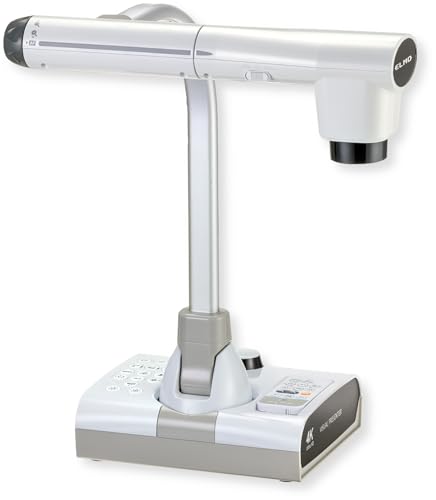
- 4K Ultra HD imaging with 12MP sensor
- 192x total zoom for fine-detail teaching
- HDMI, USB, VGA, and Miracast support
Best For: Detail-heavy lessons and mixed-device classrooms
Budget Foldable Visualiser

- Foldable design with multi-angle support
- Manual image inversion and 3-level brightness control
- Dual microphones with Windows, macOS, and Chrome OS support
Best For: Portable classroom demo and video teaching
AI-Tracking 4K Classroom Pick
OKIOCAM S2-4K for Interactive Displays

- 8MP capture up to 3264 x 2448 at 30 fps
- OKIOPoint AI-tracking follows your pointer in real time
- Works with Windows, Mac, iPad, Chromebook, and interactive displays
Best For: teachers using interactive displays who want AI-tracking and strong low-light performance
Reliable Plug-and-Play Demo Tool
INSWAN INS-1 for Classroom Use

- 8MP SONY sensor with up to 3264 x 2448 capture
- Built-in LED light and anti-glare sheet improve visibility
- Plug-and-play USB-A works with Windows, Mac, and Chromebook
Best For: educators who want a straightforward USB document camera with built-in lighting and easy setup
Compact Budget Classroom Camera

- 2448P resolution with autofocus and macro capture
- Foldable multi-joint body is easy to position and store
- Direct brightness and image inversion controls on the camera
Best For: teachers who want a compact, foldable document camera for standard classroom materials
Premium 4K Smart-Pointer Pick
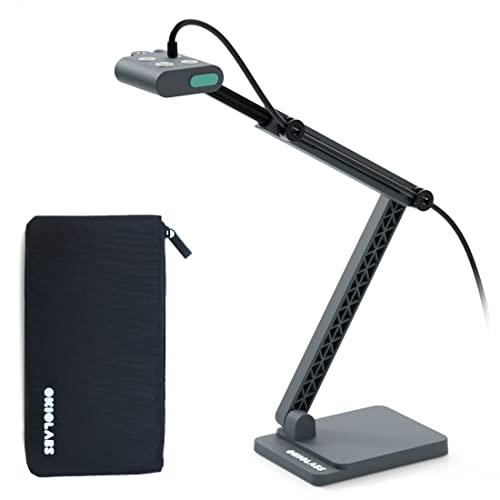
- 13MP sensor with 4K UHD capture
- OKIOPoint smart pointer for interactive demos
- LED light and broad OS compatibility
Best For: Teachers who want 4K clarity and interactive presenting
Dual-Mic A3 Visualizer Choice

- 8MP imaging with 30fps live output
- A3-size coverage for larger classroom materials
- Dual mics and 3-level LED lighting
Best For: Teachers who want larger capture area and built-in audio
Simple Plug-and-Play Classroom Option

- 3-in-1 document camera, visualizer, and webcam
- Manual focus with 1944P capture
- LED light and exposure controls for dim rooms
Best For: Teachers who want a compact camera for lessons and conferencing
Premium AI Classroom Hub – 65" Google EDLA Smart Board Pro
For interactive classroom displays with document cameras, this 65-inch JAV smart board is built to handle teaching, collaboration, and hybrid meetings from one screen. It combines a 4K UHD touchscreen, Google EDLA certification, Android 14, and a built-in 48MP AI camera, making it a strong all-in-one option when you want display, annotation, and video calling features in one system.
Best For: Schools and teams that want a large-format interactive whiteboard with Google access, touch tools, and conferencing support.
Pros:
- Google EDLA certification gives access to Google Play Store, Google Workspace, and Google Education Suite.
- 20-point touch, palm erase, handwritten annotations, PDF import, and split-screen support improve lessons and presentations.
- Built-in 8-array microphones, noise reduction, echo cancellation, and compatibility with Zoom, Google Meet, and Teams support hybrid use.
- Includes screen sharing, smart voting, screenshot, timer, and wireless mirroring features for interactive instruction.
Cons:
- Large 65-inch design may be more display than some smaller rooms need.
- Feature set is broad, so setup may take more planning than a basic classroom display.
- Focuses on built-in collaboration tools rather than a separate document camera arm.
The JAV board is best for buyers who want a feature-rich classroom centerpiece instead of a simple display. Its mix of whiteboard tools, conferencing hardware, and Android-based flexibility makes it a practical hub for modern teaching spaces.
Reliable Live Demo Pick – IPEVO V4K 8MP USB Document Camera
If you need a straightforward tool for interactive classroom displays with document cameras, the IPEVO V4K is a compact USB document camera designed for live demos, remote teaching, and web conferencing. Its 8MP sensor, fast focusing, and broad compatibility with Mac, Windows, and Chromebook make it a dependable choice for teachers who want easy plug-and-play use.
Best For: Teachers and presenters who need a simple, portable document camera for live demonstration and distance learning.
Pros:
- 8MP sensor captures up to 3264 x 2448 resolution for sharp live images.
- Streams at up to 30 fps at Full HD for smooth demonstrations.
- Fast focusing and Sony CMOS sensor help reduce interruptions and improve image quality in dim light.
- Works with Mac, Windows, and Chromebook for flexible classroom use.
Cons:
- No built-in zoom, so close-up framing depends on positioning.
- USB-only design is less versatile than multi-output classroom models.
- Best suited to document capture rather than larger interactive whiteboard-style collaboration.
The IPEVO V4K is a practical pick when you want reliable image capture without a steep learning curve. It is especially useful for classrooms that value portability, software flexibility, and quick setup over advanced hardware extras.
Pro Zoom Teaching Camera – Elmo TT-12G 4K Document Camera
For interactive classroom displays with document cameras, the ELMO TT-12G stands out as a premium presentation tool with 4K Ultra HD imaging, a 12MP sensor, and a flexible multi-angle arm. It is designed for classrooms and distance learning setups that need detailed visuals, broad device compatibility, and strong zoom performance for showing fine print or small objects.
Best For: Instructors who need a high-end document camera with zoom, flexible positioning, and multiple connection options.
Pros:
- 4K Ultra HD imaging and a 12MP sensor deliver sharp, detailed presentation visuals.
- 192x total zoom helps reveal fine details during lessons and demonstrations.
- HDMI, USB, and VGA outputs support both modern and legacy classroom equipment.
- Flexible arm, LED lighting, autofocus, and Miracast support make setup and sharing easier.
Cons:
- Larger and heavier than compact USB-only document cameras.
- May be more than needed if you only want basic live document viewing.
- SD card recording and multi-output features add complexity compared with simpler models.
The TT-12G is a strong choice when image quality and presentation flexibility matter most. Its zoom range and connection options make it well suited to classrooms that need a capable, long-term document camera solution.
Budget Foldable Visualiser – 4K 8MP USB Teacher Camera
This 4K USB document camera is a practical option for interactive classroom displays with document cameras when you want portability and easy setup. With an 8MP sensor, adjustable image inversion, foldable design, and dual microphones, it is aimed at teachers who need a flexible visualiser for live demos, distance learning, and web conferencing.
Best For: Teachers who want a foldable, plug-and-play document camera with brightness control and built-in microphones.
Pros:
- 8MP sensor with 2448P output supports clear live images and video.
- Manual image reversal and adjustable brightness help adapt to different teaching setups.
- Foldable multi-joint design makes it easy to carry and store.
- Dual microphones and wide platform compatibility support online classes and conferencing.
Cons:
- USB-only design may not fit classrooms needing HDMI or VGA output.
- Best capture area is sized for A3 materials, which may limit larger displays.
- Feature set is more focused on basics than advanced teaching software tools.
For classrooms that need a simple and adaptable capture solution, this model covers the essentials well. It is a sensible choice if you value portability, manual control, and broad OS support over premium hardware extras.
AI-Tracking 4K Classroom Pick – OKIOCAM S2-4K for Interactive Displays
If you need interactive classroom displays with document cameras, the OKIOCAM S2-4K is built for teachers who want sharp image quality, smooth live video, and easy pointer-following during lessons. It pairs 8MP 4K capture with OKIOPoint AI-tracking, making it a strong fit for guided demos, hybrid teaching, and display-based instruction.
Best For: Teachers using interactive displays who want AI-tracking and strong low-light performance.
Pros:
- 8MP Sony Exmor R sensor captures up to 3264 x 2448 resolution at 30 fps.
- OKIOPoint AI-tracking follows your pointer in real time for more focused lessons.
- Works with Windows, Mac, iPad, Chromebook, and interactive displays with no extra software required.
- Back-illuminated sensor helps deliver clear images in low light without needing extra LEDs.
Cons:
- No built-in LED light, so it relies on the sensor for low-light clarity.
- Feature-rich software may be more than some users need for simple document sharing.
- Best results depend on a compatible setup for interactive display use.
The S2-4K stands out for classrooms that want more than a basic document camera. Its AI tracking, strong compatibility, and clear imaging make it especially useful when teaching on an interactive display and keeping student attention on the right detail.
Reliable Plug-and-Play Demo Tool – INSWAN INS-1 for Classroom Use
The INSWAN INS-1 is a practical choice for interactive classroom displays with document cameras when you want a simple, dependable setup for live demos and online teaching. It offers 8MP image capture, 30 fps streaming, and built-in LED lighting, so it can handle everyday classroom sharing without much fuss.
Best For: Educators who want a straightforward USB document camera with built-in lighting and easy setup.
Pros:
- 8MP SONY sensor delivers up to 3264 x 2448 resolution with smooth 30 fps streaming.
- Built-in LED light and anti-glare sheet help manage uneven lighting.
- Plug-and-play USB-A connection keeps setup simple on Windows, Mac, and Chromebook.
- Included Documate software adds zoom, annotation, recording, and snapshots.
Cons:
- USB-A cable may be less convenient for newer USB-C-only setups without adapters.
- Designed more for basic classroom sharing than advanced AI-guided presentation features.
- Some users may prefer a model with a larger capture area for bigger documents.
For teachers who want a familiar document camera that just works, the INS-1 is easy to recommend. It balances clear imaging, useful software tools, and broad compatibility, making it a solid match for display-based lessons and distance learning.
Compact Budget Classroom Camera – PAKOTOO USB Doc Cam for A3/A4
For interactive classroom displays with document cameras, this PAKOTOO model focuses on the basics: clear 2448P imaging, flexible positioning, and direct image controls on the camera. It is a sensible option for teachers who need a compact USB document camera for A3 or A4 materials and want simple adjustments during distance teaching or live display use.
Best For: Teachers who want a compact, foldable document camera for standard classroom materials.
Pros:
- 2448P resolution with autofocus helps keep documents and objects clear.
- Foldable, multi-joint design makes it easy to position and carry.
- 3 brightness levels and 10 exposure levels offer direct on-device control.
- Supports left-right and up-down image inversion without software.
Cons:
- Does not support zoom or HDMI features.
- Not compatible with iPad.
- Not true plug-and-play according to the notes; you may need to select USB Camera manually.
This is a practical classroom tool if you want a smaller-footprint camera and basic image controls built into the device. It is best for straightforward teaching setups rather than feature-heavy presentation workflows.
Premium 4K Smart-Pointer Pick – OKIOCAM S2 Pro
If you want interactive classroom displays with document cameras that can make live demos feel more polished, the OKIOCAM S2 Pro is built for high-detail presentation work. Its 13MP sensor, 4K capture, fast autofocus, and OKIOPoint smart pointer are geared toward teachers who want clearer visuals and more engaging annotation during lessons.
Best For: Teachers and presenters who want 4K clarity, smart pointer interaction, and broad compatibility for hybrid or in-class teaching.
Pros:
- 13MP sensor with 4K UHD output for detailed document and object display.
- OKIOPoint smart pointer adds interactive zoom-and-follow presentation control.
- Integrated LED light helps in dim classrooms or meeting spaces.
- Compatible with Windows, Mac, Chromebook, and common meeting platforms.
Cons:
- Requires use of OKIOCAM Live software to get the smart-pointer experience.
- More feature-rich than basic classroom document cameras, so it may be overkill for simple needs.
The S2 Pro stands out when presentation quality and interaction matter more than basic document capture. For educators building more dynamic lesson delivery, it brings a strong mix of resolution, speed, and classroom-friendly software support.
Dual-Mic A3 Visualizer Choice – THUSTAR 8MP Document Camera
For interactive classroom displays with document cameras, the THUSTAR 8MP model is a practical pick if you need a larger capture area and built-in audio. It offers 8MP imaging, 30fps output, dual microphones, and adjustable lighting, making it useful for lessons that mix live demos with clear video and sound.
Best For: Educators who need A3-size coverage, built-in microphones, and simple plug-and-play setup.
Pros:
- 8MP capture with 30fps output for steady live demonstration video.
- A3-size coverage supports larger worksheets, books, and objects.
- Dual microphones can improve voice pickup during remote teaching.
- 3-level LED lighting and brightness controls help in varied lighting.
Cons:
- Image reversal and focus behavior may need manual adjustment during use.
- Bulky A3 coverage is useful, but the unit may be less compact than smaller classroom cameras.
This model is especially appealing if you want an all-in-one classroom visualizer that handles both visuals and audio. Its mix of adjustable lighting, flexible imaging, and broad compatibility makes it easy to fit into school workflows.
Simple Plug-and-Play Classroom Option – THUSTAR 1944P Doc Camera
If you need interactive classroom displays with document cameras and want a straightforward, flexible setup, this THUSTAR doc camera covers the basics well. It works as a document camera, visualizer, and PC webcam, with manual focus, adjustable image inversion, and LED lighting for clearer teaching visuals.
Best For: Teachers who want a compact, easy-to-use camera for lessons, remote teaching, and video conferencing.
Pros:
- 3-in-1 design works as a document camera, visualizer, and webcam.
- Manual focus and 1944P resolution support accurate classroom viewing.
- 3-level LED light plus 5-level exposure control helps in dim rooms.
- Compatible with Windows, Mac, and Chromebook, with plug-and-play use.
Cons:
- Uses manual focus instead of autofocus.
- 1080p is listed in the detailed specs, so the top-line resolution claims should be read carefully.
This is a solid pick for classrooms that need a compact, adaptable visualizer without extra complexity. It emphasizes ease of use, broad compatibility, and useful image controls for everyday teaching tasks.
How We Picked the Best Interactive Classroom Displays with Document Cameras
For Interactive Classroom Displays with Document Cameras, the best choices balance image clarity, broad device compatibility, flexible mounting or positioning, and simple day-to-day operation. We prioritized models that can support real classroom workflows, not just spec-sheet numbers.
We also looked for features that matter in teaching environments: autofocus, LED lighting, microphone support, image inversion, easy USB connectivity, and compatibility with common school platforms such as Windows, Mac, and Chromebook.
Quick Comparison
Broadly, the list splits into two types: full interactive display systems for front-of-class instruction, and USB document cameras that add visual-sharing capability to existing setups. If you need a complete teaching surface, an all-in-one smart board is the larger investment. If you already have a display, a document camera is usually the faster and more affordable upgrade.
For shared classrooms, portability and plug-and-play setup matter. For dedicated rooms, larger-format viewing, stronger zoom, and better tracking or pointer tools can improve visibility and pacing.
Key Buying Factors for Interactive Classroom Displays with Document Cameras
Image Quality and Lighting
Look for at least 8MP resolution for clear text and small objects, plus adjustable LED lighting for dim rooms or glossy materials. If you regularly show fine print, lab specimens, or handwriting, sharper optics can make a big difference.
Compatibility and Connectivity
Most schools need flexible support across operating systems and devices. USB plug-and-play is the simplest option, while HDMI, VGA, or wireless functions may be useful for more complex rooms. Make sure the camera works cleanly with your existing teaching software and display hardware.
Movement, Focus, and Capture Area
A flexible arm, rotating head, or large capture area helps when presenting books, science materials, or student projects. Autofocus and quick image adjustment reduce interruptions during live lessons.
Audio and Collaboration Features
Built-in microphones are helpful for hybrid teaching and recorded lessons, though they are not essential if your room already has a separate audio system. Smart pointer or tracking tools can also improve visibility when you are moving quickly through material.
Who Should Buy Which Interactive Classroom Displays with Document Cameras?
Teachers who want a simple classroom upgrade should start with a USB document camera. Schools building a full presentation station or replacing older board hardware should consider an interactive display with integrated camera support. If your priority is sharing documents, demonstrations, and hands-on materials clearly, the best choice depends on whether you need portability, screen size, or a complete all-in-one teaching hub.