When you’re starting your audio journey, choosing the right audio interface can greatly impact your sound quality. With so many options available, it’s essential to find one that suits your needs and skill level. From user-friendly models to those with advanced features, these top picks can help you create professional-sounding audio. Let’s explore the best audio interfaces that can elevate your sound game and enhance your creativity.
HOSONGIN 2i2 USB Audio Interface for Beginners

The HOSONGIN 2i2 USB Audio Interface is perfect for beginners looking to plunge into audio recording without the hassle of complicated setups. With 24Bit/192kHz recording quality and 48V phantom power, you’ll capture studio-quality sound for vocals and instruments. Its plug-and-play feature means you can start recording in just 60 seconds, making it ideal for podcasts or YouTube. You’ll appreciate the zero-latency headphone monitoring and intuitive design, ensuring you focus on your creativity. While it works well with various operating systems, some users have noted compatibility issues on certain PCs. Overall, it’s a great value for your audio journey!
Best For: Beginners and aspiring podcasters looking for an easy-to-use audio recording solution.
Pros:
- Studio-quality recording with 24Bit/192kHz sound.
- Quick plug-and-play setup allows for immediate use.
- Durable metal chassis ensures longevity and reliability.
Cons:
- Some users report compatibility issues with certain PCs.
- Limited brand recognition may affect support options.
- Users may prefer more established brands for professional use.
MOTU M2 USB-C Audio-MIDI Interface Bundle
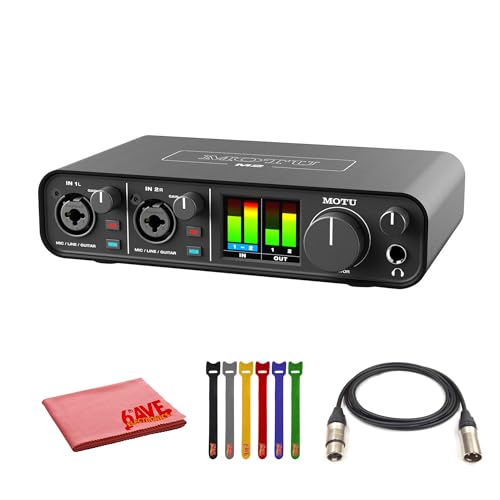
For musicians, podcasters, and content creators looking to elevate their audio game, the MOTU M2 USB-C Audio-MIDI Interface Bundle stands out with its ESS Sabre32 Ultra DAC technology, delivering a remarkable 120 dB dynamic range. You’ll appreciate the ultra-low latency of just 2.5 ms at 96 kHz, ensuring your recordings sound crisp and immediate. With two XLR-1/4 combo inputs featuring individual gain control and 48V phantom power, this interface meets diverse needs. Plus, its MIDI I/O and loopback support make it perfect for live streaming. It’s compatible with macOS, Windows, and iOS, and comes bundled with essential software.
Best For: Musicians, podcasters, and content creators seeking high-quality audio performance with low latency.
Pros:
- High-quality ESS Sabre32 Ultra DAC technology providing a 120 dB dynamic range.
- Ultra-low latency of 2.5 ms at 96 kHz for crisp and immediate recordings.
- Versatile connectivity options including MIDI I/O and loopback support for live streaming.
Cons:
- Limited to two XLR-1/4 combo inputs, which may not suffice for larger setups.
- USB-C bus-powered design may require an adapter for older devices.
- Best Sellers Rank suggests it may not be as widely recognized as competitors.
Pyle 6-Channel Bluetooth Studio Audio Mixer (PMXU67BT)

If you’re looking for an affordable yet versatile audio mixer, the Pyle 6-Channel Bluetooth Studio Audio Mixer (PMXU67BT) could be your ideal choice. Weighing just 4.22 pounds, it’s compact and packed with features for both beginners and pros. With six channels, built-in Bluetooth, and 16 DSP effects, it allows seamless integration with various devices. You’ll appreciate the USB connectivity for recording and playback, plus multiple inputs and outputs for your mics and speakers. While some users report minor connectivity quirks, its solid performance and value make it a top pick for enhancing your sound game.
Best For: The Pyle 6-Channel Bluetooth Studio Audio Mixer (PMXU67BT) is best for musicians, podcasters, and content creators looking for an affordable and versatile audio mixing solution.
Pros:
- Versatile for various applications such as live performances, studio use, and vlogging.
- Multiple inputs and outputs for flexible integration with microphones and speakers.
- Affordable price point for the features offered.
Cons:
- USB interface may have occasional connectivity issues.
- Phantom power applies to all XLR inputs simultaneously.
- Recording out only allows for a single stereo track; no multitrack available.
Guitar Audio Interface with Type-C & Lightning for Live Streaming

Guitarists seeking a portable solution for live streaming will find the KYXAIN MOMIX CAB an excellent choice, thanks to its compact design and high-quality audio recording capabilities. This mini audio interface connects seamlessly to smartphones and PCs, delivering 24-bit/48KHz audio quality. With low latency and plug-and-play functionality, you can dive right into your sessions. It features Type-C connectivity for Android and laptops, plus a Lightning adapter for iPhones and iPads. While it’s not a full sound card, its user-friendly design and volume control make it perfect for quick recordings and live streams anywhere you go.
Best For: Guitarists and musicians looking for a compact and high-quality audio interface for live streaming and recording on-the-go.
Pros:
- High-quality 24-bit/48KHz audio recording with low latency for synchronized output.
- Compact and portable design with a back clip, making it easy to carry for on-the-go use.
- Compatible with various devices including iPads, iPhones, Android devices, and PCs, with included adapters for seamless connectivity.
Cons:
- Limited software compatibility; may not work with all recording apps and could require built-in recorders for optimal performance.
- Outputs a mono signal which may not be suitable for all users expecting stereo sound.
- Designed as a basic recording device rather than a full-featured sound card, limiting its functionality in more complex recording setups.
Focusrite Scarlett Solo 3rd Gen USB Audio Interface

The Focusrite Scarlett Solo 3rd Gen USB Audio Interface stands out as an ideal choice for beginner musicians and podcasters seeking studio-quality sound without the complexity of professional setups. With high-performing mic preamps and switchable Air mode, you’ll capture bright, clear recordings. Two high-headroom instrument inputs prevent clipping, ensuring your guitar and bass sound great. You can achieve professional quality recordings at up to 24-bit/192kHz, while low-noise balanced outputs deliver clean audio playback. Plus, it includes powerful software like Pro Tools Intro+ and FL Studio, giving you all the tools you need to start creating right away.
Best For: Beginner musicians and podcasters seeking studio-quality sound without the complexity of professional setups.
Pros:
- High-performing mic preamps deliver bright and clear recordings.
- Switchable Air mode enhances clarity for acoustic instruments.
- Includes powerful software tools like Pro Tools Intro+ and FL Studio for immediate music creation.
Cons:
- Limited to two inputs, which may not suffice for larger recording setups.
- Some users may find the bundled software has a learning curve.
- Does not include MIDI inputs, limiting certain music production capabilities.
M-AUDIO M-Track Solo USB Audio Interface for Recording and Streaming

For those just starting out in music production, the M-AUDIO M-Track Solo USB Audio Interface stands out with its user-friendly design and essential features. It’s compatible with both Mac and PC, delivering 48 kHz audio resolution for high-quality recordings. You’ll appreciate its versatile input options, including one combo XLR/Line input with phantom power and an additional Line/Instrument input for guitars and vocals. Plus, the 1/8” headphone output and stereo RCA outputs provide extensive monitoring. With the USB/Direct switch, you can enjoy zero latency monitoring, ensuring real-time feedback. The included MPC Beats Software enhances your production capabilities, making it a fantastic choice.
Best For: Beginners in music production seeking a user-friendly audio interface with essential features for recording and streaming.
Pros:
- Versatile input options with combo XLR/Line input and Line/Instrument input for multiple recording scenarios.
- Zero latency monitoring with USB/Direct switch for real-time sound feedback during recordings.
- Included MPC Beats Software offers essential production tools to enhance music production capabilities.
Cons:
- Limited number of inputs, which may not satisfy more advanced users with multiple instruments and microphones.
- Lower audio resolution compared to higher-end interfaces, which might be a drawback for professional recordings.
- Build quality may feel basic, potentially affecting durability over time with heavy use.
M-AUDIO M-Track Duo USB Audio Interface for Recording and Streaming

Looking for an audio interface that’s both portable and easy to use? The M-Audio M-Track Duo is perfect for recording, streaming, and podcasting. It offers 48 kHz audio resolution on Mac or PC, with dual combo XLR/Line/DI inputs and phantom power for added versatility. USB-powered, it’s lightweight and ideal for on-the-go setups. Enjoy zero-latency monitoring through its headphone output, ensuring clear sound even at high gain levels. With a straightforward setup process and compatibility across multiple operating systems, this interface also includes MPC Beats software to kickstart your music production journey. Elevate your sound game with the M-Track Duo!
Best For: Musicians, streamers, and podcasters looking for a portable and user-friendly audio interface for high-quality recordings.
Pros:
- High-quality 48 kHz audio resolution for clear recordings.
- Lightweight and USB-powered, making it extremely portable.
- Zero-latency monitoring for a seamless audio experience.
Cons:
- Sensitivity in gain control may require adjustments for different input types.
- Some users reported compatibility issues with older PC systems.
- Limited to basic features compared to more advanced interfaces.
PreSonus AudioBox GO USB-C Audio Interface

Compact and ultra-affordable, the PreSonus AudioBox GO USB-C audio interface is perfect for beginners keen to immerse themselves in home or mobile recording. With studio-grade converters, you’ll enjoy professional sound quality at up to 24-bit/96 kHz. It’s bus-powered, meaning you can connect it easily to your Apple or Android devices. The interface features one instrument and one combo mic/line input, plus a headphone output for zero-latency monitoring. It’s lightweight and fits in your guitar case or laptop bag. Plus, you’ll get Studio One Prime DAW and the Studio Magic bundle to kickstart your music-making journey.
Best For: Beginners and musicians seeking a compact, portable audio interface for home or mobile recording.
Pros:
- Ultra-affordable and lightweight, making it easy to transport.
- Professional sound quality with studio-grade converters up to 24-bit/96 kHz.
- Comes with useful software bundle including Studio One Prime DAW and music tutorials.
Cons:
- Some users report sensitivity issues with microphone gain control.
- Build quality is plastic, which may affect durability.
- Headphone output volume may be lower compared to other models, especially for dynamic microphones without additional preamps.
Focusrite Scarlett Solo Studio 4th Gen USB Audio Interface Bundle

The Focusrite Scarlett Solo Studio 4th Gen USB Audio Interface Bundle is an ideal choice for aspiring songwriters, guitarists, and vocalists enthusiastic to elevate their recording experience. This bundle includes a CM25 MkIII condenser microphone, SH-450 headphones, and all necessary cables. With a dynamic range of 120dB, you’ll enjoy studio-quality sound. The Air mode enhances vocals and guitars, adding richness to your recordings. It’s compact and lightweight, making it easy to transport. Plus, you’ll receive top software like Pro Tools Intro+ and Ableton Live Lite. Rated 4.6 stars, users love its ease of use and excellent sound quality.
Best For: This product is best for aspiring songwriters, guitarists, and vocalists looking to enhance their recording quality with a professional-grade setup.
Pros:
- Excellent sound quality with a dynamic range of 120dB.
- Compact and portable design, making it easy to transport.
- Comes with valuable software and tools, including Pro Tools Intro+ and Ableton Live Lite.
Cons:
- Some users report occasional driver crashes with specific software.
- Limited to two XLR input channels, which may not suffice for larger setups.
- Users may need to manage software updates to avoid performance issues.
M-AUDIO M-Track Duo HD Audio Interface
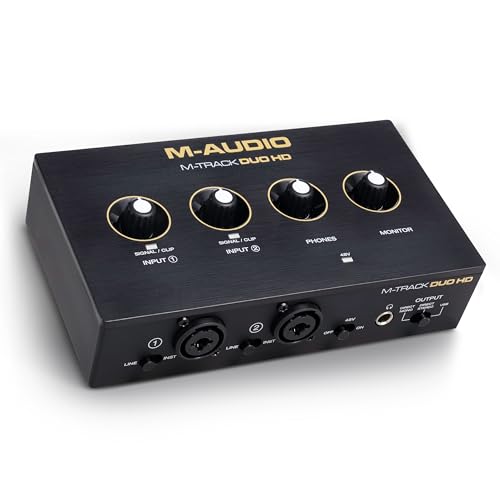
For beginner producers and podcasters seeking a seamless audio experience, the M-AUDIO M-Track Duo HD Audio Interface stands out with its impressive 24-bit/192kHz audio resolution. Weighing just 1.04 pounds and measuring 4.4 x 7.5 x 2.1 inches, it’s compact and easy to fit on any desk. This 2-in/2-out USB-C interface features zero-latency monitoring and crystal preamps with 55dB gain, making your recordings sound professional. Plus, it comes with essential software like Ableton Live Lite and a Splice subscription. Just be mindful of gain sensitivity to avoid clipping. Overall, it’s a fantastic choice for home recording and streaming.
Best For: Beginner producers, session musicians, and pro podcasters seeking a compact and high-quality audio interface.
Pros:
- Easy integration with DAWs and includes a USB-C cable for direct connectivity.
- Zero-latency monitoring and crystal preamps providing high sound clarity.
- Comes with a software bundle that includes Ableton Live Lite and a Splice subscription.
Cons:
- Solo output blends all sounds to one output, which may not suit diverse recording needs.
- Gain control sensitivity can lead to clipping issues if not managed carefully.
- Compatibility issues with older PCs may limit usage for some users.
Factors to Consider When Choosing Audio Interfaces for Beginners
When choosing an audio interface as a beginner, you’ll want to take into account several key factors. Your budget, device compatibility, and recording quality are essential for ensuring you get the right fit for your needs. Additionally, think about the input and output options and how easy the interface is to use, as these will impact your overall experience.
Budget and Affordability
Choosing an audio interface can feel overwhelming, especially with the wide range of prices available. As a beginner, you’ll find entry-level models typically priced between $50 and $200, making affordability vital. Fortunately, many budget-friendly options still deliver high-quality features, like 24-bit/192kHz recording resolution, essential for achieving professional sound. Don’t forget to factor in additional costs for necessary accessories like cables and microphones, as they can impact your overall budget. Some interfaces even come bundled with software packages, adding value without extra expense. Take time to evaluate your specific needs and intended use. Balancing features with cost will guarantee you invest wisely, leading to greater satisfaction and usability in your audio projects.
Compatibility With Devices
Understanding compatibility with your devices is a key aspect of selecting an audio interface as a beginner. First, check the operating system compatibility; most interfaces support Windows, macOS, and iOS, but not all work with Linux or Android. Next, confirm the connection type (USB-C, USB-A, Lightning) matches your devices, as adapters may be necessary for some. Look for plug-and-play functionality, which simplifies setup without complex drivers, making it beginner-friendly. Additionally, consider whether the interface supports various input types, like XLR, line, and instrument, to fit different recording needs. Finally, verify compatibility with popular digital audio workstations (DAWs) to confirm seamless integration for your music production or podcasting endeavors.
Recording Quality Standards
Recording quality standards play a crucial role in your overall audio experience, so it’s important to take into account several key factors when selecting an audio interface. Look for an interface with a 24-bit depth and a sample rate of at least 44.1 kHz; this guarantees you capture a broad dynamic range and accurate audio frequencies. A higher sample rate, like 192 kHz, is ideal for professional-grade recordings. Pay attention to the quality of preamps, as they greatly enhance the clarity and richness of your audio inputs. Finally, zero-latency monitoring is essential for musicians and podcasters, allowing you to hear your performance in real-time without any distracting delays. Choose wisely, and elevate your sound game!
Input and Output Options
When selecting an audio interface, you’ll want to pay close attention to the input and output options it offers. Look for multiple input types, like XLR/Line combo inputs, which let you record various microphones and instruments. Balanced TRS outputs are essential for connecting studio monitors, and don’t forget a headphone output with independent level control for effective monitoring. If you plan on using MIDI devices, check for MIDI I/O for smooth integration with synthesizers. Also, verify the interface supports phantom power (+48V) for condenser microphones. Finally, evaluate the number of outputs; some interfaces provide multi-channel outputs, while others might only have a single stereo output, which could limit your recording capabilities.
Ease of Use
Choosing the right audio interface goes beyond just input and output options; ease of use plays a significant role, especially for beginners. Look for interfaces with plug-and-play functionality, letting you start recording within 60 seconds without dealing with complicated drivers. Intuitive designs, like physical knobs for volume and gain control, make adjustments straightforward and stress-free. Zero-latency monitoring is essential too, as it allows you to hear yourself in real-time while recording, ensuring your timing stays sharp. Clear indicator lights help you monitor levels, so you know when you’re in the ideal range without distortion. Finally, opt for lightweight and portable devices, making it easy to record in various locations whenever inspiration strikes.