A good surround system makes dialogue easier to follow and puts movie effects where they belong: around you. But the right setup depends as much on your room and TV connections as it does on the number of speakers.
These 10 picks span straightforward 5.1 soundbars, expanded-channel packages, and a traditional receiver-based system. Use the guide below to narrow your options before comparing the individual products.
Best 10 51 Surround Sound Systems Picks for 2026
Best Wireless Rear-Speaker Setup
ULTIMEA Poseidon M100 7.1 Dolby Atmos

- Two wireless surround speakers
- Dolby Atmos via HDMI eARC
- Wireless 6.5-inch subwoofer
Best For: Atmos TV audio with fewer speaker cables
Best Four-Surround Layout

- Four wired surround speakers
- Wireless-audio subwoofer
- 7.1 virtual surround; no Atmos
Best For: Rooms that can accommodate four surround speakers
Best Compact Atmos Option

- Dolby Atmos via HDMI eARC
- No separate rear speakers
- Wired 5.25-inch subwoofer
Best For: Compact TV setups prioritizing simple placement
Best Component Speaker Package
Klipsch Reference 5.1 Theater Pack
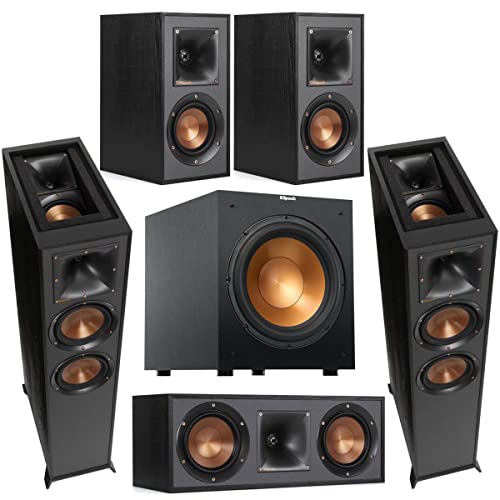
- Separate towers, center, and surrounds
- Up-firing elevation channels
- Powered 12-inch subwoofer
Best For: Dedicated rooms with space for component speakers
Premium Wireless Pick
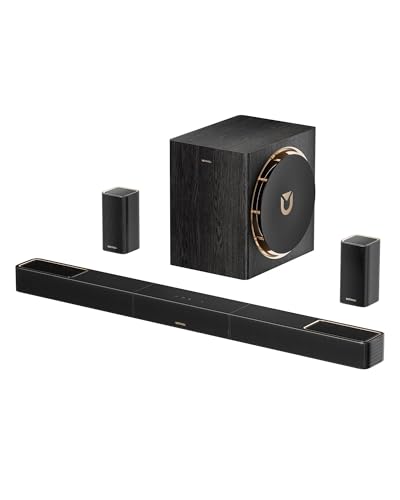
- 5.1.4-channel surround and height effects
- Dual 5GHz wireless transmission
- 8-inch subwoofer rated down to 28Hz
Best For: Cable-light surround setups with overhead effects
Straightforward 5.1 Pick
Sony HT-S40R Home Theater System

- 5.1 channels with rear speakers
- HDMI, optical, and analog TV inputs
- Dialogue and nighttime bass controls
Best For: Traditional 5.1 home theater with simple controls
Atmos Tuning Pick

- Dolby Atmos with up-firing drivers
- HDMI eARC and CEC support
- App EQ and surround-level controls
Best For: Atmos playback with adjustable sound settings
Best Complete Receiver Package
Yamaha YHT-4970U 5.1 Home Theater System
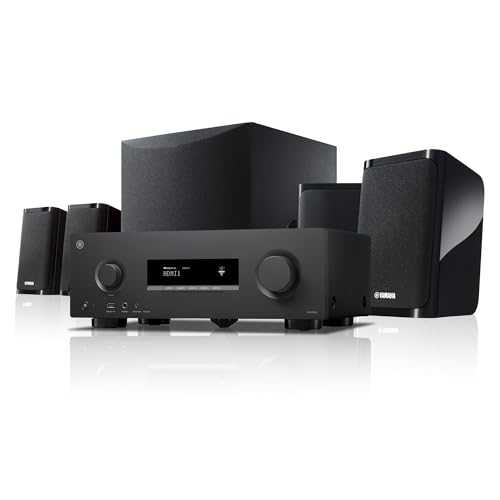
- Receiver, five speakers, and powered subwoofer
- 4K/120, 8K/60, and HDMI eARC support
- Setup microphone for room optimization
Best For: A traditional receiver-based home theater
Best EQ Flexibility
ULTIMEA Aura A60 Pro 7.1 Soundbar System

- Four surround speakers and Dolby Atmos
- 10-band EQ with 121 app presets
- Wired 5.25-inch subwoofer
Best For: App-based audio tuning in a 108–270-square-foot room
Best Wireless Speaker Setup

- Wireless surrounds and 6.5-inch subwoofer
- Dolby Atmos and DTS:X support
- AI Sonic room calibration
Best For: A streamlined 5.1 TV setup with flexible speaker placement
Best Wireless Rear-Speaker Setup – ULTIMEA Poseidon M100 7.1 Dolby Atmos
Among 51 surround sound systems, the Poseidon M100 suits buyers who want a soundbar with separate rear speakers but fewer audio cables. Its 7.1-channel package pairs Dolby Atmos with two wireless surround speakers and a wireless 6.5-inch subwoofer.
Best For: TV viewers who want Dolby Atmos and separate surround speakers without running audio cables across the room.
Pros:
- Two wireless surround speakers provide sound from behind or beside the seating area.
- HDMI eARC supports Dolby Atmos playback; optical, USB, and Bluetooth 6.0 add connection options.
- App controls let you adjust EQ, bass, surround levels, and listening modes.
Cons:
- The subwoofer and surround speakers each still need power outlets.
- Dolby Atmos playback calls for an HDMI eARC connection.
This is a practical middle ground between a single soundbar and a more cable-heavy speaker layout. Check outlet locations before deciding where the rear speakers will go.
Best Four-Surround Layout – ULTIMEA Poseidon D70 7.1
If you are comparing 51 surround sound systems for a room with space for multiple speakers, the Poseidon D70 offers a soundbar, four wired surrounds, and a wireless-audio subwoofer. Its 7.1-channel virtual surround processing is aimed at a wider sound field without a traditional AV receiver.
Best For: Buyers willing to place and wire four surround speakers for a more spread-out TV audio setup.
Pros:
- Four surround speakers can be positioned at the front and rear of the room.
- The subwoofer connects wirelessly to the soundbar for audio.
- HDMI ARC, optical, AUX, USB, and Bluetooth offer flexible connections.
Cons:
- All four surround speakers are wired, and the subwoofer needs an outlet.
- It does not support Dolby Atmos or DTS decoding.
The D70 makes sense when speaker placement matters more to you than a cable-free room. Its surround sound is virtual, so do not choose it expecting Atmos decoding.
Best Compact Atmos Option – ULTIMEA Poseidon M60 5.1
The Poseidon M60 is worth considering among 51 surround sound systems when you want a simpler footprint. It combines a 5.1-channel Dolby Atmos soundbar with a wired 5.25-inch subwoofer, using built-in side-firing drivers rather than separate rear speakers.
Best For: Smaller or less flexible rooms where separate rear speakers would be inconvenient.
Pros:
- Five built-in speakers create a wider presentation without rear-speaker placement.
- HDMI eARC supports Dolby Atmos audio.
- VoiceMX dialogue enhancement and app-based EQ provide listening adjustments.
Cons:
- There are no separate rear speakers for sound physically coming from behind you.
- The subwoofer requires a wired connection.
Choose the M60 for a tidier Atmos-capable TV setup, not for a traditional speaker-around-the-room arrangement. Its dialogue controls are a useful consideration if speech clarity is a priority.
Best Component Speaker Package – Klipsch Reference 5.1 Theater Pack
For shoppers considering 51 surround sound systems with full-size speakers, this Klipsch Reference pack takes a different approach from a soundbar. It includes two R-625FA floorstanding speakers with up-firing elevation channels, an R-52C center, two R-41M bookshelf surrounds, and an R-12SW powered subwoofer.
Best For: A dedicated home theater room with space for tower speakers, separate surrounds, and a 12-inch subwoofer.
Pros:
- Dedicated center and bookshelf surround speakers provide distinct speaker positions.
- Up-firing channels in the towers add an overhead-effect option for Dolby Atmos setups.
- The powered 12-inch subwoofer has a 400W peak amplifier.
Cons:
- The towers and separate speakers need substantially more floor and shelf space than a soundbar.
- The supplied package list does not include an AV receiver; plan for compatible amplification and connections.
This is the pick for someone who wants separate home theater speakers rather than a streamlined soundbar. Account for the room layout and receiver before buying.
Premium Wireless Pick – ULTIMEA Skywave X50 5.1.4ch
Among 51 surround sound systems, the ULTIMEA Skywave X50 is worth considering if you want rear and height effects with fewer signal cables. Its 5.1.4-channel layout, dual 5GHz wireless transmission, and 8-inch subwoofer are aimed at an immersive home-theater setup.
Best For: Viewers who want wireless surround connectivity, overhead effects, and substantial bass.
Pros:
- 5.1.4-channel configuration adds height effects to surround sound.
- Dual 5GHz wireless transmission is designed for stable speaker connectivity.
- Subwoofer is rated to reach 28Hz; 4K HDR pass-through supports compatible video sources.
Cons:
- 760W is a peak-power figure, not a continuous-power rating.
- Wireless audio connectivity does not eliminate the system’s need for power.
The X50 makes the most sense when height channels and cable-light placement matter more than a basic 5.1 setup. Check your room’s power-outlet locations before choosing speaker positions.
Straightforward 5.1 Pick – Sony HT-S40R Home Theater System
If you’re comparing 51 surround sound systems for a conventional home-cinema layout, the Sony HT-S40R offers a 5.1-channel soundbar system with rear speakers. Color-coded connections help with setup, while HDMI, optical, and analog inputs provide TV connection options.
Best For: Buyers who want rear-speaker surround sound and simple remote-based controls.
Pros:
- Dedicated rear speakers complete the 5.1-channel layout.
- HDMI, optical, and analog TV connection options.
- Bluetooth music streaming and selectable sound modes.
- Dialogue enhancement and bass reduction help with speech and nighttime viewing.
Cons:
- Rear speakers require setup with the system’s color-coded connections.
- No height channels are specified for overhead effects.
The HT-S40R is a practical choice if you prefer a familiar 5.1 arrangement over extra height-channel features. Its speech and nighttime options are especially useful in a shared living space.
Atmos Tuning Pick – ULTIMEA Skywave F40 5.1.2ch
The ULTIMEA Skywave F40 adds Dolby Atmos height effects to the field of 51 surround sound systems. Its 5.1.2-channel layout pairs two rear speakers with up-firing drivers, while HDMI eARC supports its multichannel audio connection to a compatible TV.
Best For: Dolby Atmos viewers who want rear speakers and detailed app-based sound adjustments.
Pros:
- Two up-firing drivers add height effects to the 5.1.2-channel layout.
- HDMI eARC and CEC support audio transmission and coordinated TV controls.
- App offers surround-level adjustment, a 10-band EQ, and sound presets.
Cons:
- Not compatible with DTS.
- The 5.25-inch subwoofer is wired, and the included rear-surround cable adds cable routing.
The F40 suits buyers who will use its Atmos playback and tuning options. Before buying, confirm that your TV supports the connection you plan to use and that your sources do not require DTS playback.
Best Complete Receiver Package – Yamaha YHT-4970U 5.1 Home Theater System
Among 5.1 surround sound systems, the Yamaha YHT-4970U is a practical choice if you want a separate AV receiver, five speakers, and a powered subwoofer in one box. Speaker wire, a subwoofer cable, and a setup microphone are included.
Best For: Buyers building a receiver-based home theater who also want support for newer TVs and game consoles.
Pros:
- Includes the receiver, full 5.1 speaker package, and connection cables.
- Supports 4K/120 and 8K/60 video, HDMI eARC, Dolby Vision, HDR10+, ALLM, and VRR.
- Setup microphone automatically optimizes sound for the room; Bluetooth Multipoint pairs two source devices.
Cons:
- Separate speakers require placement and speaker-wire connections.
- The included speaker layout is 5.1, even though the receiver supports Dolby Atmos processing.
Choose this over a soundbar when receiver inputs and a traditional speaker layout matter more than minimal wiring.
Best EQ Flexibility – ULTIMEA Aura A60 Pro 7.1 Soundbar System
If you’re comparing 5.1 surround sound systems but want more surround channels and extensive sound controls, the ULTIMEA Aura A60 Pro is a 7.1-channel soundbar package worth considering. It combines a three-channel bar, four surround speakers, and a wired 5.25-inch subwoofer.
Best For: Buyers who want to tune movie, music, and game audio through an app in a 108–270-square-foot space.
Pros:
- Four surround speakers provide front and rear placement options.
- Supports Dolby Atmos and includes a dedicated subwoofer.
- App offers a 10-band equalizer, 121 EQ presets, and six listening modes.
Cons:
- The subwoofer and surround speakers require wired connections; the rear speakers link wirelessly to the soundbar through the powered rear-right speaker.
- It is a 7.1-channel system, not a conventional 5.1 package.
Its standout feature is customization, but plan speaker placement and power access before buying.
Best Wireless Speaker Setup – TCL S65K 5.1 Soundbar System
The TCL S65K is one of the 5.1 surround sound systems to consider if you prefer a soundbar with wireless surround speakers and a wireless subwoofer over a traditional receiver package. Its center channel is designed to keep dialogue clear.
Best For: TV viewers who want a 5.1 soundbar setup with flexible surround-speaker placement and automatic room calibration.
Pros:
- Wireless surround speakers and a wireless 6.5-inch subwoofer reduce audio-cable clutter.
- Supports Dolby Atmos and DTS:X, with a built-in center channel and tweeter.
- AI Sonic Auto Room Calibration adjusts sound for the space; Bluetooth supports music streaming.
Cons:
- The soundbar format does not provide the separate front speakers of a receiver-based 5.1 package.
- Wireless speakers still need power.
This is the streamlined pick when surround placement and straightforward TV integration take priority over receiver-based flexibility.
How We Picked the Best 51 Surround Sound Systems
We considered channel layout, speaker placement, connection options, setup complexity, and the space each system needs. This list includes true 5.1 options alongside 5.1.2, 5.1.4, and 7.1 systems for shoppers who want to compare standard surround sound with added height or rear channels. A larger channel number is not, by itself, a reason to buy: the speakers still need to fit your room and your willingness to place them.
Quick Comparison of 5.1 Surround Sound Systems
Start by choosing a format. Soundbar-based packages from Sony, TCL, and ULTIMEA generally offer a simpler route to surround sound, with a main bar, subwoofer, and separate surround speakers where included. The Klipsch speaker package suits buyers who want traditional speakers and have space for floorstanding fronts; check what additional equipment it needs for your setup. The Yamaha package includes an AV receiver, making it the clearest choice here for buyers who want receiver-based control and multiple source connections.
Next, compare the labels carefully. A 5.1 layout has front left, center, and front right channels, two surround channels, and a subwoofer. In 5.1.2 or 5.1.4, the final digit denotes height channels; 7.1 adds more surround channels. Dolby Atmos support and a height-channel label do not guarantee the same effect in every room.
Key Buying Factors for 51 Surround Sound Systems
Room Layout and Speaker Placement
Check where the surrounds can go relative to your seating, whether the subwoofer has a practical location, and how you will power any rear speakers. “Wireless” often describes the audio connection, not freedom from power cords. In a small or awkward room, a well-placed 5.1 system may be more useful than extra channels you cannot position properly.
TV and Source Connections
Confirm that your TV and system share a suitable connection, such as HDMI eARC or ARC, and check the requirements for the audio formats you use. Gamers and buyers with several devices should also look at HDMI inputs and video passthrough specifications rather than assuming every system handles their preferred resolution and refresh rate.
What Is Included
Before ordering, verify the box contents: surround speakers, subwoofer, cables, mounting hardware, and receiver are not interchangeable details. Also consider whether you want app-based adjustments or the greater setup flexibility of an AV receiver.
Who Should Buy Which 51 Surround Sound Systems?
Choose a 5.1 soundbar package if you want distinct surround speakers without building a component system. Consider a 5.1.2 or 5.1.4 option if height effects matter to you and your room can support the intended placement. Pick a 7.1 system only if you have space for its additional channels. If you want traditional speakers and more hands-on control, compare the Klipsch package’s equipment needs with the receiver-based Yamaha system. Whichever route you take, prioritize a layout you can install correctly over the longest feature list.