If you need to monitor multiple HDMI sources at once, a multiview switcher can make setup faster and day-to-day use much easier. These units are useful for security monitoring, streaming, live demos, gaming, and home AV systems.
In this roundup of the best multi camera HDMI switchers with multiview, we focus on practical features like resolution support, display modes, audio handling, and switching behavior so you can choose the right model for your setup.
Best 10 Multi Camera HDMI Switchers with Multiview Picks for 2026
Quad Multiview 4-in-1 with VGA
OREI 4-Port Seamless 4K Viewer

- 4 HDMI inputs with 5 viewing modes
- 4K @ 30Hz plus VGA output
- Integrated digital and analog audio conversion
Best For: Simple quad-view monitoring with mixed HDMI and VGA output needs
4K60 Quad Viewer
J-Tech Digital 4x1 Seamless Switcher

- 4K @ 60Hz with zero-latency switching
- 8 modes including PiP, PBP, and quad-view
- RCA and optical audio extraction
Best For: Users who want higher-resolution quad viewing with flexible layout control
1080p Quad Screen Switcher

- 4 HDMI inputs to 1 display
- 5 display modes with IR remote control
- VGA output and 1080p support
Best For: Budget-friendly quad-screen viewing at up to 1080p
4x2 Dual Output Multiview

- 4 sources to 2 displays with multiview on Output A
- 6 viewing modes plus seamless full-screen switching
- SPDIF and 3.5mm audio extraction
Best For: Dual-display setups that need multiview on one screen and a second output on another
Best Layout Flexibility
4K HDMI Multiviewer Switch with 10 Modes

- 4 inputs on one screen with 10 display modes
- Seamless switching within the same mode
- 4K@30Hz and 1080P@60Hz support
Best For: buyers who want lots of viewing layouts for cameras, consoles, or office monitoring
Simple HDMI/VGA Multiview
OREI 4x1 HDMI Switcher with VGA Output

- 4 HDMI inputs with seamless switching
- 5 display modes plus IR remote control
- HDMI, 3.5mm audio, and VGA output
Best For: buyers who need a straightforward multiview switcher with an extra VGA connection
Most Flexible Layouts
PORTTA 4x1 Multiviewer with PIP and Scaler

- Six modes including PIP and 1 big 3 small
- 1080p@60Hz with up/down scaling
- Toslink, 3.5mm, IR, and RS232 control
Best For: users who want advanced split-screen options and audio outputs
Quad Multiview Starter
4x1 HDMI Multiviewer with 12 Modes
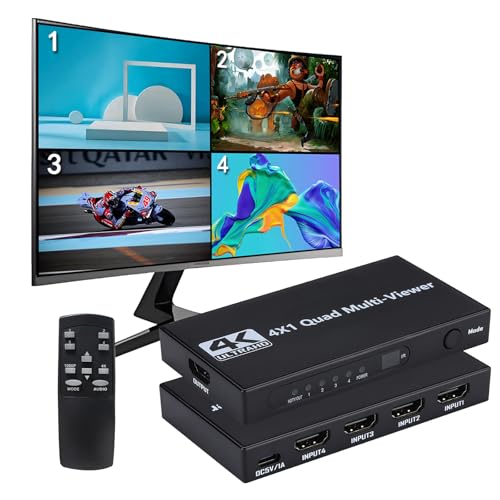
- 4 HDMI inputs on one display
- 12 layouts with IR remote control
- 4K@30Hz full screen, 1080P@60Hz multiview
Best For: simple 4-source viewing for cameras, consoles, or PCs
Pro 4K Viewer
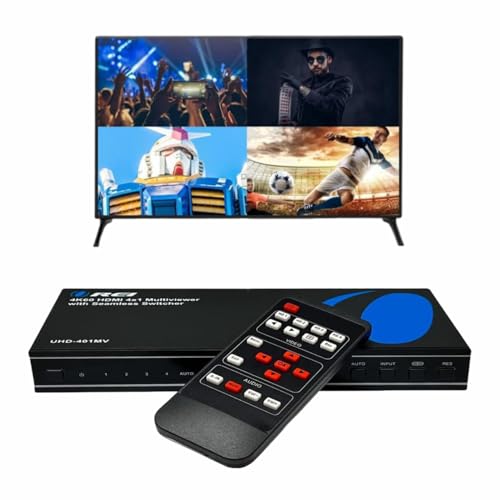
- 4K@60Hz support with seamless switching
- Optical and L/R audio outputs
- IR remote and front-panel control
Best For: 4-source setups that need better audio output options
Dual Output Matrix

- 4 inputs to 2 outputs with matrix routing
- 8 layouts including PIP, PBP, triple, quad
- Front panel, IR, software, and RS-232 control
Best For: two-display installations that need flexible multiview routing
Quad Multiview 4-in-1 with VGA – OREI 4-Port Seamless 4K Viewer
If you want multi camera HDMI switchers with multiview for a simple 4-source monitoring setup, this OREI unit is built around quick switching and flexible output options. It can show up to 4 HDMI inputs on one display, supports 4K @ 30Hz and 2K @ 60Hz, and adds VGA output for extra compatibility.
Best For: Basic quad-view monitoring with mixed HDMI and VGA output needs.
Pros:
- Displays up to 4 HDMI sources in one multiview layout with 5 viewing modes.
- Supports 4K @ 30Hz and 2K @ 60Hz for a range of source devices.
- Includes integrated audio conversion for simultaneous digital and analog audio output.
- Works with common devices like game consoles, streaming boxes, DVD/Blu-ray players, and cameras.
Cons:
- Top video support is 4K @ 30Hz, not 4K @ 60Hz.
- Designed as a 4-input system, so it is not ideal for larger source counts.
This is a practical pick if you need a straightforward 4-in-1 multiviewer with strong compatibility and the added convenience of VGA output. The included IR remote and front-panel controls make it easy to manage day-to-day use.
4K60 Quad Viewer – J-Tech Digital 4×1 Seamless Switcher
Among multi camera HDMI switchers with multiview, this J-Tech Digital model stands out for 4K @ 60Hz support and a more advanced set of viewing controls. It switches between 4 HDMI inputs on one display with zero latency and offers 8 display modes, including PiP, PBP, and quad-view.
Best For: Users who want higher-resolution quad viewing with flexible layout control.
Pros:
- Supports 4K @ 60Hz for sharper high-resolution output.
- Offers 8 viewing modes, including PiP, PBP, and quad-view.
- OSD and PC software let you rearrange sources and adjust PiP settings.
- Includes RCA and optical audio outputs with support for premium digital audio formats.
Cons:
- Requires an AC adapter, so it is not a simple plug-and-play passive switch.
- Best suited to users who will take advantage of the OSD or PC software controls.
This is a strong option if image quality and layout control matter more than basic switching alone. The mounting ears and lifetime technical support also make it a better fit for more permanent installations.
1080p Quad Screen Switcher – OREI HD-401MV Multiviewer
If you need multi camera HDMI switchers with multiview for a simpler 1080p setup, this OREI model covers the basics cleanly. It connects 4 HDMI inputs to one display, supports smooth switching, and includes VGA output for added flexibility.
Best For: Budget-friendly quad-screen viewing at up to 1080p.
Pros:
- Connects 4 HDMI sources to a single display with fast, smooth switching.
- Offers 5 display modes and control via IR remote or front-panel buttons.
- Includes VGA output for additional display compatibility.
- Backed by a 1-year warranty and includes remote, power supply, and user manual.
Cons:
- Video support tops out at 1080p, so it is not for 4K setups.
- Best for straightforward use rather than advanced layout customization.
This model makes sense if your priority is dependable multiview switching without paying for higher-resolution features you may not need. It keeps setup simple while still offering multiple viewing modes and familiar audio support.
4×2 Dual Output Multiview – PORTTA 4K Matrix Switch
For buyers comparing multi camera HDMI switchers with multiview, this PORTTA unit adds extra flexibility by driving two displays from four sources. Output A provides multiview with 6 viewing modes, while Output B can mirror Output A or show one source independently.
Best For: Dual-display setups that need multiview on one screen and a second output on another.
Pros:
- 4×2 matrix design supports 4 HDMI sources and 2 HDMI displays.
- Output A includes 6 viewing modes such as PIP, full screen, and 1 big with 3 small.
- Built-in audio extraction via SPDIF and 3.5mm outputs.
- Supports seamless switching in full-screen mode and includes mounting ears.
Cons:
- Multiview is limited to Output A, so only one display gets the expanded layouts.
- Top resolution is 4K @ 30Hz rather than 4K @ 60Hz.
This is a smart choice when one monitor needs a multiview layout and a second display needs either mirroring or its own source. The included scaler and broad device compatibility help it fit mixed home or monitoring setups.
Best Layout Flexibility – 4K HDMI Multiviewer Switch with 10 Modes
If you want multi camera HDMI switchers with multiview for live monitoring, this 4×1 HDMI multiviewer gives you four inputs on one screen with seamless switching and multiple layouts. It supports 4K@30Hz or 1080P@60Hz, includes IR remote control and DIP switch control, and is built for mixed use cases like security feeds, gaming consoles, offices, and presentation setups.
Best For: Users who need a flexible 4-input multiviewer for security, gaming, or general monitoring on a single display.
Pros:
- Displays 4 HDMI sources on one screen with 10 viewing modes.
- Supports seamless switching within the same mode for smooth monitoring.
- Works with a wide range of HDMI devices, including cameras, consoles, PCs, and streamers.
- Includes synchronized audio transmission and a 3.5mm stereo audio jack.
Cons:
- The remote control does not include batteries.
- Switching between different display modes can take a few seconds.
- Resolution tops out at 4K@30Hz rather than 4K@60Hz.
This is a practical pick if you want a feature-rich multiviewer with plenty of layout options and broad compatibility. It is especially useful when you need to watch several HDMI sources at once without constant cable swapping.
Simple HDMI/VGA Multiview – OREI 4×1 HDMI Switcher with VGA Output
For shoppers comparing multi camera HDMI switchers with multiview, this OREI quad multi viewer focuses on simple 4-input monitoring with real-time seamless switching up to 1080p and 2K@60Hz. It supports four HDMI sources on one display, adds VGA output, and includes IR remote control and front-panel buttons for straightforward day-to-day use.
Best For: Anyone who wants an easy-to-use 4-input multiview switcher with HDMI and VGA output options.
Pros:
- Supports 4 HDMI inputs with real-time seamless switching.
- Offers 5 display modes for different viewing setups.
- Includes HDMI and 3.5mm stereo audio output, plus VGA output.
- Backed by a 1-year full warranty with OREI support.
Cons:
- Resolution support is lower than 4K models, topping out at 1080p/2K@60Hz.
- Fewer viewing modes than some competing multiviewers.
- Designed around basic switching rather than advanced layout control.
This OREI unit is a sensible choice if you want the core multiview experience without extra complexity. The VGA output can also be useful if you need compatibility with older displays or mixed equipment.
Most Flexible Layouts – PORTTA 4×1 Multiviewer with PIP and Scaler
If you need multi camera HDMI switchers with multiview and want more layout control, this PORTTA 4×1 multiviewer adds PIP, 1 big 3 small, equal-screen, and side-by-side modes. It supports seamless switching, 1080p@60Hz output, up/down scaling for 1080p and 720p, and provides both Toslink and 3.5mm audio outputs for flexible installations.
Best For: Users who want advanced viewing modes and audio output options for security, gaming, or projector setups.
Pros:
- Six viewing modes, including PIP, full screen, and 1 big 3 small.
- Seamless switching across four HDMI inputs.
- Includes downscaler/upscaler support for 1080p and 720p.
- Offers Toslink and 3.5mm audio outputs, plus RS232 and IR control.
Cons:
- Max output resolution is 1080p@60Hz.
- Only four inputs, so it may not suit larger camera arrays.
- Advanced controls may be more than casual users need.
Among compact multiviewers, this one stands out for layout variety and useful scaling features. It is a strong fit when you need more than basic split-screen viewing and want practical audio integration too.
Quad Multiview Starter – 4×1 HDMI Multiviewer with 12 Modes
If you want multi camera HDMI switchers with multiview for a simple 4-source setup, this 4×1 HDMI multiviewer delivers a practical mix of screening modes and easy source switching. It supports four HDMI inputs, offers 12 display modes, and can show 4K@30Hz in full screen or 1080P@60Hz in multiview mode.
Best For: Users who need an affordable 4-input multiview switcher for security camera feeds, gaming, or general multi-source viewing.
Pros:
- Supports 4 HDMI inputs with quad multiview on one display.
- 12 display modes, including full screen, 2-screen, 3-screen, and 4-screen layouts.
- IR remote and front-panel controls make source changes easy.
- Plug-and-play compatibility with Windows, Linux, Unix, and Mac OS.
Cons:
- Multiview mode is limited to 1080P@60Hz.
- When no HDMI signal is present, unused areas display black.
- Best suited to basic switching rather than advanced routing.
This is a straightforward pick if you mainly need four inputs on one screen with flexible layouts and simple control. The resolution tradeoff is worth noting, but the mode selection and broad compatibility make it a solid entry-level option.
Pro 4K Viewer – OREI UHD-401MV 4 In 1 Out
For buyers comparing multi camera HDMI switchers with multiview, the OREI UHD-401MV stands out for its 4K@60Hz support, seamless switching, and flexible audio options. It accepts four HDMI sources into one display and adds optical plus L/R audio output for setups that need more than basic HDMI passthrough.
Best For: People who want a polished 4-input multiview switcher with stronger audio handling and 4K@60Hz support.
Pros:
- Supports 4 HDMI inputs to 1 display with seamless switching.
- Up to 4K@60Hz and 2K@60Hz output support.
- Optical and L/R audio outputs add more connection flexibility.
- IR remote and front-panel buttons provide easy control.
Cons:
- Only 5 display modes, so layout choice is more limited than some rivals.
- Audio output selection is limited to one source at a time.
- Best for users who need multiview and audio routing, not just simple switching.
This OREI model is a strong all-around option if you care about smoother switching and better audio integration. It is especially useful when one display needs to handle mixed sources without giving up audio flexibility.
Dual Output Matrix – OREI UHD-402MV 4 In 2 Out
If your setup needs multi camera HDMI switchers with multiview and more than one display, the OREI UHD-402MV adds dual outputs and matrix-style flexibility. It supports four HDMI inputs, two outputs, and 8 display modes, including single, PIP, PBP, triple, and quad layouts, while also offering 4K@60Hz support.
Best For: Users who want one switcher to feed two displays while managing multiple HDMI sources and multiview layouts.
Pros:
- 4 HDMI inputs with 4 in 2 out matrix switching.
- 8 display modes, including PIP, PBP, triple, and quad options.
- 4K@60Hz and 2K@60Hz support with EDID management.
- Multiple control methods: front panel, IR remote, OSD, software, and RS-232.
Cons:
- More complex than a basic 4×1 viewer.
- Designed for users who actually need dual outputs.
- Setup may take more time because of the added control and routing options.
This is the most versatile option in the group if you need to mirror or route sources across two displays. The extra output, broader layout choices, and control methods make it better suited to more demanding installations.
How We Picked These Multi Camera HDMI Switchers with Multiview
We prioritized switchers that balance viewing flexibility, signal support, and ease of use. The most useful models offer stable multiview layouts, remote control, clear on-screen display options, and enough input/output combinations for common camera, PC, and media-source setups. We also weighed resolution support carefully, since many buyers need either reliable 1080p multiview or 4K passthrough for sharper monitoring.
Quick Comparison
For most buyers, the main choice is between simpler 4×1 multiview switchers and more flexible 4×2 or matrix-style units. A 4×1 model is best when you want several sources on one display. A 4×2 model is better when you need to feed more than one screen, such as a monitor wall plus a control display. If audio extraction matters, look for built-in optical or 3.5mm outputs. If you need smoother workflow, compare the number of display modes, picture-in-picture support, and whether the unit offers seamless switching.
Key Buying Factors for Multi Camera HDMI Switchers with Multiview
Resolution and Refresh Rate
Match the switcher to your display and sources. Many multiview units support 4K at 30Hz or 60Hz on the output side, while some multiview layouts may be limited to 1080p. If you are using cameras, security feeds, or office sources, 1080p is often enough. For gaming, content creation, or sharper desktop use, 4K support matters more.
Display Modes and Layout Flexibility
More modes can make the switcher more useful. Look for quad view, full-screen, PIP, and split-screen options if you want to prioritize different sources at different times. The best Multi Camera HDMI Switchers with Multiview make it easy to switch layouts without digging through complicated menus.
Audio Handling
Some setups need separate audio output instead of relying only on HDMI. Optical and 3.5mm outputs are helpful if you want to send sound to speakers, a mixer, or a recorder. This is especially important for live production and monitoring workflows.
Inputs, Outputs, and Expansion
Check whether you need one output or two. A 4×1 switcher suits a single monitoring station, while a 4×2 matrix can support multiple displays. Also confirm compatibility with your sources, including consoles, PCs, cameras, and media players.
Control and Ease of Use
IR remotes, OSD controls, and seamless switching can save time in real-world use. If the switcher will be used by multiple people or in a fixed installation, simple controls matter as much as raw specs.
Who Should Buy Which Multi Camera HDMI Switchers with Multiview?
If you want a straightforward monitoring solution for a single display, choose a 4×1 multiview switcher with the resolution you need. If you need more advanced routing or a second screen, consider a 4×2 matrix model. Streamers and presenters should look for flexible layouts and audio outputs. Security and office users may value stable quad view and easy remote switching more than top-end video specs. In short, pick the model that best matches your display count, resolution needs, and audio workflow rather than chasing the longest feature list.