Choosing the right switcher can make a podcast feel polished, fast, and much easier to produce. The best setups let you move between hosts, guests, and screen sources without distracting delays or complicated workflows.
In this roundup, we focus on multi camera video switchers for podcasts that balance ease of use, input flexibility, recording and streaming support, and audio integration for real-world studio setups.
Best 10 Multi Camera Video Switchers for Podcasts Picks for 2026
Premium all-in-one studio hub

- 4 video inputs: 3 HDMI + 1 USB
- Built-in XLR audio with Revolution Preamps
- Streams live and records ISO to USB
Best For: Podcasters who want integrated audio and scene control
Budget-friendly 4K touch control
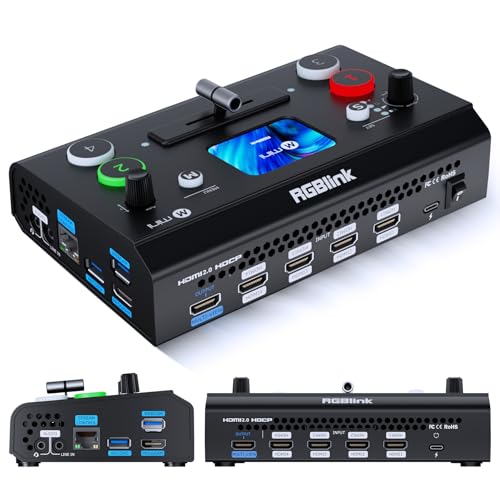
- 4 HDMI inputs with dual HDMI outputs
- 2.1-inch touch screen plus T-bar control
- Optional PTZ, recording, and overlay features
Best For: Smaller podcast studios that want compact touch control
Expanded six-input studio switcher

- 6 inputs: 4 HDMI + 2 USB
- Seven customizable multi-source scenes
- Built-in XLR audio and ISO recording
Best For: Larger podcast productions with more cameras and scene needs
Compact streaming switcher

- 4 HDMI inputs for multi-camera setups
- USB 3.0 webcam output for streaming
- 14 transitions and 9 PIP layouts
Best For: Podcasters who want simple switching and webcam output
Quad-Multiview Value Pick
ACHAVE 4x1 HDMI Switcher with USB Capture

- 4 HDMI inputs with 10 multiview display modes
- USB 3.0 capture for streaming to a computer
- Audio I/O, mic input, and IR remote included
Best For: Small podcast and streaming setups needing simple multiview switching
Touchscreen Production Hub
FEELWORLD L4 4x HDMI + SDI Mixer

- 10.1-inch touchscreen for live preview and setup
- 4 HDMI inputs plus 1 SDI input for bigger productions
- USB 3.0 output for streaming and PTZ support
Best For: Medium to large podcasts and events needing touchscreen control
Broadcast-Ready Pro Option
SPROLINK Neolive R5 4K Streaming Switcher

- 4 HDMI inputs with 4K60/1080p60 source support
- Built-in NDI, RTMP, and SRT hardware streaming
- Audio mixer, PTZ control, and USB 3.0 UVC output
Best For: Podcasts and live shows needing an all-in-one pro streaming switcher
Large-screen live production pick
FEELWORLD L4 10.1" Touchscreen Switcher

- 10.1-inch touchscreen for live preview and menu control
- 4 HDMI plus 1 SDI input for flexible podcast setups
- USB 3.0 output, chroma key, logo overlay, and transitions
Best For: podcast producers who want a bigger, feature-packed switcher
Compact solo-production pick
FEELWORLD LIVEPRO L1 V1 Compact Switcher

- 4 HDMI inputs for 1080p multi-camera switching
- USB 3.0 output works with streaming software
- Compact body with tripod-mount option and LAN control
Best For: solo podcasters who want a simple, space-saving switcher
4K PTZ control pick
FEELWORLD L1 Plus 4K Touchscreen Switcher

- 4 HDMI 2.0 inputs support 4K@60Hz sources
- PTZ control with VISCA, presets, focus, and zoom
- USB 3.0 output plus chroma key and logo overlay
Best For: podcast studios using PTZ cameras and 4K sources
Premium all-in-one studio hub – RØDECaster Video S
If you want multi camera video switchers for podcasts that can handle both video and serious audio, the RØDECaster Video S is built for exactly that job. It gives you up to four video sources, custom multi-source scenes, and front-panel access to media, overlays, chroma keying, and transitions for a streamlined podcast workflow.
Best For: Podcasters who want a compact switcher with integrated pro audio and hands-on scene control.
Pros:
- Switches between up to four sources with 3 HDMI inputs and 1 USB input.
- Includes two Neutrik combo jacks with low-noise Revolution Preamps for XLR mics and other audio sources.
- Supports streaming via Wi‑Fi, Ethernet, or USB, plus ISO recording to external USB storage.
- Offers five customizable scenes, media playback, overlays, chroma keying, and auto-switching.
Cons:
- Limited to four video inputs, so larger camera setups will need a different model.
- Designed around 1080p60 rather than higher-resolution production.
This is a strong pick if your podcast needs a true control center for both switching and audio capture. The built-in podcast-focused features make it easier to run a polished live show without piling on extra gear.
Budget-friendly 4K touch control – RGBlink Mini V3
The RGBlink Mini V3 is a compact option in multi camera video switchers for podcasts when you want 4K HDMI switching without a big footprint. It combines four HDMI inputs, a 2.1-inch touch screen, and dual HDMI outputs, with UVC webcam mode for easy use in streaming software.
Best For: Smaller podcast setups that want touch control, dual outputs, and optional feature upgrades.
Pros:
- Provides 4 HDMI inputs plus dual HDMI outputs for program and preview.
- Includes a 2.1-inch touch screen and T-bar control for hands-on operation.
- Supports UVC webcam mode for quick recognition in streaming software.
- Can add features like PTZ control, recording, chroma key, and logo overlay through TAO Cloud plans.
Cons:
- Several advanced functions require TAO Cloud activation.
- Needs setup steps and internet connection for cloud-based feature binding.
The Mini V3 works well if you want a compact switcher with a modern interface and the flexibility to add features later. It is especially appealing for creators who care more about streamlined switching than an all-in-one audio package.
Expanded six-input studio switcher – RØDECaster Video
For podcasts that need more sources, this version of the RØDECaster Video stands out among multi camera video switchers for podcasts thanks to its six-input layout and seven customizable scenes. It brings the same podcast-friendly workflow as the smaller model, but with more room for cameras, laptops, or USB sources in a larger production.
Best For: Larger podcast productions that need extra inputs and more scene options.
Pros:
- Switches between up to six sources with 4 HDMI inputs and 2 USB inputs.
- Offers seven customizable multi-source scenes for flexible show layouts.
- Includes dual Neutrik combo jacks and Revolution Preamps for XLR audio capture.
- Supports Wi‑Fi, Ethernet, USB streaming, and ISO recording to external storage.
Cons:
- Larger and heavier than the smaller four-input version.
- Still focused on 1080p60 rather than higher-resolution output.
If your show regularly uses multiple cameras and guest feeds, the extra input capacity will matter more than a smaller footprint. It is a practical upgrade for podcasters who need more room to grow without giving up integrated audio features.
Compact streaming switcher – RGBlink Mini Video Mixer
If you need multi camera video switchers for podcasts on a simpler budget, the RGBlink Mini Video Mixer focuses on the essentials. It offers four HDMI inputs, USB 3.0 webcam output for streaming software, and built-in transition and picture-in-picture tools for straightforward live production.
Best For: Podcasters and solo streamers who want a simple HDMI switcher with webcam output.
Pros:
- Handles up to four HDMI inputs for multi-camera setups.
- USB 3.0 output is recognized as a webcam for streaming software.
- Includes 14 transition effects and 9 picture-in-picture layouts.
- Supports remote control over LAN without extra software.
Cons:
- Does not include onboard recording in this model.
- Battery-powered design may be less ideal for permanent studio installs.
This is a clean entry point if you mainly need dependable switching and webcam-style output for live podcasting. It is best viewed as a practical production tool rather than a feature-packed studio hub.
Quad-Multiview Value Pick – ACHAVE 4×1 HDMI Switcher with USB Capture
If you want one of the more affordable multi camera video switchers for podcasts, this ACHAVE unit focuses on the basics: four HDMI inputs, a multiview layout, and USB 3.0 capture for streaming or recording. It’s a practical fit when you need to see multiple sources at once and send a clean feed to a computer without adding extra hardware.
Best For: Podcast hosts and small streaming setups that need simple four-source switching with multiview monitoring.
Pros:
- 4 HDMI inputs plus 1 HDMI output for straightforward multi-camera setups
- 10 display modes make it easy to monitor multiple sources simultaneously
- USB 3.0 capture supports live streaming workflows
- Includes audio I/O, mic input, screen rotation, and remote control
Cons:
- Capture output is limited to 1080p full HD
- Remote control requires an AAA battery that is not included
Overall, this is a sensible entry point for creators who want multiview monitoring and basic streaming support without overcomplicating the workflow. The feature set is broad enough for podcasts, gaming, and simple live productions, but it is best suited to users who don’t need advanced broadcast tools.
Touchscreen Production Hub – FEELWORLD L4 4x HDMI + SDI Mixer
The FEELWORLD L4 is built for multi camera video switchers for podcasts and larger live productions where monitoring matters. Its 10.1-inch touchscreen, 4 HDMI inputs, and SDI support make it easier to preview sources, switch shots quickly, and keep the whole setup visible on screen while streaming to your preferred platform through USB 3.0.
Best For: Podcasts, church services, weddings, and event streams that need touchscreen control and broader camera support.
Pros:
- 4 HDMI inputs plus 1 SDI input for flexible camera and source connections
- 10.1-inch touchscreen makes previewing and setup easier
- T-bar and button switching support quick picture changes
- USB 3.0 output lets you stream through a computer
Cons:
- Best suited to medium or large setups rather than ultra-compact rigs
- Some advanced workflows may require external PTZ control gear
For creators who want a hands-on control surface and a larger preview area, the L4 offers a strong balance of usability and input flexibility. It is especially appealing if your podcast or event production needs to juggle multiple cameras and a computer feed in one place.
Broadcast-Ready Pro Option – SPROLINK Neolive R5 4K Streaming Switcher
The SPROLINK Neolive R5 is the most feature-rich pick here for multi camera video switchers for podcasts, especially if you want streaming, monitoring, audio mixing, and control in one box. With 4 HDMI inputs, NDI and RTMP support, dual HDMI outputs, and USB 3.0 UVC capture, it is designed for creators who want a more complete production workflow.
Best For: Podcasts, interviews, and live shows that need hardware streaming, audio mixing, and PTZ control.
Pros:
- 4 HDMI inputs with support for mixed 4K60 and 1080p60 sources
- Built-in NDI, RTMP, and SRT workflows for hardware streaming
- Dual HDMI outputs plus USB 3.0 UVC capture for flexible monitoring
- Integrated audio mixer, headphone monitoring, and PTZ control
Cons:
- Feature set is more complex than basic switchers
- May be more than a simple two-camera podcast setup needs
For teams that need a serious production tool, the R5 goes well beyond simple source switching. Its built-in streaming, audio, and control features make it a strong fit when you want to reduce the number of separate devices in your podcast or live studio.
Large-screen live production pick – FEELWORLD L4 10.1" Touchscreen Switcher
If you’re comparing multi camera video switchers for podcasts, the FEELWORLD L4 is built for creators who want a bigger monitoring screen and flexible input options. It combines 4 HDMI inputs, 1 SDI input, and USB 3.0 output, so you can switch between cameras and send a clean live feed to your computer in real time.
Best For: Podcast teams that want a large touchscreen switcher with SDI support and built-in streaming features.
Pros:
- 10.1-inch HD LCD touchscreen lets you preview signals, preset, and program output clearly.
- 4 HDMI + 1 SDI inputs give you more connection flexibility for multi-camera setups.
- USB 3.0 output works with common streaming software for live production.
- Includes chroma key, logo overlay, 13 transitions, and 1080p@60 recording support.
Cons:
- Larger footprint may be less convenient for very small podcast desks.
- Chroma key and logo overlay depend on setup steps and app-based image upload.
The L4 stands out when you want a feature-rich switcher that can handle podcast camera switching plus overlays and recording without adding extra gear. Its screen and input count make it a practical fit for more involved live shows.
Compact solo-production pick – FEELWORLD LIVEPRO L1 V1 Compact Switcher
For creators shopping for multi camera video switchers for podcasts, the FEELWORLD LIVEPRO L1 V1 focuses on simple operation in a smaller body. It offers 4 HDMI inputs, USB 3.0 output, and real-time switching, making it straightforward to run multiple camera angles and send the program feed to streaming software.
Best For: Solo podcasters or small teams that need a compact, easy-to-run switcher.
Pros:
- 4 HDMI inputs support multi-camera live production in 1080p.
- USB 3.0 output connects to a computer and works like a built-in webcam.
- Compact design and tripod-mount screw hole suit solo operation.
- Remote control via LAN and XPOSE software adds extra operating flexibility.
Cons:
- Smaller 2-inch display is less expansive than larger touchscreen models.
- Fewer advanced hardware features than the higher-end switchers in the lineup.
The LIVEPRO L1 V1 is a practical choice if you value simplicity and portability over a long list of extras. It covers the basics of podcast switching well and should be easy to manage from a single position.
4K PTZ control pick – FEELWORLD L1 Plus 4K Touchscreen Switcher
If your shortlist of multi camera video switchers for podcasts includes 4K-ready gear, the FEELWORLD L1 Plus is designed for higher-resolution sources and more control. It supports 4 HDMI 2.0 inputs up to 4K@60Hz, adds a touchscreen with joystick control, and includes PTZ control for compatible cameras.
Best For: Podcast studios using PTZ cameras or 4K HDMI sources that want touch control and scene tools.
Pros:
- 4 HDMI 2.0 inputs support 4K@60Hz video sources.
- 2-inch touchscreen and 5-direction joystick make operation more intuitive.
- PTZ control via VISCA protocol covers rotation, focus, zoom, and presets.
- USB 3.0 output, chroma key, logo overlay, scene saving, and onboard effects add production value.
Cons:
- Only 4 inputs, so it is less expandable than 5-channel models.
- Small screen may not be ideal if you prefer a larger visual preview area.
The L1 Plus is the most control-focused option here, especially if your podcast setup uses PTZ cameras. It blends 4K input support with useful scene and overlay tools in a compact switching surface.
How We Picked These Multi Camera Video Switchers for Podcasts
We prioritized the features podcasters actually use: reliable HDMI or USB input handling, simple camera switching, solid preview/production monitoring, and workflow-friendly audio support. We also considered whether a unit is easier for a solo operator or better suited to a larger studio with multiple cameras and guests.
Quick Comparison
Some models are built like podcast-first production hubs with integrated audio tools and streamlined controls, while others lean more toward live streaming and multi-view switching. If you want an all-in-one studio centerpiece, look closely at podcast-focused switchers with deeper audio integration. If your priority is pure video routing, PTZ control, or higher flexibility for live events, a more broadcast-oriented unit may be the better fit.
Key Buying Factors for Multi Camera Video Switchers for Podcasts
Input Count and Source Mix
Check how many cameras, computers, and mobile sources you need to connect today, then add one or two extra inputs for future growth. HDMI-only systems are common, but HDMI plus USB support can be especially useful for podcast guests, screen shares, and remote-call workflows.
Audio Handling
For podcasts, audio matters as much as video. Look for switchers that can integrate microphones, line-level sources, or external mixers without forcing awkward sync fixes. If you already use a dedicated audio chain, make sure the switcher plays nicely with it.
Resolution, Frame Rate, and Output Options
Most podcast studios will be well served by 1080p60, which keeps motion smooth and production manageable. Some options support 4K input or output, which may be useful if you want more future-proofing or multi-use studio flexibility. Also verify whether the switcher offers clean output for recording and separate program output for streaming.
Controls and Monitoring
Touchscreens, preview/program layouts, and multi-view monitoring can dramatically reduce mistakes during live recordings. If one person is operating the show, a clear interface is a major advantage. For multi-operator studios, external control options and PTZ support can be valuable.
Who Should Buy Which Multi Camera Video Switchers for Podcasts?
If you want a podcast-first workflow with tighter audio and simpler day-to-day use, choose a model designed around creator studios. If you need the most camera inputs and a more traditional production style, go with a switcher that emphasizes connectivity and multiview monitoring. If you stream often or manage remote guests, prioritize the unit with the easiest routing, best capture support, and least complicated setup.
For most buyers comparing Multi Camera Video Switchers for Podcasts, the best choice is the one that reduces operator stress while matching your camera count, audio setup, and streaming goals.