Choosing the right switcher can make multi-camera production feel simple instead of stressful. The best models combine clean camera switching, dependable live output, and useful audio controls in one box.
Below, we focus on options that suit streaming, podcasting, classrooms, churches, and event setups, with an eye on ease of use, input flexibility, and real-world audio handling.
Best 10 Multi Camera Switchers with Audio Mixing Picks for 2026
Editor’s Choice

- 4 HDMI inputs with multiview
- Built-in 6-input audio mixer
- USB-C webcam output and recording
Best For: Compact livestream setups that need simple camera switching and audio mixing
Best for Podcast Video

- 3 HDMI plus 1 USB video input
- Two combo jacks with Revolution Preamps
- Wi-Fi, Ethernet, and USB streaming
Best For: Podcast and interview productions that prioritize strong audio and scene control
Best Value 4K

- 4K60 input with 1080p60 output
- PTZ control with 9 presets
- XLR input and up to 8 audio sources
Best For: Users needing 4K-capable switching plus more advanced audio and PTZ control
Most Flexible I/O

- 4 SDI, 4 HDMI, USB-C, and NDI HX support
- GUI, software, and Companion control
- Streams to up to 3 platforms
Best For: Teams that need broad source compatibility and flexible live control
Cloud-Expandable Pick
RGBlink Mini V3 4K HDMI Switcher
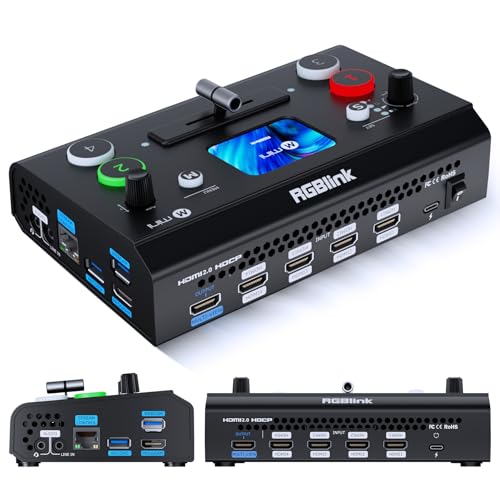
- 4 HDMI inputs with dual HDMI outputs
- UVC webcam mode for easy streaming setup
- Optional TAO Cloud unlocks advanced features
Best For: Small live streams that need a compact switcher with upgradeable tools
Compact Streaming Starter
FEELWORLD LIVEPRO L1 V1 4-Input Mixer

- 4 HDMI inputs with 1080p support
- USB 3.0 output behaves like a webcam
- Small LCD and tripod mount for simple setups
Best For: Solo streaming setups that need easy real-time switching
Built-In Monitor Choice
CINETREAK Mixer Plus 4 HDMI Switcher

- 4-inch built-in screen with multiview monitoring
- 4 HDMI inputs plus zero-latency switching
- PTZ, effects, and audio level meters
Best For: Portable productions that need built-in monitoring and advanced controls
Compact all-in-one switcher
1SDI/3HDMI Switcher With Audio Mixing
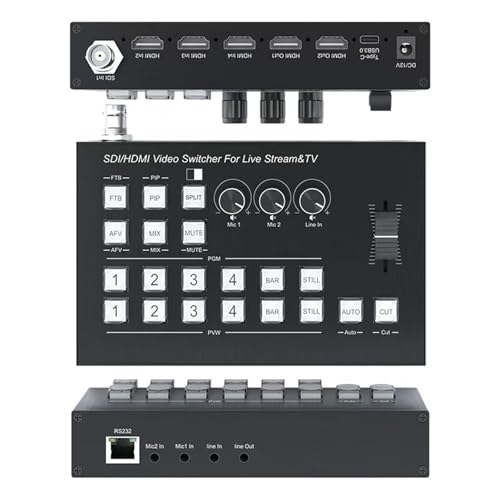
- 1 SDI + 3 HDMI inputs
- USB-C 3.0 capture for OBS
- Built-in MIC/LINE audio mixing
Best For: Small live streams needing simple audio mixing and SDI support
Touchscreen PTZ production switcher
5.5-inch HDMI Switcher With PTZ Control
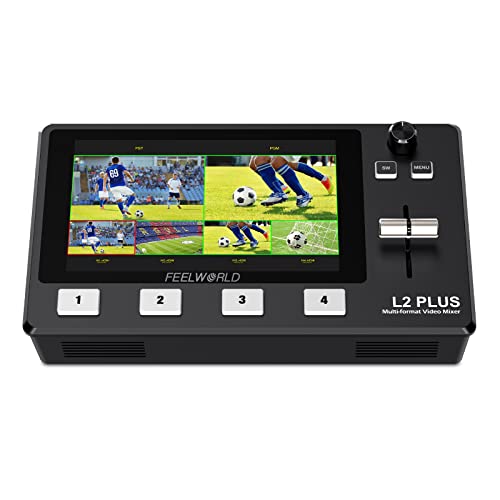
- 5.5-inch touchscreen with preview monitoring
- 4 HDMI inputs and USB 3.0 output
- PTZ control for up to 8 cameras
Best For: Touch-first live switching with PTZ camera control
Large-format live production mixer
10-inch HDMI/SDI Switcher With Audio Mixing
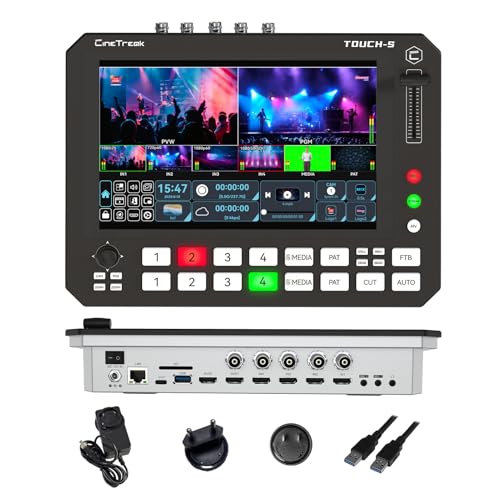
- 4 HDMI + 4 SDI inputs
- 10-inch touchscreen with shortcut keys
- Audio mixing, recording, and USB capture
Best For: Larger productions that need advanced switching and routing
Editor’s Choice – Blackmagic ATEM Mini Pro
If you want multi camera switchers with audio mixing for straightforward live streaming, the Blackmagic Design ATEM Mini Pro keeps the essentials tightly integrated. It offers four HDMI camera inputs, a built-in 6-input, 2-channel audio mixer, and a 4-camera multiview, making it a practical fit for small studios, classrooms, presentations, and esports streams.
Best For: Streamers and presenters who want a compact 4-input switcher with built-in audio mixing and multiview monitoring.
Pros:
- 4 HDMI inputs with 10-bit 4:2:2 YUV support
- Built-in 6-input, 2-channel audio mixer
- 4-camera multiview for easier monitoring
- USB-C webcam output and external drive recording support
Cons:
- Limited to HDMI camera workflows
- Audio mixer is basic compared with larger production mixers
Overall, this is a strong all-in-one option if you need a compact live switcher that handles camera switching and audio without adding extra gear. It is best when your production needs are simple but you still want useful transition and keying tools.
Best for Podcast Video – RØDECaster Video S
The RØDE RØDECaster Video S is aimed at creators who want multi camera switchers with audio mixing in a podcast-friendly format. It combines up to four video sources with two studio-grade Neutrik combo inputs and Revolution Preamps, plus scene creation, chroma keying, and direct streaming tools for a polished production workflow.
Best For: Podcasters and creator teams that need strong audio, customizable scenes, and simple multi-source switching.
Pros:
- Switches up to four sources with 3 HDMI and 1 USB input
- Two combo jacks with low-noise, high-gain preamps
- Supports custom scenes, overlays, chroma keying, and transitions
- Streams via Wi-Fi, Ethernet, or USB and records to external USB storage
Cons:
- Only four video inputs total
- More specialized for podcast-style production than general-purpose switching
This model stands out when audio quality matters as much as switching speed. If your workflow centers on interviews, panels, or streaming with mics and scene control, it offers a well-rounded production hub.
Best Value 4K – FoMaKo KC602 4K Mixer
The FoMaKo KC602 is a feature-heavy choice for buyers comparing multi camera switchers with audio mixing at 4K input levels. It supports 4K60 input, 1080p60 output, PTZ control, and a flexible audio section with XLR balanced input, phantom power, EQ, multiple analog and digital sources, and monitoring tools.
Best For: Live producers who want 4K-capable switching, PTZ control, and deeper audio mixing options in one unit.
Pros:
- 4K60 input with 1080p60 output and 4K loop-through
- Controls up to 4 PTZ cameras with 9 presets
- Supports up to 8 audio sources with XLR, phantom power, EQ, and monitoring
- Streams to multiple platforms and records to USB storage
Cons:
- More complex front panel than simpler switchers
- Output is limited to 1080p60 despite 4K input support
For users who need both camera control and a more capable audio workflow, this is one of the more versatile options in the group. It fits best in productions that benefit from routing flexibility and hands-on operation.
Most Flexible I/O – Osee GoStream Duet
Osee GoStream Duet Multiple Camera SDI and HDMI Live Stream Video Mixer Switcher
Check Price On AmazonIf your priority is input flexibility, the Osee GoStream Duet fits the multi camera switchers with audio mixing category by accepting SDI, HDMI, USB-C, NDI HX, and media playback sources. It also includes key effects, T-bar transitions, portrait and landscape support, and built-in streaming options for live events that need adaptable routing.
Best For: Streamers and event producers who need a flexible SDI/HDMI mixer with multiple source types and easy control options.
Pros:
- Supports 4 SDI, 4 HDMI, USB-C, NDI HX, and SD/SSD playback sources
- Offers GUI, software, and Bitfocus Companion control methods
- Includes key effects, PIP, DSK, and multiple transitions
- Can stream to up to 3 platforms at once
Cons:
- Audio details are less prominent than on some competing models
- Needs firmware steps to unlock the included NDI HX license
This is a strong pick when your production mixes different camera and media formats rather than only HDMI sources. It is especially appealing for users who want broad compatibility and several control paths in one box.
Cloud-Expandable Pick – RGBlink Mini V3 4K HDMI Switcher
If you want multi camera switchers with audio mixing potential in a compact build, the RGBlink Mini V3 is aimed at entry-level live production with 4 HDMI inputs, dual HDMI outputs, and UVC webcam mode. Its 2.1-inch touch screen and T-bar make switching straightforward, while optional TAO Cloud features let you add advanced functions only when you need them.
Best For: Streamers and small crews who want a compact 4K HDMI switcher with optional cloud-activated features.
Pros:
- 4 HDMI inputs with dual 1080p HDMI outputs for program and preview workflows
- UVC webcam mode for easy connection to OBS and major streaming platforms
- Record to USB drives up to 2TB and add PIP, chroma key, and transition effects
- Optional TAO Cloud licensing lets you activate advanced features as needed
Cons:
- Some features require TAO Cloud activation and firmware setup before use
- Stable UVC streaming calls for the included USB 3.0 cable and a recommended 35W+ USB-C adapter
- Compact design may be less suitable for users wanting built-in full multiview monitoring
The Mini V3 is a flexible choice if you want a small switcher that can grow with your production needs. It focuses on core switching, webcam output, and add-on features rather than bundling everything into the base unit.
Compact Streaming Starter – FEELWORLD LIVEPRO L1 V1 4-Input Mixer
The FEELWORLD LIVEPRO L1 V1 is a practical option in the multi camera switchers with audio mixing category when you want straightforward live switching without extra complexity. It offers 4 HDMI inputs, USB 3.0 output for webcam-style streaming, and a small LCD monitor so you can keep an eye on your sources and program feed.
Best For: Solo creators and small teams that need a compact 4-input switcher for live streaming and real-time production.
Pros:
- 4 HDMI inputs and 1 HDMI output, all supporting 1080p
- USB 3.0 output works like a built-in webcam for streaming software
- Compact design with a 2-inch LCD display and tripod mounting screw hole
- Remote operation supported through LAN connection and XPOSE software
Cons:
- Display is small compared with larger multiview switchers
- Basic feature set is simpler than more advanced production mixers
- Power comes from an AC adapter rather than portable battery-style operation
This model makes sense if you want a clean, easy-to-run switching setup for streaming, slides, or gaming inputs. It prioritizes usability and compactness over advanced broadcast extras.
Built-In Monitor Choice – CINETREAK Mixer Plus 4 HDMI Switcher
The CINETREAK Mixer Plus stands out among multi camera switchers with audio mixing because it combines a 4-inch built-in screen with a 4-channel HDMI switcher in a portable body. It is designed for live streaming, online classes, events, and OBS or Zoom workflows, while also adding multiview monitoring, audio level meters, and several broadcast-style effects.
Best For: Creators who want built-in multiview monitoring and a portable 4-input switcher with advanced production tools.
Pros:
- Built-in 4-inch display provides real-time multiview monitoring
- 4 HDMI inputs with zero-latency switching and 30 transition effects
- PTZ control, chroma key, luma key, PIP, DSK, and logo overlay support
- Audio level meters and headphone audio output for monitoring
Cons:
- Only 4 HDMI inputs, so it is less scalable than larger production switchers
- Portable design may still be more than casual users need
- Advanced controls can be overkill for very basic streaming jobs
If you want a compact production switcher with its own display and a stronger feature set, Mixer Plus is the most fully equipped option here. It is built for users who value monitoring, effects, and flexible output control in one unit.
Compact all-in-one switcher – 1SDI/3HDMI Switcher With Audio Mixing
If you want multi camera switchers with audio mixing for a small live setup, this model packs a lot into a compact box. It combines 1 SDI and 3 HDMI inputs, dual HDMI outputs, and a USB-C 3.0 capture output, so it can fit cameras, consoles, and a computer-based streaming workflow without much fuss. The built-in audio mixer also supports MIC, LINE IN, and mixed/through audio modes, which is useful when you need cleaner live sound without adding extra gear.
Best For: Small streaming setups that need SDI support, basic audio mixing, and USB capture in one unit.
Pros:
- 1 SDI + 3 HDMI inputs give you flexible source options.
- USB-C 3.0 capture supports OBS and YUY2 format.
- Audio mixing includes MIC, LINE IN, and LINE OUT handling.
- PIP, fade transitions, OSD, and RS232 control add production features.
Cons:
- Only one SDI input, so it is not ideal for all-SDI workflows.
- Audio tools are practical, but not as deep as dedicated mixers.
- Designed around 1080P@60Hz rather than higher-resolution formats.
This is a good fit if you want straightforward live switching with useful audio control and broadcast-style extras. It offers a balanced feature set for creators who need reliable switching more than advanced studio complexity.
Touchscreen PTZ production switcher – 5.5-inch HDMI Switcher With PTZ Control
For buyers comparing multi camera switchers with audio mixing, the FEELWORLD L2 Plus stands out for its touchscreen workflow and production tools. It accepts 4 HDMI inputs, offers USB 3.0 live streaming output, and lets you monitor PST preview and PGM output on the built-in 5.5-inch display, which reduces the need for an external monitor. While the notes emphasize video and camera control more than advanced audio features, it still suits streamers who want an integrated switching surface for live production.
Best For: Streamers and small production teams that want touchscreen control, PTZ operation, and built-in monitoring.
Pros:
- 5.5-inch touchscreen shows input sources, preview, and program output.
- 4 HDMI inputs support real-time switching for multiple cameras or sources.
- PTZ control can manage up to 8 cameras using VISCA protocol.
- USB 3.0 output works as a webcam source for streaming software.
Cons:
- The supplied notes do not highlight a dedicated audio mixing section.
- Only HDMI inputs are listed, so it is less flexible for SDI-based rigs.
- Touchscreen operation may still require staying in the control interface for PTZ use.
Overall, this is a practical choice if your priority is fast switching, camera control, and built-in monitoring. It is especially appealing for users who want a more interactive control surface than a basic button-only mixer.
Large-format live production mixer – 10-inch HDMI/SDI Switcher With Audio Mixing
If you need multi camera switchers with audio mixing for a more ambitious setup, the Touch-S is built for larger live productions. It combines 4 HDMI and 4 SDI inputs, a 10-inch touchscreen, physical shortcut keys, USB capture, and recording support, giving you a broad set of tools for studio, event, or webinar workflows. The notes also call out audio mixing and recording, plus customizable AUX outputs and Super Source layouts, which makes it especially useful when you need both flexibility and control.
Best For: Bigger live productions that need HDMI and SDI flexibility, multi-view layout options, and audio mixing.
Pros:
- 4 HDMI and 4 SDI inputs support mixed source environments.
- 10-inch touchscreen plus shortcut keys can speed up operation.
- Audio mixing and recording are built into the unit.
- Super Source, PIP, and customizable AUX outputs add routing flexibility.
Cons:
- The feature set is more complex than smaller switchers.
- May be more than needed for simple two- or three-camera setups.
- Best suited to users who can take advantage of the advanced layout options.
This model is the strongest fit when your live workflow needs both camera routing flexibility and deeper production control. It looks geared toward users who want a more capable centerpiece for a multi-camera broadcast setup.
How We Picked the Best Multi Camera Switchers with Audio Mixing
Our shortlist favors Multi Camera Switchers with Audio Mixing that are practical for real productions, not just spec sheets. We looked at camera input count, HDMI and SDI compatibility, USB streaming output, built-in monitoring, onboard audio controls, PTZ support, and workflow speed. We also considered portability, screen size, and whether the unit suits solo creators or team-based setups.
Quick Comparison
If you want the simplest streaming workflow, compact HDMI-first switchers are usually the fastest to learn. If your setup includes longer cable runs, pro cameras, or more complex rooms, SDI or hybrid HDMI/SDI models offer more flexibility. Larger touchscreens and multiview monitoring can also save time when you need to manage sources, graphics, and audio at once.
Key Buying Factors for Multi Camera Switchers with Audio Mixing
Inputs and Output Formats
Check how many cameras or sources you actually need today, then leave room for growth. HDMI is common and affordable, while SDI is better for longer distances and more robust installations. Make sure the switcher supports the output format your streaming platform, recorder, or computer expects.
Audio Mixing Features
For Multi Camera Switchers with Audio Mixing, look for independent mic or line inputs, gain control, mute options, and delay or sync adjustment. If you use a mixer, wireless mics, or a guest feed, verify that the switcher can accept and manage those signals without creating latency or clipping problems.
Monitoring and Control
A clear display, multiview, or touch interface can reduce mistakes during live production. PTZ control is especially helpful for churches, classrooms, panels, and training rooms where one operator may handle both switching and camera movement.
Workflow and Portability
Some buyers need a rugged desktop unit for a fixed studio, while others need a compact switcher for travel, pop-up events, or field recording. Think about fan noise, power options, and how quickly you can set up and tear down.
Who Should Buy Which Multi Camera Switchers with Audio Mixing?
Creators running simple two- to four-camera streams will usually be happiest with compact HDMI switchers that are easy to operate. Podcast teams and educational producers should prioritize strong audio mixing, screen visibility, and simple USB streaming output. For higher-end live production, choose a model with SDI support, larger monitoring, and more advanced control options. If you want one device to handle cameras and audio in a single workflow, focus on the feature balance rather than the highest resolution claim.