Choosing the right scanner for books, manuals, archives, and other bound materials can save serious time while improving readability and searchability. The best models handle curved pages, glare, and mixed paper sizes without forcing you to damage the binding.
This roundup focuses on book scanners for bound documents that balance image quality, OCR performance, and practical ease of use for classrooms, offices, libraries, and home archives.
Best 10 Book Scanners for Bound Documents Picks for 2026
Portable A3 Book Scanner
CZUR Shine Ultra Smart Portable Document Scanner

- Patented flattening for curved book pages
- About 1 second per page for A3 and smaller
- OCR supports 180+ languages
Best For: Thin books, A3 documents, and fast desktop scanning
Flatbed A3 Archive Scanner
Plustek OS1180 A3 Document Scanner

- A3 flatbed scanner for large originals
- LED light source with no warm-up
- Includes ABBYY FineReader OCR software
Best For: Libraries, schools, and offices scanning A3 documents
Portable Teaching Book Camera
NetumScan 13MP Book Document Camera

- One-key automatic correction for skewed pages
- Captures up to A4 with a 13MP sensor
- Supports projection and video recording
Best For: Teachers and presenters needing an A4 book camera
Overhead Non-Destructive Scanner

- Non-contact scanning for books and magazines
- Auto Book Correction reduces curve distortion
- Page Turning Detection and Time Mode help workflow
Best For: Non-destructive scanning of bound books and mixed documents
Fast AI Book Scanner
CZUR Aura Pro Book & Document Scanner

- 2-second-per-page scanning
- Auto-flatten and deskew for curved books
- OCR with 180+ languages
Best For: Fast scanning of bound books and mixed documents
A3 Overhead Archive Scanner

- A3 overhead capture for books and large pages
- 16MP camera with 300 DPI scanning
- Anti-glare LED lighting for cleaner pages
Best For: Digitizing books, archives, and oversized documents
Portable Scanner-Lamp Combo
CZUR Aura Pro Portable Book Scanner

- Auto-flatten and fingerprint removal
- 2-second-per-page scanning
- Foldable design with smart lamp modes
Best For: Compact scanning of books with lamp-style desk use
Professional digitization pick
VIISAN K48 48MP overhead book scanner

- 48MP capture with up to 600 DPI
- AI page flattening and splitting
- OCR and text-to-speech support
Best For: Heavy scanning of books, reports, and archived documents
Advanced OCR option
CZUR ET24 Pro 24MP book scanner
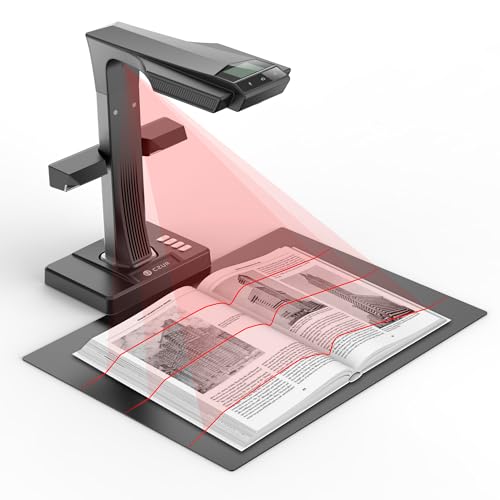
- 3rd-gen auto-flatten and deskew
- ABBYY OCR with 180+ languages
- Windows, Mac, and Ubuntu support
Best For: Users who want reliable bound-document scanning and OCR
Large-format choice
VIISAN S21 A2/A3 large-format book scanner

- A2 capture for oversized pages
- Auto-flatten and finger removal
- OCR outputs to many editable formats
Best For: Scanning oversized books, journals, maps, and manuscripts
Portable A3 Book Scanner – CZUR Shine Ultra Smart Portable Document Scanner
If you need book scanners for bound documents that can handle thin books and standard paperwork, the CZUR Shine Ultra is built around speed and desk-friendly convenience. It uses a patented flattening process for curved pages, scans A3 and smaller originals in about 1 second per page, and also doubles as a USB document camera for teaching or meetings.
Best For: Thin books, A3 documents, and users who want a fast scanner that also works as a document camera.
Pros:
- Patented page-flattening technology for curved book pages
- Fast scanning at about 1 second per page for A3 and smaller originals
- OCR supports 180+ languages for text recognition
- Foldable, lightweight 4 lb design with adjustable height
Cons:
- Only suitable for thinner books; thicker books are better matched to the ET series
- Not compatible with Android or iOS
- Thai, Hebrew, and Arabic are not currently supported in OCR
For buyers who want a portable overhead-style option with strong OCR and quick workflow, this model is a practical fit. Its real strength is speed plus book flattening, but only if your materials stay within its thinner-book sweet spot.
Flatbed A3 Archive Scanner – Plustek OS1180 A3 Document Scanner
For book scanners for bound documents that prioritize flat, careful capture of large pages, the Plustek OS1180 is a straightforward A3 flat scanner. It is designed for libraries, schools, and small offices, with LED lighting, one-touch operation, and software aimed at OCR and file sharing.
Best For: A3 documents, archives, and environments that want a simple flatbed scanner for careful page capture.
Pros:
- Supports large A3-size originals up to 11.7″ x 17″
- LED light source means no warm-up hassle
- One-touch preset button helps speed up routine scanning
- Includes ABBYY FineReader OCR and DocAction software
Cons:
- Scans one sheet at a time with a 1-sheet capacity
- Slower than overhead-style book scanners at about 9 seconds for A3 scans
- Less suited to preserving bound books than a non-contact overhead design
If your workflow centers on large documents rather than frequent book digitizing, this scanner keeps things simple and dependable. It is best viewed as a flat A3 workhorse, not a fast overhead book scanner.
Portable Teaching Book Camera – NetumScan 13MP Book Document Camera
If you’re comparing book scanners for bound documents and want a portable camera-style option, the NetumScan 13MP model is built for quick capture, projection, and recording. It supports Windows, Mac OS, and Linux, captures up to A4 size, and includes automatic correction to straighten skewed pages.
Best For: Teachers, presenters, and users who need an A4 book camera for scanning and live projection.
Pros:
- One-key automatic correction helps fix skewed images quickly
- Captures up to A4 size with a 13MP CMOS sensor
- Works on Windows, Mac OS, and Linux
- Also supports real-time projection and video recording
Cons:
- Capture size is limited to A4
- Requires USB connection and software installation to use
- Best suited to camera-style workflows rather than flatbed-style archiving
This is a flexible pick if you want one device for scanning, teaching, and live display. Its feature set is broad, but its A4 ceiling makes it better for standard books and classroom use than oversized documents.
Overhead Non-Destructive Scanner – ScanSnap SV600 Book Scanner
For book scanners for bound documents that need non-contact capture, the ScanSnap SV600 is designed to scan books, magazines, newspapers, and loose items without cutting them apart. Its overhead setup uses auto book correction, multi-document detection, and page-turning detection to help streamline repetitive scanning.
Best For: Bound books, magazines, newspapers, and users who want non-destructive overhead scanning.
Pros:
- Scans books and documents directly without cutting or damaging them
- Auto Book Correction helps flatten curve distortion
- Multi Document Detection can crop and rotate multiple items in one scan
- Page Turning Detection and Time Mode support hands-free workflows
Cons:
- Standard sheet capacity is only 1, so it is not built for batch feeders
- Requires a compatible Windows 10/11 or macOS Monterey 12+ system
- Overhead design is less compact than a simple flat scanner
This model stands out when preserving originals matters more than speed-fed volume. It is a strong fit for libraries, archives, or home users who want book scanning without damaging the source material.
Fast AI Book Scanner – CZUR Aura Pro Book & Document Scanner
If you’re comparing book scanners for bound documents, the CZUR Aura Pro stands out for quick overhead capture, automatic flattening, and deskewing on curved pages. It’s built for books, A3/A4 materials, and searchable file workflows, with USB connection and broad Windows/Mac compatibility.
Best For: Users who want fast, AI-assisted scanning for books, paperwork, and mixed document sizes.
Pros:
- Scans in about 2 seconds per page for fast batch work.
- Auto-flatten and deskew help curved book pages look cleaner.
- Outputs JPG, Word, PDF, and searchable PDF with OCR support for 180+ languages.
- Includes glare-free lighting and multiple color temperature settings for easier viewing.
Cons:
- Thai, Hebrew, and Arabic are not supported in OCR.
- Requires desk space and a connected USB setup rather than a handheld workflow.
Overall, this is a strong choice if your priority is speed plus software help with bound materials. The lighting and AI features make it especially useful when page curvature and reflection would otherwise slow you down.
A3 Overhead Archive Scanner – VIISAN DL16 Book Scanner
Among book scanners for bound documents, the VIISAN DL16 is designed for A3 overhead capture, making it a practical pick for books, oversized pages, sheet music, artwork, and archive materials. Its 16MP camera, 300 DPI resolution, and anti-glare LED lighting are aimed at producing clearer overhead scans for storage and reference.
Best For: Libraries, offices, and home users digitizing bound books or larger-format materials.
Pros:
- A3 overhead design handles bound books and large documents.
- 16MP camera with up to 300 DPI for clear capture.
- Anti-glare LED lighting helps reduce shadows and reflections.
- Works with both Windows and Mac.
Cons:
- 300 DPI is lower than some higher-resolution book scanner options.
- Fewer software details are provided than on more feature-heavy models.
The DL16 is a straightforward overhead scanner for users who need larger-page support more than advanced automation. It fits well when the main goal is dependable capture of books and oversized documents in a desktop setup.
Portable Scanner-Lamp Combo – CZUR Aura Pro Portable Book Scanner
If you want book scanners for bound documents that also double as a desk lamp, the CZUR Aura Pro Portable combines overhead scanning with auto-flattening and fingerprint removal features. It supports A3-size materials, offers fast 2-second-per-page scanning, and includes side lights to reduce reflection on glossy paper.
Best For: Users who want a compact overhead scanner with lamp functionality for books and office use.
Pros:
- Auto-flatten and fingerprint removal improve scans of bound pages.
- Fast 2-second-per-page scanning for single sheets and double-page books.
- OCR supports 180+ languages, with searchable file options available.
- Foldable 90-degree design and smart lamp features add flexibility.
Cons:
- Thai, Hebrew, and Arabic OCR are not supported.
- Sound-control lamp functions can be affected by noise and distance.
This model is best when you want one device for scanning and lighting without giving up overhead book capture. The included software tools make it a sensible pick for users who value convenience and page cleanup features.
Professional digitization pick – VIISAN K48 48MP overhead book scanner
If you want a book scanner for bound documents that balances detail, speed, and everyday usability, the VIISAN K48 is built for that job. Its 48MP capture and up to 600 DPI output are aimed at books, reports, worksheets, and archive files, while AI-assisted page flattening and automatic page splitting help reduce cleanup after scanning curved spreads.
Best For: Digitizing textbooks, reports, and archive pages with strong image detail and OCR support.
Pros:
- 48MP capture with up to 600 DPI for fine text and diagrams
- AI-assisted page flattening and automatic page splitting for bound materials
- OCR plus text-to-speech for searchable and accessible digital files
- Also works as a 4K@30fps USB document camera for teaching or review
Cons:
- Best suited to desktop scanning workflows rather than portable use
- Requires Windows or Mac compatibility for the intended software workflow
Overall, the K48 is a practical choice if your priority is turning bound documents into clean digital files without constant manual correction. It offers a solid mix of resolution, automation, and classroom-friendly flexibility.
Advanced OCR option – CZUR ET24 Pro 24MP book scanner
The CZUR ET24 Pro is a strong pick if you need book scanners for bound documents with advanced page correction and broad software support. Its upgraded flattening technology is designed to handle curved book pages, and the 24MP camera with ABBYY OCR supports searchable PDF and editable file conversion across a wide language range.
Best For: Office, library, or home users who need dependable book scanning with strong OCR language support.
Pros:
- Upgraded flattening technology for curved book pages
- 24MP camera with ABBYY OCR for searchable PDF, Word, Excel, and more
- Supports Windows, macOS, and Linux Ubuntu 20.04 to 24.04
- Side lights and head light help reduce reflection on some glossy pages
Cons:
- Very glare-heavy papers are not recommended
- Linux support is limited to Ubuntu 20.04 to 24.04
In practice, the ET24 Pro stands out for users who want a mature scanning workflow with OCR depth and desktop compatibility. If you regularly digitize books and want stable results across multiple systems, it is easy to place near the top of a shortlist.
Large-format choice – VIISAN S21 A2/A3 large-format book scanner
If your bound documents are larger than a standard book or notebook, this VIISAN S21 is built for oversized scanning tasks. It captures A2-sized material, offers up to 26MP resolution with software-enhanced 600 DPI, and adds auto-flatten, finger removal, and double-page splitting to simplify book digitization.
Best For: Oversized journals, manuscripts, newspapers, maps, and other large-format bound documents.
Pros:
- A2 capture size makes it useful for large-format materials
- Auto-flatten, finger removal, and page-splitting tools reduce cleanup
- OCR can convert scans to PDF, Word, Excel, EPUB, TXT, and more
- Built-in LED lighting helps when you need to scan in dim conditions
Cons:
- Bundled software is not compatible with ARM-based Windows devices
- Very glossy papers are not recommended
For users who need more than a typical A3 setup, the S21 offers a strong large-format workflow with useful automation tools. It is especially appealing when the priority is handling oversized pages while still keeping OCR and document cleanup features in one device.
How We Picked These Book Scanners for Bound Documents
We focused on overhead and document-camera style scanners that are well suited to bound materials, especially when the goal is to capture pages cleanly without pressing a spine flat. Priority went to models with strong OCR, page-flattening tools, anti-glare lighting, and support for common sizes such as A3 and larger.
We also considered setup flexibility, compatibility with Windows, Mac, and Linux where relevant, and whether the scanner is practical for real-world use in libraries, schools, small offices, or home offices.
Quick Comparison: What Matters Most
When comparing Book Scanners for Bound Documents, think in terms of workflow rather than just megapixels. A high-resolution camera helps, but so do auto-flattening, de-skewing, and fingerprint removal if you scan books frequently. For heavier-duty work, larger capture areas can reduce repositioning and speed up batch scanning.
Key Buying Factors for Book Scanners for Bound Documents
Capture Size and Page Coverage
A3 support is a strong baseline for textbooks, magazines, and many reference materials. If you scan oversized atlases, archival pages, or large diagrams, consider A2-capable models so you do not have to crop or stitch as often.
OCR Quality and Language Support
OCR turns scanned pages into searchable text, which is one of the biggest advantages of these scanners. If you work with multilingual materials or need editable output, look for broad language support and reliable recognition accuracy.
Flattening, Deskew, and Glare Control
Bound pages naturally curve near the spine, and glossy paper can reflect light. Auto-flattening, deskew, finger-removal tools, and anti-glare LEDs help produce cleaner scans with less manual editing.
Speed, Resolution, and Ease of Use
Higher resolution is useful, but fast capture and simple software can matter more for high-volume jobs. If you scan stacks of bound reports or library materials, choose a model that keeps the workflow efficient from page capture to export.
Who Should Buy Which Book Scanners for Bound Documents?
Schools and teachers should look for easy setup, OCR, and reliable compatibility across common operating systems. Libraries and offices usually benefit from faster overhead scanning, larger page support, and stronger image correction tools. Home users and researchers may prefer compact, portable Book Scanners for Bound Documents that still offer solid OCR and clean page correction without taking up much desk space.
If your scanning is occasional, a simpler overhead model may be enough. If you scan frequently or handle delicate materials, prioritize auto-flattening, larger capture size, and software that reduces manual cleanup.