Choosing the right book scanner is about more than image quality. If you want hands-free workflow, faster page turns, and fewer interruptions, foot pedal control can make a big difference.
In this roundup, we focus on models that help streamline scanning for books, documents, and archives while keeping text capture accurate and post-processing simple.
Best 10 Book Scanners with Foot Pedal Control Picks for 2026
Professional A3 Overhead Pick
Innex DS200 A3 book scanner with foot pedal

- 26MP scanning with A3 support
- Foot pedal, hand switch, LED, and laser guide
- OCR, flattening, deskew, and finger removal
Best For: Libraries and offices needing fast hands-free book scanning
Compact Duplex Alternative
Doxie Pro compact duplex document scanner

- Duplex scanning for two-sided pages
- Compact USB design for desk use
- OCR and auto-crop software tools
Best For: Users who need a simple desktop scanner for everyday paperwork
Large-Format Overhead Choice
VIISAN S21 A2/A3 overhead book scanner

- A2/A3 overhead scanner with 26MP output
- Auto-flattening, finger removal, and split-page tools
- OCR exports to PDF, Word, Excel, EPUB, and text
Best For: Oversized books, journals, manuscripts, and maps
Fast A4 Overhead Scanner
IRIScan Desk 6 AI book and document scanner

- Under-1-second-per-page overhead scanning
- AI flattening, auto scan, and finger hiding
- OCR for 138+ languages with PDF, Word, and Excel output
Best For: A4 book scanning and document-camera use in classrooms or offices
Budget-Friendly OCR Scanner
VIISAN A8401 16MP Document Scanner

- Windows/macOS certified plug-and-play setup
- Basic OCR and text-to-speech support
- UVC compatible for Zoom, Meet, and Teams
Best For: Small offices and classrooms needing affordable, simple digitization
AI Flat-Page Book Scanner
CZUR Aura Pro Book & Document Scanner

- About 2 seconds per page scanning speed
- AI auto-flatten and deskew for curved pages
- OCR supports 180+ languages with multiple output formats
Best For: Fast book digitization with AI page correction
High-Resolution Archiving Scanner
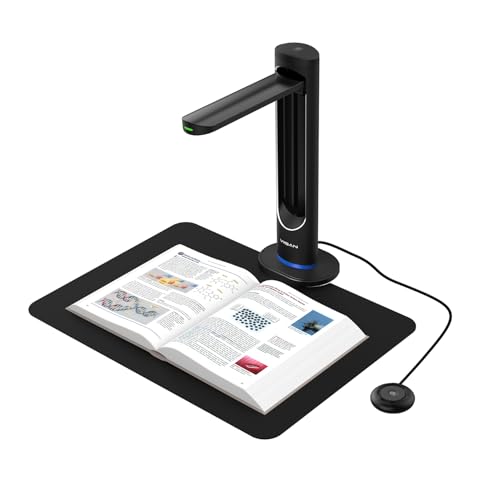
- 48MP sensor with 600 DPI capture
- AI page smoothing and automatic double-page split
- Laser positioning with page-turn detection
Best For: Libraries and archives needing detailed, high-speed scanning
Portable Teaching Scanner
NetumScan 13MP Book Document Camera for Teachers

- 13MP sensor with A4 capture support
- Built-in LED light with stepless dimming
- OCR plus real-time projection and recording
Best For: Teachers and presenters needing a portable scanning camera
Auto-Scan Book Lamp
CZUR Aura Pro Portable Book Scanner

- Auto-flatten technology for curved pages
- Auto-detects page turns and supports foot pedal use
- Scans smaller-than-A3 materials in about 2 seconds
Best For: Fast book scanning with optional hands-free triggering
Large-Format Teaching Camera
NetumScan 13MP Book Document Camera A3/A4

- Supports larger A3/A4 capture sizes
- 13MP sensor with 6-LED lighting
- OCR exports to Word or TXT
Best For: Portable scanning of larger documents and teaching materials
Professional A3 Overhead Pick – Innex DS200 A3 book scanner with foot pedal
If you want book scanners with foot pedal control for hands-free, repeatable digitizing, the Innex DS200 is built for speed and flexibility. Its 26MP capture, A3 support, and smart software features make it a practical choice for bound books, documents, and mixed office materials.
Best For: Libraries, offices, and education teams that need a high-resolution overhead scanner with flexible hands-free operation.
Pros:
- Up to 26MP resolution for detailed scans
- Supports A3-sized materials and multiple item types, including books, photos, QR codes, and ID cards
- Smart software includes curve flattening, OCR, auto-cropping, page-turn detection, and finger removal
- Includes LED lamp, laser guide, hand switch, and foot pedal for adaptable scanning
Cons:
- Requires Windows or macOS compatibility
- USB-connected workflow may be less portable than wireless options
Overall, the DS200 stands out if you want an overhead book scanner that balances image quality with practical control options. The foot pedal and smart workflow tools are especially useful when you need steady productivity on large scanning jobs.
Compact Duplex Alternative – Doxie Pro compact duplex document scanner
For buyers comparing book scanners with foot pedal control, the Doxie Pro takes a different approach: it is a compact duplex document scanner focused on fast paper handling and simple software. It is better suited to everyday document, receipt, and photo scanning than to overhead book digitizing.
Best For: Home and office users who want a compact duplex scanner for paperwork, receipts, and double-sided pages.
Pros:
- Duplex scanning for two-sided documents
- Compact footprint for home or office desks
- Smart software includes text recognition, automatic cropping, rotation, and contrast boost
- Works with Mac and PC and connects by USB
Cons:
- Not an overhead book scanner
- No foot pedal included in the supplied features
- Best for papers that fit the feeder rather than bound materials
If your priority is efficient document capture rather than book scanning, the Doxie Pro is a solid compact option. Its strengths are speed, duplex handling, and easy software rather than hands-free overhead control.
Large-Format Overhead Choice – VIISAN S21 A2/A3 overhead book scanner
The VIISAN S21 is a strong fit if you are shopping for book scanners with foot pedal control and need large-format capture. With A2/A3 support, 26MP output, and book-focused software tools, it is designed for oversized books, journals, and documents that benefit from an overhead scanning setup.
Best For: Users scanning large books, manuscripts, maps, and other oversized materials with an overhead camera scanner.
Pros:
- Large A2 capture area with adjustable A2/A3 overhead design
- 26MP resolution with software-enhanced up to 600 DPI
- Smart software flattens curved pages, removes fingers, and splits double-page spreads
- Supports OCR output to PDF, Word, Excel, EPUB, and text formats
Cons:
- Bundled software is not compatible with ARM-based devices
- Large overhead setup takes more desk space than a compact scanner
For large-format digitizing, the S21 has the scale and software features to handle demanding book scanning work. It is especially appealing when you need overhead convenience and support for oversized pages.
Fast A4 Overhead Scanner – IRIScan Desk 6 AI book and document scanner
The IRIScan Desk 6 is a practical pick for buyers focused on book scanners with foot pedal control alternatives, especially when A4 scanning speed matters more than large-format support. It combines a compact overhead design with AI flattening, finger erasing, and OCR features for clean everyday book and document capture.
Best For: A4 books, flat papers, remote teaching, and users who want fast overhead scanning with AI cleanup tools.
Pros:
- Fast overhead scanning, under 1 second per page
- AI auto-flattening and finger erasing for cleaner book pages
- OCR supports 138+ languages and outputs searchable PDF, Word, and Excel
- Works as both a document camera and a scanner with built-in LED lights
Cons:
- Designed for A4, not A3, documents
- Better suited to flat papers and smaller-than-A3 materials
The Desk 6 is a good match when you want quick, simple overhead scanning without moving up to a larger A3 or A2 system. Its AI cleanup tools and broad software compatibility make it especially useful for home, classroom, or office workflows.
Budget-Friendly OCR Scanner – VIISAN A8401 16MP Document Scanner
If you’re comparing book scanners with foot pedal control, the VIISAN A8401 is really a compact, budget-oriented document camera for classrooms and small offices rather than a pedal-based book digitizer. It focuses on plug-and-play scanning, basic OCR, and text-to-speech, making it a practical choice when you want simple digitization without a steep learning curve.
Best For: Small offices, home classrooms, and first-time users who need affordable document scanning with OCR and TTS.
Pros:
- Certified compatible with Windows 10/11 and macOS for easy setup.
- One-click scanning and automatic deskewing help beginners move quickly.
- Basic OCR can create searchable PDFs, and text-to-speech adds accessibility.
- UVC support works with Zoom, Google Meet, and Microsoft Teams for remote teaching.
Cons:
- Not designed as a dedicated book scanner with foot pedal control.
- Feature set is basic compared with higher-end book digitization models.
- Best suited to simple document workflows rather than advanced archival scanning.
For buyers who need an economical scanning tool for everyday teaching or office documents, the A8401 delivers the essentials without unnecessary complexity. It’s a sensible entry-level option if your priority is quick setup and readable output, not hands-free pedal operation.
AI Flat-Page Book Scanner – CZUR Aura Pro Book & Document Scanner
The CZUR Aura Pro is a strong choice if you’re shopping for book scanners with foot pedal control alternatives and want fast, automatic book capture instead. Its AI software, laser guidance, and page-flattening tools are built to make curved pages look clean with minimal manual correction.
Best For: Readers, educators, and home offices that want fast book and document scanning with AI flattening and simple operation.
Pros:
- Scans in about 2 seconds per page for quick capture.
- AI-powered auto-flatten and deskew help curved book pages look cleaner.
- OCR supports 180+ languages and can output JPG, Word, PDF, and searchable PDF.
- Laser lines and sound-control technology help streamline setup and use.
Cons:
- No foot pedal is mentioned in the supplied features.
- Thai, Hebrew, and Arabic OCR are not supported.
- Best results depend on using the scanner’s supported software and lighting system.
If your priority is speeding through book scanning with less post-processing, the Aura Pro stands out for its AI-assisted page handling and quick turnaround. It’s a solid fit for users who value automation over pedal-based control.
High-Resolution Archiving Scanner – VIISAN K48 48MP Book Scanner
If you’re looking at book scanners with foot pedal control, the VIISAN K48 is more of a high-resolution, auto-capture book scanner that emphasizes speed and clarity. Its 48MP sensor, laser positioning, and page-turn detection make it well suited to efficient digitization workflows where image quality matters most.
Best For: Libraries, archives, and power users digitizing books or documents that need high detail and fast auto-scanning.
Pros:
- 48MP Sony CMOS sensor captures detailed scans at up to 600 DPI.
- AI-assisted page smoothing flattens curved pages and removes shadows.
- Laser positioning and page-turn detection support quick, automatic capture.
- OCR can create searchable PDFs, editable Word/Excel files, and MP3 audio.
Cons:
- No foot pedal control is listed in the supplied product details.
- Requires Windows 10/11 or macOS 10.15+.
- More specialized than a basic scanner for casual home use.
The K48 is a strong match when your workflow prioritizes precision, accessibility output, and rapid book digitization. It’s especially compelling for users who want advanced capture features without relying on manual controls.
Portable Teaching Scanner – NetumScan 13MP Book Document Camera for Teachers
If you want a practical option among book scanners with foot pedal control alternatives, this NetumScan book document camera is built for fast, manual page-by-page capture with a one-key auto-correction feature. It’s a solid fit for teachers, remote presentations, and home offices that need real-time projection, OCR, and easy portability rather than a traditional flatbed scanner.
Best For: Teachers, presenters, and users who need a foldable document camera for live projection and quick scanning.
Pros:
- 13MP CMOS sensor captures clear images and supports A4-size documents.
- Built-in LED light and stepless dimming help improve visibility in different lighting conditions.
- Supports OCR recognition plus word, PDF, and text formats for flexible file output.
- Foldable aluminum alloy body makes it easy to move between rooms or take on the go.
Cons:
- Scanning is based on manual page turning, not a true automatic book-feed system.
- A4 capture size may be limiting for larger books or documents.
- Requires computer connection and software setup before use.
Overall, this is a strong value pick if you need a portable book scanner-style setup for teaching, projection, and OCR workflows. It’s especially appealing when you want speed and simplicity without a bulky desktop scanner.
Auto-Scan Book Lamp – CZUR Aura Pro Portable Book Scanner
The CZUR Aura Pro is a strong choice for book scanners with foot pedal control because it combines auto-scan software, page-turn detection, and optional foot pedal triggering. It’s designed for quick book and document capture, with auto-flatten technology that helps curved pages look cleaner and more readable.
Best For: Users who want faster book scanning with auto-scan features and optional foot pedal control.
Pros:
- Auto-flatten and fingerprint removal technologies improve page clarity.
- Can scan a page in about 2 seconds and works with materials smaller than A3.
- Auto-detects page turns and can trigger scans automatically.
- Foot pedal support adds hands-free control when you want it.
Cons:
- OCR language support is extensive, but Thai, Hebrew, and Arabic are not supported.
- Foot pedal is an add-on control method rather than the only scanning mode.
- Best results depend on proper lighting and a relatively quiet environment for smart lamp functions.
For shoppers comparing book scanners with foot pedal control, this model stands out for its mix of automation and manual control. It suits users who want a faster workflow for books, sheets, and mixed document sizes.
Large-Format Teaching Camera – NetumScan 13MP Book Document Camera A3/A4
If you’re shopping for book scanners with foot pedal control features, this NetumScan document camera is better understood as a flexible scanning camera for manual workflows, OCR, and live projection. Its A3/A4 capture support makes it more versatile than smaller-format models, especially for larger pages, music scores, and classroom use.
Best For: Users who need a portable A3/A4 scanning camera for documents, books, and teaching materials.
Pros:
- Captures A3/A4 content, giving it more room for larger pages and materials.
- 13MP CMOS sensor and built-in 6-LED lighting help produce bright scans.
- OCR supports editable text export to Word or TXT with 98%+ claimed accuracy.
- Foldable design and USB connection make setup and transport straightforward.
Cons:
- Scanning still relies on manual page turning rather than automatic feed handling.
- Does not list foot pedal control among its supported features.
- Requires a connected computer and software to operate.
This is a practical pick for users who need larger capture size and OCR more than fully automated book-scanning hardware. It’s a good fit for classrooms, meetings, and home offices where portability matters.
How We Picked the Best Book Scanners with Foot Pedal Control
We prioritized Book Scanners with Foot Pedal Control and related workflow features that improve real-world usability: strong OCR, auto-flatten and deskew tools, fingerprint or finger removal, useful capture sizes, and broad operating system support. Portability, software quality, and speed also mattered, especially for teachers, offices, and anyone digitizing bound materials regularly.
Quick Comparison
At a glance, the best options tend to split into three groups: portable document-camera style scanners for classrooms and home use, higher-resolution book scanners for heavier digitizing work, and more general duplex scanners for mixed office tasks. If your main goal is scanning books cleanly and quickly, focus first on capture size, page correction, and how well the scanner supports hands-free operation.
Key Buying Factors for Book Scanners with Foot Pedal Control
1. OCR Quality and Language Support
Good OCR turns scans into searchable, editable text. For multilingual libraries, academic material, or mixed-language archives, choose a model with broad language recognition and reliable text output.
2. Page Correction Tools
Auto-flatten, deskew, and finger removal can save a lot of editing time. These features are especially important for bound books, where curved pages and shadows can reduce readability.
3. Capture Size and Resolution
A3 support is useful for larger books, worksheets, and diagrams, while A2 or higher capture sizes help with oversized materials. Higher resolution can improve legibility for fine print, but it should be balanced against file size and workflow speed.
4. Software and Compatibility
Check whether the scanner works smoothly with Windows, macOS, or Linux, and whether the bundled software is simple enough for your needs. For many buyers, software quality matters as much as the hardware.
5. Portability Vs. Desk Setup
If you scan in multiple locations, a foldable or lightweight model may be the better fit. For dedicated archive work, a sturdier desktop setup may be worth the extra space.
Who Should Buy Which Book Scanners with Foot Pedal Control?
Teachers and classroom users should look for easy setup, fast capture, and dependable OCR. Home office users may prefer compact models that handle receipts, documents, and books without taking over a desk. Libraries, researchers, and archive teams should lean toward higher-resolution scanners with larger capture areas and stronger correction tools. If your workflow depends on speed and consistency, Book Scanners with Foot Pedal Control are often the smartest choice because they reduce hand movement and keep pages moving efficiently.