If you’re working remotely, choosing the right ink tank printer can really streamline your tasks and save you money. With options like the HP Smart Tank 5000 and various models from Epson’s EcoTank series, these printers offer high page yields and low ink costs. But, what features should you prioritize to enhance your workflow? Let’s explore the top picks and what makes them stand out in today’s market.
HP Smart Tank 5000 Wireless All-in-One Printer

The HP Smart Tank 5000 Wireless All-in-One Printer is an excellent choice for remote workers who need a reliable, high-volume printing solution without the hassle of traditional ink cartridges. With its cartridge-free, refillable ink system, you’ll enjoy up to 6,000 pages of vibrant prints right out of the box. The user-friendly app and self-healing Wi-Fi guarantee effortless setup and operation, so you can focus on your work. You’ll appreciate the crisp text and stunning photos, while HP Wolf Essential Security keeps your data safe. If you’re looking for cost efficiency and quality, this printer’s definitely worth considering.
Best For: Remote workers and families who need a reliable, high-volume printing solution with cost efficiency.
Pros:
- User-friendly setup and operation with a convenient app and self-healing Wi-Fi connectivity.
- High-quality prints with vibrant colors and crisp text, suitable for both documents and photos.
- Cost-effective printing with a cartridge-free system and the ability to print up to 6,000 pages out of the box.
Cons:
- Initial cost may be higher compared to traditional printers due to the ink tank system.
- Limited printing speed with up to 10 pages per minute in black and 5 pages per minute in color, which may not meet the needs of very high-volume users.
- Dependence on Wi-Fi for full functionality, which could be a drawback in areas with unstable internet connections.
Epson EcoTank ET-2800 Wireless All-in-One Printer

For remote workers seeking an efficient and cost-effective printing solution, the Epson EcoTank ET-2800 Wireless All-in-One Printer stands out with its innovative cartridge-free design. You’ll love saving up to 90% on ink costs, as this printer can churn out 4,500 black and 7,500 color pages, equivalent to about 90 cartridges. With Micro Piezo Heat-Free Technology, expect sharp text and vibrant photos. Its high-resolution flatbed scanner and easy-to-use control panel add convenience to your workflow. Weighing just 11.56 pounds, it fits nicely in any workspace. Plus, a 2-year limited warranty guarantees your investment is protected.
Best For: Remote workers seeking a cost-effective and efficient all-in-one printing solution.
Pros:
- Cartridge-Free Design: Saves up to 90% on ink costs and reduces waste.
- High Print Quality: Features Micro Piezo Heat-Free Technology for sharp text and vibrant colors.
- Convenient Scanning and Copying: Includes a high-resolution flatbed scanner and easy-to-use control panel.
Cons:
- Initial Cost: Higher upfront investment compared to traditional cartridge printers.
- Internet Dependency: Some features require an Internet connection for full functionality.
- Limited Memory Storage: Only 64 MB of memory may limit more extensive printing tasks.
Epson EcoTank ET-2800 Wireless All-in-One Printer

Designed with remote workers in mind, the Epson EcoTank ET-2800 Wireless All-in-One Printer offers a hassle-free printing experience thanks to its cartridge-free ink system. With Micro Piezo Heat-Free Technology, you get vivid prints at a speed of up to 10 pages per minute, perfect for larger jobs. You’ll love the cost efficiency too; replacing ink bottles can save you up to 90% compared to traditional cartridges, equating to about 80 cartridges. Plus, it includes up to two years’ worth of ink, minimizing maintenance. By eliminating cartridge waste, you’re also contributing to a greener environment.
Best For: The Epson EcoTank ET-2800 is best for remote workers and home users seeking a cost-effective, environmentally friendly printing solution.
Pros:
- Cost-effective replacement ink bottles save up to 90% compared to traditional cartridges.
- Comes with up to two years of ink included, reducing maintenance frequency.
- Promotes zero cartridge waste, contributing to a greener environment.
Cons:
- Initial purchase price may be higher than traditional printers.
- Limited to home use, may not meet the demands of heavy-duty office printing.
- Requires occasional maintenance to ensure optimal performance.
Epson EcoTank ET-4800 Wireless All-in-One Supertank Printer

Looking for a reliable all-in-one printer that suits your home office? The Epson EcoTank ET-4800 is just what you need. This wireless printer offers printing, scanning, copying, and faxing—all in one compact design. With its high-capacity ink tanks, you’ll enjoy cartridge-free printing, greatly reducing your ink costs. Thanks to Micro Piezo Heat-Free Technology, your documents will boast sharp text and vibrant colors. Plus, its flatbed scanner and color display make navigation a breeze. By minimizing cartridge waste, you’ll also help the environment. The EcoTank ET-4800 truly combines efficiency with affordability for remote workers.
Best For: The Epson EcoTank ET-4800 is best for home office users looking for a cost-effective and environmentally friendly all-in-one printer solution.
Pros:
- Cartridge-free printing with high-capacity ink tanks reduces long-term ink costs.
- Micro Piezo Heat-Free Technology ensures high-quality printing with sharp text and vibrant colors.
- Multi-functionality allows printing, scanning, copying, and faxing, all in one compact device.
Cons:
- Initial cost may be higher compared to traditional cartridge printers.
- Ink tank refilling can be messy if not done carefully.
- Wireless connectivity issues may arise in certain network environments.
Epson EcoTank ET-4950 Wireless All-in-One Color Supertank Printer

The Epson EcoTank ET-4950 Wireless All-in-One Color Supertank Printer stands out as an ideal choice for remote workers who need a reliable and cost-effective printing solution. With up to three years of ink included, you can print approximately 6,600 pages in black and 5,500 pages in color, saving you money over traditional cartridges. Its 2.4″ color touchscreen and auto document feeder enhance usability. Plus, the unique EcoFit bottles make refilling easy and mess-free. Powered by PrecisionCore Heat-Free technology, the ET-4950 guarantees exceptional print quality, proving why Epson remains a leader in the supertank market.
Best For: Remote workers seeking a reliable and cost-effective printing solution for their home office needs.
Pros:
- Up to three years of ink included, significantly reducing printing costs.
- Easy and mess-free refilling process with EcoFit bottles.
- High-quality prints supported by PrecisionCore Heat-Free technology.
Cons:
- Initial investment can be higher compared to traditional printers.
- Larger footprint may require more space in a home office setup.
- Limited compatibility with certain mobile printing applications.
HP Smart Tank Plus 570 Wireless All-in-One Printer

For families and remote workers who need a reliable, high-volume printing solution, the HP Smart Tank Plus 570 Wireless All-in-One Printer stands out with its impressive ink capacity. With up to two years of Original HP Ink included, you can print up to 8,000 color pages or 6,000 black pages right away. This printer offers print, copy, and scan functions, along with a 35-page automatic document feeder. You’ll appreciate the exceptional color graphics and sharp text, plus its dual-band Wi-Fi guarantees fast, reliable connections. User-friendly features like a spill-free ink refill system make it a breeze to operate.
Best For: Families and remote workers seeking a reliable, high-volume printing solution with exceptional ink efficiency.
Pros:
- High ink capacity: Comes with up to 2 years of Original HP Ink, allowing for significant savings on printing costs.
- Versatile functions: Offers print, copy, and scan capabilities along with a 35-page automatic document feeder.
- User-friendly design: Features a spill-free ink refill system and a 2.2 mono touchscreen for easy navigation.
Cons:
- Print speeds: Color printing speed of 5 pages per minute may be slower for users with high-volume color printing needs.
- Size: As an all-in-one printer, it may take up more space than standalone printers.
- Limited mobile compatibility: Some users might find the mobile printing options less intuitive compared to other brands.
HP Smart Tank 5101 Wireless All-in-One Ink Tank Printer

Designed specifically for families and remote workers, the HP Smart Tank 5101 Wireless All-in-One Ink Tank Printer excels in high-volume color printing with an impressive capacity of up to 6,000 pages. It offers print speeds of up to 12 pages per minute for black and 5 pages for color, making it perfect for your busy lifestyle. With functions like print, copy, scan, and borderless prints, you’ll find it versatile for various tasks. The self-healing Wi-Fi guarantees reliable connectivity, while the user-friendly app simplifies printing and scanning. Get ready for crisp text and vibrant colors that make your documents and photos shine!
Best For: Families and remote workers who require high-volume color printing at an affordable cost.
Pros:
- High capacity: Can print up to 6,000 pages (black and color), ideal for heavy users.
- Versatile functions: Offers print, copy, scan, and borderless printing capabilities.
- User-friendly: Quick setup and a simple app make printing and scanning hassle-free.
Cons:
- Limited wireless support: Only compatible with 2.4 GHz Wi-Fi networks, which may not suit all users.
- Print speed for color: Slower print speed of 5 pages per minute for color may not meet urgent needs.
- Ink tank refills: Users may need to manage ink tank refills more frequently than traditional cartridges.
Epson EcoTank ET-2400 Wireless All-in-One Supertank Printer

Ink tank technology makes the Epson EcoTank ET-2400 an ideal choice for remote workers who want to minimize printing costs without sacrificing quality. This compact, wireless all-in-one printer lets you print, copy, and scan with ease. With an impressive ink yield of up to 4,500 black and 7,500 color pages, you’ll save up to 90% on ink costs compared to traditional cartridges. The ET-2400’s smart features, including voice activation and mobile app compatibility, enhance your printing experience. Plus, you get up to two years’ worth of ink right out of the box, making it a cost-effective solution for your home office.
Best For: The Epson EcoTank ET-2400 is best for remote workers and home office users looking for a cost-effective and efficient printing solution.
Pros:
- Cartridge-free printing: Saves up to 90% on ink costs with high-yield bottles.
- Versatile functionality: Offers printing, copying, and scanning in a compact design.
- Long-lasting ink supply: Comes with up to two years’ worth of ink included.
Cons:
- Limited output capacity: Only holds 30 sheets for output, which may require frequent emptying.
- Dependence on internet: Many smart features require an internet connection for full functionality.
- Average print speed: Max copy speed of 10 ppm may not meet the needs of high-volume users.
HP Smart Tank 7602 Wireless All-in-One Printer
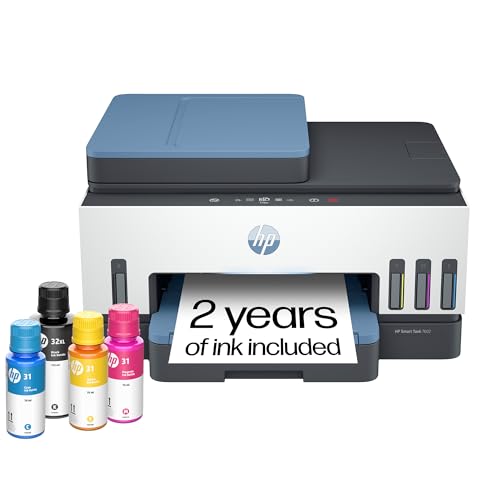
The HP Smart Tank 7602 Wireless All-in-One Printer stands out as an ideal choice for remote workers seeking efficiency and cost-effectiveness. With its cartridge-free, refillable design, you’ll enjoy up to two years of ink, printing 8,000 color pages or 6,000 black pages. Setup is quick, and the reliable Wi-Fi and intuitive app simplify printing, scanning, copying, and faxing. You’ll appreciate the 35-page auto document feeder and 2-sided printing feature. Plus, it delivers stunning prints at up to 15 pages per minute in black and 9 in color, all while ensuring data security with HP Wolf Essential Security.
Best For: The HP Smart Tank 7602 Wireless All-in-One Printer is best for remote workers and home office users looking for high-volume, cost-effective printing solutions.
Pros:
- Cartridge-free design allows for easy refilling and reduces ink costs over time.
- High-speed printing of up to 15 pages per minute in black and 9 pages per minute in color enhances productivity.
- Intuitive app and reliable Wi-Fi facilitate seamless printing, scanning, and copying from various devices.
Cons:
- Initial setup may require some technical knowledge for optimal configuration.
- The printer may be bulky, taking up more space than traditional cartridge printers.
- Limited to specific ink types, which may constrain users looking for third-party ink options.
HP Smart Tank 6001 Wireless All-in-One Ink Tank Printer

For remote workers juggling multiple tasks, the HP Smart Tank 6001 Wireless All-in-One Ink Tank Printer stands out with its cartridge-free, refillable ink tank system. It lets you print, copy, and scan effortlessly, with automatic two-sided printing. Enjoy fast print speeds of up to 12 pages per minute in black and 7 in color, ensuring high-quality output. With two years of original HP ink included, you can tackle up to 8,000 color pages or 6,000 black pages without breaking the bank. Plus, HP’s reliable Wi-Fi and app integration make printing from your smartphone a breeze.
Best For: Remote workers and families needing a reliable, high-volume printing solution with cost efficiency.
Pros:
- Cartridge-free, refillable ink tank system allows for low-cost, high-volume printing.
- Fast print speeds of up to 12 pages per minute (black) and 7 pages per minute (color) for efficient document handling.
- HP app integration enables easy printing, scanning, and copying directly from smartphones.
Cons:
- Initial setup may require some technical knowledge to connect to Wi-Fi and configure settings.
- Physical size may be larger than traditional printers, requiring more desk space.
- Limited compatibility with certain mobile devices or operating systems for app functionality.
Factors to Consider When Choosing Ink Tank Printers for Remote Workers
When choosing an ink tank printer for your remote work setup, consider your print volume needs and how much you’ll spend on ink. You’ll also want to look at the connectivity options available to make certain it fits seamlessly into your workspace. Finally, think about the print quality standards and how easy the setup and maintenance will be for you.
Print Volume Needs
Evaluating your print volume needs is essential for selecting the right ink tank printer as a remote worker. Start by estimating how many pages you plan to print monthly; ink tank printers can handle between 4,500 and 8,000 pages before refills. Consider the balance between black and color printing, especially if you need vibrant documents for reports. Look for models that come with a two-year ink supply, minimizing downtime for ink replacements. Also, pay attention to print speed; faster models can print up to 15 pages per minute, boosting efficiency for large projects. By examining these factors, you’ll find a printer that meets your demands without compromising on performance or convenience.
Ink Cost Efficiency
Considering the high costs associated with traditional ink cartridges, ink tank printers stand out as a cost-efficient option for remote workers. You can save up to 90% on ink costs compared to conventional systems, making them ideal for frequent printing. Many models come with enough ink to yield thousands of pages—about 6,000 in black and 7,500 in color—reducing how often you need to buy more. With their cartridge-free design, these printers also minimize waste, aligning with eco-friendly practices. Plus, the ability to print the equivalent of roughly 90 cartridges from a single set of refill bottles means you’ll enjoy long-term savings. Investing upfront in an ink tank printer pays off when you print high volumes regularly.
Connectivity Options Available
How can you guarantee your ink tank printer seamlessly integrates into your remote work setup? Start by selecting models with dual-band Wi-Fi connectivity. This feature guarantees reliable connections, especially in busy environments filled with multiple devices. Look for printers that support mobile printing, so you can easily print from your smartphone or tablet using compatible apps. If you’re more stationary, consider models with Ethernet connectivity for a stable connection. Self-healing Wi-Fi capabilities are also beneficial, as they automatically fix connection issues to keep your printing smooth. Finally, some printers offer voice-activated features compatible with smart home devices, enhancing usability and making your remote work life even easier. Choose wisely to maximize your productivity!
Print Quality Standards
When choosing an ink tank printer for your remote work, it’s essential to prioritize print quality standards that meet your professional needs. Look for printers with high DPI, like 5760 x 1440, to guarantee sharp text and vibrant color photos. Advanced technologies, such as Micro Piezo Heat-Free, help maintain consistent print quality across different media types. This is critical for effective communication, as crisp text and accurate color reproduction can make a significant impact. Features like borderless printing and AI-assisted formatting can enhance your documents’ visual appeal. Finally, verify the printer can sustain high-quality output at high volumes, especially if you’re managing large document tasks regularly. Quality matters when you’re presenting your best work.
Setup and Maintenance
Choosing the right ink tank printer involves understanding its setup and maintenance features, which can greatly enhance your remote work experience. Ink tank printers usually have a cartridge-free, refillable ink system that simplifies maintenance and cuts down on ink replacement frequency. Many models offer user-friendly setup processes, often aided by mobile apps that guide you through installation. Some printers even come with self-healing Wi-Fi capabilities, resolving connection issues automatically for a stable printing experience. High-capacity ink tanks yield thousands of pages, minimizing regular maintenance and the hassle of frequent purchases. Additionally, easy-access ink refill systems prevent spills, making refills quick and convenient. These features save you time and keep your workflow uninterrupted.
Additional Features Offered
While you consider an ink tank printer for your remote work setup, it’s essential to look beyond just the ink system and maintenance features. Wireless connectivity options, like dual-band Wi-Fi, guarantee a stable connection for all your tasks. Mobile printing capabilities through dedicated apps let you print directly from your smartphone or tablet, adding convenience to your workflow. An automatic document feeder (ADF) can greatly boost productivity, allowing you to scan, copy, or fax multiple pages without hassle. High print speeds, ideally up to 15 pages per minute, help you tackle large volumes quickly. Additionally, features like borderless printing and high-resolution capabilities enhance the quality of your documents, making them suitable for professional presentations and reports.