As a small business owner, finding the right printer can greatly impact your operations. With the evolution of technology, smart printers now offer features that cater specifically to your needs. From cost-effective ink systems to advanced connectivity, these devices can enhance your workflow. Curious about which printers made the cut in 2026? Let’s explore the top ten options that could redefine your printing experience.
Epson EcoTank ET-2800 Wireless All-in-One Printer

The Epson EcoTank ET-2800 Wireless All-in-One Printer is an ideal choice for small businesses looking to cut costs and streamline operations. With its cartridge-free printing system, you’ll enjoy easy maintenance and reduced costs. Utilizing Micro Piezo Heat-Free Technology, it delivers vivid prints at up to 10 pages per minute, perfect for your busy work environment. You’ll save up to 90% on ink costs, equivalent to about 80 cartridges, allowing you to print up to 4,500 pages in black and 7,500 in color. Plus, it comes with two years of ink, minimizing those frustrating out-of-ink moments while promoting zero cartridge waste.
Best For: Small businesses looking to reduce printing costs and streamline operations with efficient, cartridge-free printing.
Pros:
- Cost-effective: Saves up to 90% on ink costs, equivalent to about 80 cartridges.
- Includes ink: Comes with up to 2 years of ink included, minimizing the need for frequent replacements.
- Eco-friendly: Promotes zero cartridge waste, reducing landfill impact.
Cons:
- Initial investment: Higher upfront cost compared to traditional printers.
- Print speed: Maximum print speed of 10 pages per minute may not suffice for very high-volume printing needs.
- Limited features: Lacks advanced features found in more expensive models, such as duplex printing or high-capacity paper trays.
HP Smart Tank 7602 Wireless All-in-One Ink Tank Printer
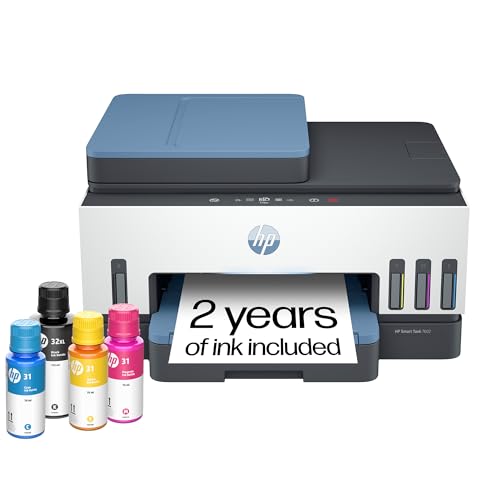
Designed specifically for home office use, the HP Smart Tank 7602 Wireless All-in-One Ink Tank Printer is perfect for small businesses that require a reliable, cost-effective printing solution. With two years of ink included, you’ll enjoy cartridge-free, refillable printing that saves you money. Its quick setup and intuitive app make printing, scanning, and copying a breeze. Plus, the 35-page auto document feeder and 2-sided printing enhance efficiency. Enjoy high-quality prints at speeds of up to 15 pages per minute in black and 9 in color. With robust security features, your data stays safe, ensuring peace of mind.
Best For: The HP Smart Tank 7602 is best for small businesses and home office users seeking a cost-effective, high-volume printing solution.
Pros:
- Cartridge-free design with two years of ink included, significantly reducing printing costs.
- High print quality with crisp text and vivid colors at speeds of up to 15 pages per minute in black and 9 pages per minute in color.
- Advanced features such as a 35-page auto document feeder and 2-sided printing enhance productivity and efficiency.
Cons:
- Initial setup may be complex for users unfamiliar with wireless printers.
- Limited connectivity options compared to some high-end models, focusing primarily on wireless and Ethernet.
- Ink tank refilling may require more maintenance and attention compared to traditional cartridges.
Brother Work Smart 1360 Wireless Color Inkjet All-in-One Printer (MFC-J1360DW)

For small business owners seeking efficiency, the Brother Work Smart 1360 Wireless Color Inkjet All-in-One Printer (MFC-J1360DW) stands out with its automatic duplex printing feature. It boasts a 20-sheet Automatic Document Feeder and a 150-sheet paper tray, allowing you to handle multiple tasks seamlessly. You can print up to 16 pages per minute in black and 9 in color, with crisp resolutions up to 1,200 x 6,000 dpi. Connectivity options like Wi-Fi Direct and AirPrint® enhance usability, while the Brother Mobile Connect app lets you manage tasks directly from your device. Enjoy a 2-month FREE ink subscription trial, too!
Best For: Small business owners and home office users looking for a versatile all-in-one printer that offers efficiency and multiple connectivity options.
Pros:
- Automatic duplex printing saves paper and enhances productivity.
- Versatile connectivity options including Wi-Fi Direct and AirPrint® for easy printing from various devices.
- Brother Mobile Connect app allows for seamless management of printing tasks directly from mobile devices.
Cons:
- Print speeds may be slower compared to some high-end laser printers.
- The 150-sheet paper tray may require frequent refills for high-volume printing.
- Limited to LC501 series inks, which may restrict options for ink replacement.
HP OfficeJet Pro 8125e Wireless All-in-One Color Inkjet Printer

With its AI-enabled features and robust functionality, the HP OfficeJet Pro 8125e Wireless All-in-One Color Inkjet Printer is an ideal choice for home office professionals seeking efficiency and versatility. It prints, scans, and copies with ease, featuring duplex printing and an automatic document feeder. You can expect vibrant color prints up to 4800 x 1200 dpi and quick speeds, with an initial page print time of just 18 seconds. The 225-sheet input tray meets your high-volume needs, while the included 3-month Instant Ink trial offers hassle-free ink management. Connect seamlessly via Ethernet or USB, and control everything through an app.
Best For: Home office professionals seeking an efficient and versatile all-in-one printing solution.
Pros:
- AI-enabled features enhance workflow adaptation for increased productivity.
- High print quality with vibrant colors and resolutions up to 4800 x 1200 dpi.
- Convenient connectivity options including Ethernet and USB for seamless integration.
Cons:
- Initial page print time of 18 seconds may be slower compared to some competitors.
- Limited output sheet capacity of 60 sheets may require frequent monitoring for high-volume tasks.
- One-year limited warranty may not provide enough coverage without the HP+ offer for extension.
Brother DCP-L2640DW Wireless Monochrome Multi-Function Laser Printer

The Brother DCP-L2640DW is the perfect ally for small business owners who need a reliable and efficient printing solution. This compact monochrome multi-function laser printer combines printing, scanning, and copying in one unit, making it ideal for busy workplaces. With a fast print speed of up to 36 pages per minute and a 50-page auto document feeder, you’ll breeze through tasks. Its dual-band wireless connectivity guarantees easy access from various devices. Plus, energy-efficient features like automatic duplex printing help reduce waste. Enjoy peace of mind with a 1-year warranty and ongoing support for your printing needs.
Best For: Small business owners looking for a reliable and efficient all-in-one printing solution.
Pros:
- High-speed performance with print speeds of up to 36 pages per minute.
- Versatile functionality combining printing, scanning, and copying in one device.
- Eco-friendly features such as automatic duplex printing and ENERGY STAR® compliance.
Cons:
- Limited color printing capability as it is a monochrome printer.
- No touchscreen interface, which may limit user-friendly navigation.
- Initial cartridge yield may be lower compared to high-yield alternatives.
HP Smart Tank 5000 Wireless All-in-One Ink Tank Printer

Designed specifically for small businesses, the HP Smart Tank 5000 Wireless All-in-One Ink Tank Printer stands out with its cartridge-free, refillable ink system. You’ll appreciate the included 2 years of Original HP Ink, allowing you to print up to 6,000 pages without frequent replacements. The user-friendly app simplifies setup and operation, while self-healing Wi-Fi guarantees reliable connectivity. Enjoy high-quality prints with crisp text and vibrant colors, thanks to HP AI technology. With the ability to print up to 10 pages per minute in black and 5 in color, it’s a cost-efficient choice for your diverse printing needs.
Best For: Families and small businesses looking for a cost-efficient, high-volume printer with reliable connectivity and high-quality output.
Pros:
- Cartridge-free system allows for easy refilling and reduces the frequency of ink replacements.
- User-friendly app simplifies printing and scanning operations for all users.
- High print quality with vibrant colors and crisp text, suitable for various document types.
Cons:
- Initial setup may take some time for users unfamiliar with wireless technology.
- Limited printing speed for color documents compared to some laser printers.
- The reliance on a smartphone app may not appeal to users who prefer traditional controls.
HP OfficeJet Pro 9125e Wireless All-in-One Color Inkjet Printer

For small businesses needing efficiency and versatility, the HP OfficeJet Pro 9125e Wireless All-in-One Color Inkjet Printer stands out as an ideal choice. It effortlessly prints, scans, copies, and faxes, enhancing your office workflow. With impressive print speeds of up to 18 ppm in color and 22 ppm in black, you’ll quickly handle all your document needs. The dual-band Wi-Fi guarantees reliable connectivity, and the 2.7-inch touchscreen simplifies navigation. Plus, HP’s AI technology improves layout precision, while HP Wolf Pro Security protects your data. With its eco-friendly design and a three-month Instant Ink trial, the OfficeJet Pro 9125e is a smart investment.
Best For: Small businesses looking for an efficient and versatile printer that can handle a variety of tasks seamlessly.
Pros:
- Fast print speeds of up to 18 ppm in color and 22 ppm in black, enhancing productivity.
- Dual-band Wi-Fi ensures reliable wireless connectivity for seamless printing from multiple devices.
- Eco-friendly design made with over 40% recycled plastic and includes a 3-month Instant Ink trial.
Cons:
- Designed to work exclusively with HP cartridges, limiting options for ink replacement.
- Periodic firmware updates may block non-HP cartridges, potentially leading to additional costs.
- The 250-sheet input tray may not be sufficient for larger print jobs without frequent reloading.
Epson EcoTank ET-4800 Wireless All-in-One Printer

Small businesses looking for an efficient and cost-effective printing solution will find the Epson EcoTank ET-4800 Wireless All-in-One Printer to be an excellent choice. This versatile printer offers printing, scanning, copying, and faxing capabilities, all while utilizing high-capacity ink tanks. You’ll save money with Epson’s EcoFit ink bottles, which eliminate the need for costly cartridges. With Micro Piezo Heat-Free Technology, you can expect sharp text and vibrant color photos on various paper types. Plus, its reduced cartridge waste helps lessen your environmental impact. The user-friendly color display makes navigation and document management a breeze in your home office.
Best For: Small businesses seeking an efficient, cost-effective, and environmentally friendly printing solution.
Pros:
- High-capacity ink tanks reduce printing costs compared to traditional cartridges.
- Micro Piezo Heat-Free Technology ensures high-quality prints with sharp text and vibrant colors.
- User-friendly color display simplifies navigation and document management.
Cons:
- Initial setup may require time and effort to fill ink tanks.
- Larger footprint compared to standard printers due to the all-in-one design.
- Limited mobile printing options compared to some competitors.
Epson EcoTank ET-2803 Wireless All-in-One Printer

The Epson EcoTank ET-2803 Wireless All-in-One Printer stands out as an ideal choice for families and small businesses looking for an efficient, cost-effective solution to their printing needs. With its cartridge-free design and high-capacity, refillable ink tanks, you won’t have to worry about running out of ink or hefty replacement costs. It offers a maximum print resolution of 5760 x 1440 DPI and can handle a variety of media sizes. Rated 4.2 out of 5 stars, this printer also comes with a limited warranty, ensuring you have support when you need it. Enjoy seamless printing with the EcoTank ET-2803!
Best For: Families and small businesses seeking an efficient, cost-effective printing solution without the hassle of cartridge replacements.
Pros:
- Cartridge-free design significantly reduces ink costs and eliminates the worry of running out of ink.
- High-resolution printing at 5760 x 1440 DPI provides sharp and vibrant prints for all your needs.
- Versatile media handling supports various sizes, making it suitable for different printing tasks.
Cons:
- Initial setup ink yields are lower than replacement bottles, which may require purchasing additional ink sooner.
- Requires internet connectivity for most features, limiting functionality in offline scenarios.
- Limited copy speed of 10 ppm for black & white prints may not meet high-volume printing demands.
HP Smart Tank 5101 Wireless All-in-One Ink Tank Printer

Designed with high-volume color printing in mind, the HP Smart Tank 5101 Wireless All-in-One Ink Tank Printer is perfect for families and small businesses that demand efficiency without breaking the bank. You’ll appreciate print speeds of up to 12 pages per minute for black and 5 for color, making it ideal for your printing needs. With a whopping 6,000 pages included, you’ll enjoy low-cost, high-volume printing. Its versatile functions—print, copy, scan, and borderless prints—combined with self-healing Wi-Fi guarantee reliable connectivity. Plus, the user-friendly app simplifies your printing experience, delivering crisp text and vivid colors every time.
Best For: Families and small businesses needing efficient, high-volume color printing at a low cost.
Pros:
- High volume printing: Comes with up to 6,000 pages included, reducing overall printing costs.
- Versatile functions: Supports printing, copying, scanning, and borderless prints for diverse needs.
- User-friendly: Quick setup and a simple app enhance the overall user experience.
Cons:
- Wireless only supports 2.4 GHz: Limited connectivity options may affect performance in certain environments.
- Print speeds may vary: Actual speeds can be slower than advertised under certain conditions.
- Limited color print speed: At 5 pages per minute for color, it may not be suitable for very high-demand color printing tasks.
Factors to Consider When Choosing Smart Printers for Small Business
When picking a smart printer for your small business, you need to evaluate several key factors. Think about your printing speed and volume, cost efficiency, and how well the printer connects with your existing devices. Also, pay attention to print quality, features, and the maintenance support available to keep everything running smoothly.
Printing Speed and Volume
Choosing the right printer for your small business means considering essential factors like printing speed and volume. Look for printers that offer speeds between 9 to 36 pages per minute (ppm), depending on your needs and print quality settings. If you often handle larger print jobs, opt for high-volume printers with larger input trays, which can hold 250 sheets or more, reducing the frequency of refills. Automatic duplex printing is another feature you’ll want, as it allows for double-sided prints without extra effort, saving time and paper. Don’t forget to check the initial page print time—some printers can produce the first page in as little as 10 seconds. Finally, evaluate monthly duty cycles to guarantee longevity for your business demands.
Cost Efficiency and Savings
Understanding the cost efficiency of printers is essential for small businesses aiming to manage their budgets effectively. Consider models with refillable ink tank systems, which can save you up to 90% on ink costs compared to traditional cartridges. Some printers even come with multiple years’ worth of ink included, reducing the frequency and costs of replacements. High-capacity ink bottles can produce up to 7,500 color pages per set, boosting your printing efficiency. While the initial investment in cartridge-free printers might be higher, the long-term savings can be significant. Additionally, subscription services for ink delivery offer predictable monthly costs, helping you avoid unexpected shortages and enhance your budget management for all your printing needs.
Connectivity and Compatibility Options
Selecting the right printer for your small business hinges on its connectivity and compatibility options. Look for printers that support dual-band Wi-Fi, allowing for stable connections on both 2.4 GHz and 5 GHz networks to enhance printing performance. Make sure the printer is compatible with mobile printing standards like AirPrint, Google Cloud Print, and Mopria, so you can print seamlessly from your smartphones and tablets. If your work environment has high network traffic, consider models with Ethernet ports for a more reliable wired connection. Also, check for USB connectivity options for direct links to your computers, especially useful when wireless connections might be unstable. Finally, evaluate support for cloud printing services, enabling easy access to print documents from various cloud storage platforms.
Print Quality and Features
Print quality and features play a crucial role in determining the right smart printer for your small business. You should consider print resolution, often measured in dots per inch (dpi), with higher resolutions like 5760 x 1440 dpi delivering sharper text and vibrant photos. Look for features like automatic duplex printing, which saves time and paper with double-sided printing. Print speeds can also impact your productivity; some models print up to 36 pages per minute. Additionally, high-capacity ink tanks minimize the frequency of replacements, allowing you to print thousands of pages before needing a refill. If you need professional-quality documents, specialized features like borderless printing will help produce impressive results without white margins.
Maintenance and Support Services
When choosing a smart printer for your small business, maintenance and support services are key factors that can greatly impact your operations. First, consider the warranty options available; extended coverage can ease worries about high printing demands. Evaluate customer support channels, including online chat, phone assistance, and email, to guarantee quick resolutions for technical issues. Subscription services for automatic ink delivery can further reduce downtime, so look for printers that offer this convenience. Additionally, make certain that replacement parts and supplies are easy to obtain, as this minimizes maintenance disruptions. Finally, research user reviews regarding the reliability of the manufacturer’s customer service—positive feedback often signals a strong support system for troubleshooting and repairs.