As you explore the best smart color laser printers of 2026, you’ll find a range of options designed for both home and office environments. These printers boast impressive features like wireless connectivity, duplex printing, and user-friendly interfaces. Choosing the right model can greatly impact your workflow and efficiency. So, what are the standout choices that can elevate your printing experience? Let’s take a closer look at the top picks that fit your specific needs.
HP Color LaserJet Pro MFP 3301sdw Wireless All-in-One Printer

The HP Color LaserJet Pro MFP 3301sdw Wireless All-in-One Printer is an ideal choice for small teams seeking a reliable and efficient printing solution. You’ll appreciate its impressive print speeds of up to 26 pages per minute for both black and color documents. With features like auto 2-sided printing and an auto document feeder, productivity soars. The 250-sheet input tray means fewer interruptions, while next-generation TerraJet toner delivers vibrant colors for professional results. Plus, its award-winning reliability and regular firmware updates guarantee consistent performance. This printer meets your high business demands effortlessly, making it a top pick for 2026.
Best For: Small teams looking for a reliable and efficient all-in-one color laser printer for professional-quality document needs.
Pros:
- Fast print speeds of up to 26 pages per minute for both black and color documents.
- Features auto 2-sided printing and an auto document feeder, enhancing productivity.
- Utilizes next-generation TerraJet toner for vibrant colors and professional results.
Cons:
- Exclusively requires Original HP toner cartridges, limiting options for replacements.
- May have higher upfront costs compared to standard inkjet printers.
- Some users may find the printer’s size and weight challenging for small office spaces.
Brother MFC-L3720CDW Wireless Color Laser Printer

Designed for small offices or home users who demand high-quality printing without sacrificing speed, the Brother MFC-L3720CDW Wireless Color Laser Printer stands out with its impressive print speeds of up to 19 pages per minute. With a 250-sheet adjustable paper tray and a 50-sheet auto document feeder, you’ll boost productivity effortlessly. Its dual-band wireless connectivity guarantees seamless printing from any device. The intuitive 3.5-inch color touchscreen offers 48 customizable shortcuts and direct access to cloud services like Google Drive. Plus, with mobile printing capabilities through the companion app, managing your workflow on the go has never been easier.
Best For: Small offices or home users seeking high-quality, efficient printing and scanning capabilities without compromising on speed.
Pros:
- High print speeds of up to 19 pages per minute enhance productivity.
- Dual-band wireless connectivity allows for seamless printing from multiple devices.
- Intuitive 3.5-inch color touchscreen with customizable shortcuts simplifies user interaction.
Cons:
- Initial setup may be complex for less tech-savvy users.
- Color printing may be slower compared to monochrome printing.
- Some users may find the size of the printer bulky for smaller spaces.
Brother Work Smart 1360 Wireless Color Inkjet All-in-One Printer (MFC-J1360DW)

If you’re looking for a versatile printer that can handle all your home and office needs, the Brother Work Smart 1360 Wireless Color Inkjet All-in-One Printer (MFC-J1360DW) is an excellent choice. This compact printer offers automatic duplex printing, a 20-sheet ADF, and a 150-sheet paper tray, making your tasks efficient. With print speeds of up to 16 ppm in black and 9 ppm in color, it won’t keep you waiting. You’ll appreciate its wireless connectivity options, including AirPrint and Cloud app support. Plus, the Brother Mobile Connect app lets you manage everything right from your mobile device.
Best For: Home users and small offices looking for a reliable all-in-one printer that offers efficient printing, scanning, and copying capabilities.
Pros:
- Automatic duplex printing saves paper and reduces costs.
- Wireless connectivity options, including AirPrint and Cloud app support, enhance convenience.
- Compact design makes it suitable for small spaces while still offering a 150-sheet paper tray.
Cons:
- Print speeds may not be fast enough for high-volume printing needs.
- The 20-sheet ADF may limit efficiency for larger scanning tasks.
- The printer’s dimensions and weight may make it less portable compared to smaller models.
HP Color Laserjet Pro MFP 4301fdw Wireless All-in-One Printer
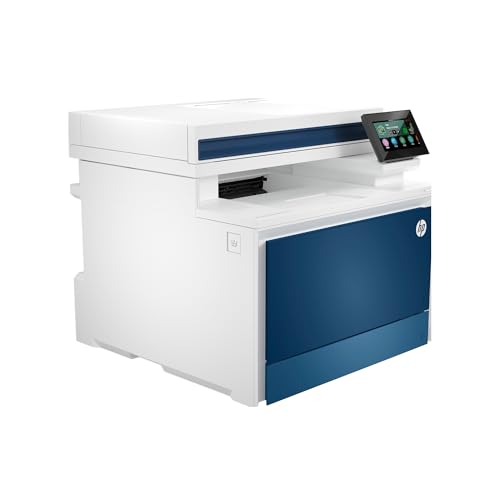
Looking for a powerful printing solution for your small team? The HP Color Laserjet Pro MFP 4301fdw is an excellent choice. This wireless all-in-one printer handles printing, scanning, copying, and faxing effortlessly, supporting up to 10 users. It delivers impressive speeds of up to 35 pages per minute with sharp color details. With intelligent Wi-Fi and compatibility for mobile devices, PCs, and tablets, you’ll enjoy seamless connectivity. Plus, HP Wolf Pro Security guarantees your data is protected. Just remember, it only works with original HP cartridges, keeping your printer running smoothly and securely.
Best For: Small teams of up to 10 users looking for a reliable all-in-one printer that provides fast color printing and secure connectivity.
Pros:
- Fast printing speeds of up to 35 pages per minute with sharp color details.
- Seamless connectivity options including intelligent Wi-Fi, Bluetooth, and compatibility with various devices and operating systems.
- Robust security features with HP Wolf Pro Security to protect sensitive data and ensure printer safety.
Cons:
- Limited to original HP cartridges, which can increase ongoing operating costs.
- Might be overkill for very small teams or home office users with lower printing needs.
- Initial setup may require additional time for configuring network settings and security measures.
HP Color Laserjet Pro 3201dw Wireless Color Laser Printer

The HP Color Laserjet Pro 3201dw Wireless Color Laser Printer stands out as an excellent choice for small teams needing high-quality color printing. With print speeds of up to 26 pages per minute for both black and color, you won’t be waiting long for your documents. Its 250-sheet input tray and auto duplex printing feature streamline your workflow. The next-generation TerraJet toner guarantees vivid colors, making every report look professional. Plus, dual-band Wi-Fi with self-reset capability assures seamless wireless connectivity. Keep in mind, it’s engineered for reliability, working best with original HP cartridges for peak performance.
Best For: Small teams that require high-quality color printing for professional documents and reports.
Pros:
- Fast print speeds of up to 26 pages per minute for both black and color.
- Auto duplex printing feature saves time and resources.
- Dual-band Wi-Fi with self-reset capability ensures reliable wireless connectivity.
Cons:
- Only compatible with original HP cartridges, limiting cartridge options.
- Initial setup may require technical knowledge for optimal wireless configuration.
- Higher cost of replacement toner compared to generic alternatives.
Brother Color Laser Printer (HL-L3220CDW)

For small to medium-sized businesses that demand high-quality prints without sacrificing speed, the Brother Color Laser Printer (HL-L3220CDW) stands out as an exceptional choice. With an impressive output speed of 19 pages per minute, you’ll produce stunning documents with crisp text and vibrant graphics. Its advanced wireless capabilities let you print seamlessly from laptops, smartphones, and tablets, while built-in security protocols keep your sensitive documents safe. The 250-sheet paper tray reduces the need for frequent refills, and automatic duplex printing saves both time and paper. Plus, mobile integration guarantees effortless printing from your preferred devices.
Best For: Small to medium-sized businesses seeking high-quality, efficient printing solutions.
Pros:
- Impressive output speed of 19 pages per minute, ensuring fast document production.
- Advanced wireless connectivity allows printing from various devices, enhancing convenience.
- Automatic duplex printing reduces paper usage and saves time for double-sided documents.
Cons:
- High initial cost compared to basic printers may be a consideration for budget-conscious users.
- Limited paper capacity in the standard tray may require frequent refills for very high-volume printing.
- Potential compatibility issues with certain mobile printing platforms may arise for specific devices.
HP Color LaserJet Pro MFP 3301fdw Wireless All-in-One Color Laser Printer

Designed specifically for small teams, the HP Color LaserJet Pro MFP 3301fdw Wireless All-in-One Color Laser Printer excels in providing efficient and versatile printing solutions. With print speeds of up to 26 pages per minute, you’ll enjoy quick black and color document output. Its upgraded TerraJet toner delivers vivid colors and professional-quality results. Enhanced features like auto 2-sided printing, a 250-sheet input tray, and 2-sided single-pass scanning boost productivity. Plus, dual-band Wi-Fi guarantees reliable wireless connections. Recognized for its award-winning reliability, this printer meets high business demands, making it a dependable choice for your office needs.
Best For: Small teams looking for a reliable all-in-one printer that offers fast printing and versatile functionality.
Pros:
- High print speeds of up to 26 pages per minute for both black and color documents.
- Enhanced features like auto 2-sided printing and 2-sided single-pass scanning increase productivity.
- Dual-band Wi-Fi ensures reliable wireless connectivity.
Cons:
- Compatible only with HP cartridges, which may limit options for replacement supplies.
- Initial setup may take time due to firmware updates and connectivity configurations.
- The 250-sheet input tray may be insufficient for larger printing tasks without frequent refills.
Canon Color imageCLASS MF751Cdw II Wireless Duplex Laser Printer

With its impressive print speed of up to 35 pages per minute, the Canon Color imageCLASS MF751Cdw II Wireless Duplex Laser Printer stands out as an excellent choice for busy offices and home environments alike. You’ll appreciate its multifunction capabilities—print, scan, and copy—along with a quick first print time of just 7 seconds. The 5-inch color touchscreen makes navigation easy, while the 50-sheet automatic document feeder streamlines your tasks. Plus, it’s compatible with mobile printing options like the Canon PRINT app and Apple AirPrint. With a 250-sheet capacity and high-yield toner, it’s designed for efficiency and reliability.
Best For: Busy offices and home users seeking a reliable, multifunction printer that offers fast printing and mobile connectivity options.
Pros:
- Multifunctionality: Combines printing, scanning, and copying in one device for efficient workflow.
- Fast Print Speed: Delivers up to 35 pages per minute, ideal for high-volume printing tasks.
- User-Friendly Interface: Features a 5-inch color touchscreen and customizable application library for easy navigation.
Cons:
- Initial Cost: Higher upfront cost compared to basic printers may be a consideration for budget-conscious buyers.
- Size and Weight: Relatively large and heavy, which may limit placement options in smaller spaces.
- Toner Replacement Cost: While high-yield toner reduces frequency of replacements, the cost of toner cartridges can add up over time.
Brother HL-L3280CDW Wireless Compact Digital Color Printer

The Brother HL-L3280CDW Wireless Compact Digital Color Printer stands out as an excellent choice for small businesses and home offices that demand high-quality color printing in a compact package. With impressive print speeds of up to 27 pages per minute, you’ll enjoy efficiency without sacrificing quality. Its Automatic Duplex printing feature saves you time and paper, while the 2.7-inch touchscreen makes navigation a breeze. You can easily print from cloud services like Google Drive or Dropbox, ensuring convenience. Plus, with a 2-month Refresh Subscription Trial and Alexa compatibility, this printer is designed to meet your modern printing needs effortlessly.
Best For: Small businesses and home offices seeking reliable, high-quality color printing in a compact design.
Pros:
- Impressive print speeds of up to 27 pages per minute for increased productivity.
- Automatic Duplex printing feature saves time and paper.
- Supports cloud printing from popular services like Google Drive and Dropbox.
Cons:
- Limited to color printing only; may not suit users needing black-and-white printing.
- Initial setup might be challenging for some users unfamiliar with wireless printers.
- The 2-month Refresh Subscription Trial may not be appealing to all users.
Canon Color imageCLASS MF662Cdw Wireless Duplex Laser Printer

If you’re looking for a reliable color laser printer that combines speed and functionality, the Canon Color imageCLASS MF662Cdw stands out. With print speeds of up to 26 pages per minute and a first print time of about 10.3 seconds, it keeps your workflow efficient. The automatic duplex printing feature helps save on paper costs. You’ll appreciate the easy wireless setup and compatibility with mobile printing apps like Canon PRINT and Apple AirPrint. The 5-inch color touchscreen simplifies operations, while the 250-sheet paper capacity means less frequent reloading. Plus, it’s ENERGY STAR certified, making it an eco-friendly choice.
Best For: Small to medium-sized businesses or home offices that require a fast, reliable, and efficient color laser printer.
Pros:
- Fast print speeds of up to 26 pages per minute for both color and monochrome printing.
- Easy wireless setup with compatibility for mobile printing apps like Canon PRINT and Apple AirPrint.
- Automatic duplex printing feature helps reduce paper usage and costs.
Cons:
- Initial setup may require some technical knowledge for optimal wireless configuration.
- The 250-sheet paper capacity may not be sufficient for high-volume printing needs.
- Replacement toner can be costly, especially if using high-capacity cartridges frequently.
Factors to Consider When Choosing Smart Color Laser Printers
When you’re picking a smart color laser printer, there are several key factors to keep in mind. You’ll want to take into account print quality and speed, as well as connectivity options that suit your needs. Don’t forget about the cost of consumables, user interface design, and mobile printing features to guarantee you get the best value for your investment.
Print Quality and Speed
Choosing a smart color laser printer involves careful consideration of print quality and speed, as these factors greatly impact your overall printing experience. Look for a printer that delivers vibrant, professional-quality images and text, ideally achieving resolutions of 1200 x 600 dpi or higher. Speed is equally important; many models print between 19 and 35 pages per minute, making them ideal for high-volume tasks. Consider the first print time too—some printers can deliver your first page in as little as 7 seconds, boosting productivity. Features like automatic duplex printing not only save paper but also speed up double-sided document completion. Finally, choose printers with advanced toner technology for enhanced color vibrancy and longevity, reducing maintenance needs.
Connectivity Options Available
After evaluating print quality and speed, it’s time to focus on connectivity options, which play a significant role in your printing experience. Look for printers with dual-band wireless networking (2.4GHz/5GHz) to guarantee a stable connection across various devices. Make sure they’re compatible with mobile printing technologies like Apple AirPrint, Google Cloud Print, and Mopria Print Service for easy mobile access. Consider models featuring built-in Ethernet and USB 2.0 ports for flexible connections to networks and computers. Wi-Fi Direct is also a great feature, allowing direct printing from your devices without needing a network. Finally, check for automatic self-reset capabilities in Wi-Fi connections to resolve issues without your intervention, enhancing your overall convenience.
Cost of Consumables
While evaluating smart color laser printers, it is important to take into account the cost of consumables, as this can markedly impact your overall printing expenses. The price of toner cartridges and imaging drums plays a significant role in the total cost of ownership. Opting for high-yield toner cartridges can offer a lower cost per page, making them more economical for high-volume printing. Be cautious, though; some printers require proprietary cartridges that may limit your options and increase costs. Additionally, consider subscription services for automatic toner delivery to manage expenses and make sure you never run out. Finally, check the average page yield of cartridges—higher yields can lead to fewer replacements and ultimately lower costs in the long run.
User Interface Design
When weighing the cost of consumables, it’s easy to overlook the importance of user interface design in smart color laser printers. A well-designed interface should have an intuitive layout that lets you navigate printing, scanning, and copying functions effortlessly. Look for printers with touchscreen displays ranging from 2.7 to 5 inches, as they provide a visually engaging experience. Customizable shortcuts can also boost efficiency, allowing you to access frequently used functions with a single tap. Additionally, clear visual indicators for toner levels and paper capacity help you monitor the printer status proactively, minimizing interruptions. These features make it easier to manage tasks and enhance your overall printing experience. Prioritize user-friendly designs to streamline your workflow.
Mobile Printing Features
Mobile printing features are essential for anyone who needs to print on the go, and they can greatly enhance your productivity. With modern smart color laser printers, you can print directly from your smartphone or tablet, making it convenient for on-the-fly tasks. Look for printers that support popular protocols like Apple AirPrint and Google Cloud Print, ensuring seamless integration with your devices. Advanced models often include dedicated companion apps, allowing you to monitor ink levels, manage print jobs, and access cloud services easily. Wireless options like Wi-Fi Direct enable direct printing without a traditional network, simplifying the process. Customizable shortcuts in these apps also help streamline your printing tasks, making busy environments more efficient.
Paper Handling Capacity
Choosing a smart color laser printer requires careful consideration of its paper handling capacity, as this factor directly impacts your efficiency and workflow. You’ll want a printer with a standard capacity of 250 to 550 sheets for office use to minimize how often you refill the tray. Look for models with automatic duplex printing to cut down on paper usage during high-volume jobs. Printers featuring multiple or adjustable trays provide greater flexibility for various paper sizes and types. A high-capacity output tray helps manage printed documents efficiently, reducing interruptions during large print runs. Additionally, a manual feed slot can accommodate specialty media like envelopes or thicker paper, ensuring you have options for all your printing needs.
Security Features Included
Security features are an essential consideration in today’s smart color laser printers, especially if you’re handling sensitive information. Look for printers that offer customizable settings to protect your data during printing and network communication. Regular firmware updates are vital, as they help address vulnerabilities and boost overall security against cyber threats. Some models include built-in protocols that prevent unauthorized access to documents, ensuring your confidential information stays safe. Additionally, compatibility with original manufacturer cartridges is often enforced, blocking non-verified alternatives that could pose security risks. Features like secure print release require user authentication, so only authorized personnel can access and print sensitive documents. Choosing a printer with robust security features can greatly enhance your data protection.