Smart garage access can do more than open and close a door. The right setup can support remote control, personalized entry codes, alerts, voice assistants, and integration with your broader home automation system.
This roundup covers garage controllers, video keypads, and smart entry locks that can help simplify access while improving visibility and control. Because compatibility varies widely, use the guide below to match features, connectivity, and installation requirements to your home.
Best 10 Smart Garage Locks for Home Automation Picks for 2026
Best Universal Garage Upgrade
Wi-Fi Garage Door Opener Controller
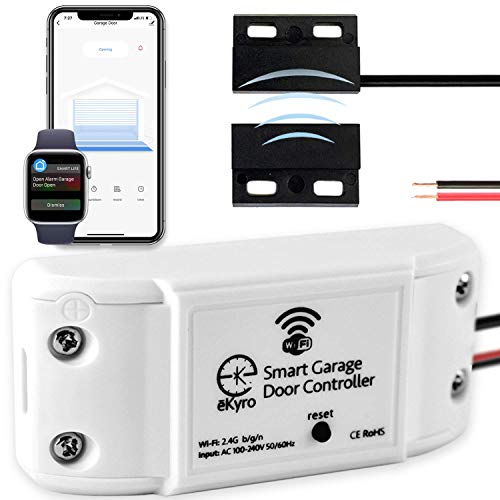
- Retrofits many existing garage door openers
- Works with Alexa, Google, Siri, iPhone, and Android
- No monthly fee for core smart features
Best For: Adding app and voice control to an existing garage opener
Best Fingerprint Entry

- Fast fingerprint unlocking with an AI-learning scanner
- Wi-Fi app control plus keypad and physical keys
- Up to eight months of battery life with USB-C backup
Best For: A garage entry door needing biometric and remote access
Best Established Garage Hub
Chamberlain Smart Garage Control
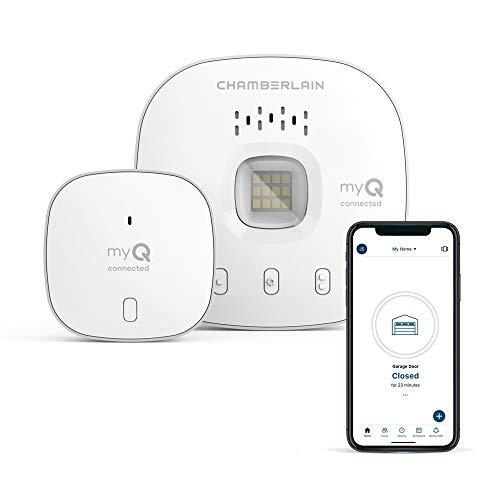
- Remote monitoring and control through the myQ app
- Scheduled closing and Amazon Key support
- Bluetooth setup for compatible sectional doors
Best For: Compatible sectional garage doors needing app-based control
Best Keypad Access
Tapo DL100 Smart Wi-Fi Deadbolt

- Supports up to 200 customizable access codes
- Works with Alexa, Google Home, and SmartThings
- Includes activity logs, alerts, and auto-lock
Best For: Managing family and guest access through a garage entry door
Best Video-Enabled Garage Access
myQ Smart Garage Door Video Keypad

- 1080p wide-angle camera with live viewing
- Custom PINs and scheduled guest access
- Motion alerts and two-way audio
Best For: Compatible Chamberlain, LiftMaster, or Craftsman garage openers
Best for Interior Garage Entries
eufy FamiLock C32 Fingerprint Smart Lock
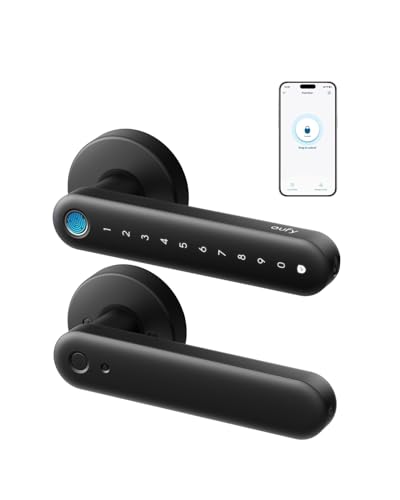
- 0.3-second fingerprint unlocking
- Built-in Wi-Fi for remote management
- Alexa and Google Assistant integration
Best For: Interior garage and storage doors
Best Matter-Compatible Deadbolt
ULTRALOQ Bolt SE WiFi Smart Deadbolt

- Seven keyless entry methods
- Matter over Thread and voice control
- Up to 18 months of battery life
Best For: Matter-enabled exterior or garage entry doors
Best Fingerprint Pick
GHome 4-in-1 Smart Fingerprint Door Knob

- Fingerprint, keypad, Bluetooth app, and key entry
- Local biometric data storage with auto-lock
- Rechargeable battery rated for up to 10,000 unlocks
Best For: Indoor garage entry doors and hub-free biometric access
Best for Z-Wave Automation
ULTRALOQ Bolt Z-Wave Long Range Deadbolt

- Works with Alarm.com, Home Assistant, and SmartThings
- Z-Wave Long Range supports detached garages and larger homes
- IP65 weather resistance and BHMA Grade 1 construction
Best For: Z-Wave-equipped homes and detached garage automation
Best Hub-Free Remote Pick
Philips Wi-Fi Smart Lock with Handle

- Built-in 2.4GHz Wi-Fi requires no hub
- Five entry methods including fingerprint and voice
- Supports up to 100 codes and scheduled access
Best For: Remote access and voice control without a separate hub
Best Universal Garage Upgrade – Wi-Fi Garage Door Opener Controller
If you want smart garage locks for home automation without replacing your existing opener, this eKyro controller is a practical retrofit option. It connects to Wi-Fi for app-based monitoring and control, while supporting Alexa, Google Assistant, Siri, iPhone, Android, and smart watches. It also includes features such as scheduling, automatic closing, and door-left-open alerts without a required subscription.
Best For: Homeowners who want broad smart-home compatibility and remote control from an existing garage door opener.
Pros:
- Works with many existing garage door openers, with an adapter available for expanded compatibility.
- Supports Alexa, Google Home, Siri, iPhone, Android, and smart watches.
- Includes scheduling, automatic door closing, and monitoring with no monthly fee.
- Multiple units can be paired for homes with more than one garage door.
Cons:
- Compatibility is not universal; RYOBI openers are specifically excluded.
- Each garage door requires its own controller.
- Some SMS or phone-call alerts may cost extra.
This is a flexible, feature-rich choice for adding connected control to an existing garage system. Confirm opener compatibility before buying, especially if your setup uses a less common brand.
Best Fingerprint Entry – Wyze Auto-Lock Bolt v2
The Wyze Auto-Lock Bolt v2 is a smart deadbolt for homeowners prioritizing fast, keyless entry alongside home automation. Its Wi-Fi connection supports remote management through the Wyze app, while fingerprint access, codes, app control, and physical keys provide multiple ways to unlock. This is a door lock rather than a garage-door opener, so it fits homes where the garage has a standard entry door.
Best For: Households wanting biometric access, remote Wi-Fi control, and several backup entry methods.
Pros:
- Fingerprint scanner can unlock the door in about 0.5 seconds.
- AI-learning scanner is designed to improve recognition over time.
- Provides app, fingerprint, keypad, and physical-key access.
- Uses eight AA batteries for up to eight months and includes USB-C emergency power.
Cons:
- It is a deadbolt for an entry door, not a controller for a garage overhead door.
- Video-doorbell integration is described specifically with a Wyze Video Doorbell.
- Its IP53 rating offers less weather protection than locks designed for more exposed locations.
For an attached garage’s pedestrian door, the Bolt v2 combines convenient biometric entry with remote app access. Verify that your existing door and deadbolt configuration can accommodate its dimensions and installation requirements.
Best Established Garage Hub – Chamberlain Smart Garage Control
The Chamberlain Smart Garage Control is a straightforward hub for adding smartphone access to a compatible sectional garage door. Through the myQ app, you can check whether the door is closed, open or close it remotely, share access, schedule closing, and use Amazon Key In-Garage Delivery. For shoppers comparing smart garage locks for home automation, it is a focused garage-control solution rather than a replacement door lock.
Best For: Owners of compatible sectional garage doors who want app control, scheduled closing, and in-garage delivery support.
Pros:
- Allows remote garage-door monitoring and operation through the myQ app.
- Supports access sharing for family and friends.
- Offers scheduled closing and Amazon Key In-Garage Delivery compatibility.
- Bluetooth simplifies setup, and a second door can be added with an additional sensor.
Cons:
- Requires a 2.4 GHz 802.11 b/g/n Wi-Fi router within 50 feet.
- Compatibility excludes certain openers, including specified yellow-learn-button Chamberlain models and Linear openers.
- Designed for sectional garage doors and certified for use in the United States.
This hub is a good fit when your opener meets the compatibility requirements and you want dependable app-based oversight. Check the opener model, sensor behavior, Wi-Fi placement, and sectional-door requirement before installation.
Best Keypad Access – Tapo DL100 Smart Wi-Fi Deadbolt
The Tapo DL100 is a keypad-focused smart deadbolt for an entry door near or inside the garage. It supports Wi-Fi remote control through the Tapo app, Bluetooth nearby access, voice commands with PIN verification, and up to 200 customizable codes. For home automation setups that need controlled access to a garage entry door, it adds activity tracking, alerts, auto-lock, and compatibility with Alexa, Google Home, and SmartThings.
Best For: Families and hosts who need customizable access codes, activity logs, and broad smart-home integration.
Pros:
- Supports keypad, Bluetooth, app, voice, and backup-key entry.
- Allows up to 200 customizable codes with guest and family profiles.
- Provides remote status checks, alerts, timestamps, and configurable auto-lock.
- Offers IP54 weather resistance, BHMA Grade 3 certification, and emergency USB-C power.
Cons:
- It is a standard-door deadbolt, not an overhead garage-door controller.
- Battery life is shorter in Wi-Fi mode—up to 200 days versus up to 300 days in Bluetooth mode.
- Voice unlocking requires PIN verification, and installation depends on standard lock-hole dimensions.
The DL100 is especially useful when several people need controlled access to a garage-side or home entry door. Its code management and access history are strong practical advantages, but confirm the door measurements and network needs before purchase.
Best Video-Enabled Garage Access – myQ Smart Garage Door Video Keypad
For homeowners comparing smart garage locks for home automation, the myQ Smart Garage Door Video Keypad combines app-based entry with video monitoring. It supports customizable PIN codes, scheduled guest access, live viewing, motion notifications, and two-way audio, making it useful for managing access to a compatible garage door from your phone.
Best For: Homeowners with a compatible Chamberlain, LiftMaster, or Craftsman opener who want video surveillance and flexible PIN-based access.
Pros:
- Creates personalized and time-specific PIN codes through the myQ app.
- 1080p wide-angle camera provides live garage-area viewing.
- Includes motion alerts, two-way audio, and wireless DIY installation.
- Works with compatible openers manufactured after 1993.
Cons:
- Controls only one compatible garage door opener.
- Advanced AI detection and recorded video history require a myQ subscription.
- Battery-powered operation may require charging or an optional power adapter kit.
This is a strong choice if visual verification matters as much as keyless entry. Check opener compatibility before buying, and factor the optional subscription into the ongoing cost if you want the premium monitoring features.
Best for Interior Garage Entries – eufy FamiLock C32 Fingerprint Smart Lock
The eufy FamiLock C32 is a practical option for smart garage locks for home automation when you need to secure an interior garage entry door rather than automate the overhead garage door. It offers fingerprint access, PIN-free keyless entry, built-in Wi-Fi, remote management, auto-locking, and Alexa or Google Assistant integration.
Best For: Garage entry doors, storage doors, offices, and other standard interior doors where fingerprint access and remote control are useful.
Pros:
- Unlocks with fingerprint recognition in about 0.3 seconds.
- Built-in 2.4 GHz Wi-Fi enables remote authorization and management without a separate hub.
- Works with Alexa and Google Assistant for voice control.
- Four AA batteries provide more than five months of operation, with USB-C emergency backup.
Cons:
- Designed for standard interior doors and is not recommended for front doors.
- Does not support rekeying.
- Wi-Fi connectivity is limited to 2.4 GHz.
Choose the C32 if your garage has a conventional interior access door and you want quick fingerprint entry plus remote app control. It is less suitable for replacing an overhead garage door opener or for a primary exterior entry door.
Best Matter-Compatible Deadbolt – ULTRALOQ Bolt SE WiFi Smart Deadbolt
For connected homes seeking smart garage locks for home automation, the ULTRALOQ Bolt SE offers several entry methods and broad Matter ecosystem support. It combines fingerprint access, passcodes, app control, shared eKeys, voice control, auto-locking, and remote management, while built-in Wi-Fi provides hub-free app access and Matter over Thread adds compatibility with supported smart-home platforms.
Best For: Exterior garage, front, or back doors where Matter integration, multiple access methods, and long battery life are priorities.
Pros:
- Supports fingerprints, passcodes, smartphone access, web control, eKeys, voice commands, and mechanical keys.
- Built-in Wi-Fi supports remote control, access sharing, activity history, and notifications.
- Matter over Thread integration works with compatible ecosystems and voice assistants.
- Battery life can reach up to 18 months, and the lock is IP65-rated and ANSI BHMA certified.
Cons:
- Matter remote access requires a compatible Matter over Thread hub.
- Supports 2.4 GHz Wi-Fi only, with the router ideally within 70 feet.
- A door sensor is not included.
The Bolt SE is the most automation-focused option here for a traditional deadbolt location. Its broad access choices and Matter support are appealing, but confirm that you have the required Thread hub and understand that it secures a door rather than controlling an overhead opener.
Best Fingerprint Pick – GHome 4-in-1 Smart Fingerprint Door Knob
For shoppers comparing smart garage locks for home automation, the GHome offers flexible indoor entry with fingerprint, keypad, app, and key access. Its local biometric storage and automatic locking make it a practical choice for a garage-to-home door, apartment, bedroom, or office.
Best For: Indoor garage entry doors and households that want fast fingerprint access without a separate hub.
Pros:
- Provides four entry methods: fingerprint, password, Bluetooth app control, and mechanical key.
- Stores fingerprint data locally rather than in the cloud.
- Supports access-code sharing, access logs, silent mode, passage mode, and five-second auto-lock.
- Rechargeable battery is rated for up to 10,000 unlocks or 300-plus days, depending on use.
Cons:
- App control is limited to Bluetooth range and does not provide remote internet access.
- Designed for indoor use, so it may not suit an exposed exterior garage door.
- Door compatibility and dimensions should be checked before purchase.
The GHome is a strong convenience-focused option when biometric entry and local privacy matter more than full remote automation. Its lack of a Wi-Fi or Z-Wave connection makes it less suitable for routines that must work from outside Bluetooth range.
Best for Z-Wave Automation – ULTRALOQ Bolt Z-Wave Long Range Deadbolt
The ULTRALOQ Bolt is the most automation-ready choice among these smart garage locks for home automation. Its Z-Wave Long Range connection works with compatible hubs such as Alarm.com, Home Assistant, and SmartThings, enabling remote access, activity alerts, and coordinated routines.
Best For: Detached garages, garage entry doors, and larger properties already using a compatible Z-Wave hub.
Pros:
- Supports remote locking, unlocking, user-code management, status checks, and automations through a compatible hub.
- Z-Wave Long Range is designed for larger homes, detached garages, guest houses, and workshops.
- Offers keypad entry, app control, auto-lock, and auto-unlock features.
- BHMA Grade 1 construction and IP65 weather resistance suit high-traffic and exposed entry areas.
Cons:
- Requires a compatible Z-Wave hub for remote control and smart-home integrations.
- Uses four AA batteries, with battery life depending on battery type and usage.
- As a deadbolt replacement, it requires a compatible existing door setup.
If your home automation system already uses Z-Wave, the Bolt offers the most complete integration path here, particularly for a detached garage. Without a compatible hub, however, its advanced remote and automation features are unavailable.
Best Hub-Free Remote Pick – Philips Wi-Fi Smart Lock with Handle
The Philips Wi-Fi Smart Lock combines direct 2.4GHz Wi-Fi with a lever handle, making it a convenient option for smart garage locks for home automation when you want remote access without buying a separate hub. It supports fingerprint, app, passcode, voice, and key entry.
Best For: Homeowners and rental-property managers who want remote access, voice control, and multiple scheduled codes from one lock.
Pros:
- Built-in 2.4GHz Wi-Fi enables remote control without an additional hub or bridge.
- Offers five unlocking methods, including fingerprint, app, password, voice assistants, and key.
- Supports up to 100 passcodes, including permanent, scheduled, temporary, and offline one-time codes.
- Auto-lock can be set from five to 180 seconds, with activity history in the app.
Cons:
- Requires eight AA LR6 alkaline batteries, which are not included.
- Installation requires a 2-1/8-inch door hole and specific clearance between the deadbolt and handle.
- Only 2.4GHz Wi-Fi is specified, so compatibility should be confirmed with the home network.
The Philips is a capable choice for users who prioritize remote management and voice-enabled routines without adding a hub. Its detailed fit requirements and higher battery count make measuring the door and planning battery replacements especially important.
How We Picked the Best Smart Garage Locks for Home Automation
We evaluated these products by focusing on the features that matter most for connected garage and entry access: compatibility with common smart-home platforms, remote operation, access controls, security features, installation demands, and everyday usability. The list includes dedicated garage-door controllers as well as smart deadbolts and keypad locks that may be useful for a garage entry door.
Before buying, confirm whether you need to control the overhead garage door, lock a pedestrian door, or manage both. These product types are not interchangeable, and a smart deadbolt generally cannot operate an overhead opener without additional hardware.
Quick Comparison
- Best for overhead-door control: A Wi-Fi garage controller or myQ-compatible hub.
- Best for temporary access: A smart lock or video keypad with customizable PIN codes.
- Best for biometric entry: A fingerprint-enabled deadbolt or door knob.
- Best for broad smart-home compatibility: A model supporting Matter, Z-Wave, Alexa, Google Home, or Apple integrations that match your system.
- Best for visibility: A garage video keypad with a wide-angle camera and smartphone notifications.
Key Buying Factors for Smart Garage Locks for Home Automation
Compatibility and Connectivity
Check support for your preferred ecosystem before considering convenience features. Wi-Fi models may connect directly to your router, while Bluetooth devices often need a hub for remote access. Z-Wave locks require a compatible controller, and Matter support can simplify cross-platform control when the rest of your setup is compatible.
Garage-Door Versus Entry-Door Function
Overhead-door controllers typically connect to the existing opener and use a sensor to confirm whether the door is open or closed. Smart deadbolts and knobs replace the lock on a standard hinged door. If your goal is whole-garage control, you may need one product for the overhead door and another for the entry door.
Access Management and Alerts
Look for unique PINs, fingerprint recognition, guest access, auto-lock settings, activity history, and open-door notifications. These features are especially useful for families, service providers, short-term guests, and anyone who wants a record of garage access.
Installation and Reliability
Verify door and opener compatibility, required backset dimensions, wireless range, power requirements, and whether a hub or subscription is needed. Battery-powered locks should offer clear low-battery warnings and a dependable backup entry method.
Who Should Buy Which Smart Garage Locks for Home Automation?
Choose a dedicated Wi-Fi garage controller if you primarily want smartphone or voice control of an existing overhead opener. Select a video keypad if you want camera visibility and code-based access at the garage entrance. A fingerprint or keypad deadbolt is better for a conventional side door, especially when multiple people need keyless entry. For established smart-home installations, prioritize the protocol your hub already supports—such as Matter or Z-Wave—rather than choosing based on brand alone.