Finding the right smart garage lock should not require complicated wiring, professional installation, or a complete overhaul of your access system. The best options combine straightforward setup with dependable entry methods such as PIN codes, fingerprints, smartphone control, or traditional keys.
We compare 10 smart locks and garage-access products to help you choose a practical fit for your home, household routines, and security priorities.
Best 10 Smart Garage Locks for Easy Installation Picks for 2026
Best Integrated Entry Lock
Yale LiftMaster Smart Touchscreen Deadbolt

- Screwdriver installation
- myQ control with hub
- Touchscreen PIN entry
Best For: Key-free myQ-connected garage entry
Best Budget Keypad Knob
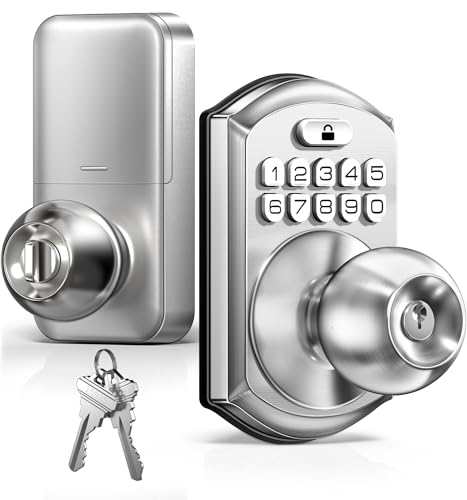
- No-drill installation
- One-time access codes
- Up to one-year battery life
Best For: Simple keypad access for garages and rentals
Best Video Garage Access

- Wireless DIY installation
- 1080p wide-angle camera
- Custom time-specific PINs
Best For: Garage-door access with video monitoring
Best Fingerprint Entry Lock
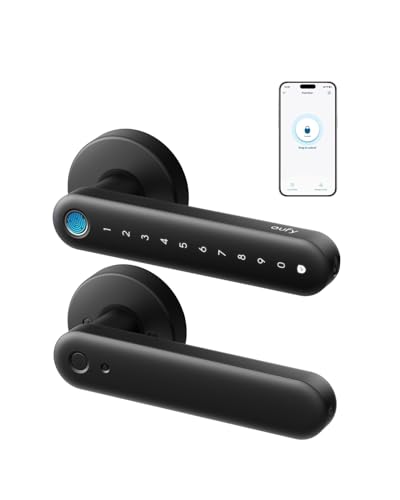
- 15-minute screwdriver install
- 0.3-second fingerprint unlock
- Built-in Wi-Fi
Best For: Biometric access for garage and interior doors
Best Video-Enabled Pick

- 2K wide-angle video with motion alerts
- Unique and time-specific PIN codes
- Works with compatible post-1993 openers
Best For: Garage access control with live video monitoring
Best Simple Keypad Value
Zowill Keypad Deadbolt with Handles

- Supports user and one-time access codes
- Includes handles, keys, and installation parts
- IP54 weather resistance and ANSI Grade 3
Best For: Straightforward keypad entry without app connectivity
Best Connected Alternative
Tapo Smart Wi-Fi Deadbolt DL100

- Wi-Fi, Bluetooth, app, and voice access
- Up to 200 customizable access codes
- Installs on standard holes without extra drilling
Best For: Remote access and smart-home integration
Simple Keypad Access

- Screwdriver-only installation
- 20 codes plus one-time guest PIN
- Auto-lock and anti-peep keypad
Best For: Keypad access without app connectivity
Hub-Free Wi-Fi Control

- 15-minute, no-drill installation
- Built-in Wi-Fi with no hub required
- App, keypad, voice, and key entry
Best For: Remote smart-home access without monthly fees
Fingerprint Family Entry

- About 15-minute screwdriver installation
- Stores up to 50 fingerprints and codes
- Bluetooth app control with optional gateway
Best For: Families wanting fast biometric garage access
Best Integrated Entry Lock – Yale LiftMaster Smart Touchscreen Deadbolt
For shoppers comparing smart garage locks for easy installation, the Yale LiftMaster Smart Lock is a practical choice for a garage entry door. It replaces an existing deadbolt with a screwdriver and adds touchscreen access, PIN management, and myQ control when paired with Smart Garage Control, sold separately.
Best For: Homeowners who want key-free garage entry and myQ-connected access.
Pros:
- Replaces an existing deadbolt in minutes with a screwdriver.
- Backlit touchscreen, one-touch locking, and customizable PIN codes.
- Supports alerts, activity viewing, and remote lock control when paired with Smart Garage Control.
- Includes a 9V battery backup and has no keyhole.
Cons:
- Smart Garage Control is required and sold separately for remote features.
- Door backset, cross bore, and thickness must be measured before purchase.
This is one of the more complete options for a garage entry door, especially if you already use the myQ ecosystem. Its easy retrofit design and delivery-related auto-lock features add convenience, but compatibility measurements and the separate hub are important considerations.
Best Budget Keypad Knob – TEEHO TE003 Keypad Door Knob
The TEEHO TE003 is a straightforward option for anyone seeking smart garage locks for easy installation without drilling. This keypad knob installs with a screwdriver on compatible standard doors and provides PIN access, backup keys, auto-locking, and temporary codes.
Best For: Garages, rentals, offices, and interior doors needing simple keypad access.
Pros:
- Installs in minutes with a screwdriver and no drilling.
- Supports up to 20 user codes, one-time codes, and two backup keys.
- Adjustable auto-lock timing from 10 to 99 seconds.
- Backlit keypad, IP54 protection, and up to one year of battery life under normal use.
Cons:
- Four AA batteries are required but not included.
- Its Grade 3 rating and knob design are aimed at everyday residential use rather than higher-security applications.
With broad door-size compatibility and uncomplicated programming, the TE003 is a convenient low-complexity pick. Temporary codes and passage mode are particularly useful when family members, guests, or service providers need flexible access.
Best Video Garage Access – myQ Smart Garage Video Keypad
For shoppers interested in smart garage locks for easy installation plus visual monitoring, the myQ Smart Garage Door Video Keypad combines wireless DIY setup with keypad access and a wide-angle camera. It works with compatible Chamberlain, LiftMaster, and Craftsman openers made after 1993.
Best For: Households wanting PIN-based garage access, live video, and motion notifications.
Pros:
- Wireless DIY installation with a supplied mounting kit.
- Wide-angle 1080p camera, motion detection, and live remote viewing.
- Creates personalized and time-specific PIN codes through the myQ app.
- Two-way audio supports communication near the garage.
Cons:
- Controls one compatible garage door opener and requires model compatibility checking.
- Advanced AI detection and recorded video history require a subscription after the trial.
- Battery operation may require charging or an optional power adapter kit.
This is better suited to monitoring and controlled garage-door access than to replacing a conventional entry-door deadbolt. Its camera and app-based PIN management make it compelling for deliveries, guests, and activity awareness, provided your opener is compatible.
Best Fingerprint Entry Lock – eufy FamiLock C32 Smart Lock
The eufy Security FamiLock C32 fits the smart garage locks for easy installation category with a screwdriver-only setup designed for standard interior doors and garage entries. It adds fast fingerprint unlocking, PIN access, built-in Wi-Fi, app management, and voice-assistant integration.
Best For: Garage entries and interior doors where fingerprint access and remote management are priorities.
Pros:
- Installs in about 15 minutes using only a screwdriver.
- Unlocks with fingerprint recognition in about 0.3 seconds.
- Built-in 2.4 GHz Wi-Fi enables remote authorization and lock management.
- Includes auto-lock, Alexa and Google Assistant support, and USB-C emergency power.
Cons:
- Not recommended for front doors.
- Four AA batteries last over five months, so replacement is needed more often than with some longer-life locks.
- Rekeying is not supported.
The C32 is a strong fit for users who prefer biometric entry over keys or codes. Its quick installation and integrated Wi-Fi keep setup relatively simple, while the interior-door recommendation limits where it should be used.
Best Video-Enabled Pick – myQ Smart Garage Video Keypad
For shoppers seeking smart garage locks for easy installation with added visibility, the myQ Smart Garage Door Video Keypad combines PIN-based entry, smartphone control, and a 2K wide-angle camera. It controls one compatible LiftMaster, Chamberlain, or Craftsman opener made after 1993.
Best For: Homeowners who want garage access codes and live video monitoring in one device.
Pros:
- Creates unique and time-specific PIN codes for family, guests, and service providers.
- Provides 2K live viewing, motion detection, real-time notifications, and two-way audio.
- Battery-powered design includes a mounting kit and offers smartphone control through the myQ app.
Cons:
- Compatibility is limited to a single qualifying garage door opener.
- Recorded video history and advanced AI alerts require a myQ subscription after the trial.
- The battery may require periodic replacement or charging unless paired with the optional power adapter kit.
This is the most feature-rich option here for users who prioritize surveillance and flexible access codes. Confirm opener compatibility and consider the power adapter if you want less battery maintenance.
Best Simple Keypad Value – Zowill Keypad Deadbolt with Handles
If you want smart garage locks for easy installation without app or Wi-Fi requirements, this Zowill keypad deadbolt provides code-based entry with included handles, keys, and installation hardware. Its design can be used on garage, front, back, bedroom, or laundry doors.
Best For: Buyers who prefer straightforward keypad access and a traditional deadbolt installation.
Pros:
- Supports up to 20 user codes, one-time codes, and two backup keys.
- Offers automatic locking from 10 to 99 seconds, plus a backlit keypad and mute mode.
- Includes two lever handles, latch, strike plate, keys, and installation instructions.
- IP54 weather resistance and ANSI Grade 3 certification suit many everyday entry locations.
Cons:
- It uses keypad and hand controls rather than smartphone, Wi-Fi, or Bluetooth control.
- Four AA batteries are required and are not included.
- Its 20-code capacity is lower than some competing keypad locks.
This lock is a practical choice when easy setup and dependable code entry matter more than remote access. It is especially suitable for a garage side door or interior garage entry where app connectivity is unnecessary.
Best Connected Alternative – Tapo Smart Wi-Fi Deadbolt DL100
The Tapo DL100 is a strong option for shoppers comparing smart garage locks for easy installation, especially when the door uses standard lock-hole sizes. It adds keypad, Bluetooth, Wi-Fi, app, and voice access while installing without drilling extra holes.
Best For: Connected households that want remote access, activity logs, and broad smart-home compatibility.
Pros:
- Supports keypad, Bluetooth, remote Wi-Fi, voice commands with PIN verification, and backup keys.
- Allows up to 200 customizable codes, access groups, alerts, activity timestamps, and auto-lock settings.
- Works with Alexa, Google Home, and Samsung SmartThings.
- Includes four AA batteries, emergency USB-C power, and fits standard 2-1/8-inch and 1-1/2-inch holes.
Cons:
- Wi-Fi mode battery life is rated up to 200 days, shorter than Bluetooth mode’s 300-day rating.
- Its smart features require app, Bluetooth, Wi-Fi, or compatible voice-assistant setup.
- BHMA Grade 3 certification is intended for everyday residential use rather than a higher security grade.
With remote control, detailed access management, and no-extra-drilling installation, the DL100 is the most connected choice in this lineup. Verify the existing door dimensions before installation and plan for periodic battery changes.
Simple Keypad Access – TEEHO TE001
The TEEHO TE001 is a practical choice among smart garage locks for easy installation when you want keypad entry without app connectivity. It installs with a screwdriver, supports multiple user codes, and includes automatic locking features for everyday convenience.
Best For: Garage, back, or front doors where family members need code-based access without a smartphone app.
Pros:
- Installs in minutes with a screwdriver and includes two backup keys.
- Supports 20 individual access codes plus a one-time guest code.
- Offers adjustable auto-lock timing, one-touch locking, anti-peep code protection, and a low-battery indicator.
Cons:
- Requires four AA batteries, which are not included.
- Fits only 2-1/8-inch door holes and is not compatible with 38mm holes.
- Provides keypad control but no app or wireless connectivity.
Choose the TE001 if straightforward installation and flexible PIN access matter more than remote control. Remember to reset it before first use so it can detect the door handing correctly.
Hub-Free Wi-Fi Control – eufy Smart Lock C30
The eufy Security Smart Lock C30 combines easy installation with built-in Wi-Fi, making it a strong option among smart garage locks for easy installation. It fits most standard deadbolts without drilling and adds app, voice, keypad, and physical-key access.
Best For: Smart-home users who want remote lock control and voice access without buying a separate hub.
Pros:
- Designed for 15-minute DIY installation with no drilling required.
- Built-in Wi-Fi enables remote app control without a bridge or hub.
- Supports keypad, app, Alexa or Google Assistant, and physical-key entry.
Cons:
- Four AA batteries are not included and are rated for up to five months.
- Its BHMA Grade 3 rating may be less suitable for buyers seeking a higher security grade.
- Smart features depend on Wi-Fi and compatible app or voice-service setup.
The C30 is a convenient fit when installation simplicity and connected control are equally important. Its IP53 exterior and broad operating-temperature range also support use at an exposed entry door.
Fingerprint Family Entry – GHome KD30A Smart Lock
The GHome KD30A adds biometric access to the easy-installation category, making it one of the more versatile smart garage locks for easy installation. It replaces most standard deadbolts in about 15 minutes and supports fingerprints, passcodes, Bluetooth app control, and a physical key.
Best For: Busy families, garage-entry users, apartments, and households that want fast fingerprint access with optional app management.
Pros:
- Designed to replace most standard deadbolts in about 15 minutes using only a screwdriver.
- Stores up to 50 fingerprints and 50 passcodes for household and guest access.
- Offers fingerprint, keypad, app, physical-key, auto-lock, and anti-peep entry options.
Cons:
- Remote control, activity notifications, voice control, and remote access require the separately sold G2B Gateway.
- Four AA batteries are not included, with typical battery life of up to six months.
- It uses Bluetooth out of the box rather than built-in Wi-Fi.
The KD30A stands out for households that value fast, key-free entry and detailed access management. It is especially flexible if you may later add the optional gateway for remote smart-home features.
How We Picked the Best Smart Garage Locks for Easy Installation
We focused on products that emphasize easy installation and convenient everyday access. The selection includes keypad deadbolts, fingerprint locks, Wi-Fi-enabled models, and myQ garage-access devices. We considered installation requirements, access methods, app connectivity, compatibility, power needs, weather exposure, and the likelihood that a typical homeowner could install and configure the product without specialized tools.
Because a garage may use either a pedestrian entry door or an overhead garage door, confirm the product type before buying. A standard deadbolt or door knob will not replace a garage-door opener or automatically control an overhead door unless it is specifically designed for that purpose.
Quick Comparison
- Best for overhead-door access: myQ video keypads and compatible LiftMaster systems.
- Best for simple keypad entry: TEEHO, Tapo, and other keypad deadbolts.
- Best for biometric access: eufy and GHome fingerprint locks.
- Best for remote control: Wi-Fi-connected locks with smartphone apps.
- Best for straightforward replacement: battery-powered deadbolts using common door-preparation dimensions.
Key Buying Factors for Smart Garage Locks for Easy Installation
Check the Door and Lock Type
Measure the existing backset, door thickness, borehole, and edge clearance before ordering a deadbolt or handle lock. Look for compatibility with your current latch and confirm whether the lock is intended for an interior garage entry door, an exterior door, or an overhead garage door.
Choose the Right Access Method
Keypads are convenient for families, guests, and deliveries because they do not require a phone. Fingerprint readers can be faster for regular users, while app control is useful for creating codes, checking activity, and locking the door remotely. A physical key or backup power option is valuable if batteries run low or connectivity fails.
Consider Connectivity and Power
Bluetooth-only locks may offer simpler setup but limited remote access. Wi-Fi models provide more control away from home, though they may require a hub, stronger network coverage, or additional setup. Review battery life, low-battery alerts, emergency charging, and whether the lock continues to work locally during an internet outage.
Evaluate Garage Conditions
For an exterior-facing garage entry, check weather-resistance ratings and temperature limits. For video keypads, consider camera angle, night visibility, notification controls, storage fees, and privacy settings. Mounting position also matters: the keypad should be reachable without interfering with vehicles or the opening garage door.
Who Should Buy Which Smart Garage Locks for Easy Installation?
Choose a keypad deadbolt if you want affordable, key-free entry with minimal configuration. Select a fingerprint lock if household members frequently enter with full hands and prefer fast access. A Wi-Fi smart lock is better for remote management, temporary codes, and activity notifications. For overhead garage doors, choose a compatible myQ or LiftMaster access product rather than adapting a standard door lock. If installation simplicity is the top priority, favor a battery-powered model that matches your existing door hardware and offers a clear mechanical backup.