A capable dock can turn a laptop into the control center for a home workshop, connecting monitors, storage, networking, cameras, instruments, and accessories through one desk-side hub.
These 10 picks cover Thunderbolt 5, Thunderbolt 4, Thunderbolt 3, and USB-C options, including high-power docks for demanding setups and more affordable choices for everyday expansion.
Best 10 Thunderbolt Docking Stations for Home Workshops Picks for 2026
Top-Tier Thunderbolt 5 Power
Plugable TBT-UDH2 Thunderbolt 5 Dock

- 140W laptop charging with six USB-C ports
- Dual HDMI 2.1 for up to dual 8K 60Hz
- 2.5GbE, UHS-II readers, and fanless design
Best For: High-resolution, high-connectivity workshop workstations
Surface-Focused Simplicity
Microsoft Surface Thunderbolt 4 Dock

- Supports up to two 4K monitors
- Three USB-C and three USB-A ports
- Adds 2.5G Ethernet and tactile port markers
Best For: Microsoft Surface-based workshop desks
Best Thunderbolt 4 Mac Dock
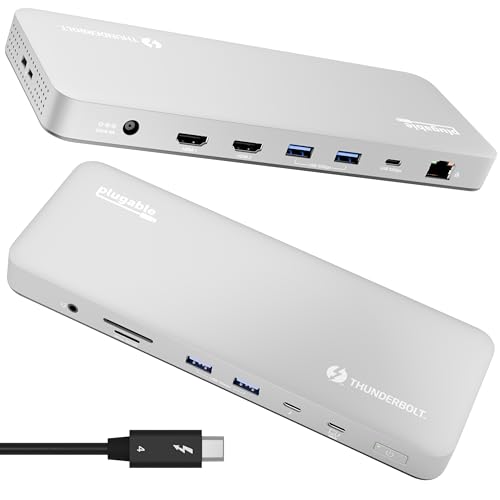
- 13 ports with Thunderbolt 4 and dual 4K HDMI
- 100W charging for compatible MacBooks
- Driverless dual-display support on supported Macs
Best For: Mac-focused workbenches and creative dual-monitor setups
Best DisplayLink Flexibility

- Dual 4K 60Hz HDMI and DisplayPort output
- 14-in-1 design with 100W charging
- Extends display support on compatible Macs via DisplayLink
Best For: Mac users needing dual monitors despite native display limits
Best for Managed Workbenches

- Supports up to three displays, including dual 4K
- 130W power delivery for compatible systems
- Includes firmware and security management features
Best For: Dell laptop workstations and multi-display benches
Best Flexible Triple-Display Pick
Plugable 12-in-1 Triple Display Dock

- Supports up to three HDMI displays
- Provides six USB 3.0 ports and Gigabit Ethernet
- Offers 100W USB-C Power Delivery
Best For: Multi-monitor USB-C, USB4, and Thunderbolt workshop setups
Best Premium Thunderbolt 4 Pick
Dell Pro Thunderbolt 4 Smart Dock

- Supports up to four 4K monitors
- Delivers up to 130W Dell laptop charging
- Adds 2.5GbE and Wi-Fi management
Best For: High-end Dell-centered multi-display workstations
Best ThinkPad-Centered Pick
Lenovo ThinkPad Thunderbolt 3 Dock Gen 2

- Supports dual UHD 4K displays
- Includes four USB 3.1 Gen 2 ports
- Adds Gigabit Ethernet and 135W power delivery
Best For: Compatible ThinkPad-based two-monitor workstations
Top-Tier Thunderbolt 5 Power – Plugable TBT-UDH2 Thunderbolt 5 Dock
For demanding Thunderbolt docking stations for home workshops, the Plugable TBT-UDH2 stands out with Thunderbolt 5 performance, 140W laptop charging, dual HDMI 2.1, and a broad selection of USB-C connectivity. It is a strong fit for modern Windows 11 and macOS 13+ systems, provided your computer meets the listed compatibility requirements.
Best For: High-resolution multi-monitor setups, fast storage, and power-hungry workshop laptops.
Pros:
- Supports dual 8K 60Hz or 4K 144Hz displays with Thunderbolt 5 hosts.
- Provides 140W laptop charging and six USB-C ports, including two front-facing 30W charging ports.
- Includes 2.5Gbps Ethernet, UHS-II card readers, and a fanless, driverless design.
Cons:
- Thunderbolt 3, standard USB-C, and Windows ARM hosts are not supported.
- Display support varies by processor and host system.
This is the most capable option here for a future-focused workshop bench, especially when dual high-refresh or 8K displays and plentiful USB-C ports matter. Check host compatibility carefully before buying.
Surface-Focused Simplicity – Microsoft Surface Thunderbolt 4 Dock
The Microsoft Surface Thunderbolt 4 Dock is a straightforward choice among Thunderbolt docking stations for home workshops, particularly for Surface users. It combines Thunderbolt 4 connectivity with USB-C, USB-A, 2.5G Ethernet, audio, and support for up to two 4K monitors.
Best For: Microsoft Surface owners who want a tidy dual-monitor workstation with familiar ports.
Pros:
- Supports up to two 4K monitors for detailed workshop documentation or multitasking.
- Offers three USB-C and three USB-A ports, plus 2.5G Ethernet and a 3.5mm audio jack.
- Includes tactile port indicators and uses 20% recycled ocean-bound plastic.
Cons:
- Its listed compatibility is centered on Microsoft Surface devices.
- It provides fewer detailed port and charging specifications than some competing models.
For a Surface-based bench, this dock delivers a clean mix of connectivity and display support without unnecessary complexity. Users with other laptop brands should confirm compatibility before choosing it.
Balanced Workstation Choice – Plugable TBT4-UD5 Thunderbolt 4 Dock
The Plugable TBT4-UD5 is a practical all-rounder for Thunderbolt docking stations for home workshops. Its 40Gbps Thunderbolt 4 connection, 100W charging, dual HDMI outputs, storage-card readers, Ethernet, and 13-port layout cover common monitor and peripheral needs.
Best For: Mixed Windows and Mac workstations needing dual 4K displays and broad peripheral support.
Pros:
- Delivers 40Gbps Thunderbolt 4 performance and up to 100W laptop charging.
- Supports dual 4K 60Hz HDMI displays or one 8K display on compatible systems.
- Includes USB ports, SD and microSD readers, Gigabit Ethernet, audio, and a security lock slot.
Cons:
- Display capability depends on the laptop, operating system, and processor.
- Base M1 and M2 Macs support only one external display.
- Its Ethernet connection is Gigabit rather than 2.5Gbps.
This dock offers a useful middle ground between premium performance and everyday practicality. It is especially appealing when a workshop setup needs card readers and dual HDMI without moving to Thunderbolt 5.
Legacy-Friendly Expansion – Belkin Thunderbolt 3 Dock Pro
The Belkin Thunderbolt 3 Dock Pro remains a useful option for Thunderbolt docking stations for home workshops built around Thunderbolt 3 or compatible USB-C laptops. It provides 12 ports, dual 4K monitor support, 85W laptop charging, and an included 0.8-meter Thunderbolt cable.
Best For: Older Mac and Windows workstations that need broad peripheral expansion and dual 4K output.
Pros:
- Offers 12 ports including Thunderbolt, USB-A, USB-C, Ethernet, SD, and audio connections.
- Supplies up to 85W laptop power through its included 170W power supply.
- Supports two 4K monitors and includes a 0.8-meter Thunderbolt 3 cable.
Cons:
- Thunderbolt 3 is an older standard than the Thunderbolt 4 and 5 options here.
- Maximum laptop charging is lower than the newer Plugable models.
- Display support and compatibility depend on the connected Mac or Windows laptop.
This Belkin is a sensible expansion dock when your workshop already uses Thunderbolt 3 hardware and needs many legacy-friendly ports. Newer systems may benefit from a more current Thunderbolt generation.
Best Thunderbolt 4 Mac Dock – Plugable TBT-UDM
For home workshops built around a newer MacBook, the Plugable TBT-UDM is a high-performance choice among Thunderbolt docking stations for home workshops. Its 13-port design combines dual 4K HDMI output, fast Thunderbolt connectivity, card readers, Ethernet, and 100W host charging without requiring display drivers on supported systems.
Best For: Mac-focused workbenches, creative setups, and users who need dual 4K displays with broad peripheral connectivity.
Pros:
- Supports up to two 4K 60Hz HDMI displays on supported M4/M5, Pro/Max M-series, and clamshell-compatible Macs.
- Offers 13 ports, including Thunderbolt 4, USB-A, USB-C, UHS-II SD and microSD readers, Ethernet, and audio.
- Provides 100W host charging and driverless plug-and-play operation on compatible Thunderbolt 4 or USB4 systems.
Cons:
- Base M1 and M2 MacBooks support only one external display.
- Base M3 Macs require clamshell mode for dual-display use.
- Its compatibility and display benefits depend on a Thunderbolt 4 or USB4 host.
The TBT-UDM is a strong premium option when a home workshop needs reliable Mac connectivity, dual-monitor support, and substantial charging power in one dock. Check your Mac’s processor and display mode before buying.
Best DisplayLink Flexibility – Plugable UD-6950PDH
The Plugable UD-6950PDH is a practical option for home workshops that need dual displays from Macs with built-in monitor limitations. It uses DisplayLink technology to provide two 4K 60Hz outputs through HDMI, DisplayPort, or both, while also adding storage readers, USB ports, Ethernet, audio, and 100W charging.
Best For: MacBook users and mixed-device workspaces that need dual external monitors beyond the computer’s native display limits.
Pros:
- Supports two 4K 60Hz monitors through HDMI, DisplayPort, or a combination of both.
- Includes 14-in-1 connectivity with USB ports, SD and microSD readers, Ethernet, audio, and 100W charging.
- Works with supported macOS, Windows, ChromeOS, USB-C, USB4, and Thunderbolt systems.
Cons:
- DisplayLink software installation is required for full functionality and dual-display output.
- HDCP is not supported.
- It uses USB-C rather than being a dedicated Thunderbolt dock.
Choose this dock when display flexibility matters more than a driver-free setup. Its DisplayLink approach is particularly useful for MacBooks that otherwise support only one external monitor, provided installing software is acceptable in your workshop workflow.
Best for Managed Workbenches – Dell WD19TBS Thunderbolt Dock
The Dell WD19TBS suits organized home workshops that need broad laptop connectivity and room for multiple displays. This Thunderbolt 3 dock supports up to three displays, including one 5K or two 4K monitors, and adds management features that can be valuable for Dell-centered setups.
Best For: Dell laptop workstations, multi-display benches, and users who value firmware and security management features.
Pros:
- Supports up to three displays, including a single 5K or dual 4K configuration.
- Provides 130W power delivery and broad Thunderbolt connectivity for power, data, audio, video, and peripherals.
- Includes MAC Address pass-through, remote port disablement, PXE Boot, Wake-on-LAN, and firmware-management support.
Cons:
- It uses the older Thunderbolt 3 interface.
- The supplied details list only one HDMI port, so other display connections may require the dock’s additional video outputs or adapters.
- Some management features are most relevant to Dell commercial environments.
The WD19TBS is a sensible choice for a Dell-oriented workshop where high power delivery, multi-monitor support, and manageability matter. It can also work with compatible HP and Lenovo Thunderbolt notebooks, but verify the laptop’s standards support first.
Best Flexible Triple-Display Pick – Plugable 12-in-1 Triple Display Dock
For home workshops using a USB-C, USB4, or Thunderbolt laptop, this Plugable dock adds three HDMI displays, Gigabit Ethernet, six USB 3.0 ports, audio, and up to 100W Power Delivery. It is a versatile option among Thunderbolt docking stations for home workshops, particularly when your setup includes mixed devices or an Apple Silicon MacBook.
Best For: Workshop users who need three monitors and broad Windows, macOS, or ChromeOS compatibility.
Pros:
- Supports up to three extended HDMI displays, including one 4K display and two 1080p displays.
- Offers six USB 3.0 ports, Gigabit Ethernet, audio, and 100W USB-C charging.
- Works with compatible USB-C, USB4, and Thunderbolt systems, including newer Apple Silicon Macs.
Cons:
- Requires DisplayLink drivers for supported DisplayLink displays on macOS.
- Not compatible with Linux, and HDCP is not supported.
- Display output depends on a full-featured USB-C port with video and Power Delivery support.
This is a strong choice when monitor count and broad device compatibility matter more than native Thunderbolt-only operation. Verify your laptop’s port capabilities and operating system before buying.
Best Premium Thunderbolt 4 Pick – Dell Pro Thunderbolt 4 Smart Dock
The Dell Pro Thunderbolt 4 Smart Dock is built for demanding home workshops that combine several displays, fast networking, and high-power laptop charging. It supports up to four 4K monitors, includes 2.5GbE and Wi-Fi management, and provides up to 130W for compatible Dell systems.
Best For: Dell-focused workshop users running multiple 4K displays and demanding connected equipment.
Pros:
- Supports up to four 4K monitors through HDMI 2.1, DisplayPort 1.4, USB-C, and Thunderbolt 4.
- Provides up to 130W charging for Dell systems and up to 96W for other systems.
- Includes dual Thunderbolt 4 data ports, 2.5GbE, Wi-Fi management, and business-focused security features.
- Uses 65% recycled plastic and 100% recycled packaging.
Cons:
- Its full charging capability is optimized for Dell systems; other systems receive up to 96W.
- Minimum listed operating system support is Windows 10.
- May be more capability than needed for a simple single-monitor workshop desk.
With four-display support, fast wired networking, and remote management, this is the most capable option in the group. It makes particular sense for a workstation that doubles as a serious creative, data, or AI workspace.
Best ThinkPad-Centered Pick – Lenovo ThinkPad Thunderbolt 3 Dock Gen 2
Lenovo’s ThinkPad Thunderbolt 3 Dock Gen 2 provides a practical connection hub for compatible ThinkPad laptops in a home workshop. It includes dual HDMI and dual DisplayPort outputs, five USB ports, Gigabit Ethernet, audio, and a 135W power adapter for a flexible two-display workstation.
Best For: Owners of compatible ThinkPad models who want dual UHD 4K display support and substantial peripheral connectivity.
Pros:
- Supports dual UHD 4K displays through two HDMI and two DisplayPort outputs.
- Includes four USB 3.1 Gen 2 ports plus a USB port with always-on charging.
- Adds Gigabit Ethernet, a 3.5mm audio connector, a security-lock slot, and a 135W power adapter.
Cons:
- Listed operating-system support is limited to Windows 7 and Windows 10.
- Compatibility notes focus on specific ThinkPad models, so other laptops should be verified carefully.
- It uses Thunderbolt 3 rather than the newer Thunderbolt 4 standard.
This dock is a sensible fit for a ThinkPad-based workshop where two high-resolution monitors and wired peripherals are the priority. Its narrower compatibility profile makes checking your exact laptop model especially important.
How We Picked the Best Thunderbolt Docking Stations for Home Workshops
We focused on docks that add meaningful connectivity for workshop tasks rather than simply increasing the number of USB ports. The selection includes Thunderbolt 5 and Thunderbolt 4 models for newer computers, Thunderbolt 3 options for compatible older systems, and USB-C docks for broader compatibility or lower-cost setups.
We compared power delivery, display support, port variety, networking, operating-system compatibility, and practical desk use. A good dock should make it easy to connect equipment, leave cables organized, and return to a ready-to-work setup with one host connection.
Quick Comparison
- Best for maximum bandwidth: Thunderbolt 5 docks with high-resolution and high-refresh display support.
- Best all-around choice: Thunderbolt 4 docks offering reliable 40Gbps connectivity, charging, and dual-display support.
- Best for business laptops: Dell, Microsoft, and Lenovo docks with strong enterprise compatibility and high-wattage power delivery.
- Best for flexible displays: USB-C docks with multiple HDMI or DisplayPort outputs, provided your computer supports the required video mode.
- Best for demanding laptops: Models rated for 100W or more of host charging, subject to the laptop’s own charging limit.
Key Buying Factors for Thunderbolt Docking Stations for Home Workshops
Host Compatibility
Check whether your computer has Thunderbolt 3, Thunderbolt 4, Thunderbolt 5, or USB-C with DisplayPort Alt Mode. A USB-C-shaped port is not automatically Thunderbolt, and some docks need specific operating-system support for multiple displays.
Displays and Resolution
Count the monitors you plan to use and verify supported resolutions and refresh rates. Dual 4K is common on Thunderbolt 4 docks, while Thunderbolt 5 can better suit high-refresh 4K or 8K workflows. Mac and Windows display behavior may differ, especially with multiple external screens.
Charging and Ports
Choose enough USB-A and USB-C ports for tools, drives, input devices, and accessories. For a laptop that powers demanding workloads, prioritize 100W or higher power delivery, while remembering that the dock’s advertised maximum may vary by configuration.
Networking and Workshop Storage
Gigabit Ethernet is adequate for most home networks, but 2.5GbE is useful for large project files and fast network storage. An SD or microSD reader can also save time when moving files from cameras, test equipment, or removable media.
Who Should Buy Which Thunderbolt Docking Stations for Home Workshops?
Choose a Thunderbolt 5 dock if you are building a premium workstation around multiple high-resolution displays, fast storage, or a newer high-performance laptop. Thunderbolt 4 is the sensible default for most modern Windows laptops and Macs that need dependable expansion and dual-monitor support.
Pick a Thunderbolt 3 model when it matches an existing computer and offers the ports and charging capacity you need. A USB-C dock is the better value for basic monitor, USB accessory, and Ethernet expansion, but verify video compatibility before buying. For managed office-style environments, Dell, Microsoft, and Lenovo models may be especially attractive because of their ecosystem support and business-oriented features.