Working across multiple monitors makes mouse comfort, precise cursor control, and reliable device switching more important. The right ergonomic mouse can reduce wrist strain while helping you move efficiently between screens and computers.
These 10 picks include vertical mice, trackballs, silent productivity models, and multi-device wireless options. Compare their shapes, controls, connectivity, and battery designs to find the best fit for your desk.
Best 10 Ergonomic Computer Mice for Multiple Monitors Picks for 2026
Premium Productivity Pick

- MagSpeed scrolling supports fast, precise navigation
- Customizable haptics and Actions Ring
- Bluetooth and USB-C connectivity; up to 70-day battery
Best For: Right-handed professionals with demanding multi-monitor workflows
Vertical Comfort Value
Redragon Ergonomic Vertical Mouse

- Vertical grip encourages a neutral wrist position
- Connects with up to three devices
- Rechargeable 500mAh battery and five DPI levels
Best For: Small to medium hands and quiet multi-device workspaces
Space-Saving Trackball Choice

- Thumb-controlled trackball needs little desk movement
- Ergonomic shape supports a relaxed forearm posture
- Bluetooth or Logi Bolt with up to 18 months of battery
Best For: Right-handed users with compact multi-monitor desks
Balanced Vertical Multi-Device Pick
UGREEN Ergonomic Vertical Mouse

- Handshake-style shape supports a natural grip
- Connects to up to three devices
- Rechargeable battery offers up to 135 hours of continuous use
Best For: Right-handed users with mixed-device workstations
Best Multi-Device Workhorse
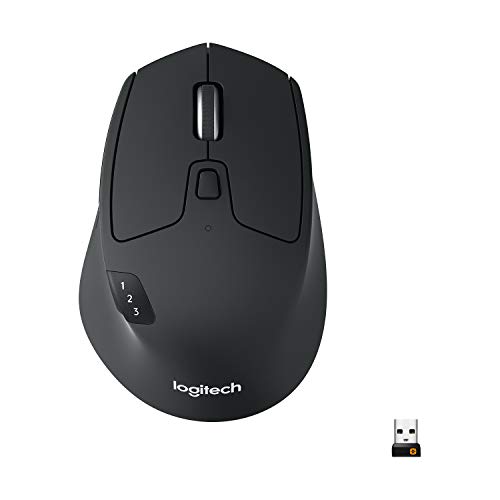
- Switches among up to three computers
- Bluetooth and Unifying receiver connectivity
- 24-month battery life and six customizable buttons
Best For: Right-handed multi-computer workstations
Best for Everyday Use

- 52° vertical grip for extended sessions
- Connects to three devices via Bluetooth or USB-A
- Rechargeable battery lasts up to two months
Best For: Right-handed users wanting quiet, vertical comfort
Best Customizable Scrolling

- Switches among three devices
- Programmable buttons and dual scroll wheels
- USB-C rechargeable battery lasts up to 90 days
Best For: Right-handed users needing shortcuts and fast navigation
Best Vertical Comfort
Logitech Lift Vertical Ergonomic Mouse
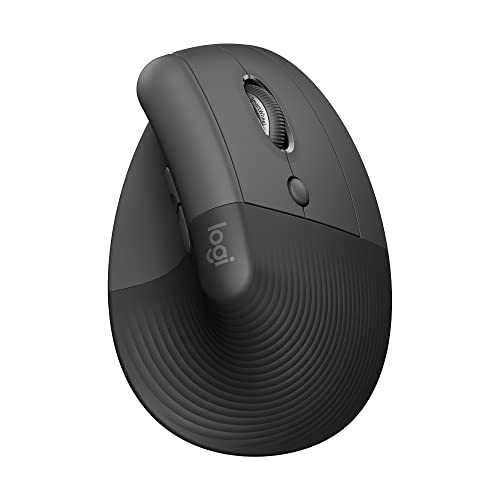
- 57-degree vertical design encourages a natural forearm posture
- Bluetooth and Logi Bolt support multiple operating systems
- Up to two years of battery life with one AA battery
Best For: Right-handed users with small to medium hands
Best Value Three-Device Vertical Mouse
TECKNET 4800 DPI Ergonomic Mouse

- Connects to three devices through Bluetooth and 2.4GHz
- Six DPI levels reach up to 4,800 DPI
- Near-vertical grip and quiet primary clicks support focused work
Best For: Right-handed users needing flexible multi-device connectivity
Premium Productivity Pick – Logitech MX Master 4
The Logitech MX Master 4 is a strong choice among ergonomic computer mice for multiple monitors, combining precise scrolling, customizable controls, and multi-connection flexibility. Its 8,000-DPI optical sensor, thumb wheel, and MagSpeed wheel are well suited to moving quickly between large displays and detailed on-screen work.
Best For: Right-handed professionals who want advanced controls and a comfortable mouse for demanding multi-monitor workflows.
Pros:
- MagSpeed scrolling can move through up to 1,000 lines per second while stopping precisely on individual pixels.
- Customizable Actions Ring, haptic feedback, and programmable controls can streamline app-based tasks.
- Supports Bluetooth or the included USB-C dongle, with a stated battery life of up to 70 days.
- Natural tilt, thumb scrolling, and Quiet Clicks are designed for comfortable, quieter work.
Cons:
- Its advanced feature set may be more than casual users need.
- The design is right-handed only.
- The included connectivity setup uses a USB-C dongle, which may require an adapter on some computers.
Choose the MX Master 4 if you want a feature-rich pointing device that can keep up with extensive scrolling and frequent movement across multiple screens. It is particularly compelling for productivity-focused setups where customization matters.
Vertical Comfort Value – Redragon Ergonomic Vertical Mouse
The Redragon vertical mouse is a practical option among ergonomic computer mice for multiple monitors when wrist position and device switching are priorities. Its handshake-style design, three-device connectivity, and adjustable DPI settings support work across computers, laptops, and other compatible devices.
Best For: Users with small to medium hands who want a rechargeable vertical mouse for shared workspaces and multi-device setups.
Pros:
- Vertical shape encourages a neutral grip intended to reduce wrist pressure.
- Connects with dual Bluetooth modes and a 2.4GHz USB-A receiver to support up to three devices.
- Five DPI levels from 800 to 4,800 allow slower precision or faster screen navigation.
- Silent operation and a built-in 500mAh rechargeable battery suit quiet offices and study spaces.
Cons:
- The fit is recommended for hand lengths up to 7.5 inches, so larger hands may find it less suitable.
- The vertical shape can require a one- to two-week adjustment period.
- The USB receiver is USB-A; the USB-C port is for recharging only.
This Redragon model makes sense if you want vertical support without giving up multi-device switching. Confirm the hand-size guidance and allow time to adapt before judging the grip.
Space-Saving Trackball Choice – Logitech ERGO M575S
The Logitech ERGO M575S stands out among ergonomic computer mice for multiple monitors because its thumb-controlled trackball moves the pointer without requiring the mouse to travel across the desk. That makes it useful when desk space is limited or when you want to navigate several screens from a fixed position.
Best For: Right-handed users with compact workstations who prefer trackball control and long battery life.
Pros:
- Thumb control lets you move the cursor without moving your hand or the mouse body.
- Sculpted ergonomic shape is designed to support forearm posture and reduce reported muscle strain.
- Connects by Bluetooth or Logi Bolt USB receiver and offers up to 18 months from one AA battery.
- Cursor speed and shortcuts can be adjusted through the Logi Options+ app.
Cons:
- The trackball control method may take time to learn if you are used to a traditional mouse.
- It is right-handed only.
- The supplied details list only two buttons, plus customization through software.
The M575S is a particularly sensible pick for small desks and multi-monitor arrangements where sweeping a mouse across the surface is inconvenient. Its fixed footprint and long battery life favor stable, low-maintenance setups.
Balanced Vertical Multi-Device Pick – UGREEN Ergonomic Vertical Mouse
The UGREEN vertical mouse is a straightforward choice among ergonomic computer mice for multiple monitors, offering a natural handshake grip, three-device support, and adjustable cursor speeds. Its 2.4GHz receiver and Bluetooth options make it convenient for switching between computers while keeping the USB ports available when needed.
Best For: Right-handed users who want a rechargeable vertical mouse with broad operating-system compatibility.
Pros:
- Curved vertical design follows the palm and encourages a more natural hand position.
- Supports up to three devices through 2.4GHz wireless and Bluetooth connections.
- Five DPI settings from 1,000 to 4,000 help balance precision and fast movement across screens.
- Works with Windows, macOS, Linux, ChromeOS, and Android, with up to 135 hours of continuous use per charge.
Cons:
- The vertical shape may not suit users who prefer a conventional flat mouse.
- It is designed for right-handed use.
- The listed battery runtime is continuous-use time rather than a stated calendar-month estimate.
Consider the UGREEN if you want a comfortable vertical shape and practical device switching without moving into a more specialized trackball design. Its wide compatibility makes it a flexible choice for mixed-device workstations.
Best Multi-Device Workhorse – Logitech M720 Triathlon
For shoppers comparing ergonomic computer mice for multiple monitors, the Logitech M720 Triathlon is a practical right-handed option focused on comfortable long sessions and multi-device control. Its sculpted rubber body, hyper-fast scrolling, and Logitech FLOW support make it well suited to moving between computers in a multi-monitor workspace.
Best For: Right-handed users who want one comfortable mouse for up to three computers or laptops.
Pros:
- Switches between up to three computers or laptops with Logitech FLOW.
- Connects through Bluetooth or the included Logitech Unifying receiver.
- Offers a sculpted rubber grip, six customizable buttons, and 24-month battery life.
- Hyper-fast scrolling includes both free-spin and click-to-click modes.
Cons:
- Designed for right-handed use.
- Maximum sensitivity is 1,000 DPI, which may feel limited for users wanting very high cursor speeds.
- Logitech FLOW and button customization require compatible software support.
The M720 emphasizes dependable office productivity rather than an aggressively vertical shape. It is a strong fit if seamless computer switching and long battery life matter more than rechargeable power or high-DPI tracking.
Best for Everyday Use – TECKNET 52° Ergonomic Mouse
The TECKNET vertical mouse gives shoppers seeking ergonomic computer mice for multiple monitors a more upright alternative for extended desk work. Its 52-degree handshake angle, three-device connectivity, rechargeable battery, and adjustable DPI make it suitable for switching between displays and devices throughout the day.
Best For: Users who prefer a vertical grip, quiet clicks, and rechargeable multi-device connectivity.
Pros:
- 52-degree vertical design promotes a relaxed handshake-style grip.
- Supports Bluetooth 5.0/3.0 and 2.4GHz USB-A connectivity across up to three devices.
- Rechargeable 600mAh battery provides up to two months of use after a 1.5-hour charge.
- Six buttons, adjustable 800–4,800 DPI, and quiet-click operation support varied workflows.
Cons:
- Designed for right-handed use and intended to fit small-to-medium hands.
- Forward and Back buttons are unavailable on Mac.
- The included receiver uses USB-A, which may require an adapter on some newer devices.
This model is especially compelling for users who want a pronounced ergonomic angle without giving up device switching. Confirm the hand-size fit and connection requirements before choosing it for a multi-monitor setup.
Best Customizable Scrolling – INFINMIND L910 Pro+
For shoppers evaluating ergonomic computer mice for multiple monitors, the INFINMIND L910 Pro+ stands out with three-device switching, programmable controls, and two scroll wheels. Its rechargeable design and adjustable DPI are useful for moving quickly across large desktop layouts while retaining shortcuts for repetitive tasks.
Best For: Right-handed multitaskers who want programmable buttons and front-and-side scrolling.
Pros:
- Connects to one 2.4GHz USB-A device and two Bluetooth devices.
- Provides six programmable buttons through software on Windows and Mac.
- Includes front and side metal scroll wheels for flexible navigation.
- Rechargeable USB-C battery lasts up to 90 days, with five DPI levels up to 4,800.
Cons:
- Programmable-button software is available only on Mac and Windows.
- Designed for right-handed use.
- The USB-A receiver may need an adapter with some newer computers.
The L910 Pro+ is a feature-rich choice for users who frequently navigate wide workspaces or assign shortcuts to their mouse. Its extra scroll control may take some adjustment, but it can streamline multi-monitor workflows once configured.
Best Vertical Comfort – Logitech Lift Vertical Ergonomic Mouse
If wrist posture is your priority when choosing ergonomic computer mice for multiple monitors, the Logitech Lift uses a 57-degree vertical design to encourage a more natural forearm position. Its SmartWheel, customizable buttons, and wireless connectivity also support efficient everyday navigation.
Best For: Right-handed users with small to medium hands who want a comfortable vertical mouse for extended office and multi-monitor work.
Pros:
- Vertical shape, textured grip, and thumb rest support a relaxed hand position.
- SmartWheel enables smooth scrolling, while six buttons provide customization options.
- Bluetooth and Logi Bolt connectivity support Windows, macOS, iPadOS, Chrome OS, and Linux.
- Up to two years of battery life from one included AA battery.
Cons:
- Designed for right-handed use only.
- Best suited to small and medium-sized hands.
- Maximum sensitivity is 4,000 DPI.
The Lift is a focused ergonomic choice for users who want a familiar wireless workflow with a more upright grip. It lacks the Philips model’s dedicated side-scroll wheel, but its long battery life and broad device compatibility make it practical for daily multi-monitor productivity.
Best Multi-Screen Scrolling – Philips SPK7858 Ergonomic Mouse
For users comparing ergonomic computer mice for multiple monitors, the Philips SPK7858 stands out with a thumb-side horizontal scroll wheel for moving through wide spreadsheets and timelines. It combines a right-handed contoured shell with three-device connectivity and rechargeable power.
Best For: Productivity-focused users who frequently scroll horizontally across spreadsheets, documents, or multi-monitor workspaces.
Pros:
- Dedicated side-scroll wheel helps navigate wide columns and extended content.
- Pairs with up to three devices using Bluetooth and the included USB-A/C receiver.
- Five DPI levels from 800 to 4,000 support different tracking preferences.
- Rechargeable 500mAh battery provides up to 25 days of heavy use, with a five-minute emergency charge option.
Cons:
- Right-handed design limits hand orientation.
- Requires macOS 14 Sonoma or Windows 11 according to the supplied compatibility details.
- Only five buttons are listed, despite customization support for selected controls.
The SPK7858 is especially compelling for spreadsheet-heavy setups because its horizontal scroll wheel can reduce repetitive dragging across screens. Its rechargeable battery and USB-A/C receiver add convenience for users moving between office and mobile devices.
Best Value Three-Device Vertical Mouse – TECKNET 4800 DPI Ergonomic Mouse
The TECKNET vertical mouse is a practical option among ergonomic computer mice for multiple monitors, offering Bluetooth connections for two devices plus a 2.4GHz USB-A mode. Six DPI levels, quiet primary clicks, and a near-vertical palm position support flexible desk work.
Best For: Right-handed users who need affordable three-device switching and adjustable tracking across Windows, Mac, Chrome, or Linux systems.
Pros:
- Supports two Bluetooth devices and one 2.4GHz USB-A connection.
- Six DPI settings range from 800 to 4,800 for adjustable cursor control.
- Near-vertical design helps reduce wrist pressure from prolonged inverted mouse use.
- Left- and right-click buttons are nearly silent, and a 36-month registered warranty is included.
Cons:
- Requires two AAA batteries, which are not included.
- Right-handed design only.
- Side buttons are not compatible with macOS, and other function buttons are not silent.
The TECKNET offers strong connectivity flexibility and the highest listed DPI range of these three options. It is a good fit for users who want vertical comfort and multi-device switching without choosing a rechargeable model, provided the macOS side-button limitation is acceptable.
How We Picked the Best Ergonomic Computer Mice for Multiple Monitors
We focused on features that matter during extended, multi-screen work: hand-friendly designs, dependable wireless connectivity, precise tracking, comfortable scrolling, and the ability to pair with more than one device. The selection includes vertical mice for a more neutral wrist position, trackballs for limited desk space, and conventional ergonomic shapes for users who want an easy transition.
We also considered practical details such as Bluetooth and USB receiver support, rechargeable batteries, programmable buttons, device switching, DPI adjustment, and compatibility with Windows, macOS, and laptops. Since hand size and grip preference vary, no single design is ideal for everyone.
Quick Comparison
| Mouse type | Best for | Key advantage |
|---|---|---|
| Vertical | Wrist-conscious users | More neutral hand position |
| Trackball | Small or crowded desks | Cursor control without moving the mouse |
| Traditional ergonomic | General productivity | Familiar control and broad usability |
| Multi-device | Desktop and laptop workflows | Fast switching between computers |
Key Buying Factors for Ergonomic Computer Mice for Multiple Monitors
Shape and Wrist Position
Vertical mice can reduce forearm rotation, but they may require a short adjustment period. A traditional contoured mouse is easier to learn, while a trackball can help if moving a mouse repeatedly across a wide desk causes discomfort. Check the mouse dimensions against your hand size before buying.
Tracking and Scrolling
Multiple monitors benefit from accurate tracking and a responsive scroll wheel. Adjustable DPI is useful when you need both precise editing and fast movement across large displays. Side-scrolling or programmable controls can also make wide spreadsheets and timelines easier to navigate.
Connectivity and Switching
Bluetooth is convenient for laptops, while a USB receiver can provide simple plug-and-play use on desktops. Models supporting two or three devices are especially useful when sharing one mouse between a workstation, laptop, and tablet. Confirm that the included receiver uses a port your computer supports.
Battery and Button Layout
Rechargeable models reduce disposable battery use, but battery life and charging access still matter. Extra thumb buttons can speed up navigation, copy-and-paste actions, or application switching; however, overly dense controls may be uncomfortable for smaller hands.
Who Should Buy Which Ergonomic Computer Mice for Multiple Monitors?
Choose a vertical model if wrist posture is your top priority and you are comfortable learning a different grip. Choose a trackball if desk space is limited or you want to keep your hand mostly stationary. A conventional ergonomic multi-device mouse is the safest choice for shared workspaces and users who want familiar cursor control.
For demanding multi-monitor workflows, prioritize adjustable tracking, smooth scrolling, and easy device switching. Laptop users should favor Bluetooth or dual-connectivity models, while desktop users may prefer a dedicated receiver for dependable everyday performance. Whichever style you choose, match the mouse to your hand size and use it with a neutral wrist position for the best long-term comfort.