The best computer trackballs make precise cursor control easier while reducing the need to move your entire arm across a desk. They are especially useful for busy workstations, compact setups, and users seeking a more comfortable alternative to a conventional mouse.
Our 2026 roundup compares ten standout models by comfort, ball size, connection options, button customization, charging, and overall usability, so you can choose the right trackball for work, creative tasks, or everyday computing.
Best 10 Computer Trackballs Picks for 2026
Best Ergonomic Pick

- 20-degree tilt with sculpted ergonomic grip
- Bluetooth and Logi Bolt wireless connectivity
- Up to 120 days of battery life
Best For: Medium- to large-sized right-handed users seeking an ergonomic wireless trackball
Best Wired Classic
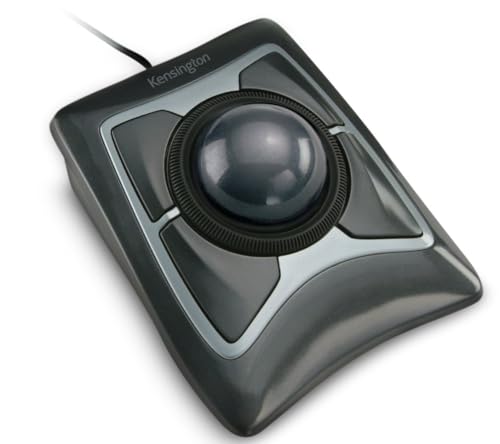
- Large 55mm ball for precise cursor control
- Ambidextrous design with detachable wrist rest
- Reliable wired USB-A connection
Best For: Desktop users who prefer a large-ball wired trackball
Best Wireless Versatility

- Bluetooth, 2.4GHz, and wired connection options
- Rechargeable battery lasts up to four months
- Ambidextrous low-profile design with 55mm ball
Best For: Users wanting a rechargeable trackball with flexible connectivity
Best Finger-Controlled Value

- Large 52mm finger-operated trackball
- Eight buttons with four-way scrolling
- Three switchable DPI settings
Best For: Right-handed users seeking extensive controls for productivity or creative work
Best Wireless Pick
Kensington Orbit Wireless Trackball

- 2.4 GHz and Bluetooth LE connectivity
- Scroll ring and four DPI settings
- Ambidextrous design with programmable buttons
Best For: Wireless office use and shared workspaces
Best Feature-Rich Option
ELECOM HUGE Plus Wireless Trackball

- Large 52mm ball and ergonomic shape
- 10 programmable buttons
- Bluetooth, 2.4 GHz, and wired USB-C modes
Best For: Right-handed power users and multi-device workflows
Best Budget Wired Pick
Kensington Orbit Trackball with Scroll Ring

- Reliable wired USB operation
- Optical tracking and dedicated scroll ring
- Ambidextrous layout with detachable wrist rest
Best For: Fixed workstations and battery-free use
Best with Extra Features

- Thumb control minimizes desk movement
- Bluetooth and USB receiver connectivity
- Up to 18 months of battery life
Best For: Right-handed users wanting a comfortable wireless trackball
Best Large-Ball Option

- Large 55mm ball for precise control
- Scroll ring simplifies page navigation
- Ambidextrous wireless design
Best For: Desktop productivity users wanting wrist support and scrolling
Best Wired Value

- Reliable wired USB connection
- Ambidextrous compact design
- No batteries required for operation
Best For: Users seeking simple, accurate wired trackball control
Best Ergonomic Pick – Logitech MX Ergo S
The Logitech MX Ergo S is a strong choice for shoppers comparing computer trackballs for ergonomic comfort and wireless flexibility. Its 20-degree tilt, thumb-operated ball, quiet clicks, and rechargeable battery are designed for extended office use.
Best For: Medium- to large-sized right-handed users who want an ergonomic wireless trackball for Windows or macOS.
Pros:
- 20-degree tilt and sculpted grip support a more comfortable hand position.
- Bluetooth and included Logi Bolt receiver provide dual wireless connectivity.
- Rechargeable battery offers up to 120 days of use on a full charge.
- Six customizable buttons and Smart Actions add productivity options.
Cons:
- Right-handed design limits use for left-handed users.
- USB-C charging cable is not included.
The MX Ergo S stands out when comfort, quiet operation, and a cable-free setup matter most. Its thumb-control layout and ergonomic shaping make it particularly suited to productivity-focused desks.
Best Wired Classic – Kensington Expert Trackball
Kensington Expert Trackball Mouse (K64325), Black Silver, 5"W x 5-3/4"D x 2-1/2"H
Check Price On AmazonThe Kensington Expert Trackball is a practical option among computer trackballs for users who prefer dependable wired USB connectivity. Its large 55mm ball, scroll ring, ambidextrous shape, and detachable wrist rest support precise navigation at a desk.
Best For: Right- or left-handed desktop users who want a large-ball wired trackball with straightforward controls.
Pros:
- Large 55mm ball and Diamond Eye optical tracking provide precise cursor control.
- Patented scroll ring makes vertical page navigation convenient.
- Ambidextrous design accommodates either hand.
- Detachable wrist rest adds support during extended use.
Cons:
- Wired USB-A connection offers less flexibility than wireless models.
- KensingtonKonnect customization is unavailable on ChromeOS and Windows ARM-based computers.
This model is a sensible pick for a permanent workstation where reliable connectivity and a large, easy-to-control ball are more important than portability. The five-year warranty is an additional advantage for long-term desktop use.
Best Wireless Versatility – Kensington SlimBlade Pro
The Kensington SlimBlade Pro offers broad connection flexibility for shoppers evaluating computer trackballs. It supports Bluetooth, 2.4GHz wireless, and wired USB-C operation, while its low-profile ambidextrous design and 55mm ball suit extended desk work.
Best For: Left- or right-handed users who want a rechargeable trackball with multiple connection options.
Pros:
- Supports Bluetooth, 2.4GHz wireless, and wired connections.
- Rechargeable battery provides up to four months of use per charge.
- Low-profile, ambidextrous design requires less arm and wrist movement.
- KensingtonKonnect enables customizable button configurations.
Cons:
- Windows ARM-based computers are not currently supported by the customization software.
- The wireless receiver uses USB-A, though a USB-C adapter is included.
The SlimBlade Pro is a flexible all-purpose choice for users who switch between computers or prefer having wired backup connectivity. Its rechargeable design also avoids routine battery replacement.
Best Finger-Controlled Value – ELECOM HUGE Trackball
The ELECOM HUGE is a substantial wired option among computer trackballs, built around a 52mm finger-operated ball and an integrated palm rest. Its eight buttons, four-way scrolling, and switchable DPI settings make it useful for productivity, design, and photo or video work.
Best For: Right-handed users who want extensive controls and a large finger-operated ball for Windows or macOS.
Pros:
- Large 52mm ball supports controlled finger-operated navigation.
- Eight physical buttons include horizontal scrolling through scroll-wheel tilting.
- Switchable 500, 1000, and 1500 DPI settings adjust cursor speed.
- Attached palm rest and removable ball simplify extended use and maintenance.
Cons:
- Wired design limits placement flexibility.
- Right-handed shape is not intended for left-handed use.
- Its large 7.2-inch length may require substantial desk space.
The HUGE favors control and customization over compactness. It is especially appealing for users who need extra buttons, adjustable sensitivity, and a broad palm-supporting surface at a fixed workstation.
Best Wireless Pick – Kensington Orbit Wireless Trackball
For shoppers comparing computer trackballs, the Kensington Orbit Wireless combines flexible wireless connectivity with a dedicated scroll ring and adjustable cursor speed. Its ambidextrous shape also makes it a practical choice for shared workspaces or users who switch hands.
Best For: Users who want an ambidextrous wireless trackball with simple scrolling and adjustable DPI settings.
Pros:
- Supports both 2.4 GHz wireless and Bluetooth LE connections.
- Dedicated scroll ring makes navigating documents and web pages easy.
- Four DPI settings, from 400 to 1,600, accommodate precision and general use.
- Works for right- and left-handed users and includes programmable button software.
Cons:
- Requires two AA batteries rather than a rechargeable battery.
- Has only two buttons.
- Windows ARM-based computers are not currently supported.
This is a well-rounded computer trackball for everyday office work, especially if wireless flexibility and an ambidextrous design matter more than extensive button customization.
Best Feature-Rich Option – ELECOM HUGE Plus Wireless Trackball
The ELECOM HUGE Plus stands out among computer trackballs with its large 52mm ball, 10 programmable buttons, and three connection modes. Its rechargeable battery, silent clicks, and broad operating-system compatibility make it suited to extended, productivity-focused sessions.
Best For: Right-handed power users who want extensive customization, multi-device connectivity, and a large trackball.
Pros:
- Large 52mm ball is designed for fluid, precise control.
- Connects by Bluetooth, 2.4 GHz wireless, or wired USB-C with up to three devices.
- Offers 10 programmable buttons for shortcuts and workflow customization.
- Rechargeable battery provides up to five months of use per charge, according to the supplied specifications.
Cons:
- Right-handed design is less flexible for left-handed users.
- At 291 grams, it is substantially heavier than compact trackballs.
- Its many controls may be more than casual users need.
Choose the HUGE Plus if customization and connection flexibility are priorities. The large body and extensive controls favor desk-based productivity over portability.
Best Budget Wired Pick – Kensington Orbit Trackball with Scroll Ring
For a straightforward computer trackball setup, the wired Kensington Orbit offers optical tracking, a dedicated scroll ring, and an ambidextrous layout without needing batteries or wireless pairing. Its detachable wrist rest adds support during longer work sessions.
Best For: Users who prefer a reliable wired USB connection and simple, ambidextrous controls.
Pros:
- Wired USB connection avoids charging and battery replacement.
- Optical tracking provides precise cursor movement with less hand movement.
- Scroll ring simplifies navigation through pages and documents.
- Includes a detachable wrist rest and software for button and speed customization.
Cons:
- Wired design offers less desk flexibility than wireless alternatives.
- Only two buttons are available for customization.
- Compatibility details list macOS and Windows requirements rather than broad multi-platform support.
This model is a sensible choice for a fixed workstation where dependable USB operation, easy scrolling, and ambidextrous comfort are more important than wireless convenience.
Best with Extra Features – Logitech ERGO M575S
The Logitech ERGO M575S is a practical choice among computer trackballs for users who want thumb control, wireless flexibility, and a compact setup. Its sculpted right-handed shape is designed to reduce hand movement while supporting a more comfortable forearm position.
Best For: Right-handed users seeking an ergonomic wireless trackball for office work or space-saving desks.
Pros:
- Thumb-controlled 2000-DPI trackball works without moving the mouse across the desk.
- Bluetooth and Logi Bolt USB receiver provide flexible wireless connectivity.
- Up to 18 months of battery life from one included AA battery.
- Three customizable buttons and cursor-speed adjustments support personalized workflows.
Cons:
- Right-handed design is not suited to left-handed or ambidextrous users.
- Its two-button specification may limit some advanced control needs despite the customizable controls noted by Logitech.
The ERGO M575S stands out when comfort, minimal desk movement, and long battery life matter most. It is especially well suited to smaller workspaces and users who prefer a thumb-operated design.
Best Large-Ball Option – Kensington Expert Wireless
The Kensington Expert Wireless is one of the more feature-rich computer trackballs in this group, pairing a large 55mm ball with optical tracking and a built-in scroll ring. Its ambidextrous layout and detachable wrist rest make it a versatile desktop option.
Best For: Users who want a large, precise trackball with scrolling controls, wrist support, and wireless connectivity.
Pros:
- Large 55mm ball and Diamond Eye optical tracking provide precise cursor control.
- Patented scroll ring makes moving through long pages convenient.
- Ambidextrous design accommodates either hand.
- Bluetooth LE and 2.4GHz USB dongle connectivity offer setup flexibility.
Cons:
- Large dimensions take up more desk space than compact trackballs.
- Requires two AA batteries, and Linux is not supported according to the supplied notes.
- Windows ARM-based computers are currently unsupported by the Kensington software.
The Expert Wireless is a strong fit for productivity-focused users who value a full-size ball and dedicated scrolling. Its broad compatibility is useful, but platform and desk-space requirements should be checked first.
Best Wired Value – Kensington Orbit Trackball
The Kensington Orbit is a straightforward wired choice among computer trackballs. Its medium 40mm ball, ambidextrous design, and compact footprint provide accurate cursor control without batteries or wireless pairing.
Best For: Users who prefer a simple USB connection, low-maintenance operation, and an ambidextrous design.
Pros:
- Wired USB connection provides simple installation and does not require battery power.
- Medium 40mm ball uses red optical tracking for precise movement.
- Ambidextrous, compact design uses less desk space than a conventional mouse.
- Kensington Konnect software supports button assignments and cursor-speed adjustments.
Cons:
- Wired-only design limits placement flexibility.
- No scroll ring is included.
- Two-button layout offers fewer physical controls than some competing trackballs.
The Orbit is best for buyers who value dependable plug-and-play operation over wireless convenience. It keeps the feature set focused and avoids battery replacement, while its lack of a scroll ring may matter for frequent document browsing.
How We Picked the Best Computer Trackballs
We selected these Computer Trackballs based on the features that most affect daily use: pointing accuracy, ergonomic design, ball placement, scroll controls, connection reliability, and compatibility. We also considered whether each model is wired, wireless, rechargeable, Bluetooth-enabled, or able to connect through a 2.4GHz receiver. Programmable buttons and adjustable settings matter for productivity, while a smooth ball and responsive tracking are essential for comfortable precision.
The selection includes thumb-operated and finger-operated designs, compact models for smaller desks, and larger options intended for users who prefer broader palm support or a more substantial control surface.
Quick Comparison
| Best For | Look For |
|---|---|
| Everyday office work | Comfortable thumb operation, dependable wireless connectivity, and easy scrolling |
| Maximum precision | A larger finger-operated ball and adjustable sensitivity |
| Multi-device setups | Bluetooth plus 2.4GHz or wired connection options |
| Small desks | A compact footprint and integrated scroll control |
| Long work sessions | Supported wrist posture, low-effort tracking, and accessible buttons |
Key Buying Factors for Computer Trackballs
Thumb or Finger Operation
Thumb-operated trackballs generally feel familiar to mouse users and keep the fingers available for clicking. Finger-operated models can offer finer control and may be preferable for design work, large cursor movements, or users who dislike thumb-based tracking.
Ball Size and Placement
A larger ball can provide smoother, more deliberate movement, while a smaller ball may help keep the device compact. Consider whether the ball sits beneath your thumb or centrally under your fingers, and choose the layout that best matches your natural hand position.
Connectivity and Power
Wired models avoid charging and receiver management, making them practical for fixed desks. Wireless models provide a cleaner workspace, but check battery type, charging support, Bluetooth compatibility, and whether a USB receiver is included. Multi-connection models are useful when switching between computers or tablets.
Buttons, Scrolling, and Software
Look for a scroll wheel or ring that is easy to reach, along with enough buttons for browser navigation or custom shortcuts. Some models support configuration software, allowing you to adjust pointer speed and assign functions for productivity applications.
Who Should Buy Which Computer Trackballs?
Choose a thumb-operated wireless model if you want an easy transition from a standard mouse and comfortable control for office tasks. Pick a finger-operated design with a larger ball if precision, reduced hand movement, or creative work is your priority. A wired trackball is a sensible choice for a permanent workstation or environments where charging is inconvenient.
For compact desks, focus on models with a smaller footprint and built-in scrolling. If you regularly use multiple devices, prioritize Bluetooth and 2.4GHz compatibility. Finally, users with wrist or arm discomfort should compare the physical angle, palm support, and button reach rather than choosing based on connectivity or appearance alone.