The best color grading control panels for compact setups give you tactile control without demanding a full-size studio desk. This roundup covers dedicated DaVinci Resolve hardware, programmable controllers, editing consoles, and color-reference tools suited to smaller workspaces.
Choose based on your software, preferred workflow, available desk space, and whether you need hands-on grading controls, shortcut automation, or more reliable color accuracy.
Best 10 Color Grading Control Panels for Compact Setups Picks for 2026
Dedicated Resolve Grading
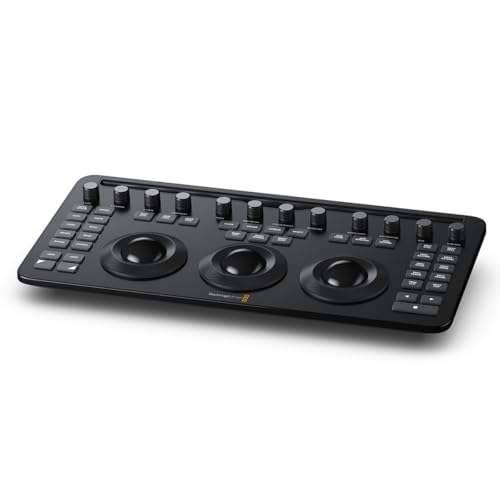
- Three trackballs plus 12 color controls
- 40 navigation and transport buttons
- Bluetooth 5.1 LE and USB-C
Best For: Compact DaVinci Resolve Studio grading stations
Flexible Workflow Control

- Four metal knobs with touchscreen and LCD keys
- Automatic layouts for multiple creative apps
- Three-port USB hub and adjustable stand
Best For: Streaming and editing desks needing broad shortcut control
Resolve Multicam Navigation

- 73 navigation and transport keys
- Designed for Resolve multicamera editing
- Bluetooth and bus-power compatibility
Best For: Compact Resolve replay and multicamera editing stations
Wireless Tactile Editing

- Joystick and three rotaries for tactile editing
- 19 buttons support 100-plus commands
- Bluetooth, 2.4G wireless, or USB-C
Best For: Portable cross-application editing and grading workflows
Compact Macro Control
ULANZI D200X Stream Controller
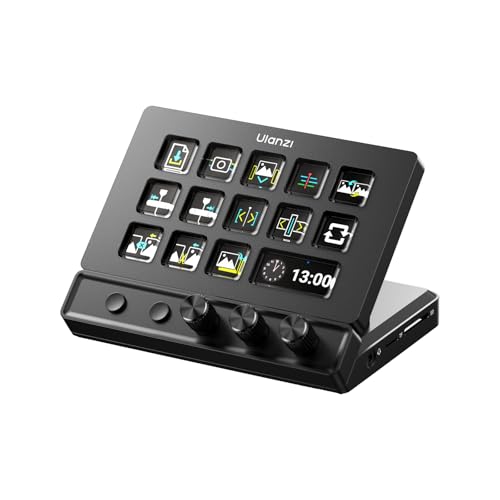
- Three precision knobs for tactile adjustments
- 14 LCD keys with 42+ expandable functions
- USB hub, HDMI, card readers, audio, and PD charging
Best For: Editors wanting compact macro control and connectivity
On-Set Color Reference

- Supports vector-scope-based color consistency
- Includes color, grayscale, neutral, and focus cards
- Portable case with interchangeable card options
Best For: Videographers matching cameras and preparing footage for grading
Advanced Macro Deck

- Four RGB knobs, LCD keys, and touch bar
- One-tap chained macros with unlimited scene presets
- Foldable stand and USB-C support for Windows and macOS
Best For: Editors automating compact, multi-application workflows
Pocket Color Reference
Calibrite ColorChecker Classic Mini

- 24-patch target for white balance and color grading
- Pocket-sized design for travel and location work
- Supports DNG and ICC profiles with Calibrite PROFILER
Best For: Portable color consistency checks during photo and video production
Resolve Editing Surface
Blackmagic DaVinci Resolve Speed Editor

- Compact keyboard with built-in search dial
- Bluetooth and USB connectivity
- Includes a DaVinci Resolve Studio activation card
Best For: DaVinci Resolve editing and timeline control in compact workspaces
Dedicated Resolve Grading – Micro Color Panel
For color grading control panels for compact setups, the Blackmagic Design DaVinci Resolve Micro Color Panel is a focused option for DaVinci Resolve Studio users. Its compact 14.33-by-7.18-inch footprint combines three trackballs, dedicated correction controls, and navigation buttons in a purpose-built workstation.
Best For: DaVinci Resolve Studio users who want dedicated tactile color controls without a full-size panel.
Pros:
- Three trackballs and 12 color-correction controls support hands-on grading.
- Includes 40 navigation and transport buttons for workflow control.
- Bluetooth 5.1 LE and USB-C connectivity suit desktop or laptop setups.
- Compact, lightweight design measures about 14.33 by 7.18 by 1.89 inches.
Cons:
- Designed specifically for DaVinci Resolve Studio rather than broad software compatibility.
- Provides one USB-C port and has no included power plug.
This is the most purpose-built choice in the group for Resolve color work. Choose it when dedicated grading controls matter more than general-purpose macros or streaming features.
Flexible Workflow Control – CT-SD10 Stream Controller
The CT-SD10 is a versatile alternative among color grading control panels for compact setups, pairing four metal knobs with a touchscreen and customizable LCD keys. It is better suited to creators who also manage streaming, editing, audio, lighting, or application shortcuts from the same desk.
Best For: Streamers and editors who want knobs, touchscreen navigation, macros, and app-aware controls in one compact controller.
Pros:
- Combines 10 LCD keys, one touchscreen, and four precision metal knobs.
- Automatic app-based layouts can switch for OBS, Premiere Pro, Ableton Live, or Chrome.
- Supports OBS scene and source controls, macros, plugins, and icon packs.
- Built-in three-port USB hub and adjustable 0–60-degree stand add desk flexibility.
Cons:
- It is a general-purpose stream controller, not a dedicated Resolve color panel.
- Its larger 5.4-by-4.8-by-4.3-inch form may require careful desk placement.
The CT-SD10 makes sense when color-related knob control is only part of a wider production workflow. Its software profiles and OBS integration give it broader utility than a specialist grading surface.
Resolve Multicam Navigation – Replay Editor
For compact setups centered on DaVinci Resolve, the Blackmagic Design Replay Editor emphasizes replay and multicamera editing rather than dedicated color-wheel work. Its 73 navigation and transport keys provide tactile control while the panel connects through Bluetooth or bus power.
Best For: Resolve editors handling multicamera replay, navigation, and transport-heavy workflows.
Pros:
- Purpose-built replay editor panel for DaVinci Resolve.
- Supports multicamera editing with 73 navigation and transport keys.
- Offers Bluetooth connectivity and bus-power compatibility.
- Works with macOS and Windows and measures about 8.54 by 14.96 by 1.73 inches.
Cons:
- Its listed controls focus on replay, navigation, and transport rather than color grading.
- Less suitable if dedicated color wheels or trackballs are the main priority.
This panel is a specialized fit for editors who need fast replay and multicamera control in Resolve. It should not be mistaken for a dedicated color-grading surface, but its shallow profile can suit a compact editing desk.
Wireless Tactile Editing – Pilot Pro Editing Console
The XPPen Pilot Pro is a flexible pick among color grading control panels for compact setups, using an all-way joystick, three rotaries, and programmable buttons for hands-on editing. Tri-mode connectivity and a rechargeable battery make it practical for creators who want to move between wired and wireless workflows.
Best For: Editors and colorists who want portable, one-handed control across DaVinci Resolve, Premiere Pro, Photoshop, and related creative applications.
Pros:
- All-way joystick is designed for one-step color grading in DaVinci Resolve.
- Three rotaries support timeline scrubbing and precise frame adjustments.
- Maps 19 buttons and three rotaries to more than 100 commands with seven themes.
- Offers Bluetooth 5.3, 2.4G wireless, or USB-C connectivity plus up to 24 hours of battery use.
Cons:
- Its controls are programmable and multifunctional rather than a dedicated set of color wheels.
- Wireless operation depends on the internal battery, which requires recharging.
The Pilot Pro is a strong compromise for compact workspaces that need editing, grading, and shortcut control in one device. Choose it over a specialist panel when portability and cross-application flexibility are priorities.
Compact Macro Control – ULANZI D200X Stream Controller
For creators building color grading control panels for compact setups, the ULANZI D200X combines three precision knobs with programmable LCD keys in a relatively space-conscious controller. Its knobs can handle timeline, brightness, or volume adjustments, while macros can launch commands in DaVinci Resolve and other creative applications.
Best For: Video editors who want tactile dial control, shortcut automation, and hub connectivity in one desktop device.
Pros:
- Three knobs provide hands-on control for timeline and other adjustable parameters.
- 14 LCD keys and page-turning keys expand access to more than 42 functions.
- Compatible with DaVinci Resolve, Premiere Pro, Final Cut Pro, and CapCut through Ulanzi Studio.
- Built-in HDMI, USB, card-reader, audio, and 100W PD features can reduce desk cable clutter.
Cons:
- It is a general-purpose macro controller rather than a dedicated color-grading panel.
- Advanced customization depends on Ulanzi Studio software.
The D200X is a practical pick when compactness and multipurpose workflow control matter more than having numerous dedicated grading trackballs or faders. Its aluminum construction and broad connectivity also make it useful in a small editing workstation.
On-Set Color Reference – Datacolor SpyderCheckr Video
For color grading control panels for compact setups, the Datacolor SpyderCheckr Video addresses the reference side of the workflow rather than adding physical editing controls. Its color targets and neutral cards help creators capture consistent color information before post-production, making grading decisions more repeatable across cameras and lenses.
Best For: Videographers who need a portable color reference for camera matching, white balance, exposure checks, and more consistent grading.
Pros:
- Works with vector scopes to support color accuracy and consistency.
- Includes color cards, a gradient greyscale card, neutral grey card, and focus star card.
- Color Pattern Card shows hues at two saturation levels across primary and secondary color ranges.
- Replaceable, interchangeable cards support combined photo and video workflows.
Cons:
- It is a physical color reference tool, not a hardware control panel with knobs or keys.
- Glossy cards may require careful positioning to identify flare and avoid unwanted reflections.
The SpyderCheckr Video is a strong companion for a compact grading station: it helps establish a reliable visual reference during capture, reducing guesswork later. Its small 4.81-by-3.84-inch case is also easy to carry between shoots.
Advanced Macro Deck – VSD N4 Pro Stream Controller
The VSD N4 Pro is worth considering for color grading control panels for compact setups when programmable workflow automation is the priority. It pairs four RGB knobs with LCD keys and a touch bar, allowing editors to assign shortcuts, chained actions, application launches, and scene presets around a grading or post-production workflow.
Best For: Editors and creators who want customizable macros, tactile knobs, and multiple workflow presets in a compact desktop controller.
Pros:
- Four RGB knobs, 10 customizable LCD keys, and an interactive touch bar offer multiple control methods.
- One-tap macros can trigger multi-step editing operations without coding.
- Unlimited independent scene presets can separate editing, streaming, gaming, and office workflows.
- USB-C connectivity and a foldable 60-degree stand suit Windows and macOS workstations.
Cons:
- It does not provide dedicated color-grading trackballs or purpose-built grading controls.
- Its feature set is broad, so setup and customization may take time.
- The USB sound-deck function sends computer commands and does not include built-in speakers.
With more knobs and macro flexibility than a basic keypad, the N4 Pro can centralize repeated grading and editing commands while preserving desk space. It is best viewed as a configurable companion to software-based color controls rather than a standalone grading console.
Wireless Dial Keyboard – ULANZI D100H
For color grading control panels for compact setups, the ULANZI D100H offers a small keyboard-style controller with a tactile dial, programmable buttons, and wireless Bluetooth connectivity. Its aluminum alloy knob is designed for precise adjustments, while compatibility with DaVinci Resolve, CapCut, Final Cut Pro, and select Adobe applications supports a range of editing workflows.
Best For: Creators who want a portable, wireless dial controller for editing and color-related adjustments on Windows or macOS.
Pros:
- Compact 7.2-by-5.35-inch design with a dedicated multifunction knob.
- Seven customizable buttons support shortcuts and one-hand operation.
- Bluetooth 5.1 can connect and switch between up to three devices.
- Supports DaVinci Resolve, Final Cut Pro, CapCut, and selected Adobe software.
Cons:
- Compatible only with Windows 10+ and macOS 12+; it does not support iPad or iPhone use.
- USB is for charging only, not wired dual-mode operation.
- Battery runtime is listed at approximately 2.5 hours after a full charge.
The D100H is a practical space-saving choice when you need shortcut access and a tactile adjustment dial without a full-size control surface. Confirm your operating system and software requirements before buying.
Pocket Color Reference – Calibrite ColorChecker Classic Mini
The Calibrite ColorChecker Classic Mini is a pocket-sized reference target rather than a physical control panel, but it can complement color grading control panels for compact setups by providing an objective color reference. Its 24 patches support white balance, exposure evaluation, profiling, and more consistent color across locations and cameras.
Best For: Photographers and video creators who need a lightweight on-set reference for white balance, exposure, and color matching.
Pros:
- Compact 3.5-by-5-inch format weighs about 1.41 ounces.
- Twenty-four color patches support white balance, exposure, and grading checks.
- Designed for travel, location shoots, and changing lighting conditions.
- Supports custom DNG and ICC profiles with Calibrite PROFILER software.
Cons:
- It is a reference chart, not a hands-on grading control surface.
- Profile creation requires compatible Calibrite PROFILER software.
- It must be captured under the same lighting as the subject for useful balancing.
For compact production kits, the Classic Mini adds a reliable visual reference without taking up meaningful bag space. Pair it with software controls when you want both accurate capture and efficient post-production adjustments.
Resolve Editing Surface – Blackmagic DaVinci Resolve Speed Editor
The Blackmagic Design DaVinci Resolve Speed Editor is a compact editing keyboard with a built-in search dial, dedicated function controls, and Bluetooth or USB connectivity. For color grading control panels for compact setups, it is best viewed as a Resolve-focused editing companion that streamlines timeline work rather than a dedicated color-correction panel.
Best For: DaVinci Resolve users who want a portable keyboard and search dial for fast editing, with Resolve Studio included in the bundle.
Pros:
- Compact editing-focused design with a built-in search dial.
- Bluetooth and USB connectivity provide flexible connection options.
- Dedicated shortcuts are matched to editing functions in DaVinci Resolve.
- Bundle includes a DaVinci Resolve Studio activation card.
Cons:
- It is primarily an editing controller, not a dedicated color-grading panel.
- Listed operating-system requirements are macOS 14 Sonoma or Windows 11.
- Its plastic enclosure may feel less premium than metal control surfaces.
The Speed Editor makes sense for Resolve editors who value transport and timeline control in a relatively compact footprint. Choose it for editing efficiency and bundled software, but consider a dedicated grading surface if hands-on color-wheel control is your priority.
How We Picked the Best Color Grading Control Panels for Compact Setups
We focused on hardware and accessories that can improve grading or post-production workflows without requiring a large control surface. The selection includes dedicated DaVinci Resolve panels, compact editing keyboards, programmable stream controllers, wireless consoles, and reference cards that support color accuracy.
We considered control layout, footprint, connectivity, software compatibility, portability, tactile feedback, customization, and the type of work each product supports. Because these products serve different roles, a compact controller is not automatically a replacement for a dedicated grading panel.
Quick Comparison
- Dedicated grading: The DaVinci Resolve Micro Color Panel is the most direct choice for hands-on primary color correction in a compact format.
- Editing and playback: The Resolve Speed Editor and Replay Editor are better suited to timeline, multicam, replay, and transport-focused workflows.
- Custom shortcuts: Stream controllers from CT-SD10, ULANZI, and VSD can centralize macros, application commands, and studio controls.
- Wireless control: XPPen Pilot Pro and ULANZI D100H offer flexible placement for users who prefer less cable clutter.
- Color reference: Datacolor SpyderCheckr Video and Calibrite ColorChecker Classic Mini help establish more consistent capture and grading references.
Key Buying Factors for Color Grading Control Panels
Control Type and Software Support
Dedicated knobs, trackballs, wheels, and buttons are valuable when you make frequent tonal or color adjustments. Programmable LCD keys and macro controls are more useful for shortcuts, repetitive commands, and mixed streaming or editing workflows. Check compatibility with DaVinci Resolve, OBS, your operating system, and any required configuration software before buying.
Desk Space and Connection Options
Measure your usable depth and consider whether the panel must share space with a keyboard, monitor, tablet, or audio interface. USB-C and USB connections are generally straightforward for desktop use, while Bluetooth can help keep a compact setup flexible. Wireless devices may still require charging or a wired connection for power.
Accuracy Versus Convenience
A control panel changes how you work, but it does not make an uncalibrated display accurate. If color consistency matters, pair your controls with a suitable monitor calibration process and a color reference card. Charts are especially useful for checking white balance, exposure, and color relationships during capture.
Customization and Learning Curve
Macro decks and multi-function consoles can save time, but they often need setup and profile management. Dedicated Resolve hardware usually offers a more purpose-built workflow, while customizable devices provide broader value across editing, streaming, and production tasks.
Who Should Buy Which Color Grading Control Panels for Compact Setups?
Choose the DaVinci Resolve Micro Color Panel if grading is your primary priority and you want compact, physical controls. Choose a Resolve Speed Editor or Replay Editor if your work centers on cutting, transport, multicam, or replay operations.
Choose a CT-SD10, ULANZI D200X, or VSD controller if you need programmable shortcuts alongside streaming or studio functions. Choose the XPPen Pilot Pro or ULANZI D100H if wireless placement and a flexible editing interface matter most.
Choose SpyderCheckr Video or the Calibrite ColorChecker Classic Mini when reference accuracy is the missing part of your workflow rather than additional controls. For many compact creators, combining one small control surface with a reliable color reference offers a better balance than buying a large professional console.