The best single-board computer kits for educational demonstrations turn abstract programming and electronics concepts into visible, hands-on projects. This roundup compares beginner-friendly Arduino sets, Raspberry Pi and Pico kits, Python-focused boards, IoT platforms, and STEM systems.
Whether you are equipping a classroom, makerspace, homeschool lab, or workshop, focus on the learning path, included components, documentation, and the age and experience level of your students.
Best 10 Single-Board Computer Kits for Educational Demonstrations Picks for 2026
Best Build-and-Code Pick

- Builds a working Raspberry Pi computer
- Includes guided StoryMode electronics projects
- Moves from visual coding to Python
Best For: Hands-on STEAM instruction for younger learners
Best Advanced SBC Bundle
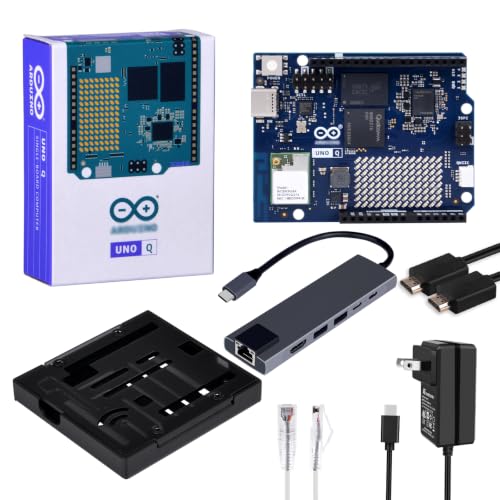
- Includes 2GB RAM and 16GB eMMC
- Supports standalone and PC-connected modes
- Adds case, hub, HDMI, Ethernet, and power
Best For: AI and embedded-development demonstrations
Best Beginner Python Board

- Includes Debian and a Python environment
- Built-in touchscreen and multiple sensors
- Bridges Mind+ blocks and Python 3
Best For: Beginner IoT and Python classroom demonstrations
Best Project Variety

- Includes 450+ parts and 117 projects
- Adds 27 guided video tutorials
- Supports MicroPython, C/C++, and Piper Make
Best For: Broad beginner IoT and microcontroller instruction
Best Beginner Build

- 22+ guided Arduino projects
- Solderless beginner setup
- Sensors, displays, and motors included
Best For: Homeschool, clubs, and introductory STEM demonstrations
Best IoT Demonstration Kit
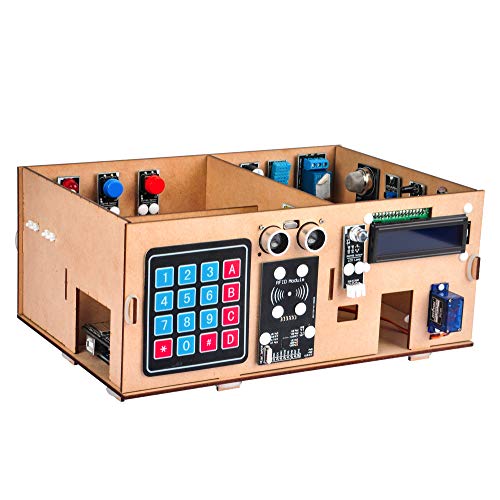
- 19-lesson smart-home curriculum
- Browser and smartphone control
- RFID, motion, and environmental sensors
Best For: IoT classes, camps, and STEM clubs for ages 15+
Best Advanced Arduino Curriculum

- 35+ guided electronics projects
- 200+ components and modules
- Expanded I/O for larger builds
Best For: Classrooms, maker projects, and multi-sensor demonstrations
Sensor Lab Builder

- 37 modules for sensing, displays, timing, and control
- Compatible with several Arduino-family and STM32 boards
- Tutorials, diagrams, datasheets, and example code included
Best For: Expanding an existing classroom or maker electronics setup
Complete Arduino Classroom Kit
UNO R3 Most Complete Starter Kit

- 200-plus components across 63 types
- 30-plus guided projects with PDF tutorial and code
- Includes board, breadboard, power accessories, and storage
Best For: Beginners and classrooms starting Arduino-based STEM lessons
Connected IoT Learning Kit

- Dual-core ESP-32 with Wi-Fi and Bluetooth 4.2
- 35-plus modules and components for connected projects
- 30-plus guided projects with code and circuit diagrams
Best For: Wireless, IoT, and advanced electronics demonstrations
Best Build-and-Code Pick – Piper Computer Kit
For hands-on single-board computer kits for educational demonstrations, the Piper Computer Kit combines a Raspberry Pi, 7-inch screen, speaker, rechargeable battery, and wooden enclosure in a buildable computer. Its guided projects introduce coding and electronics through an interactive format.
Best For: Younger learners and classrooms demonstrating foundational STEAM concepts, visual coding, electronics, and introductory Python.
Pros:
- Includes the core components needed to build a functioning computer.
- StoryMode provides guided, project-based electronics activities.
- Offers 11 progressively challenging drag-and-drop coding projects.
- Can progress from PiperCode to pre-loaded Python programming.
Cons:
- Its educational focus and guided ecosystem may be less suitable for advanced standalone computing.
- The 13-inch-square kit is less compact than pocket-sized boards.
The Piper stands out when the demonstration needs to make computer hardware and coding tangible. It is a particularly engaging choice for structured, self-paced learning rather than a minimal bare-board setup.
Best Advanced SBC Bundle – GeeekPi Arduino UNO Q Kit
The GeeekPi Starter Kit is one of the more capable single-board computer kits for educational demonstrations, pairing the Arduino UNO Q with 2GB of RAM, 16GB of eMMC storage, and the accessories needed for monitor-based or PC-connected development.
Best For: Advanced classroom demonstrations of AI, embedded development, Linux-style standalone computing, and Arduino workflows.
Pros:
- Provides 2GB RAM and 16GB eMMC storage for demanding projects.
- Supports standalone monitor-and-keyboard use or USB-C PC connectivity.
- Includes an aluminum case for protection and heat dissipation.
- Comes with a USB-C hub, power supply, HDMI cable, Ethernet cable, screws, and screwdriver.
Cons:
- Its higher-performance focus may be more complex for beginners.
- The kit includes only one total USB port on the listed board specifications, making the hub important for expansion.
This bundle is a strong fit when demonstrations require more memory, storage, and connectivity than an entry-level microcontroller kit. Its dual operating modes also support both classroom computer labs and more traditional Arduino instruction.
Best Beginner Python Board – UNIHIKER M10
The UNIHIKER M10 simplifies single-board computer kits for educational demonstrations by arriving with Debian Linux and a Python environment pre-installed. Its built-in touchscreen, sensors, wireless connectivity, and beginner-friendly software reduce setup work for classroom projects.
Best For: STEM classes and beginners demonstrating Python, IoT, sensor data, touch interfaces, and the transition from block-based coding to text programming.
Pros:
- Supports quick startup through pre-installed Debian and Python tools.
- Includes a 2.8-inch color touchscreen, microphone, motion sensors, light sensor, and buzzer.
- Supports Mind+ block coding alongside Python 3.
- Offers built-in Wi-Fi, Bluetooth, and expansion interfaces for sensors and accessories.
Cons:
- With 512MB of RAM, it is oriented toward lightweight educational and IoT work rather than demanding computing.
- Its 2.8-inch screen is useful for compact demonstrations but smaller than a conventional monitor.
The UNIHIKER is especially practical when instructors want students to see results directly on the board. Its combination of integrated hardware and low-friction software makes it well suited to demonstrations that move quickly from setup to experimentation.
Best Project Variety – SunFounder Pico W Kit
The SunFounder Raspberry Pi Pico W Ultimate Starter Kit is designed for broad, hands-on demonstrations. With more than 450 components, 117 projects, sensors, actuators, displays, and online instruction, it gives educators substantial variety for teaching microcontroller programming and IoT concepts.
Best For: Beginners aged 8 and up, makerspaces, and classrooms that need many progressive sensor, actuator, wireless, and coding activities.
Pros:
- Includes more than 450 components and 117 projects.
- Provides 27 video tutorials from educator Paul McWhorter.
- Supports MicroPython, C/C++, and Piper Make.
- Includes community forum access and technical assistance.
Cons:
- The large number of components and projects may require organized storage and lesson planning.
- It is based on the Raspberry Pi Pico W microcontroller rather than a full desktop-style single-board computer.
This kit is a strong choice for repeatable educational demonstrations where variety matters more than a built-in display. Its extensive parts selection and multi-language support can sustain a progression from basic circuits to wireless IoT projects.
Best Beginner Build – UNO R3 Super Starter Kit
The ELEGOO UNO R3 Project Super Starter Kit is a practical entry point for anyone comparing single-board computer kits for educational demonstrations. Its 22+ guided lessons cover LEDs, sensors, displays, motors, and input devices, giving beginners a clear path from basic wiring to interactive projects.
Best For: Homeschool units, family builds, coding clubs, and introductory STEM classrooms.
Pros:
- Includes 22+ guided projects covering sensing, displays, sound, and motor control.
- Uses a solderless breadboard and several plug-in modules, including a pre-soldered LCD header.
- Provides a broad component mix for experimenting with Arduino IDE code.
- Includes an illustrated component list and downloadable tutorial and code.
Cons:
- The UNO R3 has only 2 KB of installed RAM, limiting larger projects.
- Beginners must check polarity, breadboard rows, computer-port settings, and the power module’s 9V limit.
This kit emphasizes accessible, hands-on demonstrations rather than advanced connected systems. It is a strong choice when structured lessons and a variety of beginner-friendly components matter most.
Best IoT Demonstration Kit – Smart Home Learner Kit
The OSOYOO IoT Electronic Smart Home Learner Kit stands out among single-board computer kits for educational demonstrations because it turns programming lessons into a model smart-home system. Its 19-lesson curriculum introduces browser and smartphone control alongside RFID, motion, distance, environmental, and actuator projects.
Best For: IoT classes, summer camps, science clubs, hands-on learning centers, and learners aged 15 and older.
Pros:
- Builds toward a functional smart-home model with a wooden house structure.
- Includes a MEGA2560 board, IoT extension board, relay, servo, LCD, RFID, keypad, and multiple sensors.
- Lessons cover browser-based control, temperature and humidity detection, RFID entry, and motion sensing.
- The XH2.54 plug-and-play connections are designed to reduce wiring errors.
Cons:
- The recommended age is 15+, so it may be less suitable for younger beginners.
- Its focus is specifically IoT and smart-home demonstrations rather than general-purpose electronics practice.
Choose this kit when the demonstration needs a visible, themed project and network-connected control. The model-home format gives lessons a coherent goal while retaining a range of sensors and outputs for experimentation.
Best Advanced Arduino Curriculum – Mega 2560 Starter Kit
The ELEGOO Mega 2560 R3 Project Kit is designed for broader, more complex lessons than a basic starter set. For educators evaluating single-board computer kits for educational demonstrations, its 35+ guided projects and 200+ components support demonstrations involving RFID, real-time clocks, motion, environmental sensing, displays, and multiple motors.
Best For: STEM classrooms, coding clubs, maker projects, and learners ready to combine several sensors and controls.
Pros:
- The MEGA 2560 R3 provides 54 digital I/O pins, 15 PWM outputs, 16 analog inputs, and four hardware serial ports.
- Includes 35+ guided projects and more than 200 components for extended practice.
- Supports varied demonstrations with RFID, RTC, PIR, ultrasonic, water-level, motion, keypad, and display modules.
- A storage case and small-parts box help organize components between lessons.
Cons:
- The larger component count can create a steeper organization and setup burden for first-time builders.
- Its 2.2-pound kit is less compact than a minimal introductory set.
This is the strongest option here for a curriculum that needs room to grow. The Mega board’s expanded I/O and the kit’s extensive module selection make it well suited to repeatable, multi-stage demonstrations.
Sensor Lab Builder – 37-in-1 Sensor Modules Kit
For shoppers comparing single-board computer kits for educational demonstrations, this module-only ELEGOO set offers a broad way to add sensing, display, timing, and control functions to compatible Arduino, ESP-32, or STM32 projects. It is best viewed as an expansion lab rather than a complete starter kit.
Best For: Classroom experiments, prototyping, and learners who already have a compatible controller board, breadboard, USB cable, and jumper wires.
Pros:
- Provides 37 modules covering motion, distance, light, sound, temperature, touch, displays, and control.
- Supports compatible UNO R3, MEGA 2560, Nano, ESP-32, and STM32 projects.
- Includes digital tutorials, datasheets, wiring diagrams, and example code.
- Encourages custom experiments involving clocks, alarms, counters, and automated projects.
Cons:
- Controller board, USB cable, breadboard, and jumper wires are not included.
- Recommended for ages 13 and up, so younger learners may need supervision.
- Power and pin requirements must be checked carefully before wiring.
This is a flexible choice for expanding an existing electronics setup, especially when the goal is to demonstrate many sensor types in one course or workshop. Buyers starting from scratch should budget for the required controller and connection accessories.
Complete Arduino Classroom Kit – UNO R3 Most Complete Starter Kit
Among single-board computer kits for educational demonstrations, this ELEGOO UNO R3 bundle is a practical all-in-one starting point. It combines the controller, breadboard, common sensors, motors, displays, power accessories, storage, and more than 30 guided projects for structured hands-on learning.
Best For: Beginners, coding clubs, classrooms, and STEM learners who want to progress from simple LED circuits to sensor, motor, RFID, and display projects.
Pros:
- Includes an UNO R3 controller and more than 200 components across 63 types.
- Offers 30-plus guided projects with a PDF tutorial and example code.
- Supports solderless experimentation with a breadboard and pre-soldered modules.
- Includes a storage case, USB cable, 9 V power supply, battery, and breadboard power module.
Cons:
- The extensive component assortment may feel overwhelming to complete beginners.
- The power supply module should not be used above 9 V.
- Some projects require organizing many small components and wires.
With its broad component selection and included power and connection accessories, this is the strongest option here for a first structured Arduino course. It also leaves room to modify guided projects into original demonstrations as skills develop.
Connected IoT Learning Kit – ESP-32 Super Starter Kit
For more advanced single-board computer kits for educational demonstrations, the ELEGOO ESP-32 Super Starter Kit adds built-in Wi-Fi and Bluetooth 4.2 to a guided electronics platform. Its modules and online projects let learners move from basic circuits toward connected devices, sensors, and IoT concepts using the Arduino IDE.
Best For: Students, makers, and instructors demonstrating wireless communication, smart-home concepts, weather stations, and other connected projects.
Pros:
- Uses a dual-core ESP-32 board with integrated Wi-Fi and Bluetooth 4.2.
- Includes more than 35 modules and components, including sensors, displays, motors, and input devices.
- Provides 30-plus projects with code, circuit diagrams, and step-by-step instructions.
- Supports beginner through advanced learning and Arduino IDE programming.
Cons:
- Its wireless and IoT capabilities may be more complex than needed for basic electronics lessons.
- The supplied notes identify the kit as containing 35 counts, but do not provide a complete item-by-item inventory.
- Connected projects may require additional setup beyond basic offline circuits.
This kit is a good fit when demonstrations need networking or Bluetooth rather than only local sensor readings. The guided progression helps, while the ESP-32 platform provides more room for connected projects than a basic controller kit.
How We Picked the Best Single-Board Computer Kits for Educational Demonstrations
We selected kits that support clear, repeatable demonstrations across coding, electronics, sensors, automation, IoT, and embedded development. The lineup includes highly accessible Arduino starter sets, component-rich project bundles, Raspberry Pi-based learning systems, MicroPython boards, and more advanced ESP32 and Arduino Mega options.
We prioritized the practical details that affect teaching: included hardware, software compatibility, tutorials, project variety, connectivity, expandability, and how easily learners can see results. A kit does not need the most powerful board to be useful; it needs a sensible relationship between its capabilities and the lesson being taught.
Quick Comparison
| Best For | Look For | Strongest Kit Types |
|---|---|---|
| First electronics lessons | Simple wiring, LEDs, buttons, and clear tutorials | Arduino UNO starter kits |
| Large project progression | Many sensors, modules, and expansion options | Mega and complete project kits |
| Python and STEM computing | Linux, display, networking, or MicroPython support | Raspberry Pi, UNIHIKER, and Pico kits |
| IoT and wireless projects | Wi-Fi, sensors, cloud connectivity, and automation examples | ESP32, Pico W, and smart-home kits |
| Game-based learning | Guided challenges, storytelling, and creative projects | Piper Computer Kit |
Key Buying Factors for Educational Demonstrations
Board and Programming Environment
Arduino boards are excellent for introducing circuits, control logic, and C/C++-style programming. Raspberry Pi and UNIHIKER systems are better suited to Python, Linux, displays, networking, and higher-level applications. Pico and ESP32 boards can bridge basic electronics with MicroPython, wireless projects, and embedded development.
Included Components and Lesson Coverage
Count the parts that support your curriculum rather than choosing by item count alone. Sensors, motors, displays, relays, breadboards, LEDs, and input modules create more demonstration opportunities, but only when the tutorials explain how to use them safely and progressively.
Documentation and Classroom Repeatability
Prioritize kits with organized project guides, wiring diagrams, example code, and accessible online support. For group teaching, confirm whether every student or team receives the essential cables, power supply, controller board, and reusable components.
Age, Safety, and Expansion
Beginners benefit from guided projects and forgiving connections. Older learners may need access to serial communication, Linux tools, wireless networking, or more advanced sensors. Also check power requirements, exposed moving parts, storage, and whether replacement components are easy to find.
Who Should Buy Which Single-Board Computer Kits for Educational Demonstrations?
- Teachers introducing coding and circuits: Choose an UNO-based starter kit with a structured tutorial.
- STEM clubs and makerspaces: Select a complete Mega or sensor-rich kit for varied, repeatable builds.
- Python-focused learners: Consider a UNIHIKER, Raspberry Pi, Pico, or Piper system based on the desired complexity.
- IoT and smart-home demonstrations: Look for Wi-Fi-capable Pico W, ESP32, or Mega-based sensor kits.
- Creative younger learners: Piper’s guided, game-oriented approach can make computing concepts more approachable.
Match the kit to the lesson outcomes first, then compare component depth, documentation, and total classroom cost. The right choice is the one students can assemble, understand, troubleshoot, and extend.