The best flight simulator controls for streamers should look good on camera, feel precise in play, and offer enough buttons to manage complex aircraft without breaking immersion. The right setup can also make your broadcasts easier to follow by putting essential functions within reach.
This roundup compares 10 options across HOTAS systems, yokes, rudder pedals, throttle controls, and complete flight packs. Whether you fly Microsoft Flight Simulator on PC or need Xbox compatibility, you can match the hardware to your aircraft preferences, desk space, and streaming style.
Best 10 Flight Simulator Controls for Streamers Picks for 2026
Premium HOTAS Control
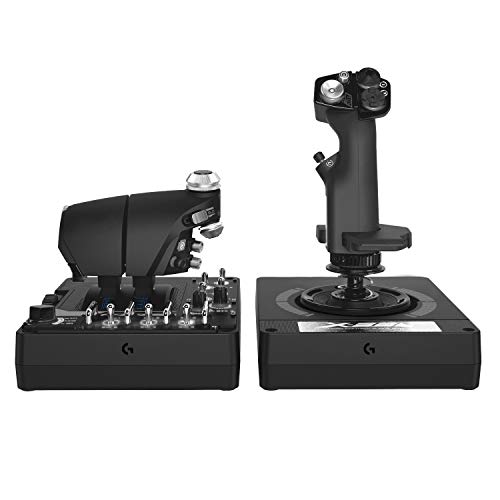
- 189 programmable controls for complex mappings
- Twin throttles with friction adjustment
- RGB lighting and VR-friendly layout
Best For: PC streamers building a feature-rich combat or space-sim setup
Balanced Flight Pack

- Includes joystick, throttle, and pedals
- Ambidextrous stick supports either hand
- T.A.R.G.E.T software enables custom profiles
Best For: PC streamers seeking a complete and adaptable flight-control bundle
Immersive Yoke System
Turtle Beach VelocityOne Flight
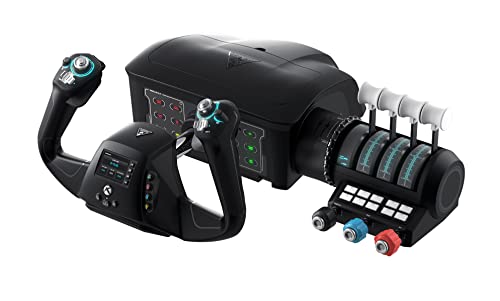
- All-in-one yoke, throttle, trim, and rudder system
- Works with Xbox and Windows 10/11 PCs
- Includes flight-management display and status panel
Best For: Microsoft Flight Simulator streamers seeking civil-aviation realism
Compact Budget Stick
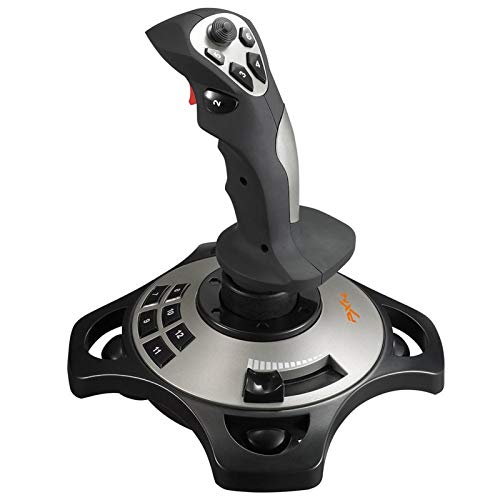
- Four axes and 12 programmable buttons
- Vibration function with adjustable driver settings
- Suction cups help hold it on smooth surfaces
Best For: Windows PC streamers wanting an affordable single-stick entry point
Professional Yoke Pick
Logitech G PRO Flight Yoke System
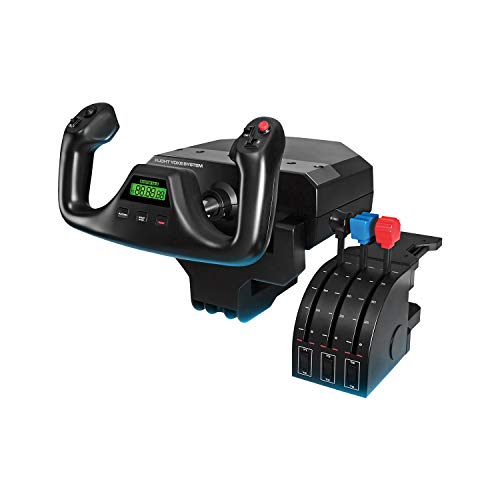
- Realistic yoke and separate throttle quadrant
- 14 buttons, POV hat, and three-position mode switch
- Desk clamps and Windows simulator compatibility
Best For: Windows streamers creating a traditional civil-aviation cockpit
Complete HOTAS Pick
Thrustmaster T-Flight Full Kit

- Flight stick, detachable throttle, and rudder pedals included
- Five axes and 14 programmable buttons
- PC and Xbox Series X|S support
Best For: Streamers wanting a full multi-platform flight-control kit
Fine-Adjustment Pick
Flight Sim Stuff Vernier TPM Controls

- Dedicated throttle, propeller, and mixture controls
- Vernier twist and push-pull adjustments
- Compact, driver-free USB design for PC and Mac
Best For: Streamers adding precise engine controls to a PC or Mac cockpit
Best Rudder Pedals
Logitech G Pro Flight Rudder Pedals
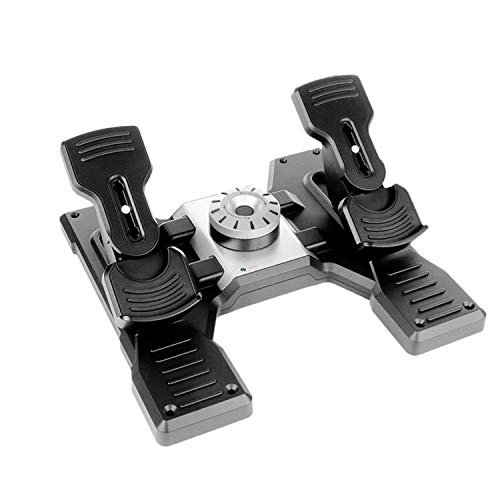
- Self-centering rudder with adjustable tension
- Differential toe brakes for runway control
- USB-connected PC pedal set
Best For: PC streamers adding dedicated rudder control
Best Budget HOTAS

- Detachable stick and full-size throttle
- 12 programmable buttons and 5 axes
- Plug-and-play setup with profile memory
Best For: PC streamers starting with a configurable HOTAS
Best Xbox & PC HOTAS
Thrustmaster T-Flight Hotas One MSFS 2024

- Official MSFS 2024 Xbox and PC compatibility
- Detachable throttle with 5-axis control
- 14 buttons plus dual rudder options
Best For: MSFS streamers using Xbox Series X|S and PC
Premium HOTAS Control – Logitech G X56
For streamers who want expansive flight simulator controls for streamers, the Logitech G X56 combines a joystick, twin throttles, extensive programmable inputs, and RGB lighting in one PC-focused HOTAS setup. Its adjustable springs, Hall-effect sensors, and separate mini analog stick support detailed space- and flight-sim control.
Best For: PC streamers who want a feature-rich HOTAS for combat, space, or VR-oriented simulator content.
Pros:
- Offers 189 programmable controls with 24 buttons listed in the specifications.
- Twin throttles include friction adjustment and a throttle-lock cable.
- Includes adjustable stick force, Hall-effect sensors, and RGB backlighting.
- Designed with controls positioned under the fingers for VR use.
Cons:
- Requires Windows and two USB 2.0 ports.
- Its broad feature set may be more than casual simulator users need.
- At 6.9 pounds, it is a substantial desktop setup.
The X56 is a strong choice when your stream benefits from visible hardware, extensive button mapping, and separate throttle control. Verify your desk space and available USB ports before buying.
Balanced Flight Pack – Thrustmaster T16000M FCS
The Thrustmaster T16000M FCS Flight Pack gives streamers a coordinated set of flight simulator controls for streamers, including a joystick, throttle, and pedals. Its USB PC connection, ambidextrous design, and configurable T.A.R.G.E.T software make it practical for varied simulator layouts.
Best For: PC streamers who want a complete joystick, throttle, and pedal package with flexible hand placement.
Pros:
- Includes the flightstick, throttle, and pedals in one pack.
- H.E.A.R.T technology is designed to maintain precision over time.
- Ambidextrous joystick can be tailored for left- or right-handed use.
- Provides 16 action buttons, an 8-way hat switch, and four independent axes.
Cons:
- Compatible with PC through USB and Windows only according to the supplied notes.
- It has fewer listed buttons than the X56.
- The setup may require profile creation or loading in T.A.R.G.E.T software.
This pack is a sensible middle ground for streamers who want coordinated controls without assembling separate components. Its ambidextrous stick and included pedals add flexibility for shared or changing setups.
Immersive Yoke System – Turtle Beach VelocityOne Flight
For aviation-focused broadcasts, the Turtle Beach VelocityOne Flight provides approachable flight simulator controls for streamers in an all-in-one yoke system. It combines a yoke, throttle quadrant, trim wheel, rudder and brake controls, and a flight-management display for Microsoft Flight Simulator on Xbox and Windows.
Best For: Streamers creating civil-aviation or Microsoft Flight Simulator content who prefer a yoke over a conventional joystick.
Pros:
- Combines yoke, throttle quadrant, trim wheel, rudder, and brake controls.
- Provides 180-degree yoke rotation with a non-contact Hall-effect sensor.
- Includes 12 analog axes, POV and HAT switches, and 26 listed buttons.
- Supports Xbox consoles and Windows 10/11 PCs.
Cons:
- The yoke-oriented design is less suited to users seeking a combat-style joystick.
- At 10 pounds, it is a sizable piece of hardware.
- It requires suitable desk space and uses a clamping system.
The VelocityOne Flight is particularly compelling when realism and on-camera control visibility matter. Its integrated trim, throttle, and rudder functions reduce the need for multiple separate peripherals, though the larger footprint deserves planning.
Compact Budget Stick – PXN 2113PRO PC Joystick
The PXN 2113PRO is a straightforward option for streamers who need accessible flight simulator controls for streamers without a full HOTAS or yoke system. This PC-only USB joystick offers four axes, an 8-way hat switch, 12 programmable buttons, vibration, and suction cups for smooth-surface stability.
Best For: Windows PC streamers starting with a single-stick setup for supported flight and combat games.
Pros:
- Provides four-axis control, an 8-way hat switch, and 12 programmable buttons.
- Vibration can be enabled and adjusted through the driver.
- Four suction cups help secure it on a smooth desk surface.
- Supports games including Microsoft Flight Simulator, X-Plane 10, and War Thunder.
Cons:
- Works only with Windows 7/8/10/11 PCs and does not support consoles or Mac devices.
- It is a single joystick rather than a separate throttle-and-pedal package.
- The supplied notes state that Force Feedback and some listed games are unsupported.
The PXN 2113PRO makes sense for streamers who want an uncomplicated entry point and do not need a multi-device cockpit. Confirm game compatibility and Windows support before choosing it for a broadcast rig.
Professional Yoke Pick – Logitech G PRO Flight Yoke System
The Logitech G PRO Flight Yoke System is a strong choice among flight simulator controls for streamers who want realistic pitch and roll inputs on a desk-mounted setup. Its yoke, throttle quadrant, programmable controls, and mode switch support a broad range of simulator functions, while the included clamps help keep the hardware secure during a broadcast.
Best For: Streamers building a realistic Windows-based civil aviation cockpit.
Pros:
- Realistic yoke control can help new pilots and support muscle-memory practice.
- Includes a separate flight throttle quadrant and two desk clamps.
- Offers 14 buttons, a POV hat, and a three-position mode switch for extensive programmable control.
- Works with Windows 11, 10, 8.1, and 7, with supported simulator software.
Cons:
- Requires optional software downloads for listed simulators.
- Designed for Windows rather than Xbox or PlayStation use.
- The yoke-and-quadrant arrangement takes more desk space than a single controller.
Choose this system if your streams focus on civil flight simulation and you value a traditional yoke feel plus configurable cockpit access. Its corded USB setup and secure clamps are practical for a permanent streaming station.
Complete HOTAS Pick – Thrustmaster T-Flight Full Kit
The Thrustmaster T-Flight Full Kit combines a flight stick, detachable throttle, and rudder pedals, making it a versatile set of flight simulator controls for streamers covering both civil aviation and combat scenarios. Xbox integration and dedicated console buttons also make it convenient for creators who switch between PC and Xbox Series X|S.
Best For: Streamers who want a complete HOTAS-and-pedals setup for PC and Xbox Series X|S.
Pros:
- Includes a hands-on throttle-and-stick system plus TFRP rudder pedals.
- Five axes, 14 programmable buttons, a trigger, and a multidirectional hat switch support detailed control.
- S.M.A.R.T. slide rails provide smooth pedal steering for yaw, taxiing, and landings.
- Dedicated Xbox Guide, View, and Menu buttons support console navigation.
Cons:
- At 12.4 pounds, it is a substantial kit for a compact desk.
- Its full stick, throttle, and pedal layout requires more setup space than a standalone flight stick.
- The listed warranty is one year.
This is the most complete option of the three for streamers who want viewers to see a full cockpit-style control setup. It is especially appealing when platform flexibility and coordinated rudder input matter as much as stick precision.
Fine-Adjustment Pick – Flight Sim Stuff Vernier TPM Controls
The Flight Sim Stuff Vernier Controls add dedicated throttle, propeller, and mixture inputs to a streaming cockpit. For creators seeking flight simulator controls for streamers, this compact USB TPM unit offers fine vernier adjustment for propeller and mixture settings, along with a friction lock for the throttle.
Best For: PC and Mac streamers refining engine-management controls in Microsoft Flight Simulator or X-Plane.
Pros:
- True vernier controls allow fine twisting and larger push-pull adjustments for propeller and mixture.
- Throttle includes a friction lock nut to help hold its position.
- Works with Windows and Mac without drivers.
- Compact 7-by-5.75-by-2-inch design fits more easily into a crowded streaming desk.
Cons:
- Does not work with Xbox or PlayStation.
- Provides engine-management controls rather than a complete yoke, stick, or pedal setup.
- Its compatibility is centered on Microsoft Flight Simulator and X-Plane.
This TPM controller is best viewed as an add-on for a more detailed simulator station, not a standalone flight-control solution. Its small footprint and driver-free USB operation make it a practical upgrade for PC or Mac streamers who want more precise engine controls.
Best Rudder Pedals – Logitech G Pro Flight Rudder Pedals
For streamers building flight simulator controls for streamers setups, the Logitech G Pro Flight Rudder Pedals add dedicated directional control without taking up the desk space of another joystick. Their self-centering rudder, adjustable tension, and differential toe brakes make them a practical upgrade for more realistic taxiing, braking, and coordinated turns.
Best For: PC flight sim streamers who want dedicated rudder and toe-brake control.
Pros:
- Smooth, accurate self-centering rudder control
- Adjustable tension dial supports lighter or heavier resistance
- Differential toe brakes provide added runway control
- USB connectivity and ergonomic pedal design
Cons:
- Designed for Windows PCs rather than consoles
- Adds a sizable 31 x 41 cm pedal footprint
- Does not replace a joystick or throttle
This is a focused control upgrade rather than a complete flight setup. It makes the most sense for streamers who already have a stick or HOTAS and want smoother rudder work plus more convincing takeoffs and landings on camera.
Best Budget HOTAS – Thrustmaster T-Flight Hotas X
The Thrustmaster T-Flight Hotas X is a straightforward starting point for flight simulator controls for streamers who need a complete stick-and-throttle arrangement. Its programmable buttons, adjustable resistance, detachable throttle, and plug-and-play setup make it easy to adapt for different games and streaming sessions.
Best For: PC streamers seeking an accessible, configurable HOTAS for civil or military flight sims.
Pros:
- Includes a joystick and full-size detachable throttle
- 12 programmable buttons and 5 axes
- Adjustable joystick resistance and dual rudder control
- Preset memory and plug-and-play installation simplify setup
Cons:
- Primarily intended for PC, with PlayStation 3 compatibility also listed
- May require desk space for its weighted base and throttle
- Offers fewer controls than more advanced HOTAS systems
For creators who want to get flying quickly without a complicated configuration process, this is a versatile entry-level HOTAS. The detachable layout also gives streamers flexibility when changing between a compact desk setup and a more spread-out cockpit arrangement.
Best Xbox & PC HOTAS – Thrustmaster T-Flight Hotas One MSFS 2024
The Thrustmaster T-Flight Hotas One MSFS 2024 Collector Edition is a strong fit for streamers who want flight simulator controls for streamers that work across Xbox Series consoles and PC. As an officially licensed Microsoft Flight Simulator control set, it combines a detachable throttle, 5-axis precision, multiple rudder options, and dedicated action controls for a flexible broadcast setup.
Best For: Microsoft Flight Simulator streamers switching between Xbox Series X|S and PC.
Pros:
- Officially licensed for Microsoft Flight Simulator 2024
- Compatible with Xbox Series X|S and PC
- Detachable throttle supports desk or lap-based setups
- Includes 5 axes, 14 action buttons, and dual rudder control
Cons:
- Rudder pedals are sold separately
- Its MSFS-focused feature set may be more than needed for casual users
- White finish may be more visually noticeable in a streaming setup
This model stands out when platform flexibility matters. Its console-and-PC compatibility can help streamers keep the same control style across broadcasts, while the modular throttle and optional TFRP pedal support leave room to expand the setup later.
How We Picked the Best Flight Simulator Controls for Streamers
We focused on control systems that balance precision, compatibility, customization, and presentation value. The selection includes entry-level sticks, complete HOTAS bundles, yokes for civilian aircraft, and add-on pedals or throttle panels for more advanced cockpit layouts.
We also considered how each type of controller fits a streaming workflow. Programmable buttons can reduce keyboard searching, clear labeling helps viewers understand your inputs, and adjustable resistance or spring settings can improve control during longer sessions. Platform support matters too, especially for streamers who switch between PC and Xbox.
Quick Comparison
- Best for broad customization: HOTAS systems with many programmable inputs and adjustable controls.
- Best for civilian flight simulation: Yoke-and-pedal setups that replicate general aviation controls.
- Best for beginners: Compact USB flight sticks or affordable stick-and-throttle kits.
- Best for a complete cockpit feel: Full packs that include a joystick, throttle, and rudder pedals.
- Best for expanding an existing setup: Dedicated rudder pedals or throttle, propeller, and mixture controls.
Key Buying Factors for Flight Simulator Controls for Streamers
Aircraft and Control Layout
Choose a HOTAS for jets, space-style controls, and aircraft that rely heavily on a stick and throttle. A yoke is more natural for many airliners and general aviation planes. Dedicated pedals and engine controls add realism but may be unnecessary for casual flying.
Compatibility
Check the exact platform before buying. PC support is common, but Xbox compatibility varies by model and game. Also confirm whether the product connects through USB, requires additional software, or works with your preferred simulator and streaming computer.
Streaming Ergonomics
Look for controls that fit your desk and remain stable during energetic sessions. A broad base, clamps, or mounting options can prevent unwanted movement. Quiet buttons and smooth axes are useful when your microphone is close to the controls.
Inputs and Customization
More buttons are valuable when they are easy to reach and assign. Consider whether you need trim, autopilot, camera, radio, landing gear, or combat functions at your fingertips. RGB lighting can improve on-camera presentation, but it should not outweigh build quality or reliable input detection.
Who Should Buy Which Flight Simulator Controls for Streamers?
New streamers should start with a straightforward USB stick or affordable HOTAS kit that is easy to install and leaves room to learn. Variety streamers may prefer a versatile system with extensive programmable controls and wide platform support.
Microsoft Flight Simulator enthusiasts who mainly fly airliners or small civilian aircraft should consider a yoke, rudder pedals, or dedicated throttle controls. Immersion-focused creators can combine a yoke or HOTAS with pedals and engine controls for a more complete cockpit presentation.
Before purchasing, measure your available space, confirm your simulator and console support, and decide whether the controller will stay permanently mounted or be stored after each stream. A well-matched, stable setup is usually more valuable than simply choosing the most elaborate control system.