Choosing your first laser engraver can be difficult when machines differ in power, work area, software, controls, and safety features. The best beginner-friendly laser engravers make setup approachable without limiting the projects you can tackle.
We compare 10 popular desktop models, from compact pocket-sized machines to larger 10W engravers, so you can match your budget and workspace with the right capabilities.
Best 10 Beginner-Friendly Laser Engravers Picks for 2026
Best for Guided Crafting
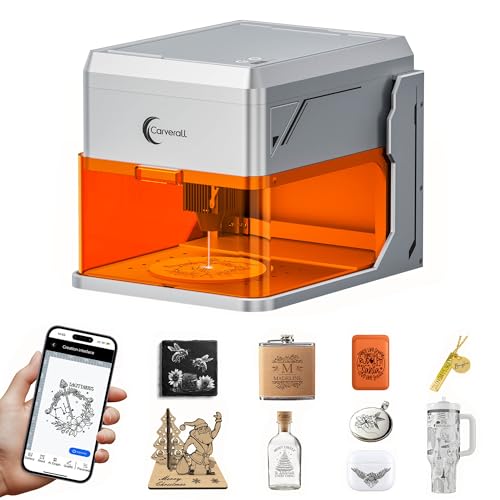
- Camera-assisted design placement
- Enclosed Class 1 construction
- Compact area for small crafts
Best For: Beginners making pet tags and small personalized projects
Best for Large Beginner Projects

- Spacious 400 × 400mm work area
- Built-in touchscreen and AlgoOS
- 95% pre-assembled design
Best For: Beginners making signs, décor, and light batches
Best for Speed and Expansion

- Up to 30,000mm/min engraving speed
- 300 × 300mm work area
- LightBurn and LaserGRBL compatible
Best For: Hobbyists growing into advanced and small-business projects
Best with Extra Features

- Pre-assembled, lightweight desktop design
- Fine short-focus laser for detailed crafts
- 180 × 180 mm work area for small projects
Best For: Beginners, classrooms, and compact DIY workspaces
Best for Larger Projects

- Large 15.7 × 16.3-inch workspace
- Fast 10,000 mm/min operating speed
- Supports LightBurn, LaserGRBL, and SD-card work
Best For: Larger signs, batches, and versatile material projects
Best Smart Beginner Upgrade

- Quick assembly with free multi-device software
- Near-A4 workspace and one-touch focusing
- Offline control and upgradeable laser options
Best For: Beginners building toward frequent crafting or small-business jobs
Best for Guided Crafting – Carverall A1 Pro 5W
For shoppers seeking beginner-friendly laser engravers, the Carverall A1 Pro emphasizes guided setup and easy positioning. Its enclosed Class 1 design, built-in camera, material presets, and app-based controls help simplify small crafting projects.
Best For: Beginners making pet tags, jewelry blanks, bookmarks, and other compact crafts at home.
Pros:
- HD camera enables visual placement and 0.01mm positioning precision.
- Enclosed Class 1 design includes lid and tilt safety shutoffs.
- Includes CutLabX software, app control, offline TF-card jobs, and support for LightBurn and LaserGRBL.
- Verified 5.12–5.35W output, built-in air assist, and support for more than 150 materials.
Cons:
- The 3.94 × 3.94-inch work area is relatively small.
- Some capabilities, including bare-metal marking, require the optional IR head.
The A1 Pro is a strong choice when ease of alignment and enclosed operation matter more than a large work area. Its presets and camera-guided workflow make it especially approachable for first-time users.
Best for Large Beginner Projects – AlgoLaser MK3 8W
The AlgoLaser MK3 is one of the more accessible beginner-friendly laser engravers for users who want a generous work area without complicated setup. Its touchscreen, built-in AlgoOS, visual positioning, and pre-assembled frame reduce the need for a computer or extensive assembly.
Best For: New users creating signs, home décor, gifts, coasters, and light batch projects.
Pros:
- 400 × 400mm work area accommodates larger designs.
- 3.5-inch touchscreen supports sketching, typing, and importing without a PC.
- Ships 95% pre-assembled and includes a flip-down focus column.
- Offers material presets, Wi-Fi, USB, SD-card, app, LightBurn, and LaserGRBL support.
Cons:
- The open-frame format may require more workspace safety planning than an enclosed machine.
- Its larger footprint is less convenient for highly portable use.
Choose this model if you want beginner-friendly controls now but room to grow into larger projects. The touchscreen and broad connectivity options keep simple jobs easy while preserving more advanced workflows.
Best Portable Pick – LaserPecker LP1 Plus
For shoppers prioritizing portability, the LaserPecker LP1 Plus is a particularly simple option among beginner-friendly laser engravers. It is designed for quick, mobile use, with an adjustable stand, magnetic base, and app workflow for importing photos or doodles.
Best For: Beginners who want to personalize small non-metal items at home, outdoors, or while traveling.
Pros:
- Pocket-sized, lightweight design weighs 2.4 pounds.
- Can start engraving in under two minutes and run from a power bank.
- Adjustable stand supports 360° multi-angle engraving.
- App is designed for importing photos and doodles with minimal learning curve.
Cons:
- Metal engraving is not supported.
- Requires a precise 200mm lens-to-material distance.
- Its compact format is better suited to small items than large projects.
The LP1 Plus makes the most sense for users who value convenience and mobility over broad material compatibility or a large work area. Its quick-start design is well matched to casual personalization projects.
Best for Speed and Expansion – Twotrees TTS-55 Pro
The Twotrees TTS-55 Pro suits beginners who want a capable open-frame machine with room to explore more advanced settings. Its 300 × 300mm work area, wireless controls, offline engraving, and compatibility with LightBurn and LaserGRBL support a gradual learning path.
Best For: Hobbyists and small-business makers working on wood, leather, acrylic, paper, and selected metal projects.
Pros:
- 5.5W laser supports engraving and cutting, including up to 5mm plywood and 3mm acrylic according to the supplied specifications.
- Up to 30,000mm/min speed and 0.1mm engraving accuracy support detailed work.
- Includes air-assist support, red laser shielding, Wi-Fi, and TF-card offline engraving.
- Works with LaserGRBL and LightBurn across supported operating systems.
Cons:
- As a Class II open-frame machine, it requires careful safety practices and setup.
- Some features may be more involved for absolute beginners than touchscreen-based alternatives.
The TTS-55 Pro is a good fit if you expect your skills and projects to grow. It offers substantial speed and software flexibility, though its open-frame design makes safety preparation especially important.
Best Compact Starter – ACMER S1 6000mW Laser Engraver
The ACMER S1 is a practical pick among beginner-friendly laser engravers for shoppers who want quick setup and compact storage. It arrives 99% preassembled, includes beginner-friendly ACMER Studio software with AI design tools, and also works with LightBurn and LaserGRBL.
Best For: Beginners, home crafters, and small projects that need a portable machine with engraving and light cutting capability.
Pros:
- 99% preassembled, with a reportedly one-minute laser-head installation.
- AI-assisted ACMER Studio software can turn text prompts or photos into designs.
- Supports wood, bamboo, leather, acrylic, ceramics, and other listed materials.
- Compact 130 x 130mm work area and approximately 2kg build make it easy to store.
Cons:
- The 130 x 130mm work area is relatively small for larger projects.
- Its Class 4 laser certification means buyers should take laser-safety precautions.
- Cutting performance is best suited to thin plywood, MDF, and acrylic according to the supplied details.
The S1 stands out for approachable software, minimal assembly, and portability. Its small work area limits project size, but it is a convenient entry point for detailed desktop engraving and modest cutting tasks.
Best Enclosed Starter Kit – BlazeX M3 10W Laser Engraver
The BlazeX M3 is one of the more beginner-friendly laser engravers for buyers who want an enclosed setup and useful accessories included from the start. Its bundle includes a protective enclosure, honeycomb bed, goggles, tools, and 13 engraving materials, while compatibility with several software platforms keeps the workflow flexible.
Best For: Beginners and hobbyists who prioritize an enclosed, safety-focused starter bundle for desktop DIY projects.
Pros:
- 10W laser module and stated 0.01mm precision support detailed engraving.
- Protective enclosure, honeycomb bed, goggles, tools, and sample materials are included.
- Class 1 safety rating, lid and tilt sensors, fan exhaust, and automatic-stop protections are built in.
- Works with LightBurn, LaserGRBL, and CutLabX across Windows, macOS, iOS, and Android.
Cons:
- The included desktop-oriented design may not suit larger workpieces.
- Rotary, air-assist, and purifier capabilities require optional accessories.
- The feature-rich bundle may be more than a beginner needs for very simple engraving.
The M3 is a strong convenience-focused option because it combines an enclosure, starter materials, and safety features in one package. It is especially appealing when reducing setup friction matters more than maximizing workspace.
Best Large-Format Beginner Option – LONGER Ray5 5W Laser Engraver
The LONGER Ray5 is a suitable choice among beginner-friendly laser engravers for users who want more workspace and flexible operation. Its 400 x 400mm engraving area accommodates larger projects, while USB, TF card, Wi-Fi, and app connections support both connected and offline workflows.
Best For: Beginners and DIY users who need a spacious work area for wood, leather, acrylic, glass, and other listed materials.
Pros:
- Large 400 x 400mm work area supports substantially bigger projects than compact machines.
- 3.5-inch touch screen and offline usage options add operating flexibility.
- Supports USB, TF card, Wi-Fi, and app connections, plus LightBurn and LaserGRBL.
- Includes emergency shutdown, motion protection, overheating detection, covers, and goggles.
Cons:
- The larger footprint requires more workspace and storage room.
- At 5W, its cutting capability may be less suited to thicker materials than higher-power models.
- Assembly is required, although tools and detailed guides are supplied.
The Ray5 makes the most sense when project size is the deciding factor. Its broad connectivity and safety features are beginner-friendly, while the larger frame offers room to grow beyond small personalized items.
Best with Extra Features – Aufero Laser 1 5W
For shoppers seeking beginner-friendly laser engravers, the Aufero Laser 1 is a compact, pre-assembled option designed for quick setup and straightforward USB operation. Its 5W short-focus laser is suited to light engraving and cutting on common craft materials.
Best For: Beginners, classrooms, home workshops, and small DIY projects involving wood, leather, and acrylic.
Pros:
- Fully assembled and lightweight at 1.565 kg for easy placement.
- 5W short-focus laser produces a fine 0.12 × 0.15 mm spot.
- 180 × 180 mm work area fits many personalized gifts and craft projects.
- Includes safety protections and broad software compatibility.
Cons:
- The 7.1 × 7.1-inch work area is smaller than larger desktop machines.
- Its cutting capability is limited to lighter materials and projects.
This is a practical entry point if you value minimal assembly, a small footprint, and a simple learning path. Choose a larger or more powerful model if you expect to process bigger pieces or thicker materials regularly.
Best for Larger Projects – Creality Falcon 10W
The Creality Falcon 10W gives beginner-friendly laser engravers a larger working area and faster operating speed than compact starter machines. Its compressed-spot laser is built for detailed engraving and more substantial cutting across wood, acrylic, leather, fabrics, and other supported materials.
Best For: New users who want room for larger signs, batches, and versatile engraving projects.
Pros:
- 15.7 × 16.3-inch workspace accommodates larger materials.
- 10,000 mm/min speed supports efficient engraving.
- 0.06 × 0.06 mm compressed spot is designed for precise detail.
- Works with LightBurn and LaserGRBL, with SD-card offline operation.
Cons:
- The larger work area requires more dedicated workspace than compact models.
- Software compatibility details specify Windows versions for LightBurn.
Consider this Falcon when project size and throughput matter as much as ease of use. Its safety-focused acrylic filter and included goggles are useful additions, while the larger bed leaves more room to grow beyond small crafts.
Best Smart Beginner Upgrade – K15 Pro 10W
The K15 Pro stands out among beginner-friendly laser engravers for its guided software options, quick assembly, and wireless or offline controls. Its verified 10W diode module combines a near-A4 work area with one-touch focusing, making it approachable for both first projects and repeat crafting work.
Best For: Beginners who want guided controls, batch-friendly features, and a compact machine that can support a growing craft business.
Pros:
- Assembles in about three minutes with six screws and includes starter materials.
- Free CutLabX software supports computers, tablets, and phones, with AI design tools.
- 11.8 × 7.9-inch A4 work area fits most everyday craft projects.
- One-touch focus, offline TF-card operation, and optional upgrades add flexibility.
Cons:
- Some advanced capabilities require optional accessories or the 1W IR laser head.
- The compact A4 work area is not intended for very large projects.
- The feature-rich control system may take time to explore fully.
This is a strong choice if you want an easy starting workflow without quickly outgrowing the machine. Its cooling system, repeat-job features, support resources, and upgrade path make it especially appealing for frequent gifts or small-business production.
How We Picked the Best Beginner-Friendly Laser Engravers
We focused on practical features that matter most to first-time users: laser output, usable work area, setup requirements, control options, software compatibility, accuracy claims, and material support. We also considered conveniences such as cameras, touchscreens, app control, offline operation, adjustable stands, and pre-assembled designs.
Power ratings are useful, but they do not tell the whole story. A well-supported 5W machine may be easier to learn on than a more powerful model with complicated software or limited documentation. Likewise, advertised cutting performance varies with material, thickness, number of passes, focus, and air assistance.
Quick Comparison
| Best For | What to Look For |
|---|---|
| Small crafts and gifts | Compact design, simple controls, and an adjustable stand |
| General beginner projects | 5W to 8W output, dependable software, and a practical work area |
| Larger signs and batches | Near-A4 or 400 × 400mm workspace and sturdy framing |
| More cutting capability | 10W output, accurate focusing, and suitable ventilation |
| Easy positioning | Camera alignment, touchscreen controls, or app support |
Key Buying Factors for Beginner-Friendly Laser Engravers
Laser Power and Materials
For engraving wood, leather, paper, and coated items, 5W can be sufficient. An 8W or 10W diode generally offers more flexibility for thicker wood and faster work, although it still is not a universal cutter. Glass and bare metal often require marking compounds, coatings, or a different laser type.
Workspace and Machine Size
Measure your available table space before buying. Small machines suit ornaments, tags, and personalized gifts, while 400 × 400mm or near-A4 work areas are better for signs and larger panels. Leave room for ventilation, cable routing, and safe material handling.
Software and Controls
Beginners benefit from clear focusing procedures, familiar design-file support, and software with straightforward power and speed settings. Touchscreens and offline controls are useful when you do not want to keep a computer connected, while camera or app features can simplify placement and alignment.
Safety and Ventilation
Never operate an open-frame laser unattended. Use appropriate eye protection, keep the machine away from children and flammable materials, and provide effective ventilation or an enclosure suited to the smoke produced. Confirm the included safety features and local requirements before operating.
Who Should Buy Which Beginner-Friendly Laser Engravers?
Choose a compact or adjustable-stand model if you have limited space or mainly create small gifts. A 5W machine is a sensible starting point for straightforward engraving and learning basic settings. Move to an 8W model if you want a larger work area and more cutting flexibility without jumping to the most powerful options.
A 10W engraver is the better choice for users planning frequent wood projects, larger signs, or faster production. Look for camera alignment if accurate placement matters, and prioritize a touchscreen or offline workflow if you want to work without a permanently connected computer. Whichever model you choose, start with scrap material, record successful settings, and expand gradually into new materials.