If you need a compact system that can handle more than one screen, the right mini PC makes all the difference. The best models for multi-monitor use balance display outputs, processor headroom, and reliable connectivity.
Below, we focus on mini desktop computers for multiple monitors that are practical for work, home offices, trading desks, and light creative tasks in 2026.
Best 10 Mini Desktop Computers for Multiple Monitors Picks for 2026
Quad-Display Power for Multitaskers
Glorlin Ryzen 7 8745HS Mini PC

- Supports up to four 4K displays
- Ryzen 7 8745HS with Radeon 780M
- 16GB DDR5, 1TB SSD, dual 2.5G LAN
Best For: multi-monitor productivity, coding, trading, and light gaming
Triple-Monitor Value Pick

- Triple 4K display support
- Intel i5-12600H with 16GB RAM
- WiFi 6, Bluetooth 5.2, 1Gbps LAN
Best For: triple-monitor offices, split-screen work, and everyday multitasking
Budget Dual-Display Office Choice
KAMRUI AK1PLUS Dual 4K Mini PC

- Dual HDMI 2.0 with two 4K@60Hz displays
- 12GB RAM and 256GB SSD
- Low 28W power use with Wake-on-LAN
Best For: budget offices, study desks, and light everyday multitasking
Compact Workstation for Triple Screens
ACEMAGIC K1 Ryzen 7 7730U Mini PC

- Triple 4K@60Hz display support
- Ryzen 7 7730U with Radeon graphics
- 16GB RAM and 1TB SSD included
Best For: three-monitor workstations, light creative tasks, and compact media setups
Budget Dual-Monitor Starter

- Dual HDMI 2.0 outputs for 2x 4K@60Hz displays
- Intel N95 with 8GB RAM and 256GB SSD
- WiFi 5, Bluetooth 5.0, Gigabit Ethernet
Best For: Affordable dual-monitor use for office, browsing, and streaming
Refurbished Business Dual Display
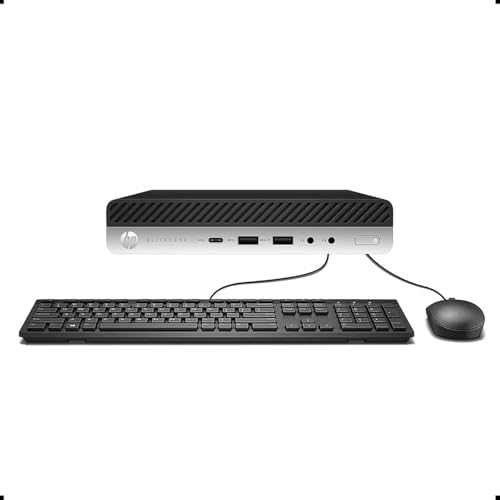
- 16GB DDR4 RAM with 256GB SSD
- 2 DisplayPort ports plus Type-C for dual monitors
- Windows 11 Pro and Intel i5-6500
Best For: Renewed business users who need reliable dual-monitor productivity
Triple-Display Value Pick

- Triple display support via dual HDMI plus USB-C
- 16GB RAM and 512GB NVMe SSD
- WiFi 6, Bluetooth 5.3, Gigabit Ethernet
Best For: Home office multitaskers needing three-screen support and upgrade room
Balanced Triple-Screen Workhorse
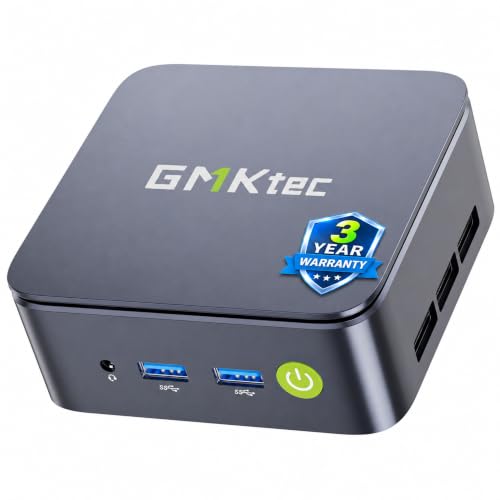
- Triple 4K display output
- Ryzen 5 3500U with Vega 8 graphics
- 16GB RAM and 512GB SSD included
Best For: Office multitasking, trading, and triple-monitor setups
Best Simple Pick

- Triple 4K display support
- 16GB DDR4 and 512GB NVMe SSD
- WiFi 6 and Bluetooth 5.3
Best For: Compact home office setups with three monitors
Quad-Display Power for Multitaskers – Glorlin Ryzen 7 8745HS Mini PC
If you want mini desktop computers for multiple monitors, this Glorlin model is built for serious screen real estate. Its Ryzen 7 8745HS processor, Radeon 780M graphics, and support for up to four 4K displays make it a strong pick for coding, trading, office work, or a compact home server.
Best For: Users who need four-monitor support, fast multitasking, and a compact PC for work or light gaming.
Pros:
- Supports up to four 4K displays through HDMI, DisplayPort, and dual USB-C connections.
- Ryzen 7 8745HS with 8 cores and 16 threads handles demanding everyday workloads smoothly.
- Radeon 780M graphics are suitable for 4K playback, media work, and casual gaming.
- Includes 16GB DDR5 RAM, 1TB SSD, dual 2.5G LAN, WiFi 6, and Bluetooth 5.3.
Cons:
- Ships with a single 16GB memory stick, so dual-channel performance may require an upgrade.
- Integrated graphics are solid for light gaming, but not a substitute for a discrete GPU.
Overall, this is one of the more capable mini desktop computers for multiple monitors if your priority is productivity and flexible connectivity. The combination of quad-display support and fast Ryzen hardware makes it especially appealing for busy workstations.
Triple-Monitor Value Pick – ACEMAGIC K1 12600H Mini PC
This ACEMAGIC K1 is a practical choice among mini desktop computers for multiple monitors when you want strong everyday performance without overcomplicating the setup. The Intel 12600H processor, 16GB RAM, and support for three simultaneous 4K displays make it a flexible fit for home offices, split-screen work, and light content creation.
Best For: People who want triple-monitor support and a balanced Windows 11 Pro mini PC for work and play.
Pros:
- Supports three simultaneous 4K displays through HDMI, DisplayPort, and Type-C.
- Intel i5-12600H offers 12 cores and 16 threads for smooth multitasking.
- 16GB DDR4 RAM and a 512GB SSD provide a responsive daily-use setup.
- WiFi 6, Bluetooth 5.2, and 1Gbps LAN cover modern connectivity needs.
Cons:
- Comes with a 512GB SSD, which may fill up quickly for large media libraries.
- Storage expansion is flexible, but adding a 2.5-inch drive requires a separate purchase.
For buyers who need a reliable multi-monitor desktop in a small footprint, this model hits a strong middle ground. It offers enough power for everyday productivity while keeping the setup simple and quiet.
Budget Dual-Display Office Choice – KAMRUI AK1PLUS Dual 4K Mini PC
If you need mini desktop computers for multiple monitors on a tighter budget, the KAMRUI AK1PLUS is an easy, low-power option. It supports dual 4K displays, has 12GB of RAM, and is designed for everyday tasks like browsing, video calls, spreadsheets, and office work.
Best For: Budget-conscious buyers who want a compact dual-monitor PC for home, business, or study use.
Pros:
- Dual HDMI 2.0 outputs support two 4K@60Hz displays at the same time.
- 12GB RAM and a 256GB SSD are enough for basic multitasking and quick boot-ups.
- Very low 28W power consumption makes it efficient for all-day use.
- Includes useful business features like Auto Power On, RTC Wake, and Wake-on-LAN.
Cons:
- Intel N5030 is suited to everyday computing, not heavy workloads.
- Maximum RAM is limited to 16GB, so long-term headroom is modest.
This is a sensible pick if you mainly want dual-screen productivity without paying for excess performance. It is not a powerhouse, but it does the basics well and keeps energy use low.
Compact Workstation for Triple Screens – ACEMAGIC K1 Ryzen 7 7730U Mini PC
For buyers comparing mini desktop computers for multiple monitors, this ACEMAGIC K1 stands out with triple 4K support and a stronger Ryzen 7 processor. It is aimed at users who want a small workstation for business tasks, creative work, spreadsheet-heavy setups, or a compact media center.
Best For: Users who want a Ryzen-powered mini PC for three monitors, multitasking, and light creative work.
Pros:
- Triple 4K@60Hz display support is built in for multi-monitor workflows.
- Ryzen 7 7730U with Radeon graphics is suited to office work, editing, and 1080p gaming.
- Comes with 16GB RAM and a 1TB SSD for a strong out-of-box setup.
- Dual-vent cooling helps maintain performance under a 15–28W TDP range.
Cons:
- Integrated graphics are fine for light gaming, but not ideal for demanding 3D tasks.
- The product notes emphasize HDMI and do not spell out every display connection in the same detail as some rivals.
This model is a good fit if you want a more capable mini PC for a three-monitor desk without moving up to a full tower. It balances storage, memory, and display support in a clean, compact package.
Budget Dual-Monitor Starter – GMKtec G3 S Mini PC
If you want mini desktop computers for multiple monitors without spending much, the GMKtec G3 S is a simple, low-power option built around Intel N95. Its dual HDMI 2.0 outputs let you run two 4K@60Hz displays, while the 8GB RAM and 256GB SSD help keep everyday browsing, office work, and streaming responsive.
Best For: Basic home office users, students, and anyone who needs an affordable dual-monitor mini PC for routine tasks.
Pros:
- Dual HDMI 2.0 ports support two 4K@60Hz monitors
- 8GB DDR4 RAM and 256GB M.2 SSD for everyday multitasking
- WiFi 5, Bluetooth 5.0, and Gigabit Ethernet for flexible connectivity
- Compact mini PC design with VESA mount included
Cons:
- 8GB RAM max may be limiting for heavier multitasking
- Best suited to office, browsing, and media use rather than demanding workloads
For a compact setup centered on two monitors, this model covers the essentials well and keeps the footprint small. It is a practical pick when your priority is dual-display support and simple day-to-day performance rather than high-end power.
Refurbished Business Dual Display – HP EliteDesk 800 G3 Mini
Among mini desktop computers for multiple monitors, the HP EliteDesk 800 G3 stands out if you want a business-style setup with stronger memory and proven hardware. Its 16GB DDR4 RAM, 256GB SSD, and dual display support make it a practical fit for multitasking across two monitors in a home or office workspace.
Best For: Users who want a renewed business mini desktop with better multitasking headroom and dual-monitor support.
Pros:
- 6th Gen Intel Core i5-6500 with Intel HD Graphics 530
- 16GB DDR4 RAM for smoother multitasking
- 2 DisplayPort outputs plus 1 Type-C port for two-monitor setups
- Windows 11 Pro included for a modern work environment
Cons:
- Refurbished unit rather than new hardware
- Storage is limited to 256GB SSD
This is a sensible choice if your priority is dependable day-to-day productivity on a dual-monitor desk. The combination of business-class design, stronger RAM, and multiple video outputs makes it an easy fit for routine office workflows.
Triple-Display Value Pick – Getorli Ryzen 5 Mini PC
If you need mini desktop computers for multiple monitors with more flexibility, the Getorli Mini PC is built for a triple-display setup. Dual HDMI ports plus a full-function USB-C port support up to three screens, and the Ryzen 5 3501U, 16GB RAM, and 512GB NVMe SSD give it a stronger everyday multitasking foundation.
Best For: Home office users and multitaskers who want room for three displays and more storage headroom.
Pros:
- Supports up to three displays through dual HDMI and USB-C
- 16GB DDR4 RAM with 512GB PCIe 3.0 NVMe SSD
- Upgradable to 32GB RAM and up to 2TB SSD, plus 2.5-inch HDD support
- WiFi 6, Bluetooth 5.3, and Gigabit Ethernet for modern connectivity
Cons:
- Best described for everyday computing and light gaming, not heavy workloads
- Compact size may still require external accessories for a full workstation setup
For a multi-screen desk, this model offers the most display flexibility of the group. It is a good fit if you want a compact machine that can handle a broader home office layout while still leaving upgrade room for later.
Budget Dual-Display Starter – Bmax B1 Plus Mini PC for Basic Work
If you want mini desktop computers for multiple monitors without spending much, the Bmax B1 Plus is a practical entry-level option. Its Intel Celeron J3355, 6GB RAM, and 128GB onboard storage are aimed at everyday tasks like browsing, documents, and light office work, while dual HDMI support lets you run two 4K displays at once.
Best For: Home office users, students, and light multitaskers who need a low-cost dual-monitor setup.
Pros:
- Dual HDMI output supports two monitors at 4K 60Hz.
- Compact 4.2 x 4.1 x 1.4-inch body with VESA bracket for behind-monitor mounting.
- M.2 expansion support for adding more storage later.
- Includes WiFi, Bluetooth 5.0, and Gigabit Ethernet for flexible connectivity.
Cons:
- Celeron J3355 is suited to basic productivity rather than heavy workloads.
- 6GB RAM and 128GB storage are modest compared with higher-end mini PCs.
For a simple two-screen workstation, this model covers the essentials: dual displays, quiet operation, and easy expansion. It is best viewed as a budget mini PC for light daily use rather than a demanding multitasking machine.
Balanced Triple-Screen Workhorse – GMKtec G10 Ryzen Mini PC
The GMKtec G10 is a strong fit if you need mini desktop computers for multiple monitors and want more headroom for multitasking. Its Ryzen 5 3500U, 16GB DDR4, and 512GB SSD give it a much more capable feel for office work, media playback, and light gaming, while the triple 4K display output is useful for multi-window workflows.
Best For: Productive users who want a compact triple-monitor desktop for office tasks, trading, or media-heavy work.
Pros:
- Triple-display support via HDMI 2.1 TMDS, DisplayPort 1.4, and USB-C.
- Ryzen 5 3500U with Radeon Vega 8 graphics is designed for balanced performance.
- 16GB dual-channel RAM and 512GB PCIe SSD come preinstalled.
- 2.5GbE LAN adds fast wired networking for office or server-style use.
Cons:
- Not positioned as a full gaming PC for demanding modern titles.
- Triple-display capability is most useful if your workflow actually needs the extra screens.
This model stands out for giving you more display flexibility than basic dual-output mini PCs, along with stronger multitasking hardware. It is a well-rounded choice when your desktop needs include multiple monitors, fast storage, and better networking.
Best Simple Pick – Glorlin Ryzen 5 Mini PC
The Glorlin mini PC is a compelling option for mini desktop computers for multiple monitors, especially if you want three-screen support in a compact box. With a Ryzen 5 3501U, 16GB DDR4 RAM, and a 512GB NVMe SSD, it is built for smooth everyday computing, browser-heavy work, and general home office productivity.
Best For: Home office users and multitaskers who want a compact triple-display desktop with modern connectivity.
Pros:
- Supports three 4K displays through two HDMI ports plus a Type-C 3.2 video connection.
- 16GB DDR4 RAM and 512GB NVMe SSD help with multitasking and fast load times.
- WiFi 6 and Bluetooth 5.3 provide updated wireless connectivity.
- Compact, quiet design with multiple USB ports for accessories.
Cons:
- Ryzen 5 3501U is aimed at everyday productivity, not heavy creative workloads.
- Its value depends on whether you will actually use the three-display output.
For shoppers who want a small, quiet desktop with strong multitasking basics and triple-monitor support, this Glorlin model is easy to justify. It offers a practical mix of modern ports, ample memory, and space-saving design.
How We Picked the Best Mini Desktop Computers for Multiple Monitors
For Mini Desktop Computers for Multiple Monitors, we prioritized display support first: number of video outputs, maximum resolution, and whether the system can run dual, triple, or four screens at once. We also weighed CPU class, integrated graphics capability, RAM capacity, SSD size, wireless and Ethernet options, and the overall fit for productivity workloads.
Quick Comparison
The strongest options are the Ryzen 7 and Core i7/Core i5-based mini PCs for demanding multi-screen work, especially if you want smoother window management or 4K output. Midrange Ryzen 5 and Intel U-series systems are a smart fit for office apps, browsing, dashboards, and media. Entry-level N-series and Celeron models can support extra displays, but they are best for lighter use.
Key Buying Factors for Mini Desktop Computers for Multiple Monitors
Display Outputs and Resolution
Check both the count and type of ports. HDMI, DisplayPort, USB4, and USB-C with video output matter more than raw specs if you need a practical multi-monitor setup. If you plan to run 4K panels, confirm the unit explicitly supports the refresh rate and number of screens you want.
Processor and Graphics Headroom
More displays mean more system overhead. For everyday office multitasking, efficient midrange chips are usually enough. For heavier spreadsheets, browser tabs, data tools, or content work, choose a faster Ryzen 5/7 or Intel 12th-gen-class processor with stronger integrated graphics.
Memory and Storage
At least 16GB of RAM is the safest starting point for a smooth multi-monitor experience. A 512GB SSD is a good baseline, while 1TB is better if you keep large files locally or want room for apps and updates.
Connectivity and Expansion
Dual Ethernet, WiFi 6, and USB4 can make setup easier and more flexible. If you expect to expand later, look for M.2 storage support or an extra drive bay.
Who Should Buy Which Mini Desktop Computers for Multiple Monitors?
If you want the best overall performance for demanding multi-screen productivity, pick a higher-end Ryzen 7 or Intel 12th-gen mini PC. If you want a balanced everyday system for office work and home use, a Ryzen 5 model is usually the sweet spot. If your budget is tight and your workload is basic, an N95, N5030, or Celeron-based unit can still handle a dual-display setup without overpaying.
In short, choose based on your monitor count, resolution needs, and workload intensity rather than size alone. That approach will get you the best long-term value from a compact desktop.