Mini desktops are a smart fit for students who need a dependable computer without sacrificing valuable desk space. They can handle online classes, assignments, research, streaming, and light multitasking in a compact footprint.
In this roundup, we focus on practical choices that make sense for dorm rooms, shared apartments, and home study setups, with attention to performance, connectivity, and overall value.
Best 10 Mini Desktop Computers for Students Picks for 2026
Reliable Refurbished Value

- Core i5-9500 with 8GB RAM for everyday coursework
- 250GB SSD and Windows 11 Pro for quick startup
- Compact, low-power Micro design fits small spaces
Best For: Students who want a space-saving refurbished desktop for school and daily use
Budget Multitasking Choice

- 12GB RAM and 256GB SSD for everyday student tasks
- Dual 4K HDMI outputs support two-monitor study setups
- Expandable storage up to 4TB total
Best For: Students seeking an affordable mini PC for classes and light multitasking
High-Performance Pick
Lenovo ThinkCentre neo 50q Gen 4
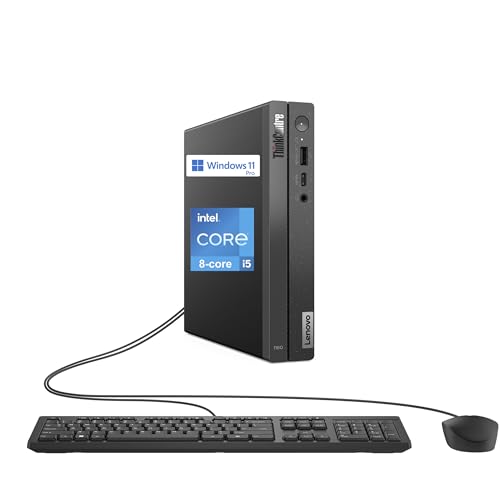
- 13th Gen Core i5-13420H for stronger school performance
- 16GB RAM and 512GB SSD for multitasking
- Up to 64GB RAM and 4TB SSD for future upgrades
Best For: Students who need extra speed for research, projects, and heavy multitasking
Budget-Friendly Triple-Display Mini PC
Glorlin Ryzen 5 Mini PC with Triple Display Support

- Ryzen 5 3501U handles browsing, office work, and video calls.
- 8GB RAM and 256GB SSD deliver quick startup and smooth basics.
- Triple-display support helps with multitasking on a student desk.
Best For: students who need a compact desktop for schoolwork and light streaming
Reliable Refurbished Student Workhorse
Dell OptiPlex 3070 Micro with 16GB RAM
- Intel i5-9500 delivers solid everyday multitasking performance.
- 16GB RAM and 500GB SSD provide speed and plenty of storage.
- Windows 11 Pro and wireless support make setup easy.
Best For: students who want a compact desktop with stronger multitasking and storage
Entry-Level Dual-Display Study Mini PC
GMKtec G3S N95 Mini PC with Dual 4K HDMI

- Intel N95 is suited to routine school and home tasks.
- 8GB RAM and 256GB SSD keep basics responsive.
- Dual HDMI 2.0 supports two 4K displays at 60Hz.
Best For: students looking for an affordable compact PC for homework and streaming
Space-Saving Office Pick
Lenovo ThinkCentre M720Q Mini PC
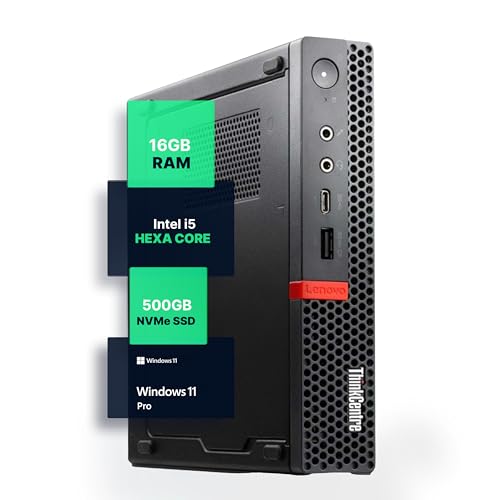
- Compact micro desktop for tight spaces
- 16GB RAM + 500GB NVMe for quick daily work
- Windows 11 Pro with WiFi and Bluetooth
Best For: Students needing a compact, dependable study PC
Quiet 4K Ready Pick

- Ultra-compact design with quiet operation
- Triple 4K support and plenty of modern ports
- 16GB DDR5 RAM with WiFi 6 and Bluetooth 5.2
Best For: Students who want a small, modern desktop for study and multitasking
Budget Everyday Performer

- Affordable mini PC for routine student tasks
- Dual 4K support and useful connectivity
- Expandable storage up to 4TB
Best For: Budget-minded students needing a basic study and media PC
Student-Friendly Upgrade Pick – Intel 6500Y Mini PC with 16GB RAM
If you want mini desktop computers for students that can handle classes, research, streaming, and everyday schoolwork without taking up much room, this compact Windows 11 Home mini PC is a practical option. The Intel Pentium Gold 6500Y, 16GB dual-channel RAM, and 256GB NVMe SSD are aimed at smooth daily use, with room to expand later if your workload grows.
Best For: Students who need a compact, upgradeable PC for online classes, note-taking, and everyday multitasking.
Pros:
- 16GB dual-channel RAM and 256GB NVMe SSD provide responsive everyday performance.
- Dual SSD slots and up to 32GB RAM support future upgrades.
- Triple 4K display support can help with research and multitasking setups.
- Compact size and included VESA mount work well in dorm rooms or tight desks.
Cons:
- Processor is built for daily efficiency, not heavy creative or gaming loads.
- Storage starts at 256GB, so larger media or project libraries may need expansion.
This is a sensible pick if you want a small student PC that starts ready for school tasks and leaves room to grow. It focuses on convenience, stable connectivity, and easy expansion rather than raw power.
Reliable Refurbished Value – Dell OptiPlex 3070 Micro
For students comparing mini desktop computers for students on a budget, this renewed Dell OptiPlex 3070 Micro offers a straightforward balance of compact size and dependable everyday performance. With an Intel Core i5-9500, 8GB RAM, and 250GB SSD, it is built for web browsing, assignments, and routine productivity in a space-saving format.
Best For: Students who want a compact, business-style desktop for coursework and everyday multitasking.
Pros:
- Intel Core i5-9500 delivers solid everyday productivity performance.
- 8GB RAM and 250GB SSD support quick boot times and responsive use.
- Windows 11 Pro adds business-friendly features and security.
- Micro design and low power usage suit dorms and small study spaces.
Cons:
- Renewed unit may not appeal to buyers who want a brand-new system.
- Storage is modest if you keep many large files locally.
This is a practical choice if you value proven hardware and a compact footprint over flashy specs. It should feel comfortable for schoolwork, general browsing, and everyday productivity.
Budget Multitasking Choice – KAMRUI AK1PLUS Mini PC
This KAMRUI AK1PLUS is a good fit if you need mini desktop computers for students that keep online classes, browsing, and basic multitasking moving smoothly. The Intel N5030 processor, 12GB RAM, and 256GB SSD give it a stronger everyday profile than entry-level basics, while dual 4K display support helps with split-screen study workflows.
Best For: Students who want an affordable mini PC for online learning, browsing, and light multitasking.
Pros:
- Intel N5030 and 12GB RAM handle everyday school tasks and video calls.
- Dual 4K HDMI outputs support two-monitor setups for studying.
- Expandable storage options can reach up to 4TB total.
- Compact, quiet design works well in bedrooms or dorm desks.
Cons:
- Designed for everyday computing, not demanding workloads.
- Base storage is only 256GB before expansion.
For students who mainly need a compact machine for class, research, and document work, this model covers the basics well. Its upgrade paths and small footprint make it easy to adapt as storage needs increase.
High-Performance Pick – Lenovo ThinkCentre neo 50q Gen 4
If you want mini desktop computers for students that can handle heavier coursework, this Lenovo ThinkCentre neo 50q Gen 4 brings more headroom than basic mini PCs. Its 13th Gen Intel Core i5-13420H, 16GB RAM, and 512GB SSD make it a strong choice for multitasking, research, and more demanding academic workloads in a compact desktop form.
Best For: Students who need a fast mini desktop for demanding school projects and heavy multitasking.
Pros:
- 13th Gen Core i5-13420H offers stronger performance than low-power mini PC chips.
- 16GB RAM and 512GB SSD provide a solid starting point for school use.
- Up to 64GB RAM and 4TB SSD support substantial future expansion.
- WiFi 6, Bluetooth 5.3, USB-C, and dual display outputs add modern convenience.
Cons:
- More powerful than many students need for basic note-taking or browsing.
- Likely a less budget-focused option than entry-level mini PCs.
This is the strongest performance-oriented choice in the group, especially if school tasks go beyond the basics. It pairs compact size with upgrade flexibility, making it a better long-term buy for demanding users.
Budget-Friendly Triple-Display Mini PC – Glorlin Ryzen 5 Mini PC with Triple Display Support
If you want mini desktop computers for students that can handle everyday schoolwork without taking up much space, the Glorlin Mini PC is a practical pick. Its Ryzen 5 processor, 8GB of RAM, and 256GB SSD are a solid fit for web browsing, documents, video calls, and light streaming.
Best For: Students who need a compact desktop for school tasks, online classes, and a tidy study setup.
Pros:
- Ryzen 5 3501U processor is built for everyday tasks like browsing, office work, and video calls.
- 8GB DDR4 RAM and 256GB SSD help with fast startup and smooth basic use.
- Supports dual or triple displays through HDMI and USB-C for better multitasking.
- WiFi 6, Bluetooth 5.3, Ethernet, and multiple USB ports make device connections easy.
Cons:
- 8GB RAM is fine for basics, but heavy multitasking may call for an upgrade.
- Storage starts at 256GB, which may feel limited for large media libraries.
Overall, this Glorlin model is a straightforward student desktop that emphasizes space savings and everyday responsiveness. Its triple-display support is a nice bonus for anyone who likes keeping assignments, browser tabs, and notes open at once.
Reliable Refurbished Student Workhorse – Dell OptiPlex 3070 Micro with 16GB RAM
For students comparing mini desktop computers for students, the Dell Optiplex 3070 Micro stands out as a dependable space-saver. With an Intel i5-9500, 16GB of RAM, and a 500GB SSD, it is set up for smooth multitasking, quick loading, and everyday productivity.
Best For: Students who want a compact desktop with stronger multitasking and more storage.
Pros:
- Intel Core i5-9500 hexacore processor supports everyday multitasking and productivity.
- 16GB RAM and 500GB SSD offer fast response times and generous storage.
- Windows 11 Pro is pre-installed for a ready-to-use setup.
- WiFi and Bluetooth adapter included for convenient wireless connectivity.
Cons:
- As a renewed system, condition can vary compared with a brand-new PC.
- No display or upgrade extras are called out in the supplied details.
This Dell micro PC is a strong choice if you want more headroom for school apps, tabs, and files than entry-level minis typically offer. Its quiet, low-power design also suits dorm rooms and shared study spaces.
Entry-Level Dual-Display Study Mini PC – GMKtec G3S N95 Mini PC with Dual 4K HDMI
If you need mini desktop computers for students that keep costs and desk clutter down, the GMKtec G3S is designed for routine school and home use. Its Intel N95 processor, 8GB RAM, and 256GB SSD are aimed at browsing, office apps, streaming, and other everyday tasks.
Best For: Students looking for an affordable compact PC for homework, streaming, and basic multitasking.
Pros:
- Intel N95 processor is built for routine tasks, office work, and home entertainment.
- 8GB RAM and 256GB M.2 SSD support quicker startup and smoother basic multitasking.
- Dual HDMI 2.0 ports support two 4K@60Hz displays for multitasking.
- WiFi 5, Bluetooth 5.0, and Gigabit Ethernet provide flexible connectivity options.
Cons:
- 8GB RAM and 256GB storage are best suited to light-to-moderate workloads.
- WiFi 5 is less current than newer wireless standards.
As an entry-level mini PC, the G3S focuses on the basics without wasting desk space. It is a sensible fit for classwork, video playback, and a simple dual-monitor setup.
Space-Saving Office Pick – Lenovo ThinkCentre M720Q Mini PC
If you’re comparing mini desktop computers for students, the Lenovo ThinkCentre M720Q is a practical choice for a small dorm desk or shared study area. It pairs a compact footprint with Windows 11 Pro, 16GB of RAM, and a 500GB NVMe SSD, so everyday work like browsing, note-taking, and multitasking should feel responsive.
Best For: Students who want a space-saving desktop for coursework, browsing, and light productivity.
Pros:
- Compact micro design fits neatly on crowded desks
- 16GB DDR4 RAM and 500GB NVMe SSD support fast everyday use
- Windows 11 Pro and WiFi/Bluetooth add useful flexibility
- Quiet, energy-efficient build suits home or study spaces
Cons:
- Renewed condition may not suit buyers who want brand-new hardware
- Integrated graphics limit it to basic visual tasks
This is a sensible pick if you want dependable performance without taking up much room. It looks best as an everyday student machine rather than a computer for heavy creative workloads or gaming.
Quiet 4K Ready Pick – HP Pro 400 G9 Mini PC
Among mini desktop computers for students, the HP Pro 400 G9 stands out for its ultra-compact size and triple 4K display support. It comes with 16GB DDR5 RAM, a 256GB PCIe SSD, Windows 11 Pro, and modern connectivity like WiFi 6 and Bluetooth 5.2, making it a tidy fit for a study setup that also needs room for monitors and accessories.
Best For: Students who want a compact, quiet desktop with modern ports and multi-display support.
Pros:
- Very small footprint and under-3-pound design
- Triple 4K display support adds flexibility for multitasking
- 16GB DDR5 RAM and PCIe SSD help with responsive everyday use
- WiFi 6, Bluetooth 5.2, and USB-C improve connectivity
Cons:
- 256GB SSD may feel limited for users with lots of files
- Celeron processor is aimed at basic computing, not demanding workloads
For students focused on coursework, video calls, and organized multitasking, this HP offers a polished setup in a very small chassis. Its stronger value is convenience and connectivity rather than raw performance.
Budget Everyday Performer – Bmax B3 Pro Mini PC
If you’re shopping mini desktop computers for students on a practical budget, the Bmax B3 Pro focuses on the basics that matter most. It includes an Intel N4500 processor, 8GB of RAM, a 256GB M.2 SSD, and Windows 11 Pro, plus dual 4K display support for a simple home or dorm workstation.
Best For: Students who want an affordable mini PC for schoolwork, streaming, and everyday tasks.
Pros:
- Compact mini PC design is easy to place in tight spaces
- Dual 4K display support helps with productivity
- Expandable storage design offers room to grow
- WiFi 5, Bluetooth 5.0, and Gigabit Ethernet cover key connections
Cons:
- 8GB RAM is modest for heavier multitasking
- N4500 processor is best suited to routine tasks
This model makes sense when the priority is simple, reliable computing rather than high-end speed. It should handle homework, web use, and media playback well, especially if you value expansion options and a small footprint.
How We Picked the Best Mini Desktop Computers for Students
For Mini Desktop Computers for Students, the goal is simple: enough performance for schoolwork now, plus enough headroom to stay useful through several semesters. We favored systems with modern Intel Core or efficient entry-level processors, at least 8GB of RAM, SSD storage, and wireless connectivity that works well in dorms or campus housing.
We also looked for practical details that matter day to day, including quiet cooling, multiple display outputs, small footprints, and upgrade-friendly designs where available. For students on a tighter budget, lower-power chips can still be a good fit if the workload is mostly browsing, documents, video calls, and streaming.
Quick Comparison
Broadly speaking, the lineup breaks into three groups. Entry-level mini PCs are best for basic classwork and media. Midrange models offer a better balance of speed and longevity for heavier multitasking. Higher-end options with newer Intel Core or Ryzen processors are the strongest choice for students who keep many tabs open, run creative apps, or want a machine that can last through more demanding coursework.
Match the Tier to the Task
If your day is mostly Google Docs, Canvas, Zoom, and web research, an efficient entry-level model can be enough. If you edit photos, use spreadsheets heavily, or multitask across several apps, step up to a Core i5 or comparable system with more memory and a larger SSD.
Key Buying Factors for Mini Desktop Computers for Students
Processor: Look for a processor that fits the workload, not just the price. Efficient N-series chips are fine for basics, while Intel Core i5 and similar processors are better for long-term flexibility.
Memory: 8GB is the minimum we’d recommend, but 16GB is the safer choice for students who multitask or keep laptops and browsers open all day.
Storage: A 256GB SSD works for light use, but 512GB gives more breathing room for files, downloads, and school software.
Connectivity: Reliable WiFi, Bluetooth, and enough USB ports matter for headsets, printers, webcams, and external drives. HDMI or DisplayPort support is useful if you plan to use one or two monitors.
Upgrades and noise: A mini desktop is most valuable when it can grow with you. Models with accessible RAM or storage upgrades are ideal, and quieter systems are better for dorms and shared study spaces.
Who Should Buy Which Mini Desktop Computers for Students?
Budget-focused students: Choose an entry-level mini PC for coursework, video calls, and browsing.
Everyday multitaskers: Pick a midrange system with 16GB of RAM and a larger SSD for smoother performance over time.
Power users and future-proof buyers: Go with a newer Core i5 or higher-spec mini desktop if you want better speed, stronger multitasking, and more longevity.
Shared rooms and small desks: Prioritize compact, quiet models with wireless connectivity and dual-display support.
Used this way, mini desktops can be one of the best-value computing options for students who want a tidy workspace and dependable everyday performance.