Choosing the right compact PC can make a big difference when your workflow depends on fast exports, smooth timelines, and plenty of connected displays. The best mini desktop computers for content creators balance CPU power, graphics capability, memory, storage, and cooling in a small footprint.
Below, we focus on the features that matter most for editing, design, streaming, and everyday creative work so you can match the right machine to your projects and budget.
Best 10 Mini Desktop Computers for Content Creators Picks for 2026
Creator Performance Pick
ACEMAGICIAN S3A Ryzen 7 Mini PC for Creation

- Ryzen 7 H 255 with 8 cores/16 threads
- Radeon 780M graphics for creative tasks
- Triple 4K display support and quiet modes
Best For: Creators wanting strong multitasking and flexible monitor support
High-End Editing Pick
GEEKOM IT13 i9 Mini PC with 32GB/2TB
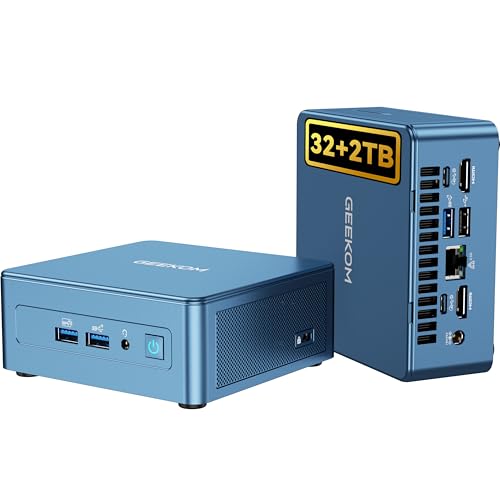
- Intel i9-13900H with up to 5.4GHz
- 32GB RAM and 2TB Gen4 SSD included
- Dual USB4 plus quad-display support
Best For: Power users and creators needing maximum speed and display flexibility
Budget Multi-Screen Pick

- Core i7-1185G7 with 35W power use
- 16GB RAM and 1TB NVMe SSD
- Triple 4K display support and 2.5Gbps LAN
Best For: Value-focused creators needing multi-monitor support
Creator Power Pick
GEEKOM A7 Mini PC, Ryzen 9 7940HS, 32GB RAM

- Ryzen 9 7940HS with desktop-class performance
- 32GB DDR5 RAM and 2TB PCIe 4.0 SSD
- Radeon 780M, USB4, dual HDMI, WiFi 6E
Best For: Creators needing strong integrated graphics and fast storage in a compact desktop
Budget Business Creator Choice
HP Mini PC, Intel Core i5-9500T

- Core i5-9500T for reliable multitasking
- 16GB RAM with fast NVMe SSD
- Dual DisplayPort and broad USB connectivity
Best For: Light content work, conferencing, and dual-monitor productivity
Compact Productivity Performer
Lenovo ThinkCentre neo 50q Gen 5 1L Mini Desktop

- Core 5 210H with 8 cores and 12 threads
- 512GB PCIe 4.0 SSD and Windows 11 Pro
- Dual 4K support with HDMI 2.1 and DisplayPort 1.4b
Best For: Tiny Windows 11 Pro setups, dual displays, and everyday productivity
Editor’s Pick
HP Pro Mini 400 G9 for Heavy Creative Workflows

- 12-core Core i7-12700T processor
- 32GB RAM and 1TB NVMe SSD
- Dual DP 1.4 plus HDMI 2.1 output
Best For: Creators needing a compact, multitasking-focused Windows 11 Pro mini PC
Best Connectivity
ASUS NUC 13 Pro Slim with 4K Quad Display Support

- Core i5-13420H with up to 4.6GHz boost
- 2 HDMI 2.1 and 2 Thunderbolt ports
- Wi-Fi 6E, Bluetooth 5.3, expandable internals
Best For: Creators who need a compact mini PC with flexible multi-monitor support
Quietest Pick
ASUS NUC 13 Pro Slim for Low-Noise Studios

- Ultra-quiet mini PC design
- 512GB SSD with 16GB RAM installed
- 2 HDMI 2.1 and 2 Thunderbolt ports
Best For: Creators who want a quiet, compact Windows 11 Pro workstation
Creator Performance Pick – ACEMAGICIAN S3A Ryzen 7 Mini PC for Creation
For buyers comparing mini desktop computers for content creators, the ACEMAGICIAN S3A focuses on fast multitasking, flexible display output, and quiet operation in a compact chassis. Its Ryzen 7 H 255 and Radeon 780M graphics are built to handle editing, streaming, programming, and other demanding creative work without taking over your desk.
Best For: Content creators who want strong everyday performance, triple-monitor support, and quiet operation in a small desktop.
Pros:
- Ryzen 7 H 255 with 8 cores and 16 threads for multitasking and creative workloads
- Radeon 780M graphics for content creation, photo/video editing, 3D design, and casual gaming
- Supports up to three 4K displays through HDMI, DP, and USB4
- Three power modes plus dual-fan cooling for quieter or higher-performance use
Cons:
- Comes with 16GB RAM and 512GB SSD, so heavy libraries may need expansion
- Performance mode may raise noise and power use versus Silent Mode
This is a practical creator-friendly mini PC if you want a balanced mix of speed, display flexibility, and upgrade room. The expandable storage and adjustable performance modes make it easy to adapt to different workflows.
High-End Editing Pick – GEEKOM IT13 i9 Mini PC with 32GB/2TB
Among mini desktop computers for content creators, the GEEKOM IT13 stands out for its high-core-count Intel i9 processor, large memory capacity, and extensive display support. It is aimed at users who want a fast, upgrade-friendly mini PC for video editing, multitasking, and other heavy workloads.
Best For: Creators and power users who want a fast, expandable mini PC with premium connectivity and multi-display support.
Pros:
- Intel i9-13900H with 14 cores and up to 5.4GHz for demanding work
- 32GB RAM and 2TB PCIe Gen4 SSD included for fast storage and multitasking
- Dual USB4 and dual HDMI support up to two 8K plus two 4K displays
- Tri-band WiFi 6E and 2.5G Ethernet for fast networking
Cons:
- High-spec design may be more than casual users need
- Heavier focus on performance can mean a higher upfront investment
If your workflow involves large projects, multiple screens, and frequent multitasking, this model offers a lot of headroom. The upgrade options and strong connectivity make it a versatile long-term workstation.
Business Creator Pick – HP Elite Mini 800 G9 for Pro Workflows
For creators who split time between office work and production tasks, the HP Elite Mini 800 G9 is a compact Windows 11 Pro desktop with strong business hardware. It pairs a 14th Gen Core i5 processor, DDR5 memory, and quad-display support, making it a practical fit for desk setups that need speed and organization.
Best For: Professionals and creators who want a compact business mini PC with lots of ports and four-monitor support.
Pros:
- 14th Gen Intel Core i5-14500 with 14-core hybrid architecture
- 16GB DDR5 RAM and 512GB PCIe NVMe SSD for responsive everyday work
- Supports up to four monitors through DisplayPort, HDMI, and USB-C
- Windows 11 Pro plus keyboard and mouse included out of the box
Cons:
- Integrated Intel UHD 770 graphics are geared more toward productivity than heavy creative rendering
- 512GB storage may fill quickly for large media projects
This is a strong choice if your content workflow overlaps with spreadsheets, planning, meetings, and general office use. The included accessories and enterprise-focused features make setup simple and reliable.
Budget Multi-Screen Pick – GMKtec M2 Pro S i7 Mini PC
If you want mini desktop computers for content creators without stepping into a premium price bracket, the GMKtec M2 Pro S offers a practical mix of multitasking, triple-display support, and storage expansion. Its Intel Core i7 chip and 16GB of RAM are positioned for everyday creative work, light editing, and general productivity.
Best For: Budget-minded creators who want triple 4K display support and solid everyday performance.
Pros:
- Intel Core i7-1185G7 with up to 4.8GHz and 35W power draw
- 16GB DDR4 RAM and 1TB NVMe SSD with upgrade options
- Supports three independent 4K displays via dual HDMI and USB-C
- 2.5Gbps LAN, WiFi 6, and Bluetooth 5.2 for flexible connectivity
Cons:
- Older 11th Gen processor is not as strong as newer high-end creator chips
- DDR4 memory is less current than DDR5-based alternatives
This mini PC makes the most sense when value and monitor support matter more than top-tier rendering power. It gives creators a usable foundation for editing, streaming, and multitasking with room to expand later.
Creator Power Pick – GEEKOM A7 Mini PC, Ryzen 9 7940HS, 32GB RAM
If you want one of the strongest mini desktop computers for content creators, the GEEKOM A7 is built for demanding creative work. Its Ryzen 9 7940HS, 32GB of DDR5 memory, and 2TB PCIe 4.0 SSD give you the speed and storage headroom needed for editing, design, and heavy multitasking.
Best For: Creators who need strong integrated graphics, fast storage, and a compact desktop for editing, design, and multitasking.
Pros:
- Ryzen 9 7940HS offers desktop-class performance for content creation and video editing.
- 32GB DDR5 RAM and 2TB SSD support large projects and fast file access.
- Radeon 780M graphics help with photo editing, graphic design, and 4K video workflows.
- USB4, dual HDMI, WiFi 6E, and 2.5GbE LAN make it flexible for modern creator setups.
Cons:
- Integrated graphics are strong for a mini PC, but still not a substitute for a discrete GPU.
- Premium hardware and cooling-focused design may push it beyond basic office budgets.
This model stands out when you need creator-ready performance in a compact chassis with quiet, stable operation. It is a particularly strong fit for users who want a capable all-rounder for editing and multitasking without moving to a full tower.
Budget Business Creator Choice – HP Mini PC, Intel Core i5-9500T
This HP mini desktop is a practical option for mini desktop computers for content creators who care more about everyday responsiveness than high-end media horsepower. The Core i5-9500T, 16GB of RAM, and NVMe SSD make it a sensible fit for writing, light editing, conferencing, and general creative workloads.
Best For: Creators who need a compact, business-class PC for light content work, multitasking, and dual-monitor productivity.
Pros:
- Intel Core i5-9500T delivers solid multitasking performance for productivity and content creation tasks.
- 16GB DDR4 RAM and 256GB NVMe SSD provide responsive everyday speed.
- Dual DisplayPort outputs support multi-monitor workflows.
- Extensive USB and network connectivity helps it fit into a desk setup easily.
Cons:
- 256GB storage is modest if you keep large media libraries locally.
- Integrated Intel UHD Graphics 630 is best suited to light creative work rather than demanding editing.
Overall, this HP is best viewed as a reliable compact workstation for creators with simpler needs. It brings enterprise-style stability and useful display connectivity, but it is not aimed at heavy visual production.
Compact Productivity Performer – Lenovo ThinkCentre neo 50q Gen 5 1L Mini Desktop
The Lenovo ThinkCentre neo 50q Gen 5 is a compact choice for creators who want fast everyday performance in a very small footprint. With an Intel Core 5 210H, 8GB of DDR5 memory, and a 512GB PCIe 4.0 SSD, it is tuned for smooth multitasking, office apps, and light content creation in a tidy workspace.
Best For: Creators and professionals who want a tiny Windows 11 Pro desktop for multitasking, dual displays, and general productivity.
Pros:
- Intel Core 5 210H provides 8-core, 12-thread performance for responsive multitasking.
- 512GB PCIe 4.0 NVMe SSD supports fast boots and quick application launches.
- Dual 4K display support with HDMI 2.1 and DisplayPort 1.4b helps streamline workflows.
- Wi-Fi 6E, Bluetooth 5.3, and Windows 11 Pro make it well suited to modern work environments.
Cons:
- 8GB RAM may feel limited for heavier creative projects or larger multitasking loads.
- Integrated graphics and small form factor make it better for productivity than demanding media editing.
This Lenovo is a strong fit when space is tight and reliability matters more than raw creator horsepower. It is a practical mini desktop for people who want clean dual-display productivity and fast everyday responsiveness.
Editor’s Pick – HP Pro Mini 400 G9 for Heavy Creative Workflows
If you want mini desktop computers for content creators that can handle real multitasking, the HP Pro Mini 400 G9 is the strongest business-style option here. Its 12th Gen Core i7-12700T, 32GB of RAM, and 1TB NVMe SSD make it a solid fit for editing, file management, video calls, and general production work in a very small footprint.
Best For: Creators who want a compact, Windows 11 Pro mini PC with strong multitasking headroom and lots of wired connectivity.
Pros:
- Intel Core i7-12700T with 12 cores and 20 threads for strong multitasking
- 32GB DDR4 RAM and 1TB PCIe NVMe SSD for fast loading and ample space
- Dual DisplayPort 1.4 plus HDMI 2.1 support for multi-monitor setups
- Very compact body with VESA mounting support for space-saving setups
Cons:
- Integrated graphics, so it is not aimed at GPU-heavy creative workloads
- Business-first design may feel less creator-focused than some alternatives
- VESA mount sold separately
This is the best choice if your workflow values CPU strength, storage, and connectivity more than graphics horsepower. It is especially practical for creators who work across multiple apps and screens.
Best Connectivity – ASUS NUC 13 Pro Slim with 4K Quad Display Support
For mini desktop computers for content creators who care about display flexibility, the ASUS NUC 13 Pro Slim stands out with 2 HDMI 2.1 ports and 2 Thunderbolt ports. The Core i5-13420H should handle everyday productivity and creative workflows smoothly, while the expandable memory and storage make it easier to tailor the machine to your needs later.
Best For: Creators who want a compact mini PC with strong multi-display support, modern wireless features, and upgrade flexibility.
Pros:
- Intel Core i5-13420H with boost speeds up to 4.6GHz
- 2 HDMI 2.1 ports plus 2 Thunderbolt ports for flexible monitor setups
- Wi-Fi 6E and Bluetooth 5.3 for modern wireless connectivity
- Expandable DDR4 memory and PCIe NVMe SSD storage for future upgrades
Cons:
- Ships with 16GB RAM and 256GB SSD, which may feel light for larger media files
- Microsoft 365 for the web is browser-based rather than full desktop Office
- Integrated graphics limit it to lighter creative workloads
This model is a smart pick if your workspace depends on multiple monitors and up-to-date connectivity. It is flexible enough for creator desk setups that prioritize compact size and easy expansion.
Quietest Pick – ASUS NUC 13 Pro Slim for Low-Noise Studios
If you need mini desktop computers for content creators that stay unobtrusive on a desk, this ASUS NUC 13 Pro Slim is a strong choice. It uses the same Core i5-13420H platform and multi-display connectivity as the other NUC here, but adds a 512GB SSD and ultra-quiet operation for a cleaner, less distracting workspace.
Best For: Creators who want a small, quiet Windows 11 Pro mini PC for editing, browsing, and multi-monitor productivity.
Pros:
- Ultra-quiet design that suits shared spaces and studio desks
- 512GB PCIe SSD offers more room than the 256GB configuration
- 2 HDMI 2.1 ports and 2 Thunderbolt ports support versatile display setups
- Wi-Fi 6E and Bluetooth 5.3 provide modern wireless connectivity
Cons:
- Still uses integrated graphics, so it is not built for heavy GPU work
- 16GB RAM may be limiting for larger creative projects out of the box
- Storage and memory are expandable, but the stock setup is midrange
This is the better fit if noise matters as much as size. It delivers the same practical connectivity profile in a more workspace-friendly package with a larger starting SSD.
How We Picked the Best Mini Desktop Computers for Content Creators
We focused on compact systems that can handle real creative workloads, not just basic office tasks. That means prioritizing modern multi-core processors, enough RAM for multitasking, fast NVMe storage, and display outputs that support a practical creator setup. We also considered thermals, upgrade potential, and whether the mini PC offers the ports needed for external drives, color-critical monitors, audio gear, and peripherals.
Quick Comparison: What Matters Most
For photo work and lighter 1080p editing, a capable midrange CPU with 16GB of RAM is often enough. For 4K timelines, motion graphics, large Adobe projects, or heavier multitasking, 32GB of RAM and a stronger processor are much easier to live with. Integrated graphics have improved a lot, especially on newer Ryzen and Intel H-series chips, but creators who rely on GPU acceleration should still pay close attention to graphics performance, cooling, and sustained power limits.
Key Buying Factors for Mini Desktop Computers for Content Creators
Processor and Sustained Performance
Short burst speeds look good on paper, but creative work needs sustained performance. Look for modern H-series or higher-wattage CPUs when possible, especially if you edit video, batch export images, or run multiple creative apps at once.
Memory and Storage
16GB RAM is the practical floor for most creators, while 32GB is the safer choice for serious editing and multitasking. A 512GB SSD is workable, but 1TB or more is better once you start storing caches, project files, and raw media locally.
Graphics and Display Support
Many mini PCs rely on integrated graphics, which can still be excellent for content creation if the CPU and memory are strong. Also check for the number and type of display outputs. Dual- or quad-monitor support can make a huge difference when you’re editing, color grading, or managing timelines and reference materials.
Ports, Networking, and Expansion
Creators often need high-speed USB ports, HDMI or DisplayPort, Thunderbolt or USB4 for fast external storage, and reliable Wi-Fi or Ethernet. If you move large files frequently, fast wired connections and easy expansion matter as much as raw CPU specs.
Who Should Buy Which Mini Desktop Computers for Content Creators?
If you want the best overall balance for Mini Desktop Computers for Content Creators, choose a newer high-performance model with 32GB RAM and a 1TB to 2TB SSD. If your work is mostly social content, streaming, design, or light editing, a well-equipped 16GB system can deliver great value. Budget-focused buyers should look for a reliable business-class mini PC with solid connectivity, while power users should prioritize the fastest sustained CPU, the most memory, and the best multi-display support they can afford.
In short, buy for your actual workflow: everyday creators should optimize for value and connectivity, while heavy editors should spend more on memory, storage, and processor headroom to keep the system responsive over time.