Choosing the right printer can save time, reduce wasted labels, and keep every shipment moving smoothly.
Below, we focus on the best options for small businesses, home offices, and high-volume sellers who need reliable 4×6 shipping labels.
Best 10 Thermal Label Printers for 4×6 Shipping Labels Picks for 2026
Commercial-Grade Desktop Pick
Rollo USB Shipping Label Printer

- 150mm/s direct thermal printing
- Windows and Mac compatible
- Works with major shipping platforms
Best For: Small businesses needing a fast USB shipping-label printer
Label Supply Value Pack
MFLABEL 4x6 Thermal Shipping Labels

- 2 rolls of 250 perforated labels
- Water, oil, and scratch resistant
- Compatible with many direct thermal printers
Best For: Bulk shipping-label supplies for direct thermal printers
Portable Wireless Runner
KNAON Bluetooth 4x6 Shipping Printer

- Bluetooth and USB connectivity
- Works with phones, computers, and Chromebook
- Up to 180 mm/s print speed
Best For: Users wanting a compact wireless shipping-label printer
Wired Commercial Workhorse
Westinghouse USB 4x6 Shipping Printer

- Up to 6 inches per second
- Windows, macOS, and Linux compatible
- Supports rolls or fanfold 4x6 labels
Best For: High-volume shipping stations needing a wired printer
Compact Storage Pick
D450BT 4x6 Thermal Shipping Label Printer

- Built-in bin stores up to 250 4x6 labels
- Bluetooth and USB for broad device support
- 203 DPI, no ink or toner, up to 72 labels/min
Best For: Shippers who want a compact printer with built-in label storage
Simple Starter Pick
Mvgges Bluetooth 4x6 Shipping Label Printer

- Bluetooth for Android/iOS and USB for Mac/Windows
- 203 DPI thermal printing with no ink or toner
- Up to 160mm/s speed and support for major platforms
Best For: Budget-minded sellers who want easy shipping-label printing
Wireless All-Rounder
Nelko Bluetooth 4x6 Shipping Label Printer

- Bluetooth via NELKO app plus USB support
- 203 DPI, up to 72 sheets per minute
- Works with fanfold and roll labels from 1.54 to 4.1 inches
Best For: Sellers who want flexible connectivity and compact shipping-label printing
Portable Bluetooth Labeler
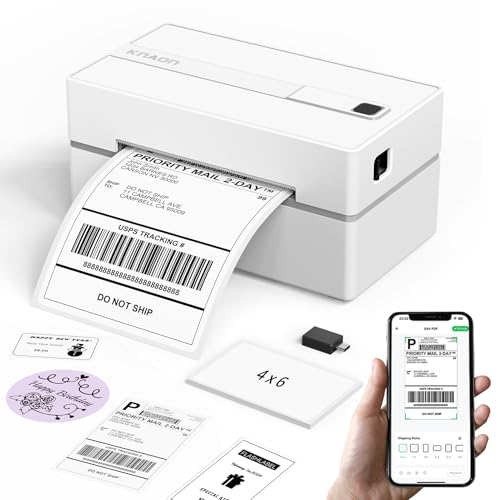
- Works with FlashLabel Pro for wireless label printing
- Supports USB on Windows, macOS, ChromeOS, and Linux
- Includes lots of templates, icons, and fonts
Best For: Sellers who need a compact app-driven printer with desktop backup support
Wireless Budget Pick

- 203 DPI direct thermal printing with no ink needed
- Supports fanfold and roll labels up to 4.1 inches wide
- Works with many marketplaces and shipping platforms
Best For: Sellers who want a dependable, easy-to-use label printer for routine shipping
High-Speed Dual-Connect
NULLTONEX 4x6 Shipping Printer

- Bluetooth and USB connectivity for flexible workflows
- Prints at up to 150 mm/s with 203 DPI output
- Works with 4x6 labels and other wide label sizes
Best For: Busy sellers who need fast shipping labels with app-based design tools
Commercial-Grade Desktop Pick – Rollo USB Shipping Label Printer
If you want thermal label printers for 4×6 shipping labels that can keep up with a busy workflow, the Rollo USB is built for straightforward desktop use. It supports Windows and Mac, prints at 150mm/s with 203 DPI, and works with major shipping platforms and marketplaces, making it a practical choice for e-commerce shipping, warehouse labels, and custom sticker jobs.
Best For: Small businesses that want a fast USB thermal printer for shipping labels, barcode labels, and custom stickers.
Pros:
- Prints 4×6 shipping labels at up to one label per second.
- Compatible with Windows and Mac, plus major platforms like Shopify, ShipStation, USPS, UPS, Amazon, Etsy, and eBay.
- Supports labels from 1.57″ to 4.1″ wide, so it can handle more than just shipping.
- Direct thermal printing means no ink or toner to replace.
Cons:
- USB-only connection, so it is not a wireless option.
- Best suited to desktop/laptop setups rather than mobile printing.
The Rollo USB is a dependable pick if you want a no-fuss printer that focuses on speed, compatibility, and everyday label output. It is especially appealing for sellers who need one printer that can cover shipping plus basic custom labeling.
Label Supply Value Pack – MFLABEL 4×6 Thermal Shipping Labels
When shopping for thermal label printers for 4×6 shipping labels, the labels you feed into the machine matter just as much as the printer. This MFLABEL pack gives you the standard 4×6 size with perforated edges, smudge-resistant direct thermal coating, and compatibility with popular thermal printers like Rollo and Zebra.
Best For: Sellers who need a reliable bulk label supply for direct thermal shipping workflows.
Pros:
- Standard 4×6 size with perforations for easy peel-and-stick use.
- Compatible with many direct thermal printers, including Rollo, Zebra, MUNBYN, and others.
- Resistant to water, oil, scratches, and smudging.
- Works well for Amazon, eBay, Etsy, Shopify, USPS, UPS, and FedEx shipping.
Cons:
- Not compatible with inkjet, laser, Dymo, or Brother printers.
- This is a label supply, not a printer.
This is a strong choice if you already own a thermal printer and want a durable, standard-size label roll that is easy to use in a shipping setup. The perforation and resistance features make it a practical upgrade for busy packing stations.
Portable Wireless Runner – KNAON Bluetooth 4×6 Shipping Printer
If you need thermal label printers for 4×6 shipping labels with more flexible setup options, the KNAON Y41BT adds Bluetooth plus USB support in a compact body. It works with iPhone, Android, Windows, Mac, Chromebook, and Linux, and it is designed for shipping labels, barcode labels, and other small thermal label jobs.
Best For: Sellers who want a compact thermal printer with Bluetooth and broad device support.
Pros:
- Bluetooth and USB connectivity options for different devices and workflows.
- Supports iPhone, Android, Windows, Mac, Chromebook, and Linux.
- Prints up to 180 mm/s and supports paper widths from 1.38 to 4.41 inches.
- Includes 3,000+ templates, 5,000+ icons, and 100+ fonts in the app.
Cons:
- Bluetooth setup requires the FlashLabel Pro app; devices cannot connect directly to Bluetooth.
- Mac users with M1/M2/M3/M4 processors must also use the app.
The KNAON stands out for flexibility more than simplicity, especially if you want wireless printing and template-driven label customization. It is a practical option for users who are comfortable working through the app-based setup.
Wired Commercial Workhorse – Westinghouse USB 4×6 Shipping Printer
For shoppers comparing thermal label printers for 4×6 shipping labels, the Westinghouse USB model is aimed at dependable desktop use. It supports Windows, macOS, and Linux, prints at up to 6 inches per second at 203 DPI, and works with fanfold labels or rolls for shipping, warehouse, and e-commerce tasks.
Best For: Businesses that want a durable USB/Ethernet label printer for high-volume shipping.
Pros:
- Fast output at up to 6 inches per second with 203 DPI print quality.
- Compatible with Windows, macOS, and Linux, plus ZPL software.
- Supports 4×6 labels in rolls or fanfold formats.
- Includes starter labels, label holder, USB flash drive, and cables in the box.
Cons:
- Not Bluetooth-capable.
- Ethernet and USB-C accessories may require separate purchases.
This Westinghouse printer is a solid fit for a fixed shipping station where speed, compatibility, and commercial-grade construction matter more than portability. The wired setup and included accessories make it a practical choice for routine package labeling.
Compact Storage Pick – D450BT 4×6 Thermal Shipping Label Printer
If you want thermal label printers for 4×6 shipping labels that save desk space, the D450BT is built around convenience. Its built-in label bin holds up to 250 4×6 labels, and it supports both Bluetooth and USB so you can print from mobile devices or desktops with less setup hassle.
Best For: Small businesses or home shippers who want a compact 4×6 label printer with built-in label storage and wide device compatibility.
Pros:
- Built-in paper bin holds internal rolls and helps reduce clutter.
- Supports Bluetooth plus USB for Android, iPhone, Windows, macOS, Linux, and ChromeOS.
- No ink or toner required, with 203 DPI printing and up to 72 labels per minute.
- Compatible with major shipping and selling platforms like USPS, UPS, Amazon, Shopify, Etsy, and more.
Cons:
- Maximum media width tops out at 4.6 inches, so it is focused on label work rather than larger formats.
- Bluetooth and software setup may still take a little time depending on your device.
The D450BT stands out if you value a tidy workspace and easy label storage as much as printing performance. It is a practical fit for regular shipping jobs where compact size and platform support matter.
Simple Starter Pick – Mvgges Bluetooth 4×6 Shipping Label Printer
For buyers comparing thermal label printers for 4×6 shipping labels on a tighter budget, the Mvgges model keeps the essentials simple. It prints via Bluetooth on Android and iOS, connects by USB to Windows and Mac, and focuses on straightforward shipping-label output without ink or toner.
Best For: Small online sellers and home offices that need a simple 4×6 thermal printer for shipping labels and basic fulfillment tasks.
Pros:
- Bluetooth printing for Android and iOS, plus USB support for Windows and Mac.
- 203 DPI thermal printing with no ink or toner needed.
- Fast output up to 160mm/s and support for labels from 1.37 to 4.1 inches wide.
- Works with major platforms like USPS, UPS, Etsy, eBay, Shopify, and PayPal.
Cons:
- Bluetooth is limited to Android and iOS, not Wi-Fi.
- Mac and PC use requires USB and driver/software setup.
This is a solid pick if you mainly need reliable label output and wide platform compatibility rather than advanced extras. The included test labels and accessories also make it easier to get started right away.
Wireless All-Rounder – Nelko Bluetooth 4×6 Shipping Label Printer
If you need thermal label printers for 4×6 shipping labels and want a well-rounded wireless option, the Nelko PL70E covers the basics well. It supports Bluetooth through the NELKO app for iOS, Android, and even Windows 7 or later, while USB is available for Windows, Mac, and ChromeOS.
Best For: Sellers who want a compact 4×6 thermal shipping printer with broad platform support and both Bluetooth and USB options.
Pros:
- Bluetooth printing through the NELKO app for mobile and supported Windows use.
- USB support for Windows, Mac, and ChromeOS.
- 203 DPI output with up to 72 sheets per minute and no ink or toner.
- Handles fanfold and roll labels from 1.54 to 4.1 inches wide.
Cons:
- Bluetooth printing depends on the app workflow rather than direct device pairing.
- Mac OS is USB only, not Bluetooth.
The Nelko is a practical all-around shipping label printer for users who want flexibility across devices and a compact footprint. It also includes helpful setup materials, which can reduce frustration for first-time buyers.
Portable Bluetooth Labeler – KNAON 4×6 Shipping Printer
If you want a flexible option among thermal label printers for 4×6 shipping labels, the KNAON model is built around app-based wireless printing with a strong focus on small-business convenience. It supports Bluetooth through the FlashLabel Pro app, plus USB printing for Windows, macOS, ChromeOS, and Linux, so it can fit both mobile and desktop workflows.
Best For: Sellers who want a compact shipping label printer with mobile app control and broad OS support.
Pros:
- Bluetooth printing through the FlashLabel Pro app for iPhone, Android, Windows, and Mac use
- USB support for macOS, Windows 7+, ChromeOS, and Linux
- Fast printing up to 180 mm/s with support for label widths up to 4.2 inches
- Includes 3,000+ templates, 5,000+ icons, and 100+ fonts in the app
Cons:
- Bluetooth does not connect directly on all devices; the app is required
- Users on ChromeOS need the FlashLabel extension for setup
- Best results depend on using the supported app workflow for shipping labels
Overall, the KNAON is a practical choice if you want a portable printer with lots of customization and straightforward platform support. Its strongest advantage is the mix of wireless convenience and USB fallback, which helps it adapt to different setups.
Wireless Budget Pick – JADENS 4×6 Thermal Printer
For buyers comparing thermal label printers for 4×6 shipping labels, the JADENS model stands out for simple wireless use and a no-ink direct thermal setup. It uses a Japanese thermal print head for 203 DPI output and supports both fanfold and roll labels, making it a practical fit for everyday shipping tasks.
Best For: Small businesses that want a straightforward Bluetooth and USB shipping printer with broad marketplace compatibility.
Pros:
- 203 DPI thermal printing with no ink or toner required
- Works with fanfold and roll labels from 1.57 to 4.1 inches wide
- Bluetooth printing for Windows 8+, plus app-based printing for Android and iOS
- USB support for Windows 7+ and Mac OS 10.9+
Cons:
- Phone printing requires the Jadens printer app instead of direct Bluetooth
- Label size calibration is needed when changing labels
- Wireless printing rules differ by device type, which may slow first-time setup
The JADENS is a solid everyday shipping printer if you value reliable output and broad service compatibility over advanced extras. It is especially appealing for sellers who want a simple, proven label workflow for online orders.
High-Speed Dual-Connect – NULLTONEX 4×6 Shipping Printer
If speed and flexibility matter, this thermal label printer for 4×6 shipping labels is designed to keep up with busy order days. The NULLTONEX model combines Bluetooth and USB connectivity, 203 DPI direct thermal printing, and up to 150 mm/s print speed, so it works well for small businesses that need fast, black-and-white shipping output.
Best For: High-volume sellers who want quick printing, app-based customization, and both wireless and wired connectivity.
Pros:
- Dual connectivity via Bluetooth and USB for phone, laptop, or PC use
- 203 DPI resolution with speeds up to 150 mm/s
- Supports 4×6 labels plus other sizes from 1.57 to 4.3 inches wide
- Includes 1,800+ templates, 300+ fonts, and offline template storage in the FlashLabel Pro app
Cons:
- Prints in black and white only
- Requires the FlashLabel Pro app for Bluetooth setup and editing
- Best suited to direct thermal label work rather than general-purpose printing
Overall, this is the most speed-focused option in the group, with enough compatibility and customization to handle a busy fulfillment routine. It makes the most sense for sellers who prioritize throughput and want a printer that can move easily between mobile and desktop use.
How We Picked the Best Thermal Label Printers for 4×6 Shipping Labels
We focused on real-world shipping use: print quality, setup ease, connection options, operating system support, and whether the printer handles common marketplace and carrier labels without fuss. For Thermal Label Printers for 4×6 Shipping Labels, consistency matters more than extra features, so we prioritized dependable output and broad compatibility.
Quick Comparison
USB models are usually best for desk-based users who want a simple, stable connection. Bluetooth models are a better fit for sellers who print from phones, tablets, or multiple devices. Built-in label-bin designs can help keep workspaces organized, while commercial-grade units tend to be the better choice for higher daily volume.
Key Buying Factors for Thermal Label Printers for 4×6 Shipping Labels
Compatibility
Make sure the printer works with your shipping platforms and devices. If you print from Shopify, Amazon, USPS, UPS, or FedEx, confirm support before buying. Also check whether you need Windows, Mac, Android, or iOS support.
Connection Type
USB printers are typically easiest for a single workstation. Bluetooth models add flexibility, especially for mobile workflows, but setup can vary by app and operating system.
Print Speed and Duty Cycle
If you ship occasionally, a standard desktop unit is usually enough. If you print labels every day, look for faster output and a design meant for frequent use.
Label Handling and Quality
Choose a printer that feeds labels cleanly and prints clear barcodes, addresses, and QR codes. Smudge-proof direct thermal output is important for labels that may be handled during transit.
Space and Workflow
Consider where the printer will live. Compact models are ideal for tight desks, while printers with built-in label storage can reduce clutter and make batch printing easier.
Who Should Buy Which Thermal Label Printers for 4×6 Shipping Labels?
If you want the most straightforward setup, a USB model is often the safest choice. If you ship from a phone or need more flexibility, a Bluetooth printer makes more sense. High-volume sellers should lean toward commercial-grade options, while smaller home-based businesses may prefer a compact, portable unit that is easy to move and store.
For buyers comparing Thermal Label Printers for 4×6 Shipping Labels, the best choice usually comes down to your device ecosystem, daily order volume, and how much convenience you want in your shipping workflow.