Choosing the right conference camera can make remote meetings feel far more natural. The best options now combine sharp video, intelligent framing, and built-in audio to keep speakers visible without constant manual adjustment.
This roundup focuses on practical AI conference cameras with auto framing for teams that want easier setup, better room coverage, and smoother collaboration in 2026.
Best 10 AI Conference Cameras with Auto Framing Picks for 2026
Halo VX10 All-in-One Room Bar
4K conference camera for bigger rooms

- AI auto framing for group meetings
- Presenter and speaker tracking built in
- 4-mic array with dual speakers
Best For: Medium and large rooms needing automatic framing and integrated audio
AVerMedia Mingle Bar
Wired 4K conferencing with autoframing
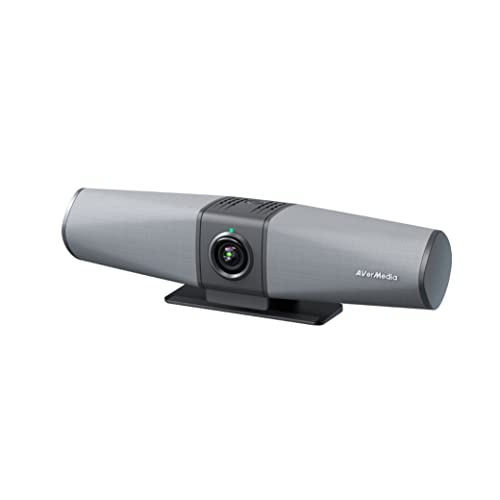
- One-cable Type-C connection
- 124° FoV with 4K UHD video
- AI noise cancellation and beamforming audio
Best For: Professional teams wanting reliable wired setup and room coverage
TONGVEO 3-in-1 4K Webcam
Compact auto-tracking meeting cam
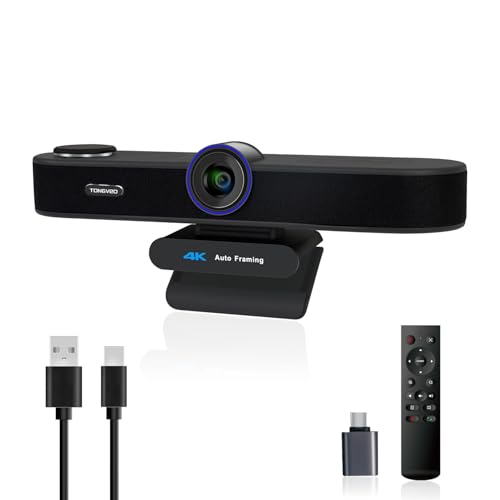
- AI auto framing with voice tracking
- Built-in dual mics and 3W speaker
- 5x digital zoom with adjustable FOV
Best For: Small rooms and desk setups needing simple all-in-one conferencing
Yealink UVC40 E2
Smart 4K room camera with speaker tracking

- Auto framing with speaker tracking
- 8-mic array with echo reduction
- Electric lens cap for privacy
Best For: Installed conference rooms needing automated framing and strong audio
AV Access Pick
4K Auto Framing and Presenter Tracking
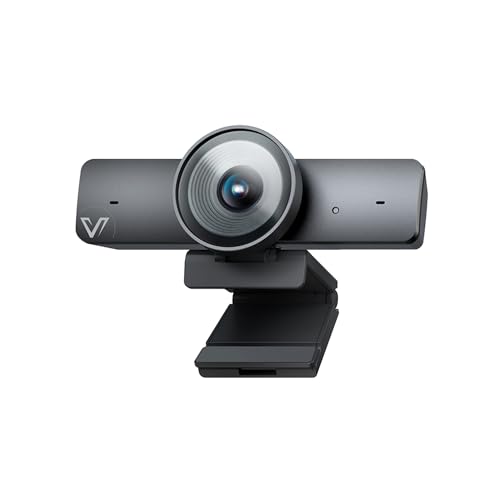
- 4K/30fps with 1/1.8" CMOS sensor
- AI auto framing, presenter tracking, Individuals Gallery
- 120° FOV, 5X digital zoom, dual mics
Best For: Teams wanting smart framing and wide room coverage
TOALLIN Choice
4K Video Bar with Auto-Framing and Speaker Tracking

- 4K webcam with built-in mic and speaker
- AI auto-framing and speaker-following VAD
- Remote and touch controls for AI modes
Best For: Small rooms that want an all-in-one USB video bar
NEARITY Recommendation
4K Auto Framing with 4-Mic Audio

- 4K UHD with 120° wide-angle lens
- Face and voice tracking auto framing
- 4 mics, speaker, and expansion mic support
Best For: Medium meeting rooms needing better audio and framing
Compact 4K Tracking Webcam
Innex C570 4K AI Tracking Webcam

- 4K video with 120° wide-angle coverage
- AI auto-framing and tracking keep speakers centered
- Remote control and dual noise-canceling mics
Best For: Small teams and desk-based calls needing simple AI framing
Panoramic Room Coverage Camera
IPEVO Totem 180 AI Auto-Framing Camera

- 180° full-room view with dual-lens video stitching
- AI Stage auto-frames one or multiple participants
- Two mics with noise reduction and 16 ft pickup
Best For: Small to medium meeting rooms and hybrid learning spaces
All-in-One Meeting Bar
Yealink UVC34 4K Auto Framing Camera

- 4K 120° camera with auto framing
- Built-in microphone and speaker simplify setup
- Low-light optimization and face enhancement
Best For: Dedicated PC meeting rooms needing an integrated USB solution
Halo VX10 All-in-One Room Bar – 4K conference camera for bigger rooms
If you need AI conference cameras with auto framing for a medium or large meeting space, this all-in-one system is built to keep groups visible without constant adjustments. It combines a 4K wide-angle camera, tracking features, microphones, and speakers in one USB device for simpler setup.
Best For: Medium to large conference rooms that need automatic group framing, speaker tracking, and integrated audio in one unit.
Pros:
- AI auto framing keeps multiple participants centered in real time.
- Presenter and speaker tracking is useful for presentations and training sessions.
- 120° wide-angle view with 5X optical zoom adds flexibility for room coverage.
- 4-mic array plus built-in dual speakers reduce extra audio hardware.
Cons:
- Designed primarily for larger rooms, so it may be more than small teams need.
- No image stabilization is listed in the supplied details.
This is a practical pick when you want a single device to handle video framing and room audio together. The plug-and-play USB design also makes it easier to deploy across common meeting platforms.
AVerMedia Mingle Bar – Wired 4K conferencing with autoframing
For buyers comparing AI conference cameras with auto framing, this AVerMedia unit stands out for its one-cable design and room-wide coverage. It is aimed at quick deployment in professional meeting spaces where wired reliability and clear pickup matter.
Best For: Teams that want a wired 4K conference camera with autoframing, built-in speakerphone features, and simple one-cable setup.
Pros:
- One Type-C cable connects the meeting essentials for faster setup.
- 124° field of view helps capture the room and whiteboard.
- AI noise cancellation, beamforming, and adaptive far-field audio support clearer calls.
- 4K UHD video with HDR, 3DNR, and AWB improves image quality in varied lighting.
Cons:
- Uses a wired connection, so it is less flexible than wireless options.
- The product notes do not emphasize strong digital zoom depth beyond the listed optical support.
This is a strong fit if you value dependable cabling and an all-in-one bar for business meetings. The combination of autoframing and room-focused audio makes it well suited to collaborative spaces.
TONGVEO 3-in-1 4K Webcam – Compact auto-tracking meeting cam
This TONGVEO model is a compact option among AI conference cameras with auto framing, especially if you want video, microphones, and speaker support in one USB webcam. It is designed for meetings, classes, streaming, and other PC or Mac uses where easy setup matters.
Best For: Small meeting rooms, desks, and hybrid users who want auto framing, voice tracking, and built-in audio in a single webcam.
Pros:
- AI auto framing centers attendees automatically within the field of view.
- Voice tracking follows the active speaker within about 3 seconds.
- 5x digital zoom and three adjustable FOV modes give useful framing control.
- Built-in dual mics and a 3W speaker reduce the need for extra audio gear.
Cons:
- Digital zoom is used rather than optical zoom.
- The compact design may be better suited to smaller spaces than larger conference rooms.
It is a flexible choice if you want an easy plug-and-play webcam with conferencing features built in. The privacy cover and broad platform compatibility add convenience for everyday use.
Yealink UVC40 E2 – Smart 4K room camera with speaker tracking
Among AI conference cameras with auto framing, the Yealink UVC40 E2 is built for rooms that need dependable video, audio pickup, and privacy features in one system. Its wide-angle 4K lens and automated framing tools are aimed at keeping meetings professional without extra manual control.
Best For: Conference rooms that need 4K video, auto framing, speaker tracking, and strong microphone coverage.
Pros:
- Ultra-HD 4K camera with a 120° field of view captures the whole room.
- Auto framing and speaker tracking help keep participants in focus.
- 8 microphone arrays provide noise cancellation and echo reduction.
- Electric lens cap adds automatic privacy protection when not in use.
Cons:
- Heavier, room-focused design is less suited to portable use.
- Connectivity and deployment are more oriented toward installed conference spaces than simple desktop setups.
This is a polished room-system option if you want camera automation plus clear audio in a permanent meeting setup. The integrated design and remote management support make it a solid choice for business deployments.
AV Access Pick – 4K Auto Framing and Presenter Tracking
If you want an AI conference camera with auto framing for a small meeting room or hybrid setup, the AV Access BizEye 90 is built around flexibility. Its 4K sensor, 120° wide-angle view, and AI modes like auto framing, presenter tracking, and Individuals Gallery help keep people visible without constant manual adjustment.
Best For: Teams that want a 4K USB conference camera with smart framing, gesture control, and room-friendly wide-angle coverage.
Pros:
- 1/1.8" CMOS sensor and 4K/30fps video for sharper meeting image quality
- AI auto framing, presenter tracking, and Individuals Gallery for up to 4 participants
- 120° wide-angle lens plus 5X digital zoom for flexible room coverage
- Dual noise-reducing mics and plug-and-play USB compatibility
Cons:
- Individuals Gallery is limited to up to 4 people
- Gesture control may require a firmware update on some units
Overall, this is a strong pick if you want more than basic auto framing and need smarter participant handling in a conference room webcam. It balances image quality, framing tools, and simple USB setup well for everyday meetings.
TOALLIN Choice – 4K Video Bar with Auto-Framing and Speaker Tracking
The TOALLIN Aione-Pro is an all-in-one AI conference camera with auto framing for teams that want video, audio, and speaker output in a single USB bar. Its 4K lens, auto-framing mode, and voice-activity speaker-following make it a practical option for compact meeting spaces where easy setup matters.
Best For: Small meeting rooms and home offices that need a 3-in-1 USB video bar with built-in mic and speaker.
Pros:
- 4K UHD camera with 1/3" CMOS sensor for 3840 x 2160 at 30fps
- AI auto-framing plus speaker-following mode driven by VAD
- Built-in 2-mic array and Hi-Fi speaker for all-in-one conferencing
- Remote control and touch button support for AI modes and flip functions
Cons:
- 5X digital zoom only works at 1080p and below
- 94° field of view is narrower than some room-focused alternatives
This video bar makes sense if you want an uncluttered desk or conference setup without separate speakers and microphones. The auto framing and speaker-tracking tools are useful for keeping calls centered and active, especially in smaller rooms.
NEARITY Recommendation – 4K Auto Framing with 4-Mic Audio
The NEARITY 120 Max is an AI conference camera with auto framing designed for rooms that need strong video coverage and better audio pickup. With 4K resolution, a 120° wide-angle lens, 5X digital zoom, and face-and-voice tracking, it is aimed at keeping meetings centered without repeated manual tweaks.
Best For: Medium-sized meeting rooms that need auto framing, wide coverage, and stronger built-in audio.
Pros:
- 4K UHD camera with 8MP CMOS sensor and 120° distortion-free view
- AI auto-framing with face and voice tracking to follow active speakers
- 4-mic array, full-duplex speaker, and included expansion mic support
- Plug-and-play setup with broad platform compatibility
Cons:
- WiFi adapter is sold separately
- Expansion mic is useful for larger rooms, but the core system is still room-size dependent
For teams that want a conferencing system instead of just a webcam, the 120 Max offers a solid mix of framing intelligence and room audio. It is especially appealing when you need a camera that can adapt automatically while still covering a wider meeting area.
Compact 4K Tracking Webcam – Innex C570 4K AI Tracking Webcam
If you want AI conference cameras with auto framing for a compact desk setup, the Innex C570 is built for keeping presenters centered while still showing a wide 120-degree view. Its 4K resolution, 5X digital zoom, and remote control make it a practical option for calls where you need a clear image and flexible framing without extra software.
Best For: Solo users or small teams who want a simple plug-and-play 4K webcam with AI tracking and remote-controlled framing.
Pros:
- 4K video with a 120-degree wide field of view for sharp, roomy coverage.
- AI auto-framing and tracking help keep people centered during meetings.
- Dual noise-canceling microphones support clearer voice pickup.
- Remote control adds easy access to zoom, light correction, and manual/auto mode.
Cons:
- Designed more like a webcam than a full-room conference bar.
- Digital zoom is 5X, so close-in detail is still limited by the camera setup.
- No image stabilization is listed in the supplied specs.
Overall, the C570 is a strong fit if you want a straightforward conference camera that combines wide-angle 4K video with useful AI framing and easy controls. It is best suited to desks, huddle spaces, and hybrid work calls where setup speed matters.
Panoramic Room Coverage Camera – IPEVO Totem 180 AI Auto-Framing Camera
The IPEVO Totem 180 is aimed at buyers comparing AI conference cameras with auto framing for small to medium meeting rooms. Its dual-lens design delivers a 180-degree full-room view, while the onboard AI Stage can automatically frame one person or multiple participants at the center of the image.
Best For: Small to medium meeting rooms that need full-room coverage plus automatic framing for hybrid meetings.
Pros:
- 180-degree full-room view helps capture everyone at the table.
- 120-degree small-group mode gives a more focused framing option.
- AI Stage automatically frames a person or multiple participants.
- Two omnidirectional mics include background noise reduction and up to 16 ft pickup.
Cons:
- It is larger in scope than a basic personal webcam.
- Best results are tied to meeting-room placement rather than casual desktop use.
- Requires USB-C/USB setup, so it is not a wireless solution.
For rooms that need broad coverage and smart framing, the Totem 180 offers a strong balance of panoramic video and AI-assisted composition. It is especially appealing for hybrid learning and meeting spaces where you want one camera to serve the whole table.
All-in-One Meeting Bar – Yealink UVC34 4K Auto Framing Camera
The Yealink UVC34 fits the AI conference cameras with auto framing category well if you want an all-in-one USB meeting device for PC calls. It combines a 120-degree wide-angle 4K camera, built-in microphone and speaker, and AI features like auto framing, face enhancement, and low-light optimization to keep participants visible in different lighting conditions.
Best For: PC meeting rooms that want an all-in-one 4K USB camera with speaker, mic, and automatic framing.
Pros:
- 4K video with a 120-degree wide-angle lens for meeting-room coverage.
- AI auto framing, face enhancement, and low-light optimization support better presentations.
- Built-in microphone and speaker reduce the need for separate peripherals.
- USB design makes it straightforward for Microsoft Teams and Zoom use.
Cons:
- Heavier and more all-in-one than a basic webcam.
- Exposure control is listed as manual in the supplied specs.
- It is designed for PC use, so compatibility is narrower than some cross-platform options.
The UVC34 is a practical choice when you want a single device to handle video and audio while automatically framing meeting participants. It makes the most sense for dedicated workspaces that need a tidy, integrated conferencing setup.
How We Picked These AI Conference Cameras with Auto Framing
We focused on cameras that solve common meeting-room problems: keeping people centered, covering wider spaces, and reducing the need for constant camera control. Priority went to models with reliable auto framing, strong resolution, useful audio features, and flexible connectivity for modern meeting spaces.
We also considered whether each option fits real-world use cases such as small huddle rooms, medium conference rooms, hybrid office setups, and all-in-one video bars.
Quick Comparison: What Matters Most
Before you buy, compare field of view, zoom capability, microphone quality, speaker quality, and how well the camera integrates with your meeting platform. Some AI Conference Cameras with Auto Framing are built for simple plug-and-play use, while others add presenter tracking, gesture control, or multi-person framing for larger rooms.
If your room is wide or deep, look for a broader lens and stronger tracking. If your team meets in smaller spaces, a compact USB model may be the better fit.
Key Buying Factors for AI Conference Cameras with Auto Framing
Framing and Tracking Quality
Auto framing should respond smoothly when people enter, leave, or shift seats. Presenter tracking is helpful for training rooms and demos, while group framing is more important for boardrooms and team meetings.
Video Resolution and Lens Coverage
4K is now common in this category, but resolution alone does not guarantee better meetings. Pay attention to lens width, digital zoom, and how much of the room the camera can actually capture without distortion.
Audio Features
Many buyers want an all-in-one setup, so built-in microphones and speakers can reduce cable clutter. For larger rooms, choose models with stronger noise reduction, echo cancellation, or microphone arrays.
Connectivity and Platform Compatibility
USB is the easiest choice for most offices, while networked or certified systems may be better for dedicated conference rooms. Check compatibility with Teams, Zoom, and your preferred conferencing tools before purchasing.
Who Should Buy Which AI Conference Cameras with Auto Framing?
If you want a simple setup for small to medium rooms, choose a USB all-in-one model with auto framing and built-in audio. If your meetings include frequent presentations, look for presenter tracking or gesture control. For larger rooms or more polished conference spaces, a wider-angle system with stronger microphone coverage and room-focused framing will usually deliver better results.
In short, the best AI Conference Cameras with Auto Framing are the ones that match your room size, meeting style, and setup preference. Prioritize the features you will actually use, not just the longest spec sheet.