The best streaming control panels for video editing put frequent commands, timelines, audio adjustments, and scene controls within easy reach. They can reduce mouse travel and make repetitive editing tasks faster and more consistent.
This roundup compares 10 options ranging from dedicated creative consoles to customizable LCD-key decks and hybrid video-production controllers. The right choice depends on your software, workflow, desk space, and need for physical dials or built-in connectivity.
Best 10 Streaming Control Panels for Video Editing Picks for 2026
Focused Creative Control

- 14 dedicated controls with dial, scroll, and D-pad
- Customizable application-specific workflow presets
- Compact wired controller for Windows and macOS
Best For: Editors seeking tactile control for video, photo, and color workflows
Macro Studio Deck

- 10 LCD keys, four RGB knobs, and touch bar
- Multi-step macros and independent scene presets
- USB sound controls, plugins, and passive USB dock
Best For: Streamers and editors building visual, multi-action desktop workflows
Visual Workflow Hub

- 15 customizable LCD keys for editing and OBS control
- Three status panels show system and real-time information
- Preset pages, action flows, and 100+ plugins
Best For: Editors and streamers needing a larger visual macro workspace
Live Production Hub

- Four HDMI inputs for multi-camera switching
- Built-in audio, recording, overlays, and streaming
- Hardware T-Bar and PVW/PGM production controls
Best For: Multi-camera livestreams and live event production
Precision Editing Console
TourBox Elite Editing Controller

- Haptic feedback for detailed timeline and color control
- Customizable workflow across editing and grading tasks
- Wireless Bluetooth plus USB-C wired operation
Best For: Precision-focused video editing and color work
Shortcut Macro Deck

- 18 programmable keys with customizable LCD visuals
- Triggers OBS scenes, app launches, and multi-step macros
- USB-C compatibility with Windows and macOS
Best For: Shortcut-driven streaming and editing workflows
Precision Modular Control

- Two push-enabled jog wheels for scrubbing
- Eight pressure-sensitive Hall Effect buttons
- Programmable MIDI, HID, and LUA workflows
Best For: Editors who prioritize tactile timeline and parameter control
Stream Shortcut Specialist
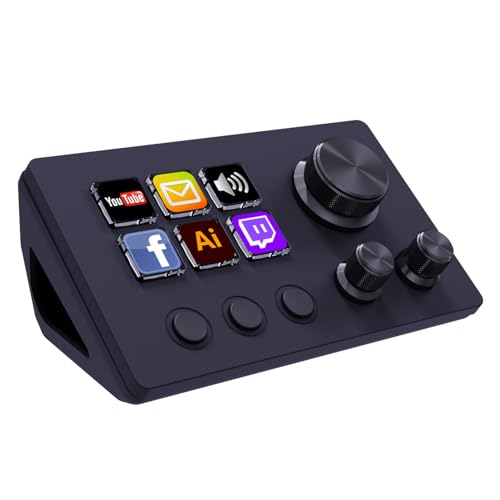
- Twelve customizable buttons and rotary controls
- One-touch macros for OBS, media, audio, and apps
- Dynamic icons plus an extensions marketplace
Best For: Streamers needing visible shortcuts and quick app actions
All-in-One Creative Hub

- Fourteen LCD keys and three encoder knobs
- Built-in hub with 4K HDMI, audio, readers, and USB
- App switching and presets through Ulanzi Studio
Best For: Creators wanting editing controls and desktop connectivity together
Focused Creative Control – TourBox NEO
The TourBox NEO is a compact option among streaming control panels for video editing, bringing dedicated buttons, a dial, scroll controls, and a D-pad into one wired desktop controller. Its application-specific presets and customization are designed to reduce reliance on keyboard-and-mouse shortcuts in Premiere Pro and other creative software.
Best For: Video editors and creative professionals who want a compact, customizable wired controller for editing, color grading, illustration, and photo work.
Pros:
- Provides 14 dedicated controls, including a dial, scroll controls, D-pad, and buttons.
- Supports workflow-based presets and customization across applications such as Premiere Pro, Lightroom, and Photoshop.
- Compact 370 g design keeps frequently used controls within reach.
Cons:
- Requires a wired USB connection.
- Compatible with Windows and macOS only; iPadOS, iOS, Linux, and Android are not supported.
The NEO favors tactile, focused control over a large grid of programmable keys. It is a practical fit when editing precision and a compact footprint matter more than integrated displays or wireless operation.
Macro Studio Deck – VSD N4 Pro
The VSD N4 Pro combines LCD macro keys, RGB knobs, and an interactive touch bar in a flexible choice among streaming control panels for video editing. Its scene presets and chained actions can handle editing shortcuts, app launches, audio commands, and other repeated desktop tasks without coding.
Best For: Streamers and video creators who need visible macro controls, audio commands, multi-scene presets, and expandable plugin support.
Pros:
- Offers 10 customizable LCD keys, four RGB knobs, and an interactive touch bar.
- Supports single commands, multi-step macros, custom icons, and unlimited independent scene presets.
- Includes a USB sound-deck function, 500+ downloadable plugins, and a built-in passive USB dock.
Cons:
- Its sound-deck feature sends audio commands but does not produce sound through built-in speakers.
- Requires Windows 10 or later or macOS 11.0 or later.
- Uses a corded USB-C connection rather than wireless operation.
With its visual keys and scene-based automation, the N4 Pro is particularly suited to setups that move between live production, editing, gaming, and office tasks. The adjustable stand also supports longer desktop sessions.
Wireless Dial Editing – ULANZI D100H
The ULANZI D100H takes a focused approach to streaming control panels for video editing, pairing seven customizable buttons with a tactile aluminum dial. Bluetooth connectivity and support for popular editing applications make it useful for timeline adjustments, color grading, and one-handed shortcut control.
Best For: Video editors and photographers who want portable wireless dial control for CapCut, DaVinci Resolve, Final Cut Pro, Photoshop, or Lightroom Classic.
Pros:
- Uses an aluminum anti-slip knob with motor vibration feedback for parameter adjustments.
- Provides seven customizable buttons and online working modes through Ulanzi Studio.
- Bluetooth 5.1 can connect and switch between up to three devices.
Cons:
- Only supports Windows 10+ and macOS 12+; iPad and iPhone are not supported despite the stated multi-device capability.
- The USB port is for charging only, not dual-mode wired connection.
- Battery runtime is listed at 2.5 hours after a full charge.
The D100H is best when wireless portability and a physical adjustment knob are priorities. Its smaller control set may be less suitable for users who need a broad bank of programmable keys or LCD displays.
Visual Workflow Hub – STREONOR S15
The STREONOR S15 provides 15 customizable LCD keys and three status panels for users comparing streaming control panels for video editing. Dedicated pages can separate editing commands from OBS scenes, office shortcuts, or gaming controls, while action flows and plugins automate repeated tasks.
Best For: PC and Mac users who want a larger visual macro deck for editing, streaming, productivity, and system-status monitoring.
Pros:
- Offers 15 customizable LCD keys for shortcuts, app actions, OBS controls, and editing commands.
- Three status panels can display information such as time, weather, CPU temperature, GPU status, and memory usage.
- Supports preset control pages, multi-command action flows, and more than 100 plugins.
Cons:
- Requires Windows 10 64-bit or later or macOS Big Sur 11.0 or later; Linux is not supported.
- Uses a direct USB connection and requires STREONOR software setup.
- Some third-party app integrations may require an account, subscription, or membership.
The S15 is a strong fit for editors who want many visible controls and separate layouts for different tasks. Its status displays add useful at-a-glance information, though setup may require attention to software compatibility and integrations.
Live Production Hub – Osee GoStream Deck HDMI Pro
The Osee GoStream Deck is a full-featured option for anyone comparing streaming control panels for video editing and live production. With four HDMI inputs, hardware switching controls, audio tools, recording, overlays, and direct streaming, it is built more for multi-camera production than simple shortcut control.
Best For: Multi-camera livestreams, conferences, worship services, podcasts, and event production.
Pros:
- Four HDMI inputs and two HDMI outputs support multi-source production and monitoring.
- Includes a T-Bar, PVW/PGM buses, macros, audio controls, and built-in menu operation.
- Can stream to three platforms, record to SD card or USB SSD, and play back MP4 files.
- Supports graphics overlays, chroma key, picture-in-picture, and landscape or portrait streaming.
Cons:
- Its broadcast-oriented feature set may be more than needed for basic editing shortcuts.
- Requires compatible HDMI sources and a more involved production setup than a simple USB keypad.
Choose this model when your workflow extends beyond timeline control into actual live switching, audio management, recording, and streaming. It is the most production-focused option in this group.
Precision Editing Console – TourBox Elite Editing Controller
The TourBox Elite is a dedicated creative console for users seeking streaming control panels for video editing with a stronger focus on hands-on timeline and image adjustments. Its haptic feedback, customizable controls, workspace recognition, and wireless connectivity are designed to reduce mouse use during editing and grading.
Best For: Video editors, colorists, photographers, and digital artists using compatible Windows or macOS software.
Pros:
- Haptic feedback and variable-speed control support precise timeline navigation and parameter adjustments.
- Customizable controls can handle trimming, transforms, crop, opacity, color, and export tasks.
- Workspace Recognition can shift presets across editing, grading, audio mixing, and delivery.
- Dual-channel Bluetooth supports switching between devices, while USB-C enables wired control.
Cons:
- Does not support iPad, iOS, Linux, or Android devices.
- Its device-only package may require separate software setup and workflow customization.
This is the strongest fit for editing-centered workflows where tactile precision matters more than camera switching. It can also extend into photo and digital-art applications, making it a versatile creative control surface.
Shortcut Macro Deck – VSD M18 Stream Controller
The VSD M18 is a compact programmable option for shoppers comparing streaming control panels for video editing, OBS, and everyday desktop automation. Its 15 LCD keys and three physical buttons can launch applications, trigger multi-step macros, switch OBS scenes, and display custom icons or animations.
Best For: Streamers, editors, gamers, and office users who want customizable one-tap shortcuts on Windows or macOS.
Pros:
- Provides 18 programmable keys, including 15 customizable LCD visual keys.
- Supports single actions, multi-step sequences, text input, app launches, and OBS scene switching.
- Works over USB-C with Windows 11 and newer or macOS 11.0 and newer.
- Includes customizable JPG, PNG, and GIF key visuals plus an adjustable RGB light ring.
Cons:
- Native Linux plug-and-play support is not available.
- It is a shortcut macro pad rather than a dedicated hardware video mixer or jog-control console.
- USB-C operation is wired rather than wireless.
The M18 makes sense when you want fast, visual access to editing commands and streaming actions without investing in a full production switcher. Its programmable macros offer flexibility, though detailed timeline work may still rely on a mouse or keyboard.
Precision Modular Control – Grid TEK2
The Grid TEK2 is a compact choice among streaming control panels for video editing, especially if timeline scrubbing and hands-on parameter adjustments matter more than a large bank of shortcut keys. Its two jog wheels, pressure-sensitive buttons, LED feedback, and programmable software support editing, DAW, and streaming workflows.
Best For: Video editors and creators who want precise jog-wheel control with a highly customizable, modular interface.
Pros:
- Two endless jog wheels with push functionality support timeline scrubbing and fine adjustments.
- Eight velocity- and pressure-sensitive Hall Effect buttons provide responsive macro control.
- LED rings and a central display provide real-time parameter feedback.
- Supports MIDI, HID keyboard, mouse, and game-control protocols through Grid Editor and LUA scripting.
Cons:
- Its eight-button layout is less suited to users who need many dedicated shortcuts.
- Advanced customization may require time with the Grid Editor and scripting tools.
- It connects via USB-C rather than functioning as a standalone wireless controller.
The TEK2 stands out for tactile precision and deep programmability. It is a strong fit for editors who prefer jog wheels and configurable controls over a conventional stream deck layout.
Stream Shortcut Specialist – TreasLin N3 Stream Controller
The TreasLin N3 is a straightforward option among streaming control panels for video editing when fast access to macros, app commands, and OBS actions is the priority. It combines six visual LCD buttons, three tap buttons, and three rotary buttons for one-touch control across streaming and creative software.
Best For: Streamers and content creators who want customizable scene switching, media control, audio adjustments, and app shortcuts in a compact keypad.
Pros:
- Twelve customizable controls include LCD buttons, tap buttons, and rotary buttons.
- Can trigger macros, text input, files, websites, media actions, OBS scenes, and audio controls.
- Works with OBS Studio, Streamlabs, Twitch, YouTube, Discord, Photoshop, and other listed applications.
- Supports dynamic animated icons and access to a marketplace with plugins, profiles, and scenes.
Cons:
- The listed software support is centered on PC and Mac workflows rather than Linux.
- Spotify integration requires an active Spotify Premium account.
- It has fewer physical controls than larger editing decks.
The N3 is best viewed as a flexible macro and streaming command center. Its LCD buttons and broad app compatibility make it useful for creators who want quick, visible shortcuts without switching windows.
All-in-One Creative Hub – ULANZI D200X Creative Deck
The ULANZI D200X combines a macro keyboard with a built-in docking station, making it one of the more expansive streaming control panels for video editing. Its 14 LCD keys, three encoder knobs, large display, and integrated HDMI, audio, card-reader, and high-speed USB connections are designed for a consolidated desk setup.
Best For: Video editors, streamers, and laptop users who want customizable controls and multiple desktop connectivity options in one device.
Pros:
- Fourteen customizable LCD keys and three encoder knobs support timeline, brush, and audio adjustments.
- Built-in 8-in-1 hub includes 4K/60fps HDMI, audio, SD and TF readers, USB-A, USB-C, and power passthrough.
- Supports listed editing and streaming tools including Premiere Pro, DaVinci Resolve, Final Cut Pro, OBS-web, Meld Studio, and Twitchat.
- Ulanzi Studio offers drag-and-drop presets and automatic app-based layout switching.
Cons:
- Its larger feature set may be excessive for users who only need simple macro buttons.
- Compatibility notes specify macOS 12 Monterey or Windows 10 as minimum operating system versions.
- The supplied warranty description is three months.
The D200X is the most comprehensive option of the three for consolidating controls and connectivity. It makes particular sense for creators who want to reduce cable clutter while keeping editing and streaming commands visible.
How We Picked the Best Streaming Control Panels for Video Editing
We focused on controllers that can improve real-world editing and production workflows, rather than treating every macro pad as an interchangeable option. Our comparison considers programmable keys, rotary controls, jog wheels, display feedback, connection methods, software support, and suitability for tasks such as timeline navigation, trimming, color adjustments, audio mixing, and stream management.
We also separated compact shortcut controllers from larger production decks. A simple keypad may be ideal for triggering common commands, while a controller with encoders, LCD keys, or video I/O can serve a broader studio workflow.
Quick Comparison
| Controller type | Best suited to | Features to prioritize |
|---|---|---|
| Creative editing console | Timeline, trimming, and application shortcuts | Dial, programmable controls, ergonomic layout |
| LCD stream deck | OBS, livestreaming, and app-specific commands | Custom icons, profiles, layered actions |
| Macro pad | Compact desks and repetitive shortcuts | Key count, remapping software, portability |
| MIDI or jog controller | DAW, timeline, and precision parameter control | Jog wheels, encoders, smooth response |
| Video-production hub | Multicamera and connected studio setups | HDMI, audio, USB, and card-reader support |
Key Buying Factors for Streaming Control Panels for Video Editing
Software Compatibility and Customization
Check whether the controller works with your editor, streaming application, and operating system. Custom profiles are especially useful if you switch between Premiere Pro, DaVinci Resolve, Final Cut Pro, OBS, or audio software. Look for software that supports multi-action commands, application-specific profiles, and easy reassignment.
Keys, Dials, and Jog Wheels
Keys are useful for shortcuts and scene changes, while rotary encoders provide tactile control for volume, zoom, opacity, and color parameters. Jog wheels are valuable for frame-by-frame timeline movement. Choose physical controls based on the actions you perform most often rather than selecting the highest key count.
Connection, Power, and Desk Setup
Wired USB models generally offer straightforward setup and dependable responsiveness. Wireless models reduce cable clutter but require battery management. Also check the controller’s footprint, cable placement, stand, and whether its display or key labels are easy to read from your normal seating position.
Displays and Expansion
LCD keys can show icons, labels, or changing states, helping you identify profiles and commands. Built-in HDMI, audio, USB, or SD/TF connectivity may be useful in a compact studio, but these extras should not outweigh compatibility and control quality if your workflow does not need them.
Who Should Buy Which Streaming Control Panels for Video Editing?
Choose a dedicated creative console if editing speed, timeline navigation, and tactile adjustments are your main priorities. A customizable LCD deck is better for creators who alternate between editing, streaming, and content-production apps. A compact macro pad suits beginners, smaller desks, and anyone who mainly wants quick shortcuts. Pick a jog-wheel or MIDI-style controller for precise timeline or audio parameter work, and consider a video-production hub if you need to connect cameras, displays, storage, and audio equipment through one desk device.