The right control panel can make live streaming faster, more consistent, and easier to manage. Instead of relying on keyboard shortcuts or hunting through software menus, you can trigger scenes, adjust audio, switch sources, and launch production tasks from dedicated controls.
This roundup covers 10 options for different setups, including customizable stream decks, YoloBox-focused controllers, audio consoles, and HDMI video switchers. Use the guide below to match the panel’s connections, software support, controls, and workflow to the way you stream.
Best 10 Streaming Control Panels for Live Streaming Picks for 2026
Best All-Around Control

- LCD keys, touch strip, and dials
- Multi-actions and smart profiles
- Plugins for streaming and studio apps
Best For: Flexible stream, audio, and studio control
Best for Multi-Camera Production
FoMaKo KC601 Pro HDMI Switcher

- Four HDMI inputs up to 1080p60
- T-bar and customizable scene presets
- USB recording and UVC streaming
Best For: Events and multi-camera 1080p productions
Best YoloBox Companion

- 15 customizable LCD keys
- Mirrors the YoloBox touchscreen interface
- Plug-and-play USB-C connection
Best For: YoloBox users needing dedicated stream controls
Best for Desktop Productivity
Loupedeck Live S Streaming Console
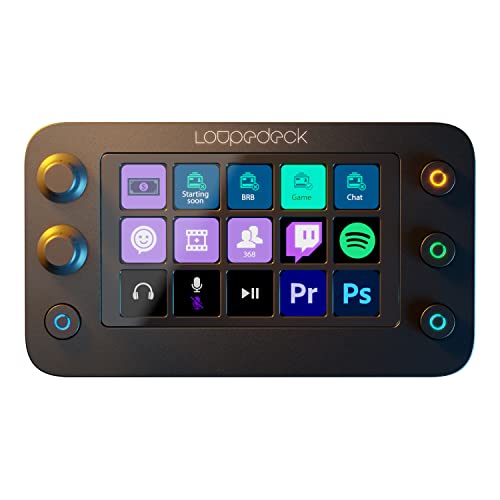
- Touch buttons, dials, and RGB controls
- Profiles for streaming and creative apps
- Up to 14 customizable control pages
Best For: Creators combining streaming and desktop workflows
YoloBox Production Control

- 15 customizable LCD buttons
- Dedicated YoloBox production actions
- USB-C tactile control
Best For: YoloBox Ultra and Pro users
Flexible Macro Deck
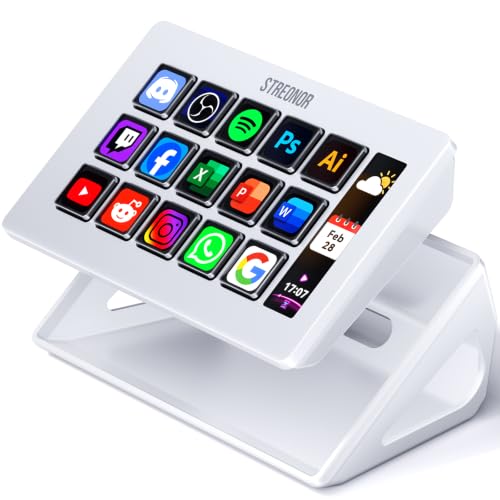
- 15 customizable LCD keys
- Three real-time status displays
- Supports OBS and action flows
Best For: Multi-purpose streaming and productivity setups
Hands-On Switching Console
8-Channel Video Switcher Controller

- T-bar for live transitions
- Four audio control knobs
- 24 programmable keys for vMix and OBS
Best For: Hands-on vMix and OBS production
Flexible Macro Control

- 10 customizable LCD keys with visual icons
- Four RGB knobs, touch bar, and scene presets
- USB audio commands, dock, and ergonomic stand
Best For: Creators needing customizable macros and multi-scene control
Production Switching Hub

- Multi-source 4K HDMI and USB switching
- Built-in recording, streaming, and audio mixing
- PTZ control, transitions, effects, and remote access
Best For: Multi-camera events and advanced live production
Compact Creator Deck

- 18 programmable controls with 15 LCD visual keys
- Triggers OBS scenes, apps, media, text, and macros
- RGB light ring and built-in productivity plugins
Best For: Streamers wanting visual shortcuts in a compact macro pad
Best All-Around Control – Elgato Stream Deck +
The Elgato Stream Deck + is a versatile choice among streaming control panels for live streaming, combining LCD keys, a touch strip, and dials for hands-on control of audio, video, lighting, and other studio functions. Its customizable profiles and multi-actions make it useful for streamers who want to consolidate frequent commands.
Best For: Streamers who need flexible control across OBS, audio mixing, lighting, and desktop workflows.
Pros:
- LCD keys, touch strip, and dials provide tactile control with visual feedback.
- Multi-actions can trigger several commands at once or in sequence.
- Supports plugins for Wave Link, OBS, Twitch, YouTube, Discord, Spotify, and more.
- Works with Mac and PC and includes a two-year manufacturer warranty.
Cons:
- Requires a corded USB-C connection.
- Its broad customization may take time to configure.
The Stream Deck + is a strong general-purpose option when you want one compact panel to manage stream controls, audio, and connected smart devices.
Best for Multi-Camera Production – FoMaKo KC601 Pro HDMI Switcher
The FoMaKo KC601 Pro is a production-focused option among streaming control panels for live streaming, combining a four-channel HDMI switcher, built-in monitor, USB recording, and streaming output. Its physical T-bar, scene presets, and real-time effects suit events that require hands-on camera switching.
Best For: Worship services, events, weddings, education, and other 1080p multi-camera productions.
Pros:
- Accepts four HDMI inputs at up to 1080p 60fps; it does not support 4K.
- Includes a T-bar, customizable scenes, transitions, chroma key, PIP, and logo overlays.
- Supports UVC streaming with OBS, YouTube, Facebook, Zoom, and vMix.
- Provides XLR and mic/line audio inputs plus USB recording.
Cons:
- Limited to 1080p rather than 4K video.
- Its larger feature set is more than needed for simple single-camera streams.
Choose the KC601 Pro when live production requires camera switching, audio connections, recording, and effects from one dedicated hardware unit.
Best YoloBox Companion – YoloLiv YoloDeck Controller
The YoloLiv YoloDeck is a compact choice among streaming control panels for live streaming, designed specifically to add physical controls to compatible YoloBox systems. It offers 15 customizable LCD keys, a touchscreen that mirrors the YoloBox interface, and plug-and-play USB-C connectivity.
Best For: YoloBox Extreme, Ultra, and Pro users who want faster one-touch stream control.
Pros:
- Provides 15 customizable LCD keys for triggering YoloBox actions.
- Its touchscreen mirrors the YoloBox interface for monitoring and control.
- Supports multiple pages for different live-streaming scenarios.
- Compact, lightweight design with a plug-and-play USB-C setup.
Cons:
- Compatibility is currently limited to specified YoloBox models.
- Requires updating the YoloBox to the latest version for compatibility.
The YoloDeck makes the most sense for an existing YoloBox setup, where its dedicated controls can reduce on-screen interaction during a broadcast.
Best for Desktop Productivity – Loupedeck Live S Streaming Console
The Loupedeck Live S combines streaming controls with desktop and content-creation functions, making it a versatile option among streaming control panels for live streaming. Its touch-sensitive buttons, analog dials, RGB buttons, and customizable profiles can manage streams, audio, lighting, apps, websites, and editing tasks.
Best For: PC and Mac users who want one controller for streaming, productivity, media, and creative applications.
Pros:
- Offers haptic touch buttons, analog dials, and customizable RGB buttons.
- Native plugins and profiles support OBS Studio, Streamlabs, Twitch, vMix, Spotify, and creative software.
- Allows up to 14 pages of controls with macros, multi-toggle actions, and rotary adjustments.
- Marketplace provides profiles, plugins, icons, and sound packs.
Cons:
- Its extensive customization may require setup time.
- Some listed integrations are platform-specific, such as Streamlabs for Windows.
The Live S is a practical pick for creators who want streaming controls alongside editing, application launching, audio, and desktop shortcuts.
YoloBox Production Control – YoloDeck Control Panel
For creators already using a compatible YoloBox setup, the YoloDeck is a dedicated option among streaming control panels for live streaming. Its 15 large LCD buttons can be assigned to YoloBox actions such as source switching, streaming, recording, overlays, audio mixing, instant replay, and scoreboard controls.
Best For: YoloBox Ultra and Pro users who want tactile, visual control over frequent live-production commands.
Pros:
- 15 large customizable LCD buttons provide visual feedback.
- Supports a wide range of YoloBox actions, including source switching, overlays, and audio controls.
- Drag-and-drop customization and multiple action pages help organize workflows.
- Connects through USB-C.
Cons:
- Its controls are designed specifically around YoloBox software and compatible YoloBox devices.
- It may be less useful for setups centered on other streaming platforms.
The YoloDeck is a focused, streamlined choice rather than a general-purpose macro pad. If your production relies on YoloBox, its dedicated controls and on-button feedback can make repetitive live-stream operations faster and easier to manage.
Flexible Macro Deck – S15 Stream Controller
The STREONOR S15 is a versatile choice among streaming control panels for live streaming, with 15 customizable LCD keys for OBS scenes, shortcuts, app actions, and hotkeys. Three additional status panels can display information such as time, weather, system performance, CPU temperature, or GPU status.
Best For: Streamers and creators who want one programmable deck for OBS, editing, office tasks, gaming, and general computer control.
Pros:
- 15 customizable LCD keys support shortcuts, OBS controls, and app actions.
- Three status displays provide at-a-glance information.
- Preset pages can separate streaming, editing, office, and gaming workflows.
- Supports action flows, plugins, icons, and GIF customization.
Cons:
- Linux is not supported.
- Setup requires downloading the latest STREONOR software and connecting directly by USB.
- Some third-party integrations may require an account, subscription, or membership.
The S15 suits users who want more than simple scene switching. Its combination of programmable LCD keys, workflow pages, and status displays makes it a practical multi-purpose control surface, provided your computer runs supported Windows or macOS software.
Hands-On Switching Console – 8-Channel Video Switcher Controller
This video switcher controller takes a more production-oriented approach to streaming control panels for live streaming. It combines an 8-channel PGM/PVW layout, T-bar fader, audio knobs, programmable keys, and dedicated production controls for software such as vMix and OBS.
Best For: Live producers who need physical transition, audio, overlay, and recording controls for vMix or OBS.
Pros:
- T-bar fader enables hands-on transitions between program and preview sources.
- Four knobs provide dedicated audio adjustment controls.
- Offers 24 programmable keys plus dedicated Record, Cut, Auto, and overlay controls.
- Supports MIDI mode and standard keyboard mode on Windows, macOS, and Linux.
Cons:
- Its production-focused layout may be more control than casual streamers need.
- Software support is centered on vMix, OBS, MIDI applications, and custom hotkeys.
- The supplied dimensions indicate a compact control surface, which may limit spacing for larger workflows.
With its fader, audio knobs, backlighting, and programmable keys, this controller is aimed at hands-on live production rather than basic shortcut launching. It is a strong fit for operators who prefer physical mixing and transition controls and need cross-platform connectivity.
Flexible Macro Control – VSD N4 Pro Stream Controller
The VSD N4 Pro is one of the more customizable streaming control panels for live streaming, combining 10 LCD keys, four RGB knobs, and an interactive touch bar. Its programmable scenes and chained macros can help creators manage OBS-style production tasks, app launches, audio commands, and repetitive desktop workflows from one USB-C device.
Best For: Streamers and creators who want visual macro keys, multi-step automation, audio controls, and configurable scene presets for Windows or macOS.
Pros:
- Ten LCD keys support individual or sequential actions with custom JPG, PNG, and GIF icons.
- Four RGB knobs and a touch bar provide additional control options for streaming and audio workflows.
- Supports unlimited independent scene presets, a USB dock, and a foldable ergonomic stand.
Cons:
- The soundboard sends audio commands to the computer but has no built-in speakers.
- Full functionality may depend on available plugins and the VSDinside ecosystem.
The N4 Pro is a strong choice when visual customization and complex one-tap workflows matter more than a simple button-only layout. Its broad feature set is particularly useful for users who want one controller for streaming, editing, gaming, and general desktop automation.
Production Switching Hub – FoMaKo M1 4K Video Mixer
The FoMaKo M1 is a full video production switcher rather than a compact macro deck, making it suitable for multi-camera streaming control panels for live streaming. It combines HDMI and USB inputs, recording, streaming, audio mixing, transitions, PTZ support, and remote browser-based control for more involved broadcasts.
Best For: Event producers, churches, wedding videographers, and multi-camera streamers who need switching, recording, audio management, and streaming in one unit.
Pros:
- Accepts multiple HDMI, USB, webcam, and NDI-upgradeable sources, with 4K input support.
- Includes HDMI and UVC outputs, simultaneous USB and SD recording, and streaming to two platforms over IP.
- Provides audio delay, automatic level control, chroma key, luma key, PIP, DSK, PTZ control, and up to 30 transitions.
Cons:
- Its larger production feature set may be excessive for a basic single-camera stream.
- NDI input requires an upgrade, according to the supplied notes.
- The device includes a built-in fan, which may matter in noise-sensitive setups.
The M1 is best viewed as an all-in-one live production workstation. It offers substantially more signal and audio handling than a typical streaming deck, while browser-based remote control adds flexibility for operators managing a broadcast from another device.
Compact Creator Deck – VSD M18 Macro Pad
The VSD M18 is a compact option among streaming control panels for live streaming, with 15 LCD visual keys and three physical buttons. It can trigger OBS scene changes, app launches, text inputs, media controls, and multi-step macros, making it useful for creators who want straightforward one-tap access without a larger production switcher.
Best For: PC and Mac streamers, gamers, and office creators who want customizable visual shortcuts for OBS, media, applications, and repetitive tasks.
Pros:
- Provides 18 programmable controls, including 15 LCD keys that support JPG, PNG, and GIF images or animations.
- Runs single commands or ordered and simultaneous multi-step macro sequences.
- Works with popular software such as OBS, Streamlabs, YouTube, Discord, Photoshop, Word, and Excel.
- Includes an adjustable RGB light ring and built-in utility plugins such as a clock, calendar, and stopwatch.
Cons:
- Native Linux plug-and-play support is not available.
- It requires Windows 11 or newer, or macOS 11.0 or newer, according to the supplied notes.
The M18 offers a practical balance of button count and visual feedback for everyday streaming shortcuts. It is more focused on macro control than video mixing, so it fits creators who need quick software commands rather than HDMI switching or camera management.
How We Picked the Best Streaming Control Panels for Live Streaming
We evaluated these panels by looking at the controls they provide, the workflows they support, and how well they fit common live-production setups. The selection includes compact macro pads for creators who primarily use OBS or desktop software, dedicated controllers for YoloLiv systems, and larger switchers designed for multi-camera production.
Important considerations included programmable keys, LCD or LED feedback, audio controls, video inputs and outputs, switching performance, shortcut compatibility, build format, and the learning curve involved in configuring each device. Because these products serve different purposes, the best choice depends on whether you need software control, hardware video mixing, or both.
Quick Comparison
- Best for customizable all-in-one control: Elgato Stream Deck +
- Best for YoloBox users: YoloLiv YoloDeck or a compatible YoloDeck controller
- Best for desktop productivity and streaming: Loupedeck Live S
- Best for compact LCD macro control: S15 Stream Controller or VSD M18
- Best for audio and studio control: VSD N4 Pro
- Best for hardware video switching: FoMaKo HDMI switchers or the 8-channel video switcher controller
Key Buying Factors for Streaming Control Panels for Live Streaming
Software and Ecosystem Compatibility
Check whether the panel works with your streaming application, operating system, and production hardware. Some controllers are highly flexible with OBS, vMix, shortcuts, plugins, or MIDI, while others are built specifically for YoloBox equipment. A feature-rich panel is less useful if it cannot trigger the functions you use.
Macro Keys and Visual Feedback
LCD keys and screens make it easier to identify scenes, sources, effects, and shortcuts at a glance. Consider how many actions you need during a broadcast and whether you want dedicated controls or layered pages and profiles.
Audio and Video Connections
Macro decks primarily control software; HDMI switchers handle physical video signals. If you need camera switching, capture, recording, PTZ support, or audio adjustment, inspect the input and output specifications carefully. Confirm resolution and frame-rate support for every device in the signal chain.
Size, Layout, and Setup
A compact controller suits a small desk or mobile rig, while a larger console can provide more direct access during complex productions. Also consider USB requirements, mounting space, cable management, and how much configuration time you are willing to spend.
Who Should Buy Which Streaming Control Panels for Live Streaming?
Choose a customizable stream deck if you want quick scene changes, app shortcuts, chat actions, or automation without replacing your existing streaming software. Pick a YoloDeck-compatible controller if your production is centered on a YoloBox and you want controls designed for that ecosystem.
For multi-camera events, interviews, presentations, or broadcasts requiring physical HDMI routing, choose a video switcher rather than a macro pad. Creators who need hands-on audio adjustments should prioritize a panel with dedicated knobs or mixing controls. If you want one device for streaming and everyday desktop workflows, a flexible controller such as the Loupedeck Live S may be the better fit.